






















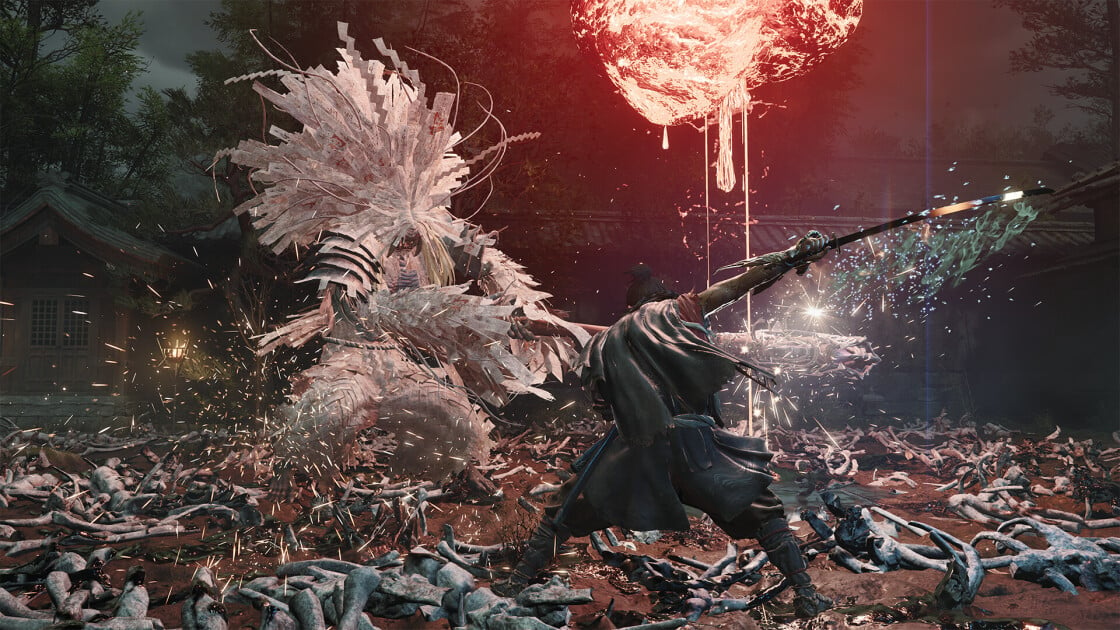
Onimusha: Way of the Sword Has Moved Up Its Release Date—Is Your Gaming PC in Canada Ready for It?
Capcom moving Onimusha: Way of the Sword to an earlier release date is more than just good news for fans of samurai action games. For Canadian buyers researching a Gaming PC Canada solution, it is also a reminder that major releases have a way of exposing the limits of older systems fast. When a highly anticipated title combines cinematic visuals, weighty combat, fast reactions, large environments, and modern effects, the biggest question becomes simple: is your current PC actually ready, or are you about to discover its weaknesses the hard way?
The source coverage highlights exactly why this game is catching attention. Early hands-on impressions point to sharp visuals, convincing character performance, satisfying parry-focused combat, open-area exploration, and memorable boss encounters. That combination matters because games like this are often where performance expectations rise all at once. It is not just about whether a game launches. It is about whether it feels smooth, responsive, immersive, and worth playing at the settings you actually want.
For Groovy Computers, that is where the conversation gets practical. A release date change can shift buying decisions forward. If you were planning to upgrade “sometime later,” but a major action title suddenly lands sooner, should you still wait? If your current PC already struggles with newer AAA games, are you risking another season of compromises, frame drops, lowered settings, and upgrade regret? And if you also stream, edit videos, create thumbnails, or work in design software, should your next system be just a gaming rig, or something more versatile?
Why This Release Date Shift Matters More Than It Looks
When a publisher brings a major game forward, it can create a subtle but real buying wave. Players who were delaying a new build start checking specs. People with aging GPUs begin comparing 1080p, 1440p, and 4K options. Buyers who planned to “make do” through another year suddenly realize that one major release usually turns into several.
That is the real takeaway here. Onimusha: Way of the Sword is not important only as a single game. It represents the broader pressure of new-generation gaming. Visual fidelity is rising. Lighting and effects are becoming more demanding. Action games increasingly reward high frame rates and low input latency. Open combat arenas, better physics, and more detailed environments all raise the hardware floor for a genuinely premium experience.
So ask yourself: are you preparing for one game, or for the next wave of games? If your next system needs to handle this title, future action releases, ray tracing options, live streaming, Discord, browser tabs, recording software, and maybe even some creative work on the side, then your buying decision should be based on a category of use, not just one launch day.
What the Early Impressions Suggest About PC Performance Needs
The source article emphasizes several things that usually translate into meaningful PC demand: strong graphics, fast-paced combat, parry timing, open explorable areas, distinct enemy encounters, and flashy boss battles with multiple phases. Even without an official PC performance breakdown in the supplied source, those design elements tell experienced buyers a lot.
Games built around timing-heavy melee combat benefit from stable frame delivery. If you are trying to parry, dodge, and react to attack windows, stutter matters. Frame pacing matters. CPU consistency matters. A weak or aging system can make a mechanically satisfying game feel less precise than it should.
Games with high-detail characters, atmospheric environments, and cinematic action also tend to reward stronger GPUs. If you want rich textures, better lighting, and enough overhead for modern effects, GPU tier becomes the biggest part of the conversation. And if you are hoping to pair that with high refresh gameplay at 1440p or a premium 4K setup, that conversation gets serious fast.
That raises a natural question: what level of experience do you actually want from your next PC? Is your goal simply to run the game? Do you want high settings at 1080p? Are you aiming for 1440p high refresh because that is the real sweet spot? Or are you shopping with a premium, long-life system in mind so you can enjoy future releases without upgrading too soon?
What Do You Want Your Next PC to Do for You?
This is the section many buyers skip, and it is usually the one that matters most.
Before you compare graphics cards or monthly payment options, ask yourself what your next system needs to do over the next few years, not just the next few weeks.
- Do you want a budget gaming computer that plays new releases at 1080p with solid settings and good value?
- Do you want a 1440p gaming system that feels smoother, sharper, and more future-ready for upcoming AAA titles?
- Do you want a premium RTX gaming PC for ultra settings, ray tracing, and longer-term headroom?
- Do you also plan to stream to Twitch, YouTube, or social platforms while gaming?
- Do you create content and need one machine for gaming, recording, editing, thumbnails, and uploads?
- Do you work in video editing, photo editing, graphic design, or 3D modeling and want your gaming purchase to double as a productivity investment?
- Do you want to avoid upgrading too soon and buy stronger now instead of replacing weak parts later?
The answers determine whether you need a straightforward gaming build, a gaming-and-streaming machine, a Creator PC Canada solution, or a full workstation-class custom system.
What PC Do You Need for 1080p, 1440p, or 4K Gaming?
Resolution is one of the easiest ways to sort buyers into the right performance tier.
1080p Gaming PC Canada: Who Is It For?
A 1080p system makes sense if you want strong value, smooth play in modern games, and a lower total spend. It is ideal for first-time buyers, students, esports players, and anyone focused on solid performance without chasing maximum visual settings.
But here is the key question: are you buying for today only, or are you trying to stay comfortable through the next several game cycles? If your monitor is already higher refresh and you enjoy AAA releases, you may outgrow a basic 1080p build faster than expected.
1440p Gaming PC Canada: Why It Is Often the Smartest Choice
For many Canadian buyers, 1440p is the sweet spot. It offers a major visual upgrade over 1080p, gives modern GPUs room to show their value, and lines up well with the kind of cinematic action titles that make visual detail part of the experience.
If you are looking at games like Onimusha: Way of the Sword and thinking, “I want this to look impressive and feel responsive,” then a 1440p-focused system is often the best balance of immersion, longevity, and cost control.
It is also a better choice if you want some overhead for streaming, background apps, mods, recording, or future titles that may demand more than expected.
4K Gaming PC Canada: Who Should Go Premium?
If your goal is high-end visual impact, larger displays, and fewer compromises over the long term, then a 4K Gaming PC Canada build may be worth it. This is where premium GPUs, stronger cooling, better power delivery, and carefully matched components matter most.
But be honest with yourself. Do you really need 4K right now, or would a stronger 1440p machine deliver better value? Are you trying to maximize image quality, or would you rather prioritize higher frame rates and longer system life? The best premium purchase is not the most expensive one. It is the one that matches how you actually play.
If You Stream or Record Gameplay, Should You Buy More PC Than You Think You Need?
Very often, yes.
Many buyers shop only for the game itself, then add streaming, recording, clip editing, browser tabs, chat tools, and overlays later. That is where a PC that looked “good enough” on paper suddenly feels tight in practice. If you want a Gaming and Streaming PC Canada setup, you should plan for more than raw game performance alone.
Ask yourself:
- Will you stream at 1080p while gaming?
- Do you want smooth gameplay and a stable broadcast at the same time?
- Will you use OBS, Streamlabs, Discord, and background apps together?
- Do you want to record local footage for YouTube or short-form clips?
- Would stronger hardware now save you from building a second system later?
If that sounds like your use case, then a custom streaming-capable build is often the smarter move. Better GPU encoding support, more CPU headroom, adequate RAM, fast SSD storage, and good cooling can make the difference between a system that survives multitasking and one that feels built for it.
Could This Be the Right Time to Buy a Content Creation PC Instead of Just a Gaming PC?
For a growing number of buyers, the answer is yes.
One of the biggest changes in the PC market is how much overlap now exists between gaming and creation. A buyer excited about a new action game may also be cutting together reaction videos, editing gameplay highlights, building social posts, making channel art, or handling side work in Adobe software. That is why the line between a gaming tower and a Content Creation PC Canada build keeps getting thinner.
If you edit in Premiere Pro, work in DaVinci Resolve, design in Photoshop or Illustrator, or produce thumbnails and social graphics, then your next PC should be selected with those workflows in mind too. Why buy a system that only solves half your needs?
For Video Editing Buyers
If you need a Video Editing PC Canada system, think about timeline smoothness, export speed, codec support, RAM capacity, and SSD setup. Are you editing 1080p clips, or are you already moving into 4K footage? Do you work with gameplay captures, layered effects, multicam projects, or heavy assets? Faster hardware is not just about convenience. It saves time on every project.
For Photo Editing and Graphic Design Buyers
If your workload is more visual design focused, a Photo Editing PC Canada or Graphic Design PC Canada build may need different priorities. Strong single-core responsiveness, plenty of RAM, fast storage, and dependable stability matter more than buyers often realize. Are you working with large RAW libraries, layered Photoshop files, Illustrator assets, or multiple displays? If so, your build should reflect that.
For 3D Modeling and Rendering Buyers
If your “gaming PC” also needs to run Blender, Unreal Engine, CAD tools, or rendering workloads, then you are really shopping in workstation territory. A 3D Modeling PC Canada or Workstation PC Canada build should be planned differently from a standard gaming rig. GPU performance, CPU class, memory capacity, airflow, and upgrade path all become more important when deadlines and project files are involved.
Why Canadian Buyers Should Think Carefully Before Waiting
Waiting always sounds safe. Sometimes it is. But sometimes waiting means paying more for the same class of performance, settling for weaker part availability, or buying under pressure just before a major release period.
Canadian PC buyers face a few realities that make timing more important:
- Exchange-rate pressure can affect imported components.
- GPU demand can rise quickly around major game launches and upgrade cycles.
- High-demand CPUs, graphics cards, and memory kits can become less predictable in price.
- Storage and component costs can shift enough to change the value of a full build.
- Replacing a weak system later can cost more than choosing the right one now.
That does not mean panic buying. It means strategic buying.
If you already know your system is old, your next games are more demanding, and your workloads are expanding, then the better question may be: what exactly are you waiting for? A lower price that may not arrive? Another game announcement that confirms what you already know? Another season of using lower settings and telling yourself it is temporary?
Should You Finance a Better PC Instead of Buying a Cheaper One?
This is one of the most practical questions in the market right now.
A lot of buyers try to avoid financing by dropping to a lower tier build. Sometimes that works. Sometimes it creates a false economy. If a weaker system leaves you wanting a GPU upgrade, more RAM, larger storage, or a better CPU sooner than expected, the “cheaper” decision may actually become the more expensive one.
That is why many buyers explore Gaming PC Financing Canada options when a major release or workflow upgrade is approaching. If financing helps you secure the system you actually need, instead of the one you hope will be enough, it can be the smarter long-term move.
Ask yourself honestly:
- Would monthly payments make it easier to step into a stronger GPU tier now?
- Would extra RAM or better storage prevent frustration later?
- Would a more capable system help with both gaming and work?
- Would financing up to 4 years make a future-proofed build more realistic?
- Is buying once, properly, better than buying twice?
For many people, the answer is yes. Especially if the alternative is compromising on performance right before a new wave of demanding games and software.
Which Performance Tier Fits You Best?
If you are not sure where you fit, this framework can help.
Tier 1: Value-Focused Buyer
You want dependable gaming performance, strong everyday use, and a sensible budget. You care about playing new titles well, but you are not chasing ultra-everything. This is often the right lane for first-time buyers, students, and budget-conscious gamers.
Ask yourself: am I happy with 1080p and smart value, or will I wish I had gone higher within a year?
Tier 2: Balanced Enthusiast
You want smooth 1440p gaming, better visuals, and enough performance headroom for modern releases, multitasking, and maybe some recording or streaming. This is the most common “best value over time” tier for serious players.
Ask yourself: do I want the sweet spot build that feels strong now and still relevant later?
Tier 3: Premium Gamer or Hybrid Creator
You want high settings, ray tracing readiness, stronger longevity, and more flexibility for gaming plus editing, streaming, or demanding multitasking. This tier suits buyers who want a premium daily experience without constant second-guessing.
Ask yourself: will I use this PC for both play and production, making a higher tier easier to justify?
Tier 4: High-End Gaming Workhorse or Workstation
You want serious 4K capability, premium parts, advanced cooling, and enough hardware to support rendering, creator workloads, large projects, or professional software alongside gaming. This is where custom part matching matters most.
Ask yourself: am I buying a hobby machine, or a central platform for gaming, streaming, editing, and work?
Why Custom Builds Matter More When Big Releases Approach
As game launches get bigger and system expectations climb, generic one-size-fits-all prebuilts become less appealing. A custom build is not just about aesthetics. It is about part balance, thermal design, upgrade path, reliability, and making sure the money goes where it matters.
That matters especially if you are buying in anticipation of a title like Onimusha: Way of the Sword. You do not want to overpay for flashy but mismatched parts. You also do not want to underbuy a key performance area and feel bottlenecked immediately.
With a proper custom approach, your system can be tuned around your real goals:
- AAA gaming performance
- Esports responsiveness
- Ray tracing capability
- Streaming support
- Video editing workflow
- Creative software acceleration
- 3D rendering needs
- Upgrade-friendly longevity
That is the difference between just owning a PC and owning the right PC.
Why Groovy Computers Fits This Moment for Canadian Buyers
Groovy Computers is positioned for exactly this kind of buying decision. When a new game creates urgency, but your needs extend beyond gaming alone, you want a Canadian custom PC builder that understands how to match hardware to real use cases.
Whether you need a gaming-focused build, a creator-ready desktop, or a hybrid system that handles modern games and creative software together, Groovy Computers helps buyers avoid guesswork. That means custom configurations, practical performance guidance, rigorous testing, and the confidence of a 1-year warranty.
For Canadian shoppers, that trust matters. You are not just buying a parts list. You are buying reliability, support, and a system that is stress-tested before it reaches your setup. If timing matters because a game release moved up, or because your current machine is already behind, confidence matters just as much as raw specs.
It also matters if financing would help you secure the right build without waiting. If stretching to the proper GPU tier, RAM capacity, or creator-class setup would make a real difference, then financing up to 4 years can turn hesitation into a practical plan.
What Questions Should You Ask Before Buying Your Next PC?
Before you commit, make sure you can answer these clearly:
- What games or software do I actually use most?
- Am I targeting 1080p, 1440p, or 4K?
- Do I care more about ultra settings, frame rate, or long-term value?
- Will I stream, record, or edit content on this system?
- Do I need a gaming PC, a creator PC, or a workstation-style hybrid?
- How soon do I want to upgrade again?
- Would financing help me avoid buying too low and replacing too early?
- Do I want a tested custom system with warranty support from a Canadian builder?
If you cannot answer all of those yet, that is not a problem. It simply means you should talk to a builder who can help map your goals to the right performance tier.
Is Your Current PC Ready for Onimusha: Way of the Sword and What Comes After?
This may be the most important question in the entire article.
If your current system already struggles with newer releases, if you have been lowering settings more often, if your storage is constantly full, if your CPU pegs under load, or if your GPU no longer feels current, then this release-date shift is a useful signal. Not because one game demands an instant upgrade, but because one game often marks the moment when buyers stop postponing the obvious.
Do you want to enjoy the next wave of AAA titles the way they are meant to feel? Do you want one PC that can also handle streaming, editing, creative projects, or demanding multitasking? Do you want to buy smart now instead of upgrading reactively later?
If so, this is a strong time to plan your next move carefully.
Ready to Choose the Right Custom PC for Gaming, Streaming, or Creation?
What do you want your next system to do for you: dominate 1440p gaming, push 4K visuals, stream smoothly, edit faster, or handle both work and play without compromise? If you are ready to stop guessing and start building around your real needs, visit GroovyComputers.ca to explore custom gaming PCs, creator PCs, workstation options, and financing solutions built for Canadian buyers.
Big game releases have a way of making upgrade decisions feel urgent, but the smartest move is not rushing into any PC. It is choosing the right one. A stronger, properly matched custom build can deliver better gameplay now, better flexibility later, and more confidence every time a new title lands. For buyers searching for a Gaming PC Canada solution that also makes sense for streaming, editing, or future-proofing, Groovy Computers offers the kind of guidance and build quality that helps you buy once and buy well.
#GamingPCCanada #CustomGamingPCCanada #GamingPCBuildsCanada #CreatorPCCanada #VideoEditingPCCanada #StreamingPCCanada #3DModelingPCCanada #WorkstationPCCanada #CanadianCustomPCBuilders #NovaScotiaPCBuilder
Groovy Computers | All Rights Reserved

Leave a comment
This site is protected by hCaptcha and the hCaptcha Privacy Policy and Terms of Service apply.