























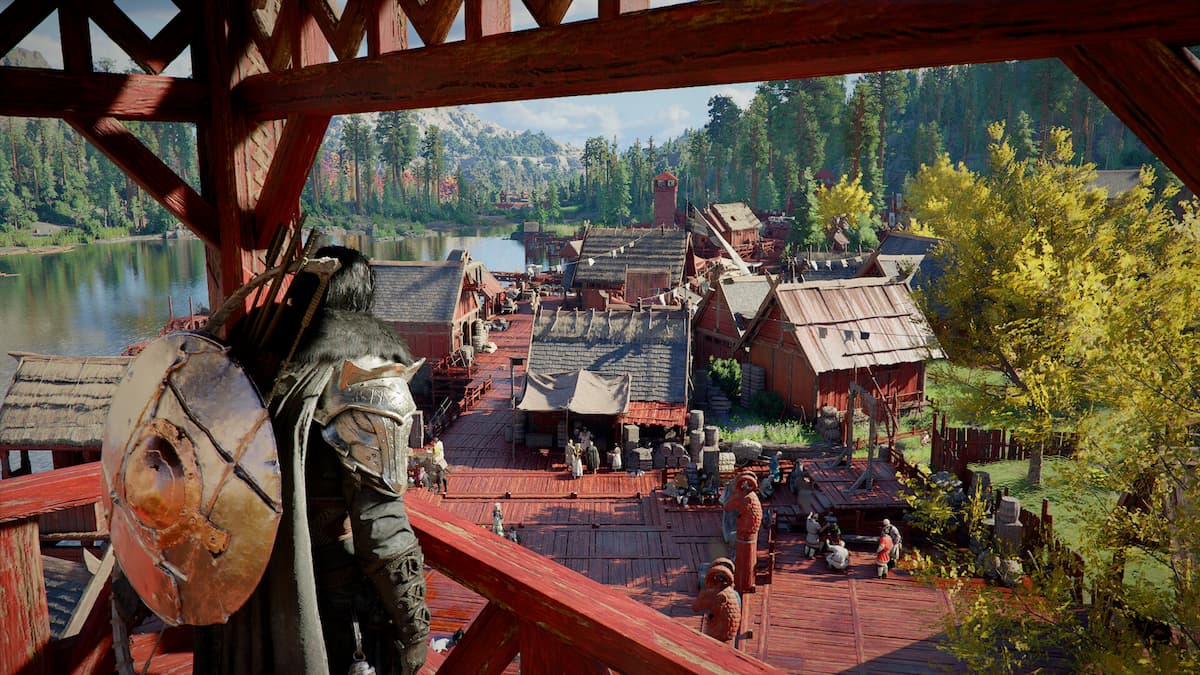
Crimson Desert Patch 1.13 Shows Why a Gaming PC for New Games Matters More Than Ever
Crimson Desert Patch 1.13 is exactly the kind of update that reminds Canadian gamers why choosing the right gaming PC for new games is no longer just about launch-day performance. Modern open-world games keep changing after release. They get new armour, new systems, improved companions, UI refinements, bug fixes, expanded areas, visual updates, and performance changes that can make yesterday’s “good enough” computer feel less ready than expected.
For players following Crimson Desert, the latest 1.13 patch brings meaningful updates: better integration for NPC companions Oongka and Damiane, access for those companions to the Abyss region, new armour options, companion-related bug fixes, puzzle tweaks, inventory and UI improvements, and more than 20 new armour pieces for players to earn. That might sound like a normal patch note summary at first glance, but for PC buyers, it points to something bigger: today’s games are living platforms, and your computer needs enough headroom to keep up.
Are you buying a PC for one specific game, or are you trying to avoid upgrading too soon as newer AAA titles keep adding content and demanding more from your hardware? Are you planning to play at 1080p, 1440p, or 4K? Do you want ray tracing, high FPS, streaming, video editing, or content creation performance from the same system? These are the questions that matter before you spend money on a budget gaming computer, premium RTX gaming PC, custom creator PC, editing workstation, or 3D modeling workstation.
At Groovy Computers, we build custom PCs in Canada for the way real people actually use their systems: gaming, streaming, editing, designing, rendering, working, learning, and creating. Crimson Desert’s patch is a timely reminder that a great PC is not just about running a game today. It is about staying smooth, responsive, and reliable when that game evolves tomorrow.
Why Crimson Desert Patch 1.13 Matters for PC Buyers
Crimson Desert is an ambitious action-adventure title with large environments, cinematic combat, companion systems, armour progression, exploration, and visually dense world design. Patch 1.13 expands the experience by making Oongka and Damiane feel more connected to the game instead of functioning like optional side characters. When companion systems become more integrated, the game is doing more in the background: tracking character behaviour, pathing, combat interactions, region access, equipment, scripting, puzzle states, and UI feedback.
Does that mean Patch 1.13 suddenly requires a completely different PC? Not necessarily. But it does show why performance headroom matters. A game that receives meaningful updates after launch can become more complex over time. New content can increase storage needs. Better systems can increase CPU activity. Improved visuals or armour detail can make GPU performance more important. UI changes may not sound heavy, but inventory-heavy games benefit from fast storage, enough memory, and stable system responsiveness.
That is why the best PC for new games is rarely the cheapest system that can barely meet the minimum requirement. Minimum specs are survival specs. They are not comfort specs. They do not guarantee high FPS, smooth 1440p gameplay, consistent 1% lows, or a good experience while streaming to Twitch, recording gameplay, running Discord, using a browser, and keeping game launchers open in the background.
If you are excited about Crimson Desert, GTA 6 on PC when it arrives, future open-world RPGs, ray tracing games, competitive shooters, survival games, or the next wave of Unreal Engine releases, the smarter question is not “Can this PC run it?” The better question is: Will this PC still feel fast after patches, expansions, driver updates, and your own workload grows?
What Does the Crimson Desert Update Tell Us About Modern Game Performance?
The details of Patch 1.13 are useful because they highlight several trends in modern PC gaming. Companions are becoming more interactive. Equipment systems are getting deeper. Exploration zones are more vertical and complex. Games are using heavier UI layers, larger inventories, more physics interactions, and broader content progression. Even when a patch is not marketed as a graphics update, it can still affect how a game feels on your hardware.
For PC players, that means you should think beyond the GPU name on a product listing. A reliable gaming PC for new games needs balance. The CPU must handle world simulation, AI, background tasks, and high frame rates. The GPU must handle resolution, texture detail, lighting, and effects. RAM must be sufficient for the game plus everything else you run. Storage must be fast enough to reduce loading friction, asset streaming issues, and general system sluggishness.
Are you the kind of gamer who opens a new patch, jumps into the updated content, and expects everything to feel smooth? Or do you tolerate stutters, long loads, texture pop-in, and background apps slowing you down because the system was built to the lowest possible price? That difference is often where a custom gaming PC becomes worth it.
Gaming PC for New Games: What Should Canadian Buyers Prioritize?
When Canadian customers ask Groovy Computers what gaming PC for new games makes sense, we start with the actual experience they want. There is no single perfect build for everyone. A great 1080p esports PC is not the same as a 4K open-world ultra settings PC. A gaming and streaming PC is not the same as a basic living-room gaming desktop. A creator workstation that edits 4K video and renders 3D scenes has different priorities than a budget gaming PC for students.
So before choosing parts, ask yourself: what games, software, and creative workloads do you want your next PC to handle?
- Do you want to play Crimson Desert, open-world RPGs, survival games, shooters, and AAA releases at smooth frame rates?
- Are you targeting 1080p gaming, 1440p gaming, or 4K gaming?
- Do you want high FPS for competitive games such as Counter-Strike 2, Valorant, Fortnite, or Call of Duty?
- Do you care about ray tracing, ultra textures, cinematic visuals, and long-term performance?
- Will you stream with OBS, record gameplay, edit YouTube videos, or create TikTok clips?
- Do you use Adobe Premiere Pro, DaVinci Resolve, Photoshop, Lightroom, Illustrator, Blender, Unreal Engine, AutoCAD, Revit, or SolidWorks?
- Are you buying before a major game release, school term, work contract, content schedule, sale period, or possible component price spike?
- Would financing help you secure a stronger system now instead of settling for a weaker PC that may need upgrades sooner?
These questions are not just technical. They are financial. A PC that is too weak may cost less today, but it can become more expensive if you need to replace the GPU, add RAM, swap storage, upgrade cooling, or buy a new system sooner than planned. A properly planned custom PC can be a better long-term value because it is built around your real use case from the beginning.
What Do You Want Your Next PC to Do for You?
This is the most important question in the entire buying process: what do you want your next PC to do for you?
Do you want a smooth gaming machine for Crimson Desert and upcoming AAA titles? Do you want a streaming PC that lets you game, chat, record, and broadcast without frame drops? Do you want a video editing PC in Canada that can handle 4K footage without making every export feel like a waiting game? Do you want a creator PC for Adobe Creative Cloud, CapCut, OBS, Photoshop, and social media content? Do you want a 3D modeling PC for Blender, Unreal Engine, Maya, Revit, SketchUp, or product rendering?
The answer changes the build. A gamer may need the best GPU they can reasonably afford. A streamer may benefit from an RTX GPU with strong encoding support, enough CPU performance, and 32GB or more memory depending on workload. A video editor may need more RAM, fast NVMe storage, a strong CPU, and a GPU that accelerates effects and exports. A 3D artist may need GPU power, VRAM, CPU rendering capacity, and a stable workstation-style configuration.
If you are not sure where you fit, that is normal. Many customers are not “just gamers” anymore. They play games, record clips, edit videos, stream occasionally, run school software, manage a small business, create designs, or experiment with AI tools. A modern custom PC should be planned around that mixed reality.
Which Performance Tier Fits You Best?
Choosing a performance tier is easier when you think in terms of your monitor, your games, and your workload. The right PC is not always the most expensive one. It is the one that gives you the experience you actually want without wasting money on parts you do not need or underbuying parts you will quickly outgrow.
Entry-Level and Budget Gaming PC Canada: Is 1080p Enough?
A budget gaming PC in Canada can still make sense if your target is 1080p gaming, esports, lighter AAA titles, school use, and everyday productivity. If you mostly play Fortnite, Roblox, Minecraft, Valorant, League of Legends, Counter-Strike 2, indie games, or older titles, you may not need a premium build right away.
But ask yourself: are you only playing lighter games, or are you also excited for demanding open-world titles like Crimson Desert and future AAA releases? If you want to play newer games smoothly, a very cheap system can become limiting. Budget builds should still be carefully balanced with a modern CPU, enough RAM, fast SSD storage, and a GPU that matches your expectations.
A budget gaming computer is best for buyers who want value, play at 1080p, and are comfortable adjusting settings when needed. It is not the best fit if you expect ultra settings, ray tracing, high-refresh 1440p, heavy multitasking, streaming, or long-term AAA performance without compromise.
Mid-Range 1440p Gaming PC Canada: The Sweet Spot for Many Players?
For many Canadian gamers, a 1440p gaming PC is the ideal balance. You get a sharper image than 1080p, smoother performance than 4K on the same budget, and enough visual quality to make open-world games feel impressive. If you are excited about Crimson Desert’s landscapes, armour detail, combat effects, and exploration, 1440p is often where the experience starts to feel premium without entering extreme pricing.
What PC do you need for 1440p gaming? In general, you want a strong modern CPU, a capable GPU with enough VRAM for newer textures, 32GB of RAM for comfort, and fast NVMe storage. If you stream or edit, you may want to step up the CPU, RAM, and storage layout. If you want high-refresh 1440p, you need more GPU power than a basic 1440p setup.
This tier is also excellent for gamers who do not want to upgrade too soon. A well-built mid-range custom gaming PC can often provide better long-term value than a cheaper system that needs major upgrades after one or two demanding releases.
High-End and 4K Gaming PC Canada: Do You Want Ultra Settings and Ray Tracing?
A high end gaming PC in Canada is for players who want the least compromise. If you want 4K gaming, ray tracing, ultra settings, high frame rates, premium cooling, and strong future-proofing, this is where flagship-class builds enter the conversation.
Should you buy a premium gaming PC if you are mainly interested in Crimson Desert and other open-world games? That depends on your expectations. If you want maximum visual settings, a high-end monitor, content creation on the side, and enough headroom for future patches and expansions, a premium RTX gaming PC makes sense. If you are happy with 1080p or medium settings, it may be overkill.
High-end systems also make more sense when gaming is not the only job. If the same PC will handle streaming, 4K video editing, 3D rendering, graphic design, multitasking, and business workloads, the extra performance can pay for itself through time saved and smoother work.
Creator PC Canada: Are You Gaming, Streaming, and Editing on the Same System?
Many people reading about games like Crimson Desert are not only playing. They are also recording highlights, streaming reactions, making guides, editing shorts, posting reviews, designing thumbnails, and building communities. That changes the PC buying decision.
A creator PC in Canada should be built for multitasking. Gaming performance matters, but so do encoding, memory capacity, storage speed, export times, and application stability. If you use OBS Studio, Adobe Premiere Pro, DaVinci Resolve, Photoshop, Lightroom, Illustrator, CapCut, or After Effects, your PC needs to perform well outside the game too.
Is a gaming PC good for content creation? It can be, if it is configured properly. A generic gaming desktop may focus too heavily on one flashy component while cutting corners on RAM, SSD capacity, cooling, power supply quality, or upgrade path. A custom creator PC from Groovy Computers can be balanced around your exact mix of gaming, streaming, editing, and design work.
Workstation and 3D Modeling PC Canada: Are You Building Worlds, Not Just Playing Them?
Crimson Desert’s world-building, companion systems, armour detail, and environmental design also speak to another group: creators who make games, assets, animations, 3D scenes, architectural renders, product models, or virtual environments. If you use Blender, Unreal Engine, Unity, Maya, 3ds Max, Cinema 4D, ZBrush, AutoCAD, Revit, SolidWorks, or SketchUp, your needs are different from a standard gaming buyer.
What PC do you need for 3D rendering? The answer depends on whether your work is GPU-rendered, CPU-rendered, memory-heavy, or viewport-heavy. A 3D modeling PC often needs a strong GPU, enough VRAM, 64GB or even 128GB of RAM for demanding projects, fast storage, stable thermals, and a CPU that can handle simulation, compiling, and rendering tasks.
A gaming PC can be good for Blender or Unreal Engine, but only if it is built with workstation realities in mind. Groovy Computers can help Canadian buyers choose between a gaming-first system, a creator-first system, or a custom workstation PC that does both.
Why 1080p, 1440p, and 4K Choices Matter More Than Patch Notes
Patch notes tell you what changed in a game. Your monitor tells you how hard your PC has to work. A system that performs well at 1080p may struggle at 1440p. A system that handles 1440p may not be ideal for 4K with high settings. If you are buying a gaming PC for new games, resolution is one of the biggest decisions you will make.
At 1080p, the CPU often plays a larger role in high frame rate gaming, especially in esports and competitive titles. At 1440p, the GPU becomes more important because the graphics card must render more pixels. At 4K, the GPU workload increases dramatically, and VRAM, GPU horsepower, cooling, and power delivery all become more important.
Do you already own a monitor, or are you planning to upgrade your display soon? Buying a PC for your current 1080p monitor might make sense today, but if you plan to move to 1440p or 4K within a year, it may be smarter to build for the monitor you are about to buy, not the one you are replacing.
This is where Groovy Computers can help. Instead of guessing, we can match your custom gaming PC to your monitor, favourite games, target frame rate, preferred settings, and future upgrade plans.
Why Patches Like Crimson Desert 1.13 Make Storage and RAM More Important
Gamers often focus on the GPU first, and for good reason. But modern game updates also make storage and RAM more important than many buyers realize. When games grow through patches, new content, new armour, improved systems, and quality-of-life changes, installation sizes and asset demands can increase. Even when a patch is not massive, your overall game library grows over time.
Fast NVMe SSD storage helps your PC feel responsive. It can reduce game loading friction, improve general system speed, and make updates less painful. Enough RAM helps when you run a game alongside Discord, browsers, launchers, music apps, capture tools, streaming software, or editing programs.
How much RAM do you need for gaming? Many modern gaming builds should strongly consider 32GB as a comfortable target, especially for new AAA games and multitasking. For content creation, 4K editing, heavy Photoshop files, Lightroom catalogues, Blender projects, or workstation tasks, 64GB or more may be the better choice.
Do you want your PC to feel quick only when one game is open, or do you want it to stay smooth when your real desktop life is happening around the game?
Custom PC vs Generic Prebuilt: Why Part Matching Matters
A custom PC is not just a list of parts. It is a system where every component should make sense together. The CPU and GPU should be matched to avoid wasted performance. The power supply should be reliable and properly sized. The case should support airflow. The cooling should match the CPU and workload. The motherboard should support the features and upgrade path you need. The RAM and storage should fit your actual gaming and creator habits.
That matters more as games and software evolve. A generic prebuilt gaming PC may look attractive because of one headline spec, but the hidden details can make or break the experience. Weak cooling can cause throttling. Limited RAM can hurt multitasking. A small SSD can fill quickly. A low-quality power supply can limit future upgrades. Poor cable management and airflow can create heat problems. Lack of testing can turn a purchase into troubleshooting.
Why buy a custom gaming PC from a Canadian custom PC builder instead of grabbing a random mass-market tower? Because a properly built system is designed around your use case, tested before it reaches you, and supported by people who understand the full build, not just the invoice.
Groovy Computers builds custom gaming PCs, creator PCs, and workstation PCs with careful component selection, clean assembly, rigorous testing, and a 1-year warranty. That matters whether you are in Nova Scotia, Atlantic Canada, Ontario, Alberta, British Columbia, or anywhere else ordering a custom PC shipped Canada wide.
Should You Buy a Gaming PC Now or Wait?
Is it better to buy a gaming PC now or wait? That question comes up constantly, especially when new games, hardware launches, sale periods, exchange rate movement, and component price changes are all part of the Canadian buying landscape.
Waiting can make sense if you truly do not need a system yet. But waiting also carries risks. GPU demand can rise around major game launches. Memory and storage pricing can move. Supply can tighten. Sale inventory can disappear. New software updates can increase what you need from your PC. A system that fit your budget today may cost more to replace later, or the same budget may buy less performance if prices shift.
For a game like Crimson Desert, Patch 1.13 is a reminder that the experience keeps expanding. If you are planning to jump into a big open-world game, stream gameplay, edit content, or upgrade before the next wave of releases, timing matters. Buying before demand spikes can help you secure the parts, performance tier, and build quality you actually want.
Are you waiting because there is a specific upcoming part you need, or are you waiting because the buying decision feels overwhelming? If it is the second one, Groovy Computers can help you narrow the choice quickly and confidently.
Could Financing Help You Secure a Stronger System Before Prices Change?
Financing is not about buying more than you need. It is about avoiding the trap of buying too little when your workload clearly demands more. If the choice is between paying cash for a weaker PC that may disappoint you and financing a better-balanced system that lasts longer, financing can be a practical tool.
Can you finance a gaming PC in Canada? Groovy Computers offers financing options up to 4 years, making it easier for customers to secure a stronger gaming PC, creator PC, video editing PC, or workstation PC without needing to pay the full amount upfront. For many buyers, monthly payments can make a better GPU, more RAM, larger SSD, stronger CPU, or higher-quality cooling more realistic.
Should you finance a better PC instead of buying a cheaper one? Ask yourself:
- Will a cheaper PC force you to lower settings in the games you actually want to play?
- Will you need to upgrade the GPU, RAM, or storage within a short period?
- Will slow exports, render times, or stutters cost you time, money, or motivation?
- Are component prices, availability, or demand likely to affect your replacement cost later?
- Would a stronger system help you game, stream, edit, design, or work more comfortably for years?
If the answer is yes, financing can be worth discussing. The goal is not to overspend. The goal is to buy the right PC once instead of buying the wrong PC twice.
Looking for a gaming PC for new games but not sure what budget makes sense? Visit GroovyComputers.ca to explore custom gaming PCs, creator PCs, workstation options, and financing possibilities built for Canadian buyers.
How a Crimson Desert-Ready PC Can Also Support Streaming
If you are excited about Crimson Desert’s updates, you may also be thinking about streaming the game, recording gameplay, or creating guides. Companion improvements, new armour pieces, and updated systems make good content. But streaming and gaming at the same time can expose weaknesses in a PC very quickly.
What PC do you need for streaming? A gaming and streaming PC in Canada should have enough CPU performance for multitasking, a strong GPU for game performance and encoding, adequate RAM, and reliable thermals. If you use OBS Studio, Streamlabs, Twitch, YouTube Live, or TikTok Live, your system needs to maintain smooth gameplay while also encoding video and handling chat, alerts, overlays, browser sources, and background apps.
Do you need a separate streaming PC? Many creators do not. A well-configured single-PC setup can be excellent, especially with modern GPU encoding. But if you are aiming for professional-grade streaming, high-refresh gaming, 4K capture, or heavy production scenes, Groovy Computers can help determine whether a single powerful system or a more advanced setup makes sense.
Streaming is one of the clearest reasons to avoid underbuying. A PC that is “fine” for gaming alone may struggle once OBS, Discord, browser sources, music, and capture tools are running. If streaming is part of your plan, say so before choosing your build.
How a Gaming PC Can Become a Video Editing PC
A modern gaming PC can also be a strong video editing PC, but only if the parts are chosen correctly. If you record Crimson Desert gameplay, make YouTube videos, edit short-form clips, or produce reviews, you need more than raw FPS. You need timeline smoothness, fast exports, enough memory, and storage space for media files.
What PC do you need for video editing? For 1080p editing, a mid-range system may be enough. For 4K editing in Adobe Premiere Pro or DaVinci Resolve, you should consider a stronger CPU, RTX GPU acceleration, 32GB to 64GB of RAM depending on project complexity, and fast NVMe storage. For After Effects, motion graphics, multi-layer timelines, or heavy colour work, more RAM and CPU power can make a major difference.
Is a gaming PC good for video editing? It can be excellent if it is not built like a bare-minimum gaming tower. The problem is that many generic gaming PCs prioritize the GPU while giving you limited RAM, one small SSD, and little room for media storage. A custom video editing PC from Groovy Computers can balance gaming performance with editing productivity.
If you are buying a PC because of a game you love, but you also want to create content around that game, tell us. A small change in configuration can make the difference between a gaming-only build and a system that supports your creative workflow for years.
Photo Editing, Graphic Design, and Everyday Creative Work
Not every creator is editing video or rendering 3D scenes. Many Canadian customers need a PC for Photoshop, Lightroom, Illustrator, Canva, InDesign, Capture One, or Adobe Creative Cloud. If you are creating thumbnails, social media assets, stream overlays, product graphics, branding materials, or photography edits, your build should reflect that.
What PC do you need for photo editing? Photographers benefit from fast CPUs, enough RAM, fast SSDs, and reliable storage planning. Large RAW files, Lightroom catalogues, batch exports, AI photo tools, and Photoshop layers can slow down weak systems. A dedicated GPU can help certain acceleration features, but the whole system must be balanced.
What PC do you need for graphic design? Designers often need smooth multi-monitor performance, fast application launching, strong single-core responsiveness, enough RAM for large files, and dependable colour workflow support. If you also game, stream, or edit video, a custom creator PC becomes even more appealing.
A gaming desktop can be a great creative machine, but only when configured with the right memory, storage, CPU, GPU, cooling, and display goals. Groovy Computers can help you avoid a build that looks powerful on paper but slows down when your real creative workload starts.
3D Modeling, Rendering, and Workstation Use: When Gaming Specs Are Not Enough
Open-world games like Crimson Desert showcase what complex 3D environments can look like from the player’s perspective. But if you are building environments, modelling characters, rendering products, creating assets, or working in CAD, your PC needs a workstation mindset.
What PC do you need for Blender? It depends on scene size, render engine, GPU acceleration, VRAM requirements, and whether you also use software such as Unreal Engine, Unity, Maya, 3ds Max, Cinema 4D, ZBrush, AutoCAD, Revit, or SolidWorks. A strong GPU can dramatically improve GPU rendering and viewport performance, while a powerful CPU and lots of RAM help with simulation, compiling, multitasking, and CPU rendering.
Workstation PC vs gaming PC: which is right for you? If your primary goal is gaming, choose a gaming-first build. If your work generates income or deadlines, choose a workstation-first build. If you do both, Groovy Computers can build a hybrid gaming and workstation PC that balances FPS, reliability, render performance, cooling, RAM, storage, and upgrade paths.
For professional users, stability matters as much as speed. A crashed render, thermal throttle, storage bottleneck, or underpowered PSU is not just annoying. It can cost time and money. That is why custom configuration and testing matter.
Why Canadian Buyers Should Think Differently About PC Value
Buying a PC in Canada is different from reading international hardware advice. Exchange rates, shipping costs, regional availability, component pricing, tax, warranty support, and service expectations all affect the real cost of a gaming computer. A build that looks affordable in another market may not translate cleanly into Canadian dollars.
Canadian buyers also need to think about support. If something goes wrong, do you want to deal with a faceless marketplace listing, or do you want a Canadian gaming PC company that understands the system and can support you? Do you want a computer that was built, configured, and stress tested before it reached you, or do you want to spend your first weekend troubleshooting temperatures, drivers, cable issues, or unstable memory settings?
Groovy Computers serves customers in Nova Scotia, Atlantic Canada, and across the country with custom gaming PCs and workstation solutions. Whether you are looking for gaming computers in Trenton, New Glasgow, Halifax, Ontario, Alberta, British Columbia, or anywhere with Canada-wide shipping, the goal is the same: a reliable, tested, performance-focused PC built around your needs.
Questions to Ask Before Buying a Custom Gaming PC
Before buying your next system, take a few minutes to answer these questions. They will help you choose the right performance tier and avoid spending money in the wrong place.
- What games do I care about most? Crimson Desert, competitive shooters, open-world RPGs, survival games, racing games, simulators, and esports titles all stress hardware differently.
- What resolution do I want? 1080p, 1440p, and 4K require different GPU levels.
- Do I want ray tracing or ultra settings? If yes, budget for more GPU power and VRAM.
- Do I stream or record gameplay? If yes, make sure the CPU, GPU, RAM, and storage can handle it.
- Do I edit video or photos? If yes, do not treat RAM and storage as afterthoughts.
- Do I use 3D, CAD, or rendering software? If yes, you may need a workstation-style configuration.
- How long do I want the PC to last before major upgrades? A stronger system now may reduce upgrade pressure later.
- Am I buying before a major release, school term, content project, or possible price increase? Timing can affect both availability and cost.
- Would financing help me buy the correct system instead of settling? Monthly payments can make a longer-lasting build more accessible.
- Do I want expert help? If you are unsure, a custom PC builder can save you from costly mismatches.
Why Groovy Computers Is Built for This Moment
The PC market moves fast. Games update. Creator software becomes heavier. GPU demand changes. Memory and storage pricing can shift. New releases create buying spikes. For Canadian customers, the safest move is not guessing. It is working with a custom PC builder that can match the system to your actual use.
Groovy Computers focuses on custom gaming PCs, creator PCs, video editing PCs, streaming PCs, 3D workstations, and high-performance desktops for Canadian buyers. We help customers choose systems based on real goals: 1080p gaming, 1440p gaming, 4K gaming, high FPS, ray tracing, OBS streaming, Adobe Creative Cloud, DaVinci Resolve, Blender, Unreal Engine, CAD, business productivity, and long-term upgrade planning.
Every good PC purchase should answer three questions: what do you want to do, how well do you want to do it, and how long do you want the system to stay relevant? Once those answers are clear, the build becomes much easier to plan.
Groovy Computers also emphasizes rigorous testing, clean custom builds, thoughtful component matching, and a 1-year warranty. That gives buyers more confidence than choosing a random system based only on a discount tag or one impressive headline spec.
Should Crimson Desert Players Upgrade Now?
If your current PC already runs your games smoothly at your desired settings, you may not need to upgrade immediately. But if you are already lowering settings, dealing with stutters, waiting through long loads, running out of storage, struggling to stream, or postponing creative work because your system feels slow, Patch 1.13 is a good reminder to reassess.
Do you want to enjoy Crimson Desert and other new games as they evolve, or do you want to keep fighting your hardware every time a patch lands? Do you want to build content around the games you play, or just watch opportunities pass because your PC cannot handle recording and editing comfortably? Do you want to buy once with a clear plan, or keep making small upgrades that never fully solve the problem?
For many buyers, the right answer is not the cheapest PC. It is the right custom gaming PC for new games, built with enough performance headroom for the next several years of gaming, streaming, editing, and creative work.
Final Take: A Gaming PC for New Games Is an Investment in Flexibility
Crimson Desert Patch 1.13 adds more than bug fixes. It improves companion integration, expands how companions interact with the Abyss, adds new armour pieces, refines puzzles, and improves parts of the UI experience. For players, that means more reasons to return. For PC buyers, it is a signal that modern games keep growing, and your computer should be ready for that reality.
A gaming PC for new games should not be chosen by minimum specs alone. It should be chosen by your monitor, your favourite genres, your performance expectations, your streaming plans, your editing workload, your creative software, your budget, and your timeline. Whether you need a budget gaming PC, a 1440p sweet-spot build, a 4K premium RTX gaming PC, a custom creator PC, a video editing workstation, or a 3D modeling workstation, Groovy Computers can help you choose with confidence.
If you are buying before a major game release, a demanding software upgrade, a school or work project, a content push, or a possible price shift, do not wait until the exact system you want becomes harder or more expensive to secure. Explore your options, ask the right questions, and build around the experience you actually want.
Ready to find the right gaming PC for new games? Visit GroovyComputers.ca to browse custom gaming PCs, ask about financing up to 4 years, and get help choosing a Canadian-built system that fits your games, workload, and future plans.
#GamingPCForNewGames #GamingPCCanada #CustomGamingPCCanada #CrimsonDesert #1440pGamingPC #4KGamingPC #StreamingPCCanada #CreatorPCCanada #VideoEditingPCCanada #3DModelingPCCanada #GroovyComputers
Groovy Computers | All Rights Reserved



Leave a comment
This site is protected by hCaptcha and the hCaptcha Privacy Policy and Terms of Service apply.