




















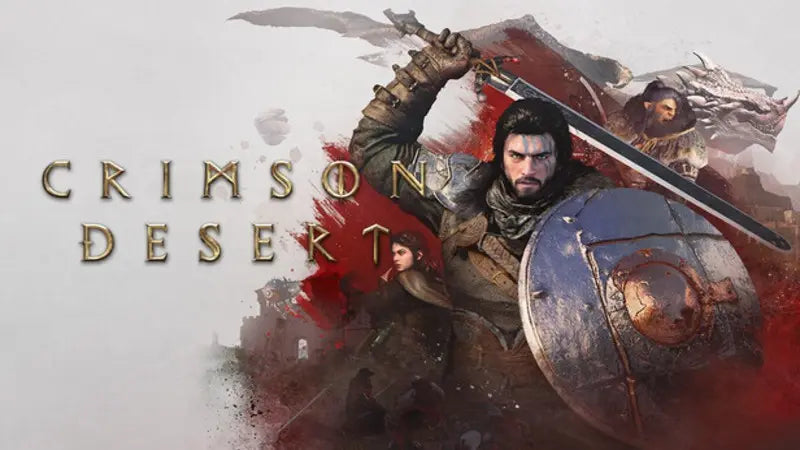
Crimson Desert’s Massive Updates Prove Why You Need a Gaming PC for Open World Games Built to Last
Gaming PC for Open World Games is no longer a niche search term for players who simply want pretty landscapes and big maps. After the rapid growth of Crimson Desert since launch, it is now a practical buying question for Canadian gamers who want a system that can handle huge worlds, major patches, new features, streaming, recording, and future content without feeling outdated too quickly.
Crimson Desert arrived as an ambitious open-world action-adventure game with combat, exploration, unusual side activities, character progression, and a world built to pull players away from the main path. Five months later, the game has reportedly expanded through 17 patches, more than 20 new features and content additions, over 120 new pets and mounts, and more than 70 outfits, equipment pieces, and other items. That kind of post-launch growth is exactly why buying a gaming computer in Canada should not only be about whether a PC can run a game on day one. It should be about whether that PC can keep up after the game becomes bigger, heavier, more complex, and more demanding over time.
For Canadian buyers looking at a Custom Gaming PC Canada build, a 1440p Gaming PC Canada setup, a 4K Gaming PC Canada rig, or even a balanced gaming and creator system, Crimson Desert is a useful reminder: modern games are living platforms. Updates add systems. Patches improve visuals. New mechanics change how players interact with the world. Cross-save support expands where and how people play. Mounts, housing, trading, crafting, pets, minigames, and rematch systems all add to the experience. The real question is not just, “Can my PC launch this game?” The better question is, “Will my next PC still feel smooth when the games I love keep growing?”
Why Crimson Desert’s Growth Matters for Canadian PC Buyers
Crimson Desert’s post-launch expansion is important because it reflects a much larger trend in PC gaming. Big games do not stay still anymore. They launch, patch, expand, rebalance, and add content over months or years. Players who buy a PC only for minimum requirements can quickly discover that “playable” is not the same as enjoyable, especially when the game expands with new zones, systems, traversal options, visual improvements, and performance-heavy mechanics.
What does that mean if you are shopping for a gaming desktop in Canada right now? It means you should think beyond the first boot. You should think about resolution, frame rate, GPU headroom, CPU strength, memory capacity, SSD space, cooling, streaming needs, multitasking, and how long you want the PC to last before you feel pressured to upgrade again.
Crimson Desert’s updates include new skills, difficulty options, inventory improvements, boss rematches, expanded sandbox features, new pets, new minigames, farming improvements, rideable Wyverns, housing upgrades, outdoor decorations, furniture additions, crafting tools, and cross-save support across major platforms. The revamped trading system alone reportedly added 133 trading posts, new trade goods, wagon workshops, improved pricing and profits, minimap routes, and a dedicated trade tab. None of that is just “extra content” from a PC buyer’s perspective. It is a signal that your system should be ready for evolving games, not just launch-day games.
Are you buying a PC for a game as it exists today, or are you buying for the version of that game you will still be playing after months of patches, expansions, high-resolution texture updates, new gameplay systems, and community-driven expectations?
What Crimson Desert Gets Right About Modern Open-World Gaming
The most interesting part of Crimson Desert’s growth is not simply the number of updates. It is the variety. Some patches focused on gameplay. Others expanded sandbox features. Some added quality-of-life improvements. Others introduced travel, housing, trading, and cross-save features that change how people spend time inside the world.
This is exactly what makes modern open-world games so hardware-sensitive. A player may start by fighting enemies and exploring landscapes, but later they may be managing inventory, riding flying mounts, decorating homes, farming, trading between posts, revisiting bosses, recording clips, streaming discoveries, or running the game across multiple displays while chatting with friends. A good PC has to support the full experience, not just the opening hour.
For many Canadian gamers, Crimson Desert also fits into a wider library that might include Elden Ring-style exploration, massive RPGs, visually intense action games, survival crafting games, ray-traced titles, competitive shooters, and upcoming AAA releases. If your PC is struggling now, the next wave of open-world games will not become easier to run. They will likely become larger, denser, and more demanding.
So what kind of player are you? Do you want to explore at 1080p with strong value? Do you want a 1440p Gaming PC Canada build that gives you sharper visuals and high frame rates? Are you chasing a 4K Gaming PC Canada experience with ultra settings, ray tracing, and maximum immersion? Or do you want one system that can game, stream, edit videos, and create content without feeling like a compromise?
What Do You Want Your Next PC to Do for You?
Before choosing a custom gaming PC, stop and ask a more useful question: what do you want your next PC to do for you?
Do you want it to run massive open-world games smoothly at 1080p? Do you want to move into 1440p gaming with higher detail and better future-proofing? Do you want 4K gaming on a large monitor or TV? Do you care about ray tracing, frame generation, high refresh rates, quiet cooling, or long-term upgrade paths?
Or is gaming only part of the story? Are you also using OBS Studio for streaming? Are you editing YouTube videos in Adobe Premiere Pro or DaVinci Resolve? Are you working in Photoshop, Lightroom, Illustrator, Canva, Blender, Unreal Engine, AutoCAD, Revit, or SolidWorks? Are you a student, photographer, streamer, designer, engineer, 3D artist, small business owner, or content creator who needs one reliable machine to handle both entertainment and work?
This is where a custom build becomes more valuable than a generic one-size-fits-all computer. Two people can both say they need a gaming PC, but one may need a budget-friendly esports machine while another needs a premium RTX-powered system for open-world gaming, streaming, 4K editing, and rendering. The right build depends on the workload.
If you are not sure what category you fit into, that is normal. Many customers start with a game in mind and quickly realize they also want the PC to handle school, work, streaming, editing, or creative software. A good buying process should help you discover that before you spend your money, not after.
Gaming PC for Open World Games: What Performance Tier Actually Fits You?
A Gaming PC for Open World Games should be chosen based on how you play, not just what the game box says. Open-world titles often involve large environments, fast traversal, streaming assets, CPU-heavy world simulation, GPU-heavy visuals, and storage demands that can grow with updates. When a game like Crimson Desert keeps expanding, the smartest buyers leave room for the future.
Entry-Level and Budget Gaming: Is 1080p Enough for You?
A budget gaming PC can still make sense if your goal is smooth 1080p gaming, popular online games, school use, and general everyday performance. If you are buying your first gaming desktop or replacing an older system, this tier can offer strong value without overbuilding.
Ask yourself: are you comfortable lowering a few settings if needed, or do you want every new AAA game to run at high settings for years? Are you playing on a 1080p monitor, or are you planning to upgrade to 1440p soon? Do you mostly play esports and lighter games, or are open-world AAA games your main focus?
For many students and first-time buyers, an affordable gaming PC in Canada can be the right starting point. But if your game library is shifting toward large RPGs, open-world action games, and future AAA releases, it may be worth stepping up before you feel limited.
Mid-Range Sweet Spot: What PC Do I Need for 1440p Gaming?
For many Canadian gamers, 1440p is the sweet spot. It looks significantly sharper than 1080p, does not demand quite as much as 4K, and pairs well with high-refresh gaming monitors. A well-balanced 1440p build usually gives you better longevity for open-world games, stronger visual quality, and more room for future patches.
If you are asking, “What PC do I need for 1440p gaming?” the answer depends on whether you want high settings, ultra settings, ray tracing, streaming, or recording at the same time. A basic 1440p build and a high-FPS 1440p build are not the same thing. If you want to stream Crimson Desert-style open-world gameplay while keeping frame rates stable, GPU selection, CPU strength, RAM capacity, and cooling all matter.
This tier is often ideal for players who want a strong gaming desktop without jumping all the way into flagship pricing. It is also a smart category for customers who want to avoid upgrading too soon.
Premium and 4K Gaming: Do You Want Ultra Settings, Ray Tracing, and Long-Term Headroom?
If you want the most immersive experience possible, a premium gaming PC is where 4K, ray tracing, high-resolution textures, and ultra settings become realistic goals. This is the tier for players who want the world to feel cinematic, who use large displays, who demand stronger future-proofing, or who play the most visually demanding games available.
A premium build can also make sense if you do more than game. High-end GPUs are valuable for video editing acceleration, AI-assisted creative tools, 3D rendering, Blender workloads, Unreal Engine projects, and high-bitrate streaming. If you are already investing in a serious desktop, it can be smarter to build one powerful system than to buy a cheaper gaming PC now and replace it sooner.
So ask yourself: do you want to simply run modern games, or do you want to experience them at their best? Do you want a PC that feels impressive today but still has room for tomorrow’s bigger game worlds, heavier patches, and more demanding software?
Why Open-World Games Put Pressure on Every Part of a PC
Many buyers focus almost entirely on the graphics card, and the GPU is absolutely important. But open-world games are not only about graphics. They also stress the CPU, RAM, SSD, cooling system, and overall platform balance.
- GPU performance: Drives resolution, visual quality, ray tracing, high frame rates, and GPU-accelerated features. For a Ray Tracing Gaming PC Canada build or a 4K-focused rig, GPU choice is one of the biggest decisions.
- CPU performance: Helps with world simulation, NPC behaviour, background systems, high frame rates, streaming, multitasking, and creator workloads.
- RAM capacity: Supports modern games, background apps, browsers, Discord, OBS, editing software, and large creative projects. For gaming alone, capacity needs differ from streaming and editing needs.
- SSD speed and capacity: Helps with load times, asset streaming, game libraries, project files, video footage, and large updates. Modern games can consume significant storage over time.
- Cooling and airflow: Sustained performance matters. A PC that boosts well for five minutes but throttles under longer sessions is not ideal for open-world gaming or rendering.
- Power supply and upgrade path: A properly selected PSU and platform can make future upgrades easier and safer.
Crimson Desert’s ongoing expansion shows why balance matters. A game with travel systems, trading systems, housing, pets, mounts, combat, inventory, crafting, and large environments benefits from a PC that is not bottlenecked in one obvious place. If the GPU is powerful but the CPU is weak, you may not get the smoothness you expect. If the CPU and GPU are strong but storage is cramped, managing modern game libraries becomes frustrating. If cooling is poor, performance can dip during long sessions.
That is why working with a Canadian custom PC builder matters. A good custom build is not just a pile of expensive parts. It is a balanced system designed around your monitor, games, workload, budget, and upgrade expectations.
Is a Gaming PC Good for Streaming, Editing, and Content Creation?
For many buyers, the answer is yes, but only if the system is configured properly. A gaming PC can be an excellent starting point for content creation because the same GPU and CPU power that helps in games can also accelerate editing, streaming, rendering, and design workflows. However, a pure gaming build and a multi-purpose creator build may need different priorities.
If you want a Gaming and Streaming PC Canada system, you should think about OBS performance, encoder support, CPU headroom, RAM, storage for recordings, and dual-monitor use. Streaming an open-world game while keeping gameplay smooth is more demanding than simply playing offline.
If you want a Content Creation PC Canada build, you should think about editing timelines, export times, Adobe Creative Cloud performance, DaVinci Resolve acceleration, Photoshop responsiveness, Lightroom catalog handling, and how many programs you keep open at once. If you create short-form videos, YouTube content, thumbnails, social posts, livestream highlights, and client work, your PC has to support your workflow without constant waiting.
What PC do content creators need? The best answer starts with your actual software. Premiere Pro, DaVinci Resolve, After Effects, Photoshop, Lightroom, Blender, Unreal Engine, and CAD programs do not all behave the same way. Some lean heavily on the GPU. Some reward a stronger CPU. Some need more RAM. Some need fast storage. The right creator PC is built around the work, not just the label.
What If You Also Edit Video, Photos, or Design Graphics?
Crimson Desert may be the reason you are thinking about upgrading, but your PC might need to do far more than explore Pywel. Many gamers are also creators, freelancers, students, photographers, designers, streamers, and entrepreneurs. If you are spending money on a new desktop, it is worth asking whether it should be a gaming PC, a creator PC, or a hybrid system.
Video Editing: Are You Working in 1080p, 4K, 6K, or 8K?
A video editing PC in Canada needs more than gaming performance. If you work in Adobe Premiere Pro, DaVinci Resolve, After Effects, CapCut, or YouTube editing workflows, you should consider CPU cores, GPU acceleration, RAM, fast NVMe SSD storage, scratch space, and export speed. A gamer may tolerate lowering a visual setting. An editor loses time every time a timeline stutters or an export drags on.
Are you editing simple 1080p clips, or are you cutting 4K footage with effects, colour grading, transitions, captions, and multiple audio tracks? Are you building a PC for occasional edits, or is content creation part of your income? If your computer helps you earn money, a stronger build can pay for itself through time saved and smoother production.
Photo Editing: Do You Work With RAW Files, Lightroom Catalogs, or AI Tools?
Photo editing may seem lighter than gaming, but high-resolution RAW files, batch exports, AI masking, noise reduction, large Photoshop documents, and Lightroom catalogs can put serious pressure on a desktop. A good photo editing PC should feel responsive while importing, previewing, editing, exporting, and multitasking.
If you are a photographer in Canada, do you need a colour-focused workflow, fast SSD storage, enough RAM for large catalogs, and a GPU that supports modern AI tools? A generic PC might work for casual edits, but a custom photo editing build can be tuned for the way you actually shoot and deliver work.
Graphic Design: Are You Building Brands, Ads, Mockups, and Social Content?
Graphic designers often need fast performance in Photoshop, Illustrator, InDesign, Canva, Affinity Designer, CorelDRAW, and Adobe Creative Cloud workflows. If you work across multiple apps, use large files, manage brand assets, create social content, and run several monitors, your PC should be built for responsiveness.
Do graphic designers need a dedicated GPU? Not always at the same level as a 4K gaming rig, but GPU acceleration, RAM, SSD speed, and display support can make a major difference. If your work involves motion graphics, video, 3D mockups, or AI tools, stronger hardware becomes even more valuable.
What About Blender, Unreal Engine, 3D Modeling, and Workstation Use?
Open-world games do more than entertain players. They inspire creators. A player who loves massive environments may also want to build game assets, learn Unreal Engine, render scenes in Blender, model products, design architecture, or create animations. If that sounds like you, a gaming PC may not be enough unless it is designed as a workstation too.
A 3D Modeling PC Canada or 3D Rendering PC Canada build needs careful planning. Blender, Unreal Engine, Unity, Maya, 3ds Max, Cinema 4D, SketchUp, ZBrush, AutoCAD, Revit, and SolidWorks can all benefit from different hardware choices. GPU rendering may demand a stronger graphics card and more VRAM. CPU rendering may reward more cores. Large scenes and simulations can require more RAM. Professional project storage can require larger and faster SSDs.
Ask yourself: are you only playing open-world games, or are you also building worlds of your own? Do you want to learn game development, architectural visualization, product rendering, animation, or CAD? If so, Groovy Computers can help you think beyond gaming benchmarks and build a workstation that supports creative ambition.
Is It Better to Buy a Gaming PC Now or Wait?
One of the most common questions Canadian buyers ask is: is it better to buy a gaming PC now or wait? The honest answer depends on your budget, your current system, your urgency, and the market. But there is one important point: waiting does not always mean saving money.
PC component prices can move because of GPU demand, memory pricing, SSD supply, currency changes, shipping costs, seasonal demand, major game releases, back-to-school buying, holiday shopping, AI hardware pressure, and new product cycles. A system that fits your budget today may not be available at the same price later. Even when one component drops, another can rise.
There is also a performance cost to waiting. If your current computer is already struggling, every month you wait is another month of lower frame rates, longer loading times, missed streaming opportunities, slower edits, and less productivity. If a major game release, software upgrade, school term, client workload, or creative project is coming up, timing matters.
Are you waiting because you have a clear reason, or are you waiting because buying a PC feels complicated? If the real issue is uncertainty, a custom PC consultation can be more useful than endlessly watching component rumours.
Should You Finance a Better PC Instead of Buying a Cheaper One?
Another important question is: should you finance a better PC instead of buying a cheaper one? For some customers, financing can make sense because it lets them secure a stronger, longer-lasting system without paying the full amount upfront.
Groovy Computers offers financing options up to 4 years where available, which can help Canadian buyers choose a better-balanced PC before replacement costs rise or before they are forced into a rushed purchase. This is especially relevant if you are trying to avoid upgrading too soon. A cheaper PC may feel easier today, but if it lacks GPU headroom, RAM, storage, or cooling, you may end up spending more sooner than expected.
Financing is not about buying more than you need. It is about matching the system to your real goals. If you only need casual 1080p gaming, a smart budget build may be perfect. But if you want 1440p open-world gaming, streaming, 4K editing, Blender rendering, or a long-term workstation, spreading payments over time may help you secure the right machine instead of settling for one that becomes a bottleneck.
Can you finance a gaming PC in Canada? With Groovy Computers, qualified customers can explore financing options directly through the buying process. The key is choosing a build that fits your monthly comfort level and your performance needs.
How Crimson Desert Highlights the Risk of Buying Too Low
Crimson Desert is a perfect example of why buying the absolute minimum can be risky. At launch, a game may run acceptably on a modest system. But after months of updates, new systems, expanded content, and potential visual improvements, the same PC may have less breathing room.
This does not mean every player needs a flagship desktop. It means buyers should be realistic. If you plan to play large open-world games for years, stream gameplay, install many AAA titles, and use creative software, your PC should have extra headroom. Buying too low can lead to compromises like lowering texture quality, reducing resolution, turning off ray tracing, closing background apps, deleting games to make space, or upgrading earlier than planned.
What gaming PC do I need? The practical answer is the one that fits your monitor, your games, your workload, your budget, and your upgrade timeline. A 1080p gamer has different needs than a 1440p streamer. A 4K open-world player has different needs than a student playing esports. A video editor has different needs than a casual gamer. A 3D artist has different needs than someone only browsing and gaming on weekends.
The wrong build is not always the cheapest build. Sometimes the wrong build is the one that ignores what you will want six months from now.
Custom PC vs Prebuilt PC Canada: Why Build Quality Matters More Than Ever
When people compare custom PCs and generic prebuilt systems, they often focus only on specs. But specs do not tell the whole story. Two computers can list similar CPUs and GPUs while delivering very different real-world experiences because of cooling, motherboard quality, power supply selection, case airflow, RAM configuration, SSD choice, cable management, BIOS setup, and testing.
A custom gaming PC built by Groovy Computers is designed around your needs. That means the part selection is not random, the cooling is considered, the build is assembled with care, and the system is tested before it reaches you. This matters when your PC will be used for long gaming sessions, streaming, editing, rendering, or professional work.
Why does testing matter in a gaming PC? Because instability can ruin the experience. A system that crashes during a boss fight, drops frames during a livestream, overheats during an export, or fails under load is not a good deal. Groovy Computers focuses on reliable, stress-tested systems with a 1-year warranty, giving Canadian buyers more confidence than a mystery marketplace machine or poorly balanced off-the-shelf desktop.
If you are investing in a PC for modern open-world games, creator software, or workstation tasks, reliability should be part of the budget. A lower upfront price is not a win if the system runs hot, throttles, crashes, or forces upgrades sooner than expected.
Canadian Buying Context: Why Local Support and Canada-Wide Shipping Matter
Canadian PC buyers face a unique mix of currency shifts, shipping costs, regional availability, seasonal demand, and limited access to certain parts at certain times. That is why working with a Canadian gaming PC company can be helpful. You are not just buying parts; you are buying a complete system, support, warranty confidence, and a build designed for Canadian customers.
Groovy Computers serves customers in Nova Scotia, Atlantic Canada, and across the country with custom gaming PCs, creator PCs, and workstation PCs. Whether you are near Trenton, New Glasgow, Halifax, elsewhere in Nova Scotia, or ordering from another province, the goal is the same: help you get the right PC for the way you play and work.
Do you want to buy a gaming PC online in Canada but still feel like a real person helped you choose it? Do you want a Canada-built gaming PC with proper testing and warranty support? Do you want guidance before spending thousands of dollars on a system that needs to last? That is where Groovy Computers is built to help.
Which Groovy Computers Build Category Is Right for You?
Choosing the right PC becomes easier when you start with your use case. Instead of asking only what the newest GPU is, ask what you want the PC to accomplish. Here are the main buyer categories to consider.
Choose a Budget Gaming PC If You Want Smart Value
A budget gaming PC is a strong fit if you play at 1080p, want your first gaming desktop, need a student-friendly system, or want an affordable way into PC gaming. This category is best for buyers who care about value and are comfortable choosing settings wisely in demanding games.
Ask yourself: how much should I spend on a gaming PC if I mostly play esports, lighter titles, and occasional AAA games? If you are not chasing 4K or ultra settings, a smart budget build can be the right choice.
Choose a 1440p Gaming PC If You Want the Best Balance
A 1440p gaming PC is ideal for many modern players. It offers a sharper image, strong performance potential, and better long-term comfort for open-world games than entry-level 1080p builds. If you are excited about games like Crimson Desert and other visually rich open-world titles, this is often the tier to consider first.
Ask yourself: do I want high settings and smooth frame rates without paying for a full flagship 4K build? If yes, a 1440p custom gaming PC may be the best fit.
Choose a Premium Gaming PC If You Want 4K, Ray Tracing, and Longevity
A premium gaming PC makes sense if you want 4K gaming, ray tracing, high refresh rates, maximum settings, streaming, and stronger future-proofing. It is also a smart category for buyers who do not want to feel behind when the next wave of demanding games arrives.
Ask yourself: what PC do I need for 4K gaming and ultra settings? If your answer includes cinematic visuals, large open worlds, ray tracing, and long-term headroom, a premium build is worth considering.
Choose a Gaming and Streaming PC If You Want to Go Live
A streaming PC should be designed for gameplay and broadcast performance at the same time. If you want to stream on Twitch, YouTube, TikTok Live, or record gameplay for editing later, you need more headroom than a basic gaming-only system.
Ask yourself: what PC do I need for streaming? If you plan to run a game, OBS, chat, browser sources, alerts, overlays, and multiple monitors, build for that workload from the beginning.
Choose a Creator PC If You Edit, Design, and Publish Content
A creator PC is best for YouTubers, TikTok creators, photographers, graphic designers, social media managers, editors, podcasters, and small business owners who need fast creative performance. This category often blends gaming power with workstation reliability.
Ask yourself: what PC do I need for Adobe Creative Cloud, Premiere Pro, Photoshop, Lightroom, DaVinci Resolve, and content creation? If your desktop is part of your creative output, build for speed, stability, and storage.
Choose a 3D Modeling or Workstation PC If Your Projects Are Heavy
A workstation PC is the right move if you use Blender, Unreal Engine, CAD, Revit, SolidWorks, Maya, Cinema 4D, 3ds Max, or heavy rendering tools. These systems need to be planned around your software, not just gaming benchmarks.
Ask yourself: what PC do I need for Blender or 3D rendering? If you render, simulate, model, animate, or handle large project files, you need a custom workstation built for sustained performance.
Why Financing Can Be a Smart Timing Tool Before Prices Change
Financing is especially useful when buyers are caught between the PC they can pay for today and the PC they actually need for the next several years. Component pricing can shift, and replacement costs can rise. If a better GPU, more RAM, larger SSD, stronger CPU, or better cooling setup would meaningfully extend the life of your system, financing may help you avoid a short-term compromise.
This matters for games that grow after launch. It also matters for creators whose software keeps getting heavier. AI tools, higher-resolution footage, larger texture packs, more complex effects, and multi-app workflows all raise the performance bar over time.
Should you buy a gaming PC before prices go up? No one can guarantee future pricing, but waiting for the “perfect” moment can leave you stuck with an aging system while component costs, game demands, and your own workload keep moving. If you already know you need a stronger PC, the more useful question may be: what build gives me the best long-term value at a monthly payment I can handle?
If financing helps you secure a better-balanced system with more lifespan, it can be smarter than buying the cheapest possible PC and upgrading again too soon.
Questions to Ask Before Buying Your Next Gaming PC
Before you choose a build, take a few minutes to answer these questions. They can help you avoid overspending in the wrong place or underspending where it matters.
- What games do I actually play? Are they esports titles, AAA open-world games, simulation games, survival games, ray-traced games, or upcoming releases?
- What resolution do I want? 1080p, 1440p, and 4K have very different hardware needs.
- Do I care about ray tracing? If yes, GPU choice becomes more important.
- Do I stream or record? OBS, overlays, multiple monitors, and recording storage should be considered.
- Do I edit video? 4K editing, effects, colour grading, and exports need stronger hardware than gaming alone.
- Do I edit photos or design graphics? Photoshop, Lightroom, Illustrator, Canva, and InDesign benefit from fast RAM, SSDs, and responsive CPUs.
- Do I use 3D software? Blender, Unreal Engine, CAD, and rendering tools may require workstation-level planning.
- How long do I want this PC to feel powerful? If you want longevity, build with headroom.
- Do I want to avoid upgrading too soon? Spending slightly more now can sometimes reduce upgrade pressure later.
- Would financing help me choose the right PC instead of the cheapest PC? A stronger system may be easier to justify if payments are spread over time.
These questions are not meant to make buying complicated. They are meant to make the purchase smarter. A PC is not just a box of parts. It is the machine you may use for gaming nights, school projects, freelance work, livestreams, edits, designs, renders, and entertainment for years.
Why Groovy Computers Is the Right Fit for Canadian Buyers
Groovy Computers builds custom gaming PCs, creator PCs, and workstation PCs for Canadian customers who want performance, reliability, and guidance. Instead of pushing a generic system, Groovy Computers helps match your build to your games, monitor, software, budget, and future goals.
If Crimson Desert has you thinking about a new desktop, Groovy Computers can help you choose the right category. Maybe you need a value-focused 1080p gaming PC. Maybe you should step up to a 1440p gaming PC. Maybe you want a premium 4K gaming PC with ray tracing headroom. Maybe you need a gaming and streaming PC for OBS. Maybe your real need is a creator PC for editing, design, and content production. Maybe you need a 3D workstation for Blender, Unreal Engine, CAD, or rendering.
Every build choice should have a reason. The CPU should match the workload. The GPU should match the resolution and software. The RAM should match the multitasking and project size. The storage should match your game library and media files. The cooling should support long sessions. The power supply should support stability and future upgrades. The warranty should give confidence.
That is the difference between simply buying a computer and buying the right computer.
Ready for Crimson Desert, Future Open-World Games, and Everything Else You Do?
A Gaming PC for Open World Games should be built for more than today’s minimum requirements. Crimson Desert’s rapid growth shows how quickly a modern title can evolve after launch, and Canadian gamers should plan accordingly. If your current PC is already struggling, the next big update, game release, creator project, or software upgrade may expose its limits even more.
Do you want help choosing a budget gaming computer, a premium RTX gaming PC, a custom creator PC, an editing workstation, or a 3D modeling workstation? Do you want to compare whether 1080p, 1440p, or 4K makes the most sense for your budget? Do you want to explore whether financing up to 4 years could help you secure a stronger build before replacement costs rise?
If you are ready to buy with confidence, visit GroovyComputers.ca and explore custom gaming PCs, creator PCs, workstation options, and financing solutions built for Canadian customers. The right PC should not just run your next game. It should support the way you play, create, stream, work, and grow.
Final Takeaway: Build for the Game You’ll Be Playing Months From Now
Crimson Desert’s continued expansion is a reminder that modern games are not frozen in time. They become larger, deeper, and more demanding as developers add systems, features, and content. A smart PC purchase should account for that reality.
If you are buying a new gaming desktop in Canada, do not only ask whether it can run one game today. Ask whether it can handle the games, updates, software, streams, edits, designs, renders, and projects you will care about next year. Ask whether a cheaper PC will truly save money if it forces an upgrade too soon. Ask whether financing a stronger build could give you better long-term value. Ask whether you want expert help from Canadian custom PC builders who understand gaming, content creation, workstation performance, testing, warranty, and real customer needs.
For open-world gamers, creators, streamers, editors, designers, and workstation users, the best PC is the one built around your actual life. Groovy Computers is here to help Canadian buyers choose that system with confidence.
#GamingPCForOpenWorldGames #GamingPCCanada #CustomGamingPCCanada #1440pGamingPCCanada #4KGamingPCCanada #ContentCreationPCCanada #GamingPCFinancingCanada #GroovyComputers
Groovy Computers | All Rights Reserved


Leave a comment
This site is protected by hCaptcha and the hCaptcha Privacy Policy and Terms of Service apply.