




















Crimson Desert DLC Confirmed: Why a Gaming PC for New Games Matters More Than Ever in Canada
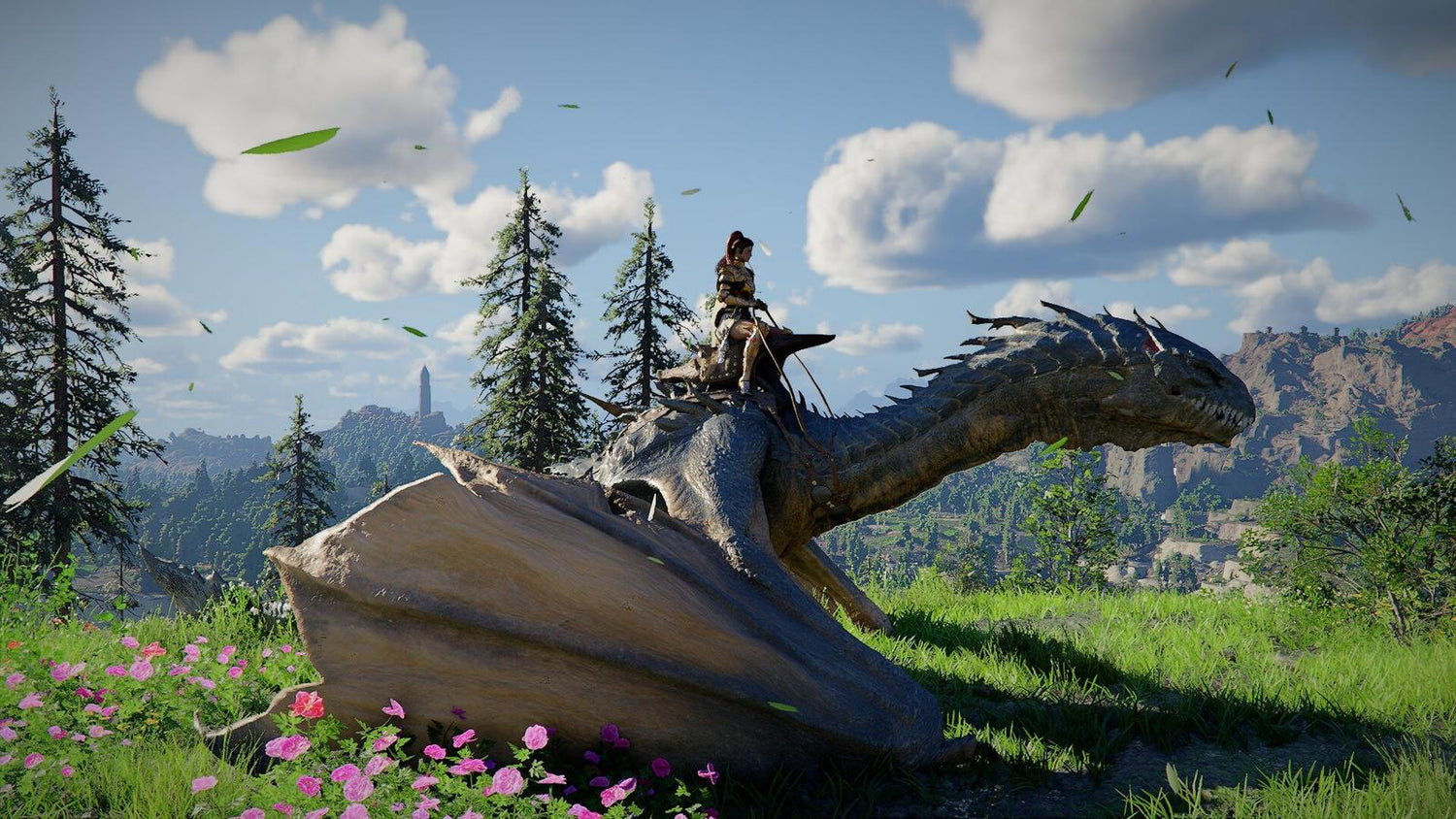
Pearl Abyss has confirmed that Crimson Desert is set to receive at least one major story expansion, with the DLC planned for release in 2026. For players following massive open-world action adventures, that news is more than a content update. It is a reminder that a Gaming PC for New Games is no longer just about running the base game on launch day. It is about staying ready for years of patches, expansions, visual upgrades, cross-save features, new areas, new systems, and heavier performance expectations.
According to the source report, Pearl Abyss has continued active development after release, thanking players for their support and noting that Crimson Desert has already received 17 updates. Those updates reportedly include more than 20 new features and content additions, more than 120 new mounts and pets, and more than 70 new costumes, gear items, and other items. The latest update also added cross-save between PC and consoles while improving the trading system, with more patches and refinements expected.
For Canadian PC buyers, that pattern should sound familiar. The biggest games are no longer one-and-done purchases. They grow. They get larger. They get more complex. They add high-resolution textures, richer worlds, larger asset libraries, better lighting, more customization, and sometimes more demanding performance profiles. So the real question is not only, Can my PC run Crimson Desert today? The better question is: will your PC still feel good after the next major expansion, the next update, and the next wave of games?
At Groovy Computers, we look at gaming news like this through a practical lens: what does it mean for the customer deciding between a budget gaming computer, a premium RTX gaming PC, a custom creator PC, or a workstation that can handle gaming, streaming, editing, and productivity at the same time? If you are planning your next system in Canada, Crimson Desert’s upcoming story DLC is a useful case study in why buying the right PC tier now can help you avoid upgrading too soon.
Why the Crimson Desert Expansion News Matters for PC Buyers
Crimson Desert is built around the kind of large-scale adventure that tends to push gaming hardware harder than smaller competitive titles. Open-world games often combine demanding graphics, streaming world assets, CPU-heavy simulation, animation systems, large environments, and fast traversal. When a game like this receives continued updates and a major DLC, the hardware conversation becomes more important.
Think about what expansions usually add. They may bring new zones, new characters, new quests, new visual assets, new enemies, new cinematic sequences, and updated systems. Even when developers optimize over time, modern games can become larger and more layered as post-launch support continues. That matters if you are buying a PC and hoping it lasts more than one season of gaming.
Are you buying for Crimson Desert only, or are you buying for the next two to four years of AAA games? Do you want to run new open-world games at 1080p with smooth settings, or are you aiming for a 1440p high-refresh experience? Are you hoping for 4K, ray tracing, streaming, recording, video editing, or content creation on the same machine?
Those questions change the build completely. A player who wants casual 1080p gaming does not need the same PC as someone who wants 4K ultra settings, OBS streaming, YouTube editing, and Adobe Creative Cloud performance. The right Gaming PC for New Games should match your actual use case, not just a generic minimum-spec checklist.
What the Source Report Gets Right: Modern Games Keep Growing
The most important takeaway from the Crimson Desert DLC confirmation is not just that new story content is coming. It is that Pearl Abyss appears committed to long-term development. The source report highlights 17 updates since release, cross-save support between PC and consoles, trading system improvements, and more patches planned. That kind of active roadmap means players can expect the game experience to evolve.
For PC gamers, this has a hardware implication. Games that receive long-term support often reward stronger systems. You may get better texture options, more graphics settings, smoother high-refresh gameplay, improved loading behaviour, and more flexibility for multitasking. A stronger PC can also make patches and expansions feel exciting instead of stressful.
If you have ever installed a major update and suddenly noticed longer loading times, lower frame rates, stuttering, or storage pressure, you already know the issue. A game may technically run, but that does not mean it feels premium. That is why Groovy Computers focuses on balanced custom builds: the GPU, CPU, RAM, SSD, cooling, power supply, and case airflow all need to work together.
What Do You Want Your Next PC to Do for You?
Before choosing a build, ask yourself a simple question: what do you want your next PC to do for you?
Do you want to explore Crimson Desert and other open-world games after work without worrying about settings? Do you want a high FPS gaming PC for competitive titles and a cinematic experience for AAA adventures? Do you want to stream on Twitch, record gameplay for YouTube, edit clips for TikTok, manage photo edits in Lightroom, design thumbnails in Photoshop, or render scenes in Blender?
The best PC is not always the most expensive one. It is the one that fits the way you actually use it. For some Canadian buyers, that means a value-focused 1080p gaming system. For others, it means a 1440p gaming PC Canada shoppers can rely on for demanding new releases. For premium buyers, it may mean a 4K Gaming PC Canada setup with powerful graphics performance, fast storage, and enough RAM to keep background apps from slowing everything down.
If your current PC already struggles with new games, ask yourself: will another minor upgrade really solve the problem, or is it time to move into a properly balanced custom gaming PC?
Gaming PC for New Games: Which Performance Tier Fits You?
Choosing the right performance tier is the difference between buying once with confidence and feeling forced into another upgrade too soon. Crimson Desert’s ongoing updates are a reminder that the target is always moving. Here is how Groovy Computers thinks about practical gaming PC tiers for Canadian customers.
Entry-Level and Budget Gaming: Is 1080p Enough for You?
A budget gaming computer is ideal if you mostly play esports titles, lighter games, older AAA releases, or new games at 1080p with optimized settings. If your monitor is 1080p and you care more about affordability than maxed-out visuals, this tier can make sense.
But ask yourself: are you comfortable lowering settings in future games? Do you want a first gaming PC for a student, a family gaming setup, or a value-focused desktop that handles everyday work too? If yes, a budget gaming PC can be a smart starting point.
The caution is longevity. Big open-world games and expansions can become demanding over time. If you buy too low, you may save money today but face an upgrade sooner. That is why many buyers compare a cheaper system against financing a stronger build with a longer useful life.
1440p Gaming: The Sweet Spot for Many Canadian PC Gamers?
For many players, 1440p is the modern sweet spot. It looks noticeably sharper than 1080p, pairs well with high-refresh monitors, and does not demand the same level of graphics power as 4K. If you are asking, What PC do I need for 1440p gaming?, the answer usually starts with a strong modern GPU, a capable gaming CPU, 32GB of RAM for comfort, and a fast NVMe SSD.
This tier is especially appealing for open-world action games, RPGs, shooters, racing games, and visually rich adventure titles. If you want Crimson Desert, upcoming AAA releases, and current games to feel smooth without constantly fighting settings menus, a well-built 1440p system is often the best value-performance balance.
Do you use Discord, a browser, game launchers, RGB software, capture tools, or music apps while gaming? If so, extra RAM and a stronger CPU can improve the overall experience. A Gaming PC for New Games should not collapse just because you have modern background apps open.
4K and Ultra Settings: Do You Want Premium Visuals Without Compromise?
If you are asking, What PC do I need for 4K gaming?, you are in premium territory. 4K gaming demands much more from the GPU, especially in visually dense open-world games. If you want ultra settings, high-resolution textures, ray tracing, smooth frame rates, and long-term headroom, you should be looking at a high-end gaming PC rather than a basic prebuilt.
A premium RTX gaming PC can also make sense if you keep your systems longer. The upfront cost is higher, but the experience can remain stronger across multiple game cycles. If you want to avoid upgrading too soon, investing in the right GPU tier, a powerful CPU, strong cooling, and high-quality power delivery matters.
Are you buying for a 4K monitor or a high-refresh 1440p display? Do you want ray tracing gaming PC Canada performance, or are you more focused on raw FPS? Your monitor should guide your build. A system designed for 1080p can be wasted on a 4K dream, and a flagship PC can be underused on a basic display.
Do You Need Ray Tracing, High FPS, or Both?
Modern gaming performance is no longer a single number. Some players care about competitive FPS. Others want cinematic visuals. Some want both. A high FPS gaming PC Canada buyer may prioritize responsiveness in shooters and esports games, while a ray tracing gaming PC Canada buyer may care more about lighting, reflections, shadows, and immersion in single-player worlds.
Crimson Desert’s expansion news is relevant because visually ambitious games benefit from headroom. Even if you do not enable every premium graphics option, a stronger GPU can help maintain smoother performance when new content arrives. The goal is not just peak FPS in a benchmark. The goal is a stable, enjoyable experience when the game world gets busy.
Ask yourself: do you notice stutter more than slightly lower graphics settings? Do you want smooth gameplay during combat, traversal, and crowded scenes? Do you want to record or stream while playing? If yes, your PC should be built with more than minimum requirements in mind.
Gaming, Streaming, and Editing: Are You Really Buying One PC for Everything?
Many customers start by asking for a gaming PC, then mention they also want to stream, edit videos, design thumbnails, manage photos, or experiment with 3D. That changes the recommendation. A Gaming and Streaming PC Canada build should not be configured exactly like a gaming-only system.
If you plan to stream Crimson Desert or other visually rich games, you should think about GPU encoding, CPU overhead, RAM capacity, storage for recordings, and multi-monitor use. OBS, Streamlabs, Discord, browsers, chat tools, overlays, and game capture can all run at once. A system that performs well in a game by itself may feel weaker once streaming is added.
If you record gameplay for YouTube, you also need editing performance. A Custom Creator PC Canada setup may include more RAM, additional SSD storage, a stronger CPU, and a GPU that accelerates video workflows. Adobe Premiere Pro, DaVinci Resolve, After Effects, Photoshop, Lightroom, and CapCut can all benefit from a thoughtfully balanced machine.
Are you only playing, or are you building a content channel around your gameplay? Are you saving long recordings? Are you editing in 1080p, 1440p, or 4K? Do you want your PC to handle gaming now and creative work later? These questions help determine whether you need a gaming desktop, a streaming PC, a creator PC, or a hybrid system.
Is a Gaming PC Good for Video Editing, Photo Editing, and Graphic Design?
A good gaming PC can be excellent for creative work if it is configured properly. The key phrase is configured properly. A gaming-only build may prioritize GPU performance and leave storage, RAM, or CPU performance too tight for heavy creator workloads. A custom build can correct that.
For video editing, you may need 32GB or 64GB of RAM, fast NVMe storage, a strong CPU, and a GPU that helps with effects, timeline playback, encoding, and colour work. If you are asking, What PC do I need for video editing?, your footage matters: 1080p social clips, 4K YouTube videos, multi-camera edits, 6K footage, and heavy After Effects projects all have different requirements.
For photo editing, applications like Photoshop, Lightroom Classic, Capture One, and AI photo tools benefit from responsive CPUs, sufficient RAM, fast SSDs, and a smooth display workflow. If you are asking, What PC do I need for photo editing?, think about RAW file sizes, batch exports, catalogue size, and whether you use AI masking or noise reduction.
For graphic design, tools such as Photoshop, Illustrator, InDesign, Canva, CorelDRAW, Affinity Designer, and Adobe Creative Cloud benefit from quick responsiveness, multitasking capacity, and reliable display support. If your design business depends on deadlines, waiting through lag is not just annoying. It costs time.
Do you want one desktop that can game at night and produce client work during the day? If so, Groovy Computers can help you choose a build that avoids the common mistake of buying a gaming PC that is fast in one task but underbuilt for everything else.
What About 3D Modeling, Blender, Unreal Engine, and Workstation Use?
Crimson Desert is an open-world game, but the conversation around modern game technology also connects to 3D artists, game developers, animators, product designers, and workstation users. If you are inspired by game worlds and want to create your own assets, environments, renders, or prototypes, your PC needs may go beyond gaming.
A 3D Modeling PC Canada build or 3D Rendering PC Canada workstation may require more GPU memory, more system RAM, stronger CPU performance, and larger SSD capacity than a standard gaming desktop. Blender, Unreal Engine, Unity, Maya, 3ds Max, Cinema 4D, ZBrush, SketchUp, AutoCAD, Revit, and SolidWorks can all stress a PC in different ways.
Are you doing viewport modeling, GPU rendering, CPU rendering, CAD work, architectural visualization, animation, or game development? Do you need 64GB or 128GB of RAM? Are your scenes small and simple, or are they complex enough to punish a basic system? This is where a custom workstation PC becomes far more valuable than a generic prebuilt.
A gaming PC can be good for Blender or Unreal Engine, but only if the components are chosen for those workloads. Workstation PC vs gaming PC decisions come down to software, project size, render method, memory needs, and reliability expectations.
Should You Buy a Gaming PC Now or Wait?
One of the most common questions Canadian buyers ask is: Is it better to buy a gaming PC now or wait? The honest answer depends on your current system, your target games, your budget, and your tolerance for risk. However, major game expansions, seasonal demand, component availability, and pricing pressure can all make waiting less comfortable than it seems.
When a major game gains momentum, demand can rise for GPUs, higher-capacity RAM, fast SSDs, and complete gaming PCs. At the same time, component pricing can shift because of supply constraints, exchange rates, memory market changes, storage pricing pressure, and demand spikes around sales periods or major launches. Canadian buyers also have to consider shipping, availability, and replacement cost changes in Canadian dollars.
If your PC is already struggling, waiting may mean months of compromised performance. If you are planning to play Crimson Desert’s major DLC, upcoming open-world games, competitive titles, and creator software upgrades, a stronger system now may deliver value immediately while giving you more headroom later.
Ask yourself: are you waiting because you have a clear upgrade plan, or are you waiting because the decision feels overwhelming? If the second answer is true, Groovy Computers can help simplify the choice.
Should You Finance a Better PC Instead of Buying a Cheaper One?
Another important question is: Should I finance a better PC instead of buying a cheaper one? For many buyers, the answer may be yes, especially if the cheaper system will need upgrades too soon. Financing can help you secure a stronger build earlier, spread payments over time, and avoid settling for a PC that only meets your needs today.
Groovy Computers offers financing options up to 4 years, which can be useful for customers who want a better GPU tier, more RAM, a stronger processor, larger SSD storage, or a more future-ready platform. This is especially relevant when replacement costs may rise or when a major release schedule is pushing demand higher.
Financing is not about overspending for no reason. It is about matching the build to the job. If a budget PC handles your needs, great. But if you are planning 1440p gaming, 4K gaming, streaming, video editing, content creation, or 3D work, financing a stronger system can sometimes be more practical than buying an underpowered machine upfront.
Can I finance a gaming PC in Canada? Yes, and if you are considering that route, look at the total value of the system, how long you expect to keep it, whether it will support your games and software, and whether the monthly payment helps you avoid a weak short-term purchase. If you are ready to explore options, visit GroovyComputers.ca and look at custom build and financing paths built for Canadian customers.
Why Canadian Buyers Should Think Differently About Custom Gaming PCs
Canadian PC buyers face a different buying environment than customers in larger markets. Currency changes, shipping realities, regional availability, taxes, seasonal demand, and component replacement costs all matter. A part that looks affordable one month can become more expensive later, especially when demand shifts around major games or new hardware cycles.
That is why working with a Canadian custom PC builder matters. Groovy Computers builds systems for real Canadian customers, with support that understands the local market. Whether you are in Nova Scotia, Atlantic Canada, Ontario, Alberta, British Columbia, or elsewhere in the country, the goal is the same: a reliable, tested gaming PC shipped Canada wide, built around what you actually need.
For local customers looking for a Custom Gaming PC Nova Scotia option, Groovy Computers brings the advantage of Canadian service, custom configuration, and practical build advice. For customers ordering online from other provinces, the value is still clear: you are not guessing your way through a random marketplace listing. You are working with a Canadian gaming PC company focused on matching parts properly.
Custom PC vs Prebuilt PC Canada: Why the Details Matter
Generic prebuilts can look appealing because the headline specs seem simple: CPU, GPU, RAM, storage. But the details behind those specs often determine the real experience. What model is the power supply? Is the cooling appropriate? Is the case airflow strong enough? Is the motherboard limiting future upgrades? Is the RAM configuration ideal? Is the SSD fast and reliable? Has the system been stress tested?
A custom PC gives you better control over those decisions. At Groovy Computers, systems are built with component balance in mind, then tested for stability. That matters for gaming, but it matters even more for streaming, editing, rendering, and workstation workloads where instability can interrupt real work.
Why testing matters in a gaming PC is simple: performance is only valuable if it is reliable. A system that crashes under load, overheats, throttles, or struggles with memory stability can ruin the experience. Groovy Computers emphasizes rigorous testing and a 1-year warranty, giving buyers more confidence than a mystery build with unknown assembly quality.
What Specs Should You Prioritize for Crimson Desert and Other Open-World Games?
Because exact performance needs can change by settings, resolution, patches, and optimization, it is better to think in practical categories rather than chase a single universal spec list. For open-world action games, the most important components usually include the GPU, CPU, RAM, storage, cooling, and display target.
- GPU: The graphics card is critical for resolution, visual settings, ray tracing, high-refresh gaming, and long-term headroom.
- CPU: Open-world games can benefit from strong CPU performance, especially when handling simulation, background systems, asset streaming, and high FPS targets.
- RAM: 16GB can still work for some gaming, but 32GB is increasingly comfortable for modern gaming, multitasking, streaming, and creator workflows.
- Storage: A fast NVMe SSD improves loading, responsiveness, and the experience of large modern game installs. More capacity matters if you keep multiple AAA games installed.
- Cooling: Better cooling helps maintain performance under long gaming sessions and heavy workloads.
- Power supply and platform quality: A reliable PSU and smart motherboard choice protect upgrade paths and system stability.
Ask yourself: are you building for a single game install, or do you want room for several large games, captured footage, creative files, and software? Storage is one of the easiest areas to underestimate until your drive is full.
How Much Should You Spend on a Gaming PC?
How much should I spend on a gaming PC? The answer depends on your monitor, games, and workload. A 1080p player can spend less than a 4K player. A gaming-only user can often spend differently than a streamer or video editor. A student gaming PC has different priorities than a premium creator workstation.
Instead of starting with the lowest possible price, start with your target experience. Do you want high settings at 1080p? Smooth 1440p? 4K? Ray tracing? Streaming? Editing? 3D work? Once that is clear, the budget becomes easier to justify because every dollar has a purpose.
If your budget is tight, Groovy Computers can help you prioritize the parts that matter most now while preserving a sensible upgrade path. If your needs are demanding, financing may let you choose the right tier immediately rather than buying a system that feels outdated too quickly.
Questions to Ask Before Buying or Financing Your Next PC
Before you buy, take a few minutes to answer the questions that actually determine the right build.
- What games do you want to play now, and what upcoming games are you waiting for?
- Are you buying for Crimson Desert, other open-world games, esports titles, simulation games, or a mix?
- Do you want 1080p, 1440p, or 4K gaming?
- Do you care about ray tracing, ultra settings, or high FPS more?
- Will you stream with OBS, Twitch, YouTube Live, Streamlabs, or TikTok Live?
- Will you record gameplay and edit videos for YouTube, TikTok, or social media?
- Do you use Adobe Premiere Pro, DaVinci Resolve, After Effects, Photoshop, Lightroom, Illustrator, Canva, or other creator software?
- Do you plan to use Blender, Unreal Engine, Unity, CAD, or 3D rendering tools?
- How long do you want this PC to feel powerful before your next major upgrade?
- Would financing help you secure a stronger system before pricing or availability changes?
- Do you want a budget gaming computer, a premium RTX gaming PC, a custom creator PC, or a 3D modeling workstation?
- Do you want expert help choosing parts instead of guessing?
If you do not know every answer yet, that is normal. A good custom PC builder helps translate your goals into the right system.
Why Groovy Computers Is a Strong Fit for Canadian Gamers and Creators
Groovy Computers is built around a simple idea: customers should not have to gamble when buying a gaming PC, creator PC, or workstation. You should know what your system is designed to do, why the components were chosen, and how the build supports your goals.
For gamers, that means custom gaming PCs designed around resolution, FPS targets, graphics settings, and upgrade expectations. For streamers, it means systems that can handle gameplay, encoding, overlays, chat, and recording. For video editors and creators, it means builds that account for RAM, CPU performance, GPU acceleration, fast storage, and workflow reliability. For 3D artists and workstation users, it means stronger attention to memory, rendering performance, and long-session stability.
Every serious PC should be more than a parts list. It should be assembled cleanly, configured properly, stress tested, and backed by support. Groovy Computers offers custom builds, rigorous testing, and a 1-year warranty, helping customers buy with more confidence.
Whether you are looking for a Gaming PC for New Games, a 1440p gaming system, a 4K gaming desktop, a streaming and editing PC, or a custom workstation, Groovy Computers can help you choose a build that makes sense for your budget and your goals.
CTA: What Should Your Next Gaming PC Be Ready For?
So what should your next PC be ready for: Crimson Desert’s major DLC, the next wave of AAA games, 1440p high-refresh gaming, 4K ultra settings, ray tracing, streaming, video editing, photo editing, graphic design, 3D modeling, or all of the above?
If you are unsure, that is exactly where Groovy Computers can help. Visit GroovyComputers.ca to explore Canadian custom gaming PCs, creator PCs, workstation options, and financing solutions. If you are considering whether to finance gaming PC Canada options instead of buying a weaker system upfront, Groovy Computers can help you compare performance tiers and choose a build you will not outgrow too quickly.
Final Takeaway: Crimson Desert’s DLC Is a Reminder to Build for the Future
The confirmed Crimson Desert story expansion shows where modern gaming is headed: longer support cycles, richer content, bigger worlds, and more reasons to keep your PC ready. A Gaming PC for New Games should not be built only around today’s minimum requirements. It should be built around the experience you want tomorrow.
If you are gaming at 1080p, choose a value-focused system with a smart upgrade path. If you want the best balance for modern AAA titles, consider a strong 1440p custom gaming PC. If you want premium visuals, 4K, ray tracing, streaming, editing, or long-term headroom, a higher-end build or financed system may be the smarter investment.
The key is not panic-buying. The key is planning. With component pricing pressure, major game updates, creator software demands, and hardware availability constantly shifting, buying the right system at the right time can protect both your experience and your budget. Groovy Computers is here to help Canadian buyers make that decision with confidence.
#GamingPCForNewGames #CustomGamingPCCanada #CrimsonDesert #GamingComputersCanada #1440pGamingPC #4KGamingPC #StreamingPCCanada #CreatorPCCanada #GroovyComputers
Groovy Computers | All Rights Reserved

Leave a comment
This site is protected by hCaptcha and the hCaptcha Privacy Policy and Terms of Service apply.