






















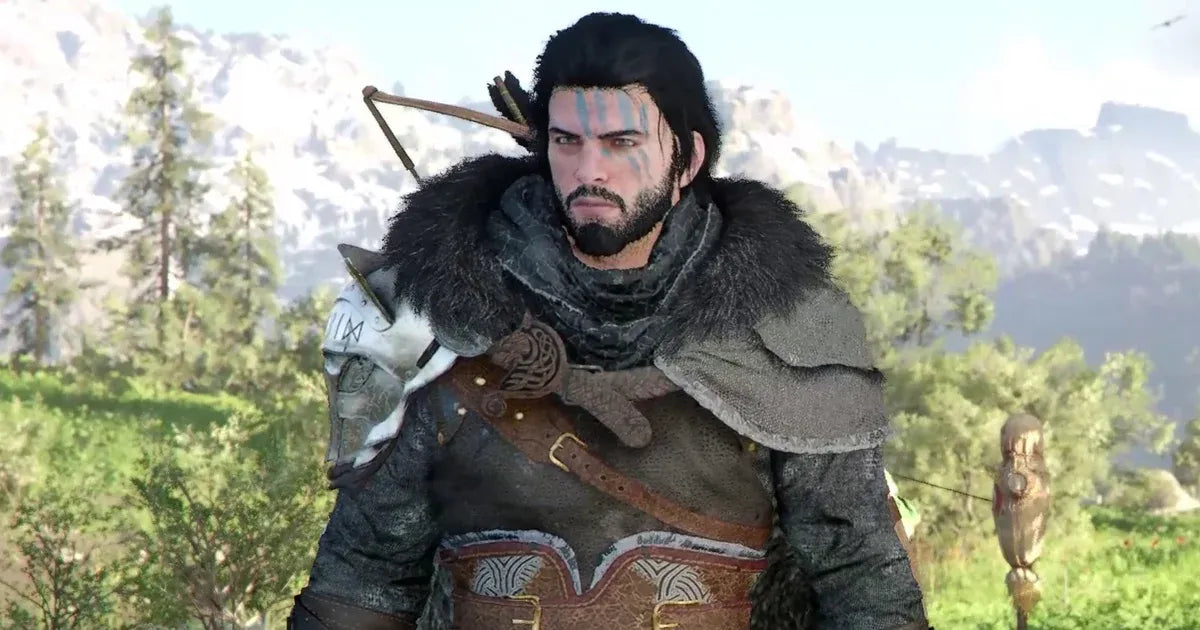
Crimson Desert Update 1.13.00 Is Live: Why This Is a Smart Moment to Choose a Gaming PC for New Games
Crimson Desert update 1.13.00 is live, and for players watching the game’s rapid post-launch evolution, this patch is more than a simple bug-fix drop. It adds Abyss access for Oongka and Damiane, expands gear and dye options, introduces useful pet behaviour changes, improves combat interactions, and fixes stability issues across the experience. For Canadian players, it also raises a practical buying question: if modern open-world games keep growing through updates, systems, effects, gear customization, traversal mechanics, and performance patches, what kind of Gaming PC for New Games should you actually buy?
That question matters because games like Crimson Desert are not static products anymore. A game can launch, receive major content updates, add new combat behaviours, improve animations, expand outfit systems, adjust boss routes, and change how characters move through high-density environments. Every patch can make the experience feel richer, but it can also expose weak spots in an older PC: inconsistent frame rates, stutters during cutscenes, long load times, unstable performance while streaming, or poor results at 1440p and 4K.
At Groovy Computers, we look at gaming news through a practical Canadian PC-building lens. A patch like Crimson Desert 1.13.00 is exciting for players, but it is also a reminder that your next custom gaming PC should be built around where games are going, not only where they are today. Are you buying for 1080p? Are you moving to 1440p? Do you want 4K, ray tracing, streaming, video editing, or content creation headroom? Are you trying to avoid upgrading too soon? These are the questions that separate a short-term purchase from a system that stays satisfying for years.
If you are in Canada and you are considering a custom gaming desktop, a premium RTX gaming PC, a budget gaming computer, a creator PC, or a workstation-style build that can handle both gaming and production work, this guide will help you connect the Crimson Desert update to the PC performance decisions that actually matter.
What Crimson Desert Update 1.13.00 Adds and Why PC Buyers Should Care
The latest Crimson Desert patch is built around five key categories: new Abyss access, expanded equipment, wardrobe and dye upgrades, pet and quality-of-life changes, combat and control fixes, and broader stability and visual polish. On paper, that sounds like a standard update. In practice, these changes reveal exactly why modern open-world games are becoming heavier, more layered, and more demanding over time.
The patch allows Oongka and Damiane to enter the Abyss, which means more players can push deeper into alternate character progression and rematch content. Memory Fragment locations for several bosses have shifted, including bosses such as Corrupted Caliburn, Goyen, Draven the Crowcaller, Clockwork White Horn, and others referenced in the patch notes. If you are the type of player who farms boss routes, repeats challenging encounters, or optimizes your progression path, this kind of update changes how you play.
The gear additions are substantial as well. Kliff and Oongka receive 39 new equipment pieces between them, Damiane gets eight new armour pieces, and several boss equipment sets become available to characters who previously could not use them. Oongka also gains broader access to many of Kliff’s existing outfits, while dye options have expanded across many outfits, weapons, and secondary weapons.
Why does this matter for a PC buyer? Because gear systems, wardrobe customization, particle-heavy combat, boss arenas, dense open-world environments, improved animations, and high-resolution textures all contribute to the kind of experience players expect from a premium PC game. If your computer is already struggling with newer open-world games, the issue is not just one title. It is the direction of the entire PC gaming market.
So ask yourself: do you want a PC that merely launches new games, or do you want one that makes updates like this feel smooth, responsive, and visually impressive?
Why a Gaming PC for New Games Needs More Headroom Than It Used To
A strong Gaming PC for New Games is not just about meeting minimum specs. Minimum specs are often designed to answer the simplest question: can the game run? Most players are asking something more important: can it run well at the resolution, settings, frame rate, and multitasking level I actually want?
Modern games are increasingly built around large worlds, shader compilation, cinematic cutscenes, dynamic lighting, high-resolution asset streaming, advanced character animation, and more complex AI behaviour. Crimson Desert’s update highlights several of these trends. New special attacks were added to enemies such as the Flame Knight, Wyvernflames, Savage Fang, and Goldenscale Bandits. Wyvern flight animations were refined. Cutscene stutter was addressed on PS5. Load-time issues were improved. Boss rematch crash conditions were fixed. These are all reminders that performance is a living issue, not a one-time checkbox.
On PC, your experience depends heavily on the balance between the CPU, GPU, RAM, storage, cooling, and power delivery. A high-end graphics card may not save a system with insufficient memory or slow storage. A fast CPU may not deliver the visuals you expect if the GPU is undersized for your monitor. A budget build may be excellent at 1080p but frustrating at 4K. That is why custom part matching matters.
What gaming PC do I need? The honest answer depends on what you expect your next few years of gaming to look like. Are you playing open-world RPGs, ray tracing games, competitive shooters, survival games, modded titles, simulation games, or content-heavy AAA releases? Are you playing on a 1080p monitor today but planning to upgrade to 1440p soon? Are you buying once and hoping to avoid a replacement for as long as possible?
If the answer is yes, you should be shopping for a system with performance headroom, not just a low entry price.
What Do You Want Your Next PC to Do for You?
Before choosing a custom gaming PC, stop and ask the most important question: what do you want your next PC to do for you?
Do you want to explore Crimson Desert at high settings with smooth frame pacing? Do you want to play open-world games while recording clips for YouTube or TikTok? Do you want to stream boss fights, edit highlight reels, design thumbnails, manage Discord, and keep browser tabs open at the same time? Do you want your PC to double as a school, business, or creative workstation?
The right computer changes depending on the answer. A first-time gamer may only need a value-focused 1080p gaming desktop. A serious enthusiast may want a 1440p Gaming PC Canada buyers can rely on for high-refresh gameplay. A visual-quality player may want a 4K Gaming PC Canada build with a stronger GPU and better cooling. A streamer may need a Gaming and Streaming PC Canada setup that balances GPU encoding, CPU multitasking, and memory. A creator may need a Content Creation PC Canada build that handles video editing, Photoshop, Lightroom, Blender, or design software without slowing down.
This is where Groovy Computers helps Canadian buyers make a better decision. Instead of guessing based on one game, one forum comment, or one sale price, a custom build can be matched to your monitor, your games, your software, your budget, your upgrade timeline, and your comfort level with financing.
Which Performance Tier Fits You Best?
Choosing the right performance tier is one of the biggest decisions in any gaming PC buying guide Canada readers can use. Spend too little, and you may upgrade sooner than planned. Spend too much in the wrong category, and you may pay for performance you do not actually use. The goal is not simply to buy the most expensive computer. The goal is to buy the right computer.
Entry-Level and Budget Gaming PC: Is 1080p Your Main Goal?
A budget gaming computer is best for players who want strong 1080p performance, esports titles, lighter content creation, and a lower starting cost. If you mostly play games at 1080p, do not need ultra settings, and want a dependable first gaming PC, this tier can make a lot of sense.
But ask yourself: can a budget gaming PC play new games the way I want to play them? For many players, yes, especially if expectations are realistic. For demanding open-world games, however, a budget build may require adjusted settings. You may need to lower shadows, effects, texture quality, or crowd and environment detail to keep performance stable.
This tier is ideal if you are looking for value, but less ideal if you are already thinking about a 1440p monitor, heavy mods, simultaneous streaming, or long-term ultra settings. If your plan is to buy cheap now and upgrade again soon, financing a stronger system may actually be the smarter long-term move.
Mid-Range Gaming PC: Is 1440p the Sweet Spot?
For many Canadian gamers, 1440p is the current sweet spot. A well-built 1440p gaming PC delivers a major visual upgrade over 1080p without the extreme GPU demand of 4K. If you want Crimson Desert, future open-world games, competitive shooters, and visually rich single-player titles to look sharp and run smoothly, this is often the tier to target.
What PC do I need for 1440p gaming? You generally want a strong modern GPU, a capable multi-core CPU, fast NVMe storage, enough RAM for current and upcoming games, and cooling that keeps boost clocks stable under long sessions. The specific parts depend on budget and availability, but the build philosophy is clear: balance the system so the GPU, CPU, memory, and storage work together.
This tier is especially strong for players who want a future-conscious system without going all the way into flagship pricing. It is also a good fit if you stream casually, edit short videos, use Discord and browser tabs while gaming, or plan to keep the PC for several years.
High-End Gaming PC: Do You Want 4K, Ray Tracing, and Ultra Settings?
A premium or high-end gaming PC is for buyers who want the best visual experience, high frame rates at higher resolutions, ray tracing headroom, and longer useful life before the next major upgrade. If you are shopping for a Ray Tracing Gaming PC Canada build or a 4K Gaming PC Canada configuration, GPU selection becomes the centre of the decision.
What PC do I need for 4K gaming? You need a graphics card with enough power and VRAM for high-resolution textures, a CPU that can keep up in CPU-heavy areas, fast storage to reduce loading and asset-streaming issues, and strong thermal design so the system stays quiet and stable during extended sessions.
This tier is ideal if you play open-world games, cinematic RPGs, simulation-heavy games, ray tracing titles, and visually demanding new releases. It is also the tier to consider if you want to avoid upgrading too soon. Paying more upfront can make sense when it prevents an early GPU replacement, especially if component prices rise later.
Creator and Hybrid Gaming PC: Are You Gaming, Streaming, and Editing?
More players are becoming creators. A Crimson Desert boss rematch is not just a personal challenge anymore; it can become a YouTube short, a Twitch stream, a TikTok clip, or a tutorial. If you plan to record gameplay, stream to Twitch or YouTube, edit 4K footage, design thumbnails, manage social media, and play at high settings, you may need more than a standard gaming build.
A Gaming and Streaming PC Canada configuration should consider GPU encoding, CPU multitasking, RAM capacity, and fast storage for recordings. A Content Creation PC Canada build should also account for editing software such as Adobe Premiere Pro, DaVinci Resolve, After Effects, Photoshop, Lightroom, Illustrator, and other creative tools.
Is a gaming PC good for content creation? Often, yes, if it is configured properly. A strong GPU, fast CPU, 32GB or more RAM depending on workload, and quality storage can make a gaming PC excellent for editing, streaming, and design. But if you are editing large 4K projects, working with RAW photos, managing multiple Adobe apps, or producing frequent content, a creator-focused configuration may save you hours over the life of the system.
Workstation and 3D Modeling PC: Are You Building More Than a Gaming Setup?
Some buyers come for gaming and discover they also need serious workstation performance. If you use Blender, Unreal Engine, Unity, AutoCAD, Revit, SolidWorks, Maya, 3ds Max, Cinema 4D, SketchUp, ZBrush, or other production tools, your PC decision changes. You are no longer just buying frames per second. You are buying render time, viewport smoothness, stability, and professional productivity.
What PC do I need for 3D rendering? That depends on whether your software relies more heavily on GPU rendering, CPU rendering, RAM, storage, or a mix of all four. A custom 3D workstation can be built differently from a pure gaming PC, even if both systems use powerful graphics cards.
Workstation PC vs gaming PC is not always an either-or decision. Many Canadian buyers need a hybrid system: one machine that can run new games at high settings, stream or record gameplay, edit video, and handle 3D or CAD work. Groovy Computers can help match that kind of multi-purpose workload to the right hardware instead of forcing you into a generic one-size-fits-all desktop.
Why Crimson Desert’s Patch Details Point to Real Hardware Priorities
Patch notes can look like small technical details, but they often reveal what matters in a gaming PC. Crimson Desert 1.13.00 includes fixes for map-related crashes, boss-rematch crash conditions, cutscene stutter, longer-than-expected load times, visual clipping, animation issues, housing mode problems, and combat-control behaviour. These are software-side improvements, but they connect directly to the hardware experience players care about.
When a game has large environments and frequent transitions, storage matters. A fast NVMe SSD can improve responsiveness, reduce load-time frustration, and help with asset-heavy games. When combat is active and enemies use new special attacks, frame pacing matters. A balanced CPU and GPU combination can help avoid inconsistent performance. When a game supports detailed outfits, dyes, weapons, mounts, pets, and environmental effects, GPU strength and VRAM matter. When you are streaming or recording at the same time, RAM and encoder support matter.
This is why a custom build is different from a random prebuilt. A low-cost system can advertise a familiar GPU name while cutting corners on storage speed, cooling, power supply quality, memory configuration, case airflow, or upgrade path. On paper, it may look appealing. In real gameplay, the difference shows up as noise, heat, stutter, throttling, or premature upgrade pressure.
Why buy a custom gaming PC? Because the whole system matters. The graphics card gets the headlines, but the supporting parts determine how consistently that graphics card performs.
Canadian Buyers Should Think About Timing, Not Just Specs
Is it better to buy a gaming PC now or wait? That is one of the most common questions Canadian buyers ask, and the answer depends on your needs, your current system, and the market.
Waiting can make sense if you are not in a rush and your current PC is performing well. But waiting can also become expensive if component prices move upward, if a sale period ends, if a major game release increases demand, if GPU availability tightens, if memory prices rise, or if storage pricing changes. The Canadian market can also feel these shifts more sharply because exchange rates, import costs, shipping costs, and limited supply can affect final system pricing.
Games like Crimson Desert keep players engaged through ongoing updates. Other major releases and seasonal content drops can create sudden demand spikes for gaming PCs, graphics cards, SSDs, and higher-memory builds. If you already know your current computer struggles with modern games, postponing the upgrade may not save you money. It may only delay the point where you are forced to buy under worse conditions.
Should I buy a gaming PC before prices go up? If your current system is limiting your gaming, streaming, editing, or work, it is worth having that conversation now. You do not need to panic buy, but you should understand your options before demand or replacement costs move against you.
Could Financing Help You Secure a Stronger PC Before Replacement Costs Rise?
Financing is not about buying irresponsibly. Used properly, it can help you avoid the common trap of buying a system that is too weak simply because the upfront payment feels easier. For some customers, financing a stronger, better-balanced gaming PC can be smarter than paying cash for a lower-tier computer that needs upgrades too soon.
Should I finance a better PC instead of buying a cheaper one? If the cheaper PC will not handle the resolution, games, software, or lifespan you expect, financing may be worth considering. A stronger GPU, more RAM, faster storage, or better CPU can make the difference between a system that feels outdated quickly and a system that stays useful for years.
Groovy Computers offers financing options up to 4 years where available, giving Canadian customers a way to secure a custom gaming PC, creator PC, or workstation PC without needing to pay the full amount upfront. That can be especially useful if you are buying before a major game release, a busy holiday sale season, a school or work requirement, a content-creation upgrade, or a possible component-price shift.
Can I finance a gaming PC in Canada? With Groovy Computers, Canadian buyers can explore financing options directly through a company focused on custom builds, testing, and support. The key is to choose a configuration that matches your needs, not simply the lowest monthly number.
If you are wondering whether financing could help you move from a short-term budget system to a more future-ready build, visit GroovyComputers.ca and compare your options with a Canadian custom PC builder that understands gaming, streaming, editing, and workstation performance.
Custom PC vs Prebuilt PC Canada: Why the Difference Matters More for Modern Games
Custom PC vs prebuilt PC Canada is not just a debate for enthusiasts. It is a practical buyer question. A generic prebuilt may be fast enough for a simple spec sheet comparison, but modern games expose every weak link. Cooling, airflow, motherboard quality, power supply reliability, RAM configuration, storage speed, cable management, and stress testing all affect the experience.
When you buy from Groovy Computers, the goal is not to throw parts into a case and hope for the best. The goal is to build a balanced system that fits your actual use. A 1080p esports player should not be sold the same configuration as a 4K open-world enthusiast. A Twitch streamer should not be configured the same way as a pure single-player gamer. A video editor should not be treated like someone who only opens one game at a time.
Testing matters because a gaming PC is a full system under load. A machine may turn on and still have issues with heat, instability, memory errors, poor airflow, driver conflicts, or power behaviour. Groovy Computers emphasizes rigorous testing so buyers receive a dependable system, not just a box of expensive parts.
Warranty support matters too. Groovy Computers offers a 1-year warranty, which gives Canadian buyers confidence after the purchase. When you are investing in a custom gaming PC, creator PC, or workstation PC, that confidence matters. A reliable build with support is worth more than a slightly cheaper system with unknown parts and no meaningful after-sale help.
What PC Do You Need for Crimson Desert and Similar Open-World Games?
Without relying on invented benchmark claims, the safest way to think about Crimson Desert and similar open-world games is to match your PC to your target experience. The game’s updates show a focus on combat polish, traversal systems, animation quality, visual customization, boss content, and quality-of-life improvements. That kind of experience benefits from a well-rounded system.
If you want to play at 1080p with good settings, focus on a balanced gaming PC with a capable modern GPU, strong CPU, fast SSD, and enough RAM for smooth multitasking. If you want 1440p, step up the GPU and make sure the CPU will not hold back performance in dense environments. If you want 4K or ray tracing, treat the GPU as a premium investment and make sure cooling, power supply, and case airflow are built to support it.
What PC do I need for this game? Start with your monitor. Your monitor determines the workload. A 1080p 60Hz display is very different from a 1440p 165Hz display or a 4K high-refresh monitor. Next, consider your settings target. Are you comfortable optimizing settings, or do you want ultra-quality visuals? Finally, consider what else you do while gaming. Streaming, recording, Discord, browsers, music, overlays, capture software, and editing tools all add demand.
A good gaming PC for open-world games is not only about peak FPS. It is about consistency. Smooth frame pacing, fast loading, stable thermals, quiet operation, and upgrade flexibility are what make a system feel premium every day.
Streaming Crimson Desert? Here Is What to Consider
Crimson Desert’s boss fights, character progression, outfit customization, and open-world exploration are exactly the kind of content that players like to stream or record. If you want to share your gameplay, your PC needs to do more than run the game. It needs to run the game while encoding video, managing overlays, handling audio, and possibly recording high-quality footage at the same time.
What PC do I need for streaming? A strong GPU with modern encoding support is a major advantage. A capable CPU helps with multitasking. 32GB of RAM is often a smart target for gaming and streaming, especially if you run OBS, Discord, a browser, music, alerts, chat tools, and capture software. Fast storage also matters because recorded gameplay can consume space quickly.
Do I need a separate streaming PC? Most buyers do not. A properly configured single-PC streaming setup can handle gaming and streaming extremely well. A separate streaming PC may make sense for advanced creators, but many Canadian players are better served by one strong custom system with the right GPU, CPU, RAM, and storage.
If you want a Gaming and Streaming PC Canada build, Groovy Computers can help you avoid the common mistake of buying a gaming-only system and discovering later that it struggles once OBS and recording software are added.
Editing Gameplay Clips, Thumbnails, and Social Content? Do Not Ignore Creator Performance
Gaming and content creation now overlap constantly. Players capture boss fights, post build guides, make reaction clips, edit YouTube videos, design thumbnails, manage social media graphics, and produce short-form content. A PC that feels excellent in-game can still feel slow when exporting video or batch-editing images if the creator side was ignored.
What PC do content creators need? It depends on the software. Adobe Premiere Pro, DaVinci Resolve, After Effects, CapCut, Photoshop, Lightroom, Illustrator, and Canva all benefit from different combinations of CPU speed, GPU acceleration, RAM, and fast SSD storage. If you edit 1080p clips occasionally, a gaming PC may be enough. If you edit 4K footage, use effects, create thumbnails, and multitask heavily, a Custom Creator PC Canada build is worth considering.
How much RAM do creators need? Many gaming-only users can be comfortable with 16GB depending on the game and background usage, but creators often benefit from 32GB or more. Heavy editing, large photo libraries, After Effects work, 3D assets, and multitasking can push memory needs higher. Storage planning is equally important because video files, project files, cache files, and game libraries can fill drives quickly.
If your PC is also your income tool, your school tool, or your creative growth platform, do not shop only by gaming benchmarks. Shop by time saved. Faster exports, smoother timelines, quicker renders, and fewer crashes can matter more than a few extra frames in one game.
Photo Editing, Graphic Design, and 3D Work: When a Gaming PC Needs Workstation Thinking
Many Groovy Computers customers start by asking for a gaming PC and then mention that they also use Photoshop, Lightroom, Illustrator, InDesign, Blender, AutoCAD, SketchUp, or other productivity software. That changes the conversation in a good way. It means the PC can be designed as a multi-purpose machine instead of a narrow gaming box.
Is a gaming PC good for Photoshop? Yes, if it has the right CPU, memory, storage, and display workflow considerations. Is a gaming PC good for Blender? It can be, especially with the right GPU, but heavy 3D rendering may require more VRAM, more RAM, and stronger cooling than a typical gaming-only setup. What PC do I need for graphic design? Usually, you want fast single-core performance, enough memory for large files, fast SSDs, and a GPU suitable for your design and display needs.
For a photographer, fast Lightroom imports and exports can be more important than extreme gaming FPS. For a designer, smooth Adobe Creative Cloud performance and multi-monitor support may be the priority. For a 3D artist, viewport performance and render speed can decide how productive the system feels. For a gamer-creator, the best answer may be a hybrid custom PC that balances all of these needs.
This is where custom building has a clear advantage. Instead of accepting a generic configuration, you can build around your real workflow. Are you a gamer who edits? A streamer who designs thumbnails? A student learning Unreal Engine? A photographer who also plays AAA games? The right PC should reflect that.
How Component Pricing Pressure Affects Full-System Decisions
Canadian PC buyers often focus on the GPU price first, but full-system pricing can shift across several categories. Graphics cards can be affected by demand spikes from new games, creator workloads, AI interest, and limited availability. Memory pricing can change based on supply conditions. SSD pricing can move as NAND supply changes. Power supplies, cases, cooling components, and motherboards can also be affected by availability, exchange rates, and shipping costs.
That is why timing matters. If you are planning to buy before a major release, before a school semester, before a holiday sale rush, before a content-creation project, or before your current system fails, it may be better to start the conversation early. Waiting until everyone else is buying can reduce choice and increase pressure.
Is now a good time to buy a gaming PC? If your current PC is holding you back and you know what performance tier you need, waiting for the perfect moment can become a cycle that never ends. The better strategy is to define your use case, choose a smart performance target, compare financing if helpful, and buy a balanced system when it fits your needs.
A custom PC builder can also help you spend where it matters. Sometimes the smarter move is a stronger GPU. Sometimes it is more RAM. Sometimes it is a better SSD configuration. Sometimes it is better cooling or a higher-quality power supply. The best value is not always the cheapest part list; it is the system that performs reliably for your workload.
Should You Buy a Cheaper PC Now or Build for the Next Few Years?
This is one of the most important questions in the entire buying process. Should you buy the cheapest system that runs today’s games, or should you invest in a stronger PC that gives you more room for future updates, expansions, creator software, and new releases?
If you only play lighter titles, esports games, or older games, a value-focused build can be excellent. But if you are drawn to games like Crimson Desert, future open-world RPGs, ray tracing titles, heavily patched live-service games, and high-fidelity single-player experiences, a too-cheap PC may become frustrating quickly.
How long will a high-end gaming PC last? No builder can promise a fixed number of years because games, engines, and software demands change. But a well-balanced premium system usually gives you more flexibility, better settings, higher resolution options, and a longer runway before major upgrades feel necessary.
Should I finance a high-end gaming PC? If a stronger system matches your real needs and financing keeps the monthly cost manageable, it can be a practical option. The key is to finance a smart build, not an oversized build. Groovy Computers can help you decide whether you need a budget gaming computer, a premium RTX gaming PC, a custom creator PC, an editing workstation, or a 3D modeling workstation.
Questions to Ask Before Buying Your Next Custom Gaming PC
Before you choose a system, ask yourself the questions that reveal the right build:
- What games do I want to play most? Open-world games, competitive shooters, esports titles, modded games, and ray tracing games all place different demands on a PC.
- What resolution do I want? 1080p, 1440p, and 4K require very different GPU choices.
- Do I care more about visuals or frame rate? Ultra settings and high refresh rates do not always require the same build priorities.
- Will I stream or record? If yes, plan for encoding, memory, storage, and multitasking.
- Will I edit video or photos? Premiere Pro, DaVinci Resolve, Photoshop, Lightroom, and After Effects can benefit from stronger creator-focused hardware.
- Will I use graphic design or 3D software? Illustrator, InDesign, Blender, Unreal Engine, CAD, and rendering tools may require workstation thinking.
- How long do I want to keep this PC? If you want to avoid upgrading too soon, buy with headroom.
- Am I buying before a major release, sale period, shortage, or price spike? Timing can affect both availability and final Canadian pricing.
- Would financing help me choose the right PC instead of settling? Monthly payments may make a stronger, longer-lasting build more realistic.
- Do I want help choosing a build? If you are unsure, working with Groovy Computers can save time, confusion, and costly mistakes.
Why Groovy Computers Is Built for Canadian Gamers, Creators, and Workstation Buyers
Groovy Computers is a Canadian custom PC builder focused on helping buyers choose systems that make sense for real-world use. Whether you are in Nova Scotia, Atlantic Canada, Ontario, Alberta, British Columbia, Quebec, or anywhere else in Canada, the goal is the same: provide a better path to a custom gaming PC, creator PC, or workstation PC that is built, tested, and supported with care.
For local trust, Groovy Computers is especially relevant to buyers searching for a Custom PC Builder Nova Scotia, Gaming Computers Trenton, Gaming Computers New Glasgow, Gaming Computers Halifax, or Gaming PC Atlantic Canada support. For Canada-wide buyers, Groovy Computers offers a practical online path for customers who want Canadian custom PC builders without relying on generic marketplace machines.
What makes a Canada Built Gaming PC different? It is not just geography. It is support, communication, build quality, testing, warranty confidence, and a better understanding of Canadian pricing realities. Exchange rates, shipping costs, availability, and seasonal demand can all affect PC buying in Canada. A Canadian builder helps you navigate those decisions with less guesswork.
Every serious PC purchase should feel guided, not rushed. Groovy Computers can help you choose between budget and premium, 1080p and 1440p, gaming-only and creator-ready, air cooling and liquid cooling, more GPU or more RAM, faster storage or larger storage, and buying outright versus financing.
Gaming PC for New Games: The Practical Recommendation
If Crimson Desert update 1.13.00 caught your attention, the practical recommendation is simple: buy for the experience you want, not just the patch you read about. A Gaming PC for New Games should be chosen around resolution, settings, frame rate, multitasking, storage needs, and future headroom.
For 1080p players, a well-built budget or mid-range gaming desktop can deliver excellent value. For 1440p players, a stronger GPU and balanced CPU become much more important. For 4K and ray tracing players, premium graphics performance, VRAM, cooling, and power delivery should be treated as core priorities. For streamers and creators, RAM, encoder performance, CPU strength, and SSD planning can be just as important as raw gaming FPS.
If you want one machine that handles Crimson Desert, upcoming AAA games, streaming, video editing, photo editing, graphic design, and maybe even 3D modeling, do not shop like a one-game buyer. Shop like someone building a platform for the next few years.
Ready to Choose the Right Build?
Are you trying to decide between a budget gaming computer and a premium RTX gaming PC? Are you wondering whether a 1440p gaming PC is enough, whether 4K is worth it, or whether financing could help you secure a stronger system before prices change? If you want expert help choosing a Gaming PC for New Games, Groovy Computers can help you move from uncertainty to a build that fits your games, software, budget, and upgrade timeline.
Visit GroovyComputers.ca to explore custom gaming PCs, creator PCs, workstation options, and financing availability. Whether you are buying for Crimson Desert, upcoming open-world games, streaming, editing, 3D work, or everyday high-performance use, Groovy Computers can help you build smarter and buy with confidence in Canada.
Final Takeaway: Crimson Desert Is a Reminder to Build Ahead
Crimson Desert update 1.13.00 adds meaningful content, useful quality-of-life changes, combat improvements, visual fixes, and stability polish. For players, it is a reason to jump back in. For PC buyers, it is a reminder that modern games keep growing after launch, and your system should be ready for that reality.
A strong Gaming PC for New Games is not only about today’s settings menu. It is about tomorrow’s patches, future expansions, new game releases, creator workflows, higher-resolution monitors, and the way you actually use your computer. If you want to avoid upgrading too soon, if you want smooth performance at the resolution you care about, or if you want one PC that can handle gaming and serious creative work, a custom build from Groovy Computers is the smarter path.
#GamingPCForNewGames #GamingPCCanada #CustomGamingPCCanada #1440pGamingPC #4KGamingPC #StreamingPCCanada #CreatorPCCanada #GroovyComputers
Groovy Computers | All Rights Reserved



Leave a comment
This site is protected by hCaptcha and the hCaptcha Privacy Policy and Terms of Service apply.