






















Gaming PC for New Games: What Crimson Desert’s “Dog Show” Detail Says About the Future of Open-World Performance
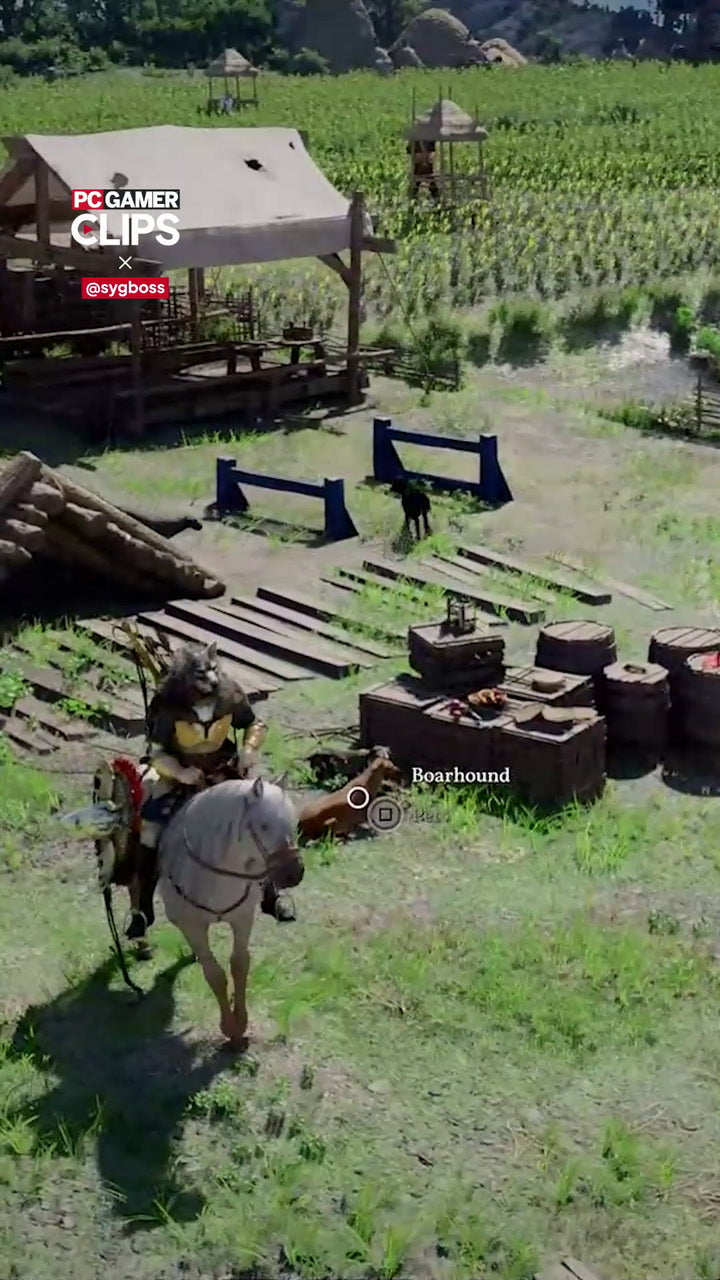
A recent gameplay clip from Crimson Desert made headlines for an unexpected reason: not a boss fight, not a cinematic duel, not a massive battlefield, but a lively village full of dogs running what looked like their own playful agility course. For players, it was charming. For PC buyers, it was a signal. If this is the level of environmental detail, animation density, world simulation, and background activity modern open-world games are pushing toward, then choosing the right Gaming PC for New Games matters more than ever.
At Groovy Computers, we see this trend every day from Canadian gamers who are not just asking, “Can this PC run my game?” They are asking better questions: “Can it run new AAA games smoothly at 1440p?” “Can it handle ray tracing?” “Can I stream while playing?” “Will I regret buying too weak of a system six months from now?” “Should I finance a stronger custom gaming PC before component prices move again?”
The Crimson Desert clip is a perfect example of where PC gaming is heading. Open worlds are becoming denser, smarter, more animated, and more cinematic. Villages are no longer static backdrops. Wildlife, NPCs, physics, lighting, shadows, particles, foliage, reflections, and AI-driven world behaviour all compete for CPU, GPU, RAM, and storage bandwidth. That means the right gaming desktop is not just about hitting minimum requirements. It is about choosing a balanced system that can keep up with the way games are actually being built now.
Why a Funny Dog Clip Is Actually a Serious PC Performance Warning
On the surface, a group of animated dogs running around a village sounds like a small visual flourish. But in modern game design, that kind of detail can represent a lot of hidden workload. Every moving character, every pathing behaviour, every shadow cast by a moving object, every texture loaded into memory, every physics interaction, and every camera movement through a dense environment adds pressure to your PC.
What does that mean for a Canadian gamer shopping today? It means a low-end machine might technically launch a new open-world game, but it may not deliver the experience you expect. You may see stutter when entering busy towns, lower frame rates in combat, texture pop-in while travelling, dips during weather effects, or noisy fans as the system struggles to keep up.
And if you are buying a PC now because you want to play upcoming AAA releases, the more important question is not “What is the cheapest PC that works?” It is “What gaming PC do I need so I do not feel forced to upgrade too soon?”
Modern open-world gaming is no longer just about high-resolution textures. It is about simulation, animation, streaming assets, AI behaviour, lighting, and smooth frame delivery happening all at once.
What Does Crimson Desert Tell Us About Gaming PC Builds Canada Buyers Should Consider?
Without relying on unconfirmed performance requirements, the footage points toward a broader trend: new open-world games are becoming more demanding in ways that go beyond raw graphics. A good Gaming PC for New Games needs balance. A powerful GPU matters, but so does the CPU. Fast RAM matters. A quality SSD matters. Cooling matters. Power supply quality matters. Case airflow matters. Testing matters.
Canadian buyers often compare gaming PCs by graphics card first, and that is understandable. The GPU has a huge impact on FPS, resolution, visual settings, and ray tracing. But if a game world is packed with NPC routines, physics, crowd activity, animals, towns, combat systems, and asset streaming, then a weak CPU or slow storage can still create a poor experience even with a decent graphics card.
So before you buy, ask yourself: are you shopping for today’s esports games only, or are you trying to prepare for the next wave of open-world RPGs, action adventures, survival games, and cinematic AAA titles?
What Do You Want Your Next PC to Do for You?
This is the most important question in the entire buying process. Not every customer needs the same PC, and not every “gaming PC” is built for the same kind of gaming.
Do you want your next system mainly for 1080p gaming, or are you ready for 1440p? Are you planning to move to a high-refresh monitor? Do you want 4K visuals on ultra settings? Do you care about ray tracing, cinematic lighting, and maximum detail? Will you be streaming to Twitch or YouTube? Will you be editing clips for TikTok, YouTube Shorts, or full-length videos? Are you using Adobe Premiere Pro, DaVinci Resolve, Photoshop, Lightroom, Blender, Unreal Engine, AutoCAD, Revit, or other professional software?
If your answer is “I want one PC that can game, stream, edit, and last,” then you should not shop only by the lowest advertised price. You should be looking at a properly balanced custom gaming and creator system.
Are You Buying for 1080p, 1440p, or 4K?
Resolution changes everything. A 1080p gaming PC can be excellent for competitive gaming, students, casual players, and budget-focused buyers. But a 1440p Gaming PC Canada customer usually needs more GPU horsepower, stronger cooling, and a better overall platform. A 4K Gaming PC Canada buyer needs to think even more carefully because 4K demands dramatically more graphics performance, especially in open-world games with dense environments.
If you are asking, “What PC do I need for 1440p gaming?” the answer depends on the games you play, the refresh rate of your monitor, and whether you want high settings or ultra settings. If you are asking, “What PC do I need for 4K gaming?” then you are usually entering premium GPU territory, especially if you want ray tracing or high frame rates.
Do You Want High FPS or Maximum Visual Quality?
Some gamers want every frame possible. They play competitive titles, shooters, battle royale games, racing games, and esports titles where responsiveness matters more than cinematic lighting. Others want the full visual experience: dense worlds, ray tracing, high textures, beautiful shadows, and maximum immersion.
Which matters more to you: smoother competitive performance, or the most beautiful version of the game? Your answer affects the right CPU, GPU, RAM, monitor pairing, and budget.
Which Performance Tier Fits You Best?
Choosing the right system becomes easier when you match the build tier to your real use case. At Groovy Computers, we help customers think in practical categories rather than confusing spec lists.
Entry-Level and Budget Gaming PC Canada Buyers
A budget gaming PC is a smart choice if you mostly play esports, lighter multiplayer games, school-friendly titles, older AAA games, or modern games at adjusted settings. It can be a great first gaming PC, especially for students or families who want value without overspending.
But here is the key question: are you buying a budget PC because it genuinely fits your games, or because the stronger system feels out of reach today? If the second answer is true, financing may help you avoid buying too low and upgrading too soon.
A value-focused gaming computer can make sense when the goal is 1080p gaming, everyday productivity, Discord, web browsing, schoolwork, and moderate content creation. However, if your target is new open-world AAA games at high settings, a budget system may need compromises.
Mid-Range 1440p Gaming PC Canada Buyers
For many Canadian gamers, this is the sweet spot. A strong 1440p gaming PC can deliver a major visual upgrade over 1080p while avoiding the extreme cost of top-end 4K builds. If you want to play new games smoothly, keep settings high, use a high-refresh monitor, and avoid immediate upgrades, this tier often makes the most sense.
Are you the type of player who wants to install a major new release on launch week and enjoy it without spending hours lowering settings? If so, this is where a properly configured custom gaming PC becomes valuable.
A well-built mid-range machine should focus on strong GPU performance, a capable modern CPU, enough RAM for current games and background apps, fast NVMe storage, stable cooling, and room for future upgrades.
Premium and High-End Gaming PC Canada Buyers
If you want 4K gaming, ultra settings, high FPS, ray tracing, content creation, streaming, or long-term headroom, a premium gaming PC may be the better investment. This is where buyers often ask about high-end RTX gaming PCs, flagship GPU options, powerful processors, higher RAM capacities, and premium cooling.
Do you want to avoid wondering whether your system can handle the next big game? Do you want the freedom to turn settings up instead of constantly deciding what to sacrifice? Do you want one machine that can game at night and render, edit, or create during the day?
For customers who want maximum performance and longevity, a custom high-end gaming PC can be less about bragging rights and more about reducing future frustration.
Creator, Editing, and Workstation Buyers
Not every customer who starts by reading about a game is only a gamer. Many players are also creators. They stream, edit clips, design thumbnails, produce content, make 3D assets, run small businesses, or work from home. If that sounds like you, a normal gaming PC may not be optimized enough for your workflow.
A Content Creation PC Canada buyer may need more RAM, more storage, stronger CPU performance, and GPU acceleration for creative software. A video editor may care about export times and timeline smoothness. A photographer may care about fast RAW photo editing, Lightroom responsiveness, and Photoshop performance. A graphic designer may need multi-monitor support and fast Adobe Creative Cloud performance. A 3D artist may need a 3D Rendering PC Canada build with serious GPU and memory resources.
Ask yourself: is your next PC only for entertainment, or is it also part of how you earn money, grow a channel, complete school projects, serve clients, or build a portfolio?
Is a Gaming PC Good for Streaming, Editing, Graphic Design, and 3D Modeling?
Yes, a gaming PC can be good for creative work, but only if it is configured properly. The overlap is real: gaming and creative workloads both benefit from strong GPUs, fast CPUs, SSD storage, and enough RAM. But the best gaming-only build is not always the best creator build.
If you stream, you need smooth game performance while OBS, Streamlabs, browser sources, alerts, camera feeds, chat, and background tools run at the same time. A Gaming and Streaming PC Canada build should be planned around multitasking, not just average FPS.
If you edit video, you may need a Video Editing PC Canada approach with more RAM, fast storage for footage, and strong CPU/GPU acceleration for Premiere Pro or DaVinci Resolve. If you edit 4K footage, use effects, colour grade, or export frequently, a weak system costs you time every single day.
If you create graphics, your PC for Photoshop, Illustrator, Canva, InDesign, or Adobe Creative Cloud should be responsive with large files, multiple apps, and high-resolution displays. If you do 3D modeling, Blender, Unreal Engine, Unity, Maya, Cinema 4D, AutoCAD, Revit, or SolidWorks can shift the buying decision toward more powerful GPUs, higher RAM, and workstation-grade stability.
So the better question is not “Is a gaming PC good for content creation?” The better question is: “Is this gaming PC built for the kind of content creation I actually do?”
Why New Open-World Games Put Pressure on More Than Just the GPU
When people think about game performance, they often think only about the graphics card. The GPU is critical, especially for resolution, ray tracing, lighting, shadows, and visual effects. But modern open-world games also rely heavily on CPU performance, RAM, storage speed, and system balance.
GPU: The Visual Engine
Your GPU determines how well your PC handles higher resolutions, advanced lighting, demanding textures, ray tracing, upscaling technologies, and high refresh rates. If you want a Ray Tracing Gaming PC Canada experience, you need to plan for that from the start.
Are you okay turning ray tracing off for better FPS, or do you want the full cinematic look? That one decision can change the right graphics card tier.
CPU: The World Simulation Driver
The CPU helps manage game logic, NPC behaviour, physics, background tasks, draw calls, and system responsiveness. In dense villages, large battles, city areas, or worlds full of active characters and creatures, CPU performance can matter a lot.
If a game is filled with moving characters, animals, scripted events, AI routines, and dynamic systems, a weak CPU can contribute to stutter even if your GPU looks strong on paper.
RAM: The Multitasking Safety Net
RAM matters more when games are large, browsers stay open, Discord is running, launchers are active, and streaming or recording software is involved. For many modern gaming systems, 32GB is becoming a more comfortable target than older minimum standards, especially for players who multitask.
How much RAM do you need? If you only game casually, your needs are different from someone gaming, streaming, recording, editing, and running creative apps on the same machine.
SSD Storage: The Open-World Loading Advantage
Fast NVMe SSD storage can improve load times, asset streaming, system responsiveness, and the overall feel of a modern PC. Open-world games increasingly rely on fast storage to move huge amounts of data quickly.
If you are tired of uninstalling games to make space, this is also the time to think about capacity. New games are not getting smaller, and creator files can grow even faster.
Cooling and Power: The Stability Foundation
A powerful PC is only useful if it stays stable. Poor cooling can lead to noise, thermal throttling, inconsistent performance, and shorter component lifespan. A low-quality power supply can create reliability concerns. A custom build should be designed as a complete system, not as a random list of parts.
This is where Groovy Computers’ custom build process, testing, and warranty support matter. A system should not only perform well on a product page. It should perform reliably in your actual home, office, studio, dorm, or gaming setup.
Should You Buy Before a Major Game Release, Hardware Shortage, Sale Period, or Price Spike?
Timing matters. Canadian PC buyers know that component pricing can change quickly. GPUs, CPUs, RAM, SSDs, power supplies, cases, and cooling parts can all be affected by supply constraints, demand spikes, currency movement, new hardware launches, seasonal sale cycles, and sudden popularity around major games.
If a highly anticipated game drives a wave of upgrades, the best-value systems can disappear quickly. If memory or storage pricing rises, the same build can become more expensive to replace. If a sale period ends, a buyer who waited may be stuck choosing between paying more or settling for less performance.
So ask yourself: are you buying because you need a PC eventually, or because you want to be ready before the next major release, school term, content project, software upgrade, or business workload hits?
Waiting can make sense if you truly do not need a system. But if your current PC is already struggling, delaying can also mean months of poor performance, missed content opportunities, lower productivity, and the risk that your ideal configuration costs more later.
Is It Better to Buy a Gaming PC Now or Wait?
The honest answer depends on your current system, your budget, and what you want to play or create. If your existing PC still handles your games and software well, waiting may be reasonable. But if you are already lowering settings, dealing with stutter, running out of storage, skipping new releases, or losing time on slow exports, waiting may not save you as much as you think.
A better question is: “What is the cost of staying on a PC that no longer fits my needs?”
For a gamer, that cost may be lower FPS, poor visuals, and missing out on launch-week experiences. For a streamer, it may be dropped frames, poor stream quality, and inconsistent recordings. For a video editor, it may be hours lost waiting on exports. For a student, it may be a system that cannot keep up with both coursework and entertainment. For a professional creator, it may be real productivity loss.
If you are already planning to buy within the next few months, choosing the right custom PC now may help you lock in performance before replacement costs shift.
Could Financing Help You Secure a Stronger System Before Costs Rise?
For many customers, the choice is not between buying a powerful PC and buying nothing. It is between buying a cheaper system today or financing a better system that will last longer. That is a very different decision.
Groovy Computers offers financing options up to 4 years where available, helping Canadian customers access stronger gaming PCs, creator PCs, and workstation PCs without needing to pay the entire amount upfront. Financing is not about overspending. Used wisely, it can help you avoid buying too weak of a machine and replacing it earlier than expected.
Should you finance a better PC instead of buying a cheaper one? Consider financing if the stronger build gives you the resolution, FPS, creative performance, storage, RAM, and upgrade headroom you actually need. Consider paying outright or choosing a lower tier if your workloads are light and you do not need the extra performance.
The key is matching the payment decision to the lifespan of the PC. A well-chosen custom gaming PC can serve you for years. A too-cheap system may feel outdated much sooner.
What Questions Should You Ask Before Buying a Custom Gaming PC?
Before choosing a system, slow down and answer a few practical questions. These are the questions that prevent buyer’s remorse.
- What games do I actually play? Esports titles, open-world RPGs, simulation games, shooters, racing games, survival games, and cinematic AAA releases all stress hardware differently.
- What resolution do I want? 1080p, 1440p, and 4K require very different GPU choices.
- Do I care about ray tracing? If yes, plan for a stronger GPU tier.
- Do I stream or record gameplay? If yes, consider a gaming and streaming PC with enough CPU, GPU, RAM, and storage headroom.
- Do I edit videos or photos? If yes, think beyond gaming specs and consider a creator-focused configuration.
- Do I use 3D software? Blender, Unreal Engine, CAD, and rendering workloads may require workstation-level planning.
- How long do I want this PC to feel fast? Future-proofing is not about buying the most expensive part. It is about avoiding obvious bottlenecks.
- Am I buying before a big release, sale ending, software change, or price increase? Timing can affect value.
- Would financing help me get the system I actually need? Monthly payments may make a stronger, longer-lasting PC more realistic.
- Do I want help choosing? If you are unsure, a Canadian custom PC builder can save you from mismatched parts and confusing spec decisions.
Custom PC vs Generic Prebuilt PC Canada: Why the Difference Matters
A generic prebuilt can be tempting because it looks simple. But the spec sheet does not always tell the full story. Two PCs with similar headline parts can perform differently because of cooling, motherboard quality, RAM configuration, power supply selection, case airflow, BIOS settings, storage choices, and testing standards.
A custom PC is built around your use case. That means the system can be configured for 1080p value gaming, 1440p high-FPS gaming, 4K ultra settings, streaming, video editing, photo editing, graphic design, 3D rendering, CAD, or workstation productivity.
Why buy a custom gaming PC? Because the right build is not just a collection of parts. It is a performance plan.
At Groovy Computers, that plan includes custom build guidance, careful part matching, rigorous testing, Canadian support, and a 1-year warranty. For buyers in Nova Scotia, Atlantic Canada, and across Canada, that adds confidence compared with taking a chance on a random marketplace PC or a system that was never designed around your actual workload.
Canadian Buyers Should Think Differently About PC Value
Canadian pricing is affected by exchange rates, shipping costs, import pressures, availability, and regional demand. A deal that looks great in another market may not translate cleanly into Canadian dollars. That is why Canadian buyers should evaluate complete system value, not just a single component price.
A proper value calculation includes performance, warranty, support, build quality, testing, upgrade path, shipping confidence, and whether the system is actually suited to your games and software.
Groovy Computers is a Canadian Gaming PC Company focused on custom systems for real buyers, not one-size-fits-all assumptions. Whether you are in Trenton, New Glasgow, Halifax, elsewhere in Nova Scotia, Atlantic Canada, Ontario, Western Canada, or ordering online from another province, the goal is the same: help you choose a system that makes sense for how you play, work, and create.
What Kind of Groovy Computers Build Should You Choose?
If the Crimson Desert clip made you excited for more immersive open-world games, your next step is to match that excitement with the right hardware tier.
Choose a Budget Gaming Computer If...
- You play mostly 1080p games.
- You are buying your first gaming PC.
- You want strong value without premium settings.
- You play esports, lighter games, or older AAA titles.
- You are comfortable adjusting graphics settings in demanding new releases.
This tier is great for value, but be honest: will you be satisfied if new games require reduced settings, or will that make you wish you had stretched to a stronger build?
Choose a 1440p Gaming PC If...
- You want a major visual upgrade over 1080p.
- You play modern AAA games and open-world titles.
- You want smoother frame rates on a high-refresh monitor.
- You want better longevity without going all the way to extreme 4K pricing.
- You may stream, record, or edit light content.
For many buyers, this is the most balanced path. It delivers impressive gaming performance while keeping the budget more controlled than the highest-end systems.
Choose a Premium RTX Gaming PC If...
- You want 4K gaming or ultra settings.
- You care about ray tracing and visual fidelity.
- You want strong performance in upcoming AAA games.
- You stream, edit, and multitask heavily.
- You want a longer-lasting build with more headroom.
This tier is for buyers who do not want to compromise. If you want a PC that feels powerful for gaming and creative workloads, premium hardware can make sense, especially when paired with financing.
Choose a Custom Creator PC If...
- You edit video for YouTube, TikTok, business, school, or clients.
- You use Adobe Premiere Pro, DaVinci Resolve, After Effects, Photoshop, Lightroom, or Adobe Creative Cloud.
- You create graphics, thumbnails, marketing assets, or photography edits.
- You need more RAM and storage than a standard gaming PC.
- You want one PC for gaming, streaming, editing, and productivity.
A creator PC should be built for your software, not just your games. If your PC helps you earn money or finish projects faster, performance is not a luxury. It is part of your workflow.
Choose a 3D Modeling or Workstation PC If...
- You use Blender, Unreal Engine, Unity, Maya, 3ds Max, Cinema 4D, ZBrush, AutoCAD, Revit, SolidWorks, or SketchUp.
- You work with large scenes, models, simulations, renders, or CAD files.
- You need GPU rendering, CPU rendering, or both.
- You want 64GB or 128GB RAM depending on workload size.
- You need reliability for professional projects.
Workstation PC vs gaming PC for 3D modeling is an important decision. A gaming PC may be a strong starting point, but a true rendering workstation should be planned around memory, stability, GPU acceleration, CPU performance, and long render sessions.
Why Testing and Warranty Matter More When Games Get More Demanding
As games become more demanding, weak system design becomes easier to notice. A PC may seem fine during light use but struggle under full gaming load, long streaming sessions, or extended rendering. That is why stress testing and quality control matter.
A tested gaming PC gives you more confidence that the CPU, GPU, RAM, storage, cooling, and power delivery are working together properly. A warranty gives you support if something goes wrong. A custom builder gives you guidance before the purchase and accountability after it.
Groovy Computers builds systems with performance, reliability, and customer support in mind. Every serious gaming PC, creator PC, or workstation PC should be more than attractive on day one. It should be dependable when you are deep into a new game, live on stream, exporting a deadline project, or rendering overnight.
What If You Are Not Sure Which PC You Need?
If you are unsure, you are not alone. Many customers know the games they want to play but do not know which CPU or GPU they need. Others know they want to edit video or stream but are not sure how much RAM is enough. Some buyers are torn between a cheaper system now and financing a stronger system that may last longer.
Here is a simple way to think about it: tell us what you want the PC to do, and the parts become easier to choose.
Do you want to play open-world games at 1440p? Do you want to move into 4K? Do you want to stream with OBS? Do you want to edit 4K footage? Do you want to work in Photoshop, Lightroom, Illustrator, Blender, or Unreal Engine? Do you want a quiet system? Do you want upgrade room? Do you need it shipped in Canada? Do you want financing up to 4 years?
Those answers matter more than chasing random spec recommendations online. A good custom PC should be built around your goals, your monitor, your software, your budget, and your timeline.
CTA: Want a Gaming PC for New Games That Actually Fits Your Needs?
If you are excited by the level of detail shown in modern games like Crimson Desert, but you are not sure which system is right for you, Groovy Computers can help. Are you looking for a budget gaming computer, a 1440p high-FPS build, a premium RTX gaming PC, a custom creator PC, a video editing workstation, or a 3D modeling workstation?
Visit GroovyComputers.ca to browse custom gaming PCs, explore financing options, and get help choosing a system that matches your games, software, budget, and upgrade plans. If you want a Gaming PC for New Games without guessing your way through parts, Groovy Computers is ready to help Canadian buyers build smarter.
The Bottom Line: New Games Are Getting Smarter, Denser, and More Demanding
The viral appeal of Crimson Desert showing a village full of energetic dogs is more than a cute moment. It is a reminder of how much detail modern games are packing into their worlds. The next generation of open-world gaming will reward players who have systems built for smooth performance, fast asset streaming, strong visual settings, and stable multitasking.
If your current PC is already struggling, now is the time to ask the right questions. What gaming PC do I need? What PC do I need for 1440p gaming? Is it better to buy a gaming PC now or wait? Should I finance a better PC instead of buying a cheaper one? Do I need a gaming PC, a streaming PC, a creator PC, or a workstation?
The best answer is the one that fits your real use. A properly chosen Gaming PC for New Games can help you enjoy upcoming releases, avoid early upgrades, create better content, and stay ready for whatever developers build next. Groovy Computers helps Canadian customers make that choice with custom builds, expert guidance, rigorous testing, financing options, and 1-year warranty confidence.
#GamingPCForNewGames #GamingPCCanada #CustomGamingPCCanada #1440pGamingPC #4KGamingPC #StreamingPCCanada #CreatorPCCanada #GroovyComputers
Groovy Computers | All Rights Reserved



Leave a comment
This site is protected by hCaptcha and the hCaptcha Privacy Policy and Terms of Service apply.