






















Diablo 4 Season of Death Awakening and the Best Gaming PC Canada Buyers Should Consider Next
The Diablo 4 Season of Death Awakening is more than just another seasonal content drop. It signals a heavier gameplay loop, denser combat events, more loot pressure, more visual chaos on screen, and more reasons for Canadian players to ask a practical question: is your current system actually ready for the way you want to play? If you want smoother fights during Pandemonium Ruptures, better responsiveness in crowded Helltides, stronger performance while streaming, or a more future-proof setup for upcoming AAA releases, this is exactly where a smarter gaming PC Canada buying decision starts to matter.
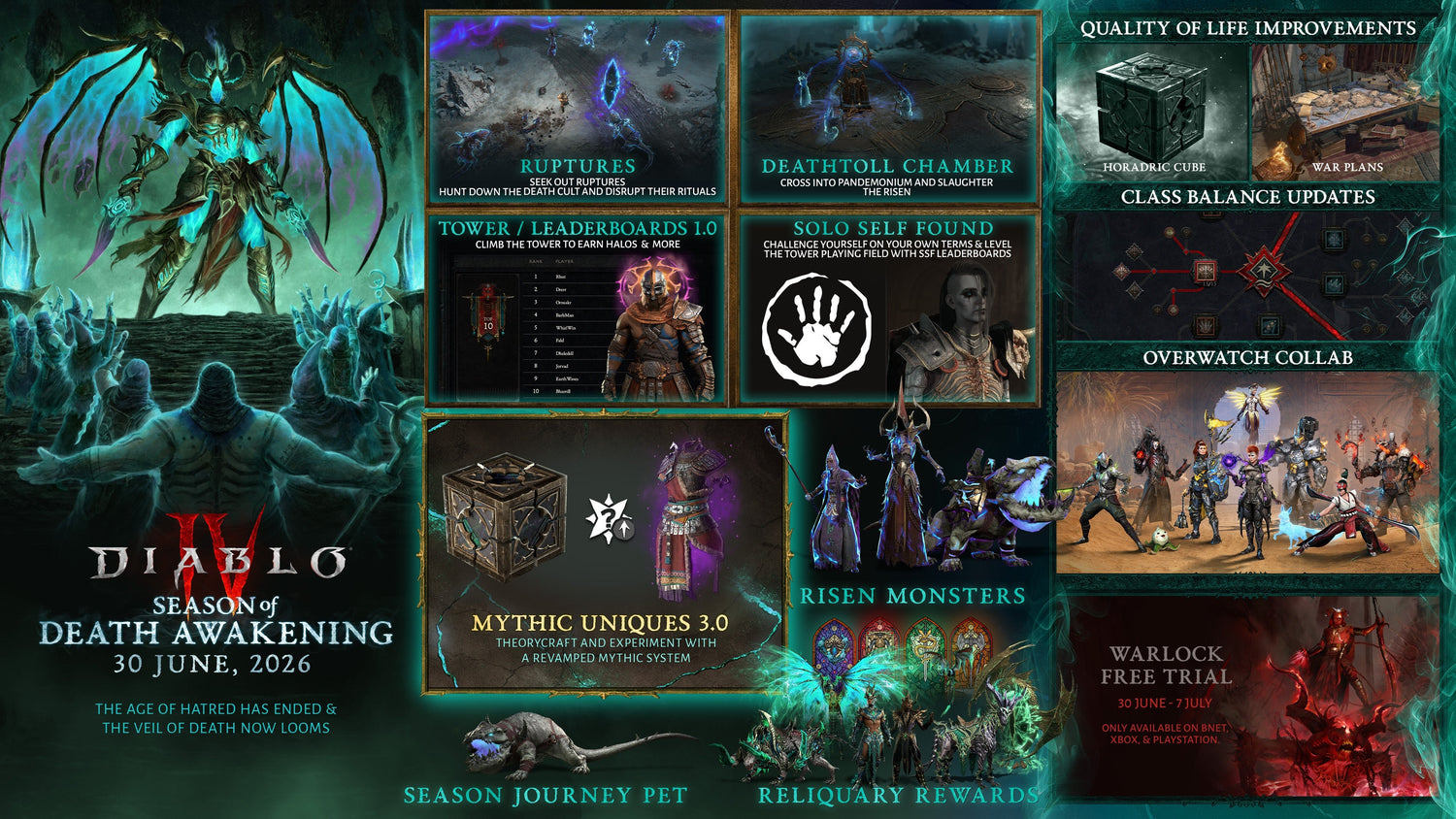
Based on the source details, Season of Death Awakening brings a Warlock free trial window, new Pandemonium Ruptures, Deathtoll Chambers, Realmwalkers, a new seasonal Lair Boss, Mythic Uniques 3.0, expanded leaderboards, and several quality-of-life changes. In simple terms, that means more action, more systems, more reasons to chase efficiency, and more time spent in effects-heavy encounters where stable performance becomes part of the experience.
For some players, this season is just a reason to jump back into Sanctuary. For others, it is the push that exposes stutters, long load times, weak minimum FPS, poor multitasking, overheating, old storage bottlenecks, or a graphics card that was already struggling in newer games. So what matters more right now: squeezing one more season out of an aging PC, or moving into a custom-built system that can handle Diablo 4 properly and still be ready for what comes next?
What the Diablo 4 Season of Death Awakening changes mean for PC players
The source article highlights several core additions that are important from a performance perspective. Pandemonium Ruptures increase combat intensity. Surging and Colossal Ruptures add event scaling and reward incentives. Realmwalkers create another layer of seasonal progression. Deathtoll Chambers become a highly relevant activity for key farming. The new Risen monster family adds more enemy interactions. The seasonal Lair Boss creates another repeatable target farm. Mythic Uniques 3.0 deepens late-game itemization. Leaderboards push players toward more optimized play.
That all sounds exciting, but it also creates a real hardware question. Are you the kind of Diablo player who just wants the game to run, or do you want your next PC to feel fast, smooth, and ready for long sessions without compromise?
If you only play casually at 1080p and do not mind lowering settings, your needs are very different from someone targeting 1440p high refresh gameplay, ultra settings, or a gaming-and-streaming setup. The source does not provide current official hardware benchmarks for each new seasonal feature, so it would be irresponsible to invent exact requirements. What we can say credibly is that action-heavy ARPG content tends to reward stronger CPUs, faster SSDs, enough RAM, and GPUs that can maintain stability when the screen fills with enemies, effects, particles, and interface elements.
Why Canadian buyers should think beyond minimum specs
Many buyers search for the cheapest machine that can technically launch a game. That is not the same as buying a PC that feels good to own for the next several years. A minimum-spec mindset often leads to compromise on cooling, power supply quality, RAM capacity, SSD size, and future upgrade paths. It also tends to create the exact outcome buyers want to avoid: needing another upgrade too soon.
In Canada, this matters even more. Hardware pricing can shift with exchange pressure, inventory shortages, new GPU launches, regional demand swings, and seasonal shopping periods. If a major game release, component shortage, or back-to-school demand spike is approaching, waiting does not always save money. Is it better to buy a gaming PC now or wait? The answer depends on your current system, your budget, and how soon you want a better experience, but many buyers underestimate how fast replacement costs can change.
That is why a custom system from a trusted Canadian builder can be the smarter play. Instead of overpaying for flashy specs that do not help your use case, or underbuying and regretting it, you can match the build to your real needs.
What does your next PC actually need to do for you?
Before you compare parts, ask a more useful question: what do you want your next PC to do for you every day?
- Play Diablo 4 smoothly at 1080p?
- Run Diablo 4 at 1440p with stronger visuals and better minimum FPS?
- Handle ray tracing in newer games beyond Diablo 4?
- Stream to Twitch or YouTube while gaming?
- Edit your clips in Premiere Pro, DaVinci Resolve, or CapCut?
- Use Photoshop, Lightroom, Illustrator, or Canva for creative work?
- Build a system that can also handle Blender, Unreal Engine, or heavier workstation use?
This is where many buyers realize they are not just shopping for a Diablo 4 machine. They are shopping for a better all-around desktop that supports gaming, content creation, school, work, and long-term value.
What PC do you need for Diablo 4 Season of Death Awakening?
If your only goal is entry-level Diablo gameplay, a budget gaming PC Canada configuration can still make sense. But if you want to enjoy denser seasonal content, avoid hitching in larger fights, and keep your system relevant for newer games, moving up a tier often delivers better value over time.
Entry tier: 1080p gaming and value-focused players
This tier is for the buyer asking, how much should I spend on a gaming PC if I mainly want smooth 1080p gameplay and solid everyday use? A value-oriented system should prioritize:
- A modern multi-core CPU with strong gaming responsiveness
- A dedicated GPU suitable for current 1080p gaming
- 16GB of RAM minimum, with 32GB being more comfortable for multitasking
- A fast NVMe SSD for load times and system responsiveness
- Good airflow and a quality power supply
This category is ideal for players who want dependable Diablo 4 performance, esports gaming, and room for mainstream titles without overspending. But ask yourself honestly: if you already know you will be streaming, modding, multitasking, or moving to a higher refresh monitor, is the cheapest build really the best buy?
Mainstream performance tier: 1440p gaming sweet spot
For many buyers, this is the real sweet spot. If you are wondering what PC do I need for 1440p gaming, this is the category to watch. A stronger mid-to-upper-tier GPU, a faster gaming CPU, 32GB of RAM, and a fast SSD create a much better long-term experience.
This is also the tier where a custom gaming PC Canada build starts to separate itself from generic box-store systems. Why? Because balanced thermals, part compatibility, case airflow, and power delivery become more important as you aim higher. A good 1440p build is not just about average FPS. It is about consistency, frame pacing, low noise, upgrade options, and confidence in demanding seasonal content.
If Diablo 4 is one of several games you play, and your library also includes newer open-world, shooter, or ray tracing titles, a 1440p-focused system is often the smartest performance-per-dollar tier for serious PC gamers in Canada.
High-end tier: 4K, ultra settings, streaming, and long-term headroom
This tier is for buyers asking bigger questions: what PC do I need for 4K gaming, what PC do I need for ultra settings, or should I finance a high-end gaming PC? If you want premium visuals, stronger minimum FPS, heavier multitasking, and better readiness for future AAA games, this is where premium GPUs and higher-tier CPUs come in.
A 4K gaming PC Canada class build also makes more sense if your monitor, content goals, or next few years of game releases demand more than entry-level hardware can realistically provide. The upfront cost is higher, but so is the usable lifespan before you feel the urge to replace major parts.
That raises a practical buying question: would you rather buy a weaker system now and upgrade sooner, or lock in a stronger platform that lasts longer?
Are you only gaming, or do you also want to stream and create content?
One of the biggest mistakes buyers make is assuming a gaming PC and a creator PC are always the same thing. They overlap, but they are not identical. If you plan to stream Diablo 4, record gameplay, cut shorts for TikTok or YouTube, or maintain a content schedule, your system needs change.
A proper gaming and streaming PC Canada setup benefits from more CPU headroom, stronger GPU encoding support, more RAM, and enough storage to avoid constantly juggling game installs and media files. If you are asking what PC do I need for streaming, think beyond the game itself. OBS, browser tabs, music tools, chat applications, overlays, and editing software all consume resources.
Do you want to play Diablo 4 while livestreaming at 1080p? Do you want clean performance during crowded events? Do you want your exports to finish faster after your session ends? Those are not minor upgrades. They are quality-of-workflow upgrades.
Could this season be the reason you finally upgrade your creator setup too?
For many customers, a game-triggered upgrade becomes a broader productivity decision. If you already edit thumbnails, clips, photos, or short-form video, then a creator PC Canada or content creation PC Canada build may be the smarter category than a pure gaming box.
That matters if you use:
- Adobe Premiere Pro
- DaVinci Resolve
- After Effects
- Photoshop
- Lightroom
- Illustrator
- Canva
- Blender
If your current PC lags while gaming and then slows you down again while editing, the hidden cost is time. A faster export, smoother timeline, stronger playback experience, and better multitasking can make a custom creator build worthwhile even if Diablo 4 is what started the conversation.
What PC do content creators need if they also game? Usually, something more balanced than an entry gaming desktop and more practical than a maxed-out workstation. That is exactly where custom configuration helps.
What if you edit video, photos, or design work after gaming?
Some Diablo players are also creators, students, marketers, photographers, and small business owners. If that sounds like you, then your next desktop should fit the work you actually do.
For video editing
If you cut gameplay clips, YouTube videos, or social content, a proper video editing PC Canada build can dramatically improve workflow. More cores, more RAM, better GPU acceleration, and larger SSD capacity make a real difference in Premiere Pro and DaVinci Resolve.
What PC do I need for video editing? If you are editing 1080p casually, your needs are moderate. If you are working with 4K footage, effects, multicam timelines, or regular export workloads, you should be shopping for a stronger creator system, not just a starter gaming machine.
For photo editing and graphic design
If you use Photoshop, Lightroom, Illustrator, InDesign, or browser-based design tools, a photo editing PC Canada or graphic design PC Canada build should focus on responsiveness, RAM, fast storage, and display support. You may not need the same GPU tier as a 4K gaming buyer, but you do need reliability and enough headroom for large files and multitasking.
Is a gaming PC good for Photoshop or Illustrator? Sometimes yes, but only if the parts are chosen intelligently. A random gaming tower can be imbalanced. A custom system built around both gaming and design work is usually the better investment.
For 3D work and rendering
If your post-gaming workflow includes Blender, Unreal Engine, CAD, rendering, or modeling, then you are entering workstation territory. A 3D modeling PC Canada or custom workstation PC Canada build should prioritize sustained performance, GPU power where relevant, memory capacity, cooling, and stability under load.
What PC do I need for Blender? It depends on whether you are modeling lightly, rendering heavily, animating, or doing professional asset work. But one thing is clear: if your machine is already struggling in dense game scenarios, it probably is not ideal for serious rendering either.
How Season of Death Awakening connects to future-proof buying
The source article describes a season with more systems, more repetition loops, more event density, and more endgame incentive. That matters because game demand rarely moves backward. Seasonal action RPG players often bounce between Diablo, shooters, open-world releases, survival games, and whatever major launch is next. The PC you buy for this season should not only cover today. It should reduce the chance that you are shopping again too soon.
That is where future proof gaming PC Canada thinking becomes useful. Not because any PC is future-proof forever, but because some builds age much better than others. Better cooling, stronger CPU choice, more RAM, bigger SSDs, cleaner upgrade paths, and the right GPU tier can extend satisfaction dramatically.
Ask yourself a brutally honest question: are you upgrading for one season, or are you buying for the next three to five years of gaming and creative use?
Should you buy now if hardware prices might change?
Canadian PC buyers often hesitate for understandable reasons. They wonder if a sale is around the corner, if the next GPU launch will lower prices, or if waiting a few months might deliver a better deal. Sometimes that happens. Sometimes the opposite happens.
GPU demand pressure, memory pricing shifts, storage fluctuations, and exchange-rate effects can all push complete system prices upward. Add holiday demand, back-to-school timing, or major release cycles, and the build you are considering today may not cost the same later.
Should I buy a gaming PC before prices go up? If your current machine is limiting your enjoyment, slowing your work, or forcing compromises you are tired of making, waiting for a perfect market can be more expensive than acting on a well-balanced build now.
Could financing help you secure a stronger PC before replacement costs rise?
This is where many buyers change their whole approach. Instead of forcing a weaker budget, they ask a smarter question: should I finance a better PC instead of buying a cheaper one?
For some customers, the answer is yes. If financing lets you move from an underpowered build to a system that better fits 1440p gaming, streaming, editing, or long-term use, it can be the more economical decision over the full life of the machine. Groovy Computers offers financing options up to 4 years, which can help Canadian buyers secure the performance tier they actually need instead of settling for one they will outgrow quickly.
This does not mean everyone should finance. It means financing is worth considering if it helps you avoid a short-term purchase that becomes a long-term frustration. Is financing a gaming PC worth it if it gets you stronger components, a longer usable lifespan, and fewer near-term upgrades? For many buyers, absolutely.
Which performance tier fits you best?
If you are still unsure where you land, use this practical guide.
Choose a budget-value build if:
- You mainly play at 1080p
- You want a solid first desktop gaming experience
- You are not focused on heavy streaming or creator workloads
- You want a practical entry point without overbuying
Choose a mainstream 1440p build if:
- You want better visuals and smoother overall gameplay
- You play multiple modern AAA games
- You multitask regularly
- You want more longevity before needing upgrades
- You may stream or edit occasionally
Choose a premium or high-end build if:
- You want 4K or high-refresh 1440p performance
- You care about ultra settings and stronger long-term relevance
- You stream, record, and edit often
- You want one desktop for gaming plus serious creative work
- You would rather buy once properly than upgrade too soon
If you are asking what gaming PC do I need, the best answer is the one that matches both your monitor and your habits. A player on a 1080p screen with light multitasking should not be sold like a 4K streamer. But a customer gaming, editing, and creating content on a daily basis should not be pushed into a weak entry machine either.
Why custom builds matter more than ever
There is a big difference between owning a PC and owning the right PC. A custom-built system gives you control over the parts that actually shape your experience: thermal performance, noise, power quality, upgrade paths, storage planning, RAM headroom, CPU-GPU balance, and case airflow.
Is a custom gaming PC worth it? If you want a machine tailored to your games, software, budget, and future plans, yes. Especially in a market where generic prebuilts often cut corners in areas the average buyer does not see until problems show up later.
That is one reason buyers across Canada increasingly prefer experienced builders. With Groovy Computers, you are not just buying parts in a box. You are buying a tested custom system built for the workload you actually care about.
Why Groovy Computers is a strong fit for Canadian gamers and creators
Groovy Computers serves buyers who want more confidence in their purchase. Whether you need a gaming desktop Canada setup for Diablo 4, a streaming PC Canada build, a custom creator PC Canada system, or a heavier-duty workstation, the value is in the guidance as much as the hardware.
Canadian customers want practical answers. They want to know if a build suits 1080p, 1440p, or 4K. They want to know if 32GB of RAM is enough. They want to know whether a stronger GPU is worth it for their game mix. They want to know if they should finance. They want to know if the system is tested and backed by support.
That is where Groovy Computers stands out:
- Custom PC builds matched to real gaming and creator needs
- Rigorous testing before delivery
- 1-year warranty for added confidence
- Financing options up to 4 years
- Canadian service from a builder that understands local buyers
Whether you are in Nova Scotia, Atlantic Canada, or ordering from elsewhere in the country, buying from a Canadian custom PC builder can make the process easier, clearer, and more trustworthy.
Questions to ask before you buy your next PC
Before you click buy anywhere, stop and ask yourself these questions:
- What games am I actually playing over the next 12 to 24 months?
- Am I staying at 1080p, or am I moving to 1440p or 4K?
- Do I want ray tracing, higher settings, or high-refresh gameplay?
- Will I stream, record, or edit content on this same PC?
- Do I use Premiere Pro, DaVinci Resolve, Photoshop, Lightroom, Illustrator, or Blender?
- How soon would I outgrow the cheaper option?
- Would financing help me buy the right build once instead of upgrading twice?
- Do I want support, testing, and warranty confidence from a Canadian builder?
If those questions make your current shortlist feel too vague, that is a good thing. It means you are thinking like a smart buyer, not just chasing a sale sticker.
So, what should you do if Diablo 4 Season of Death Awakening has you thinking about upgrading?
If the new season has reminded you that your current desktop is holding you back, do not treat that as a small annoyance. Treat it as buying clarity. This is your chance to choose a system that supports not only Diablo 4, but the way you actually use your PC for gaming, streaming, editing, designing, and creating.
Do you want a budget-friendly system that gets you into smooth 1080p play? Do you want a stronger 1440p gaming machine that feels great across modern titles? Do you want a premium build that can game, stream, edit, and stay relevant longer? Do you want to avoid the cycle of underbuying and upgrading too soon?
If so, visit GroovyComputers.ca and ask the question that matters most: what do you want your next PC to do for you? From custom gaming rigs to creator systems and workstation-class builds, Groovy Computers can help Canadian buyers choose a more capable machine with less guesswork.
As Diablo 4 Season of Death Awakening pushes players back into heavier action, denser events, and more endgame grinding, it also makes one thing clear: the right gaming PC Canada purchase is not just about meeting minimum requirements. It is about buying a system that feels fast, stable, enjoyable, and ready for what comes next. If you are planning your next upgrade, this is a strong time to think carefully, buy strategically, and choose a custom build that truly fits.
#Diablo4 #SeasonOfDeathAwakening #GamingPCCanada #CustomGamingPCCanada #GamingPCBuildsCanada #CreatorPCCanada #StreamingPCCanada #VideoEditingPCCanada #3DModelingPCCanada #CanadianCustomPCBuilders #NovaScotiaBusiness #GroovyComputers
Groovy Computers | All Rights Reserved



Leave a comment
This site is protected by hCaptcha and the hCaptcha Privacy Policy and Terms of Service apply.