






















Subnautica 2 Deepwing Leviathans Show Why a Custom Gaming PC in Canada Matters More Than Ever
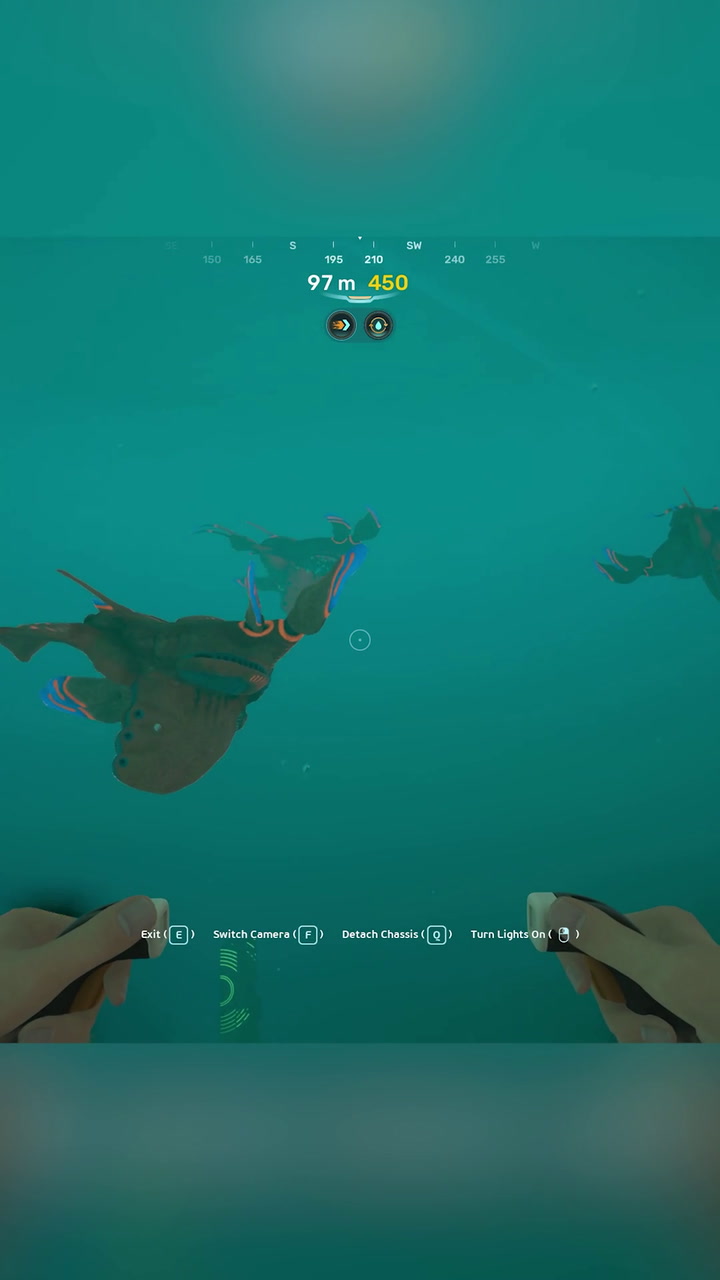
The first look at Deepwing Leviathans in Subnautica 2 does exactly what strong PC game reveals are supposed to do: it creates curiosity, tension, atmosphere, and immediate hardware questions. If a short gameplay encounter can make players stop and ask how immersive the full game will feel on a proper setup, then this is already bigger than a simple creature reveal. For Canadian buyers researching a custom gaming PC Canada solution, this kind of moment matters because visually rich survival games often reward stronger GPUs, faster storage, better cooling, and a system that can stay smooth when the screen fills with lighting effects, water simulation, environmental detail, and creature animation.
The source clip highlights a peaceful but tense encounter with the new Deepwing Leviathans, with the player carefully navigating and scanning these massive underwater creatures. That may sound simple on paper, but scenes like this are exactly where weaker systems can break immersion. Have you ever played a game built around atmosphere, only to lose the effect because of stutter, muddy visuals, long load times, or settings you had to turn down too far? If you are interested in upcoming games with cinematic environmental design, this is the kind of release that should make you evaluate your next PC before the hype turns into demand pressure.
Why is Subnautica 2 already relevant to anyone shopping for a gaming PC in Canada?
Because game reveals do not just sell the game. They also reveal the direction PC hardware demand is moving. A title like Subnautica 2 suggests exactly the sort of experience modern PC players chase: expansive worlds, environmental immersion, creature encounters, suspenseful exploration, and visual storytelling that feels better at higher settings and smoother frame rates. That means readers are not only asking, “Will this game be good?” They are also asking, “What PC do I need for this game?” and “Should I buy now or wait?”
Those are smart questions.
Open-world and atmosphere-heavy games can be surprisingly demanding because they are not only about raw combat performance. They also lean on asset streaming, lighting, texture quality, draw distance, and stable frame delivery. In a game built around underwater tension, visual consistency matters. Dark water, motion, shadows, reflections, and distant creatures all contribute to the emotional effect. A strong PC does not just raise numbers on a benchmark chart. It preserves the feeling the developers are trying to create.
What did the Deepwing Leviathans footage get right?
It reminded players that suspense is often built through scale, restraint, and environment. The encounter appears less like a loud boss introduction and more like a controlled moment of discovery. That matters because games like this are strongest when the world feels alive enough that you slow down, look around, and wonder what is beneath you. In PC terms, that kind of design pushes buyers toward systems that can deliver cleaner image quality, stronger texture performance, and smoother traversal through large environments.
In other words, this was not just a creature reveal. It was a hardware motivation moment.
If you have been delaying a system upgrade, footage like this can be the push that turns a vague idea into a purchase decision. Are you still gaming on aging hardware and hoping it can stretch through the next wave of visually ambitious titles? Are you lowering settings more often than you want? Are you avoiding new releases because you already know your current system is near its comfort limit?
What do you want your next PC to do for you?
Before choosing parts, choose your goal. That sounds obvious, but many buyers still start with random specs instead of asking what they actually want from the machine. Do you want a system mainly for immersive gaming? Are you also planning to stream your gameplay, record clips, edit YouTube videos, or create social content? Will you only play at 1080p, or are you aiming for 1440p ultrawide or full 4K? Do you care about ray tracing, high refresh rates, or keeping the build relevant for several years?
Your answer changes everything.
- If you mainly want smooth 1080p gaming, you do not need to overspend.
- If you want 1440p at high settings in upcoming games, balance becomes more important.
- If you want 4K, premium visuals, and strong longevity, your GPU tier matters a lot more.
- If you want gaming plus streaming and editing, your CPU, RAM, storage, and cooling choices become much more important.
- If you are also using Blender, Adobe apps, or creator tools, a gaming-only mindset may leave performance on the table.
This is where a custom build becomes far more valuable than a generic one-size-fits-all box. A proper system should reflect what you are trying to do, not what happened to be bundled together by a mass-market seller.
What gaming PC do I need for Subnautica 2 style games?
Even without full final performance data, the reveal tells us what kind of experience many players will want: sharp visuals, stable performance, fast loading, and enough GPU strength to enjoy environmental detail without immediate compromise. For games driven by exploration and immersion, there is a major difference between “it runs” and “it feels right.”
Entry-level 1080p buyers
If your goal is straightforward 1080p gaming on sensible settings, you are likely looking for a value-focused build. This tier is ideal if you play a mix of survival games, esports titles, indie releases, and mainstream AAA games without insisting on maxed-out settings. A good entry gaming desktop should still include a modern CPU, a solid GPU pairing, fast SSD storage, and enough RAM to avoid quick obsolescence.
Ask yourself: do you just want to play the game comfortably, or do you want visual headroom for future titles too? If you buy too low, you may save money now but end up upgrading too soon.
1440p sweet spot buyers
For many Canadian gamers, 1440p is the real target. It is where modern games start to look meaningfully more premium while still being achievable without going all the way to flagship pricing. If Subnautica 2 is on your radar because you care about atmosphere, detail, and immersion, then a 1440p-focused build is often the best balance of cost and experience.
This is especially true if your library includes graphically richer single-player games, open-world releases, and upcoming PC titles where visual mood matters as much as frame rate. Want the ocean to look expansive, the lighting to land properly, and the creatures to feel intimidating instead of visually compressed? This is the tier where that starts to come together.
4K and premium immersion buyers
If you want the most cinematic version of this type of game, a premium build makes sense. A high-end system is not only for competitive numbers. It is for players who want more texture detail, stronger visual presets, better ray-traced effects where supported, and longer-term confidence as new games become more demanding.
Should everyone buy at this level? No. But if you are the kind of player who buys fewer systems and expects each one to stay strong for years, then stepping up now can be smarter than buying twice.
Do you only game, or are you planning to stream and create content too?
This is one of the biggest buying mistakes in the market. Many customers shop for a gaming PC, but what they really need is a gaming and streaming PC Canada build or even a creator-focused desktop. Why does that matter? Because once you add OBS, Discord, browser tabs, recording software, clip editing, Photoshop, Premiere Pro, or DaVinci Resolve, your performance needs change fast.
Maybe you are excited about Subnautica 2 not just because you want to play it, but because you want to stream first reactions, produce gameplay breakdowns, or build a YouTube channel around new survival games. In that case, a stronger CPU, more RAM, proper airflow, and storage planning become part of the value equation.
What PC do you need for streaming? That depends on how serious you are. Casual streaming at 1080p has very different requirements than playing modern games at high settings while recording clean footage, running alerts, managing multiple displays, and editing highlight reels after the stream ends.
When a gaming PC is enough for creators
If you do occasional streaming, light editing, thumbnails, and short-form uploads, a well-balanced gaming build can absolutely do the job. Many buyers do not need a separate creator workstation. They need a smartly configured custom machine that handles both workloads well.
When you should step into creator-PC territory
If you regularly edit 4K footage, render longer timelines, use After Effects, or batch process media while gaming and streaming, then a creator PC Canada or video editing PC Canada approach is better. The right build can save time every week, not just boost in-game visuals. Faster exports, smoother previews, better multitasking, and more storage flexibility all matter if your PC is part of your income, side hustle, or content plan.
Could a game reveal like this affect buying timing?
Yes, and not because this single clip changes the whole market overnight. It matters because high-interest releases contribute to the broader cycle of upgrade demand. When more players start thinking about new hardware at the same time, the pressure does not only hit GPUs. It can affect full-system availability, memory pricing, SSD demand, and how long buyers keep waiting before finally replacing older desktops.
That is why “I will wait and see” is not always the cheapest strategy.
Sometimes waiting works. Sometimes it means buying later during heavier demand, paying more for similar performance, or settling for weaker parts because the ideal configuration is no longer attractive. If you already know your current PC is underpowered for the next phase of game releases, what are you really waiting for? A better price, or just a later problem?
Should I buy a gaming PC now or wait?
This is one of the most common research-stage questions in Canada, and the honest answer is: it depends on your current system, your target games, and your tolerance for compromise.
You should lean toward buying now if:
- Your current PC already struggles with newer titles.
- You want to be ready before major game releases stack up.
- You are moving from 1080p to 1440p or 4K.
- You want to stream, edit, or create content on the same machine.
- You would rather secure a stronger system than risk replacement cost increases later.
You may be able to wait if:
- Your current PC still comfortably handles your actual use case.
- You are not planning to play demanding new releases anytime soon.
- Your performance goals are modest and you are happy with reduced settings.
But here is the more important question: are you waiting because it is strategically smart, or because choosing the right build feels overwhelming? If it is the second one, that is exactly where guidance from a Canadian custom PC builder matters.
Which performance tier fits you best?
Choosing the right tier is often more important than chasing the most expensive one. Here is a cleaner way to think about it.
Tier 1: Budget-conscious gaming
Best for buyers who want dependable 1080p performance, student-friendly value, and a practical first desktop. This is the right fit if your focus is playing current games well without pushing premium visual goals. It is also the right conversation if you are comparing a budget gaming PC Canada option against the temptation to buy something too weak from a generic seller.
Ask yourself: do you need the cheapest machine, or the best value machine? Those are not the same thing.
Tier 2: Balanced 1440p gaming
This is the sweet spot for many players shopping a gaming PC Canada build today. It offers a stronger experience in demanding games, more longevity, and a better match for modern monitors. If titles like Subnautica 2 are interesting to you because you want detail, scale, and atmosphere, this tier often gives the best return.
Tier 3: Gaming plus streaming and editing
This tier is ideal for content-minded users who want one system for gameplay, OBS, recording, and media work. If you plan to clip gameplay, edit videos, upload to YouTube, and maybe branch into Photoshop or short-form content, a mixed-use build is often a smarter long-term buy than a gaming-only machine.
Tier 4: Premium high-end gaming
Built for players targeting 1440p ultra, 4K, ray tracing, higher refresh experiences, and maximum headroom. If you are asking, “What PC do I need for ultra settings?” or “How long will a high-end gaming PC last?” this is the category to explore. Premium systems cost more up front, but they can delay your next upgrade cycle and keep more future games within comfortable range.
Tier 5: Workstation and 3D crossover builds
If your interest in game worlds overlaps with game development, Blender work, Unreal Engine projects, rendering, or professional workloads, then a standard gaming build may not be ideal. This is where 3D modeling PC Canada and workstation PC Canada logic start to matter. The right balance depends on whether your work is GPU-heavy, CPU-heavy, memory-heavy, or all three.
Can a gaming PC also work for video editing, photo editing, and graphic design?
Often, yes. But not always equally well.
A good gaming desktop can be an excellent starting point for light-to-moderate creator tasks, especially if it has a strong multicore CPU, enough RAM, fast SSD storage, and a capable GPU. For users doing occasional Premiere Pro work, photo editing, social media graphics, Lightroom exports, or design projects, a well-configured custom system can cover a lot of ground.
But if you are regularly working in Adobe Creative Cloud, managing high-resolution media, or balancing multiple creative apps at once, the ideal machine may look different from a pure gaming rig.
For video editing buyers
If you are wondering, “What PC do I need for video editing?” start by considering your footage type. Are you editing 1080p clips, 4K timelines, multi-camera projects, or heavier colour work in DaVinci Resolve? Do you need fast exports, smoother scrubbing, and room for project files? A proper video editing PC Canada build should be chosen for workflow, not just game performance.
For photo editing buyers
Photographers and photo-heavy creators should ask different questions. How many RAW files are you processing? Do you use Lightroom Classic, Photoshop, Capture One, or AI-based enhancement tools? Do you need more RAM, better storage planning, or a cleaner multi-monitor setup? A custom system can be tuned for speed and stability without wasting budget on the wrong parts.
For graphic design buyers
If your world is Illustrator, Photoshop, InDesign, Canva, mockups, social media campaigns, or branding work, then responsiveness and multitasking matter more than flashy marketing specs. A graphic design PC Canada build should feel quick, dependable, and comfortable under real project loads.
Why Canadian buyers should think differently about PC value
In Canada, full-system buying decisions are rarely just about the headline component. Taxes, shipping realities, part volatility, and replacement timing all affect what “good value” really means. That is why comparing random listings is often misleading. A machine that looks cheaper at first glance may cut corners in cooling, motherboard quality, power supply reliability, upgrade path, or memory configuration.
That is also why many buyers are moving back toward trusted builders instead of chasing mystery-box pricing. A proper custom desktop from a Canadian company should give you better clarity on what is inside, what it is built for, how it is tested, and what support looks like after the sale.
For buyers in Nova Scotia and Atlantic Canada, local trust matters even more. And for customers ordering from Ontario, Alberta, British Columbia, Quebec, or elsewhere, Canada-wide support and clear communication matter just as much.
Why custom builds matter when games get more ambitious
The more visually demanding and feature-rich new games become, the less sense it makes to buy a generic machine with poorly matched parts. A custom build is not just about aesthetics or branding. It is about balance.
That balance includes:
- A CPU that matches your gaming and multitasking needs.
- A GPU tier that fits your monitor and target settings.
- Enough RAM to avoid immediate bottlenecks.
- SSD storage that keeps modern games feeling responsive.
- Cooling that protects sustained performance.
- A power supply that supports long-term reliability.
- A motherboard and case combination that leaves room to grow.
Have you ever seen a PC listing where one flashy part is used to distract from weaker components elsewhere? That is exactly what a buyer should avoid. The right custom build feels coherent. It is built for the actual job.
Is financing a better PC worth considering?
For many buyers, yes. Especially when the alternative is buying too low and regretting it quickly.
Financing is not about spending carelessly. It is about matching the system to the years you expect to use it. If a stronger desktop helps you avoid an early upgrade, improves your daily experience, and keeps you ready for upcoming games and software demands, monthly payments can make practical sense.
Ask yourself a simple question: would you rather buy the cheapest system you can tolerate today, or secure the better system you actually want before prices or demand shift again? For gamers, streamers, students, creators, and professionals alike, that answer is often clearer than they expect.
Groovy Computers offers customer-focused build guidance and financing options up to 4 years, which can be especially useful if you are trying to move into a better GPU tier, increase RAM for creator workloads, or avoid compromising on the storage and cooling your system really needs.
What questions should you ask before buying or financing your next PC?
- What games do I plan to play over the next 2 to 4 years?
- Do I want 1080p, 1440p, or 4K performance?
- Do I care about ray tracing or ultra settings?
- Will I stream, record, or edit content on the same machine?
- Do I need a gaming desktop only, or a mixed-use creator system?
- Am I buying a stopgap PC, or a system I want to keep for years?
- Would financing a stronger build save me from upgrading too soon?
- Do I want a generic prebuilt, or a system that is tested and built around my goals?
These are not small questions. They are the difference between short-term satisfaction and long-term regret.
Why Groovy Computers is a smart fit for Canadian buyers
Groovy Computers is positioned for the customer who wants more than a random spec sheet. Whether you need a gaming desktop, a streaming-ready build, a creator PC, or a workstation-style configuration, the advantage is in the match between the hardware and the workload.
For Canadian shoppers, that means:
- Custom-built systems tailored to real use cases.
- Guidance on choosing the right performance tier.
- Strong value for gaming, streaming, editing, and workstation needs.
- Rigorous testing before your system ships.
- A 1-year warranty for added confidence.
- Financing options that can help you secure a better build now.
- Support from a Canadian custom PC builder instead of a faceless marketplace listing.
If you are in Nova Scotia, Atlantic Canada, or ordering elsewhere in the country, that combination of customization, testing, and support is a major reason buyers increasingly prefer purpose-built systems over generic alternatives.
So, what should Subnautica 2 buyers do next?
If the Deepwing Leviathans reveal got your attention, do not just add the game to your wishlist and ignore the hardware side. Use the moment properly. Think about what your current system can realistically handle, what kind of visual experience you want, and whether your next PC should only cover this game or the next generation of titles around it.
Do you want a budget-friendly 1080p machine that gets you in the door? A balanced 1440p gaming system that makes atmospheric titles shine? A premium RTX gaming desktop with room for years of new releases? Or a stronger all-around creator build that lets you play, stream, record, and edit without compromise?
If you are still asking yourself what gaming PC you need, whether a stronger tier is worth it, or whether financing makes more sense than settling, this is the right time to talk to a builder who understands the difference between “good enough” and “built for what you actually want.” Visit GroovyComputers.ca if you want help choosing the right custom gaming PC Canada build for upcoming games, content creation, or a better long-term setup before replacement costs rise.
Whether you are upgrading for Subnautica 2, preparing for the next wave of AAA releases, or trying to buy one system that can handle gaming, streaming, and creative work, the smartest move is usually not to wait until your current PC forces the issue. A carefully chosen custom gaming PC Canada build can give you smoother gameplay, more visual headroom, better multitasking, and a much stronger ownership experience from day one.
#CustomGamingPCCanada #GamingPCCanada #GamingPCBuilderCanada #CanadianCustomPCBuilders #GamingAndStreamingPCCanada #CreatorPCCanada #VideoEditingPCCanada #WorkstationPCCanada #BudgetGamingPCCanada #HighEndGamingPCCanada #NovaScotiaTech #AtlanticCanadaGaming #BuyGamingPCOnlineCanada
Groovy Computers | All Rights Reserved



Leave a comment
This site is protected by hCaptcha and the hCaptcha Privacy Policy and Terms of Service apply.