
























GTA 6 Gaming PC Canada Guide: Why the Miami Heat Vice City Hype Matters for Your Next Build
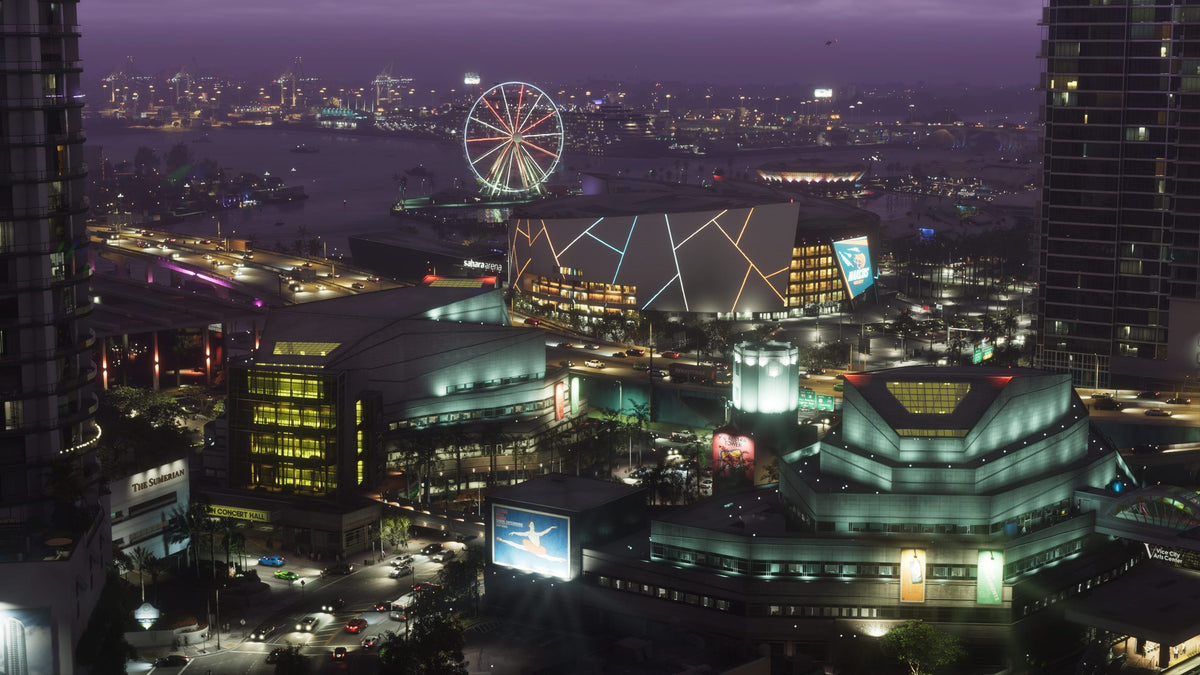
The GTA 6 gaming PC Canada conversation just got even louder. A source report revealed that the Miami Heat will transform into “Vice City” for a one-night promotional event tied to the release of Grand Theft Auto VI, with special uniforms, themed activations, and a heavily marketed lead-in to launch. On the surface, that sounds like a fun crossover between basketball, pop culture, and one of the most anticipated games in years. But for Canadian PC buyers, there is a more important takeaway: when a game reaches this level of mainstream hype, demand for capable gaming hardware usually follows.
That matters if you are asking a practical question instead of just enjoying the headlines: will your current system actually be ready for GTA 6-level gaming expectations, modern open-world performance, ray tracing, streaming, and the next wave of AAA releases?
For many buyers, this is the moment when gaming excitement turns into a buying decision. Do you keep stretching an aging PC for one more season? Do you settle for a lower-tier machine that may need upgrading too soon? Or do you secure a properly matched custom build now, before game-driven demand and premium GPU pressure make the same class of system harder to replace affordably in Canada?
What the source story gets right about GTA 6 hype
The source story captures something important: GTA 6 is no longer just another game release. It is a cultural event. A full NBA-style promotional night themed around Vice City shows how far the game’s reach extends beyond gaming communities. Fans are already treating launch night like a major entertainment moment, and that kind of broad attention tends to influence hardware shopping behaviour.
Why does that matter for PC buyers? Because blockbuster launches create a spike in questions such as: Can my PC run this game? Do I need an RTX GPU for this game? What PC do I need for 1440p gaming? Is now a good time to buy a gaming PC?
Those are exactly the questions smart buyers should be asking early, not after inventory tightens and replacement costs move upward.
Why Canadian buyers should read this trend differently
In Canada, buying decisions are shaped by more than hype alone. Exchange-rate pressure, shipping realities, component availability, and demand spikes can change the total cost of a gaming system faster than many shoppers expect. A globally anticipated release like GTA 6 does not just sell games. It motivates upgrades, pushes buyers into the market, and increases interest in GPUs, fast CPUs, higher-capacity SSDs, and stronger cooling solutions.
That means a Canadian shopper looking for a Gaming PC for GTA 6 should think beyond minimum specs. The real question is whether the system you buy today will still feel strong once you move from one big title to the next. If you buy only for launch week, are you creating another upgrade problem six to twelve months later?
That is why a custom approach often matters more than impulse buying. Groovy Computers helps Canadian customers choose systems based on how they actually play, stream, edit, and work, rather than chasing generic one-size-fits-all specs.
What do you want your next PC to do for you?
Before talking parts, resolutions, or budgets, it helps to start with the question that actually defines the right build: what do you want your next PC to do for you?
Do you want a machine that simply gets you into big new games at solid settings? Do you want smooth 1440p gameplay in open-world titles? Are you aiming for 4K visual quality and ray tracing? Do you also want to stream on Twitch or YouTube, record clips, edit videos, create thumbnails, or run Adobe Creative Cloud after gaming sessions? Are you buying one PC for gaming at night and content creation during the day?
Your answer changes everything. A buyer looking for a Budget Gaming PC Canada solution is not shopping for the same machine as someone who needs a Gaming and Streaming PC Canada setup, a Creator PC Canada workflow system, or a 3D Rendering PC Canada workstation.
That is where many shoppers lose money. They either underbuy and upgrade too soon, or overbuy in the wrong places. A properly selected custom build avoids both.
What PC do you need for GTA 6 and other new AAA games?
Even without inventing unsupported official system requirements, it is reasonable to say that a title with GTA 6’s scale, visual expectations, and launch profile will push modern hardware conversations toward stronger GPUs, fast multi-core CPUs, more memory headroom, and SSD performance that supports large-world streaming and patch-heavy installs.
If you are wondering what gaming PC do I need, start with your target experience rather than a random parts list.
Entry-level modern gaming: is 1080p enough for you?
If your goal is to play new games at 1080p with sensible settings, strong value still exists. This tier fits first-time buyers, students, and players who care more about getting into the game than chasing ultra settings. But ask yourself one honest question: if GTA 6 is only the beginning of your upgrade cycle, will an entry-level build still satisfy you when the next demanding release lands?
This tier works best for buyers who want a Budget Gaming Computer Canada option, play a mix of esports and AAA titles, and want a sensible first step into PC gaming without pretending low-end hardware is magically future-proof.
1440p gaming sweet spot: is this the smartest place to spend?
For many Canadian buyers, 1440p is the real performance sweet spot. It gives you a major visual upgrade over 1080p while remaining more attainable than full 4K gaming. If you want stronger image quality, smoother frame pacing, and a better long-term balance between cost and experience, this is often the most practical target.
Are you the kind of player who wants major open-world games to look impressive for the next few years, not just launch weekend? Do you want high settings without immediately wishing you had bought more GPU? A 1440p Gaming PC Canada build often makes the most sense for buyers trying to balance value and longevity.
4K and ray tracing: are you buying for spectacle or long-term top-tier performance?
If your plan is to play giant cinematic games at very high visual settings, with ray tracing and premium image quality, you are shopping in High End Gaming PC Canada territory. This is where GPU selection becomes more critical, cooling quality matters more, and weak shortcuts show up faster.
But this tier is not just about luxury. It can be the right fit if you keep systems longer, use a high-refresh or large-format display, or want enough overhead for future games instead of buying again too soon. Ask yourself: what PC do I need for 4K gaming, and how long do I want this machine to stay satisfying?
Do you also want to stream, record, or create content?
One of the biggest mistakes in the current market is buying a gaming-only system for a workflow that is clearly gaming plus more. If GTA 6 is the spark that gets you back into streaming, clip creation, YouTube uploads, or social content, your PC requirements change immediately.
A proper Streaming PC Canada or Gaming PC for Streaming Canada setup needs more than game-ready graphics. You should also think about CPU overhead, encoder support, RAM capacity, storage layout, and thermal consistency during longer sessions. Are you planning to run OBS, stream gameplay, record footage, keep Discord and browser tabs open, and still maintain stable performance? That is not the same workload as gaming alone.
If your next system needs to game, stream, and edit, it often makes more sense to build for the full workflow now than to discover bottlenecks later.
Could GTA 6 hype push more buyers into creator-grade hardware?
Absolutely. Big game launches do not just sell gaming PCs. They also motivate content creation. Reaction videos, benchmark videos, highlight clips, livestreams, thumbnails, commentary channels, shorts, and long-form breakdowns all put pressure on your machine in different ways.
That means some shoppers reading about GTA 6 do not actually need only a gaming PC. They need a Content Creation PC Canada build or a Custom Creator PC Canada system that can handle gameplay plus editing software efficiently.
Are you planning to cut footage in Premiere Pro? Work in DaVinci Resolve? Create social graphics in Photoshop or Illustrator? Batch export clips while downloading games and keeping multiple apps open? If so, asking “can my PC run this game?” is only half the right question. You should also ask, “can my PC handle the work I want to do around this game?”
What if you need one PC for gaming, editing, design, and everyday work?
Many Groovy Computers customers are not single-purpose buyers. They want one machine that does everything well enough to justify the spend. That can include gaming at night, editing content on weekends, design work during the day, or even heavier workstation tasks depending on the user.
In that case, selecting the right build is about balance.
- Gaming-focused buyers should prioritize GPU strength, a capable CPU, fast storage, and enough RAM for today’s games.
- Streaming-focused buyers should add more processing headroom and consider the broader multitasking environment.
- Video editors should think seriously about CPU performance, RAM, storage speed, and timeline/export behaviour.
- Graphic designers and photo editors should focus on responsiveness, RAM, SSD speed, and a system that remains smooth under Adobe-heavy workflows.
- 3D users and workstation buyers should be much more careful about scaling, render workloads, thermals, and long-session stability.
Do you need a machine that simply plays games, or do you need a platform that supports how you actually use a computer every week? That answer should shape the build from day one.
Which performance tier fits you best?
If you are unsure where you land, this quick framework can help.
Tier 1: Value-first buyer
You want a practical system for 1080p gaming, school, media, and lighter multitasking. You care about price discipline and want to avoid overspending. This tier suits a first Gaming Desktop Canada purchase or a buyer entering the market carefully.
Best question to ask yourself: am I okay lowering settings sooner if future games get heavier?
Tier 2: Balanced gamer
You want strong 1080p or 1440p performance, smoother gameplay in newer titles, and a system that does not feel outdated too quickly. This is often the broadest value category for people searching Best Gaming PC Canada style advice without needing extreme hardware.
Best question to ask yourself: do I want a machine that still feels right a couple of major releases from now?
Tier 3: Gaming plus streaming or editing
You want one PC to handle gaming, recording, OBS, voice chat, browser tabs, editing, and creative software without constantly juggling limitations. This is where a Gaming Streaming Editing PC Canada type of build becomes the smarter long-term buy.
Best question to ask yourself: am I buying a gaming PC, or am I really buying a creator workflow machine that also games?
Tier 4: Premium enthusiast
You want 1440p at very high settings or 4K-class performance, stronger ray tracing capability, premium responsiveness, and more headroom for future games. This is the tier for buyers who know they dislike compromise and want a Future Proof Gaming PC Canada solution.
Best question to ask yourself: would I rather spend more once than upgrade again too soon?
Tier 5: Creator or workstation power user
You are not only thinking about games. You may need a Video Editing Workstation Canada system, a PC for Adobe Premiere Pro Canada workflow, a Graphic Design PC Canada setup, or a 3D Modeling PC Canada machine for Blender, Unreal Engine, or rendering tasks.
Best question to ask yourself: how much time do I lose every week waiting on exports, renders, cache rebuilds, or laggy multitasking?
Is it better to buy a gaming PC now or wait?
This is one of the most common buying questions in any hype cycle. The honest answer depends on your current system, your target performance level, and your tolerance for risk.
If your current PC is already struggling, waiting can cost you more than money. It can cost you the experience you were excited about in the first place. It can also push you into a market with tighter GPU supply, more aggressive demand, and less flexibility when you finally decide you have no choice but to upgrade.
If your current system is acceptable but aging, the smarter question may be: should I buy before everyone else upgrades? Major releases, holiday periods, and broad gaming trends can all put pressure on parts and full-system pricing. In Canada, even modest shifts in GPU, SSD, or memory pricing can affect what kind of build fits your budget.
No one can guarantee exact future pricing from a news headline, but experienced buyers know this pattern well: once demand becomes emotional, shopping gets less efficient.
How do pricing pressure and replacement costs affect full systems?
Many customers focus only on the headline GPU, but full-system costs move through multiple components. When major game demand rises, it can affect not just graphics cards, but also the surrounding hardware that turns a pile of parts into a stable long-term machine.
- GPUs influence resolution, ray tracing, and visual longevity.
- CPUs matter more when games get heavier, worlds get bigger, and multitasking expands.
- RAM affects responsiveness across gaming, streaming, editing, and browser-heavy use.
- SSDs matter for load times, installs, patch management, and creative project storage.
- Cooling and power delivery matter when premium parts need to stay stable under real sustained workloads.
Have you ever tried to save money by compromising on one “invisible” component, only to regret the noise, heat, instability, or upgrade limitations later? That is exactly why a professionally matched custom build often provides better ownership value than chasing isolated specs.
Should you finance a better PC instead of buying a cheaper one?
For many buyers, this is the real decision. Not whether to buy a PC, but whether to stretch into the right one.
If you buy a weaker system today and then outgrow it quickly, your “savings” can disappear fast. If financing helps you move into a stronger build that lasts longer, performs better, and avoids an early replacement cycle, it can be a sensible strategy rather than an impulse.
That is especially true if your needs include modern AAA gaming, streaming, content creation, Adobe apps, or a mixed-use setup. A little more headroom now can save a lot of frustration later.
Canadian buyers often ask: is financing a gaming PC worth it? Can I finance a gaming PC in Canada? Should I finance a better PC instead of buying a cheaper one? In many real-world cases, the answer is yes, particularly when financing allows you to secure a more suitable custom machine before broader market pricing shifts make the upgrade path less efficient.
Groovy Computers offers financing options up to 4 years, which can help buyers move from “barely enough” to “actually right for my needs.”
Why custom PC selection matters more when big games drive demand
When gaming excitement spikes, rushed buying tends to produce rushed choices. That is when people overpay for flashy labels, buy mismatched specs, or choose generic systems that look good in a headline but fall short in real use.
A Custom Gaming PC Canada approach is different because it starts with intended use. Are you aiming for 1080p value, 1440p balance, 4K immersion, streaming, editing, or all of the above? Do you need a quiet system? More storage? Better cooling? More RAM? A stronger CPU because you use OBS and Premiere Pro? These are the questions that shape a build properly.
Custom selection also matters for upgrade path planning. If you are buying with GTA 6 in mind, are you also thinking about the next two or three demanding games after that? Are you trying to avoid replacing the whole machine because the original configuration had no headroom?
Why Groovy Computers makes sense for Canadian buyers
Groovy Computers is positioned for the buyer who wants more than a random parts list. If you are shopping for a Gaming PC Canada solution, a creator desktop, or a higher-performance workstation, the value is not just in the components. It is in the build logic, testing, support, and confidence behind the machine.
For Canadian shoppers, that matters. You want a system built for the workload you actually have, not one assembled around marketing buzzwords. You want the reassurance of rigorous testing. You want a 1-year warranty. You want a machine that arrives ready for the purpose you bought it for, whether that is gaming, streaming, editing, design, or rendering.
And if you are in Nova Scotia, Atlantic Canada, or ordering from elsewhere in the country, the trust factor matters even more. A Canadian PC builder should understand how customers here shop, compare, budget, and plan around performance.
What questions should you ask before buying your next gaming or creator PC?
Before you decide, slow the hype down and ask the right questions.
- What games or software will I actually use most? GTA 6, open-world AAA games, esports, OBS, Premiere Pro, Photoshop, Blender?
- What resolution am I targeting? 1080p, 1440p, or 4K?
- Do I care about ray tracing, ultra settings, or maximum value?
- Will I stream, record, or edit content?
- Am I okay upgrading again soon, or do I want longer-term value?
- Would financing help me buy the right system now instead of replacing a weaker one earlier?
- Do I want a tested custom machine with warranty support from a Canadian builder?
These questions sound simple, but they protect you from the most expensive kind of mistake: buying a PC that does not match your real use case.
If GTA 6 is the trigger, what should your next move be?
If the Vice City marketing wave has you excited, use that excitement productively. Do not just ask whether the game looks incredible. Ask whether your hardware plan makes sense.
Do you want a system that gets you playing comfortably? A stronger 1440p machine that keeps pace with future titles? A premium RTX-class setup for ray tracing and high-end visuals? A creator-ready desktop that can game, stream, and edit without compromise? A workstation-grade machine that handles content production alongside play?
Your next move should be based on the answer, not the hype alone.
Need help choosing the right build from Groovy Computers?
If you are still asking what PC do I need for this game, what specs do I need for 4K video editing, or whether custom PC vs prebuilt PC Canada is the better route, this is the right time to get help from a builder that understands complete systems. Visit GroovyComputers.ca to explore options for gaming, streaming, creator, and workstation builds tailored for Canadian buyers.
Whether you need a balanced gaming system, a premium upgrade, a creator machine, or financing that helps you secure a stronger build before prices change, Groovy Computers can help you make the decision with more confidence and less guesswork.
Final takeaway: GTA 6 gaming PC Canada buyers should think beyond launch day
The Miami Heat’s Vice City crossover shows just how big the GTA 6 moment has become. For shoppers, the headline is fun. The buying lesson is serious. When a game reaches this level of attention, hardware demand follows, and rushed upgrades become common.
If you are planning a GTA 6 gaming PC Canada purchase, think bigger than one release night. Think about the next year of gaming, your real resolution target, whether you will stream or create content, how much upgrade headroom you need, and whether financing a stronger custom build makes better sense than settling for less now.
That is the difference between buying a PC that merely survives the hype and buying one that actually serves you well after it.
#GTAGamingPCCanada #GamingPCCanada #GamingPCForGTA6 #CustomGamingPCCanada #GamingAndStreamingPCCanada #CreatorPCCanada #1440pGamingPCCanada #4KGamingPCCanada #CanadianCustomPCBuilders #NovaScotiaPCBuilder
Groovy Computers | All Rights Reserved


Leave a comment
This site is protected by hCaptcha and the hCaptcha Privacy Policy and Terms of Service apply.