



































Gaming PC for New Games: What Crimson Desert’s Wyvern Egg Hunt Reveals About Buying the Right Custom PC in Canada
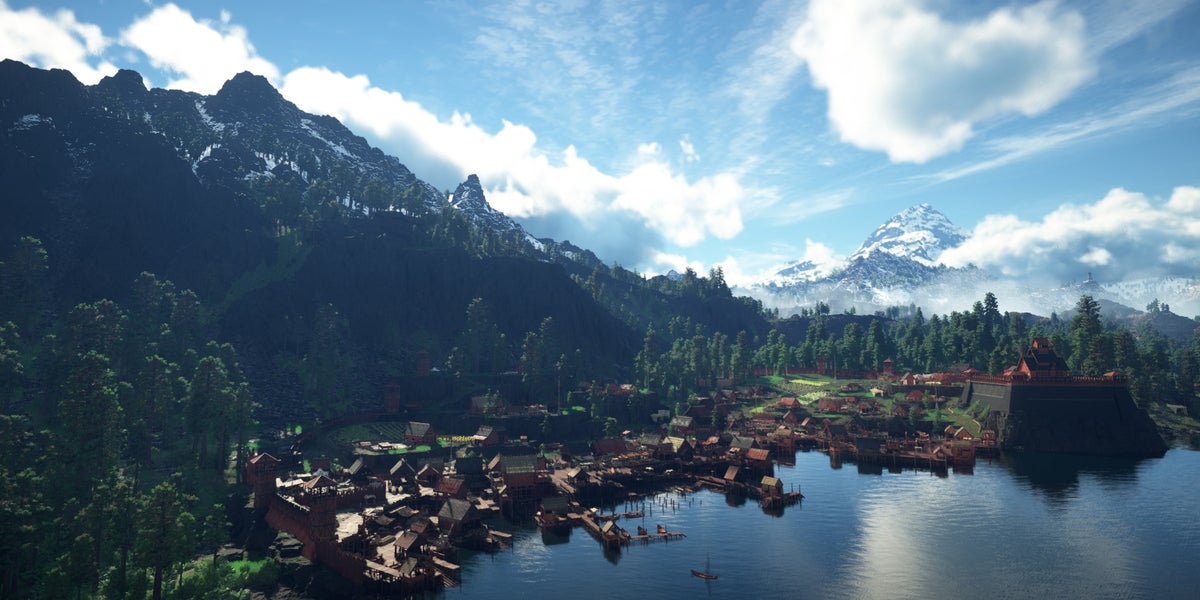
Gaming PC for New Games is no longer just a search term for players chasing higher frame rates. It is a real buying question for anyone who wants modern open-world games like Crimson Desert to feel smooth, responsive, beautiful, and ready for long sessions of exploration, combat, collecting, streaming, and content creation. When a guide points players toward a hidden Wyvern Egg, a Baby Wyvern pet, a specific region, and a progression-gated ability, it highlights something important: today’s games are not simple benchmark loops. They are huge, layered worlds that reward patience, visual clarity, fast loading, and reliable performance.
In Crimson Desert, the Wyvern Egg is found in the Three Brothers’ Cliff Wyvern Nest area in Wyvern’s Cradle, north-east of Three Brothers’ Cliff in the south-west of Dewhaven. The catch is that players need the Focused Force Palm ability, which is not available until Chapter 4, before they can break through the blocked opening and reach the egg. Once the egg is collected, it must be placed in the correct nest formation outside the cave, in the small bundle of sticks, and interacted with again once it glows to hatch the Baby Wyvern pet.
That kind of open-world detail is exactly why Canadian PC buyers should think beyond “Can my computer launch the game?” The better question is: can your system keep up when the game world gets busy, the scenery opens up, the effects stack on top of each other, and you want to stream, record, edit, or multitask at the same time?
At Groovy Computers, we build custom gaming PCs, creator PCs, and workstation systems for Canadian buyers who want performance that fits their actual use. If Crimson Desert, upcoming AAA games, ray tracing titles, streaming, video editing, graphic design, or 3D modeling are on your radar, your next PC should be planned around what you want to do next, not just what your old system barely handles today.
Why a Crimson Desert Wyvern Egg Guide Matters to PC Buyers
On the surface, a Wyvern Egg location guide is simply a gameplay tip. It tells you where to go, what ability you need, and how to hatch a pet. But underneath that, it shows the bigger direction of modern PC gaming: large landscapes, guided exploration, hidden collectibles, layered progression, cinematic environments, and constant movement between combat, traversal, map reading, and discovery.
That matters because open-world adventure games tend to expose weak PCs quickly. A system may seem fine in a menu, a small interior, or a quiet starting area, but performance can change dramatically once you enter wider landscapes, dense settlements, weather effects, large enemy encounters, high-resolution textures, and long play sessions.
Are you the kind of player who wants to quickly follow a guide, reach the right cliffside location, break through a blocked path, collect the egg, hatch the Baby Wyvern, and keep exploring without stutters or long waits? Or are you planning to record the moment, stream it, edit a guide video, and post it online? Those are very different PC requirements.
This is where a Gaming PC for New Games becomes more than a graphics card purchase. It becomes a balanced decision involving CPU speed, GPU power, RAM capacity, storage performance, cooling, case airflow, power supply quality, warranty support, and whether the system can grow with your needs.
What the Source Guide Gets Right: Progression, Location, and Timing
The core gameplay information is straightforward and useful. The Wyvern Egg is not something players should expect to grab instantly at the beginning of Crimson Desert. The guide makes it clear that you need the Focused Force Palm ability, which arrives later in the game. That means the egg is tied to progression, not just map knowledge.
That same logic applies to PC buying. Many customers start by asking, “What is the cheapest PC that can play this?” But after a few months, their needs progress. They want higher settings. They buy a 1440p monitor. They try streaming. They start editing clips. They install more games. They add mods. They open Discord, OBS, Chrome, Spotify, and a game at the same time. Suddenly, the “good enough” system becomes the blocked cave entrance, and they need more power to keep moving forward.
Before buying a new desktop, ask yourself: are you buying for the first chapter of your gaming life, or are you buying for Chapter 4 and beyond?
What Do You Want Your Next PC to Do for You?
This is the most important question in the entire buying process. Not “Which GPU is popular?” Not “What is the cheapest deal?” Not “What did someone on a forum recommend for a totally different setup?” The better question is: what do you want your next PC to do for you?
- Do you want a smooth 1080p gaming experience in open-world games without overspending?
- Do you want a 1440p Gaming PC Canada build that balances visual quality, high FPS, and long-term value?
- Do you want a 4K Gaming PC Canada system for ultra settings, cinematic visuals, and premium displays?
- Do you want ray tracing, high-resolution textures, and advanced lighting in supported games?
- Do you want to stream Crimson Desert, Fortnite, Call of Duty, GTA 6, Forza, or other upcoming titles?
- Do you want to record gameplay clips and edit them for YouTube, TikTok, or Instagram?
- Do you also use Adobe Premiere Pro, DaVinci Resolve, Photoshop, Lightroom, Blender, Unreal Engine, AutoCAD, or other creator tools?
- Do you want a system that avoids feeling outdated too soon?
- Would financing help you secure a stronger PC now instead of settling for a weaker build that may need replacing earlier?
Your answers decide the build. A budget gaming computer, a premium RTX gaming PC, a custom creator PC, an editing workstation, and a 3D modeling workstation can all look similar from the outside. Inside, they should be configured very differently.
Gaming PC for New Games: Why Open-World Titles Need Balanced Hardware
A Gaming PC for New Games should not be built around one part alone. Modern open-world games rely on the entire system. The GPU handles the heavy visual workload, but the CPU keeps the world simulation, physics, AI, asset streaming, and background game logic moving. RAM supports multitasking and large game environments. NVMe SSD storage helps with load times, texture streaming, and overall responsiveness. Cooling keeps performance consistent during long gaming sessions.
If you are exploring a dense area, following a guide to a hidden location, fighting enemies, watching particle effects, and moving across large terrain, the experience depends on balance. A powerful GPU paired with an underpowered CPU can lead to inconsistent frame pacing. A decent CPU paired with too little RAM can cause background slowdowns. A large game installed on an older slow drive can feel less responsive than it should.
So, what gaming PC do you need? The answer depends on your monitor, game settings, future plans, and whether your PC is only for gaming or also for streaming, editing, design, or professional work.
Which Performance Tier Fits You?
Choosing a PC tier should feel practical, not confusing. At Groovy Computers, we help Canadian buyers match the build to the use case. Here is a simple way to think about it.
Entry-Level and Budget Gaming PC: Are You Playing at 1080p?
A budget gaming PC is ideal if you primarily play at 1080p, enjoy popular games, want reliable everyday performance, and do not need every setting maxed out. This tier is often a smart fit for students, first-time gaming PC buyers, families, and players moving from console to PC.
Ask yourself: do you mostly want Crimson Desert and other open-world games to run smoothly at sensible settings, or are you expecting ultra settings, ray tracing, and high refresh rates? If you are realistic about settings, a value-focused system can be excellent. If you expect premium visuals, you may outgrow a budget build quickly.
This is also where buyers should be careful with “cheap” marketplace systems. A low price can hide weak power supplies, poor cooling, limited upgrade paths, older storage, mismatched parts, or no meaningful warranty support. A reliable, stress-tested, Canada-built gaming PC is often the safer long-term value.
Mid-Range 1440p Gaming PC: Do You Want the Sweet Spot?
For many Canadian gamers, 1440p is the modern sweet spot. A well-built 1440p gaming PC delivers sharper visuals than 1080p while remaining more affordable and easier to drive than 4K. If you want open-world games to look detailed, run smoothly, and stay enjoyable for years, this tier often makes the most sense.
What PC do you need for 1440p gaming? You typically want a strong modern GPU, a capable multi-core CPU, fast NVMe storage, and enough RAM to handle the game plus background apps. If you stream, record, or edit, you should plan for more headroom.
This is the tier where many customers begin asking whether they should buy a cheaper PC now or finance a better one. If the lower-cost build gets replaced sooner, the “savings” can disappear. A stronger mid-range system can be a better investment when it is configured correctly from the start.
Premium 4K and Ray Tracing Gaming PC: Are You Chasing Maximum Visual Impact?
If you want the best PC for new games at 4K, ultra settings, high refresh rates, and ray tracing where supported, you are in premium gaming PC territory. This is where GPU choice becomes more important, cooling matters more, case airflow matters more, and power supply quality becomes non-negotiable.
A Ray Tracing Gaming PC Canada build is not just about turning on one visual feature. It is about maintaining playable performance while enabling heavier lighting, shadows, reflections, high-resolution textures, and advanced rendering features. If you also want to stream or edit, the system should be planned as a gaming and creator PC rather than a simple gaming desktop.
Ask yourself: are you buying a high-end system because you want the strongest experience now, or because you want to avoid upgrading too soon? Both are valid reasons, but they may lead to different CPU, GPU, RAM, and storage choices.
Gaming and Streaming PC: Will You Share Your Wyvern Hunt Live?
Some players do not just play. They stream, record, clip, narrate, and publish. If you plan to stream Crimson Desert, create walkthroughs, record hidden pet locations, or post gameplay guides, you should think about a Gaming and Streaming PC Canada build.
Streaming adds extra workload. OBS, Streamlabs, Discord, browser tabs, chat overlays, alerts, camera feeds, audio tools, and recording software all take system resources. A game that runs smoothly by itself may feel different once you add a full streaming setup.
What PC do you need for streaming? You want a strong CPU, a GPU with excellent encoding support, enough RAM for multitasking, fast storage for recorded footage, and stable cooling. If you are streaming at 1080p now but plan to move to 1440p or 4K content later, build with that future in mind.
Creator PC: Are You Editing Guides, Shorts, and Gameplay Videos?
Crimson Desert’s Wyvern Egg guide is the kind of content that can turn into a YouTube walkthrough, TikTok clip, Instagram Reel, blog post, or livestream highlight. If you create content from your gameplay, your PC should not be judged only by FPS.
A Creator PC Canada build may need stronger CPU performance, more RAM, faster SSD storage, and a GPU that accelerates editing and effects. Adobe Premiere Pro, DaVinci Resolve, After Effects, Photoshop, and CapCut can all benefit from smart hardware choices. If you edit 4K footage, work with multiple layers, use colour grading, add effects, or export frequently, a weak PC wastes time every day.
What PC do content creators need? A creator should ask: how much footage do I store, what resolution do I edit, how many programs do I keep open, and how much is my time worth? If a faster PC saves hours every month, the right build is not just a luxury. It is a productivity tool.
3D Modeling and Workstation PC: Are You Doing More Than Gaming?
Some buyers who arrive through gaming content also work in Blender, Unreal Engine, Unity, Maya, 3ds Max, Cinema 4D, AutoCAD, Revit, SolidWorks, SketchUp, or other demanding tools. If that sounds like you, a gaming PC may be close to what you need, but not always perfectly configured.
A 3D Modeling PC Canada or custom workstation may require more RAM, a stronger CPU for simulation or CPU rendering, a high-performance GPU for viewport and GPU rendering, larger SSD capacity, and excellent thermal stability. The right system depends on whether your workload is GPU rendering, CPU rendering, CAD, animation, game development, architectural visualization, or product design.
Is a gaming PC good for Blender or Unreal Engine? Sometimes, yes. But a workstation-focused custom build can be better if your projects are complex, your deadlines matter, or your livelihood depends on reliable performance.
Why Canadian Buyers Should Think Differently About PC Timing
Canadian PC buyers face a different reality than shoppers in larger markets. Component availability, exchange rates, shipping costs, supplier pricing, GPU demand, memory pricing, storage pricing, and seasonal sale cycles can all affect final system cost in Canadian dollars. Waiting does not always guarantee a better deal.
Is it better to buy a gaming PC now or wait? The honest answer depends on your current system, the games you want to play, the software you need, and whether upcoming demand could push prices or availability in the wrong direction. If you need a PC for a major game release, school term, client work, content schedule, or business project, waiting until the last minute can limit your options.
Hardware pricing can shift quickly. GPUs are especially sensitive to demand from gamers, creators, AI workloads, 3D rendering, and new game launches. RAM and SSD pricing can also move based on supply conditions. A custom PC gives you more control because parts can be selected strategically instead of accepting whatever a generic prebuilt happens to include.
Should You Finance a Better PC Instead of Buying a Cheaper One?
This is one of the most practical questions a buyer can ask. If your budget today forces you into a system that barely meets your needs, financing may help you secure a stronger, longer-lasting build. Groovy Computers offers financing options up to 4 years, which can make a custom gaming PC, creator PC, video editing PC, or workstation PC more accessible without requiring the entire purchase upfront.
Should you finance a gaming PC? Financing can make sense if the stronger system helps you avoid an early replacement, gives you better performance for the games and software you actually use, supports your school or work needs, or helps you buy before pricing changes. It may not make sense if you are buying more power than you will ever use. The goal is not to overspend. The goal is to match the system to your real workload and timeline.
Ask yourself: would monthly payments help you move from a short-term compromise to a PC that can handle 1440p gaming, streaming, editing, and future releases with confidence? If yes, it is worth comparing your options carefully.
Custom PC vs Generic Prebuilt: Why Build Quality Matters
Custom PC vs prebuilt PC Canada is a common comparison, and the answer depends on what you are comparing. A well-built preconfigured system from a trusted builder can be excellent. A random mass-market tower with vague specs, weak cooling, and limited upgrade options can be frustrating. The difference is not only the label. It is the part matching, testing, thermal design, cable management, warranty support, and honesty about what the system is designed to do.
At Groovy Computers, custom builds are planned around the customer’s actual goals. A gaming-only system is not the same as a streaming PC. A streaming PC is not the same as a 4K video editing workstation. A graphic design desktop is not the same as a 3D rendering machine. A budget 1080p system should not be sold as if it were a premium 4K ray tracing powerhouse.
Why does testing matter in a gaming PC? Because performance claims mean little if the system overheats, crashes, throttles, or becomes unstable under real workload. Stress testing helps verify that the PC is ready for sustained use. A 1-year warranty adds confidence for Canadian buyers who want support after the sale, not just a box on delivery day.
What Games, Software, and Workloads Should Decide Your Build?
Before you buy, list what you actually use. This sounds simple, but it prevents expensive mistakes. The right PC for Crimson Desert and other open-world games may also need to handle your work, school, or creative software.
- For open-world gaming: prioritize GPU strength, CPU consistency, RAM capacity, fast NVMe storage, and cooling.
- For esports gaming: prioritize high FPS, low latency, strong CPU performance, and a monitor-matched GPU.
- For 1440p gaming: choose a balanced mid-range to upper-mid-range system with enough GPU power for modern titles.
- For 4K gaming: prioritize premium GPU performance, strong cooling, and enough system headroom for demanding settings.
- For streaming: consider GPU encoding, CPU multitasking, 32GB or more RAM where appropriate, and extra storage.
- For video editing: consider CPU cores, GPU acceleration, RAM, fast SSDs, and footage storage needs.
- For photo editing: prioritize CPU responsiveness, RAM, fast SSDs, and monitor support for colour workflows.
- For graphic design: focus on smooth Adobe Creative Cloud performance, multitasking, memory, and display support.
- For 3D modeling and rendering: match CPU, GPU, VRAM, RAM, and storage to the specific software and project size.
- For workstation use: prioritize reliability, sustained performance, memory capacity, and professional workflow stability.
What software do you open every day? What games are you excited to play this year? Do you want to keep this PC for several years without feeling boxed in? Those answers are more useful than any one-size-fits-all spec list.
How Much RAM, Storage, and GPU Power Do You Really Need?
Many buyers focus only on the graphics card, but modern systems need balance. RAM helps with multitasking, large games, editing timelines, browser tabs, and creative apps. Storage affects load times, file transfers, game libraries, project files, and overall responsiveness. GPU power affects resolution, frame rate, visual settings, ray tracing, rendering, encoding, and acceleration in creative software.
For a modern gaming PC, 16GB of RAM may still be workable for some budget-focused gaming builds, but many buyers are better served by 32GB if they want longevity, multitasking, streaming, or content creation. For video editing, 3D rendering, heavy Photoshop work, large Lightroom catalogues, or workstation tasks, 64GB or more can be the smarter choice depending on workload.
For storage, a fast NVMe SSD should be considered essential for a modern gaming and creator PC. Game install sizes continue to grow, and creators can fill drives quickly with footage, exports, project files, caches, and asset libraries. If your current system is always running out of space, your new build should solve that problem from day one.
For GPU choice, start with your monitor and workload. 1080p, 1440p, 4K, ray tracing, high refresh gaming, streaming, editing, and rendering all push the GPU differently. If you are unsure, Groovy Computers can help you avoid overbuying or underbuying.
Buying Before a Major Game Release, Sale Period, or Price Spike: What Should You Consider?
Many people wait until a major game arrives before upgrading. The problem is that demand often rises around big releases, holiday sale periods, back-to-school windows, and hardware transition cycles. If everyone starts shopping at the same time, the best-value parts can become harder to secure.
Are you buying before a major game release? Are you preparing for a new content channel, a software upgrade, a college program, a freelance workload, or a business project? If the PC is tied to a deadline, it is usually better to plan early.
Planning early gives you more time to choose the right tier, compare financing, discuss your needs, confirm availability, and avoid rushed decisions. A rushed PC purchase often leads to compromises: not enough storage, not enough RAM, weak cooling, limited upgrade path, or a GPU that does not match the monitor.
Canadian Custom PC Builders: Why Local Trust and Support Matter
Groovy Computers is a Canadian custom PC company serving customers who want gaming computers, creator desktops, and workstation systems built with care. For buyers in Nova Scotia, Trenton, New Glasgow, Halifax, Atlantic Canada, and across Canada through online ordering, working with a Canadian builder can make the buying process clearer and more personal.
When you buy a custom PC, you are not only buying parts. You are buying planning, assembly, testing, support, and confidence. You are buying a system designed around your goals instead of a generic configuration that may not fit your workload.
Do you want a budget gaming computer for 1080p? A premium RTX gaming PC for 4K? A custom creator PC for YouTube and Adobe Creative Cloud? A video editing workstation for client work? A 3D modeling workstation for Blender, Unreal Engine, or CAD? Groovy Computers can help you narrow the options and choose the system that makes sense.
Questions to Ask Before You Buy or Finance a Custom PC
Before you make a decision, use these questions to guide your build:
- What games do I want to play most over the next two to three years?
- Do I want 1080p, 1440p, or 4K gaming performance?
- Do I care about ray tracing, ultra settings, or high refresh rate gameplay?
- Will I stream, record, or edit gameplay?
- Do I use Premiere Pro, DaVinci Resolve, Photoshop, Lightroom, Illustrator, Blender, Unreal Engine, AutoCAD, or other demanding software?
- How much storage do I need for games, footage, project files, and backups?
- Do I want a system that is easy to upgrade later?
- Am I buying before a major game release, school term, work deadline, sale period, or possible price increase?
- Would financing up to 4 years help me choose a stronger system that lasts longer?
- Do I want help from a Canadian PC builder instead of guessing alone?
If you cannot answer every question yet, that is normal. The point of a custom build is that you do not have to guess your way through the process.
Gaming PC for New Games: The Smart Buyer’s Conclusion
A Gaming PC for New Games should be ready for more than a title screen. Crimson Desert’s Wyvern Egg hunt is a small example of what modern games ask from players: exploration, attention to detail, progression, beautiful environments, and long sessions in complex worlds. Your PC should support that experience instead of holding it back.
If you are only playing at 1080p, a value-focused gaming desktop may be the right fit. If you want 1440p performance, a balanced mid-range build may be the smartest long-term choice. If you want 4K, ray tracing, streaming, editing, or workstation performance, you should plan a stronger system from the beginning. If you want to avoid upgrading too soon, financing may help you secure the right PC now rather than settling for a short-term compromise.
Ready to find out which build actually fits your games, software, budget, and upgrade timeline? Visit GroovyComputers.ca to explore custom gaming PCs, creator PCs, workstation options, and financing choices from a Canadian custom PC builder that understands performance, reliability, and real customer needs.
#GamingPCForNewGames #GamingPCCanada #CustomGamingPCCanada #CrimsonDesertPC #1440pGamingPCCanada #4KGamingPCCanada #CreatorPCCanada #GamingPCFinancingCanada #GroovyComputers
Groovy Computers | All Rights Reserved


Leave a comment
This site is protected by hCaptcha and the hCaptcha Privacy Policy and Terms of Service apply.