




















Gaming PC for GTA 6: Why Miami’s “Welcome to Vice City” Moment Matters for Canadian Buyers
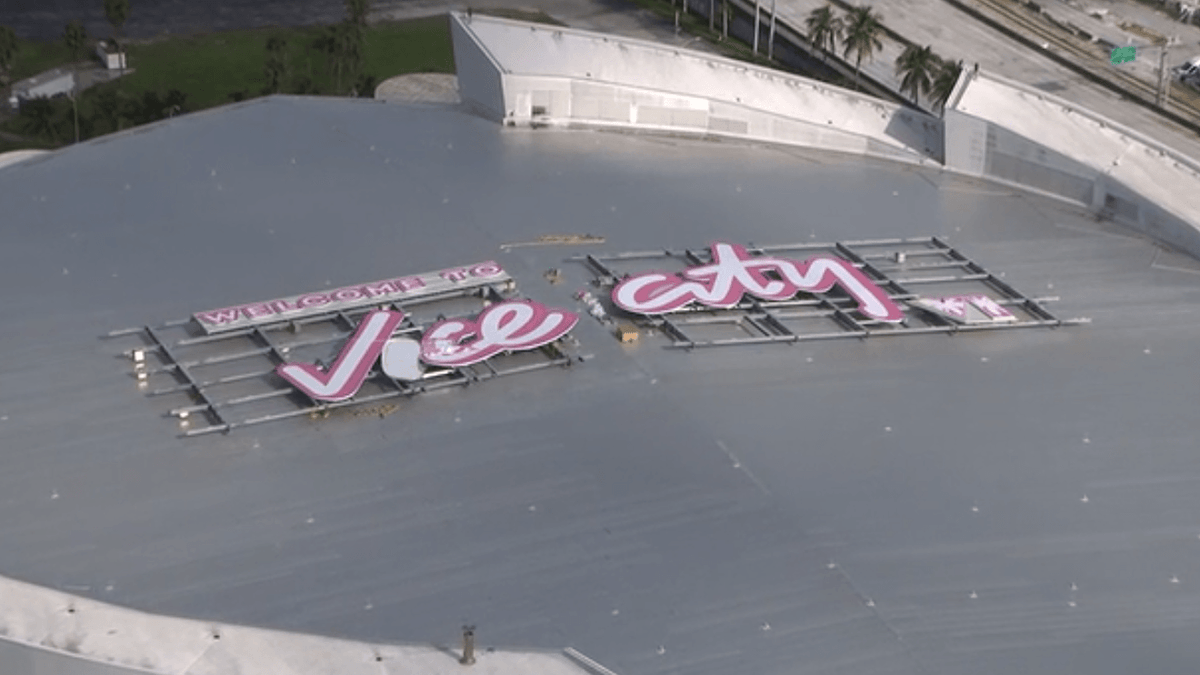
The giant “Welcome to Vice City” sign placed on top of Miami’s Kaseya Center is more than a clever bit of city marketing. It is a visible reminder that hype for Grand Theft Auto VI is building fast, and that matters to anyone shopping for a gaming PC for GTA 6. When a major open-world release starts dominating headlines, interest in stronger GPUs, faster CPUs, better cooling, and more future-ready systems usually follows. For Canadian buyers, that means this is the right time to think carefully about what your next PC needs to do before demand, pricing pressure, and last-minute upgrade panic make the decision harder.
The original news story focused on Miami embracing its connection to the fictional Vice City ahead of the upcoming GTA VI launch. That cultural crossover makes sense. Vice City has always drawn heavily from Miami’s look, energy, colour, and atmosphere. But for PC shoppers in Canada, the more practical takeaway is this: blockbuster games create real buying waves. The closer a huge release gets, the more people begin asking the same question: Can my current system actually handle what’s coming next?
Why does a “Welcome to Vice City” sign matter if you are shopping for a gaming PC in Canada?
Because major game launches do not stay local. A U.S. skyline stunt may grab headlines, but the buying behaviour it triggers spreads across North America. Canadian gamers see the same trailers, the same social media clips, the same ray tracing showcases, and the same performance discussions. That means a title like GTA VI can influence buying decisions in Nova Scotia, Ontario, Alberta, British Columbia, and everywhere in between.
If you have been putting off an upgrade, this kind of headline can be the push that makes your decision feel more urgent. Are you hoping to play at 1080p and solid settings? Are you aiming for 1440p with high frame rates? Do you want 4K visual quality, heavier effects, and enough overhead to handle the next few years of demanding releases too? Those answers matter more than the hype itself.
At Groovy Computers, the goal is not to sell you the biggest machine just because a major game is trending. The goal is to help you choose the right custom system for how you actually play, create, stream, and work.
What the source story gets right about GTA VI demand
The source article highlights a simple reality: anticipation for GTA VI is massive. Miami and Rockstar’s themed partnership reflects how large the cultural moment has become. When anticipation reaches that level, hardware demand often rises in parallel. People who ignored stuttering, low storage space, weak cooling, or aging graphics cards suddenly start thinking about replacing their machine.
That matters because open-world AAA games are often used as upgrade triggers. Players do not just want to launch the game. They want a better experience: faster loading, smoother frame pacing, stronger settings, more visual effects, cleaner streaming performance, and fewer compromises in busy city scenes. In other words, they want the version of the experience that actually feels next-generation.
If that sounds like you, ask yourself something simple: do you want your next PC to barely meet the moment, or stay ahead of it?
What do you want your next PC to do for you?
This is the most important question in the whole buying process, and it applies whether you are a gamer, a streamer, or a creator.
Do you want a system that is mainly for GTA VI, Call of Duty, Fortnite, racing games, and other modern releases? Do you also want to stream to Twitch or YouTube? Are you editing clips for TikTok, YouTube Shorts, or long-form videos after your gaming sessions? Do you need Photoshop, Lightroom, Illustrator, Premiere Pro, DaVinci Resolve, Blender, or Unreal Engine performance on the same machine?
Many buyers start by searching for one thing, such as a gaming desktop, but what they really need is a multi-purpose custom PC. A modern buyer might game at night, edit content on weekends, stream twice a week, and handle school or work tasks every day. That is why choosing a system based only on the cheapest sticker price often leads to regret.
If your next PC needs to do more than one job, the smarter move is to buy for your real workload now instead of upgrading too soon.
What kind of gaming PC for GTA 6 makes sense?
No matter how exciting the game looks, not every buyer needs the same class of machine. The right answer depends on your display resolution, target frame rate, graphics expectations, and whether you want the system to remain comfortable for future AAA games.
Entry-level and value-focused buyers
If you are looking for a Budget Gaming PC Canada shoppers can still feel good about, your goal should be sensible 1080p performance with enough modern hardware balance to avoid instant obsolescence. This is often the right path for first-time buyers, students, or anyone asking, how much should I spend on a gaming PC?
A value-oriented build makes sense if you mainly want to enjoy the game, keep costs under control, and avoid overpaying for premium-tier hardware you will not fully use. But ask yourself: if you buy too low today, will you end up replacing the GPU, adding RAM, and upgrading storage much sooner than expected?
Mid-range buyers who want the sweet spot
For many people, the real sweet spot is 1440p. This is where a lot of Canadian buyers find the best blend of image quality, performance, longevity, and value. If you are searching for a 1440p Gaming PC Canada gamers can use across multiple major releases, this tier is often the smartest place to spend.
This is also the range where buyers start asking better questions. Do you want high settings with smoother frame rates? Do you want ray tracing options without sacrificing too much responsiveness? Do you want enough CPU headroom for Discord, browser tabs, recording software, mods, and background apps? If yes, mid-range to upper-mid-range builds often deliver the best long-term satisfaction.
High-end buyers chasing immersion
If your plan is 4K gaming, heavier ray tracing, premium visual settings, or a more “buy once, enjoy longer” approach, then a 4K Gaming PC Canada customers choose should be built with a much stronger GPU and a properly matched processor, power supply, cooling setup, and storage configuration.
This is where buying carefully matters most. A premium system should not just look powerful on paper. It should be balanced, tested, thermally sound, and built for stability. That is especially true if you want to stream, capture footage, or edit content on the same machine.
Is GTA hype only about gaming, or does it affect creators too?
It absolutely affects creators too. Major game releases create waves of content demand. That means streamers, YouTubers, editors, thumbnail designers, short-form video creators, and modding communities all start producing more. Suddenly the conversation is no longer just about a gaming tower. It becomes a conversation about a Content Creation PC Canada buyers can rely on for gaming, capture, editing, and export speed.
If you plan to record gameplay, cut highlight reels, design channel art, and upload regularly, you should be asking more than “can it run the game?” You should be asking:
Can this system game and stream smoothly at the same time?
Do I need more RAM for editing and multitasking?
Will my storage fill up immediately with high-bitrate footage?
Do I want faster export times in Premiere Pro or DaVinci Resolve?
Will I regret buying a gaming-only system when I really needed a creator-ready build?
What if you want to stream GTA VI?
A lot of buyers looking for a Streaming PC Canada solution are not full-time streamers. They are gamers who want the option to stream cleanly, clip gameplay, or create online content without their machine feeling overloaded. That changes the build logic.
If you are gaming and streaming from one PC, CPU efficiency, GPU encoding support, RAM capacity, cooling, and storage all become more important. A build that is fine for gameplay alone may feel much tighter once OBS, browser sources, alerts, chat tools, and recording are all in the mix.
So ask yourself: are you only playing, or are you planning to stream to Twitch, YouTube, or Kick as well? Do you want smooth 1080p streaming now, or enough room to move into higher-quality content later? Do you need a Gaming and Streaming PC Canada buyers can grow into instead of outgrow?
What if your next PC also needs to handle editing, design, or creator software?
That is where many shoppers make a costly mistake. They assume any gaming build is automatically ideal for editing, photo work, or design. Sometimes that is partly true, but not always. A smart Creator PC Canada build should reflect the software you actually use.
For video editing
If you are cutting gameplay, reaction videos, social clips, or 4K footage, a Video Editing PC Canada users trust should prioritize strong CPU performance, capable GPU acceleration, fast SSD storage, and enough RAM for smooth timelines. Ask yourself: are you editing basic 1080p clips, or larger 4K projects with effects, colour work, and layered audio?
If your software includes Adobe Premiere Pro, After Effects, or DaVinci Resolve, your system should be chosen around that reality. A machine that feels “fine” for casual gaming can become frustrating the moment rendering, background caching, and exports enter the picture.
For photo editing and graphic design
If your workflow is more Photoshop, Lightroom, Illustrator, Canva, or InDesign than raw gaming, then your ideal machine may be a better-balanced design or photo workstation rather than a pure FPS-first build. A proper Photo Editing PC Canada or Graphic Design PC Canada configuration should focus on responsiveness, RAM, SSD speed, display pairing, and long-session reliability.
Are you handling RAW files, AI tools, heavy layered documents, or large batch exports? Do you use multiple monitors? Do you want one desktop that can game after hours but still feel professional during the workday? Those are exactly the questions a custom builder should help you answer.
For 3D modeling and rendering
If you are also working in Blender, Unreal Engine, Unity, Maya, 3ds Max, or other demanding applications, then you may be much closer to workstation territory. A strong gaming GPU can be helpful, but a true 3D Modeling PC Canada or Workstation PC Canada build needs more careful part matching, stronger thermal planning, and a more serious upgrade strategy.
What PC do you need for Blender? What PC do you need for Unreal Engine? If those questions are part of your buying journey, it is better to say that up front than to buy a gaming system that becomes a bottleneck under professional workloads.
Why Canadian buyers should think differently about timing
In Canada, waiting can have a different kind of cost. Hardware pricing can shift because of exchange rates, supply constraints, freight costs, inventory swings, and demand surges around major releases and sale periods. That does not mean every week is a crisis, but it does mean buyers should think strategically.
If a major title pushes more people toward upgrading, stronger GPUs and complete systems can come under extra pressure. Add in creator demand, seasonal shopping, and normal market volatility, and the “I’ll just wait a bit longer” approach can become more expensive than expected.
So ask yourself: are you buying before a big launch, before a software upgrade, before a holiday rush, or before another replacement cycle raises the cost of waiting? If your current system is already showing its age, delaying too long can leave you shopping in a less flexible market.
Should you buy now or wait?
This is one of the most common customer questions, and the honest answer depends on your situation.
If your current PC still handles your games and workloads well, and you are not expecting much from upcoming releases, waiting may be reasonable. But if you are already lowering settings, managing around stutter, juggling storage space, skipping ray tracing, or avoiding content creation because your hardware struggles, then waiting may simply prolong frustration.
Here is a better way to think about it: are you trying to time the market perfectly, or are you trying to secure the right system before your current one becomes the obstacle? For many buyers, the second question matters more.
Which performance tier fits you best?
If you are unsure where you fall, this breakdown can help.
Tier 1: Practical 1080p buyer
You mainly want reliable modern gaming without overspending.
You play a mix of esports and newer titles at sensible settings.
You want good value and a clear upgrade path.
You may be a first-time desktop buyer or student.
If that sounds like you, a thoughtfully built value gaming desktop may be the right fit. But it still needs quality parts, airflow, and enough balance to avoid becoming outdated too quickly.
Tier 2: 1440p performance buyer
You want better visual quality and stronger long-term performance.
You play AAA games and want higher settings with smoother results.
You may stream casually, record gameplay, or multitask heavily.
You are trying to avoid upgrading again too soon.
This is often the best all-around tier for players who want a serious but sensible custom gaming PC.
Tier 3: Premium 4K or creator-focused buyer
You want maximum immersion, stronger ray tracing, and more overhead.
You use your system for gaming plus editing, streaming, or rendering.
You value long-term performance and are willing to invest properly.
You do not want compromise to define your next few years of use.
This tier makes sense for buyers who know they will actually use the extra horsepower and want their system to stay relevant longer.
Is financing a stronger PC worth considering?
For many Canadians, yes. If you are deciding between a weaker machine you may outgrow quickly and a more capable system that better matches your real needs, financing can be the tool that changes the decision. Instead of settling immediately and paying again later through upgrades or replacement, some buyers prefer to secure a more suitable build upfront.
That question becomes especially relevant when new game launches, creator workloads, and hardware volatility all point toward stronger system requirements over time. Should you finance a better PC instead of buying a cheaper one? If the stronger system will save you from replacing major components too soon, many buyers decide the answer is yes.
Groovy Computers offers options that can help customers spread the cost over time, including financing up to 4 years where applicable. For shoppers who want a custom gaming PC, creator workstation, or multi-purpose system without making the wrong compromise today, that flexibility can matter.
Why custom PC builds matter more when game demand rises
When demand spikes, many buyers rush toward whatever is available fastest. That often leads to generic systems with weak part balance, limited upgrade planning, underwhelming cooling, or no real thought given to the buyer’s actual use case. That is where custom builds stand apart.
A proper Custom Gaming PC Canada buyer should receive more than a list of brand names. They should get a machine designed around resolution targets, software use, airflow needs, power delivery, storage needs, and future upgrade priorities. They should also get confidence that the system has been tested and built to work as a complete package.
That matters even more if your next system needs to serve multiple roles: gaming, streaming, editing, design, productivity, or workstation tasks. A random one-size-fits-all box is rarely the best answer.
Why Groovy Computers makes sense for Canadian buyers
Groovy Computers is positioned for the buyer who wants more than guesswork. If you are in Nova Scotia, Atlantic Canada, or ordering from elsewhere in the country, the value is not just in getting a powerful machine. It is in getting a custom PC built for your actual goals.
Need a gaming system built around upcoming AAA demand? Need a creator machine that can handle Premiere Pro, Photoshop, and gaming in one setup? Need a workstation that leans toward Blender, Unreal Engine, or productivity-heavy multitasking? That is where a Canadian custom builder can make the buying process much easier.
Groovy Computers also backs builds with rigorous testing and a 1-year warranty, which matters when you are investing in performance and reliability. In a market where some shoppers are tempted by unknown marketplace systems or poorly matched mass-produced desktops, trust matters.
What questions should you ask before choosing your next PC?
What games do you want to play over the next two to three years, not just this month?
Are you targeting 1080p, 1440p, or 4K?
Do you care about ray tracing, ultra settings, or just smooth gameplay?
Will you stream, record, or edit content on the same system?
Do you use Premiere Pro, DaVinci Resolve, Photoshop, Lightroom, Illustrator, Blender, or Unreal Engine?
Do you need more RAM, more SSD space, quieter cooling, or stronger multitasking?
Are you trying to avoid another upgrade in a year?
Would financing help you buy the right build now instead of settling for too little?
Do you want help selecting a build that actually matches your use case?
So what should you do before GTA VI gets even closer?
If the Miami Vice City headline got you thinking about your own setup, that is the right instinct. You do not need to panic-buy, but you also do not want to wait until every gamer, streamer, and creator starts asking for the same hardware at once.
If you are wondering what gaming PC you need, what PC do you need for 1440p gaming, whether a gaming PC is good for content creation, or whether now is a good time to secure a stronger build, the smartest next step is to get guided by a builder that understands Canadian buyers. Visit GroovyComputers.ca if you want help choosing a custom gaming PC, creator PC, or workstation that fits your budget, workload, and long-term goals.
Final thoughts: the real lesson behind Miami’s “Welcome to Vice City” sign
The sign itself is a headline. The deeper story is demand. Big game releases change how people think about performance, and they often expose whether an older system still fits the way its owner wants to play. If GTA VI has you reconsidering your setup, that is not just hype talking. It may be a timely sign that your next upgrade should be planned properly.
A gaming PC for GTA 6 should not be chosen in isolation. It should fit your gaming resolution, your content goals, your software needs, your budget comfort, and your timeline. For Canadian buyers who want a better path than generic boxes and rushed decisions, Groovy Computers offers the kind of custom-build guidance that makes the purchase feel smarter from day one.
#GamingPCForGTA6 #GamingPCCanada #CustomGamingPCCanada #GamingPCForNewGames #1440pGamingPCCanada #4KGamingPCCanada #StreamingPCCanada #CreatorPCCanada #VideoEditingPCCanada #WorkstationPCCanada #CanadianCustomPCBuilders #NovaScotiaBusiness
Groovy Computers | All Rights Reserved


Leave a comment
This site is protected by hCaptcha and the hCaptcha Privacy Policy and Terms of Service apply.