






















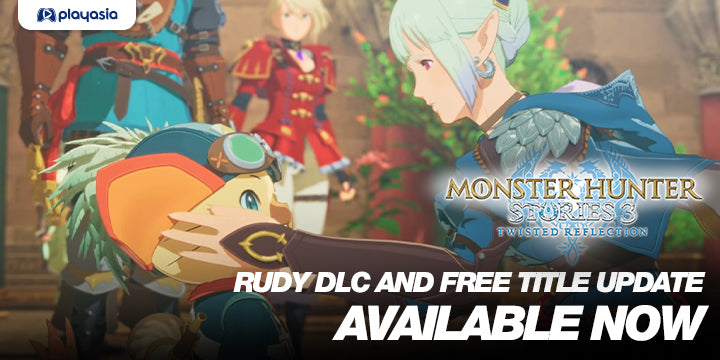
Monster Hunter Stories 3 Rudy DLC Available Now: What Kind of PC Do You Need for This RPG, Streaming, and Content Creation?
The arrival of Monster Hunter Stories 3 Rudy DLC Available Now is more than a simple content update. It is the kind of release that pulls players back into a living game, adds fresh story value, and reminds PC buyers across Canada why it matters to choose a system that is ready not just for launch day, but for the updates, endgame content, recording, streaming, and multitasking that follow. For Groovy Computers, this is exactly where a smart custom build becomes more important than a generic one-size-fits-all desktop.
The source update highlights two major developments: a paid Rudy side story expansion and a free title update that adds tougher endgame encounters, including Royal Monsters, Invasive Monsters, and Calamitous Elder Dragons. That matters because returning players often do not just jump back in to casually play. They come back to grind, optimize, capture footage, test settings, stream progression, chat on Discord, and keep browsers, guides, launchers, and editing apps open in the background. So the real question becomes: is your current PC truly ready for how you actually play now?
If you are a Canadian gamer looking at this update and thinking about a better setup, you may not just be shopping for a game-ready desktop. You may be shopping for smoother 1440p gameplay, stronger multitasking, cleaner streaming performance, faster exports for YouTube clips, or a more future-proof system that will not feel outdated the next time a major RPG, action title, or graphics-heavy release lands.
Why does Monster Hunter Stories 3 Rudy DLC Available Now matter for PC buyers in Canada?
On the surface, this update is about new content. Underneath, it is about renewed hardware demand. Whenever a game receives meaningful DLC and free endgame support, players return in waves. Some come back because they love the story. Others come back to min-max, test team builds, or revisit the game at higher settings. Many also start asking a familiar question: Can my PC still run this the way I want?
That question gets even more important in Canada, where buyers often have to think beyond the sticker price alone. Hardware pricing can shift. GPU demand can rise. Better components can become harder to find in the exact combination you want. If your current system is already borderline for modern gaming, streaming, or creator work, waiting too long can turn a simple upgrade decision into a more expensive replacement decision.
Are you planning to play at 1080p and simply want stable, smooth performance? Are you trying to move into 1440p for sharper visuals and better long-term value? Do you want ray tracing in newer games beyond this one? Or are you also the kind of player who captures gameplay for TikTok, YouTube, or Twitch and needs a system that can game and create without choking under load?
What the update tells us about modern gaming habits
The source article makes it clear that this is not just a cosmetic add-on. The Rudy DLC expands the narrative around Rudy and ties that story into the broader Monster Hunter Stories lineage through Navirou. The free title update also raises the challenge ceiling for late-game players. In practical terms, that means more time in-game, more interest from fans, and more reason for players to return with higher expectations for performance, responsiveness, and visual quality.
That is where many buyers underestimate their needs. A lot of gamers still shop as if they only need enough power to launch the game. But modern play habits are bigger than that. You may be running game overlays, voice chat, browsers, music, OBS, clip capture tools, and maybe even editing software later that same evening. So ask yourself: do you need a PC that only runs games, or a PC that supports your full gaming lifestyle?
What do you want your next PC to do for you?
This is the question more buyers should ask before comparing model names and prices. Do you want your next PC to:
- Play RPGs and new releases smoothly at 1080p?
- Handle 1440p gaming with better visual headroom for future titles?
- Support streaming while you game?
- Edit clips, trailers, or long-form gameplay videos faster?
- Run Photoshop, Lightroom, Illustrator, or Adobe Creative Cloud after gaming sessions?
- Handle Blender, Unreal Engine, or 3D modeling if your interests go beyond gaming?
- Last longer so you avoid upgrading too soon?
If you are not sure yet, that is exactly why custom PC buying guidance matters. A smart system should match your real use case, not just your current game library.
What PC do you need for Monster Hunter Stories 3 and similar RPG releases?
For this kind of game, many buyers can break their decision into three practical tiers. The key is not guessing what sounds impressive, but choosing what fits your display, your play style, and your next 2 to 4 years of use.
Entry-level gaming tier: good for 1080p players
If your goal is straightforward RPG gaming at 1080p, an entry or lower-mid tier custom gaming desktop can still make sense. This type of build is ideal if you mainly want smooth gameplay, quick load times, decent multitasking, and room for normal everyday use.
This tier is often right for buyers asking, What gaming PC do I need if I mostly play story games, indie games, and the occasional AAA title at 1080p? It is also a strong fit for students, first-time desktop buyers, and budget-conscious players who want something better than a weak off-the-shelf PC.
But there is an important caution here. If you are already thinking about streaming, modding future titles, or moving to a higher refresh monitor, a too-basic build can become limiting faster than expected.
Mid-range gaming tier: the best fit for many Canadian buyers
For a large percentage of players, the sweet spot is a balanced 1440p-capable system. This is where a Gaming PC Canada buyer starts getting stronger value over time. You gain better graphics flexibility, stronger overall responsiveness, more room for multitasking, and a more comfortable path into upcoming game releases.
If you are asking, What PC do I need for 1440p gaming, better frame consistency, and some content creation on the side? this is usually the tier to watch. It is especially useful for players who bounce between RPGs, action games, co-op games, and occasional recording or streaming.
This is also where many people begin to appreciate the benefit of a properly matched CPU, GPU, RAM, and SSD combination instead of simply chasing one flashy part.
Higher-end tier: ideal for premium gaming and creator overlap
If you want more than just smooth gameplay, a premium build makes sense. This tier is for buyers who want stronger 1440p or 4K potential, higher settings in demanding titles, cleaner performance while running OBS, faster editing exports, and a longer relevance window before the next upgrade cycle.
Are you the kind of player who says, I want one system for gaming, streaming, editing, and everything else? If so, stepping above a basic gaming desktop may actually save you money and frustration over time. A stronger system is often the smarter buy when your workflow is mixed and your expectations are rising.
Are you only gaming, or are you also streaming and recording?
This is one of the most important buying questions connected to update-driven games like this. A lot of returning players decide they want to share their runs, create build guides, record boss fights, or stream challenge content. The moment that happens, your hardware needs shift.
A standard gaming-focused build may be enough for solo play, but once you add live encoding, alerts, browser tabs, chat apps, and recording, you need more breathing room. That is where a Streaming PC Canada or gaming-and-streaming build becomes the better category.
Do you want to stream at 1080p while gaming comfortably? Do you want strong frame pacing while OBS is open? Do you want enough overhead for dual-monitor use, Discord, music, and your capture workflow? If the answer is yes, your PC should be chosen for your full load, not just the game itself.
Do you also create content after you play?
Many gamers are also creators now, even if they do not think of themselves that way. If you clip gameplay, edit thumbnails, cut shorts, make guides, or upload reaction content, you have moved beyond pure gaming. At that point, a system designed only around game frame rates may not be your best value.
If you use Premiere Pro, DaVinci Resolve, After Effects, Photoshop, Canva, Illustrator, or other tools, then a Creator PC Canada or content-focused custom build deserves serious consideration. Why? Because creator workloads reward the same things many game buyers ignore: more RAM, stronger CPUs, fast SSD storage, balanced cooling, and a build tuned for sustained load rather than just benchmark bursts.
Are you asking yourself, Is a gaming PC good for video editing or content creation? Sometimes yes, but only if it is built with the right balance. A poorly matched “gaming” desktop can look powerful on paper yet feel slow in timeline work, exports, large project handling, or multitasking.
What if you need a PC for gaming and Adobe Creative Cloud?
This is one of the most common cross-category use cases today. Someone starts by looking for a gaming system because of a title like Monster Hunter Stories 3, then realizes they also need it for photo editing, class work, design, video, or freelance tasks. That buyer should not settle for a stripped-down build that is only comfortable in one lane.
If you need a machine that can play modern games and also handle Photoshop, Illustrator, Lightroom, Premiere Pro, or social media design work, then your ideal system is not really “just” a gaming desktop. It is a mixed-use custom build with enough CPU strength, memory capacity, and storage speed to keep your daily workflow smooth.
So ask yourself: Will this PC only be used for fun, or will it also help you make money, finish projects, and save time? If the answer includes school, freelance work, editing, or client deliverables, then buying too low may cost you more in lost time than you save upfront.
How do you choose the right performance tier without overspending?
The best buying decision is rarely the cheapest option or the most expensive one. It is the build that lines up with how you actually use your PC. Here is a practical way to think about it:
- Choose your main display target. Are you on 1080p, moving to 1440p, or planning for 4K later?
- Think beyond one game. Will you also play other new releases with heavier graphics demands?
- Count your multitasking load. Are you running Discord, OBS, browsers, launchers, and apps while gaming?
- Add creator tasks honestly. Do you edit videos, process photos, design assets, or render 3D work?
- Consider upgrade pain. Would you rather buy once properly than replace sooner than expected?
If you are wondering, How much should I spend on a gaming PC? the better question may be: How much performance headroom will save me from replacing this too soon?
Why Canadian buyers should think about timing now
Game updates like this often seem unrelated to hardware buying at first, but they are part of a larger pattern. As more major games, DLC cycles, patches, and creator tools demand stronger hardware, the market does not get calmer. It gets more competitive. Buyers who wait until their current system is failing often end up shopping under pressure.
That is not ideal when GPU availability, memory pricing, SSD costs, and overall component demand can shift. Even if a part category does not spike overnight, replacement cost risk is still real. A stronger build today can be easier to justify than a panic purchase later.
Are you buying before a busy fall release cycle? Before a monitor upgrade? Before school starts? Before a new creator workflow? Before your current PC forces the issue? These are real decision points, and they matter.
Should you buy now or wait?
This is one of the most searched questions in the custom PC market, and the answer depends on your situation. If your current system already struggles, if you know you want more than basic 1080p, or if you are stepping into streaming or editing soon, waiting may not save you much. In many cases, it simply delays the time you spend enjoying better performance.
If you are asking, Is it better to buy a gaming PC now or wait? consider what waiting costs you in the meantime. Lower settings. Slower exports. Choppy streams. Limited multitasking. Frustration during major game launches. Delayed projects. More compromise every week.
For many buyers, the smarter move is not waiting for a theoretical perfect moment. It is choosing a balanced custom system now, while selecting a performance tier with enough headroom for your next few years of use.
Could financing help you secure a stronger PC before prices rise?
For some customers, the biggest mistake is buying too weak because they are trying to stay inside a narrow upfront number. That can lead to a shorter lifespan, poorer experience, and an earlier second purchase. This is where financing can make strategic sense.
If spreading the cost helps you step from an entry-level build into a much more capable mid-range or premium system, that may be the better long-term value. Instead of settling for the minimum, you can choose a build that better fits your gaming, streaming, editing, or workstation needs now. Groovy Computers offers financing options that can help qualified buyers secure the system they actually need, including terms up to 4 years where applicable.
Ask yourself honestly: Should I finance a better PC instead of buying a cheaper one that I outgrow fast? If your answer is yes, that does not mean overspending. It means buying with a longer view.
What if your needs go beyond gaming into editing, design, or 3D work?
Not every reader coming in through a game article is only a gamer. Many custom PC buyers are hybrid users. They game at night and work by day. They play RPGs, then open Premiere Pro. They hunt monsters, then jump into Blender. They stream, then edit thumbnails, logos, or social media content.
That is why Groovy Computers does not stop at gaming desktops. If your actual workload includes any of the following, your category may be different:
- Video Editing PC Canada needs if you edit 1080p or 4K footage in Premiere Pro or DaVinci Resolve
- Photo Editing PC Canada needs if you work in Photoshop or Lightroom with large RAW files
- Graphic Design PC Canada needs if you use Illustrator, InDesign, Canva, or Adobe Creative Cloud all day
- 3D Modeling PC Canada needs if you use Blender, Unreal Engine, Maya, 3ds Max, Revit, or similar tools
- Workstation PC Canada needs if your system supports paid client work, rendering, multitasking, and productivity at scale
Would a basic gaming PC run some of these applications? Yes. But if your computer is a tool, not just a toy, then reliability, thermal performance, memory capacity, and component matching matter much more.
Why custom builds matter more than ever
When buyers compare systems online, they often focus on a single part. Maybe it is the GPU. Maybe it is the CPU. But real-world performance depends on the whole build. Cooling, motherboard quality, RAM capacity and speed, SSD configuration, power supply quality, airflow, and case layout all affect the experience.
A custom build from Groovy Computers gives buyers a better chance of getting the right balance instead of a shortcut-filled generic box. That matters for game stability, long play sessions, streaming consistency, and creator workloads that push a system hard for hours at a time.
Are you worried about whether a system is truly tested before it reaches you? You should be. A powerful parts list means less if the build is not assembled, configured, and stress tested properly. Groovy Computers focuses on carefully built systems, rigorous testing, and the confidence of a 1-year warranty, which is exactly the kind of reassurance buyers should want in a market where replacement mistakes can get expensive.
What kind of buyer fits each PC category?
Budget-focused gamer
You mainly want to play current games at 1080p, keep costs under control, and get solid everyday performance. You should prioritize value, SSD speed, enough RAM, and a platform that is not immediately obsolete. If this sounds like you, ask: Am I buying for today only, or do I want enough room for next year too?
Mainstream 1440p gamer
You want stronger visual quality, smoother performance, and enough power for a broader modern library. This is where many buyers get the best long-term value. Ask: Do I want a system that feels comfortably current for several years rather than barely sufficient now?
Gaming and streaming buyer
You want to play and broadcast without your frame rate collapsing. You care about multitasking, encoding support, and a smoother creator workflow. Ask: What PC do I need for streaming if I want gaming to stay smooth at the same time?
Content creator
You game, but you also edit, design, publish, and multitask heavily. A creator-focused build can save serious time every week. Ask: How much is faster editing, smoother Adobe performance, and less waiting actually worth to me?
3D and workstation buyer
Your needs go into rendering, CAD, Unreal, Blender, or large production tasks. Your system is income-related or project-critical. Ask: Would downtime, long renders, and unstable performance cost me more than investing in the right workstation now?
What should you ask before buying your next custom PC?
Before you commit, these are some of the smartest questions to ask yourself:
- What games am I buying this for besides Monster Hunter Stories 3?
- Do I want 1080p, 1440p, or 4K capability?
- Will I stream or record gameplay?
- Do I edit video, photos, or graphics?
- Do I need a gaming PC, a creator PC, or a workstation-class build?
- Do I want this PC to last long enough to avoid upgrading too soon?
- Would financing a stronger system make more sense than replacing a weaker one early?
- Do I want help choosing the right build from a Canadian custom PC company?
Why Groovy Computers is a strong fit for Canadian buyers
Groovy Computers serves buyers who want more than random marketplace specs and more confidence than a generic off-the-shelf desktop can offer. As a Canadian custom PC builder, Groovy Computers focuses on properly matched systems for gaming, streaming, editing, design, and workstation use. That means better alignment between what you pay for and what you actually need.
For buyers in Nova Scotia, Atlantic Canada, and across the country, trust matters. So does support. So does build quality. Groovy Computers combines custom build expertise with rigorous testing, practical buying guidance, and a 1-year warranty that adds confidence when you are making a meaningful investment in your next system.
If you are in Trenton, New Glasgow, Halifax, elsewhere in Nova Scotia, or anywhere across Canada and wondering where to start, the better question may be: Why gamble on a generic box when you can get a system built around your real goals?
Need help choosing the right build for Monster Hunter Stories 3 and everything after it?
If Monster Hunter Stories 3 Rudy DLC Available Now has you thinking about upgrading, this is the perfect time to decide what you really want your next system to handle. Do you want a smooth RPG gaming experience? A stronger 1440p setup? A gaming-and-streaming rig? A creator desktop that can edit, design, and multitask without compromise? Or a more advanced workstation that supports 3D and production workloads too?
If you want guidance instead of guesswork, visit GroovyComputers.ca and explore the right path for your next custom gaming PC, creator PC, or workstation. If financing would help you secure a better long-term build before costs shift again, Groovy Computers is one of the best places in Canada to start that conversation.
Final thoughts: this update is a reminder to buy for how you really use your PC
The Rudy DLC and free title update bring fresh life to Monster Hunter Stories 3, but the larger lesson is about readiness. New content keeps games relevant longer. Endgame updates increase engagement. Players stream more, record more, multitask more, and expect more from their systems. That is why a custom build chosen intelligently can outperform a cheaper impulse buy in the ways that actually matter day to day.
If you are asking what performance tier fits you, whether now is the right time to upgrade, or whether financing a stronger build makes more sense than settling for less, that is exactly the kind of decision Groovy Computers helps Canadian buyers make. When Monster Hunter Stories 3 Rudy DLC Available Now gets you excited to jump back in, make sure your next PC is ready for the game, the next update, and everything else you want to do with it.
#MonsterHunterStories3 #RudyDLC #GamingPCCanada #CustomGamingPCCanada #CreatorPCCanada #StreamingPCCanada #VideoEditingPCCanada #3DModelingPCCanada #WorkstationPCCanada #CanadianCustomPCBuilders #NovaScotiaTech #GroovyComputers
Groovy Computers | All Rights Reserved


Leave a comment
This site is protected by hCaptcha and the hCaptcha Privacy Policy and Terms of Service apply.