























PlayStation 5 Emulation and GTA 6 on PC: What This Could Mean for Your Next Gaming PC in Canada
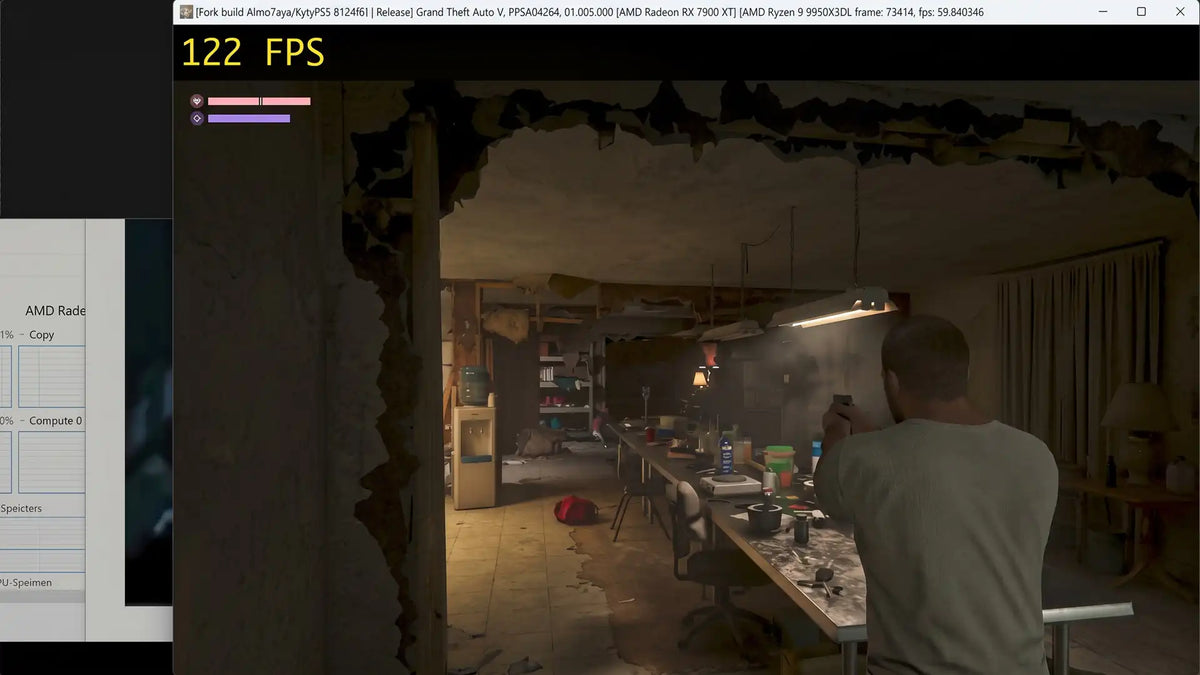
The latest PlayStation 5 emulation discussion has sparked major interest among Canadian gamers, especially after claims that Grand Theft Auto VI could become playable on PC at very high frame rates shortly after its console launch window. Whether that happens exactly as enthusiasts hope or not, the bigger takeaway is clear: demand for powerful desktop systems is only going one direction. If you are already thinking about a gaming upgrade, a custom PC for GTA 6, or a stronger all-purpose system for gaming, streaming, and content creation, this is the kind of news that should make you think carefully about timing, performance tier, and long-term value.
At Groovy Computers, this kind of story matters because it changes how people shop. A headline about console emulation is not just about curiosity or controversy. It immediately raises practical questions. Will my current PC be fast enough for new AAA games? If GTA 6 eventually lands on PC officially or unofficially, what kind of hardware will it really need? Should I buy now before high-demand releases push GPU prices higher? Would financing a better custom desktop make more sense than buying a weaker system I will outgrow too soon?
Those are exactly the questions Canadian buyers should be asking.
Why This PlayStation 5 Emulation Story Is Getting So Much Attention
According to the source material, community discussion around PS5 emulation is accelerating because independent developers and enthusiasts are making progress in reproducing console game code on PC hardware. The story connects that momentum directly to GTA 6 hype, suggesting that if development continues at a fast pace, PC users may be able to run the game through emulation at high frame rates much sooner than many expected.
Now, it is important to stay grounded. Emulation performance is rarely simple, and unofficial testing claims should always be treated carefully. There is a huge difference between a game technically launching, becoming partially playable, and delivering a polished experience with stable frame pacing, image quality, and acceptable input latency. Even so, one major point remains valid: if modern console exclusives begin to appear in PC conversations earlier and more often, then higher-end desktop performance becomes even more relevant.
That matters for buyers because heavy open-world games, advanced lighting, dense city simulation, background asset streaming, and future ray tracing features all put pressure on your GPU, CPU, RAM, and storage at the same time. GTA 6 is exactly the kind of release that makes older systems feel old in a hurry.
Why Canadian Buyers Should Think Beyond the Headline
For many shoppers, the exciting part of this story is the idea of playing a blockbuster title on PC as early as possible. But the smarter buying question is this: what kind of PC will give you the experience you actually want when the next wave of major games arrives?
Do you want basic playability at 1080p? Are you aiming for smooth 1440p gaming with higher settings? Are you hoping for ultra settings, ray tracing, high refresh rates, and the flexibility to game, stream, and edit on one machine? Or are you also a creator who wants a system that can handle OBS, Adobe apps, DaVinci Resolve, Blender, or multitasking workloads without slowing down?
That is where a custom desktop matters more than the headline itself. A generic machine built around one flashy part can still disappoint if the cooling, motherboard quality, power delivery, RAM capacity, or SSD performance are not properly balanced. Canadian buyers who want real value need the whole build to make sense.
What Do You Want Your Next PC to Actually Do for You?
Before you focus on one game, ask the better question: what do you want your next PC to do for you over the next three to five years?
If the answer is just “play games,” that is still not specific enough. Which games? Esports titles? New open-world releases? Story-driven AAA games with ray tracing? Multiplayer titles where high FPS matters more than visual effects?
If the answer includes more than gaming, your buying logic changes even more. Do you want to stream to Twitch or YouTube? Record gameplay while keeping high frame rates? Edit 4K videos for content creation? Use Photoshop, Lightroom, Illustrator, or Premiere Pro? Build assets in Blender or work inside Unreal Engine? The more your system needs to do, the less sense it makes to buy at the bare minimum.
This is why so many Canadian shoppers are moving toward custom-built systems instead of entry-level mass-market desktops. One strong, balanced machine can replace the need for a quick upgrade cycle, reduce frustration, and give you better value over time.
What PC Do You Need for GTA 6, New AAA Games, and High-FPS Gaming?
If GTA 6 becomes part of your upgrade plan, whether through a future official PC release or simply as a benchmark for next-generation gaming demands, it makes sense to shop for a gaming PC for new games rather than buying for minimum specs. Massive open-world games typically reward stronger GPUs, fast CPUs, enough system memory, and high-speed NVMe storage.
For buyers in Canada, that means thinking in performance tiers instead of just comparing one component name to another.
Entry-level performance: Is 1080p enough for you?
If you mainly play competitive games, lighter titles, or older AAA releases, a budget-focused gaming desktop can still make sense. But if your goal is to stay comfortable with upcoming heavy releases, you should be careful about buying too close to the floor. Ask yourself: do you want a machine that only gets you by today, or one that still feels capable when demanding games arrive?
An entry-level gaming system is best for buyers who prioritize value, play at 1080p, and are realistic about medium-to-high settings rather than ultra presets with advanced effects.
Mid-range performance: Is 1440p the smart sweet spot?
For many players, 1440p is where price and performance meet most effectively. This tier is often the best answer for shoppers asking, what PC do I need for 1440p gaming? You get sharper visuals than 1080p, more room for high-refresh gameplay, and a better long-term cushion for upcoming titles.
If you want a system that can tackle new AAA games more comfortably, support modern upscaling features, and leave room for streaming or light editing, the mid-range category is usually where the smartest money goes.
High-end performance: Are you aiming for 4K, ray tracing, or long-term headroom?
If you are targeting 4K, ultra settings, stronger ray tracing performance, or the best possible experience in future blockbuster releases, then a premium RTX-based desktop becomes much easier to justify. This is especially true if you also stream, edit video, or use creator apps on the same machine.
Ask yourself honestly: will you regret buying too low six months from now if your next must-play game pushes your system harder than expected? Many buyers do.
Could a Gaming PC for GTA 6 Also Be Your Streaming and Creator PC?
Yes, and for many buyers that is the smartest path.
A well-planned system does not have to be limited to gaming. If you are already spending on a new desktop, why not build for the full workflow you actually live with? Many customers need a machine that handles gaming at night, OBS streaming on weekends, video editing for social media, and day-to-day productivity in between.
That is where a content creation PC Canada mindset becomes useful. Instead of only asking, can this run my games? ask: can this also save me time when exporting videos, handling large photo libraries, multitasking on dual monitors, or rendering creative projects?
If you are a student, streamer, YouTuber, aspiring editor, or creator building a channel around major game releases, a stronger system can deliver value well beyond FPS.
What If You Also Need Video Editing, Photo Editing, or Graphic Design Performance?
Many GTA 6 and high-performance gaming buyers are not just gamers. They are also creators, freelancers, students, or professionals who need one desktop to do everything well.
Video editing
If you work in Premiere Pro, DaVinci Resolve, After Effects, or CapCut, your ideal system should not just be “good at gaming.” It should have the right CPU strength, enough RAM, fast scratch storage, and a GPU that helps with playback, effects, and exports. Are you editing 1080p clips, or are you already moving into 4K timelines? Do you use proxies, or do you want smoother native playback? Are you tired of long export times?
A proper video editing PC Canada build can save serious time every week, especially if your current machine struggles under multitasking load.
Photo editing
For photographers and content teams, the right desktop improves more than speed. It improves workflow consistency. Lightroom imports, batch exports, RAW editing, AI masking tools, Photoshop layers, and large catalog management all benefit from balanced hardware. If you edit high-resolution images regularly, are you still comfortable waiting on every batch process? Or would more RAM, a better CPU, and faster SSDs make your workday smoother?
Graphic design
Designers using Photoshop, Illustrator, InDesign, Canva, and Creative Cloud often need fast responsiveness, multi-monitor stability, and reliable performance under mixed workloads. If that sounds like you, then asking for “just a gaming PC” may not be enough. A better question is: do I need a creator-focused desktop that also happens to be excellent for gaming?
What If You Need 3D Modeling, Rendering, or Heavy Workstation Power?
Some readers following this PS5 emulation and GTA 6 conversation are also working in Blender, Unreal Engine, Maya, Cinema 4D, CAD, or rendering applications. For those buyers, game headlines often act as the trigger that finally pushes them to replace an aging machine.
If that is you, your upgrade decision should go beyond game FPS. Ask: what PC do I need for Blender? What PC do I need for 3D rendering? Do I need more VRAM, more CPU cores, more memory, or all three?
A gaming-grade GPU can absolutely overlap with creator and 3D workloads, but workstation-level needs require planning. Scene complexity, render engine choice, simulation work, viewport responsiveness, and project scale all affect what tier makes sense. If you are using your desktop to make money, underbuying usually costs more in lost time than buying properly in the first place.
Should You Buy Now or Wait for Better Timing?
This is one of the most important questions in the entire buying journey: is it better to buy a gaming PC now or wait?
There is no one-size-fits-all answer, but there are smart ways to think about it.
If your current PC already struggles, waiting can become expensive in hidden ways. You lose performance today, you may miss out on smoother gaming during major releases, and you risk shopping later during a period of increased GPU demand. High-profile game launches, holiday sales windows, new graphics card cycles, and AI-driven component demand can all affect availability and replacement cost.
In Canada, that matters even more because shipping, regional stock differences, and exchange-rate pressure can all influence complete system pricing. Even if one component category stabilizes, another may move upward. RAM can change. SSD pricing can tighten. Higher-end GPUs can sell quickly. Good power supplies and premium cooling options can become more selective buys during demand spikes.
So ask yourself: are you waiting because you truly have a better option ahead, or are you waiting by default while your current system becomes less useful?
Could Financing Help You Lock In a Better PC Before Prices Shift?
For many Canadian customers, the most practical answer is not to buy the cheapest system possible. It is to buy the right system and spread the cost more comfortably. That is why the financing conversation matters so much in a market shaped by changing hardware demand.
If you have been asking, should I finance a gaming PC instead of buying a weaker one outright? that is a valid question. A stronger system often lasts longer, performs better under new games and software, and can reduce the need for near-term replacement spending. Financing can be especially useful if you are trying to secure a better GPU tier, more RAM, or more storage before prices move again.
Groovy Computers offers custom build guidance for shoppers who want to think long term, including options that can make it easier to step into a better performance class without compromising the whole build. For many buyers, financing up to 4 years can be the difference between “good enough for now” and “ready for what is next.”
That is not about overspending. It is about avoiding false economy. If a slightly stronger system helps you skip an early upgrade, improve your daily workflow, and stay comfortable through the next round of major games and software demands, the total value can be much better.
Which Performance Tier Fits You Best?
If you are unsure where you fit, start with your real usage rather than marketing labels.
- Choose a budget-oriented gaming build if you mainly want 1080p gaming, play lighter or competitive titles, and need the best value without expecting ultra settings in every new release.
- Choose a mid-range gaming PC if you want 1440p performance, better visual settings, stronger longevity, and room for streaming or multitasking.
- Choose a premium RTX gaming PC if you want high refresh 1440p, 4K ambitions, ray tracing, long-term headroom, and smoother performance in demanding upcoming games.
- Choose a creator PC if you split your time between gaming, editing, streaming, and creative software.
- Choose a workstation-focused build if your desktop is also a production machine for rendering, modeling, heavy Adobe use, CAD, or professional multitasking.
Still not sure? Ask yourself a few honest questions. Do you upgrade often, or do you want to buy once and stay comfortable for years? Are you shopping for one game, or for an entire generation of software? Is your monitor 1080p, 1440p, or 4K? Do you care more about competitive frame rates or cinematic visual quality? Will you eventually want to stream, edit, or create content too?
Why Custom Builds Matter More When Hype and Demand Go Up
When a major gaming moment arrives, many people rush into whatever seems available. That is when custom PC value becomes even clearer.
A proper custom desktop is not just about picking a CPU and GPU. It is about making sure thermal performance, airflow, motherboard quality, memory capacity, storage speed, power supply headroom, and future upgrade potential are all matched to the use case. That is how you avoid buying a system that looks powerful on paper but feels compromised in daily use.
At Groovy Computers, that means building around the customer, not around a generic shelf configuration. It also means rigorous testing and a 1-year warranty for added confidence. When you are spending serious money on a gaming PC, creator desktop, or workstation, that support matters. Reliability matters. Smart part pairing matters. Clean upgrade paths matter.
Especially in a market where replacement costs can change faster than people expect.
Custom PC vs Prebuilt PC in Canada: What Should You Choose?
This is another common buyer question: custom PC vs prebuilt PC Canada?
A generic prebuilt can make sense if your needs are extremely basic and your expectations are low. But if you care about how the system performs under sustained gaming loads, how quiet it runs, whether it is easy to upgrade, and whether the components are truly balanced, custom tends to win.
That is particularly true for customers shopping with a specific goal. Maybe you want a gaming PC for GTA 6. Maybe you need a gaming and streaming PC. Maybe you need a desktop for Premiere Pro and Photoshop. Maybe you want one tower that handles school, work, play, and content creation without compromise. Those are exactly the situations where a custom build usually makes more sense than a one-size-fits-all machine.
What Questions Should You Ask Before Buying Your Next Desktop?
Before you commit, ask yourself the questions that actually shape long-term satisfaction:
- What games or software will I use most? Not just today, but over the next few years.
- What resolution am I targeting? 1080p, 1440p, or 4K changes everything.
- Do I care about ray tracing or maximum FPS? Your answer affects GPU choice.
- Will I stream or record gameplay? That changes CPU, GPU, and RAM priorities.
- Will I also edit video, work with photos, or use creative apps? If yes, buy for the full workload.
- How soon do I want to upgrade again? Buying too low often costs more later.
- Would financing a stronger system make more sense than settling? For many buyers, yes.
- Do I want a tested build with support and warranty from a Canadian custom PC company? If reliability matters, the answer should be obvious.
Why This Story Matters Even If GTA 6 Does Not Arrive on PC That Quickly
Even if real-world emulation progress ends up being slower, this story still highlights a bigger shift in the market. Players want flexibility. They want performance. They want access to major titles without being locked into one ecosystem. And they increasingly want one machine that handles gaming, streaming, editing, and creative work together.
That is exactly why desktop demand remains strong for customers who care about control, upgradeability, performance tuning, and long-term value. In other words, the headline may be about PlayStation 5 emulation, but the buying lesson is really about being ready.
If your current system is borderline now, imagine what the next wave of demanding games and software will feel like. If your storage is slow now, imagine larger installs and heavier asset streaming. If your GPU is already stretched, imagine future graphics features and higher texture demands. If your PC struggles while gaming and running OBS, think about what happens when your workflow gets more ambitious.
Ready for a Better Gaming PC in Canada?
If this story has you wondering whether your current system is ready for GTA 6, next-generation open-world games, high-FPS competitive play, streaming, editing, or creator workloads, now is the right time to look at your options. What do you want your next PC to do better than your current one? If the answer includes smoother gaming, stronger multitasking, faster exports, better thermals, quieter operation, and longer-lasting value, Groovy Computers is built for exactly that.
Whether you need a budget-friendly gaming desktop, a premium RTX system, a custom creator PC, or a heavier workstation build, Groovy Computers helps Canadian buyers get a properly matched system with testing, support, a 1-year warranty, and financing options that can make a stronger build easier to secure before market conditions change. Start your next build at GroovyComputers.ca.
Final Thoughts: The Smart Move Is Building for the Experience You Actually Want
The PS5 emulation conversation around GTA 6 is exciting because it points to where demand is heading: more interest in PC gaming, more pressure on hardware performance, and more buyers asking whether their current system is still enough. That is why PlayStation 5 emulation is not just a niche enthusiast topic. It is another reminder that gaming performance expectations are rising fast.
If you are buying in Canada, the best move is not chasing hype blindly. It is choosing a custom desktop that fits your real goals, your monitor, your workflow, and your timeline. If you want to avoid upgrading too soon, handle modern games with confidence, and keep room for streaming, editing, or creator work, a better-built system today can be the smarter financial decision tomorrow.
#GamingPCCanada #CustomGamingPCCanada #GamingPCForGTA6 #GamingPCBuilderCanada #CanadianCustomPCBuilders #CreatorPCCanada #VideoEditingPCCanada #3DModelingPCCanada #GamingPCFinancingCanada #NovaScotiaBusiness
Groovy Computers | All Rights Reserved



Leave a comment
This site is protected by hCaptcha and the hCaptcha Privacy Policy and Terms of Service apply.