



































Pragmata Update 1.220 and What It Means for Choosing the Right Gaming PC in Canada
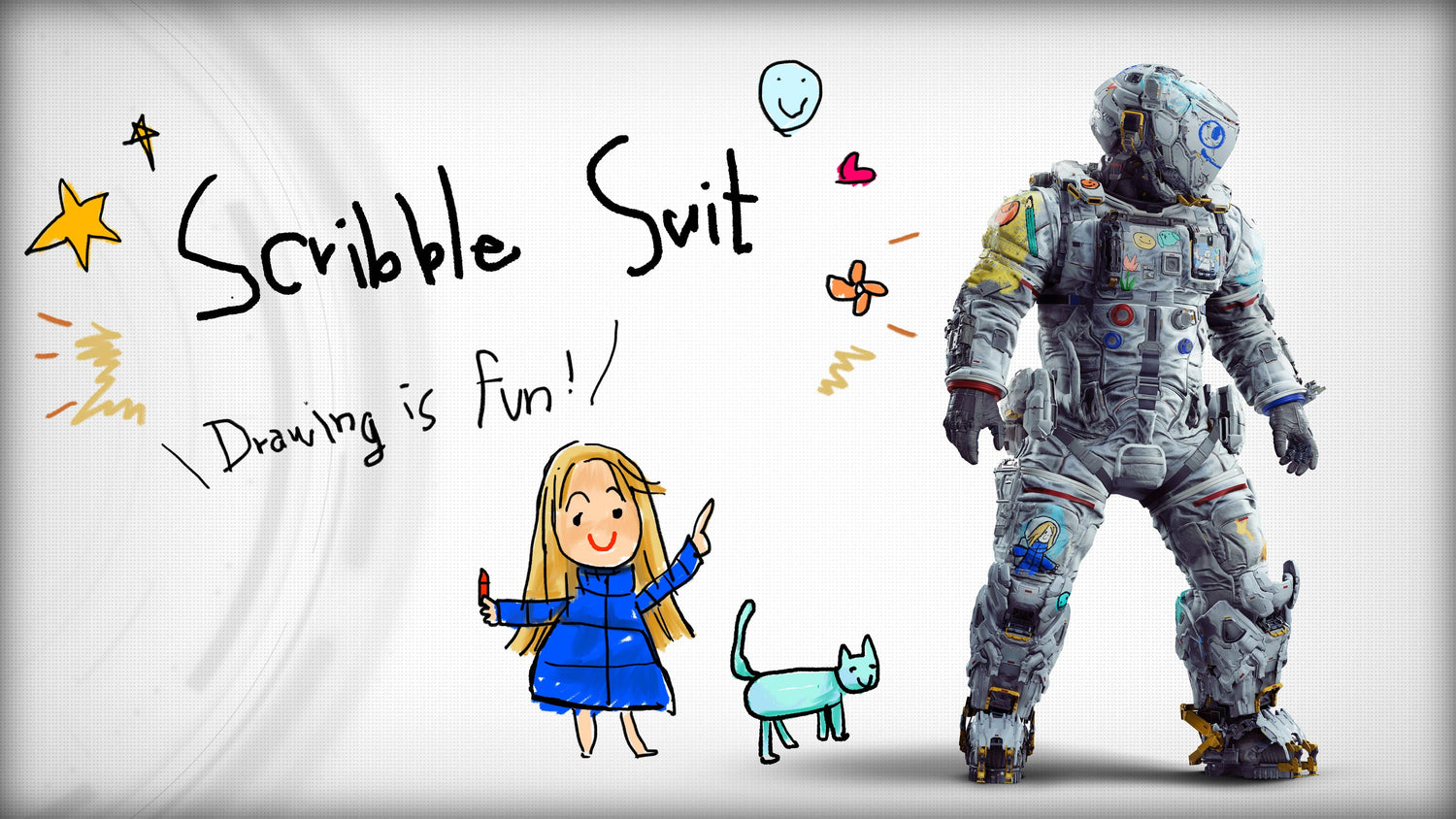
The new Pragmata update 1.220 may look small at first glance, but it is exactly the kind of game update that gets PC buyers thinking ahead. A new suit for Hugh, a tuning pass for Training Simulation #30, and minor text fixes might sound modest, yet updates like this remind players that modern sci-fi action games rarely stand still. They evolve, they get optimized, they add content, and they often become a bigger reason to upgrade your system before the next wave of patches, graphics options, and performance demands arrives.
For Canadian gamers, that raises an important question: is your current PC ready not just for launch-day performance, but for the months of updates, visual tweaks, and gameplay refinements that follow? If you are excited about visually ambitious titles, AI-driven worlds, advanced lighting, cinematic environments, and smooth high-refresh gameplay, this is the right time to think about where your current hardware stands.
At Groovy Computers, we look at stories like this through a practical lens. News about a game update is not just news. It is also a buying signal. It tells us which titles are staying active, which games players are returning to, and which custom gaming PC tiers make the most sense for customers across Canada who want reliable performance now without needing another upgrade too soon.
What changed in Pragmata update 1.220?
Based on the source material provided, the update includes three main changes:
- Scribble Suit added for Hugh
- Training Simulation #30 difficulty reduced
- Minor text corrections implemented
The headline feature is clearly the new Scribble Suit for Hugh, described as being filled with Diana’s scribbles. For players who enjoy character detail, cosmetics, worldbuilding, and personality in sci-fi games, this kind of addition matters more than it may seem. It shows continuing support, and it adds a bit of charm to a game built around the relationship between Hugh and Diana.
That matters because games with strong identity tend to hold player attention longer. And when a game holds attention longer, players start asking a different class of hardware question. Not just can my PC run it? but can my PC run it well enough that I actually enjoy spending time in it?
Why does a small update matter to PC buyers in Canada?
Because small updates often point to long-term engagement. A game does not need a giant overhaul to influence buying behaviour. Sometimes all it takes is renewed interest, social conversation, a content drop, or a new reason to jump back in. Once that happens, people begin revisiting their hardware plans.
Maybe your current desktop can still launch newer titles, but does it deliver the kind of experience you want in a visually rich action-adventure game? Are you playing at 1080p and happy there, or are you now aiming for 1440p with stronger image quality? Have you started caring more about ray tracing, smoother frame pacing, faster load times, or quieter cooling under load?
These are not small questions. They are often the difference between buying a system that feels outdated in a year and choosing one that still feels strong when the next demanding release lands.
For Canadian buyers, there is also the timing issue. GPU pricing, memory pricing, SSD costs, and demand shifts around major game releases can all affect the final cost of a system. If a title like Pragmata is helping push you toward an upgrade, you should not just ask what hardware you want. You should also ask when does it make the most sense to lock that build in?
What do you want your next PC to do for you?
This is the most important question in the whole buying process.
Do you want a system that simply runs new games decently at 1080p? Do you want a machine built for 1440p gaming with headroom for demanding sci-fi titles? Are you planning to stream your gameplay, record content, edit clips for YouTube, or create thumbnails and social media assets? Or are you crossing into heavier workloads like video editing, graphic design, or 3D modeling and need one PC that can handle both gaming and creator work?
Many buyers start with a single game in mind, then realize they actually need more than a one-purpose machine. That is where choosing the right custom build matters. A system selected only for the bare minimum can become limiting fast, especially when modern games and creator apps both compete for CPU performance, GPU acceleration, RAM capacity, and SSD speed.
If you are reading about a game like Pragmata and thinking about an upgrade, ask yourself:
- Do I want smooth 1080p gameplay, or am I ready for 1440p or 4K?
- Do I care about ultra settings and advanced lighting effects?
- Do I want to stream while I play?
- Will I also use this PC for editing, Photoshop, Premiere Pro, DaVinci Resolve, or Adobe Creative Cloud?
- Do I want to avoid replacing this system earlier than necessary?
The answers shape the right build far better than chasing random spec lists online.
Pragmata is a reminder that modern sci-fi games reward a strong custom gaming PC
Pragmata is positioned as a sci-fi action-adventure built around simultaneous control mechanics, environmental tension, and a lunar facility overtaken by rogue AI. Games with that kind of presentation tend to lean heavily on atmosphere, effects work, animation, and responsive controls. Even when official requirements are not the focus of the news, the genre itself tells us a lot.
If you enjoy cinematic single-player games, you usually benefit from:
- A capable modern GPU for visual quality and stable frame rates
- A strong CPU for world simulation, responsiveness, and background tasks
- Enough RAM for modern game demands and multitasking
- A fast SSD for loading, patching, and overall system responsiveness
- Reliable cooling for longer play sessions
That is why a Gaming PC Canada buyer should think beyond “minimum requirements.” Minimum specs get you in the door. A properly balanced custom system gets you a better experience over time.
What gaming performance tier fits you best?
Not every player needs the same machine. The best buying decisions come from matching your expectations to the right performance tier.
Entry-level 1080p gaming: is that all you need?
If your goal is straightforward 1080p gaming with good settings and solid everyday responsiveness, an entry-level or value-focused build may be the smart move. This kind of system is often right for players who enjoy new games but are not chasing maximum effects, ultra-high frame rates, or heavy multitasking.
Ask yourself: am I mainly trying to enjoy the game, or am I expecting premium visual features too? If the answer is “I want great value and dependable 1080p,” then a budget-conscious custom build can make sense.
This tier is often a good fit for students, first-time desktop buyers, and gamers moving off older hardware that struggles with current releases.
1440p gaming: is this the real sweet spot for most players?
For many Canadian gamers, 1440p is the ideal balance. It looks noticeably sharper than 1080p, feels more premium on a good monitor, and still offers excellent performance when paired with the right GPU and CPU combination.
If you are looking at immersive sci-fi games and thinking, I want strong visual quality without going all the way into extreme pricing, this is usually the performance tier worth considering first.
A 1440p-focused custom gaming PC is a smart choice if you want:
- Better image clarity than 1080p
- High settings in modern AAA games
- More longevity before your next major upgrade
- A stronger foundation for streaming or content capture
If you have been asking, what PC do I need for 1440p gaming, this is often where the answer starts: not just with a bigger GPU, but with a balanced system designed around the resolution you actually plan to use.
4K and premium gaming: do you want the full visual showcase?
If your goal is premium image quality, ultra settings, and stronger long-term headroom, then a 4K Gaming PC Canada class build may be the right path. This tier is for players who want demanding games to feel cinematic and who are less interested in compromise.
But it is important to be honest with yourself. Are you actually gaming on a 4K display? Do you care about high-end visual fidelity and advanced effects? Will you be disappointed if you buy a mid-tier system and start wanting more six months later?
Premium systems make sense for buyers who would rather spend once on a stronger machine than go through another upgrade cycle too early.
What if you also stream, record, or create content?
This is where many buyers underestimate their needs. A game update may bring you back to a title, but your real workload may be bigger than gaming alone.
Are you planning to stream to Twitch or YouTube? Record gameplay while playing? Edit highlights in CapCut, Premiere Pro, or DaVinci Resolve? Design thumbnails in Photoshop or Illustrator? If so, you may need more than a conventional gaming-only setup.
A Streaming PC Canada or Content Creation PC Canada class build usually benefits from:
- More CPU headroom for multitasking
- A GPU with strong encoding support
- More RAM for editing, browser tabs, assets, and background tools
- Larger and faster SSD storage for footage and projects
That leads to another useful question: do you want one PC that can game, stream, and edit, or are you buying only for gaming today and risking limitations tomorrow?
At Groovy Computers, this is where custom build guidance becomes especially valuable. Many customers do not need a separate streaming PC. They need a better-balanced single system.
Could a gaming PC also work for video editing, photo editing, or graphic design?
Sometimes yes, but only if it is configured correctly.
A generic gaming system may perform well in games while falling short in creator workflows if it lacks enough RAM, storage, CPU strength, or application-specific balance. If you also work in Adobe Creative Cloud, Lightroom, Photoshop, Illustrator, Premiere Pro, or DaVinci Resolve, your system should be selected with those tasks in mind.
Ask yourself:
- Do I edit 1080p videos occasionally, or am I working with 4K footage regularly?
- Do I batch export RAW photos?
- Do I use multiple Adobe apps at once?
- Do I need colour-accurate workflow support and fast storage?
- Will I be happier with a creator-focused configuration instead of a gaming-only PC?
If those questions sound familiar, then a Creator PC Canada or Video Editing PC Canada style build may fit you better than a basic gaming rig. The same goes for buyers researching a Graphic Design PC Canada or Photo Editing PC Canada solution that still handles games after hours.
What if your workload includes Blender, 3D rendering, or workstation tasks?
Then your decision changes again.
Some customers come in thinking they need a gaming PC because they enjoy games like Pragmata, but their professional or academic workload actually points toward a workstation-class custom desktop. If you are using Blender, Unreal Engine, CAD tools, rendering software, or 3D pipelines, your priorities are different from a pure gaming buyer.
You may need:
- Higher CPU core counts or stronger sustained performance
- More RAM, such as 64GB or beyond depending on project size
- Stronger GPU acceleration for rendering or viewport performance
- Expanded storage planning for assets, projects, and scratch space
So ask yourself clearly: am I buying a gaming system that can also work, or do I actually need a custom workstation that also happens to game well? That distinction can save you money, frustration, and upgrade regret.
Is now a good time to buy, or should you wait?
This is one of the most common questions in PC buying, and it matters whenever a game sparks renewed interest in upgrading.
The truth is that waiting only helps if you have a clear reason and a clear timeline. Too many buyers wait in a vague way. They hope prices will improve, new hardware will appear, or another sale will solve everything. Sometimes that works. Often it does not.
In real buying conditions, system costs can shift because of:
- GPU demand pressure
- Changes in CPU availability
- Memory pricing movement
- SSD cost fluctuations
- Seasonal demand around major game releases
- Increased demand from students, creators, and holiday shoppers
So the more useful question is not simply is it better to buy a gaming PC now or wait. It is this: if my current PC is already holding me back, what do I gain by delaying?
If your existing system struggles with modern games, longer load times, stutter, limited multitasking, or poor creator workflow performance, waiting may just mean spending more later to solve the same problem.
Could financing help you secure a better build before prices shift?
For many buyers, yes.
Some customers make the mistake of buying too low because they are focused only on upfront cost. Then they outgrow the machine quickly, especially if they move from gaming into streaming, editing, or heavier multitasking. That is often where financing makes practical sense.
If spreading the cost helps you move from an entry-level system to a better balanced build with stronger long-term value, the monthly approach may be the smarter decision. Instead of replacing a too-weak machine early, you can step into a system that better matches your real usage from day one.
That matters whether you are shopping for a custom gaming desktop, creator PC, or workstation. Groovy Computers offers financing options up to 4 years, which can make it easier to choose a stronger system while keeping your budget manageable.
Ask yourself honestly: should I buy a cheaper PC that I may outgrow fast, or would monthly payments on a better system make more sense? For many Canadian buyers, that is the question that unlocks the right purchase.
What questions should you ask before buying your next custom PC?
Before you commit, these are the questions worth answering clearly:
-
What games am I actually playing?
Are you targeting esports titles, cinematic AAA games, or a mix of both? -
What resolution do I want?
1080p, 1440p, or 4K changes the whole build strategy. -
Do I care about ray tracing or ultra settings?
If yes, your GPU choice becomes much more important. -
Will I stream, record, or edit?
If yes, your CPU, RAM, and storage plan need more attention. -
Do I use creator software?
Photoshop, Premiere Pro, DaVinci Resolve, Blender, and Illustrator all affect the ideal configuration. -
How long do I want this system to last before a major upgrade?
This helps determine whether a value tier or premium tier makes more sense. -
Am I buying for today only, or for the next few years?
That answer often justifies stepping up one tier. -
Would financing a stronger system reduce the chance of early replacement?
This is one of the most practical buying questions in today’s market.
Why choose a custom PC instead of a random off-the-shelf system?
Because matching parts properly matters. So does cooling. So does power delivery. So does storage planning. So does testing.
When customers read game news and start shopping quickly, they can end up comparing systems only on broad specs. But two machines with similar headline parts can feel very different in real-world use depending on build quality and balance.
A custom system from Groovy Computers gives Canadian buyers a more intentional path. Instead of settling for whatever configuration happens to be available, you can choose a machine built around how you actually game and work.
That is especially important if you are trying to balance any of the following:
- Gaming and streaming
- Gaming and video editing
- Gaming and graphic design
- Gaming and 3D modeling
- Performance and long-term upgrade flexibility
- Budget control and future-proofing
It is also why Custom Gaming PC Canada interest continues to grow. People want better fit, not just bigger part names.
Why Groovy Computers makes sense for Canadian buyers
Groovy Computers is built around the needs of Canadian customers who want more confidence in their PC purchase. Whether you are shopping from Nova Scotia, Atlantic Canada, Ontario, Alberta, British Columbia, or anywhere else in the country, the value is in getting a system tailored to your needs instead of forcing your needs to fit a generic machine.
Groovy Computers focuses on custom builds, careful part matching, rigorous testing, and a 1-year warranty. That matters when you are buying a gaming desktop, creator PC, or workstation that needs to perform consistently over time.
And because buying timing matters, financing can also be part of the conversation. If you are trying to secure a stronger PC before component costs climb or before your current machine becomes a bigger limitation, that flexibility matters.
Do you want help choosing between a value gaming build, a premium RTX-focused setup, a gaming-and-streaming desktop, or a creator workstation? That is exactly the kind of decision support Groovy Computers is built for.
So, what kind of buyer should choose which system?
Choose a value-focused gaming build if:
- You want reliable 1080p gaming
- You are upgrading from an older or entry-level machine
- You care most about affordability and smooth everyday play
- You are not yet diving deep into streaming or editing
Choose a stronger mid-tier gaming system if:
- You want 1440p performance
- You play modern AAA titles regularly
- You want better longevity
- You may stream or record occasionally
Choose a premium gaming or creator-class system if:
- You want 4K or high-end 1440p with stronger settings
- You care about ray tracing and visual polish
- You stream, edit, and multitask heavily
- You want to avoid upgrading again too soon
Choose a workstation-oriented build if:
- You work in Blender, Unreal Engine, CAD, rendering, or professional creator software
- You need more RAM and storage planning
- Your productivity matters as much as your gaming
- You want a system selected around workload efficiency, not just game FPS
What should you do if Pragmata update 1.220 has you thinking about upgrading?
Use the update as your prompt to make a better decision, not a rushed one. If a returning game, a new content drop, or a wave of upcoming releases has you reconsidering your setup, ask the bigger question: what do I want my next PC to handle over the next several years?
If the answer includes modern gaming, better visual quality, streaming, editing, design work, or creator workloads, then now is the time to look at a custom system that actually fits those goals.
And if you are wondering whether to settle for less or move into a stronger build with a better long-term payoff, visit GroovyComputers.ca. If you want help choosing the right gaming desktop, creator PC, or workstation for your needs in Canada, Groovy Computers is the place to start.
Final thoughts on Pragmata update 1.220 and your next PC
The Pragmata update 1.220 is a small but useful reminder that active games keep evolving, and so do player expectations. A cosmetic addition and a few gameplay adjustments may not sound like a major turning point, but they are often enough to bring players back, restart upgrade conversations, and highlight the gap between “runs fine” and “feels great.”
If your current system is making modern games less enjoyable, if you are planning for stronger 1440p or 4K performance, or if you want one desktop that can handle gaming plus creator work, this is a smart moment to act. The right custom build can save you from underbuying now and overpaying later.
#Pragmata #PragmataUpdate #GamingPCCanada #CustomGamingPCCanada #GamingComputersCanada #CreatorPCCanada #StreamingPCCanada #VideoEditingPCCanada #CanadianCustomPCBuilders #GroovyComputers
Groovy Computers | All Rights Reserved



Leave a comment
This site is protected by hCaptcha and the hCaptcha Privacy Policy and Terms of Service apply.