






















Resident Evil 2 Mystery Sparks a Bigger Question: What Kind of Gaming PC in Canada Do You Need for Classic Fandom, New Releases, and Everything Next?
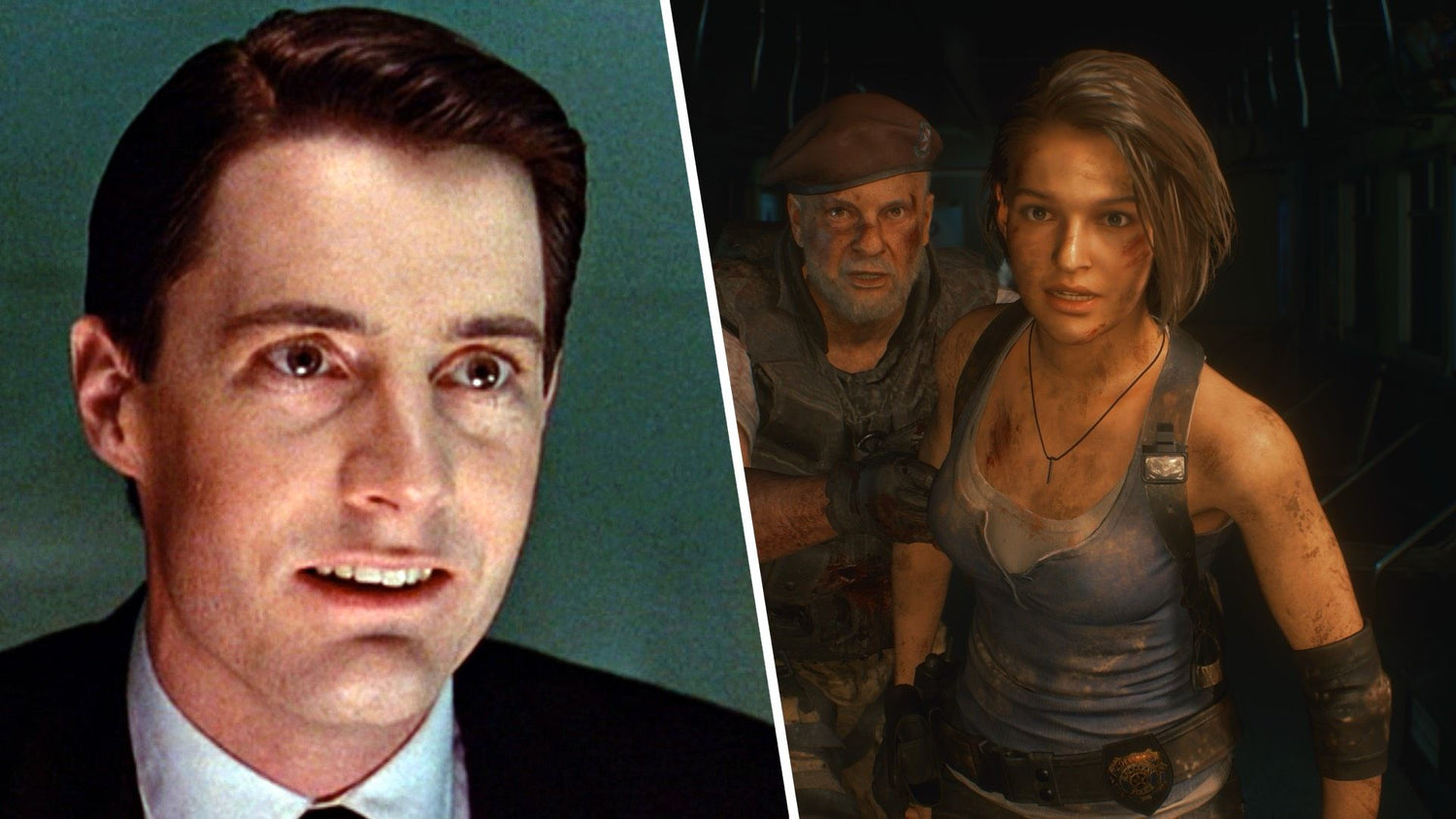
The recent reveal behind Jill Valentine’s famous desk photo in Resident Evil 2 is the kind of gaming story that reminds people why PC gaming culture runs so deep. A tiny in-game detail from the late 1990s kept fans searching for years, and now that mystery has finally been put to rest. For gamers, collectors, modders, streamers, and horror fans, that kind of moment is not just trivia. It is a reminder that the games we love stay with us for decades, and that the best way to enjoy them today is often with the right gaming PC in Canada built for both nostalgia and what comes next.
At Groovy Computers, that is where the conversation gets practical. If one retro survival horror mystery can suddenly put Resident Evil 2 back into your feed, what else are you planning to play next? Are you revisiting classic Capcom titles, jumping into remakes, preparing for upcoming AAA releases, streaming to Twitch or YouTube, or using your system for editing clips, designing thumbnails, and creating content after the game is over?
This is where a headline-worthy gaming story becomes a smart buying guide. Because once a game franchise trends again, many Canadian buyers start asking the same thing: should I keep stretching an aging rig, or is it time to move into a properly built custom PC that can handle modern gaming, creator workloads, and future upgrades without compromise?
Why this Resident Evil 2 story matters beyond the headline
The source story is simple on the surface. Fans spent years trying to identify the “young man” shown in a low-resolution photo on Jill Valentine’s desk in the original Resident Evil 2. With better comparison work and fan research, the image was finally tied to actor Kyle MacLachlan. It is the sort of detail only passionate game communities keep alive for that long.
But the larger takeaway is important for anyone shopping for a new PC. Gaming fandom is no longer just about launching one title and moving on. Today’s players revisit classics, run remasters, install mods, capture gameplay, edit social clips, watch lore videos, and keep multiple launchers and tools open at once. Even a “simple” gaming habit now often overlaps with streaming, content creation, and multitasking.
So ask yourself: is your current system only barely enough for yesterday’s games, or is it actually ready for the way you use games now?
If your PC struggles with newer textures, shader compilation, recording software, browser tabs, Discord, OBS, editing apps, or background updates, then this kind of gaming-news moment can become the push that gets you into a better build before the next wave of releases and price movement hits.
What do you want your next PC to do for you?
This is the question more buyers should ask first. Not “what is the cheapest PC I can get,” but “what do I need this machine to handle well for the next several years?”
Do you want a system that can play horror remakes, open-world blockbusters, competitive shooters, and upcoming AAA titles at 1080p with strong frame rates? Do you want to step up to 1440p for a sharper, more premium experience? Are you targeting 4K, ray tracing, high refresh gaming, or ultra settings?
Or are you not just a gamer at all? Maybe you also need your PC for OBS streaming, Premiere Pro, DaVinci Resolve, Photoshop, Lightroom, Illustrator, Blender, or Unreal Engine. If that sounds like you, the right build is not just about average FPS. It is about balanced CPU and GPU performance, enough RAM, fast storage, cooling stability, and a smart upgrade path.
That is why Groovy Computers focuses on matching the build to the person, not just moving boxes. A custom PC should reflect your games, your software, your monitor resolution, your performance expectations, and your budget reality in Canada.
If you love games like Resident Evil, what performance tier actually fits you?
Not every buyer needs the same class of system. Some players want a budget-friendly way into PC gaming. Others want a long-term premium build that handles demanding new releases without needing an upgrade in a year.
Entry-level and budget gaming buyers
If your goal is smooth 1080p gaming, strong esports performance, older classics, indie games, and a solid experience in many modern titles with sensible settings, a budget gaming PC Canada buyer does not need to overspend. This tier is ideal for first-time PC gamers, students, or players moving from console who want real value.
But here is the important question: are you buying a low-end system that you will outgrow too quickly? A budget build should still be chosen carefully so you do not end up replacing it sooner than expected.
Mid-range performance buyers
This is often the smartest zone for the widest range of customers. If you want excellent 1080p or strong 1440p gaming, modern features, smoother multitasking, better longevity, and enough performance for streaming or light editing, a mid-range custom system is often the sweet spot.
Are you the kind of player who wants new games to look great without paying flagship prices? Do you want enough overhead for future titles, mods, and background apps? This is where many Canadian buyers get the best long-term value.
High-end and premium gaming buyers
If you want high refresh 1440p, serious 4K performance, ray tracing, content creation power, and room for demanding future games, then a premium gaming PC Canada setup starts making sense. This tier is for buyers who do not want to compromise much and want a stronger chance of avoiding an early upgrade cycle.
Are you buying for today only, or are you buying so that next year’s big releases do not immediately make your system feel old?
What gaming PC do you need if you also stream or make content?
This is one of the biggest buying mistakes in the market. Many shoppers buy “a gaming PC” without realizing they actually need a gaming and streaming PC Canada setup or even a broader creator PC Canada system.
If you plan to play and stream at the same time, your PC needs to do more than deliver in-game frame rates. It must also handle encoding, background tasks, browser tabs, overlays, chat apps, audio tools, capture software, and sometimes local recording. That changes the parts recommendation significantly.
Do you stream casually to friends, or are you building a serious channel? Do you want clean 1080p streaming, smoother editing after the stream, and enough storage for footage? Do you expect your PC to game, record, export, and upload without turning every session into a compromise?
For these buyers, stronger CPUs, smart GPU selection, more RAM, and fast SSD storage matter a lot. The “cheapest gaming desktop” often becomes the most expensive mistake once you realize it cannot keep up with your workflow.
Is a gaming PC good for video editing, photo editing, and graphic design too?
Sometimes yes, but not always in the right way.
A capable gaming system can overlap with creator workloads, especially if it has the right processor, enough memory, fast storage, and a GPU that accelerates editing and visual workflows well. But if your main goal is Adobe Premiere Pro, DaVinci Resolve, Photoshop, Lightroom, Illustrator, or a full Adobe Creative Cloud workflow, then your priorities shift.
What PC do you need for video editing? That depends on your footage resolution, codecs, effects, export volume, and whether you edit occasionally or professionally. A buyer cutting short clips for social media needs something very different from a creator working on 4K timelines every day.
What PC do you need for photo editing? If you work with large RAW files, layered Photoshop documents, AI tools, or batch exports, then memory capacity, SSD speed, and overall responsiveness become just as important as game performance.
What PC do you need for graphic design? If your day includes Illustrator, InDesign, Photoshop, Canva, browser-based apps, and multi-monitor use, then you want smooth workflow stability, strong single-core responsiveness, enough RAM, and room to grow.
That is why Groovy Computers builds systems not just for “gaming” in the generic sense, but for real mixed-use buyers across Canada who need one machine to handle fun, work, and creative output together.
What if your next PC needs to handle Blender, Unreal Engine, or 3D rendering?
Now you are entering workstation territory.
If you are using Blender, Unreal Engine, 3D animation tools, rendering apps, CAD workflows, or product visualization software, then your build decisions need to be more deliberate. A standard off-the-shelf gaming system may not offer the right CPU balance, thermal performance, memory headroom, or storage configuration.
What PC do you need for Blender? That depends on whether your workload leans more on viewport interaction, simulation, GPU rendering, CPU rendering, or all of the above.
What PC do you need for Unreal Engine? Are you compiling projects, testing scenes, building assets, or handling larger development workloads? A machine for 3D work should not be selected the same way as a casual gaming desktop.
If you are asking those questions, you are likely looking at a 3D modeling PC Canada or custom workstation PC Canada category rather than a basic gaming tower. And that is exactly where a custom builder adds real value.
Why Canadian buyers should think differently about timing
Gaming stories may come and go quickly, but PC buying conditions often change in slow, expensive ways. Canadian buyers have to think about more than the base cost of components. Exchange rates, import realities, parts availability, GPU demand swings, storage pricing, and broader supply pressure can all affect what a finished build costs.
That means timing matters.
Are you waiting for a major game release this fall? Are you expecting to upgrade when a new franchise entry, remake, or graphics-heavy title drops? Are you planning around school, streaming plans, a content project, or a software upgrade?
If yes, delaying too long can sometimes leave you shopping when demand is highest and inventory flexibility is lower. Even if exact market conditions shift over time, the core risk remains the same: waiting until you urgently need a PC usually gives you fewer comfortable choices than planning ahead.
Is it better to buy now or wait?
This is one of the most common research-stage questions, and the honest answer is that it depends on your current pain points.
If your current PC already struggles with the games and software you use every week, waiting may cost you more in frustration, lost time, reduced performance, and eventually a more rushed buying decision. If your machine is crashing, overheating, bottlenecking your GPU, running out of SSD space, or dragging through editing and rendering jobs, then the “wait” strategy is often just postponing the inevitable.
Ask yourself a more useful question: what am I waiting for exactly?
Are you waiting for a sale? For one specific part? For a game release? For a bonus, tax return, or other budget milestone? Those can be valid reasons. But if you are waiting without a plan while your current system keeps falling further behind your real needs, a custom build now may be the smarter move.
Could financing help you secure a stronger system before replacement costs rise?
This is where many Canadian customers rethink the entire purchase. If the ideal build is just out of reach today, the choice is not always between buying cheap and buying nothing. In many cases, finance gaming PC Canada options can help buyers move into a better tier without compromising as much on longevity.
Would a slightly stronger GPU help you stay at 1440p longer? Would extra RAM help with editing, streaming, and multitasking? Would more storage save you from replacing a drive too soon? Would a better CPU keep you from rebuilding again earlier than expected?
These are not small differences. They can shape how long your system feels fast and capable.
That is why financing can be practical when used responsibly. Groovy Computers offers options that can help qualifying buyers spread the cost over time, including financing up to 4 years. For the right customer, that can mean buying the build that truly fits instead of settling for one that becomes limiting too soon.
Should you finance a better PC instead of buying a cheaper one outright? If the stronger machine is the one that actually covers your gaming, streaming, editing, or workstation needs for years, that can be the more efficient decision in the long run.
Which type of buyer are you really?
Many people shop in the wrong category because they describe themselves too narrowly. Here is a better way to think about it.
The budget-conscious gamer
You want reliable 1080p gaming, good value, and a system that feels responsive without overspending. You should be careful not to buy so low that modern game demands catch up immediately.
The mainstream gamer who wants balance
You want better visuals, smoother frame rates, room for new releases, and a machine that can handle Discord, browsers, launchers, mods, and maybe some streaming. This buyer often benefits most from a mid-range custom gaming PC.
The premium enthusiast
You care about high settings, high refresh, 1440p or 4K, ray tracing, and long-term performance. You do not want to revisit your hardware decisions too soon.
The hybrid gamer-creator
You game, stream, edit videos, design graphics, record clips, or manage channels. You need a system that performs beyond games alone.
The professional creator or workstation user
You need speed because time matters. Rendering, exporting, compiling, heavy multitasking, asset creation, and software stability all affect your income or productivity. Your PC is a tool, not just a toy.
Which one sounds most like you right now? And more importantly, which one will sound like you six months from now?
Why custom PC builds matter more than ever
When buyers are trying to stretch their budget, a generic preconfigured machine can look convenient. But convenience is not the same thing as fit.
A proper custom gaming PC Canada build lets you allocate budget where it matters most for your use case. A gamer focused on high FPS at 1080p does not need the same configuration as a 4K video editor. A streamer has different needs than a Lightroom-heavy photographer. A Blender user should not be treated the same as a casual esports player.
Custom building also helps with part matching, cooling, power delivery, case airflow, memory planning, storage layout, and future upgrade logic. Those details matter because the real-world experience of a PC is not just the parts list. It is how the whole system works together under load.
Do you want a PC that looks good on paper, or one that has been selected and assembled around what you actually do?
Why testing and warranty support should matter to Canadian buyers
Price is only one part of confidence. A performance system should also be properly assembled, checked, and tested before it lands at your door.
Groovy Computers builds custom systems for Canadian buyers who want confidence in their purchase, not just a pile of specs. That means attention to stability, thermals, clean build quality, and practical reliability. It also means support and a 1-year warranty that adds reassurance when you are investing in a machine for gaming, editing, streaming, or workstation use.
If you are buying online in Canada, ask yourself this: do you want to gamble on a random machine, or do you want a Canada-built gaming PC backed by a team that understands performance matching and customer needs?
How Groovy Computers helps you choose the right build
The best buying experience is not being pushed into the most expensive system. It is being guided toward the right one.
If you are unsure whether you need a budget gaming desktop, a stronger 1440p machine, a premium RTX-based setup, a creator system, or a workstation-class build, Groovy Computers can help narrow the decision based on your actual goals.
- For gaming: target resolution, refresh rate, game types, visual settings, and longevity goals matter.
- For streaming: encoding, multitasking, RAM, storage, and thermal stability matter.
- For video editing: timeline smoothness, export speed, memory capacity, and fast scratch storage matter.
- For photo editing and design: responsiveness, memory, SSD speed, and display pairing matter.
- For 3D and workstation use: CPU-GPU balance, render workflow, memory scaling, and cooling matter.
That is the difference between simply buying a computer and ordering a system that genuinely fits your workflow.
What questions should you ask before buying your next PC?
Before you commit, it helps to ask a few smart questions:
- What games or software will I use most often?
- Am I targeting 1080p, 1440p, or 4K?
- Do I want ray tracing or maximum competitive frame rates?
- Will I stream, record, edit, or design on this machine too?
- How long do I want this system to feel current?
- Would extra RAM, SSD capacity, or a stronger GPU save me from upgrading too soon?
- Am I buying before a major game release, software upgrade, or seasonal price movement?
- Would financing make it easier to get the right system now instead of compromising?
If you can answer those clearly, you are already much closer to the right build.
From Resident Evil nostalgia to real buying decisions
The Jill Valentine photo mystery is a fun reminder that gaming culture never really stops evolving. A detail hidden in a 1998 game can suddenly trend again and bring long-time fans back into the conversation. But for many readers, the practical takeaway is larger: if gaming still matters to you, your hardware should be ready for the way you play now.
Maybe that means finally replacing a system that is holding you back. Maybe it means stepping up from basic 1080p into 1440p. Maybe it means buying one PC that can handle gaming, streaming, and editing instead of forcing an older machine to do everything badly.
Maybe it means realizing your next PC is not just for games at all. It is for your channel, your content, your creative work, your side business, or your professional workflow.
Ready to choose the right gaming PC in Canada for what comes next?
If you are asking yourself what your next system should really do, now is the right time to turn that question into a smarter purchase plan. Whether you need a balanced gaming build, a stronger streaming setup, a custom creator machine, or a workstation that can keep up with demanding software, Groovy Computers can help you choose a better-fit system for your budget and goals.
Want help deciding whether you need a budget gaming PC, a premium RTX build, a creator desktop, or a workstation-class machine with financing options? Visit GroovyComputers.ca and explore custom-built Canadian systems designed for real gamers, creators, and professionals.
In a market where pricing, performance demands, and software expectations can shift quickly, buying the right system once is often better than buying the wrong one twice. For anyone shopping for a gaming PC in Canada, the smartest move is choosing a build that fits your real workload, gives you room to grow, and comes from a trusted Canadian custom PC builder.
#GamingPCCanada #CustomGamingPCCanada #CanadianCustomPCBuilders #GamingPCBuilderCanada #CreatorPCCanada #StreamingPCCanada #VideoEditingPCCanada #3DModelingPCCanada #WorkstationPCCanada #GamingPCNovaScotia #BuyGamingPCOnlineCanada #GroovyComputers
Groovy Computers | All Rights Reserved



Leave a comment
This site is protected by hCaptcha and the hCaptcha Privacy Policy and Terms of Service apply.