






















Resident Evil 2 Photo Mystery Solved: What This Retro Gaming Moment Tells Canadian Buyers About Choosing the Right Gaming PC
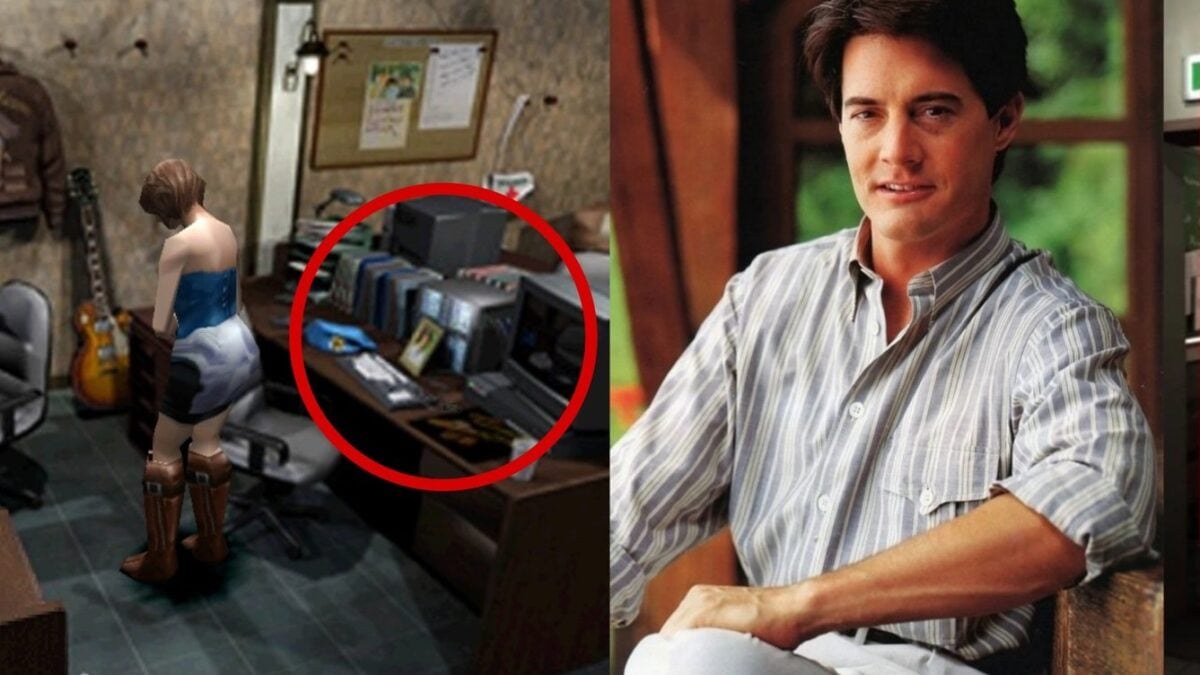
The newly solved Resident Evil 2 photo mystery is exactly the kind of gaming story that reminds fans why PC gaming culture runs deeper than frame rates alone. A small environmental detail from the original 1998 release of Resident Evil 2 kept players talking for nearly three decades, and now that fans have identified the image on Jill Valentine’s desk as a photo of Kyle MacLachlan, the conversation has expanded beyond simple trivia. It has become another example of how classic games keep rewarding close attention, replay value, modding curiosity, visual analysis, and long-term fandom. For Canadian buyers, that matters more than it may seem at first glance, because the same kind of player who cares about retro details, remakes, visual fidelity, and game preservation is often the same buyer asking a much bigger question: what should my next PC actually be built to do?
That is where Groovy Computers comes in. If a gaming news story sends you back into classic survival horror, remastered collections, emulation research, streaming, video creation, or a broader PC upgrade plan, the real opportunity is not just revisiting an old title. It is making sure your next desktop is built for the way you actually play, create, record, edit, and upgrade in Canada.
What happened with the Resident Evil 2 photo mystery?
In the original version of Resident Evil 2, players inspecting Jill’s desk could trigger dialogue suggesting a photo on the desk might be of her boyfriend. Fans spent years trying to figure out exactly who was pictured there. According to the source material, the mystery has now been solved after a fan’s long search through Japanese magazine references and image comparisons. The face appears to match actor Kyle MacLachlan, and the same investigation also reportedly identified other background images in the Raccoon City Police Department, including photos connected to recognizable film actors and promotional stills.
That discovery is fascinating because it highlights how developers in the late 1990s often built texture libraries and environmental details from pop culture references, scanned photos, and period media. It also shows how far gaming communities will go to preserve and decode the history of beloved titles. If you are the kind of player who loves original releases, remakes, visual comparisons, fan mods, texture packs, or archival deep dives, are you still trying to enjoy all of that on aging hardware that no longer feels smooth?
Why does a retro gaming mystery matter if you are shopping for a Gaming PC Canada buyers can trust?
Because stories like this drive people back into games they already love, while also pushing them toward better ways to experience them. One solved mystery can trigger a full replay. A replay can lead to installing HD texture packs, fan patches, reshade tools, ultra-wide mods, capture software, emulation front ends, and streaming overlays. Then suddenly a “quick nostalgia session” turns into a real hardware question.
Are you only replaying old games, or are you also jumping into modern horror remakes, ray-traced AAA releases, and cinematic single-player titles? Do you want to record footage for YouTube, stream on Twitch, capture screenshots, or compare original and remake visuals side by side? Do you want one machine that handles both survival horror gaming and Adobe Creative Cloud work? Those answers change what kind of system makes sense.
That is why this topic naturally turns into a buying guide. A retro story may start with a background texture, but for many players it ends with a decision about whether it is finally time to invest in a stronger custom desktop.
What do you want your next PC to do for you?
Before you think about parts, budgets, or financing, ask the question that matters most: what do you actually want your next PC to handle without compromise?
- Do you want smooth 1080p gaming for horror games, multiplayer titles, and story-driven releases?
- Do you want 1440p performance with high settings, stronger visuals, and room for newer games?
- Do you want 4K gaming with premium GPU power and better long-term headroom?
- Do you want ray tracing in visually dense remakes and atmospheric games?
- Do you want to stream gameplay while keeping performance stable?
- Do you want to edit videos for YouTube, TikTok, reviews, lore breakdowns, or gameplay highlights?
- Do you want a creator-focused desktop for Photoshop, Lightroom, Illustrator, Premiere Pro, or DaVinci Resolve?
- Do you need a heavier workstation for Blender, 3D rendering, Unreal Engine, CAD, or multi-app productivity?
Many buyers start by saying they just want “a gaming PC,” but the right build depends on whether gaming is the only priority. If you are also creating content, designing overlays, cutting video, or working in 3D, then choosing the right system now can save you from upgrading too soon.
The Resident Evil effect: one game leads to many more
A lot of Canadian customers do not upgrade because of one title alone. They upgrade because one title reminds them how many games and workloads their current machine struggles with. Maybe Resident Evil 2 leads you to revisit other remakes. Maybe that leads to higher refresh rate gaming. Maybe then you try streaming. Maybe then you realize your exports in Premiere Pro are taking too long. That is how hobby demand turns into real workstation demand.
So ask yourself: are you buying for what you played last year, or for what you are about to play and create over the next three to five years?
Which performance tier fits you best?
One of the biggest mistakes buyers make is choosing a PC category that is either too weak for their goals or unnecessarily mismatched to their workflow. Here is a practical way to think about it.
Entry-level and budget buyers
If your focus is lighter gaming, esports titles, indie games, retro libraries, older AAA releases, and 1080p settings that still feel responsive, a budget gaming PC Canada shoppers can rely on may be enough. This tier works well if you are a first-time desktop buyer, a student, or someone moving away from console limitations without jumping straight into premium pricing.
But ask yourself honestly: are you buying a true entry-level machine because it fits your needs, or because you are trying to avoid spending more today even if it means replacing the system sooner?
Mainstream 1080p to 1440p gaming buyers
This is the sweet spot for many customers. If you want stronger performance in modern games, smoother frame rates, higher settings, and enough overhead for occasional streaming or content creation, this is where a well-balanced custom system starts to make the most sense. For many players, this is the best value zone because it gives real longevity without entering flagship pricing.
If you are asking, what gaming PC do I need for current and upcoming releases, this middle tier is often the answer.
Premium 1440p and 4K enthusiasts
If you care about visual quality, ultra settings, ray tracing, high refresh displays, and stronger future-proofing, then a 4K gaming PC Canada buyers choose for premium experiences may be the better fit. This tier is ideal for players who do not want to feel boxed in by the next wave of demanding games.
Are you the kind of buyer who hates dropping settings after only a year or two? If so, underbuying usually costs more in the long run.
Gaming and streaming buyers
If you want to play and broadcast at the same time, your needs shift quickly. A proper gaming and streaming PC Canada customers can trust needs the right CPU-GPU balance, enough RAM, fast storage, cooling that can handle sustained loads, and a build plan that supports OBS, browser tabs, overlays, chat tools, Discord, and background apps.
Do you want to stream casually, or are you trying to create a polished channel setup that feels professional from day one?
Creator and editing buyers
If gameplay is only part of your workflow and you also need timeline responsiveness, faster exports, smoother playback, and multitasking stability, then a creator PC Canada shoppers should consider is often a better fit than a generic gaming-only system. Video editors, designers, and social content creators benefit from hardware matched to real software behaviour, not just gaming benchmarks.
Are you working in Photoshop and Lightroom? Do you use Premiere Pro and After Effects? Do you need a video editing PC Canada creators can depend on for 4K footage? Those answers matter.
3D and workstation buyers
If your workflow includes Blender, Unreal Engine, rendering, CAD, or technical productivity, you may need a workstation PC Canada professionals can rely on rather than a standard gaming tower. These buyers often benefit from more RAM capacity, heavier multicore performance, faster scratch and project storage, and more deliberate cooling and reliability planning.
Are you creating game assets, architectural visuals, animation, or product renders? If yes, your build should be chosen like a tool, not an impulse purchase.
What if you love games, but you also edit, design, or stream?
This is one of the most common real-world buying situations. A customer starts with gaming in mind, but they also cut highlight reels, make thumbnails, produce short-form clips, design channel art, or experiment with creator software. In that case, a one-dimensional gaming build may not be enough.
A custom system can be designed around mixed workloads. That means selecting hardware that still delivers gaming performance while also supporting content creation efficiency. If your desktop is going to handle gameplay, video capture, editing, photo work, and live streaming, why settle for a weak one-size-fits-all machine?
This is where Groovy Computers stands out for Canadian buyers. You are not just choosing a box with a logo on it. You are choosing a configuration built around how you actually use your PC.
Why custom builds matter more when game demand and component pricing can shift
Gaming interest is rarely static. A new remake, major release, update cycle, creator trend, or hardware refresh can rapidly change demand. Even if this particular source article is about a classic mystery finally being solved, the broader lesson is that gaming enthusiasm moves fast. When it spikes, so does interest in GPUs, higher-performance systems, capture-ready setups, and better creator hardware.
That is why buyers should think carefully about timing. Are you planning to upgrade before a major game launch? Before a sale period empties stock on the best-value builds? Before you begin a new streaming schedule, school term, editing contract, or software-heavy side project?
Waiting sometimes helps, but waiting can also mean dealing with higher full-system costs, less ideal part availability, or settling for a machine that was never your first choice. If you already know your current desktop is behind, delaying the decision does not always save money.
Should you buy a cheaper PC now or finance a better one?
This is one of the smartest questions a buyer can ask. If your budget is tight, it is tempting to purchase the lowest-cost machine that checks a few boxes today. But if that system forces compromises too early, the savings disappear fast. A weaker GPU, too little RAM, limited storage, or an underpowered CPU can turn into an expensive dead end.
For many customers, financing can be the more strategic move. Instead of buying a desktop that is barely enough, financing may let you secure a stronger build with better long-term value, smoother performance, and less need to upgrade in the near future. Groovy Computers offers financing up to 4 years, which can help customers buy the right system for their real needs instead of the cheapest system they can tolerate.
So ask yourself: should you finance a better PC instead of buying a cheaper one that you may outgrow quickly? If the answer is yes, then planning ahead may be the smarter Canadian buying decision.
What specs should you think about before buying?
You do not need to obsess over every single component, but you should understand the categories that shape your experience.
GPU performance
If your priority is modern gaming performance, visual settings, ray tracing, and creator acceleration, the graphics card is central. It affects your experience in current AAA games, render acceleration in some creative apps, and your ability to move from 1080p to 1440p or 4K with confidence.
Are you trying to hit high FPS in competitive games, or are you chasing visual atmosphere in cinematic titles?
CPU performance
The processor matters for gaming consistency, streaming, multitasking, exports, simulation-heavy workloads, and workstation tasks. Buyers who also stream or edit often benefit from stronger CPU choices than gaming-only shoppers expect.
Do you want your PC to game well today, or do you also want it to handle recording, editing, browser-heavy multitasking, and background tasks without feeling strained?
RAM capacity
Memory affects smoothness when multitasking, editing, streaming, browsing while gaming, and working with large creative projects. Insufficient RAM is one of the easiest ways to make a decent machine feel frustrating.
Are you only gaming, or are you the kind of user who always has Discord, Chrome, OBS, Spotify, and editing tools open at the same time?
SSD storage
Fast storage improves boot speed, game load times, project responsiveness, and media handling. It also matters if your game library and content files are growing fast. Large modern titles, cached footage, raw photos, and project exports consume space quickly.
Will your next PC need room for just a handful of games, or are you also storing clips, captures, design assets, and creator project files?
Cooling and case airflow
Performance means very little if a system cannot maintain it under sustained use. Good thermal design helps with stability, noise control, component lifespan, and consistent boost behaviour. This matters especially for streamers, editors, and workstation users running longer sessions.
What kind of buyer are you right now?
If you are unsure where you fit, start here.
- You are a budget buyer if you mainly want reliable 1080p gaming and sensible value.
- You are a mainstream gamer if you want a stronger all-around system for current releases and smoother long-term use.
- You are a premium buyer if you care about 1440p high refresh or 4K, ray tracing, and keeping settings high for longer.
- You are a hybrid buyer if you game and also stream, edit, or create content regularly.
- You are a workstation buyer if your PC is also a professional tool for rendering, design, heavy multitasking, or technical software.
Which one sounds most like you today? More importantly, which one will sound like you six months from now?
Why Canadian buyers should think differently
Buying PC hardware in Canada is not always the same as shopping in a larger U.S. market. Availability, exchange pressure, shipping realities, and broader supply changes can all shape what makes sense. That is why working with a Canadian custom PC builder matters. You want support that understands the market you are actually buying in, not generic advice built around another country’s pricing or inventory assumptions.
Groovy Computers serves Canadian customers with custom builds tailored to real workloads, with systems shipped across the country. For buyers in Nova Scotia, Atlantic Canada, and beyond, that local trust matters. For buyers elsewhere in Canada, the ability to order from a builder focused on tested performance, customer guidance, and practical value matters just as much.
Why not just grab any prebuilt and call it a day?
Because not every preconfigured machine is assembled with long-term performance, thermal balance, upgrade planning, or mixed-use workloads in mind. If your interest in gaming extends into mods, remakes, streaming, or creator work, generic systems can become limiting fast.
A custom build gives you more control over where your money goes. Instead of overpaying for the wrong component mix, you can prioritize what matters most to your experience. That might mean stronger GPU performance for horror remakes and ray tracing. It might mean more RAM for creative software. It might mean better storage planning for captures and exports. It might mean cooling that keeps your system quieter under load.
Ask yourself: do you want the easiest box to buy today, or the smartest build to own for years?
Why Groovy Computers is a strong fit for buyers following gaming trends like this
Gaming stories create buying momentum, but smart buyers still need a builder that can translate interest into the right hardware decision. Groovy Computers is built around that exact need. Whether you want a gaming-focused desktop, a streaming-ready setup, a creator machine, or a full workstation, the goal is the same: match the build to the person using it.
Groovy Computers offers custom PCs for gaming, streaming, video editing, photo editing, graphic design, content creation, 3D workloads, and productivity users who do not want to guess their way through a parts list. Systems are rigorously tested, backed by a 1-year warranty, and available with financing options that can make a stronger desktop more accessible now instead of later.
If you are trying to avoid replacing your PC too soon, getting that configuration right from the start matters.
Questions to ask yourself before you buy your next PC
- What games do I want to play over the next few years, not just this month?
- Do I want 1080p, 1440p, or 4K performance?
- Do I care about ray tracing and visual quality, or mainly competitive FPS?
- Will I stream to Twitch, YouTube, or another platform?
- Will I edit gameplay clips, podcasts, shorts, or long-form videos?
- Do I use Photoshop, Lightroom, Illustrator, Premiere Pro, DaVinci Resolve, Blender, or Unreal Engine?
- Do I need a budget system, a premium gaming machine, or a creator/workstation hybrid?
- Am I buying before a game release, software shift, school term, or business project ramp-up?
- Would financing help me buy the right system now instead of compromising and upgrading again too soon?
Those are the questions that lead to better builds and fewer regrets.
The bigger takeaway from the Resident Evil 2 photo mystery
On the surface, this is a fun retro headline: a strange image hidden in a legendary survival horror game finally gets identified after 28 years. But beneath that, it is also a reminder that gaming fans care deeply about details, preservation, replay value, and presentation. Those interests naturally connect to PC ownership. Better hardware does not just help with the newest blockbusters. It improves how you revisit classics, install mods, capture footage, compare remakes, and build a more complete gaming and creator setup.
If this story has you replaying old favourites, thinking about remakes, or wondering whether your current desktop is still enough, that is a good time to reassess your hardware goals.
Ready to choose the right build for your next chapter?
Do you want a system built for retro horror replays, modern AAA gaming, streaming, editing, and everything in between? Do you want help deciding whether a budget build, mainstream performer, premium RTX setup, creator desktop, or workstation-class machine fits you best? Visit GroovyComputers.ca to explore custom options, compare build directions, and find out whether financing a stronger system now makes more sense than settling for a weaker one.
For Canadian shoppers who want a Gaming PC Canada buyers can trust, a creator desktop that saves time, or a workstation that can keep up with demanding software, Groovy Computers offers the kind of custom guidance generic listings cannot. The smartest upgrade is not the loudest one. It is the one built around what you actually want your next PC to do.
#ResidentEvil2 #ResidentEvil #GamingPCCanada #CustomGamingPCCanada #GamingComputersCanada #CanadianCustomPCBuilders #CreatorPCCanada #VideoEditingPCCanada #StreamingPCCanada #WorkstationPCCanada #NovaScotiaBusiness #GroovyComputers
Groovy Computers | All Rights Reserved



Leave a comment
This site is protected by hCaptcha and the hCaptcha Privacy Policy and Terms of Service apply.