






















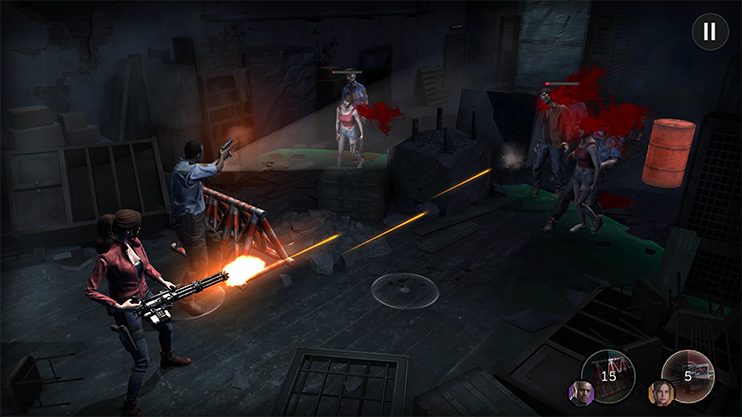
Resident Evil Survival Unit x Monster Hunter Crossover: What Kind of Gaming PC in Canada Should You Buy for Today’s Biggest Capcom Games?
The new Resident Evil Survival Unit x Monster Hunter crossover is more than just another attention-grabbing game event. It is a reminder of how quickly gaming trends move, how often players jump between genres, and how important it is to have a system that can keep up. For Canadian buyers researching a Gaming PC Canada solution, this kind of crossover moment highlights a bigger question: if you are playing survival horror today, monster-hunting action tomorrow, and streaming or creating content around both next week, is your current PC actually ready?
According to the source material provided, Capcom has launched a limited-time crossover event in Resident Evil Survival Unit that brings recognizable Monster Hunter monsters into the mobile strategy game. Confirmed event creatures include Rathalos, Yian Kut-Ku, and Silver Rathalos, alongside exclusive Hunter-themed unlocks and cosmetics. The event began on July 1 and is scheduled to run through July 29, giving players a defined window to jump in before the content disappears.
That news matters even if the event itself is on mobile. Why? Because franchise crossovers like this often spark wider player interest across entire series. One player rediscovers Resident Evil and starts looking at modern remakes on PC. Another gets pulled back into Monster Hunter and wants smoother performance, better visuals, and a more comfortable setup than what they get on older hardware. A third starts recording reactions, editing clips, or streaming gameplay. Suddenly the question is no longer just, “What is this event?” It becomes, “What should my next PC be able to handle?”
Why does this crossover matter to PC buyers in Canada?
Capcom’s biggest franchises do not live in one hardware lane. Resident Evil spans remakes, action-horror releases, and visually demanding PC titles. Monster Hunter has a long history of rewarding smooth frame rates, responsive controls, and strong GPU performance, especially when players want higher settings or larger displays. A crossover event can be the trigger that sends gamers back into both ecosystems at once.
If that sounds familiar, ask yourself a practical question: are you buying a PC for one game, or are you buying a PC for the next three years of gaming trends?
That is where many buyers make the wrong decision. They shop too narrowly. They look for the lowest spec that can launch one title today, instead of the right build for AAA games, multiplayer sessions, mods, streaming, Discord, browser tabs, and future releases. A better approach is to think beyond a single event and build around the kind of player you actually are.
For Canadian shoppers, that also means thinking about total value. Exchange rates, component swings, and demand pressure can change system pricing faster than many buyers expect. When excitement around major franchises rises, graphics card demand can rise with it. Waiting too long can mean paying more later for the same or weaker performance.
What the source story gets right about Resident Evil Survival Unit x Monster Hunter
The source article correctly frames this as a meaningful crossover between two of Capcom’s most recognizable franchises. It also points out something important for gamers: limited-time events drive urgency. Players have a reason to log in now, unlock exclusive content, and spend time with an ecosystem they may have ignored for months.
That same urgency applies to hardware decisions.
When interest in a franchise spikes, many players realize their current setup is outdated at exactly the wrong time. Maybe your system still plays lighter games, but newer horror titles stutter at higher settings. Maybe you can play, but not stream. Maybe your storage is full, your load times are slow, and background apps eat the rest of your memory. Maybe you have been telling yourself you will upgrade “later,” but later keeps becoming more expensive.
The smarter move is to buy based on where gaming demand is going, not where it was.
What do you want your next PC to do for you?
Before comparing specs, start with the real use case. Do you want a system mainly for Capcom games and other AAA releases? Do you want high frame rates at 1080p? Are you trying to step up to 1440p? Are you interested in 4K and ray tracing? Do you also want to stream, edit clips, design thumbnails, or work in Adobe apps after gaming?
This is the most important buying question in any gaming PC buying guide Canada search: what workload are you actually buying for?
Here are a few common buyer profiles:
- The focused gamer: Wants smooth gameplay in modern AAA titles and does not care much about editing or streaming.
- The multiplayer and creator hybrid: Wants to game, run voice chat, capture footage, stream occasionally, and edit short-form content.
- The premium enthusiast: Wants ultra settings, better longevity, stronger cooling, and room for new releases without upgrading too soon.
- The all-purpose creator: Wants gaming performance plus editing, Photoshop, design tools, or content production for YouTube, TikTok, and social clips.
- The workstation crossover buyer: Wants a powerful machine for gaming at night and 3D, rendering, or professional workloads during the day.
If you are unsure which one you are, that is exactly why a custom PC conversation matters.
What gaming PC do I need for modern Capcom games and other new releases?
If the Resident Evil and Monster Hunter brands are pulling you back into gaming, the right answer depends on your target resolution and expectations. Do you want “playable,” or do you want consistently enjoyable performance with headroom for what comes next?
Entry tier: 1080p gaming with sensible value
A value-focused system is ideal for players who want a Budget Gaming PC Canada option for 1080p gaming, strong everyday responsiveness, and enough power for a broad range of current titles without overspending. This tier makes sense for first-time buyers, students, and gamers moving up from an older desktop.
Ask yourself: Do you mostly want reliable 1080p performance, esports responsiveness, and a better experience than console-like compromise on settings?
If yes, an entry-to-midrange custom build can be the sweet spot. The advantage of going custom is not just raw speed. It is balanced part selection, airflow, upgrade paths, and avoiding the weak power supplies or cut-corner motherboards often found in generic systems.
Mid tier: 1440p gaming and better long-term value
For many Canadian buyers, 1440p is the smartest place to aim. It gives a meaningful visual upgrade over 1080p while staying more realistic than chasing 4K at all costs. If you play cinematic games, open-world titles, action RPGs, horror games, and big-budget releases, a 1440p Gaming PC Canada class build often delivers the best balance of sharpness, performance, and future-proofing.
Here is the key question: Do you want your new PC to still feel strong two or three years from now, or are you okay shopping again sooner?
If you would rather avoid upgrading too soon, this tier is often the better investment than buying the absolute cheapest machine available.
High-end tier: 4K, ultra settings, ray tracing, and premium longevity
If you want a 4K Gaming PC Canada experience, stronger ray tracing capability, faster frame rates on high-refresh displays, and more cushion for demanding future games, then a premium GPU and a stronger CPU platform make sense. This is especially attractive for enthusiasts who want a cleaner, more durable long-term solution instead of another near-term upgrade cycle.
Ask yourself honestly: Are you the kind of gamer who notices frame pacing, visual quality, noise levels, and thermal behaviour?
If yes, a high-end custom build is not about bragging rights alone. It is about consistent performance, thermal stability, and enjoying the games you are excited about without compromise.
Should you buy a gaming PC now or wait?
This is one of the most common questions in PC buying: is it better to buy a gaming PC now or wait? The answer depends on your current system, your game backlog, and your tolerance for market swings.
If your current PC struggles with newer titles, has limited storage, older cooling, too little memory, or an aging GPU, waiting can cost you twice. First, you lose months of better gaming and creator performance. Second, you risk buying during a worse pricing window.
Hardware pricing does not move in a straight line. GPU demand shifts. Memory pricing can climb. SSD costs can change. New releases can pull buyers into the market all at once. If major franchises are heating up and you already know your current PC is behind, “waiting for the perfect time” often becomes another way of delaying an obvious upgrade.
That does not mean every buyer should rush blindly. It means you should compare the cost of acting now against the cost of underperforming hardware and possible replacement-price increases later.
Could financing help you secure a stronger system before prices change?
For many shoppers, the real issue is not whether they need a better PC. It is whether they want to compromise too hard on performance just to stay within a short-term cash number. That is where financing becomes practical.
Instead of settling for a build you may outgrow quickly, some buyers choose to spread the cost and move into a stronger tier now. That can mean better GPU headroom, more RAM, faster storage, stronger cooling, and a platform that lasts longer. Groovy Computers offers financing options up to 4 years, which can help Canadian buyers avoid being boxed into weak entry-level decisions if their real needs are higher.
Ask yourself: Should you buy a cheaper PC that may need replacing sooner, or finance a better one that stays relevant longer?
That is not a sales gimmick question. It is a lifecycle cost question. A slightly stronger system can save frustration, reduce upgrade pressure, and give you a much better experience across gaming, streaming, and creative work.
What if you also want to stream, record, or create content?
Many players pulled into Resident Evil or Monster Hunter do more than just play. They record boss fights, post clips, stream reactions, edit tutorials, or build social content. If that sounds like you, a pure gaming spec may not be enough.
A Streaming PC Canada or Content Creation PC Canada build should be chosen with more than gaming in mind. You need enough CPU and GPU capability for game performance plus encoding, background apps, scene transitions, browser sources, and capture tools. Fast SSD storage matters too, especially if you are recording high-bitrate footage or managing large game libraries and project files.
So ask yourself: What PC do I need for streaming if I also want strong gaming performance?
If you stream casually, a balanced gaming-and-streaming system is often enough. If you are editing regularly, exporting videos, or using heavier software stacks, you should think more like a creator than a gamer-only buyer.
Gaming and streaming together
If you plan to play demanding games while using OBS, Discord, music apps, browser tabs, and overlays, you need a build designed for multitasking. This is where a Gaming and Streaming PC Canada setup becomes more than a luxury. It becomes the difference between a clean stream and a compromised one.
Editing clips after gaming
Do you plan to cut highlights, create shorts, upload to YouTube, or build a content brand around the games you play? Then you should think about storage speed, RAM capacity, and export performance too. Even if your gaming needs are moderate, editing can be what pushes you into a higher-performance category.
Is a gaming PC good for video editing, photo editing, and graphic design?
Sometimes yes, but not always equally well.
A well-configured gaming PC can absolutely help with creative work, especially if it includes a strong multi-core CPU, enough RAM, a capable GPU, and fast storage. But the best system for gaming is not automatically the best system for Adobe workflows or heavier content production.
If your workflow includes Premiere Pro, DaVinci Resolve, Photoshop, Lightroom, Illustrator, or other Adobe Creative Cloud tools, you should be looking at a Creator PC Canada or Video Editing PC Canada style configuration rather than a gaming-only machine.
Ask yourself:
- Do you edit 1080p clips occasionally, or do you work on 4K timelines?
- Do you batch export photos from RAW files?
- Do you use layers, effects, masks, and large design files daily?
- Do you need fast exports because your time has value?
If yes, your ideal build may need more memory, more storage, a different CPU priority, or a stronger GPU acceleration profile than a budget gaming-only setup.
For video editing buyers
If you are searching for a PC for Video Editing Canada because gaming led you into content creation, prioritize memory, SSD performance, and CPU/GPU balance. Smooth timeline playback and faster exports are worth paying for if you edit regularly.
For photo and design buyers
If your main creative work is Photoshop, Lightroom, branding, social media graphics, or Illustrator, a Graphic Design PC Canada or Photo Editing PC Canada build may be the better fit. Colour workflow, responsive multitasking, and adequate memory matter more than chasing gaming-only bragging specs.
What if your next PC also needs to handle 3D modeling or workstation tasks?
Some buyers arrive through gaming news but really need broader power. Maybe you play at night, but your day job includes Blender, Unreal Engine, CAD, rendering, or professional multitasking. In that case, you should not shop as if you are only buying a gaming tower.
You may need a 3D Modeling PC Canada or Workstation PC Canada configuration instead.
Ask yourself: What workstation PC do I need if I want gaming performance too?
The answer usually comes down to workload balance. If your machine spends serious time on rendering, simulation, scene compilation, or large project files, your component priorities should shift. More cores, more RAM, stronger cooling, and storage planning become increasingly important. A custom builder can match that balance in a way off-the-shelf systems often do not.
Which performance tier fits you best?
If you are still not sure where you belong, use this simple decision framework.
Choose a value-focused build if:
- You mainly game at 1080p
- You want solid current performance without overspending
- You do not do heavy editing or streaming
- You want a smart first desktop rather than a flashy one
Choose a balanced midrange build if:
- You want strong 1440p gaming
- You play modern AAA titles regularly
- You may stream, record, or multitask while gaming
- You want better long-term value and fewer upgrade regrets
Choose a premium build if:
- You want 4K or high-refresh ultra settings
- You care about ray tracing and stronger visual quality
- You expect your PC to last longer before feeling outdated
- You also create content or run heavier software workloads
Choose a creator or workstation build if:
- You edit video, photos, or design projects seriously
- You use Adobe apps, DaVinci Resolve, or 3D software regularly
- You need strong multitasking and faster project completion
- You are buying for work and performance time savings matter
If you are reading gaming news and thinking, “I probably need something between gaming, streaming, and editing,” that is a normal answer. Many modern buyers are hybrid users, and hybrid users benefit the most from a properly planned custom build.
Why custom PC selection matters more when gaming trends move fast
One of the biggest mistakes in the market is buying a system based on a label instead of a workload. “Gaming PC” can mean almost anything. Some systems are built to hit a price point, not to deliver a clean ownership experience. That can mean poor airflow, limited upgradability, generic components, or imbalanced specs.
When gaming hype rises around franchises like Resident Evil and Monster Hunter, buyers often shop in a hurry. That is when bad decisions happen.
A proper Custom Gaming PC Canada approach is different. The parts are selected to work together. Cooling and airflow are considered. Power delivery matters. Memory and storage are chosen for actual use, not just to satisfy a minimal checklist. That is how you get a machine that feels right day to day, not just in a product description.
Why Canadian buyers should care about testing, warranty, and support
A strong spec sheet is not enough. Reliability matters, especially if you are spending serious money or financing a better build. Groovy Computers positions itself around custom builds, rigorous testing, and a 1-year warranty, which is exactly the kind of confidence many buyers should be looking for.
Ask yourself: If something goes wrong, do you want to deal with a faceless listing, or do you want a Canadian custom PC builder behind your system?
That question matters even more if your PC is used for both fun and work. Whether you are gaming, editing, designing, or rendering, downtime has a cost. A tested system with real support is worth more than a bargain that becomes a problem later.
What questions should you ask before buying your next PC?
Before you commit, work through these practical questions:
- What games do I actually want to play over the next 12 to 36 months?
- Am I targeting 1080p, 1440p, or 4K?
- Do I care about ray tracing or mostly raw frame rate?
- Will I stream, record, or edit content?
- Do I also use Premiere Pro, Photoshop, Blender, or other demanding software?
- How much storage do I really need for games, clips, and projects?
- Am I trying to save money today but risk upgrading too soon?
- Would financing a stronger build make more sense than replacing a weak one earlier?
- Do I want a generic box, or a custom build with testing and warranty support?
If you cannot answer all of those alone, that is not a problem. It is exactly why working with a custom builder is useful.
So, what should a Canadian buyer do after reading about this Capcom crossover?
Use the hype as a checkpoint.
If the Resident Evil Survival Unit x Monster Hunter event reminded you how much you enjoy these franchises, take that as a sign to assess your hardware honestly. Are you ready for the games you want to play next? Are you buying around your real gaming and creator habits, or just trying to survive one more release on aging hardware?
If your answer is uncertain, this is the right time to look at your options. A budget build may be enough. A 1440p-focused system may be the sweet spot. A premium RTX gaming PC may be the better long-term answer. A creator PC or workstation may fit you better than a basic gaming desktop. The correct choice depends on your actual use, not just the latest headline.
Need help choosing the right build from Groovy Computers?
Are you trying to figure out what gaming PC do I need, whether a balanced creator setup would serve you better, or whether financing a stronger system now is smarter than buying too low and upgrading again later? That is where Groovy Computers can help. From gaming-focused desktops to creator and workstation configurations, Groovy Computers is built around custom PC guidance for Canadian buyers who want performance, testing, warranty confidence, and a system matched to real needs. To explore your next build, visit GroovyComputers.ca.
Final thoughts: the Resident Evil Survival Unit x Monster Hunter crossover is a reminder to buy for what comes next
The Resident Evil Survival Unit x Monster Hunter crossover may be a limited-time event, but the buying lesson behind it is bigger. Gaming trends move quickly, franchise momentum can change your upgrade urgency overnight, and the best time to choose a stronger PC is often before your current system forces the issue. If you want a better gaming experience, smoother streaming, faster editing, or a machine that can handle both play and productivity, buying thoughtfully now can be the smarter move for Canadian shoppers.
#GamingPCCanada #CustomGamingPCCanada #GamingPCBuilderCanada #GamingPCBuyingGuideCanada #1440pGamingPCCanada #4KGamingPCCanada #CreatorPCCanada #StreamingPCCanada #WorkstationPCCanada #CanadianCustomPCBuilders #GroovyComputers
Groovy Computers | All Rights Reserved


Leave a comment
This site is protected by hCaptcha and the hCaptcha Privacy Policy and Terms of Service apply.