




















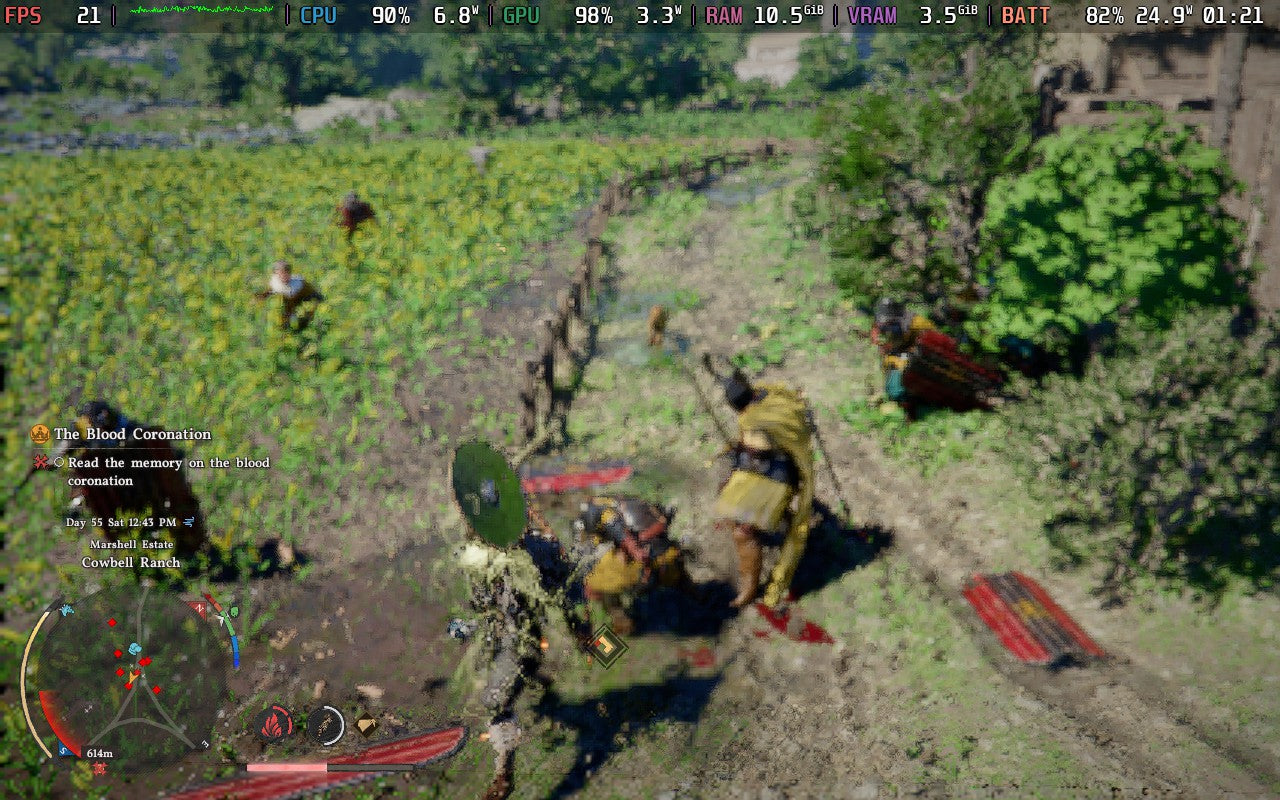
Gaming PC for New Games: What the Crimson Desert Steam Deck Verified Debate Teaches Canadian PC Buyers
A gaming PC for new games is no longer just about whether a title technically launches. It is about whether the experience is smooth, stable, sharp, responsive, and worth your time. The recent discussion around Crimson Desert receiving a Steam Deck Verified badge despite serious performance concerns is a perfect reminder that labels, badges, and minimum requirements do not always tell the full story. For Canadian gamers, streamers, creators, and professionals, the lesson is clear: if you want modern games and demanding creative software to feel good, you need to choose hardware based on real-world use, not just marketing promises.
At Groovy Computers, this matters because many customers come to us after realizing that “playable” is not the same as “enjoyable.” A game may technically run on compact handheld hardware, an older desktop, or a bargain system, but what happens when the frame rate dips during combat, the image becomes blurry from aggressive upscaling, or your system stutters right when the action gets intense? What if you also want to stream, edit clips, run Discord, record gameplay, use Photoshop, build scenes in Blender, or export YouTube videos?
The Crimson Desert situation is not just a handheld gaming story. It is a buyer’s guide in disguise. It shows why Canadian customers shopping for a Custom Gaming PC Canada build, a creator desktop, a streaming system, or a workstation should ask deeper questions before buying. What games do you want to play? What resolution do you want? Do you care about high FPS, ray tracing, 1440p, 4K, streaming, editing, or long-term upgrade room? Are you buying before a major release, a sale period, or a possible component price shift? Would financing help you secure a stronger system now instead of replacing a weaker one too soon?
Why the Crimson Desert Steam Deck Verified Debate Matters
The source discussion focused on a simple but important point: Crimson Desert may be a strong game, but it reportedly struggled badly on Steam Deck hardware. Even at the lowest settings with heavy FSR upscaling, the game was described as unable to maintain a stable 30 FPS in normal gameplay. The reported average frame rate hovered around the 30 FPS mark, but the 1% and 0.1% lows were far lower, meaning real gameplay included stutters, dips, and uneven frame delivery.
That distinction matters. Many people see an average FPS number and assume the game is fine. But if the average is 30 FPS and the low points drop into the teens, the experience can feel choppy, inconsistent, and frustrating. A graph may say “almost 30 FPS,” but your hands feel every hitch when you dodge, aim, fight, or turn the camera.
So, what should Canadian buyers take from this? If a demanding open-world game needs the lowest possible settings, extremely aggressive upscaling, and still cannot deliver consistent performance, then the hardware is not really giving you the experience the game deserves. If you are excited about big cinematic games, open-world combat, next-generation visuals, and future AAA releases, you should not build your buying decision around the bare minimum.
This is where a properly matched gaming PC for new games becomes valuable. You are not just buying a box with a CPU and GPU. You are buying headroom, image quality, stability, cooling, upgrade options, and confidence that your system can handle more than launch menus and benchmark averages.
“Verified” Does Not Always Mean “Great”: What PC Buyers Should Watch For
Steam Deck verification, console performance modes, minimum PC requirements, and generic “recommended specs” can all be useful starting points. But they are not the same as a personalized performance recommendation. A badge may confirm that a game launches, controls work, text is readable, or settings are configured. It does not always mean you will get the FPS, visual quality, resolution, or consistency you personally expect.
Ask yourself: would you be satisfied with the lowest possible settings if the game looks blurry and still stutters? Would you rather play at 1080p with stable high FPS, 1440p with strong visuals, or 4K with premium settings? Do you want to turn ray tracing on? Do you want to stream while playing? Do you want enough performance to still feel good two or three years from now?
These questions matter because PC gaming is flexible. That flexibility is powerful, but it also means the right system depends on your actual goals. A budget gaming computer can be excellent for esports, indie games, and 1080p gaming. A mid-range build may be the sweet spot for 1440p. A premium RTX gaming PC can target 4K, ray tracing, high refresh rates, content creation, and longer upgrade cycles. A workstation-class system may be better if your gaming PC also needs to handle Blender, Unreal Engine, DaVinci Resolve, Adobe Premiere Pro, Photoshop, Lightroom, or CAD workloads.
What Do You Want Your Next PC to Do for You?
Before choosing parts, pricing, or financing, start with the most important question: what do you want your next PC to do for you?
Do you want a system mainly for single-player AAA games like open-world RPGs, action adventures, racing games, shooters, and visually demanding releases? Do you want a competitive gaming PC for titles where frame rate and input response matter more than ultra graphics? Are you planning to stream on Twitch or YouTube? Do you edit video for social media, weddings, business marketing, or YouTube? Are you a photographer working with RAW files in Lightroom and Photoshop? Are you a designer using Illustrator, InDesign, Canva, or Adobe Creative Cloud? Are you learning Blender, Unreal Engine, Unity, Revit, AutoCAD, or SolidWorks?
The right answer changes the build. A gamer chasing smooth 1440p performance may prioritize GPU power differently than a video editor who needs more CPU cores, RAM, and fast storage. A streamer may benefit from an NVIDIA RTX GPU with strong encoding support. A photographer may care about fast single-core performance, memory, SSD speed, and monitor support. A 3D artist may need more VRAM, more RAM, and stronger cooling for long rendering sessions.
If you are unsure, that is exactly where Groovy Computers can help. A custom PC should be built around what you actually do, not around a random spec sheet. When you visit GroovyComputers.ca, you can browse systems, compare performance tiers, and start thinking about the right path for your gaming, streaming, editing, design, or workstation needs.
Gaming PC for New Games: Why Stable Performance Beats “Technically Playable”
A gaming PC for new games should do more than scrape by. New titles increasingly lean on advanced lighting, higher-resolution textures, large open worlds, dense cities, physics systems, AI routines, shader compilation, and asset streaming from fast storage. Even when a game offers upscaling options such as FSR, DLSS, or XeSS, those technologies should ideally improve an already solid experience rather than rescue an underpowered one from unplayability.
When performance is too close to the edge, every demanding scene becomes a problem. A quiet field may run acceptably, but a city, battle, boss fight, weather effect, cutscene, or crowded environment can cause sudden drops. That is why averages can be misleading. Smooth gameplay depends on frame pacing, 1% lows, thermal consistency, GPU headroom, CPU scheduling, memory capacity, and storage responsiveness.
For Canadian buyers, the practical takeaway is simple: do not shop only for “Can it run?” Shop for “Will I enjoy it?”
If your goal is 1080p gaming, you may not need a flagship system. If your goal is 1440p high settings with strong FPS, you should plan for a more capable GPU and CPU combination. If you want 4K gaming, ray tracing, ultra settings, or high-refresh cinematic experiences, you should be looking at a premium tier. If you want to keep the system for years without feeling outdated too quickly, building with extra headroom can save money and frustration later.
Which Performance Tier Fits You?
Choosing a PC becomes much easier when you match your expectations to a realistic performance tier. Instead of asking only “How much should I spend on a gaming PC?”, ask “What experience am I trying to buy?”
Entry and Budget Gaming PC: Is 1080p Your Main Goal?
A budget gaming PC can be a smart choice for students, first-time PC gamers, families, and players focused on esports or lighter games. If you mainly play Fortnite, Valorant, Counter-Strike 2, Roblox, Minecraft, Rocket League, League of Legends, indie games, or older AAA titles, a value-focused system may be ideal.
But what if you also want the newest open-world games? What if you want high settings instead of low settings? What if you want to record clips, stream occasionally, or keep the system for several years? In that case, buying the cheapest possible PC may lead to an upgrade sooner than expected.
A strong budget build should still include balanced parts, adequate RAM, a fast SSD, reliable cooling, and a clear upgrade path. Groovy Computers can help you avoid the common trap of buying a low-cost system with one flashy component and several weak links.
Mid-Range Gaming PC: Is 1440p the Sweet Spot?
For many Canadian gamers, a 1440p Gaming PC Canada build is the best balance of price, sharpness, and performance. 1440p looks noticeably cleaner than 1080p, especially on 27-inch monitors, while being easier to drive than 4K. It is a strong target for modern AAA games, high-refresh gaming, and a mix of visual quality and smooth frame rates.
This tier is often ideal if you want to play demanding new releases without dropping everything to low settings. It is also a good fit for gamers who want to stream, multitask, and create occasional content. If you are asking, “What PC do I need for 1440p gaming?”, the answer usually involves a well-balanced CPU, a capable modern GPU, 32GB of RAM for extra comfort, and fast NVMe storage.
Do you want your system to stay relevant through several major game launches? Then a carefully chosen mid-range custom PC can be one of the smartest long-term values.
High-End Gaming PC: Do You Want 4K, Ray Tracing, and Ultra Settings?
A high-end gaming PC is for players who want premium settings, stronger ray tracing, high FPS at higher resolutions, and enough headroom to handle tomorrow’s games more comfortably. This is where a 4K Gaming PC Canada build or a premium RTX gaming PC becomes relevant.
Ask yourself: are you buying for a 4K monitor or TV? Do you want ultra settings instead of optimized medium-high settings? Do you want ray tracing enabled? Are you planning to stream, record, edit, and game on the same machine? Do you want to avoid upgrading too soon?
Premium builds are not just about bragging rights. They can reduce compromise. They can also extend the practical life of your system because you start with more performance headroom. For buyers who would rather finance a stronger system than buy a weaker one today and replace it early, this tier can make sense when monthly payment options are available.
Creator and Workstation PC: Is Gaming Only Part of the Job?
Many customers do not fit neatly into one category. You may game at night, edit video on weekends, design graphics for clients, manage a business, create social media content, and experiment with 3D rendering. That is where a Creator PC Canada or custom workstation becomes a better conversation than a standard gaming desktop.
If you use Adobe Premiere Pro, DaVinci Resolve, After Effects, Photoshop, Lightroom, Illustrator, Blender, Unreal Engine, AutoCAD, Revit, SolidWorks, or similar software, your PC should be planned around workload balance. CPU cores, GPU acceleration, VRAM, RAM capacity, SSD layout, cooling, and reliability all matter.
Is a gaming PC good for content creation? Sometimes, yes. But a gaming PC optimized only for FPS may not be ideal for editing, rendering, multitasking, or professional workloads. A custom build allows the system to be tuned for both entertainment and productivity.
Why Handheld Struggles Should Make Desktop Buyers Think Bigger
The Steam Deck is a remarkable device for portability, indie games, older PC titles, and many optimized experiences. But handheld hardware has limits. When a visually ambitious open-world game pushes beyond those limits, the result can be heavy upscaling, low settings, inconsistent frame rates, and compromised image quality.
That does not mean handheld gaming is bad. It means buyers should match hardware to expectations. If you want portability above all else, you accept compromise. If you want the best version of a demanding new game, a properly built desktop is usually the stronger choice.
So the real question is not “Can a handheld run it?” The better question is: what kind of experience do you want when a game gets demanding?
Do you want clean visuals instead of blur? Do you want smoother combat instead of sudden frame drops? Do you want the ability to raise settings instead of turning everything down? Do you want modding, streaming, multiple monitors, fast storage, and future upgrades? If so, a custom desktop from a Canadian PC builder becomes the more practical long-term investment.
Why Canadian Buyers Should Think Differently About Timing
Canadian PC buyers face a different reality than shoppers reading generic global hardware advice. Component prices can shift due to exchange rates, shipping costs, supplier availability, memory pricing, GPU demand, tariffs, seasonal rushes, new product launches, and sudden demand spikes when major games release. A build that looks affordable today may not be priced the same later.
This is especially important when trending games, creator software updates, or new hardware cycles push demand upward. If a major game is approaching and many players realize their old PC cannot handle it, demand can rise quickly. If creators suddenly need more RAM, faster storage, or stronger GPUs for AI-assisted workflows and 4K content, those parts can become more expensive or harder to source.
Is it better to buy a gaming PC now or wait? The honest answer depends on your needs, your current system, and your budget. But waiting is not always the money-saving move people expect. If your current PC is already struggling, delaying can cost you time, performance, and potentially higher replacement pricing later.
If you are in Nova Scotia, Atlantic Canada, Ontario, Alberta, British Columbia, or anywhere shopping online across Canada, the same question applies: are you buying because you need performance now, or are you hoping prices will magically improve before your next game, project, semester, or client deadline?
Should Financing Help You Secure a Stronger PC Before Prices Change?
Financing is not about buying more than you need. It is about giving yourself options. For some customers, Gaming PC Financing Canada makes sense because it can turn a short-term budget limit into a better long-term build decision. Groovy Computers offers financing options up to 4 years, which may help buyers secure a stronger system now rather than settling for a weaker build that needs upgrades sooner.
Ask yourself: should you buy a cheaper gaming PC today and replace major parts in a year, or finance a better-balanced system with more headroom? Would monthly payments allow you to choose a stronger GPU, more RAM, a faster SSD, or a better CPU platform? Would that help you play new games, edit faster, stream more reliably, or complete paid work sooner?
Financing can be especially useful for:
- Gamers preparing for demanding new AAA releases.
- Streamers who need stable FPS while running OBS, overlays, alerts, chat, and recording tools.
- Video editors who lose time waiting on exports, proxies, and timeline playback.
- Photographers managing large RAW libraries and batch exports.
- Graphic designers working across Adobe Creative Cloud, Canva, branding assets, and multi-monitor setups.
- 3D artists and students learning Blender, Unreal Engine, CAD, animation, or product visualization.
- Professionals who need reliability and cannot afford constant slowdowns.
Is financing a gaming PC worth it? It can be, if it helps you buy the right system instead of the cheapest system. The key is choosing a build that matches your workload, budget, and upgrade timeline. Groovy Computers can help you compare practical options without pushing you into a poor fit.
How Much Performance Do You Really Need?
Performance needs are personal, but there are useful patterns. If you are asking “What gaming PC do I need?”, start with your display, your games, and your expectations.
For 1080p Gaming
1080p remains popular because it is affordable, fast, and ideal for competitive gaming. If your monitor is 1080p and you mostly play esports or moderately demanding titles, you can focus on value. However, if you want ultra settings in modern AAA games, avoid building too close to the minimum. A little extra GPU headroom can dramatically improve consistency.
For 1440p Gaming
1440p is often the modern sweet spot. It needs more GPU power than 1080p, but it delivers a clear visual upgrade without the extreme demands of 4K. If you want new open-world games to look good and feel smooth, this is where balanced custom gaming PCs shine.
For 4K Gaming
4K gaming is beautiful but demanding. It benefits from high-end GPUs, strong CPUs, enough RAM, fast storage, and excellent cooling. If you also want ray tracing, high-refresh displays, or streaming, this becomes a premium build category. Buyers in this tier should think about longevity, not just launch-day performance.
For Streaming and Recording
If you want a Gaming PC for Streaming Canada setup, your system needs extra headroom. Playing a game is one workload. Playing, encoding, recording, managing overlays, monitoring chat, and running a browser on a second monitor is a different workload. A good streaming PC should be planned around both gaming FPS and broadcast stability.
For Video Editing and Content Creation
A Video Editing PC Canada build needs to handle timelines, effects, colour correction, exports, media caches, and high-resolution footage. If you edit 4K video, use DaVinci Resolve, work in Premiere Pro, or combine After Effects with Photoshop assets, you should consider more RAM, a stronger CPU, GPU acceleration, and multiple fast SSDs.
For Photo Editing and Graphic Design
Photo editing and graphic design are often underestimated. Lightroom catalogues, Photoshop layers, large RAW files, Illustrator documents, InDesign layouts, and AI-assisted tools all benefit from responsive hardware. A custom creator PC can make day-to-day work feel faster, especially when multitasking across apps and monitors.
For 3D Modeling, Rendering, and Workstation Use
A 3D Modeling PC Canada or rendering workstation needs careful planning. Blender, Unreal Engine, Unity, Maya, 3ds Max, Cinema 4D, Revit, AutoCAD, and SolidWorks can stress different parts of the system. Some workflows lean heavily on GPU rendering and VRAM, while others need CPU power, RAM capacity, or professional stability. This is where a generic gaming PC may not be enough.
Why 1% Lows Matter More Than Many Buyers Realize
The Crimson Desert performance discussion highlighted a common issue: average FPS can hide poor real-world smoothness. A game averaging around 30 FPS can still feel bad if its low-end frame rates collapse during action. That is why serious PC builders and informed buyers care about 1% lows, 0.1% lows, frame pacing, and thermal stability.
Imagine driving on a highway where your average speed is fine, but the car slams the brakes every few seconds. Technically, the average may look acceptable. In reality, the ride feels awful. PC performance works similarly. Smoothness is about consistency.
When Groovy Computers builds a system, the goal is not just to assemble parts. It is to create a balanced machine that performs reliably under real workloads. That means paying attention to airflow, power delivery, component matching, BIOS stability, memory compatibility, storage speed, and stress testing. A stable custom PC is not an accident. It is the result of careful planning and testing.
Custom PC vs Generic Prebuilt: Why the Details Matter
Many buyers compare PCs by looking at only the CPU and GPU listed in the title. That is understandable, but it can be misleading. Two PCs with similar headline specs can perform differently because of cooling, motherboard quality, RAM speed, power supply reliability, case airflow, SSD quality, and build configuration.
A generic prebuilt may advertise a powerful graphics card but pair it with limited cooling, slower memory, a weak power supply, or poor upgrade room. A custom build can be designed around your actual use case. That matters more when you are buying for demanding new games, long streaming sessions, professional editing, or workstation workloads.
Ask yourself: do you want a PC chosen by a warehouse template, or a PC built for your games, your software, your monitor, your budget, and your upgrade plans?
Groovy Computers is a Canadian custom PC builder focused on matching customers with systems that make sense. Whether you need a budget gaming computer, premium RTX gaming PC, custom creator PC, video editing workstation, or 3D modeling workstation, the value is in getting the details right the first time.
What Should You Ask Before Buying a Gaming PC in Canada?
If you are researching a new system, use these questions to narrow down the right build:
- What games do I play most often, and what new games am I planning to buy?
- Do I want 1080p, 1440p, or 4K gaming?
- Do I care more about high FPS, ultra settings, ray tracing, or long-term value?
- Will I stream, record, or edit gameplay?
- Do I use software like OBS, Premiere Pro, DaVinci Resolve, Photoshop, Lightroom, Illustrator, Blender, Unreal Engine, AutoCAD, Revit, or SolidWorks?
- How much RAM do I need for my actual workload?
- Do I need one large SSD, or separate storage for games, media, cache files, and projects?
- Am I buying before a major game release, school term, work project, sale period, or possible price spike?
- Would financing help me buy a stronger system that lasts longer?
- Do I want help choosing a build instead of guessing?
These questions are not just technical. They protect your budget. The wrong PC can cost more over time if it needs early upgrades, struggles with your favourite games, or slows down your work.
What If You Are a Gamer and a Creator?
Many modern buyers are not just gamers. They are also creators. You might play a demanding RPG, clip highlights, edit short-form videos, design thumbnails, livestream, manage a Discord community, create TikToks, record podcasts, and experiment with AI tools. That means your PC needs to be more flexible than a basic gaming-only system.
A Content Creation PC Canada build may include more RAM than a typical entry gaming PC, stronger multi-core CPU performance, an RTX GPU for encoding and acceleration, fast NVMe storage, and a case with better airflow for longer sessions. If you are editing 4K video, working with large design files, or rendering scenes, those upgrades are not luxuries. They directly affect how quickly and comfortably you work.
What PC do content creators need? The answer depends on whether you mostly edit short clips, produce long-form YouTube videos, stream daily, handle client work, or render 3D projects. A custom system allows you to prioritize the parts that save the most time in your workflow.
Why Future-Proofing Is Really About Avoiding Regret
No PC is truly future-proof forever. Technology changes, games get heavier, software evolves, and new features arrive. But smart planning can help you avoid regret. A future-ready build is one that gives you enough performance headroom, enough memory, enough storage, reliable cooling, and an upgrade path that does not force you to replace everything too soon.
When a game like Crimson Desert struggles on limited hardware, it reminds buyers that demanding titles can expose weak points quickly. Today, you may be comfortable with medium settings. Tomorrow, a new release may ask more from your GPU, CPU, RAM, or SSD. If your system is already at the edge, you have no room left.
Would you rather save a little now and upgrade sooner, or spend strategically and keep your system comfortable longer? There is no universal answer, but it is a question worth asking before you buy.
How Component Price Pressure Can Affect Full-System Costs
PC pricing is not controlled by one part. GPUs, CPUs, motherboards, RAM, SSDs, power supplies, cases, cooling, and shipping all contribute to the final cost. When one category rises, the total build changes. When several categories rise at once, waiting can become expensive.
GPU demand often increases around visually demanding game releases, creator trends, AI workloads, and new hardware cycles. Memory and SSD pricing can move based on supply conditions and manufacturing demand. Exchange rates can affect Canadian pricing even when global MSRP appears stable. Shipping and availability can also change quickly.
This is why timing matters. If you already know your current PC cannot handle the games or software you care about, it may be smarter to secure the right build while parts are available. If financing helps you avoid a weaker compromise, it may also help you avoid paying twice.
Why Testing and Warranty Confidence Matter
A powerful PC is only valuable if it is reliable. That is why testing matters. A system can boot into Windows and still have memory instability, thermal issues, driver problems, poor cable management, weak airflow, or power delivery concerns. These problems may not show up until you run a demanding game, export a long video, render a 3D scene, or stream for several hours.
Groovy Computers emphasizes custom builds, rigorous testing, and a 1-year warranty because confidence matters. Canadian buyers should not have to gamble on whether their system will hold up under real use. Whether you are buying a gaming desktop, streaming PC, editing machine, or workstation, reliability is part of performance.
Do you want a system that only looks good on a product page, or one that has been built and tested with real usage in mind?
When a Budget PC Makes Sense and When It Does Not
A budget gaming PC is not automatically a bad choice. In fact, it can be the best choice when matched properly. If your goals are 1080p esports, schoolwork, casual gaming, and everyday use, a budget system may offer excellent value. The problem starts when a budget PC is expected to perform like a premium system.
If you want to play the newest AAA games at high settings, stream, edit video, and keep the system for years, an ultra-low-cost build may disappoint. It may require aggressive upscaling, lower textures, reduced draw distance, limited multitasking, and earlier upgrades. That can make the “cheap” option more expensive over time.
Can a budget gaming PC play new games? Sometimes, yes. Can it play every new game smoothly at the settings you want? Not always. That is why expectation-setting matters. Groovy Computers can help you decide whether budget, mid-range, premium, creator, or workstation is the right category.
When a Premium PC Is Worth It
A premium gaming PC is worth considering when the experience you want requires fewer compromises. If you have a high-refresh 1440p monitor, a 4K display, a ray tracing focus, a streaming setup, a heavy editing workflow, or professional 3D software, high-end hardware can be practical rather than excessive.
Premium systems can also make sense if you value longevity. A stronger GPU, better CPU platform, more RAM, larger SSD, and superior cooling can extend how long the PC feels fast. If you finance a high-end gaming PC responsibly, you may be able to secure that extra headroom without paying the full amount upfront.
Should you finance a high-end gaming PC? If the system supports your entertainment, school, business, creative income, or professional productivity, financing can be a practical tool. The important part is choosing a build with purpose, not just choosing the most expensive option.
Why Groovy Computers Is Built for Canadian Buyers
Groovy Computers understands that Canadian PC buyers need more than generic advice. You need real guidance, fair build planning, Canadian context, shipping awareness, financing options, and support from people who understand gaming computers in Canada.
Whether you are in Nova Scotia, New Glasgow, Trenton, Halifax, Atlantic Canada, Ontario, Alberta, British Columbia, or elsewhere across the country, buying from a Canadian custom PC company can make the process feel clearer and more accountable. You can focus on what you want the system to do while Groovy Computers helps translate that into the right performance tier.
Need a gaming PC for new games? Want a custom streaming PC? Looking for a video editing PC, creator workstation, photo editing desktop, graphic design PC, or 3D rendering build? Groovy Computers can help you avoid the guesswork and choose a system that fits your workload, monitor, budget, and upgrade expectations.
Ready to Choose the Right Gaming PC for New Games?
If the Crimson Desert Steam Deck Verified debate proves anything, it is that “verified,” “playable,” and “minimum” are not enough. A gaming PC for new games should be selected around the experience you actually want: stable FPS, better visuals, smooth streaming, faster editing, reliable rendering, and enough headroom to avoid upgrading too soon.
So, what do you want your next PC to handle? 1080p esports? 1440p AAA gaming? 4K ray tracing? Twitch streaming? YouTube editing? Photoshop and Lightroom? Blender and Unreal Engine? Business productivity? A mix of everything?
If you are ready to compare options, ask about financing, or get help choosing the right custom build, visit GroovyComputers.ca. Groovy Computers can help you find the right balance of performance, price, reliability, and upgrade room before market conditions, workload demands, or game requirements push you into a rushed decision.
Final Takeaway: Do Not Buy for the Badge, Buy for the Experience
The biggest lesson from the Crimson Desert performance conversation is simple: a label cannot replace real performance expectations. If a game has to be forced down to blurry low settings and still struggles to stay smooth, that is not the experience most players are hoping for. Canadian buyers should use that lesson when shopping for their next desktop.
Buy for the games you actually play. Buy for the software you actually use. Buy for the monitor you actually own or plan to buy. Buy for the next few years, not just the next benchmark. And if financing helps you secure a stronger, better-balanced build before pricing or availability changes, it may be worth exploring.
A custom PC is not just a purchase. It is a performance plan. Groovy Computers is here to help Canadian gamers, creators, streamers, designers, editors, and professionals choose the right system with confidence.
#GamingPCForNewGames #CustomGamingPCCanada #GamingComputersCanada #1440pGamingPC #4KGamingPC #CreatorPCCanada #StreamingPCCanada #VideoEditingPCCanada #GroovyComputers
Groovy Computers | All Rights Reserved


Leave a comment
This site is protected by hCaptcha and the hCaptcha Privacy Policy and Terms of Service apply.