






















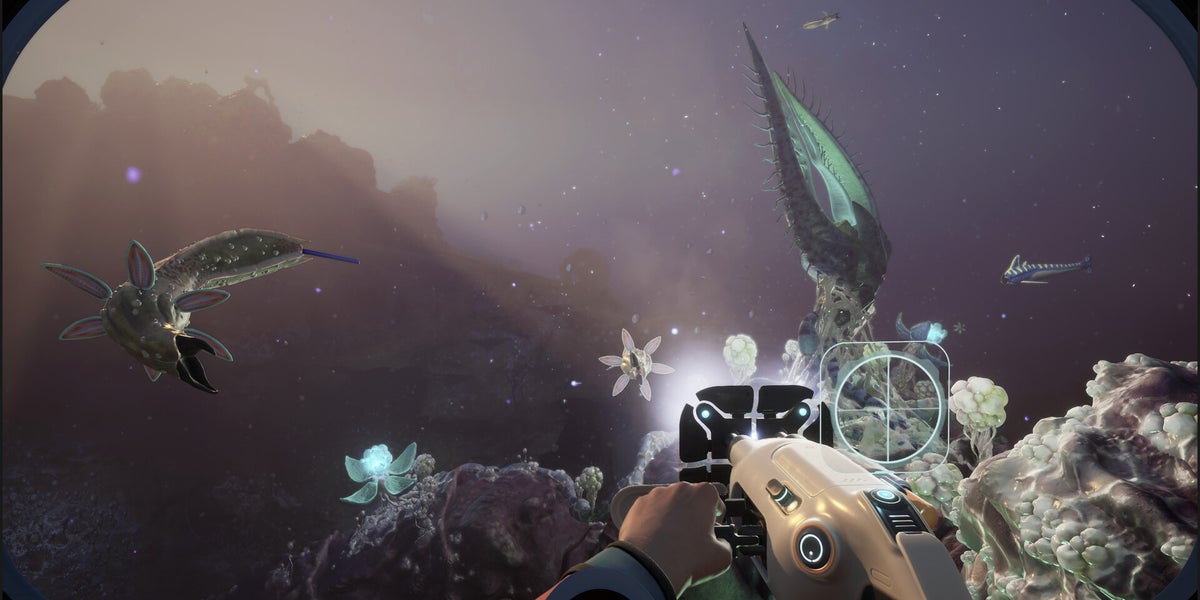
Subnautica 2 Legal Battle News and What It Means for Buying a Gaming PC Canada Can Count On
The latest Subnautica 2 legal battle update is more than industry drama. It is also a reminder that major games, early access titles, live development roadmaps, and shifting publisher decisions can all change what players expect from their hardware. When a game remains in active development, receives creature AI updates, graphical changes, optimization passes, and content expansions, your PC needs room to grow with it. For Canadian players, streamers, and creators, that raises an important question: is your current system ready for the games and workloads you actually want to keep up with over the next year?
The source story centres on the settlement between Krafton and the leadership team at Unknown Worlds, including the reinstated CEO stepping down after the dispute concluded. It also points to continued support for the studio and continued early access updates for Subnautica 2. That matters because games like this do not stand still. They evolve. Features change. Performance demands can shift. Community interest spikes. Streaming picks up. Modding expands. Suddenly, a PC that felt acceptable six months ago starts feeling cramped.
That is exactly where a smart buying guide matters. If you are following Subnautica 2, survival games, open world exploration titles, or visually rich PC releases in general, this is a good time to think beyond one headline and ask a more practical question: what kind of custom gaming PC in Canada makes sense for the way you actually play, create, and upgrade?
Why this Subnautica 2 legal battle story matters to PC buyers
At first glance, a studio leadership settlement might sound unrelated to custom PCs. But in practice, game-development uncertainty often leads to one thing for players: waiting to see what happens next. More updates. More community interest. More patches. More content. More reasons to come back. If you plan to play a game through early access and beyond, especially on higher settings, your hardware decision becomes a long-term one rather than a one-week one.
Are you the type of player who jumps into early access immediately and stays there for every update? Do you like testing visual settings, running mods, recording clips, or streaming your reactions with friends? Or are you trying to buy one strong system now so you do not have to replace it too soon when the next wave of AAA games lands?
Those are buying questions, not just gaming questions.
What the source article gets right about timing, uncertainty, and continued development
The key takeaway from the source material is stability after instability. The legal dispute appears settled, bonus arrangements reportedly improved, and the studio continues leading development. For players, that usually means the game keeps moving forward. And when a game keeps moving forward, system requirements in the real world often move with it, even if official requirement pages lag behind.
That is especially relevant for demanding genres. Underwater survival games, large world traversal, dynamic lighting, creature interactions, and future patches can all push CPU, GPU, RAM, and SSD performance harder than expected. Add OBS, Discord, browser tabs, mods, recording software, or a second monitor, and the difference between a barely-playable PC and a comfortable one becomes obvious very quickly.
So ask yourself: are you shopping for the minimum needed to launch a game, or for the experience you actually want to have with it?
Why Canadian gamers should think differently before buying
Canadian buyers have to think about more than base component specs. Total ownership matters. That includes Canadian pricing pressure, exchange-rate effects, shipping realities, upgrade timing, and the risk of buying too weak a system now only to spend more again later. A rushed low-end purchase can become the most expensive option if it forces an early GPU upgrade, more RAM, a larger SSD, or a full platform replacement sooner than expected.
That is why a Gaming PC Canada buyer should not approach the market the same way a casual international headline reader would. In Canada, buying smarter often means buying more intentionally. It means choosing a system that matches not just today’s game list, but tomorrow’s patches, next season’s releases, and your own growing expectations.
Would you rather save a little upfront and feel limited in six months? Or would you rather get a properly balanced custom system, tested and backed with warranty support, that gives you more room to enjoy modern PC gaming without immediate regret?
What do you want your next PC to actually do for you?
This is the most important question in the entire buying process.
Do you want a machine mainly for Subnautica 2 and similar open world survival games? Do you want high-refresh 1080p competitive play across multiple titles? Are you targeting 1440p ultra settings? Do you care about ray tracing and visual immersion? Do you also want to stream to Twitch or YouTube, record gameplay, edit clips, create thumbnails, or run creative software after gaming hours?
Your answer changes everything.
- Gaming only: focus on strong GPU value, enough CPU headroom, fast SSD storage, and sensible RAM capacity.
- Gaming and streaming: you need extra CPU or smart GPU encoding capability, more RAM, and better thermals.
- Gaming and content creation: a balanced creator-ready build matters more than chasing one benchmark number.
- Gaming plus video editing or design: storage speed, RAM, and multitasking stability start mattering just as much as gaming FPS.
- 3D modeling or workstation tasks: your system may need to shift from a pure gaming profile to a true workstation-oriented configuration.
If you are not sure which category you fall into, that is exactly where a custom builder becomes valuable.
What PC do you need for Subnautica 2-style games and other modern releases?
Games in the survival, exploration, and open world category tend to punish weak systems in very specific ways. They can hit storage hard during asset streaming, stress the CPU with world simulation and AI activity, and expose GPU weakness when you raise resolution or quality settings. They also reward responsive storage and enough memory because hitching and loading interruptions break immersion fast.
For a player focused on these games, a strong baseline usually means:
- A modern multi-core CPU with enough headroom for background tasks
- A capable dedicated GPU for your target resolution
- At least enough RAM for modern multitasking and current game demands
- An SSD that keeps load times and streaming smooth
- Reliable cooling for long sessions
But there is another question worth asking: are you only buying for one game, or are you buying for the next several major games too? If the answer is the second one, then future-proofing matters far more than shopping by bare minimum requirements.
Which performance tier fits you best?
One of the easiest ways to make a bad PC decision is to buy by price alone. A much better way is to buy by target experience. Here is how to think about it.
Entry-level value tier: best for practical 1080p players
This tier suits buyers who want a budget gaming PC Canada shoppers can justify without overspending, but who still want a real desktop gaming experience. If your goal is 1080p gaming with sensible settings, solid frame rates, and room for indie titles, esports games, lighter open world releases, and some current AAA games at tuned settings, this tier makes sense.
Who is this for? Students, first-time desktop buyers, younger gamers moving up from console, or anyone asking, how much should I spend on a gaming PC without going overboard?
It is also the tier where smart part selection matters most. Going too cheap can leave you with a system that needs upgrades far too soon.
Mid-range sweet spot: ideal for 1440p gaming and longer lifespan
For many Canadian buyers, this is the real value zone. A balanced mid-range system often delivers the best mix of visual quality, performance, multitasking comfort, and upgrade flexibility. If you want a 1440p gaming PC Canada gamers can use for modern releases, survival games, open world titles, streaming experiments, and some editing work, this is often the smartest place to land.
Ask yourself: do you want smooth gameplay now and the confidence that your system will still feel relevant as game updates become heavier? If yes, this tier deserves serious attention.
High-end tier: for ultra settings, creator workloads, and premium longevity
If your goal is visual immersion, higher resolutions, demanding graphics settings, advanced creator tasks, or gaming plus serious streaming and editing, high-end systems justify themselves quickly. This is where a high end gaming PC Canada buyer starts thinking not just about today’s performance, but about avoiding compromises for years rather than months.
Do you want 4K-capable performance? Better ray tracing headroom? Faster exports in creator apps? More comfort while gaming with browser tabs, OBS, voice chat, and recording all active? That is what a premium tier is really buying you: less friction.
Are you also streaming, recording, or creating content?
The Subnautica 2 story is likely to keep attracting discussion, clips, reactions, and community content. If you are the kind of player who does not just play games but also captures the moment, your PC should be chosen differently.
A proper streaming PC Canada buyers should consider needs more than game-ready specs. Streaming and recording increase memory usage, raise CPU and storage demands, and benefit from a stronger GPU encoder path. If you plan to use OBS, run alerts, monitor chat, and capture high-quality footage while playing graphically rich games, the gap between “good enough for gaming” and “good enough for gaming and streaming” is very real.
What PC do you need for streaming? That depends on whether you are doing casual 1080p streaming a few nights a week or building a more serious content workflow. If your answer is the latter, a gaming-only build may not be the right answer anymore.
What if you need one PC for gaming and editing too?
This is where many buyers underestimate their own needs. Maybe you are following game news because you want to play new releases, but you are also editing TikTok clips, YouTube shorts, stream highlights, thumbnails, or longer videos. Suddenly you are no longer just shopping for a game machine. You are shopping for a creator desktop.
A good creator PC Canada buyers can rely on should balance gaming power with creator responsiveness. That means considering CPU strength, RAM capacity, GPU acceleration, and SSD layout more carefully. If you use Adobe Premiere Pro, DaVinci Resolve, Photoshop, Illustrator, Lightroom, or similar software, it makes sense to buy one system that handles all of it rather than forcing a weak gaming PC to pretend it is also a workstation.
Is a gaming PC good for video editing? Sometimes, yes. But only when it is configured intelligently. A custom creator-focused build is usually the better answer for anyone doing regular editing, graphic design, or content production.
Could this news also matter to workstation buyers?
It can, especially if you work in 3D art, environment design, game asset creation, or simulation-heavy software. Any game that sparks community growth often drives related creative work too. That could mean Blender projects, Unreal Engine experimentation, fan art, asset design, or render work inspired by the game’s world and systems.
If that sounds like you, a 3D modeling PC Canada customers should look at may be the better fit than a standard gaming rig. You might need more RAM, stronger sustained cooling, more GPU compute power, and storage that supports project files, caches, and exports without becoming a bottleneck.
What PC do you need for Blender or Unreal Engine if you also game? Usually one balanced custom system can do both well, but only if it is selected with that workload in mind.
Is it better to buy now or wait?
This is one of the most important questions Canadian buyers ask, and it deserves a realistic answer. Waiting only makes sense if your current system already does what you need comfortably. If you are already compromising on settings, skipping games, struggling with storage, fighting crashes under load, or delaying content work because your PC feels slow, waiting is not neutral. Waiting has a cost.
That cost can show up in several ways:
- You miss out on games or updates you actually want to enjoy properly
- You spend more later if replacement costs rise
- You lose time to poor export speeds, stutter, or load delays
- You may end up buying twice by getting a weaker stopgap system first
Is it better to buy a gaming PC now or wait? If your current PC is holding you back and you know what experience you want, buying the right system now is often the smarter financial move than dragging out frustration and paying more later.
Why financing can make sense before prices change
Not every buyer wants to compromise just to hit a lower upfront number. That is where financing becomes practical, not reckless. If financing lets you move from a short-lived entry system to a stronger, more balanced build that lasts longer, the value can be very real.
For many buyers, the better question is not just can I afford a PC today? It is can I afford to buy too little and replace it too soon?
That is why Gaming PC Financing Canada customers look for can be such a useful tool. Instead of settling for a system that struggles with tomorrow’s games, creator apps, or multitasking needs, financing can help secure the stronger build upfront. If available for up to 4 years, monthly payments can make a much more capable custom PC realistic without forcing a weak-spec purchase.
Should you finance a gaming PC? If it helps you buy a properly configured, longer-lasting machine instead of a disposable compromise, it may be one of the smartest ways to shop.
What parts matter most when games keep evolving?
GPU choice
Your graphics card shapes your gaming ceiling. Resolution, settings, visual effects, and long-term relevance all tie back to GPU selection. If you are aiming for 1440p or 4K, or you care about heavier visual features in newer games, this becomes the most visible part of the build.
CPU headroom
Do not underbuy the processor if you also stream, run background tasks, or use creator software. The CPU matters for game logic, multitasking, recording, and productivity. A better CPU can make a system feel smoother for longer even when the GPU gets most of the attention.
RAM capacity
How much RAM do you need? If you only game lightly, your needs differ from a user who has Discord, a browser, mods, OBS, and editing software all in the mix. More memory headroom helps keep modern systems feeling responsive, especially as game and software demands continue to grow.
SSD storage
Large games, capture files, and creative project folders fill drives quickly. Fast storage also helps with load times and workflow smoothness. If you are buying a new PC, it is worth asking whether the storage plan fits six months from now, not just day one.
Cooling and power quality
Strong parts are only as good as the system around them. Stable power delivery, clean airflow, and proper cooling matter for reliability, noise levels, and sustained performance. That is one reason custom system quality matters more than spec-sheet shopping alone.
Custom PC vs generic prebuilt: what actually matters?
Many people researching a game-related story eventually end up comparing systems online. The mistake is assuming every PC with similar headline specs performs the same way or offers the same ownership experience.
A proper custom gaming PC Canada buyer chooses should be built around part balance, thermal performance, intended workload, upgrade path, and real testing. That matters even more when you are spending hard-earned money in a market where replacement costs can rise quickly.
Is a custom gaming PC worth it? If you care about getting the right performance tier, better component matching, cleaner upgrade options, and support from a Canadian builder who understands what the machine is for, absolutely.
Why testing and warranty support matter even more right now
When you buy a stronger PC, you are not just paying for parts. You are paying for confidence. That means knowing the system was assembled properly, stress tested, and prepared for real use rather than rushed out as a box of mismatched components.
Groovy Computers gives Canadian buyers the advantage of custom builds, rigorous testing, and a 1-year warranty. That matters whether you are buying a budget-friendly gaming system, a premium RTX gaming desktop, a creator machine, or a workstation-style build. Reliability is not a luxury feature. It is part of the value.
Would you rather troubleshoot mystery instability on your own, or start with a system built and tested for the workloads you actually care about?
What kind of buyer should choose which kind of system?
If you are a first-time gaming PC buyer
Focus on value, not minimum price. You likely want a machine that plays current games well at 1080p or 1440p without feeling outdated too quickly. Ask yourself whether a modest increase in budget now could save you from upgrading next year.
If you mainly play immersive single-player and open world games
Prioritize GPU quality, SSD speed, and enough CPU overhead for smooth gameplay. This is especially true if visual settings and atmosphere matter to you more than just raw esports frame rates.
If you stream or create content
Do not shop like a gaming-only customer. A gaming and streaming PC Canada buyers need should be configured for capture, multitasking, and editing too. If you create regularly, a creator-focused build often gives better long-term value.
If you are a designer, editor, or creator who also games
Look at a custom creator PC rather than forcing your workflow into a pure gaming build. This is especially true for users in Premiere Pro, DaVinci Resolve, Photoshop, Illustrator, Lightroom, and Adobe Creative Cloud.
If you are doing 3D or workstation work
Choose a workstation-minded configuration. Gaming performance still matters, but render speed, sustained load handling, RAM capacity, and professional workflow stability may matter more.
Questions to ask yourself before you buy your next PC
- What games do I actually want to play over the next 12 to 24 months?
- Am I targeting 1080p, 1440p, or 4K?
- Do I care about ray tracing, ultra settings, or high refresh gaming?
- Will I stream, record, or edit content on this same system?
- Do I need a gaming desktop only, or a creator or workstation hybrid?
- How soon do I want to avoid upgrading again?
- Would monthly payments help me buy the right system now instead of settling?
- Do I want a tested, warrantied Canadian custom build rather than a generic box?
Why Groovy Computers fits this moment for Canadian buyers
Industry news like the Subnautica 2 settlement reminds us that games and their development cycles are unpredictable, but your buying strategy does not have to be. Groovy Computers helps Canadian customers cut through the noise by matching the build to the real use case.
Whether you need a budget-friendly gaming desktop, a stronger 1440p system, a premium RTX gaming PC, a custom creator build, or a more serious workstation, Groovy Computers is built around the things that matter: proper part selection, custom configuration, rigorous testing, a 1-year warranty, and support from a Canadian custom PC builder.
For customers in Nova Scotia, Atlantic Canada, and across the country, that means a more trustworthy path to buying a system that actually fits. And if financing helps you secure the performance tier you really need, that can be a smarter move than underbuying and regretting it later.
Ready to choose the right performance tier for your next build?
If this Subnautica 2 story has you thinking about upcoming game updates, better performance, smoother streaming, faster editing, or simply replacing a PC that is starting to feel old, the next step is simple: decide what you want your system to do, then choose a build around that goal.
Do you want help figuring out whether you need a value-focused gaming desktop, a premium graphics-heavy setup, a creator-ready machine, or a workstation-class build? Visit GroovyComputers.ca to explore custom options, compare performance tiers, and find out whether financing could help you get the stronger system you actually want before costs shift again.
In the end, the Subnautica 2 legal battle may be settling down, but the bigger takeaway for players is clear: games evolve, expectations rise, and the right PC decision is the one that keeps you ready. If your current machine is already falling behind, now is the time to move toward a custom-built solution that fits your gaming, streaming, creator, or workstation goals with confidence.
#GamingPCCanada #CustomGamingPCCanada #GamingPCBuilderCanada #CreatorPCCanada #StreamingPCCanada #VideoEditingPCCanada #3DModelingPCCanada #CanadianCustomPCBuilders #GamingComputersCanada #GroovyComputers
Groovy Computers | All Rights Reserved



Leave a comment
This site is protected by hCaptcha and the hCaptcha Privacy Policy and Terms of Service apply.