






















GTA 6 Car Detail Raises the Bar: What Kind of Gaming PC in Canada Will You Need for Next-Gen Open-World Visuals?
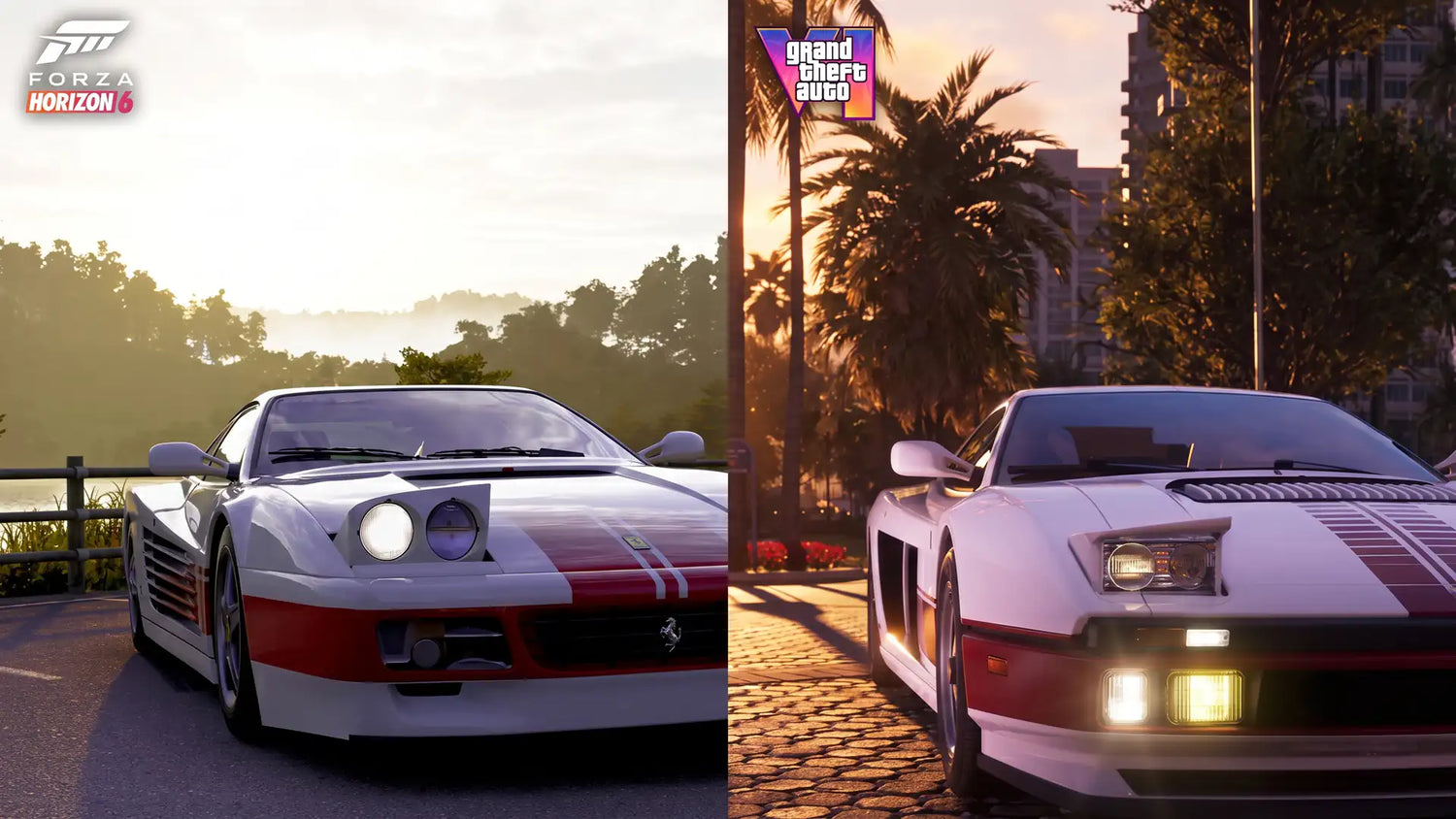
The latest discussion around GTA 6 car detail is doing more than fueling hype. It is reminding gamers, streamers, and creators that the next wave of open-world games is likely to demand more from a PC than many people expect. Based on the source material, one of the biggest talking points is how Grand Theft Auto 6 appears to push vehicle fidelity well beyond what players normally associate with large-scale driving and open-world titles. For Canadian buyers, that raises an important question: if visual detail is increasing this fast, is your current system really ready for what is coming next?
At Groovy Computers, this is where gaming excitement becomes a real buying decision. A trailer, screenshot set, or technical comparison can quickly turn into practical questions about GPU power, CPU pairing, memory capacity, storage speed, streaming capability, editing performance, and whether it makes more sense to buy now rather than scramble later when demand spikes. If you are already wondering what kind of Gaming PC Canada buyers should be looking at for the next generation of AAA games, you are asking exactly the right question.
Why is everyone talking about GTA 6 car detail?
The source article highlights a heated online discussion about the technical presentation of vehicles in Grand Theft Auto 6. The main point is not just that the cars look good. It is that the visual treatment appears to emphasize true geometric detail rather than relying as heavily on older tricks like flatter seams, painted shading illusions, or simpler body panel transitions.
In plain terms, the conversation suggests that Rockstar may be spending more of its visual budget on actual 3D structure. That includes more convincing panel gaps, more believable underbody and suspension detail, and more advanced material rendering across paint, mud, and surface wear. According to the source, users also noticed more realistic mud drying on bodywork and more physically grounded rendering choices.
That matters because modern graphics are no longer just about bigger textures. They are about layering geometry, materials, lighting, reflections, shadows, and environmental interaction all at once. When a game starts showing more depth in vehicles, body seams, suspension components, and material behavior, it usually points to broader visual ambition across the entire world.
What does that mean for PC gamers in Canada?
It means upcoming games may hit your hardware from several angles at the same time. You are not just rendering a car model. You are rendering dense city scenes, reflective surfaces, weather effects, traffic systems, pedestrians, lighting transitions, shadows, long draw distances, and potentially advanced ray tracing features. Add streaming, Discord, browser tabs, OBS, mods, or background apps, and suddenly a “still decent” older PC starts to feel a lot less comfortable.
For Canadian buyers, the timing matters too. When a major title starts dominating gaming conversation, more shoppers begin researching Gaming PC for GTA 6, PC for AAA Games, and Future Proof Gaming PC Canada options. That can put pressure on key parts like graphics cards, higher-capacity RAM kits, and fast SSDs. If your goal is to be ready before the rush, it is smart to think ahead instead of waiting until every buyer is trying to upgrade at once.
What is the source article really telling us about next-gen visuals?
The source article stops short of claiming final gameplay performance, and that is the right approach. Promotional materials can differ from final playable builds. Some viewers believe the visual quality shown could rival or surpass dedicated racing games in certain areas, while others caution that enhanced capture conditions or special modes may be involved. That balance is important.
Still, even without overclaiming, the takeaway is clear. The expectations for visual realism in AAA open-world gaming are climbing. Vehicle assets are becoming more cinematic, materials are becoming more physically believable, and players are paying closer attention to details that used to be ignored. If that trend continues, then your next gaming PC should not be chosen only for minimum playability. It should be chosen for the experience you actually want.
What do you want your next PC to do for you?
Before you think about model numbers, ask yourself a more useful question: what do you want your next PC to do for you over the next few years?
Do you just want to load into new games at 1080p and enjoy smooth performance? Do you want 1440p with high settings and stronger long-term value? Are you aiming for 4K, ray tracing, higher refresh rates, and the kind of visual fidelity that makes next-gen games feel truly next-gen? Or do you also want to stream, edit clips, create content, design thumbnails, or render 3D work on the same machine?
This is where many buyers make the wrong choice. They shop for the cheapest system that can technically run a game, then upgrade too soon. A smarter approach is to match the system to the way you actually game and work.
If GTA 6-level detail is your benchmark, which performance tier fits you?
Entry tier: for 1080p players who want solid modern gaming
If your target is 1080p with balanced settings in new releases, you may not need an ultra-premium machine. But you still need a system that is current, balanced, and upgrade-friendly. This is especially true if you want respectable performance in open-world titles that can be heavy on both the CPU and GPU.
This tier is a strong fit if you are asking questions like: Can a budget gaming PC play new games well? Do I need a dedicated GPU for modern AAA titles? How much should I spend on a first gaming PC in Canada?
For many shoppers, this is the sweet spot for a Budget Gaming PC Canada build that avoids the trap of becoming outdated too quickly. The key is choosing a modern graphics card, enough RAM to stay comfortable in newer titles, and a fast SSD so the whole system feels responsive.
Mid-high tier: for 1440p gaming, high settings, and longer relevance
This is the category where a lot of Canadian buyers should focus if they are serious about new AAA games. A well-built 1440p Gaming PC Canada system can deliver the visual quality and frame rate balance that many players actually want. It is often the best middle ground between price, longevity, and next-gen readiness.
If you are thinking, What PC do I need for 1440p gaming? Is now a good time to buy a gaming PC? How do I avoid upgrading again in a year or two? this tier is probably where your answer lives.
For titles inspired by dense urban worlds, dynamic lighting, realistic vehicles, and advanced effects, 1440p on a stronger RTX-based system can provide a much better long-term ownership experience than stretching a lower-tier card too far.
Premium tier: for 4K, ray tracing, ultra settings, and showpiece gaming
If what excites you most about GTA 6-style visuals is maximum immersion, then a 4K Gaming PC Canada or Ray Tracing Gaming PC Canada build is where the conversation changes. Here, the goal is not just to run the game. It is to enjoy the detail, density, lighting, and effects that make next-gen titles feel worth the upgrade.
Are you the kind of buyer asking, What PC do I need for 4K gaming? Is a premium RTX gaming PC worth it? How long will a high-end gaming PC last? If so, buying stronger now can often save money and frustration compared to buying twice.
This is also the tier where display quality matters more. If you are investing in a high-refresh 1440p monitor or stepping into 4K, the PC has to be built around that goal. There is no point buying a premium screen if the system behind it cannot keep up.
Do you only game, or do you create content too?
A major open-world release does not just affect gamers. It affects streamers, YouTubers, clip editors, thumbnail designers, and creators who build content around major launches. If you want to play a visually advanced game, record gameplay, stream to your audience, edit footage, and upload quickly, your PC needs a broader skill set.
That is where many off-the-shelf systems fall short. A machine built only for gaming may not feel ideal for Premiere Pro, DaVinci Resolve, Photoshop, OBS, or multitasking-heavy workflows. So ask yourself: Do I need one PC that can handle gaming and streaming? Do I also need video editing performance? Is a gaming PC good for content creation?
Gaming and streaming on one system
If you want to game and stream at the same time, you need enough CPU overhead, the right GPU encoding support, sufficient RAM, and reliable cooling. A Gaming and Streaming PC Canada build should not be chosen by GPU alone. Streaming adds another layer of workload, especially if you use overlays, alerts, browser sources, voice tools, music apps, and multi-monitor setups.
Do you want smooth gameplay while streaming to Twitch or YouTube? Do you plan to record high-bitrate local footage for later editing? Do you want your next system to handle OBS without turning every big game launch into a settings compromise? Those are custom-build questions, not generic-box questions.
Editing highlights, YouTube videos, and short-form content
If major games are part of your content strategy, you may need more than a gaming rig. A Creator PC Canada or Video Editing PC Canada build can make a huge difference in timeline smoothness, export speed, and how enjoyable your workflow feels day to day.
Ask yourself: Will I be editing 1080p clips or 4K footage? Do I use Adobe Premiere Pro, DaVinci Resolve, After Effects, or CapCut? How much RAM do I need for video editing? Is a gaming PC good for video editing, or should I move up to a creator-focused build?
For many customers, the best answer is a hybrid machine that delivers strong gaming performance while also accelerating creator software. That can mean a better CPU, more memory, more storage, or a higher GPU tier than they originally planned.
Photo editing, graphic design, and social media assets
Not everyone reading a gaming article is only a gamer. Some readers also work in Photoshop, Lightroom, Illustrator, Canva, or Adobe Creative Cloud. If your next system needs to handle gaming at night and design work during the day, your shopping strategy should reflect that.
Do you edit RAW photos? Build client graphics? Design thumbnails and stream overlays? Need a system that stays responsive with multiple creative apps open? A custom Graphic Design PC Canada or Photo Editing PC Canada approach can save time and deliver a much better experience than forcing a gaming-only spec list into a creative workflow.
3D modeling, Blender, Unreal Engine, and advanced workstation use
The source topic is about vehicle detail, geometry, and rendering realism. That naturally connects to another kind of customer: the 3D artist, designer, or developer who wants the visual wow of next-gen games because they also work with demanding 3D tools.
If you use Blender, Unreal Engine, Unity, Maya, Cinema 4D, CAD tools, or rendering applications, ask yourself: What PC do I need for Blender? Do I need a gaming PC or a workstation? How much RAM do I need for 3D rendering? Should I choose a GPU-focused or CPU-focused build?
That is where a 3D Modeling PC Canada or Workstation PC Canada build becomes the smarter investment. The right configuration can support gaming, rendering, asset work, simulation, and professional productivity on one tested machine.
Why should Canadian buyers think about timing right now?
When a massive title starts trending, the buying cycle changes. More people begin shopping for stronger GPUs, more memory, and larger NVMe SSDs. On top of game launches, there can also be pressure from creator software updates, seasonal buying periods, GPU generation changes, and broader component supply shifts.
That means waiting is not always the safe move people assume it is. Sometimes waiting leads to fewer choices, replacement pressure, and the feeling that you need to settle for whatever is left at the time you finally decide.
Are you buying before a major game release? Before a sale period ends? Before a creator software upgrade forces heavier workloads? Before the next round of GPU demand changes pricing? Those are all real decision factors.
Should you buy a cheaper PC now or finance a stronger one?
This is one of the most practical questions in the market today. Many customers know they want a better system, but they hesitate because they are focused only on immediate full-payment cost. The problem is that buying too low can lead to a shorter ownership cycle, lower enjoyment, and a faster second purchase.
If you are thinking, Should I finance a gaming PC? Is financing a gaming PC worth it? Should I finance a better PC instead of buying a cheaper one? the answer often depends on how long you want the machine to stay satisfying.
At Groovy Computers, financing can help customers secure a stronger build now instead of compromising into a lower tier that may feel outdated too soon. When available, financing up to 4 years can make a better GPU, more RAM, more storage, or a more balanced gaming-and-creator system much easier to reach. For many buyers, that means better value over the life of the PC, not just a lower upfront number.
What hardware matters most for GTA 6-style next-gen gaming?
GPU: still the star of the build
For visually demanding AAA games, the graphics card remains the biggest factor in your gaming experience. If your priority is high settings, ray tracing, smoother frame rates, and longer relevance, this is not the place to cut too deeply.
Do you want a PC mainly for esports, or do you want a system built for cinematic open-world games? Do you care about 1080p only, or are you moving to 1440p or 4K? The stronger your visual target, the more important your GPU choice becomes.
CPU: critical for open worlds, traffic, NPCs, and background tasks
Open-world games can put significant pressure on the processor, especially when handling AI, traffic systems, streaming assets, and the rest of the living-world simulation. A weak CPU can hold back a good graphics card, particularly if you stream, multitask, or chase higher frame rates.
If you are also using OBS, Discord, browsers, music apps, or editing software, CPU balance matters even more. This is where custom PC planning pays off. It is not enough to buy “a powerful GPU.” The entire platform has to make sense together.
RAM: the comfort zone matters
Modern games, creative apps, and multitasking all benefit from having enough memory headroom. If your next PC is supposed to last and support more than one use case, RAM should be chosen with that in mind.
Are you the kind of user who has a game, browser, Discord, OBS, and media apps open at once? Are you editing footage between matches? Are you planning to keep the PC for years rather than months? Then memory capacity is not a small detail. It directly affects how smooth the system feels in real life.
SSD storage: fast loading is now part of the premium experience
Large game installs, texture streaming, project files, recorded footage, and creator assets all put pressure on storage. A fast NVMe SSD helps the system feel modern, but capacity matters too.
How many big games do you keep installed at once? Will you record gameplay locally? Do you need room for Adobe projects, photo libraries, or 3D assets? Storage is one of the easiest places to underestimate your real needs.
What gaming PC do I need if I want to be ready for new games without overbuying?
The answer depends on your actual target, not internet bragging rights.
- If you want reliable 1080p gaming: choose a balanced modern system with a capable dedicated GPU, enough RAM for current games, and fast SSD storage.
- If you want strong 1440p value: prioritize a more powerful RTX-class GPU, a solid current CPU, and enough headroom for future titles.
- If you want 4K or ray tracing: build around a premium graphics tier, stronger cooling, and a platform that will not bottleneck your experience.
- If you want gaming plus streaming or editing: step beyond gaming-only specs and build for broader workload balance.
- If you want one system for gaming and serious creator work: consider a custom creator or workstation-focused configuration instead of forcing everything through an entry gaming build.
The better question is not just Can my PC run this game? It is Will this PC still feel like the right choice after the hype cycle ends and I am using it every day?
Why custom builds matter more when game demands keep rising
As visual standards rise, balance matters more. A custom build lets you choose the right level of graphics power, processor strength, memory, storage, cooling, and upgrade path instead of accepting a one-size-fits-all compromise.
This is especially important if you are deciding between gaming only, gaming plus streaming, or gaming plus content creation. The best Custom Gaming PC Canada approach is one that fits the real workload, not just the headline game title.
Would you rather buy a random box that looks powerful on paper, or a system assembled around your target resolution, your game library, your creator apps, and your budget comfort level? Would you rather guess, or get help choosing a build that makes sense from day one?
Why buy from Groovy Computers instead of gambling on a generic machine?
Groovy Computers is built around helping Canadian buyers get the right custom system for how they actually use their PC. That means gaming PCs, creator PCs, and workstation builds designed with practical performance in mind, not just flashy naming.
When you buy from Groovy Computers, you are choosing a Canadian custom builder focused on component matching, system balance, rigorous testing, and long-term ownership value. That matters when newer games are getting heavier and when buyers want confidence before spending real money.
For shoppers in Nova Scotia, Atlantic Canada, and across the country, Groovy Computers offers the kind of support and build logic that is hard to get from generic mass-market options. A properly tested system, backed by a 1-year warranty, gives buyers more confidence than rolling the dice on unknown quality.
Do you want help choosing between a budget gaming computer, a premium RTX gaming PC, a custom creator PC, an editing workstation, or a 3D modeling workstation? That is exactly the kind of decision Groovy Computers helps simplify.
Should you wait, or should you get ready now?
If the conversation around GTA 6 car detail has you rethinking your current setup, that is probably a sign worth paying attention to. You do not need to panic-buy, but you also do not need to wait until demand rises, your old system struggles, and your choices narrow.
Ask yourself a few honest questions. Are you planning around a major game release? Do you want to move into 1440p or 4K? Do you also stream, edit, or create? Are you trying to avoid another upgrade too soon? Would financing a stronger system now put you in a better position than buying a weaker one twice?
If those questions sound familiar, now is a smart time to explore your options. Visit GroovyComputers.ca to browse custom builds, compare performance tiers, and get help choosing a gaming PC, creator PC, or workstation that matches what you actually want your next system to do. If you are wondering what kind of gaming PC in Canada makes sense for next-gen games, Groovy Computers is the place to start.
As visual ambition in AAA games keeps climbing, a well-planned system becomes more than a luxury. It becomes the difference between merely launching the game and actually enjoying the experience you were excited for in the first place. For buyers looking at the future of open-world gaming, GTA 6 car detail is not just a headline. It is a wake-up call to buy smarter, size your performance tier properly, and choose a machine that is ready for what comes next.
#GTA6 #GamingPCCanada #CustomGamingPCCanada #GamingPCForGTa6 #PCForAAAGames #1440pGamingPCCanada #4KGamingPCCanada #CreatorPCCanada #WorkstationPCCanada #CanadianCustomPCBuilders #NovaScotiaGamingPC #GroovyComputers
Groovy Computers | All Rights Reserved



Leave a comment
This site is protected by hCaptcha and the hCaptcha Privacy Policy and Terms of Service apply.