






















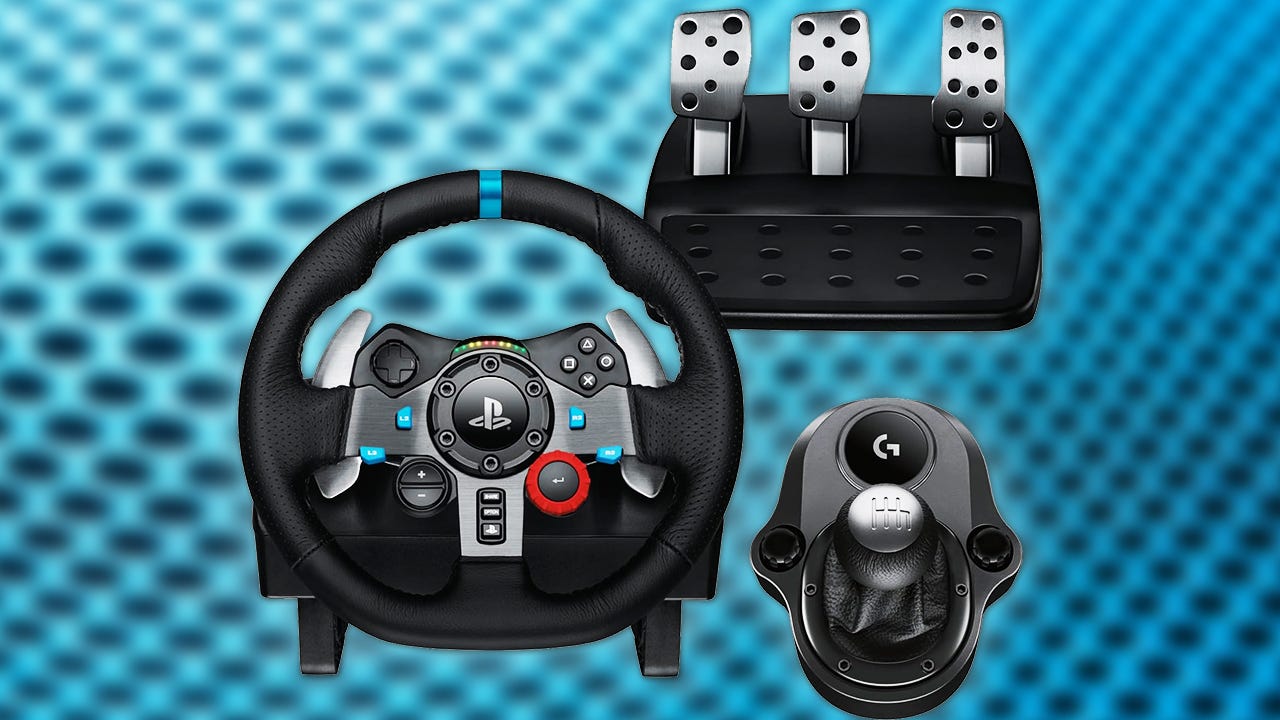
Logitech G29 and G920 Racing Wheel Deal: Why This Upgrade Matters for Canadian Gamers Choosing the Right Gaming PC
The Logitech G29 and G920 racing wheel deal is the kind of gaming news that does more than save money on an accessory. It pushes a bigger question to the front: if you are upgrading the way you play racing games, is your current system still good enough for the kind of experience you actually want? For Canadian buyers looking at sim racing, open-world driving games, and smoother performance in modern releases, this is the perfect moment to think beyond the wheel and look at the full setup. A better racing wheel can improve immersion, but the right custom gaming PC in Canada can completely change how a game feels, looks, and performs.
The source offer highlights a refurbished Logitech G29 or G920 racing wheel and pedal set at roughly $175 CAD, with a 1-year warranty included. That is a strong value entry point for players who want to move beyond a standard controller. But once you start thinking about steering precision, force feedback, pedal control, frame rate consistency, resolution, and graphics quality, the conversation naturally shifts toward the machine driving the experience. If you are getting more serious about racing games, should your next upgrade be just a wheel, or should it be a complete gaming system built around the way you want to play?
Why the Logitech G29 and G920 Deal Is Getting Attention
The appeal is easy to understand. The G29 and G920 have long been considered accessible racing wheels for gamers who want a more authentic driving experience without jumping straight into ultra-premium direct-drive hardware. The source material points to several reasons this wheel category remains popular: 900-degree rotation, force feedback, pressure-sensitive pedals, metal construction, and more immersive control in racing titles.
That matters because racing games reward hardware in a different way than many other genres. A wheel and pedal set changes your inputs. A stronger PC changes your responsiveness, visual clarity, and stability. Put the two together and the experience improves dramatically.
If you are mainly playing on console today, you may still be satisfied with the wheel alone. But if you are thinking about higher frame rates, expanded graphics options, more racing titles, mod support, multi-monitor setups, streaming your gameplay, or a setup that can also handle editing and content creation, then a custom gaming PC becomes the real upgrade path.
What Does This Mean for Canadian Buyers?
Canadian gamers should always think one step beyond the headline price. A wheel deal that looks attractive on its own can spark a larger buying decision, especially when newer games increase hardware demands and replacement costs for full systems can shift over time. In Canada, exchange rates, shipping realities, component volatility, and limited stock windows can all affect whether waiting makes sense.
So what are you really trying to buy right now? Just a racing wheel? A full sim-style experience? A system that can run racing games at 1080p smoothly? A 1440p gaming PC in Canada with room for streaming? Or a premium build that can handle 4K, ray tracing, capture, editing, and future releases without feeling outdated too soon?
That is where Groovy Computers becomes relevant. Instead of buying hardware one piece at a time and hoping it all makes sense later, Canadian customers can plan around the full result: the game performance they want, the resolution they want, the content workflow they want, and the budget or financing structure that makes the most sense.
Forza Horizon 6 Is the Real Trigger Behind This Upgrade Conversation
The source article connects this wheel deal directly to Forza Horizon 6, a major open-world racing release with broad appeal. That is an important signal. Big new games always create a wave of upgrade decisions. Some players realize their current hardware can technically launch a game, but not in the way they want to enjoy it. Others notice that once they care enough to buy a wheel, they also start caring about visual quality, frame pacing, load times, and long-term system value.
Ask yourself a simple question: do you just want to play the game, or do you want the game to feel new again?
A controller-to-wheel upgrade can make racing more immersive. A budget gaming PC can make the game run better. A premium RTX gaming system can transform the entire experience. And for some buyers, the best move is not a pure gaming machine at all, but a gaming and streaming PC in Canada that also lets them record clips, go live, edit videos, and post content without bottlenecks.
What Do You Want Your Next PC to Do for You?
Before you shop by price alone, think about what your next system actually needs to handle. This is the question many buyers skip, and it is the reason so many people either overspend in the wrong places or underbuy and regret it quickly.
Do you want a PC mainly for racing games and open-world titles? Do you want to play at 1080p with high settings and smooth frame rates? Are you aiming for 1440p because that is where many players find the best mix of sharpness and performance? Are you trying to step into 4K? Do you care about ray tracing, ultra settings, or high refresh gameplay? Do you want to stream through OBS, record gameplay, and edit for YouTube or TikTok? Do you also use Photoshop, Premiere Pro, DaVinci Resolve, Lightroom, Illustrator, Blender, or Unreal Engine?
Your answer changes the ideal build category.
- Pure gaming focus: best for players who want strong FPS and visual performance in new games.
- Gaming and streaming focus: ideal if you want to play and broadcast or record at the same time.
- Creator-focused build: best if gaming is only part of the plan and editing or design work matters too.
- 3D or workstation build: best if your system also needs to handle rendering, modeling, or professional productivity.
What Gaming PC Do You Need for Racing Games and New Releases?
Racing games often feel best when responsiveness is high and frame delivery is consistent. A wheel highlights every little delay. That means system balance matters. You do not want a build that looks impressive on paper but struggles with frame consistency, weak cooling, or poor component pairing.
Entry-Level Value Tier
This tier makes sense if you want a budget-friendly gaming desktop for 1080p play, solid settings, and a meaningful step up from older hardware. If your goal is to enjoy racing games, sports titles, esports, and many current releases without spending into premium territory, this may be the sweet spot.
Who is this for? Students, first-time buyers, younger gamers, or players upgrading from aging consoles or entry-level PCs. If you are asking, how much should I spend on a gaming PC, this tier often gives the best value when your target is smooth 1080p gameplay and not maximum prestige.
Mainstream Performance Tier
This is where many Canadian gamers should focus if they want 1440p gaming, stronger longevity, and enough overhead for heavier modern titles. If you are interested in racing games, open-world releases, shooters, and occasional streaming, this is often the smartest balance of cost and experience.
Are you the type of player who wants the game to look great today and still feel capable next year? Do you want to avoid upgrading too soon? This is usually the tier that answers yes to both questions.
Premium Enthusiast Tier
If you want a 4K gaming PC in Canada, higher ray tracing settings, ultra presets, premium monitor pairing, or a more future-proof gaming desktop, this is your lane. A high-end build is also ideal if your system will handle gaming plus live streaming, editing, capture, or demanding multitasking.
This tier is not only about chasing the biggest numbers. It is also about headroom. Headroom means your system is not constantly at the edge. That often leads to a better ownership experience, quieter operation, and more confidence when newer games arrive.
Why a Racing Wheel Upgrade Often Leads to a Full Setup Upgrade
Once a player starts investing in immersion, they rarely stop at one accessory. Better wheel. Better monitor. Better desk setup. Better headset. Better frame rate target. Better GPU. Better storage. Better capture workflow.
That progression is normal.
If you are already thinking about force feedback, pedal feel, steering input, and racing immersion, then it makes sense to ask whether your current PC is limiting the overall result. Does your machine load large games slowly? Does it force compromises in graphics settings? Is it noisy under load? Does it struggle when Discord, a browser, OBS, or background apps are open? Does it leave you wondering whether buying one more accessory is just exposing the need for a much better core system?
Should You Buy Now or Wait?
This is one of the most important buying questions in the Canadian PC market. On one hand, many shoppers want to wait for the next sale, the next hardware cycle, or the next major product announcement. On the other hand, waiting does not always improve the final cost of ownership.
Why? Because full-system pricing is affected by more than one part. GPU demand can change quickly. DDR memory pricing can move. SSD values can improve for a while and then tighten. New releases can shift buyer behaviour. Back-to-school periods, holiday spikes, and game launch windows can all increase demand.
If you are buying around a major game release or an upgrade moment you already know is coming, waiting can mean paying more later for the same class of performance. It can also mean settling for a weaker system because the budget no longer reaches the performance level you originally wanted.
So ask yourself: are you trying to time the absolute bottom of the market, or are you trying to secure the right PC before your current one becomes a problem?
Could Financing Help You Secure a Better System Before Prices Shift?
For many buyers, the smartest decision is not choosing the cheapest build available. It is choosing the strongest build they can comfortably manage without overextending. That is where financing can become practical rather than impulsive.
If a slightly stronger GPU, more RAM, a better CPU, or larger SSD would noticeably improve your gaming and creator experience for years, is it worth missing that jump just to stay at a lower upfront number? Or would monthly payments on a stronger custom build make more sense if it helps you avoid replacing the system too soon?
Groovy Computers can be a strong fit for shoppers asking questions like these because financing up to 4 years can help make better long-term performance more accessible. That matters if you are trying to buy before prices rise, before your favourite new release lands, or before your current PC starts costing you time and frustration.
The key question is not just, should I finance a gaming PC. It is, should I finance the right PC instead of buying the wrong one twice?
What If You Also Want to Stream, Edit, or Create Content?
Many modern gaming buyers are not only gamers. They clip highlights, stream casually, edit short-form content, design thumbnails, run Discord communities, and experiment with creator tools. If that sounds like you, then a gaming-only mindset may be too narrow.
A gaming and streaming PC in Canada should not only push good frame rates in your favourite titles. It should also handle recording software, browser tabs, chat tools, overlays, and video exports without feeling overloaded. If you edit in Premiere Pro or DaVinci Resolve, batch photos in Lightroom, or build thumbnails in Photoshop, extra CPU performance, GPU acceleration, RAM capacity, and SSD speed matter far more than many shoppers expect.
So what is your actual use case? Gaming only? Gaming plus OBS? Gaming plus YouTube editing? Gaming plus Adobe Creative Cloud? If your answer includes more than one category, a custom creator PC or hybrid gaming-and-creator system may be the better choice.
Is a Gaming PC Good for Video Editing, Photo Editing, and Graphic Design?
Sometimes yes, but not always in the way people assume. A gaming PC can be a strong base for creative work if it has the right CPU, enough memory, fast storage, and a GPU that benefits your applications. But a system chosen only for game FPS can be unbalanced for editing and design.
For Video Editing
If you work in 1080p or 4K timelines, export often, use effects, or keep multiple applications open, you will want more than bare-minimum specs. A proper video editing PC in Canada should consider timeline smoothness, render efficiency, cache performance, and long-session reliability. Are you asking what PC you need for video editing? Then think beyond gaming benchmarks and ask how often you wait on exports, proxies, or playback stutter.
For Photo Editing
Photo-heavy workflows benefit from strong CPU responsiveness, enough RAM for large libraries, and fast SSD access. If you use Photoshop or Lightroom, a system that feels instant in browsing, previews, and batch exports can save real time every week. Are you editing RAW photos, using AI tools, or running a colour-conscious workspace? Then the right photo editing PC in Canada matters just as much as your display.
For Graphic Design
Graphic design buyers often need a machine that feels effortless in Adobe apps while remaining quiet, stable, and ready for multi-monitor productivity. If your system handles Illustrator, Photoshop, InDesign, Canva-heavy browser workloads, and asset management, then a balanced creator desktop is often better than a gaming-first machine with compromises in memory or storage.
For 3D Modeling and Rendering
If your workflow includes Blender, Unreal Engine, product rendering, asset creation, or visualization work, the equation changes again. A 3D modeling PC in Canada needs the right combination of CPU, GPU, cooling, memory, and sustained performance. In that case, a workstation-style custom build may be far more valuable than a standard gaming tower.
How Do You Choose the Right Performance Tier?
This is where many buyers need the most help. Not everyone needs a flagship system, but not everyone should buy entry-level either. The right tier depends on what you expect the PC to do over the next several years.
- Choose value-tier gaming if you mainly want 1080p gaming, solid everyday responsiveness, and the best upfront affordability.
- Choose mainstream performance if you want 1440p, stronger longevity, room for newer AAA games, and better multitasking.
- Choose premium gaming if you want 4K, ray tracing, ultra settings, high refresh targets, or a system that stays relevant longer.
- Choose a creator hybrid if your PC must game well and also handle streaming, editing, design, or content creation.
- Choose a workstation build if your main priorities are rendering, simulation, CAD, 3D work, or professional productivity.
Still unsure? Ask yourself what would annoy you more six months from now: spending a bit more today, or realizing your new PC already needs upgrades?
Why Custom Builds Matter More Than Ever
When component pricing moves around and software demands keep rising, custom PC building becomes more valuable. A generic off-the-shelf system may cut corners in cooling, power delivery, motherboard quality, RAM configuration, or upgrade path. Those compromises are not always obvious on day one, but they show up over time.
That is why Canadian custom PC builders remain attractive to shoppers who want confidence, not just a spec sheet.
With a custom build, the goal is not simply to hit a marketing number. It is to match the right components to your actual use case. That means smarter CPU and GPU pairing, better airflow, cleaner upgrade planning, more suitable storage layouts, and a system that feels intentional instead of random.
Would you rather buy a PC that looks powerful in a listing, or one that is built around your games, your software, your monitor, your workflow, and your budget?
Why Testing and Warranty Support Matter
The source wheel deal emphasizes a 1-year warranty, and that detail matters because buyers want confidence when making a hardware purchase. The same logic applies even more strongly to a full PC.
A custom gaming or creator desktop is not just a box of parts. It is a complete system that should be tested, stress-checked, and supported. Rigorous testing helps reduce problems before the system reaches you. Good part matching improves thermals and long-term reliability. A proper warranty gives buyers more confidence in the purchase decision.
Groovy Computers stands out here because system quality is not only about headline specs. It is about build quality, compatibility, stress testing, and support after the sale. If you are shopping in Canada and want a machine that feels dependable rather than risky, that matters.
Why Groovy Computers Makes Sense for Canadian Buyers
Groovy Computers is well positioned for shoppers who want more than a random marketplace PC. The company speaks directly to the Canadian buyer who wants a custom gaming PC, creator desktop, or workstation built for real-world use. That includes customers in Nova Scotia and Atlantic Canada, as well as buyers ordering online across the country who want a Canada-built system with clear support and a more personalized buying path.
Are you looking for a budget gaming PC that can handle new releases well? A better 1440p setup before your next favourite game arrives? A premium RTX build that will last longer? A custom creator PC that can game, stream, and edit? A 3D workstation that stops wasting your time on renders?
Those are exactly the kinds of decisions where Groovy Computers can help guide you toward the right fit instead of pushing a one-size-fits-all machine. If you want help choosing a build that actually makes sense for your workload and budget, visit GroovyComputers.ca.
Questions to Ask Before You Buy Your Next PC
Before you commit, these are the questions worth asking yourself:
- What games or software will I use most often?
- Do I want 1080p, 1440p, or 4K performance?
- Do I care about ray tracing or maximum settings?
- Will I stream, record, or edit content on the same machine?
- Do I use Premiere Pro, DaVinci Resolve, Photoshop, Lightroom, Illustrator, Blender, or Unreal Engine?
- Do I want a budget system now, or a stronger system that lasts longer?
- Would financing help me secure the right performance tier before prices move?
- Am I buying before a major game launch, sale period, or hardware demand spike?
- Do I want a generic prebuilt, or a tested custom system with a clearer upgrade path?
If those questions make you realize your needs are broader than a simple accessory upgrade, that is a good thing. It means you are thinking like a smart buyer.
The Real Takeaway From the Logitech G29 and G920 Racing Wheel Deal
The wheel deal itself is compelling. For roughly $175 CAD, the G29 or G920 can be an affordable way to get more immersed in racing games, especially for players who have only used controllers. But the bigger story is that accessories often reveal whether your current system still matches your goals.
If a racing wheel has you excited about driving games again, what happens when you pair that excitement with a faster, quieter, better-balanced custom gaming PC in Canada? What if that same system also lets you stream, edit, design, or create without immediate compromises? What if financing helps you buy the stronger build now instead of settling for a weaker one that feels outdated too soon?
The best time to ask those questions is before your next major purchase, not after. If you are ready to explore a custom gaming PC, creator PC, or workstation that fits how you actually play and work, head to GroovyComputers.ca and start with the system you really need, not just the hardware headline that got your attention.
#GamingPCCanada #CustomGamingPCCanada #GamingPCForForza #1440pGamingPCCanada #4KGamingPCCanada #CreatorPCCanada #VideoEditingPCCanada #StreamingPCCanada #CanadianCustomPCBuilders #NovaScotiaComputers
Groovy Computers | All Rights Reserved


Leave a comment
This site is protected by hCaptcha and the hCaptcha Privacy Policy and Terms of Service apply.