




































Gaming PC for GTA 6 in Canada: What a Billion-Dollar Game Means for Your Next Custom PC
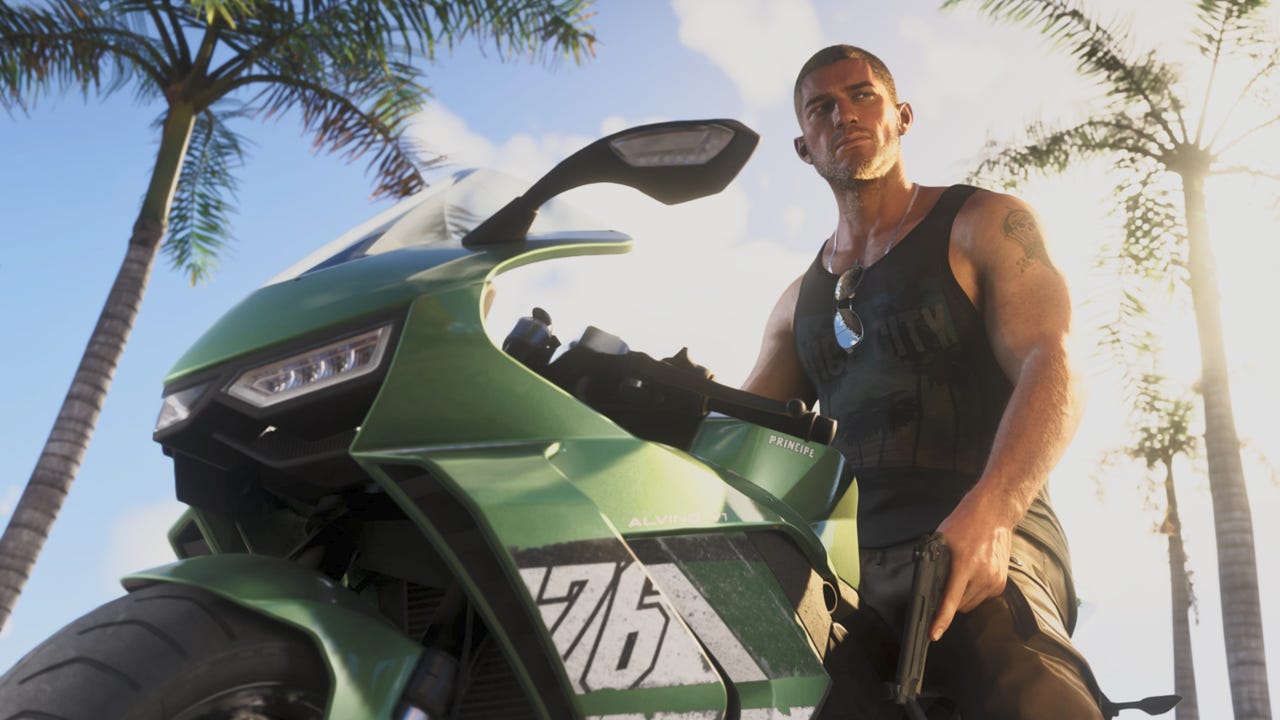
The latest GTA 6 cost headlines are doing more than fueling social media debate. They are reminding Canadian buyers that modern blockbuster games are being built for a new level of scale, visual density, open-world complexity, and long-term hardware demand. If a single game can be compared to a project worth roughly C$2 billion or more, the real question for buyers is no longer just whether the number is exact. The bigger question is this: what kind of gaming PC for GTA 6 should you be planning for if you want smooth performance, strong visuals, and room to grow?
That is where this story becomes relevant for Groovy Computers customers. A headline about a massive development budget is really a signal about performance expectations, launch demand, upgrade pressure, and why choosing the right custom system now can matter more than waiting until a major release causes another buying rush.
The original reporting focused on whether GTA 6 may have cost about as much to create as the Burj Khalifa cost to build, or roughly the equivalent of well over C$2 billion in Canadian dollars depending on the estimate used. It also highlighted analyst expectations that the publisher could potentially recover that budget at extreme speed if demand matches the hype. While the exact budget remains unconfirmed, the core takeaway is still important: this is not a small, ordinary release. It is one of the biggest entertainment launches in the world.
For Canadian gamers, streamers, creators, and workstation users, that changes the buying conversation. Are you hoping to play GTA 6 at 1080p and solid settings without overspending? Are you aiming for 1440p high refresh gaming? Do you want ray tracing, streaming, recording, editing, and multitasking on one system? Or are you trying to avoid buying a weaker machine now only to replace it too soon when bigger games and heavier software arrive?
What the GTA 6 budget story really tells PC buyers
Even if the most viral numbers are still speculative, the broader trend is obvious. High-end game development now behaves more like mega-scale media production. That means larger worlds, more detailed assets, more advanced lighting, more complex AI systems, and longer performance tails after launch through patches, expansions, online content, and creator demand.
In practical terms, that matters because major games rarely push only one component. They often reward balanced systems. A stronger GPU helps with higher resolutions and ray tracing. A capable CPU supports open-world simulation, background tasks, and smoother minimum frame rates. More RAM helps with modern multitasking, browser tabs, Discord, mods, launchers, streaming apps, and creator workflows. Faster SSD storage reduces load times and improves overall responsiveness.
So when readers see a headline comparing GTA 6 to a skyscraper-sized budget, they should also be asking a more useful question: is my current PC built for the next wave of AAA gaming, or only for the last one?
Why Canadian buyers should think about this differently
In Canada, the buying decision is not just about game hype. It is also about exchange rates, imported component pricing, shipping costs, inventory pressure, seasonal demand, and the fact that premium GPUs and memory kits can move up in price faster than most buyers expect. When a huge game launch drives attention back into PC gaming, that demand does not stay isolated to one title. It often spills into broader interest around graphics cards, higher-end CPUs, storage upgrades, gaming monitors, and full-system purchases.
That means waiting for the “perfect time” can backfire. If you already know you want a stronger PC for upcoming games, streaming, editing, or creator work, does it make more sense to buy before the rush rather than after prices and availability get worse? If replacing an older machine is inevitable, is delaying really saving money, or just postponing a better system while risking higher replacement cost later?
This is one reason so many buyers move toward a properly planned custom build instead of a random off-the-shelf system. With a custom PC, you can target your real workload instead of paying for the wrong parts mix.
What do you want your next PC to do for you?
Before choosing a system, step back from the headlines and ask the question that actually matters.
Do you want a PC mostly for GTA 6 and other AAA games? Do you also play esports titles and want high FPS at 1080p or 1440p? Will you stream to Twitch or YouTube? Do you record gameplay and edit clips for TikTok, Shorts, or long-form content? Are you a student or professional who also needs Photoshop, Illustrator, Premiere Pro, DaVinci Resolve, Blender, Unreal Engine, or other demanding software?
Your best build depends less on one viral number and more on your real daily use. A player focused on smooth 1080p gaming does not need the same configuration as a customer targeting 4K gaming with ray tracing. A creator who wants gaming plus editing needs a different balance than someone who only plays competitive shooters. A 3D artist or workstation buyer may need more CPU threads, more memory, and more storage planning than a gaming-first customer.
That is why the best buying guide is not “what is the most expensive PC?” It is “what is the right PC for what I want to do over the next several years?”
What gaming PC do I need for GTA 6?
If you are shopping for a gaming PC for GTA 6, the smart move is to buy for the class of game it represents: modern, open-world, visually ambitious, and likely to remain relevant for years. Even without inventing official PC requirements, we can still make sound buying decisions based on current AAA game trends.
Entry-level 1080p buyers: do you want good value without upgrading too soon?
If your goal is 1080p gaming with sensible settings and a balanced budget, a well-configured budget gaming PC Canada buyer should focus on a modern mid-range GPU, a capable current-generation CPU, at least 16GB of RAM, and an NVMe SSD. For some buyers, 16GB remains enough for gaming today, but if you keep browsers, voice apps, and launchers open while playing, 32GB can offer better breathing room and longer life.
Ask yourself: are you buying only for today, or are you trying to avoid another upgrade in a year or two? If the answer is the second one, stretching slightly higher now can often be smarter than buying the absolute minimum.
1440p gamers: is this the real sweet spot for new AAA titles?
For many customers, 1440p is where visual quality and performance meet in the most satisfying way. A 1440p gaming PC Canada build is often the strongest value point for players who want sharper image quality, stronger texture settings, and a more premium experience without the extreme cost of pushing everything to 4K.
If you want GTA 6, other open-world titles, and newer releases to look impressive for years, 1440p is often the tier worth targeting. Do you want your system to feel “good enough,” or do you want it to feel exciting every time you launch a new game?
4K and ray tracing buyers: are you building for wow-factor or long-term headroom?
If your goal is ultra settings, higher resolutions, heavier visual effects, and better readiness for future big-budget games, then a 4K gaming PC Canada or ray tracing gaming PC Canada build makes sense. This is where GPU choice becomes especially important. These buyers are typically looking for a high-end graphics card, stronger cooling, more power headroom, and a platform that stays relevant longer.
But here is the key buying question: are you paying for 4K because you truly use a 4K display and want that experience, or because the highest tier sounds safer? A properly selected custom PC helps prevent both overspending and underspending.
Do you also want to stream, record, or create content?
Many buyers no longer want a system that only plays games. They want one machine that can game, stream, edit, and handle daily productivity without struggling. That is where a gaming and streaming PC Canada or content creation PC Canada build becomes more relevant than a gaming-only configuration.
If you use OBS, record gameplay, cut highlight reels, upload to YouTube, or create social content around trending games, your needs change. More RAM, a stronger CPU, extra SSD capacity, and the right GPU encoder support become more important. Are you planning to stream casually, or do you want a system that can handle gaming and recording with fewer compromises?
For streamers, the best specs are not always the cheapest gaming specs. For creators, a gaming-first build can still work, but it needs the right part balance. This is why a custom system matters. You can prioritize actual workflow performance rather than chasing a label.
Are you also editing video, photos, graphics, or 3D projects?
A giant game launch often creates buying momentum well beyond gaming. Many customers start with a game in mind and then realize their next PC also needs to support work, school, side income, or creative projects. If that sounds familiar, your best option may be a creator or workstation-oriented build.
Video editing
If you cut gameplay footage, YouTube content, or client projects, a video editing PC Canada build should emphasize CPU strength, RAM capacity, storage speed, and the right GPU for accelerated editing and export workflows. Are you editing 1080p clips, or are you already moving into 4K timelines with effects, colour grading, and multiple layers?
If you use Premiere Pro, DaVinci Resolve, After Effects, or CapCut heavily, your system requirements are different from pure gaming. A gaming PC can be good for video editing, but only if it has enough memory, proper storage layout, and a CPU that will not bottleneck exports and playback.
Photo editing and graphic design
If you work in Photoshop, Lightroom, Illustrator, InDesign, or Canva alongside gaming, a photo editing PC Canada or graphic design PC Canada should deliver fast responsiveness, strong multitasking, and enough RAM for large files and layered projects. Do you need colour-focused productivity and smooth Adobe Creative Cloud performance as much as gaming performance?
For designers and photographers, reliability matters just as much as raw speed. A tested custom desktop with the right storage and memory configuration can make day-to-day work far more enjoyable.
3D modeling and rendering
If GTA 6 has you thinking bigger about visual technology, game art, or development tools, maybe your next system needs to do more than play games. A 3D rendering PC Canada or PC for Blender Canada build may be the better fit if you use Blender, Unreal Engine, Maya, Cinema 4D, CAD software, or rendering pipelines.
Are you building game assets, rendering product visuals, or learning 3D on the side? Then the answer may not be a standard gaming tower. It may be a custom workstation with more RAM, a stronger multi-core CPU, additional storage, and a GPU selected for both viewport and render performance.
Which performance tier fits you best?
One of the biggest mistakes buyers make is choosing based on hype instead of usage. Here is a more useful way to decide.
Tier 1: Value-focused gamer
- Best for 1080p gaming, esports, and everyday use
- Ideal for buyers watching budget closely
- Good fit if you want a first gaming PC or a practical upgrade
- Worth considering if you play a mix of lighter games and some newer releases at sensible settings
Ask yourself: do you want the lowest cost possible, or the best value over time?
Tier 2: Mainstream performance gamer
- Best for strong 1080p and 1440p gaming
- Better for AAA games, smoother multitasking, and longer useful life
- Great for buyers who want a custom gaming PC Canada setup that feels current instead of entry-level
- Often the sweet spot for players planning around major future releases
This tier works well for many GTA 6 buyers. It gives strong real-world value without pushing into the most expensive hardware.
Tier 3: Premium gaming and streaming
- Best for 1440p high settings, ray tracing, streaming, recording, and heavier multitasking
- Strong option for customers who want one machine for games and content creation
- More suitable if you keep systems longer and want better headroom
If you are wondering, should I buy a cheap gaming PC or finance a better one? this is often the tier where financing starts to make practical sense.
Tier 4: High-end gaming, creator, and workstation hybrid
- Best for 4K gaming, advanced creator work, large projects, and premium future-proofing
- Ideal for customers who need one system for gaming, editing, 3D, and professional workloads
- Often the right answer when replacing both an old gaming machine and an old work computer at once
If your next PC needs to do everything well, not just one thing well, this tier is often the most satisfying long-term choice.
Is it better to buy a gaming PC now or wait?
This is one of the most common customer questions, and it matters even more when a major title dominates the conversation.
If your current PC is already struggling, waiting can cost you in hidden ways. You lose performance now. You delay the games and projects you actually want to enjoy. You may end up buying during higher demand. And if GPU, RAM, or SSD pricing shifts upward, the same budget may buy less system later.
Of course, not every buyer should rush. But if you already know a stronger computer is necessary, what exactly are you waiting for? A lower price that may never arrive? Official game requirements that still leave you shopping in a crowded market? Another temporary compromise that leads to replacing your machine sooner than expected?
For many buyers, the smartest answer is not blind urgency. It is planned timing. Buy when you can still choose well, not when you are forced to react.
Should you finance a stronger PC instead of settling for a weaker one?
When major games and heavier software push hardware expectations upward, financing becomes less about impulse and more about strategy. If a weaker build will need upgrading early, was it really the cheaper option? If a slightly stronger system would last longer, run cooler, multitask better, and stay enjoyable across more games and workloads, would that be the better investment?
This is where finance a gaming computer Canada decisions become practical. Financing can help customers secure a better GPU tier, more RAM, faster storage, or a more balanced creator-ready platform before replacement costs climb. For many buyers, monthly affordability is what turns a short-term compromise into a long-term solution.
Groovy Computers offers Canadian buyers a path toward stronger systems without forcing an all-at-once payment decision. If you are comparing a minimum-spec build against the machine you actually want, ask yourself: would monthly flexibility make it easier to buy the PC you will still be happy with later?
And if your needs go beyond gaming, financing can matter even more. A customer choosing a creator system, editing workstation, or 3D workstation often benefits from buying enough CPU, memory, and storage now instead of rebuilding around limitations later.
Why custom builds matter when game and hardware demands keep rising
Not all PCs are built with the same logic. Big trending releases often expose weak system choices fast. A machine can look strong on paper yet still disappoint if the parts mix is wrong, cooling is inadequate, airflow is poor, or the storage and memory decisions were made only to hit a price point.
A proper custom PC builder Canada approach solves that by matching the system to the user. That means choosing parts for your resolution target, refresh rate, software needs, multitasking habits, upgrade goals, and budget reality.
Do you need a gaming-first build with room for future streaming? A creator desktop that also handles AAA titles? A workstation that renders, edits, and still lets you game after hours? These are not all the same machine, and they should not be sold like they are.
That is where Groovy Computers stands out for Canadian buyers. Custom builds, careful component selection, stress testing, and a 1-year warranty all matter more when system prices are significant and expectations are high.
Why Groovy Computers fits this moment for Canadian buyers
When the market is noisy, buyers need clarity. Groovy Computers helps customers across Canada choose systems based on actual use, not generic buzzwords. Whether you are looking for a gaming-focused desktop, a hybrid streaming build, a custom creator PC Canada setup, or a workstation-class machine, the goal is the same: get the right performance tier the first time.
Canadian shoppers also care about trust. They want a Canada built gaming PC from a company that understands real shipping, support, and buyer concerns here at home. They want tested systems, clean build quality, sensible part pairings, and support they can actually reach. That matters whether you are in Nova Scotia, Atlantic Canada, Ontario, Alberta, British Columbia, or ordering online from anywhere else in the country.
Groovy Computers is especially well-positioned for customers who are asking the right questions:
- What gaming PC do I need for upcoming AAA games?
- What PC do I need for 1440p gaming and streaming?
- Is a gaming PC good for video editing and content creation?
- Should I finance a better PC instead of buying a weaker one now?
- How do I avoid upgrading too soon?
- What custom build actually fits my budget and workload?
What should you ask before buying your next PC?
Before you choose a system, ask these practical questions.
- What games or software will I actually use most?
- Am I targeting 1080p, 1440p, or 4K?
- Do I care about ray tracing, ultra settings, or only smooth gameplay?
- Will I stream, record, or edit content on the same machine?
- Do I need this system for Adobe apps, Blender, CAD, or workstation tasks too?
- How long do I want this PC to stay relevant before the next major upgrade?
- Would more RAM or a better GPU save me from replacing the system too soon?
- Would financing help me buy the right build now instead of settling?
If you can answer those questions, you are already far closer to the right machine than someone shopping only by headline or hype.
The bottom line: GTA 6 hype is really a buying signal
The exact cost of GTA 6 may remain debated, but the bigger truth is already clear. Huge releases like this raise buyer expectations, stress older hardware, and push more customers toward stronger systems. For Canadian shoppers, that makes planning more important than reacting. If you are shopping for a gaming PC for GTA 6, a streaming rig, a creator desktop, or a workstation that can handle modern demands, now is the time to choose based on what you actually want your next system to do.
Do you want a budget-friendly gaming desktop that still feels modern? Do you want a premium RTX gaming PC with more headroom for future games? Do you need one machine for gaming, streaming, editing, and creative work? Do you want monthly flexibility so you can buy smarter before replacement costs rise?
If you are ready to stop guessing and start building around your real needs, visit GroovyComputers.ca and explore the right custom build for your next upgrade. Whether you need guidance on value, performance tiers, creator workloads, or financing, Groovy Computers can help you choose a system that makes sense for today and still feels right when the next wave of demanding games arrives.
#GamingPCForGTA6 #GamingPCCanada #CustomGamingPCCanada #GamingPCBuilderCanada #BudgetGamingPCCanada #1440pGamingPCCanada #4KGamingPCCanada #ContentCreationPCCanada #VideoEditingPCCanada #3DRenderingPCCanada #CanadianCustomPCBuilders #CanadaBuiltGamingPC
Groovy Computers | All Rights Reserved


Leave a comment
This site is protected by hCaptcha and the hCaptcha Privacy Policy and Terms of Service apply.