



































Pragmata Father’s Day Event News and the Bigger Question for Canadian Players: Is Your Next Gaming PC Ready for What’s Coming?
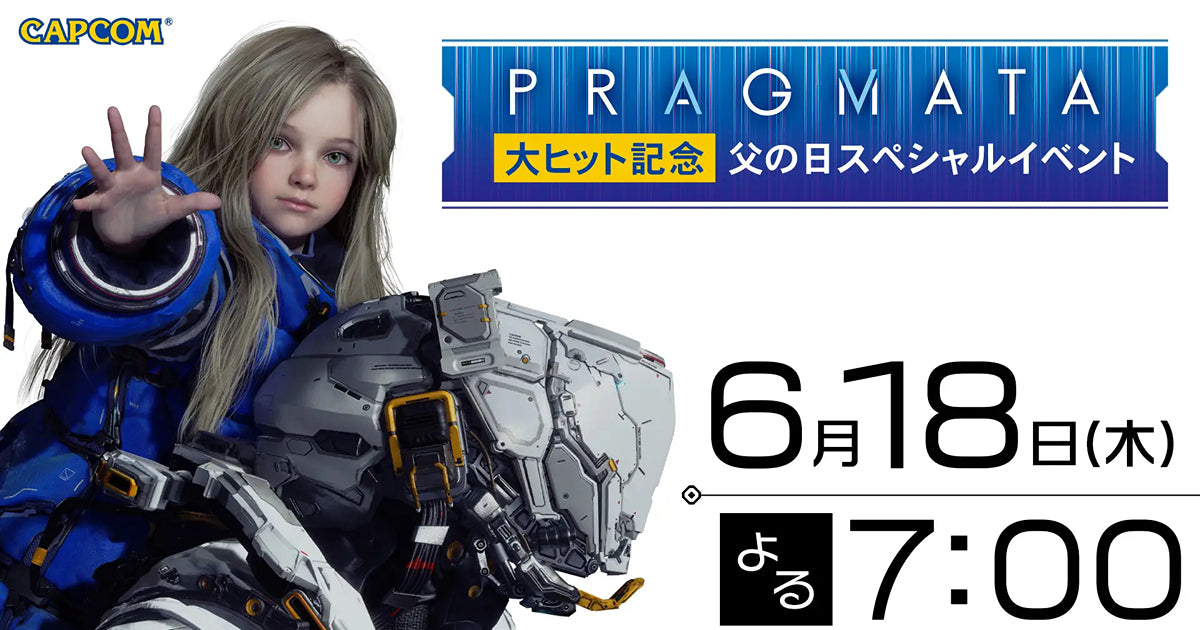
The Pragmata Father’s Day event is more than a simple livestream announcement. It is another clear signal that major game launches now move fast, build hype quickly, and push players to think seriously about whether their current system is ready for the next wave of demanding releases. According to the source material, Capcom’s Pragmata passed 2 million copies sold worldwide within just 16 days of launch and is now getting a special Father’s Day livestream on June 18, 2026 at 7:00 PM, plus a postcard giveaway campaign in Japan. For Canadian gamers, creators, and PC buyers, the real takeaway is simple: when a game catches fire this quickly, interest spreads beyond the game itself and into hardware decisions, streaming plans, content creation workflows, and upgrade timing.
If you are following Pragmata, asking whether your machine can handle future AAA experiences smoothly is a smart next step. Are you still gaming at 1080p and hoping to move up? Do you want a system that can handle 1440p high settings, ray tracing, and recording at the same time? Are you planning to stream reaction content, gameplay breakdowns, or edit clips for YouTube, TikTok, or long-form reviews? These are the questions that turn gaming news into a real buying decision.
Why the Pragmata Father’s Day event matters beyond the livestream
The source article focuses on a celebratory event: a special livestream featuring Japanese voice actors Mio Tanaka, who voices Hugh, and Nao Higashiyama, who voices Diana, along with host Kosuke Hiraiwa and key development staff including the game’s director and producer. On the surface, this is a fan-service moment tied to the game’s breakout commercial success. But from a market perspective, these kinds of events do something important: they extend a game’s momentum.
Extended momentum means more players discovering the title, more social media clips, more livestream reactions, more creator discussion, and more late adopters deciding to buy in. That wave often leads to a second question: can my current PC give me the experience I actually want?
That question matters in Canada because PC buyers are not just choosing whether to run one game. They are choosing whether to invest in a machine that can handle the next twelve to thirty-six months of bigger installs, more demanding rendering pipelines, heavier visual settings, more background apps, and increasingly common creator workloads. A single trending release often becomes the trigger that pushes someone from “I can wait” to “I should probably upgrade now.”
What does a game like Pragmata make players think about next?
After seeing a game explode in popularity and receive special event treatment so soon after launch, many readers naturally start asking practical questions.
Do I need a new gaming system for modern cinematic games?
Should I aim for 1080p, 1440p, or 4K on my next build?
Will I want ray tracing now, or will I regret skipping it later?
Am I only gaming, or am I also planning to stream, edit clips, or create content?
Is it better to buy now before hardware pricing shifts again?
These are exactly the kinds of questions a serious buyer should ask before spending money. A modern custom PC should match your actual habits, not just your wishlist. If you buy too low, you may be upgrading too soon. If you buy the wrong balance of CPU, GPU, RAM, and storage, you may spend more but still feel bottlenecked in the tasks you care about most.
What do you want your next PC to do for you?
This is the most important section for anyone reading gaming news and wondering whether now is the time to upgrade.
Do you want your next PC to deliver smooth high-FPS gameplay in current releases? Do you want visual quality first, with stronger lighting, denser effects, and cleaner frame pacing? Do you want a system that can handle gaming and OBS at the same time? Do you want enough headroom for Adobe Premiere Pro, DaVinci Resolve, Photoshop, Lightroom, Blender, or Unreal Engine after you finish your gaming session?
Many Canadian buyers start by saying they want “a gaming PC,” but what they really need may fall into a more specific category:
- Budget gaming PC for 1080p esports and lighter AAA settings
- 1440p gaming build for stronger visuals and longer-term value
- Premium RTX gaming PC for ray tracing, high refresh gaming, and future releases
- Gaming and streaming PC for Twitch, YouTube, or content capture
- Creator PC for editing, thumbnails, motion graphics, and social media production
- 3D modeling workstation for Blender, rendering, and game development workflows
- Professional workstation for heavier multitasking, production, and productivity use
If you are reading about a game like Pragmata, your needs may already be shifting from basic gaming into a broader performance category. That is why a custom recommendation matters.
Why Canadian buyers should read this gaming news differently
Gamers in Canada have to think beyond hype. Exchange pressure, hardware availability, shipping realities, and changing replacement costs can all affect what a system costs to build or replace. Even when a news item is about a livestream or promotional event, the buying signal sits underneath it: high-profile titles drive attention, attention drives demand, and demand can tighten the market for desirable parts and full systems.
That does not mean panic buying. It means buying with intention.
If you know a strong lineup of upcoming games is pulling you toward an upgrade, waiting too long can create a frustrating situation. You may end up choosing from weaker inventory, settling for a lower GPU tier, or paying more later for similar or worse performance. If your current system is already struggling with stutter, VRAM pressure, low minimum frames, or poor multitasking while Discord, browsers, launchers, and recording software are open, the cost of waiting is not always visible on paper. Sometimes the real cost is a worse experience every day.
The gaming performance question: 1080p, 1440p, or 4K?
One of the biggest mistakes buyers make is shopping by headline parts instead of shopping by target experience. So what experience do you actually want?
Are you still mainly a 1080p player?
A 1080p-focused build can still make sense if you play competitive titles, want excellent value, or are upgrading from an older machine that is several generations behind. But ask yourself: are you buying for what you play now, or what you want to play next? If more cinematic and graphically demanding games are grabbing your attention, 1080p-only planning can become limiting faster than expected.
A value-oriented gaming system should still have a balanced CPU, enough RAM for modern multitasking, a fast SSD, and a GPU that does not immediately feel dated. A budget build should save money intelligently, not trap you in another upgrade cycle too soon.
What if 1440p is really the sweet spot for you?
For many buyers, 1440p is the smartest long-term target. It gives a noticeably sharper image than 1080p, better use of higher-end monitors, and a more premium feel in modern single-player titles. It also tends to be the resolution where better GPU choices start paying off in a very visible way.
If you are asking, what PC do I need for 1440p gaming? the answer depends on whether you care most about ultra settings, ray tracing, competitive FPS, or having enough overhead for streaming and recording. A proper 1440p system should not just hit average frame rates in a benchmark. It should feel responsive and stable in actual use across many titles.
Are you chasing 4K or ray tracing performance?
If your goal is high-detail gaming with stronger lighting effects and long-term headroom, then a 4K Gaming PC Canada shopper should think carefully about GPU tier, cooling, power delivery, and total platform balance. 4K and heavy ray tracing workloads can expose weakness very quickly. This is where a premium custom build earns its value, especially if you want a machine that still feels strong several years from now.
Ask yourself honestly: do you want bragging-rights specs, or do you want the best practical fit? Sometimes 1440p ultra with excellent frame pacing is the smarter buy than chasing entry-level 4K compromises. Other times, if you have the display and the budget, a flagship-tier build is absolutely the right call.
Thinking about streaming because a game is trending?
This is where gaming interest often turns into creator interest. A major release or event does not just make people want to play. It makes them want to stream first impressions, post highlight reels, discuss story theories, and create review content. That changes the PC requirement immediately.
If you are asking, what PC do I need for streaming? start by considering how you plan to stream:
- 1080p gameplay with OBS and voice chat
- 1440p gameplay while recording local footage
- Facecam, overlays, alerts, browser sources, and multiple background apps
- Gaming, streaming, and editing on one machine
A proper Streaming PC Canada buyer should not focus on gaming alone. You need a system that remains smooth when the GPU is loaded, the CPU is handling background tasks, and memory usage starts climbing. The wrong build can “play fine” but still produce dropped frames in OBS, choppy recordings, long export times, or sluggish multitasking once the stream ends.
If you think the Pragmata hype could inspire you to create content around launch-driven gaming trends, that is a good reason to buy a stronger machine now rather than a minimal one you outgrow in a few months.
Could one gaming PC also be your creator PC?
Yes, but only if it is configured properly. Many customers want one desktop that can game at a high level and also handle editing, design, thumbnails, short-form content, and production work. That is where a Content Creation PC Canada or Creator PC Canada style build becomes more valuable than a generic low-spec gaming tower.
Consider the actual software you use or plan to use:
- Adobe Premiere Pro
- DaVinci Resolve
- Photoshop
- Lightroom
- Illustrator
- After Effects
- CapCut
- Blender
Are you editing 1080p clips now but planning to move into 4K? Are you making thumbnails and social graphics today but hoping to launch a channel or freelance service later? Are you currently a player first and creator second, but gradually becoming both? If so, buying only for today’s needs may be the wrong move.
Is a gaming PC good for video editing, photo editing, or graphic design?
Sometimes yes, sometimes no. It depends on how serious the workload is and how the parts are chosen.
Video editing
A good Video Editing PC Canada setup needs more than a decent GPU. It benefits from a strong processor, plenty of RAM, fast SSD storage, and enough cooling to sustain performance under export and timeline workloads. If you are asking, what specs do I need for 4K video editing? then the answer is almost always stronger than what a basic gaming-only system provides.
If your gaming interest around trending titles also leads to review videos, montage edits, livestream VOD trimming, or YouTube uploads, a custom creator-oriented build is often the best middle ground.
Photo editing
A Photo Editing PC Canada build should feel fast during RAW imports, batch exports, AI-assisted edits, and multitasking between Lightroom and Photoshop. If your current PC freezes when handling large image sets or slows down during layered edits, that is not just an annoyance. It is lost time and interrupted workflow.
Graphic design
For design work, responsiveness matters. A proper Graphic Design PC Canada system should handle Adobe Creative Cloud applications smoothly, support multiple displays well, and remain stable when files, fonts, browser tabs, and client assets all pile up. If your design work overlaps with gaming, content, or social media production, a balanced creator build makes much more sense than a bargain-bin gaming machine.
What if your interests go beyond gaming into Blender, Unreal Engine, or 3D work?
Some readers come in through gaming news but are actually moving toward deeper technical workloads. If you are learning Blender, experimenting with Unreal Engine, building 3D assets, or working with rendering projects, your buying logic changes again.
A 3D Modeling PC Canada or 3D Rendering PC Canada system needs enough CPU strength, GPU horsepower, memory capacity, and thermal stability to support both viewport work and actual production. If you are asking, what PC do I need for Blender? or what PC do I need for 3D rendering? then a basic gaming-first build can become limiting very quickly.
This matters because many buyers underestimate how fast their use case evolves. Today it is gaming and clips. Six months later it is Blender, Unreal, AI tools, motion graphics, and more demanding exports. That is why future-proofing should not be treated like a buzzword. It is a practical buying strategy.
Which performance tier fits you best?
If you are not sure what category you fall into, use this framework.
Entry performance tier
Best for buyers who mainly want strong 1080p gaming, esports performance, indie titles, and a noticeable jump from an aging desktop. This tier can also work for casual schoolwork, browsing, and light content use. But ask yourself: will that still be enough one year from now if you start playing more AAA games?
Mid-range sweet spot tier
Best for players who want 1440p gaming, stronger visual settings, smoother overall system behaviour, and enough flexibility for beginner streaming or light editing. For many Canadian buyers, this is the best balance of value and longevity.
High-performance gaming and creator tier
Best for gamers who want premium settings, ray tracing capability, higher refresh targets, and serious multitasking. This is often the right category for gaming plus streaming, gaming plus editing, or gaming plus school and creative work.
Premium enthusiast tier
Best for 4K gaming, ultra settings, heavy creator workloads, larger projects, stronger ray tracing, and buyers who want their system to stay relevant longer. If you hate the idea of replacing your desktop too soon, this tier may cost more up front but save frustration later.
Workstation-class tier
Best for advanced editing, 3D rendering, professional production, large file work, heavier RAM demands, and high-end multitasking. If your PC is making you wait on renders, exports, compiles, or previews, a workstation-oriented build can directly improve how much work you get done.
Is it better to buy now or wait?
This is one of the most common and most important questions. There is no one-size-fits-all answer, but there are good decision filters.
You should strongly consider buying now if:
- Your current PC already struggles with the games or software you use
- You want to be ready for upcoming game releases rather than reacting late
- You expect to start streaming, editing, or creating content soon
- You are trying to avoid paying more later for similar performance
- You know you will need to upgrade anyway and are only delaying the decision
You may be fine waiting if:
- Your current system still handles your exact needs comfortably
- You are genuinely unsure what your main use case will be
- You are planning a major monitor or peripheral upgrade first
- You want to clarify whether you are buying for gaming only or for mixed workloads
But ask yourself this: are you waiting because it is strategically smart, or because upgrading feels easier to put off? Many buyers wait through months of poor performance only to end up making a rushed decision later.
Why financing can make more sense than settling for a weaker build
For many customers, the wrong comparison is not “finance or do not finance.” The right comparison is “buy the weaker machine I can afford immediately” versus “secure the stronger machine that will actually last.”
If your budget is pushing you toward a build that may feel outdated too soon, financing can be the tool that gets you into the right tier from day one. That matters if you want to avoid upgrading again in a short cycle, especially when games, creator software, and storage demands keep growing.
A stronger build can mean:
- Better frame rates and smoother lows
- More comfortable 1440p or 4K gaming
- Enough RAM for gaming plus OBS plus background apps
- Faster exports and shorter render times
- More SSD space for large games and project files
- Longer useful lifespan before the next upgrade
If you are asking, should I finance a better PC instead of buying a cheaper one? the answer often depends on how quickly you would outgrow the cheaper system. For many buyers, especially those moving into gaming plus creation, financing up to 4 years can make the stronger long-term choice much more practical.
Why custom builds matter when gaming demand and software demands keep rising
A custom PC is not just about personalization. It is about balance, reliability, and purpose. A properly built system should be designed around what you actually do, not around a generic SKU meant to appeal to everyone and fully satisfy no one.
That is especially important when a news cycle around titles like Pragmata reminds players how quickly the market moves. You want a machine designed for your resolution target, your game library, your editing plans, your software stack, and your future upgrades.
With Groovy Computers, that means buyers can focus on:
- Custom build logic instead of one-size-fits-all specs
- Gaming, creator, and workstation matching based on actual use case
- Rigorous testing for better confidence and stability
- 1-year warranty for added peace of mind
- Canadian support from a company that understands the local buyer
If you are comparing a custom system to a random marketplace machine or a vague prebuilt listing, ask the hard questions. Was the system balanced properly? Is cooling sufficient? Is the power supply trustworthy? Was the PC stress tested? Will it still make sense when your gaming turns into streaming or editing?
What questions should you ask before buying your next PC?
Before you choose a system, ask yourself the questions a smart buyer asks:
- What games do I actually want to play over the next one to three years?
- Do I care most about 1080p, 1440p, or 4K performance?
- Do I want ray tracing now, or am I okay without it?
- Will I be streaming with OBS or recording gameplay clips?
- Am I also editing videos, photos, or design projects?
- Do I need lots of storage for large game installs and media files?
- Would more RAM save me frustration in daily use?
- Am I buying a PC for today only, or for where my hobbies and work are going next?
- Would financing help me buy the right system once instead of buying twice?
These are not minor details. They are the difference between a system that feels smart to own and one that immediately starts showing its limits.
Why this matters for buyers across Canada
Whether you are in Nova Scotia, Atlantic Canada, Ontario, Alberta, British Columbia, or elsewhere, the same reality applies: buying the right desktop is easier when you start from your intended experience instead of a random price point. A Gaming PC Canada shopper today may actually need a gaming-and-creator hybrid. A budget buyer may really need mid-range longevity. A player drawn in by a game event like this may be one major release away from realizing their current hardware is holding them back.
That is why a Custom Gaming PC Canada approach makes sense. It gives you a better chance of getting the right fit from the beginning, rather than chasing upgrades after the fact.
Need help deciding what kind of system fits your use case?
If reading about the Pragmata Father’s Day event has you thinking about your own setup, ask the practical next question: what do you want your next PC to handle without compromise?
If the answer is modern gaming at stronger settings, a better streaming experience, faster editing, smoother multitasking, or a system that will not feel outdated too soon, Groovy Computers can help. Whether you need a value-focused first gaming desktop, a premium RTX gaming rig, a custom creator PC, or a more serious workstation, the right recommendation starts with your goals, not a generic box.
Explore your options at GroovyComputers.ca if you want help choosing a custom build, comparing performance tiers, or figuring out whether financing is the smarter move for your next upgrade.
Final thoughts: Pragmata hype is exciting, but your hardware decision is the real long game
The Pragmata Father’s Day event is a fun and timely celebration of a game that reached major success quickly. But for Canadian buyers, the bigger story is what this kind of momentum means for your next PC decision. Popular game releases do not exist in isolation. They influence what people play, watch, stream, edit, and expect from their hardware.
If you are already wondering whether your current machine is enough, that question probably will not disappear. The better move may be to choose a system built for where your gaming and creative needs are headed next. From budget gaming to premium RTX performance, from editing and streaming to heavier workstation use, Groovy Computers is positioned to help Canadian buyers make that decision with more confidence.
#Pragmata #PragmataFathersDayEvent #GamingPCCanada #CustomGamingPCCanada #GamingPCBuilderCanada #StreamingPCCanada #CreatorPCCanada #VideoEditingPCCanada #3DModelingPCCanada #CanadianCustomPCBuilders #NovaScotiaTech #GroovyComputers
Groovy Computers | All Rights Reserved


Leave a comment
This site is protected by hCaptcha and the hCaptcha Privacy Policy and Terms of Service apply.