



































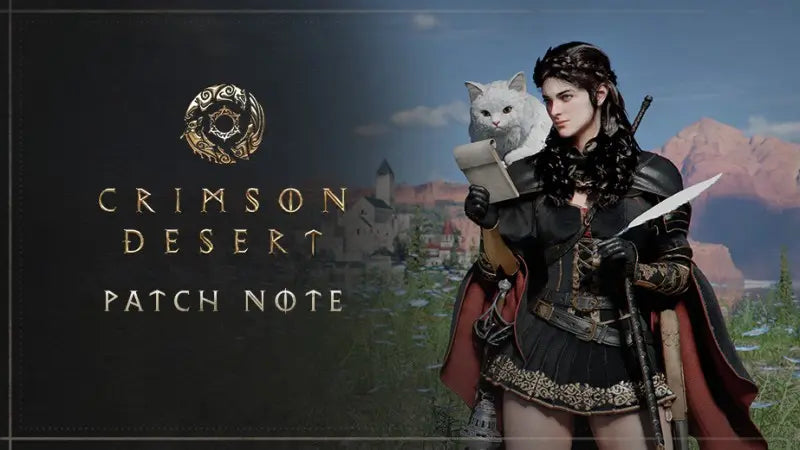
Crimson Desert Patch 1.11.00 Shows Why a Gaming PC for New Games Needs More Than Just “Good Enough” Specs
Crimson Desert Patch 1.11.00 is exactly the kind of update that reminds Canadian gamers why choosing the right gaming PC for new games matters. Pearl Abyss has pushed another substantial update into its ambitious open-world action RPG, and while the headline feature is wonderfully chaotic, the bigger message is about scale: more pets, more camp activity, more systems, more quality-of-life fixes, more controller support, and more reasons for players to spend long sessions inside a huge, busy game world.
The patch reportedly raises the pet registration cap up to 100, while still limiting the number of pets that can be summoned at camp to 50. It also adds new challenges tied to unlocking that larger pet limit, helps pets keep their names as they grow, introduces a new map icon for baby wyverns, expands controller button mapping across key menus, improves mounts and wyvern-related issues, makes the pinball minigame easier, and lets Damiane and Oongka equip tools like the Mining Drill and Chainsaw. Lost rare equipment also becomes easier to recover, with shopkeepers able to collect certain lost rare items and resell them within seven days at a higher price.
That may sound like a quirky patch note list, but for PC buyers it points to a bigger trend. Modern games are no longer just about rendering a battlefield or running a simple quest log. They are layered worlds filled with AI systems, companion systems, physics, animation, menu overlays, asset streaming, high-resolution textures, ray tracing options, controller support, photo mode, and performance-sensitive open-world traversal. So the real question is not just, “Can my PC launch Crimson Desert?” The better question is: what do you want your next PC to handle over the next several years?
At Groovy Computers, we look at news like this through the lens of Canadian gamers, streamers, creators, and workstation buyers who want a system that feels smooth now and still makes sense later. Whether you are planning to explore Crimson Desert, record gameplay for YouTube, stream boss fights, edit 4K clips, build fantasy environments in Blender, or simply avoid upgrading too soon, your PC choice should be based on what you actually do every day—not just the minimum specs printed on a store page.
Why Crimson Desert Patch 1.11.00 Matters for Gaming PC for New Games Buyers
Crimson Desert is a strong example of the direction modern AAA PC gaming is moving. It is not only about sharper graphics. It is about persistent systems. It is about how many things are happening at once while the player moves through a large world. It is about mounts, pets, camps, characters, side activities, tools, minigames, maps, equipment, menus, and cinematic combat all competing for system resources.
When a patch adds more pets and more camp behaviour, it may look like a collector-friendly feature first. But behind the scenes, that kind of system can increase the number of models, animations, AI behaviours, UI elements, and memory demands the game needs to manage. Even if the developer optimizes the feature well, the trend is clear: open-world games keep growing. If you are shopping for a gaming PC for new games, you should be thinking beyond today’s patch and asking what kind of performance headroom you want for tomorrow’s updates, DLC, expansions, texture packs, and engine upgrades.
Do you want to play at 1080p with high settings and strong value? Are you aiming for 1440p with smoother visuals and better long-term headroom? Are you chasing 4K gaming, ray tracing, ultra settings, and a premium monitor experience? Or are you also planning to stream, record, edit, and create content around the games you play?
Those questions matter because the “right” build is not the same for every gamer. A budget-conscious player who mostly wants smooth 1080p performance has different needs than someone who wants a high-refresh 1440p display, and both are different from a player building a premium 4K gaming PC in Canada for maximum visual quality. Crimson Desert’s constant updates make that difference even more important.
What Patch 1.11.00 Adds: More Pets, Better Management, and More Open-World Complexity
The most eye-catching change in Crimson Desert Patch 1.11.00 is the increase in registered pets. Players can now work toward registering up to 100 pets through new challenges. This is a big win for collectors, completionists, and players who treat their camp as a living part of the adventure rather than a simple menu hub.
There is an important catch: even with the 100-pet registration cap, only 50 pets can be summoned at camp at the same time. That limit makes sense. Fifty active pets in one area is already a lot of movement, animation, pathing, and visual activity. For players, it creates a funny and memorable “fantasy zoo” feeling. For hardware, it reinforces why CPU performance, memory capacity, and graphics horsepower all matter in dense open-world scenes.
The patch also improves pet management by allowing pets to keep their names when they grow. That may sound small, but it improves continuity for players who get attached to their companions. The new baby wyvern map icon also makes tracking easier, reducing frustration and helping players focus on exploration instead of menu hunting.
Beyond pets, the update brings several quality-of-life changes. Damiane and Oongka being able to equip the Mining Drill and Chainsaw gives more characters access to useful and entertaining tools. Rare equipment recovery through shopkeepers reduces the punishment of losing valuable gear, even if the resale price is higher. Improved mount behaviour and wyvern fixes help traversal feel cleaner. Expanded controller button mapping in menus like Inventory, Map, Skills, Journal, and Photo Mode is a meaningful accessibility and comfort improvement, especially for players who prefer a console-style experience on a gaming desktop.
Why should someone buying a custom gaming PC care about these details? Because the best gaming experience is not only raw FPS. It is consistency. It is fast loading. It is clean menu response. It is smooth traversal. It is having enough system headroom that updates do not turn yesterday’s “good enough” build into tomorrow’s compromise.
What Do You Want Your Next PC to Do for You?
Before choosing a build, ask yourself a simple but powerful question: what do you want your next PC to do for you?
Do you want a reliable gaming desktop that handles open-world AAA games without constant settings tweaking? Do you want a gaming and streaming PC Canada creators can use for Twitch, YouTube, or TikTok clips? Do you want to record Crimson Desert gameplay, edit highlight reels, and export videos quickly? Do you need a Creator PC Canada setup that can handle Adobe Premiere Pro, DaVinci Resolve, Photoshop, Lightroom, Illustrator, OBS Studio, and Discord all in the same workflow?
Or are you going even further? Are you using Blender, Unreal Engine, Unity, Maya, 3ds Max, AutoCAD, Revit, SolidWorks, or other 3D modeling and rendering tools? Are you building game assets, architectural walkthroughs, product renders, animations, or virtual production scenes? If so, a typical entry-level gaming computer may not be enough. You may need a custom workstation PC with more RAM, stronger CPU performance, GPU acceleration, larger SSD storage, and better cooling.
This is where Groovy Computers can help you avoid a common mistake: buying a PC based only on one game, then realizing six months later that you also need it for streaming, editing, design, school, business, or production work. A well-planned custom PC is not just a box of parts. It is a performance tool built around your actual life.
What Gaming PC Do I Need for Crimson Desert and Other Open-World AAA Games?
There is no single answer that fits every player, but there are clear performance tiers that make the buying decision easier. If you are asking, “What gaming PC do I need?” the first step is choosing your target resolution and use case.
1080p Gaming: Best for Value, Students, and First Gaming PCs
A 1080p gaming PC is the right starting point for many Canadian buyers who want strong value without overspending. If you play on a standard 1080p monitor, care about smooth gameplay, and are comfortable with balanced settings rather than always maxing everything out, this tier can make a lot of sense.
For a game like Crimson Desert, a value-focused 1080p build should prioritize a modern multi-core CPU, a capable dedicated GPU, 16GB to 32GB of RAM depending on multitasking needs, and a fast NVMe SSD. The SSD is especially important for open-world games because modern titles constantly stream assets as you move through the world. Slow storage can contribute to longer load times and less responsive system behaviour.
Ask yourself: are you buying your first gaming PC? Are you upgrading from an older desktop or console? Are you a student trying to balance gaming, schoolwork, Discord, browser tabs, and maybe some light content creation? If yes, a budget gaming PC Canada buyers can trust may be a smart starting point—but it should still be built with future upgrades in mind.
1440p Gaming: The Sweet Spot for Visual Quality and Longevity
For many players, 1440p is the most balanced target. A 1440p Gaming PC Canada setup gives you sharper visuals than 1080p while being more practical and affordable than full 4K ultra gaming. If you are buying a new system for Crimson Desert, future RPGs, open-world action games, survival titles, racing games, and cinematic single-player releases, 1440p is often the performance tier that feels “right” for the longest time.
What PC do I need for 1440p gaming? You typically want a stronger GPU than a basic entry-level build, a CPU that can keep frame pacing stable in complex open-world areas, 32GB of RAM for better multitasking headroom, and a fast NVMe SSD with enough capacity for modern game install sizes. If you plan to keep the PC for several years, spending a little more on the graphics card, cooling, power supply, and storage can save you from needing an early upgrade.
Do you want to run high settings without constantly checking performance guides? Do you want a system that can handle a second monitor, voice chat, browser windows, launchers, recording software, and game overlays? Do you want your PC to feel premium without jumping all the way into flagship pricing? If so, 1440p may be your best target.
4K Gaming and Ray Tracing: For Players Who Want the Premium Experience
A 4K Gaming PC Canada build is for players who want the highest visual fidelity, larger monitors, sharper image quality, and stronger long-term performance headroom. If you want Crimson Desert and other visually ambitious games to look their best, this is where GPU selection becomes critical.
4K gaming is demanding because the graphics card has to push far more pixels than 1080p or 1440p. Add ray tracing, ultra textures, high-quality shadows, advanced lighting, and future DLC content, and the system needs serious horsepower. A premium build should also include excellent cooling, a reliable power supply, a high-airflow case, sufficient RAM, and high-speed storage.
What PC do I need for 4K gaming? The answer depends on whether you simply want playable 4K, high-refresh 4K, or 4K with ray tracing and ultra settings. Those are very different targets. If you are investing in a premium display, it makes sense to build the PC around the monitor instead of buying a cheaper desktop and hoping it keeps up.
Why Open-World Games Put Pressure on More Than Just the GPU
Many buyers assume that a gaming PC is only about the graphics card. The GPU is absolutely important, especially for high resolutions, ray tracing, and modern visual effects. But games like Crimson Desert show why full-system balance matters.
The CPU helps manage game logic, AI behaviour, physics, NPCs, background systems, frame pacing, and multitasking. When a camp can contain dozens of pets, characters, interactive tools, and menu systems, CPU consistency becomes part of the experience. A weak CPU paired with a strong GPU can still cause stutters or inconsistent performance in busy areas.
RAM matters because modern games, launchers, browsers, voice chat apps, anti-cheat tools, streaming software, and overlays can all run at the same time. For a pure budget system, 16GB can still be workable in many scenarios. But for a new custom gaming PC intended to last, 32GB is increasingly attractive, especially if you stream, record, edit, or keep multiple apps open.
Storage matters because game worlds are larger and more detailed than ever. A fast NVMe SSD improves load times, patching responsiveness, and asset streaming. If you play multiple large games, record footage, or create content, SSD capacity becomes just as important as SSD speed.
Cooling and power delivery matter because stable performance depends on keeping components running properly under load. A system that looks powerful on paper but overheats, throttles, or uses mismatched parts can disappoint. That is one reason working with Canadian Custom PC Builders like Groovy Computers is different from gambling on a random marketplace desktop with vague specs.
Are You Gaming Only, or Gaming, Streaming, and Editing?
Crimson Desert’s patch cycle also raises another question: are you only playing, or are you turning your gameplay into content?
If you want to stream your adventures, record boss fights, capture funny pet-camp chaos, or make short-form videos from gameplay clips, your PC needs change. A gaming PC for streaming Canada buyers should look for enough CPU and GPU headroom to play smoothly while OBS Studio or other recording tools run in the background. GPU encoding can help reduce CPU load, and a strong CPU can improve multitasking comfort.
What PC do I need for streaming? If you are streaming at 1080p, you can often use a well-balanced gaming PC with a capable modern GPU, 32GB of RAM, and a fast SSD. If you want to stream, record locally, run a webcam, manage alerts, use multiple monitors, and edit the footage afterward, a stronger build becomes much more valuable.
Do you need a separate streaming PC? Many users do not, especially with the right custom build. A single strong gaming and streaming PC can handle gameplay, OBS, chat, browser tabs, Discord, and editing for many creators. But if you are running a more professional setup with multiple cameras, capture cards, heavy overlays, and production software, Groovy Computers can help you plan the right system around your workflow.
Is a Gaming PC Good for Video Editing, Photo Editing, and Graphic Design?
For many people, the answer is yes—but only if the PC is configured properly. A gaming desktop and a creator desktop often share similar parts, but they are not always optimized the same way. If you want one machine for Crimson Desert, Premiere Pro, DaVinci Resolve, Photoshop, Lightroom, Illustrator, Canva, and general creative work, you need to think beyond FPS.
A Video Editing PC Canada buyer should care about CPU cores, GPU acceleration, RAM capacity, fast scratch storage, and export performance. Editing 1080p footage is very different from editing 4K, 6K, multicam projects, high-bitrate footage, or heavy colour grades. If you are asking, “What PC do I need for video editing?” start with your footage type, editing software, export expectations, and how much time you lose waiting for previews or renders.
A Photo Editing PC Canada workflow has different needs. Photoshop, Lightroom Classic, Capture One, and AI photo tools benefit from strong single-core responsiveness, enough RAM for large RAW files, fast SSDs, and a capable GPU for acceleration. If you are a photographer batch-exporting weddings, sports shoots, real estate galleries, or product images, a faster PC can directly save hours.
A Graphic Design PC Canada setup should be smooth in Adobe Illustrator, Photoshop, InDesign, Canva, Affinity Designer, CorelDRAW, and multi-monitor workflows. Designers may not always need the same GPU horsepower as 4K gamers, but they do need reliability, fast storage, strong memory capacity, and a system that does not slow down when large files, mockups, fonts, browsers, and client assets are open at the same time.
So ask yourself: is your next PC just for playing games, or is it also a tool for school, freelancing, business, photography, YouTube, TikTok, design, or professional production? If it is both, Groovy Computers can help you choose a custom creator PC instead of settling for a generic gaming tower that misses your real workload.
What About Blender, Unreal Engine, CAD, and 3D Rendering?
Games like Crimson Desert are built from complex 3D assets, environments, animations, lighting systems, physics, and cinematic tools. That is why many gamers are also drawn to game development, 3D art, modding, animation, architecture, product design, and rendering. If you are not just playing open-world games but also creating worlds of your own, you may need a different class of PC.
A 3D Modeling PC Canada or 3D Rendering PC Canada build should be planned around the software you use. Blender, Unreal Engine, Unity, Maya, 3ds Max, Cinema 4D, ZBrush, SketchUp, AutoCAD, Revit, and SolidWorks can all stress hardware differently. Some workloads lean heavily on the GPU. Others demand more CPU power. Large scenes and high-resolution textures can require 64GB or even 128GB of RAM depending on project size.
What PC do I need for Blender? If you use GPU rendering, the graphics card matters enormously. If you run simulations, heavy geometry, or CPU rendering, processor choice becomes more important. If you work with huge scenes, RAM and storage speed can affect whether the workflow feels smooth or frustrating.
Is a gaming PC good for Blender? It can be, especially if it has a strong RTX-class GPU, enough RAM, and proper cooling. But a gaming PC chosen only for FPS may not be the best workstation. A custom 3D workstation Canada buyers can rely on should be built around render time, viewport performance, memory capacity, project storage, thermals, and long-session reliability.
Should You Buy a Gaming PC Now or Wait?
One of the most common questions Canadian buyers ask is: is it better to buy a gaming PC now or wait? The honest answer depends on your current system, your target games, your budget, and how urgently you need performance. But waiting is not always the safer choice.
Modern PC pricing can shift quickly. GPUs can face demand pressure when new games, AI workloads, creator applications, crypto-style speculation, or supply constraints increase competition for hardware. Memory and SSD pricing can also move due to manufacturing cycles and global demand. When a major game release, big sale period, school season, holiday rush, or hardware transition hits, the exact build you want may not stay at the same price.
If your current PC is already struggling, waiting can cost you time, enjoyment, productivity, and flexibility. If you are a creator, slow exports and laggy timelines can become real business costs. If you are a student, unreliable performance can affect schoolwork and project deadlines. If you are a gamer, waiting too long may mean missing the launch window or early community excitement around the games you care about.
Ask yourself: are you buying before a major game release? Are you trying to upgrade before a sale period creates stock pressure? Are you worried that GPU, RAM, or SSD replacement costs could rise? Are you trying to secure a stronger system before your current PC fails or becomes too limiting? Those are practical reasons to start planning now.
Could Financing Help You Secure a Stronger System Before Prices Change?
For some customers, financing is not about buying recklessly. It is about choosing the right system sooner instead of settling for a weaker PC that needs an upgrade too quickly. Groovy Computers offers financing options up to 4 years, which can help approved Canadian customers spread out payments on a custom gaming PC, creator PC, or workstation PC.
Should I finance a better PC instead of buying a cheaper one? That depends on your budget and needs. If a lower-cost system genuinely handles everything you do, staying budget-friendly is smart. But if you already know you want 1440p gaming, streaming, video editing, 3D modeling, or long-term performance, financing can make a stronger build more realistic without requiring the full payment upfront.
Is financing a gaming PC worth it? It can be when the system helps you avoid early replacement, reduces upgrade pressure, and supports both entertainment and productivity. A better GPU, more RAM, a stronger CPU, larger SSD, or improved cooling can extend the useful life of the build. If you are a creator, the time saved on editing, rendering, exporting, and multitasking may be even more valuable.
Can I finance a gaming PC in Canada? Groovy Computers supports Canadian buyers with custom PC options and financing pathways designed to make performance more accessible. The key is to choose a build that fits your real needs, not simply the most expensive configuration available.
Which Performance Tier Fits You Best?
Choosing a PC becomes easier when you match the performance tier to your actual use case. Instead of asking, “What is the best PC?” ask, “What is the best PC for me?”
Choose a Budget Gaming PC if You Want Strong Value
A budget gaming PC is ideal if you want to play modern games at 1080p, enjoy esports titles, handle schoolwork, browse, watch content, and run everyday apps without overspending. This tier is also attractive for first-time PC gamers moving from console.
Questions to ask: How much should I spend on a gaming PC? Can a budget gaming PC play new games? Am I comfortable adjusting settings for smoother performance? Do I want an upgrade path later?
Choose a 1440p Custom Gaming PC if You Want the Smart Middle Ground
A 1440p custom gaming PC is often the best fit for gamers who want a serious upgrade without going all-in on flagship pricing. It delivers better visual quality than 1080p, pairs well with high-refresh monitors, and gives more breathing room for future games.
Questions to ask: What PC do I need for 1440p gaming? Do I want high settings in AAA games? Will I use a second monitor? Do I want to stream or record gameplay? Do I want to avoid upgrading too soon?
Choose a Premium Gaming PC if You Want 4K, Ray Tracing, and Long-Term Headroom
A premium gaming PC is built for demanding players who want ultra settings, ray tracing, high-resolution textures, 4K displays, and stronger future-proofing. This is the tier for gamers who do not want to constantly compromise settings as new releases become more demanding.
Questions to ask: What PC do I need for 4K gaming? Is a high-end gaming PC worth it? How long will a premium gaming PC last? Should I finance a high-end gaming PC instead of buying a mid-range system now and upgrading again sooner?
Choose a Creator PC if You Game, Stream, Edit, and Design
A creator PC is ideal if your system needs to do more than gaming. If you use OBS, Premiere Pro, DaVinci Resolve, Photoshop, Lightroom, Illustrator, Canva, After Effects, CapCut, or social media editing tools, your build should prioritize multitasking and production speed.
Questions to ask: What PC do content creators need? Is a gaming PC good for content creation? How much RAM do creators need? Do I need a stronger CPU, stronger GPU, or more storage for my workflow?
Choose a Workstation PC if You Render, Model, Animate, or Run Professional Software
A workstation PC is the right choice for serious productivity workloads such as 3D modeling, rendering, CAD, simulation, architecture, product design, AI-assisted tools, and large professional projects. These builds should be planned carefully because the wrong part balance can waste money or slow down your work.
Questions to ask: What workstation PC do I need? Workstation PC vs gaming PC—which is better for my software? How much RAM do I need for workstation tasks? Am I using GPU rendering, CPU rendering, or both?
Why Custom Builds Matter More Than Generic Prebuilt PCs
When games and software keep getting more demanding, the quality of the full build matters. A generic prebuilt might advertise a recognizable CPU or GPU, but that does not tell the whole story. What power supply is inside? How good is the cooling? Is the case airflow adequate? Is the RAM configuration correct? Is the SSD fast and large enough? Has the system been stress tested? Is the motherboard suitable for future upgrades?
This is where a Custom Gaming PC Canada approach becomes valuable. Groovy Computers builds systems around the customer’s goals, not just a spec sheet. A gaming PC for Crimson Desert may need a different balance than a PC for Counter-Strike 2, Fortnite, Warzone, GTA 6, video editing, or Blender rendering. A system built for a 1080p monitor should not be configured the same way as a 4K ray tracing machine. A creator workstation should not be treated like a basic gaming tower.
Custom PC vs prebuilt PC Canada is not just a search phrase—it is a real buying decision. A properly planned custom build can offer better part matching, cleaner upgrade paths, stronger cooling, and more confidence. It also reduces the chance of paying for flashy specs while missing the parts that actually affect your daily experience.
Groovy Computers focuses on custom builds, rigorous testing, and a 1-year warranty so Canadian customers can buy with confidence. Whether you are in Nova Scotia, Atlantic Canada, or ordering online from elsewhere in Canada, the goal is the same: a reliable, tested PC that fits your use case.
What Should Canadian Buyers Watch Before Prices Shift?
Canadian PC buyers face a different buying environment than customers in larger markets. Exchange rates, shipping costs, component availability, distributor stock, seasonal demand, and import-related price changes can all affect final system pricing. That is why it is smart to plan before you are forced to buy in a hurry.
GPU pricing can change when demand spikes around major game launches, creator software updates, AI workloads, or new hardware generations. RAM and SSD prices can move when manufacturing supply tightens. Cases, power supplies, and cooling parts can also fluctuate, especially when certain high-quality models become harder to source.
Are you waiting for a specific game? Are you planning to upgrade before school, a creator project, a tournament, a business launch, or a holiday sale period? Are you trying to replace an aging PC before it fails? If your answer is yes, it may be smarter to get a custom quote now instead of reacting later when the parts you want are more expensive or harder to find.
This does not mean everyone should rush into a purchase. It means informed timing matters. The best time to buy is often when your needs, budget, and available components line up—not after your old PC can no longer keep up.
How Crimson Desert’s Patch Cycle Reflects the Future of PC Gaming
Crimson Desert Patch 1.11.00 is not just about pet collectors. It reflects the live-update culture of modern PC gaming. Games launch, expand, rebalance, optimize, and add features over time. A system that runs a game comfortably at launch may face different demands after several patches, DLC packs, visual upgrades, or community-driven content cycles.
For gamers, that means buying based only on minimum requirements is risky. Minimum specs are often about launching the game, not enjoying it the way you actually want to play. Recommended specs can also be broad and may not reflect your monitor, streaming habits, multitasking, preferred settings, or future update expectations.
If you want to play open-world games smoothly, look at the bigger picture. Do you want 60 FPS, 100+ FPS, or high-refresh esports-level responsiveness? Do you want high settings, ultra settings, ray tracing, or 4K? Do you use Discord, Spotify, browsers, recording tools, RGB software, controller software, and launchers while gaming? Do you want to mod games or install high-resolution texture packs? These details affect what PC is right for you.
That is why a gaming PC buying guide Canada readers can trust should always start with the player’s real target, not just a generic parts list.
Questions to Ask Before Buying Your Next Gaming or Creator PC
Before buying or financing a custom PC, ask yourself these practical questions:
- What games do I care about most? Are you playing Crimson Desert, GTA 6, Battlefield, Forza, Fortnite, Call of Duty, Cyberpunk, Elden Ring, Minecraft, Roblox, or esports titles?
- What resolution do I want? Is 1080p enough, or do you want a 1440p Gaming PC Canada setup? Are you planning for 4K gaming?
- Do I care about ray tracing? If yes, your GPU choice becomes more important.
- Will I stream or record? OBS, YouTube Live, Twitch, TikTok Live, and local recording all add workload.
- Will I edit video? Premiere Pro, DaVinci Resolve, After Effects, and CapCut can benefit from stronger CPUs, GPUs, RAM, and SSDs.
- Will I edit photos or design graphics? Photoshop, Lightroom, Illustrator, InDesign, Canva, and Capture One all feel better on a responsive desktop.
- Will I do 3D work? Blender, Unreal Engine, Unity, CAD, Revit, SolidWorks, Maya, and Cinema 4D may require workstation-level planning.
- How long do I want the PC to last? Spending slightly more now can sometimes reduce upgrade pressure later.
- Do I want to pay upfront or use financing? Financing up to 4 years may help you secure a stronger system before component pricing changes.
- Do I want expert help choosing parts? If you are unsure, Groovy Computers can guide you toward the right build tier.
Why Groovy Computers Is a Strong Fit for Canadian Gamers and Creators
Groovy Computers is built for customers who want more than a random parts list. We help Canadian buyers choose systems based on actual performance goals: gaming, streaming, editing, design, content creation, 3D modeling, workstation use, or a mix of everything.
If you are searching for a gaming PC for new games, we can help you decide whether a value-focused 1080p build, a balanced 1440p gaming PC, or a premium 4K system makes the most sense. If you are a streamer, we can help balance gameplay performance with OBS, recording, and multi-monitor use. If you are a creator, we can help plan around Adobe Creative Cloud, DaVinci Resolve, Blender, Unreal Engine, and other demanding tools.
We also understand the Canadian buying context. Component availability, shipping, warranty confidence, and support matter. A Canada Built Gaming PC from a Canadian company gives you a different level of trust than buying an unknown system with unclear part quality. Groovy Computers offers custom builds, rigorous testing, Canada-wide support, and a 1-year warranty for added peace of mind.
Do you want help choosing a build that fits your games, monitor, software, and budget? Visit GroovyComputers.ca to explore options, request guidance, and find a custom gaming PC or creator PC that matches what you actually want to do.
Should You Choose Ready-to-Ship or Fully Custom?
A ready-to-ship gaming PC can be a smart choice if you need a system quickly and the specs match your target. If your current PC is failing, you have a game release coming up, or you need a dependable desktop for school or work right away, a ready-to-ship option can save time.
A fully custom build is better when you have specific goals. Maybe you want a quiet 1440p gaming PC with a clean aesthetic. Maybe you want a high-end 4K system with strong cooling. Maybe you need 64GB of RAM for editing or 128GB for 3D rendering. Maybe you want lots of SSD storage for game libraries and video projects. Maybe you want a balanced PC that can game at night and edit client projects during the day.
Which path is right for you? If you know exactly what you need and the system is available, ready-to-ship can be convenient. If you want maximum fit, a custom build is usually the better long-term decision. Groovy Computers can help you compare both options without pushing you into the wrong tier.
The Hidden Cost of Buying Too Weak
Buying the cheapest system that technically runs a game can feel like saving money, but it can create hidden costs. If the PC struggles with new releases, you may end up lowering settings sooner than expected. If it lacks RAM, multitasking becomes frustrating. If the SSD is too small, you constantly uninstall games. If the power supply or case limits upgrades, replacing the GPU later becomes more expensive. If cooling is poor, performance may drop under sustained load.
This is especially important for games that keep expanding. A title like Crimson Desert may continue receiving new content, fixes, features, and possibly future additions. The more a game grows, the more valuable performance headroom becomes.
Do you want to avoid upgrading too soon? Do you want your system to feel smooth not just on day one, but after future patches and larger game libraries? Do you want enough power for your next monitor upgrade? Those are reasons to consider stepping up from the bare minimum to a better-balanced build.
The Smart Buyer’s Approach: Match the PC to the Monitor, the Games, and the Workload
A smart PC purchase starts with three anchors: monitor, games, and workload. Your monitor determines the resolution and refresh rate target. Your games determine the GPU and CPU pressure. Your workload determines how much RAM, storage, and processing power you need beyond gaming.
If you have a 1080p 75Hz monitor, you do not need the same system as someone with a 1440p 165Hz display. If you play competitive shooters, high FPS and low latency matter. If you play cinematic RPGs, visual settings and smooth frame pacing matter. If you stream, record, or edit, multitasking performance matters. If you render, model, or work in CAD, workstation stability matters.
That is why Groovy Computers does not treat every buyer the same. A custom gaming PC should be built around the customer. The best PC for new games is the one that matches your screen, your software, your budget, and your upgrade expectations.
Conclusion: Crimson Desert’s 100-Pet Patch Is Fun, but Your Next PC Decision Is Serious
Crimson Desert Patch 1.11.00 brings a fun and surprisingly meaningful update for collectors, explorers, and players who love living inside a dense open-world RPG. The ability to register up to 100 pets, summon up to 50 at camp, track baby wyverns more easily, recover certain lost rare equipment, remap more controller buttons, and enjoy smoother quality-of-life features gives players more reasons to return.
For Canadian PC buyers, the lesson is bigger than one patch. Modern games are becoming deeper, busier, and more demanding. If you want a gaming PC for new games, you should think carefully about resolution, FPS targets, streaming, editing, design, 3D modeling, workstation use, storage, RAM, cooling, warranty, and upgrade paths.
If you are wondering whether to buy now, wait, or finance a stronger system, the best next step is to define what you want the PC to do. Do you want smooth 1080p value? A balanced 1440p gaming experience? A premium 4K ray tracing machine? A gaming and streaming PC? A creator workstation? A 3D rendering system? Groovy Computers can help you choose confidently before component pricing, availability, or your workload changes.
Ready to choose a custom gaming PC Canada buyers can trust for Crimson Desert and the next wave of demanding games? Visit GroovyComputers.ca and let Groovy Computers help you find the right build, the right performance tier, and the right financing path for your needs.
#GamingPCForNewGames #CustomGamingPCCanada #GamingPCCanada #CrimsonDesertPC #1440pGamingPC #4KGamingPC #CreatorPCCanada #GamingPCFinancingCanada #GroovyComputers #CanadianCustomPCBuilders
Groovy Computers | All Rights Reserved


Leave a comment
This site is protected by hCaptcha and the hCaptcha Privacy Policy and Terms of Service apply.