



































Crimson Desert Patch 1.12.00 Shows Why You Need a Gaming PC for New Games That Can Handle More Than Just Combat
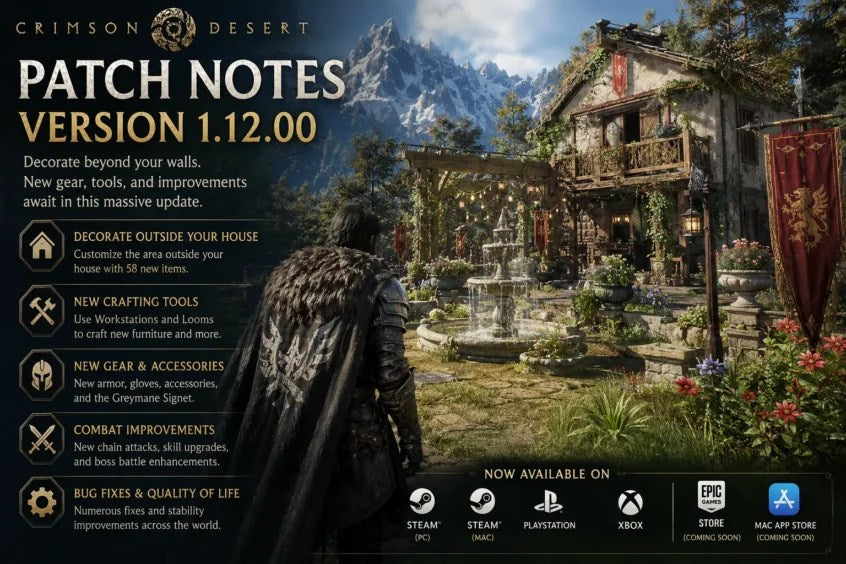
Crimson Desert Patch 1.12.00 is more than a routine update. With a major housing expansion, new crafting systems, expanded gear options, combat refinements, UI improvements, and stability fixes, it highlights a bigger trend across modern PC gaming: today’s open-world games are becoming deeper, denser, more customizable, and more demanding on your system.
For Canadian players watching updates like this roll out, the real question is not only “What changed in Crimson Desert?” It is also: is your current PC ready for the way modern games are evolving? If a game adds more environmental detail, more interactive objects, more customization, more animation systems, more crafting, more combat options, and more world complexity, your gaming desktop has to keep up with much more than a simple frame rate target.
That is where Groovy Computers comes in. As a Canadian custom PC builder, Groovy Computers helps gamers, streamers, editors, creators, designers, and workstation users choose the right system for the way they actually play and work. Whether you are looking for a budget gaming computer, a premium RTX gaming PC, a 1440p gaming PC Canada build, a 4K gaming PC Canada build, a custom creator PC, or a workstation for 3D rendering and content creation, the key is matching your PC to your real workload before prices, game requirements, or upgrade needs move against you.
What Crimson Desert Patch 1.12.00 Adds and Why PC Buyers Should Pay Attention
The latest Crimson Desert update, Patch 1.12.00, focuses heavily on player housing and world customization. According to the provided update details, players can now decorate the area outside their house, opening up far more freedom for personalizing in-game spaces. The patch also introduces new crafting tools, new housing items, additional decorations, new gear, combat changes, UI refinements, and a broad set of bug and performance fixes.
On paper, a housing update may sound purely cosmetic. In practice, it represents exactly where modern open-world games are heading. More objects. More systems. More on-screen detail. More animation. More inventory logic. More physics-like interactions. More customization. More reasons to stay in the game world longer.
For players, that is exciting. For hardware, it means your PC is doing more work. If you want a gaming PC for new games that can stay smooth as games expand through patches, DLC, seasonal updates, and long-term content drops, you need to think beyond minimum specs.
Key Crimson Desert Patch 1.12.00 Highlights
- Expanded housing customization: Players can now decorate exterior areas around their homes, not just interiors.
- New crafting tools: Workstations and looms have been introduced as new craftable systems.
- 58 new housing items: The patch adds fountains, wells, braziers, streetlights, carpets, hanging planters, automata toys, pet furniture, and more.
- New gear and rewards: Kliff receives new armour sets, helmets, gloves, accessories, and collectible knowledge entries.
- Expanded progression options: Characters such as Damiane and Oongka can now use additional progression-related systems, including equipping Visiones and interacting with memories.
- Combat improvements: New chain attacks while sliding, boss retry setting persistence, improved skills, and new enemy attack patterns add more tactical variety.
- UI and quality-of-life updates: Minimap enemy icons, collectible UI clarity, settings navigation, and key mapping improvements make the experience cleaner.
- Stability and performance fixes: The patch addresses crashes, housing placement bugs, pet and mount issues, quest progression, camera movement, and general world-system polish.
So, what does this mean if you are shopping for a Gaming PC Canada build right now? It means you should not only ask, “Can this PC launch the game?” You should ask, “Will this PC still feel good after months of updates, heavier areas, expanded content, and higher expectations?”
Why a Gaming PC for New Games Needs More Headroom Than Minimum Requirements Suggest
A modern game’s launch requirements are only part of the story. Crimson Desert Patch 1.12.00 is a good example of why. When developers add new systems such as expanded housing, more craftable items, new UI layers, new combat behaviours, and more environmental objects, a game can become more complex over time.
Minimum specs are usually designed to answer one narrow question: can the game run? They do not always answer the question that matters most to players: can the game run smoothly at the resolution, settings, frame rate, and workload you actually want?
Do you want 1080p gaming on high settings? Do you want 1440p with high FPS? Do you want 4K visuals with ray tracing where supported? Do you want to stream gameplay, record footage, edit clips, run Discord, use a second monitor, and keep browser tabs open while playing?
Those use cases require very different hardware choices. A basic entry-level desktop may be enough for lighter games, but open-world action RPGs, cinematic adventures, and large-scale AAA games benefit from stronger GPUs, modern CPUs, enough RAM, and fast SSD storage. That is especially true when a game keeps expanding after release.
What Do You Want Your Next PC to Do for You?
Before choosing a new gaming desktop, pause and ask the question that matters most: what do you want your next PC to do for you?
Do you want it to play Crimson Desert and other open-world games at smooth frame rates? Do you want it to handle future AAA releases without forcing another upgrade too soon? Do you want it to double as a streaming PC for Twitch or YouTube? Do you want to record gameplay and edit clips for TikTok, Instagram Reels, or YouTube Shorts? Do you also need it for school, business, Photoshop, Lightroom, Premiere Pro, Blender, CAD, or graphic design?
A gaming PC can be built as a simple entertainment machine, but it can also be the centre of your entire digital workflow. The best choice depends on how you answer questions like these:
- What games do you play now, and what upcoming games are you waiting for?
- Do you care more about high FPS, ultra graphics, ray tracing, or long-term upgrade room?
- Are you playing at 1080p, 1440p, ultrawide, or 4K?
- Will you stream, record, or edit gameplay?
- Do you use creative software such as Adobe Premiere Pro, DaVinci Resolve, Photoshop, Lightroom, Illustrator, Blender, Unreal Engine, AutoCAD, Revit, or SolidWorks?
- Do you want a system that stays relevant longer instead of feeling outdated after one or two demanding releases?
- Would financing help you secure a stronger PC now instead of settling for a weaker system that may need replacing sooner?
These are not small details. They determine whether you should buy a budget gaming PC, a balanced mid-range gaming desktop, a premium RTX gaming PC, a custom creator PC, or a high-performance workstation.
Which Performance Tier Fits You Best?
Choosing the right PC tier is not about buying the most expensive computer possible. It is about buying the right level of performance for your needs, your monitor, your software, your budget, and your upgrade expectations.
Entry-Level and Budget Gaming PC Canada Builds: Who Are They For?
A budget gaming PC Canada build can make sense if you mainly play esports games, lighter online titles, indie games, older AAA games, or 1080p games at sensible settings. If you are buying your first gaming PC, shopping for a student gaming PC, or moving from console to PC, this tier can offer excellent value.
But ask yourself: are you trying to play modern open-world games like Crimson Desert at higher settings, or do you simply want a smooth starting point? If you expect to play new AAA releases for several years, it may be worth stepping above the lowest tier so you are not upgrading too soon.
Budget does not have to mean poorly matched parts. A good value build should still include a sensible CPU and GPU pairing, enough RAM, a fast SSD, proper airflow, reliable power delivery, and stress testing before it ships. This is where a trusted Canadian custom PC builder can help you avoid the common mistake of buying a system with one flashy part and several weak supporting components.
1080p High-Settings Gaming: The Practical Sweet Spot
If you play at 1080p and want high settings with consistent performance, you do not always need a flagship machine. However, you still need a PC that balances CPU speed, GPU performance, RAM capacity, and SSD responsiveness.
This tier is ideal for players who ask, “What gaming PC do I need if I want new games to feel smooth without paying for 4K performance?” It can also be a strong choice for competitive players who want higher frame rates in esports titles while still enjoying visually rich single-player games.
For Crimson Desert-style open-world gaming, 1080p high settings may be the most cost-effective route for many Canadian buyers. You get strong visuals, good responsiveness, and better long-term value than an ultra-budget system.
1440p Gaming PC Canada Builds: The Best Balance for Many Players
For many modern gamers, 1440p is the real sweet spot. A 1440p gaming PC Canada build offers a noticeable visual upgrade over 1080p without demanding the same GPU power as 4K. If you want open-world games to look sharp, cinematic, and immersive, 1440p is often the right target.
Ask yourself: what PC do I need for 1440p gaming if I want high settings, strong frame rates, and room for future updates? The answer usually involves a stronger GPU, a modern multi-core CPU, 32GB of RAM for comfortable multitasking, and a fast NVMe SSD to help with loading and asset streaming.
This tier is also excellent for players who want to stream, record, or edit gameplay. It provides enough horsepower for gaming and background tasks without jumping all the way to a premium 4K-focused build.
4K Gaming PC Canada Builds: For Ultra Settings, Cinematic Detail, and Long-Term Headroom
A 4K gaming PC Canada build is for players who want the best visual experience possible. If you want expansive environments, high-resolution textures, large displays, ray tracing where available, and ultra settings in demanding games, 4K requires serious GPU power.
Is a 4K build right for you? That depends on your monitor and expectations. If you already own a 4K display, plan to upgrade to one, or want a premium gaming setup that lasts longer before compromise becomes necessary, a high-end gaming PC makes sense.
But 4K is not just about the GPU. You also need a CPU that can support consistent frame pacing, sufficient RAM, fast storage, strong cooling, and a quality power supply. A poorly balanced 4K machine can become noisy, hot, unstable, or disappointing under real gaming loads.
Premium RTX Gaming PC Builds: Who Should Go High-End?
A premium RTX gaming PC is for the player who does not want to wonder if their system can handle the next major release. It is for people who want ultra settings, ray tracing gaming PC Canada performance, high refresh rates, streaming headroom, and long-term confidence.
Should you finance a high-end gaming PC instead of buying a cheaper one outright? For some buyers, the answer may be yes. If a cheaper system forces an earlier upgrade, the total cost over time can be less attractive than securing a stronger build now with a manageable payment plan.
That does not mean everyone needs a flagship system. It means you should make the decision based on the games and workloads that matter to you, not just the lowest sticker price.
Crimson Desert Is Also a Reminder That Open-World Games Are Becoming PC Workloads
Games like Crimson Desert are not just rendering characters on a flat stage. They are building worlds. Housing systems, crafting, NPC logic, mounts, combat animations, collectibles, environment detail, UI layers, and patch-driven content all add to the feel of a living game world.
When you walk through an area filled with player-placed decorations, lighting, pets, mounts, animation systems, and interactive objects, your PC is juggling more than you might realize. The GPU handles visual rendering, the CPU helps manage game logic and simulation, RAM keeps active data ready, and the SSD feeds assets into memory quickly.
If your PC is older, you may notice frame drops in busy areas, slower loading, stutters when assets stream in, higher fan noise, or inconsistent performance after updates. Have you ever noticed a game ran fine at launch but felt heavier after a few patches? That is one reason future-proofing matters.
Do You Stream, Record, or Edit Gameplay?
Many players no longer just play games. They stream them, clip them, edit them, post them, and build communities around them. If Crimson Desert’s new housing tools encourage players to show off custom spaces, walkthroughs, build showcases, or guide content, that can quickly turn a gaming session into a content creation workflow.
Do you plan to stream on Twitch, YouTube Live, or TikTok Live? Do you use OBS Studio or Streamlabs? Do you record gameplay while keeping Discord, overlays, music, and a browser open? If so, a gaming and streaming PC Canada build may be a better fit than a basic gaming tower.
A strong streaming PC Canada configuration usually benefits from:
- A capable modern CPU for multitasking and background processes.
- An RTX GPU for hardware-accelerated encoding where supported.
- 32GB of RAM or more for gaming, streaming software, browser tabs, chat tools, and recording utilities.
- Fast NVMe SSD storage for game loading, recorded footage, and editing projects.
- Good cooling and airflow so performance stays consistent during long sessions.
If you are asking, “What PC do I need for streaming?” the answer depends on whether you only stream light esports games or whether you want to stream demanding open-world games at high settings. A PC for gaming and recording Canada workloads needs more headroom than a simple gaming-only machine.
Is a Gaming PC Good for Video Editing, Photo Editing, and Graphic Design?
Yes, a well-built gaming PC can be excellent for creative work, but not every gaming PC is automatically a great creator PC. The difference is in how the parts are selected and balanced.
If you play games like Crimson Desert and also edit gameplay footage, thumbnails, social media clips, or long-form YouTube videos, you may be better served by a Gaming Streaming Editing PC Canada configuration. This type of build balances gaming performance with creator workloads such as Adobe Premiere Pro, DaVinci Resolve, After Effects, Photoshop, Lightroom, Illustrator, and other creative tools.
What PC do you need for video editing? For 1080p editing, a mid-range system may be enough. For 4K editing, multi-layer timelines, colour grading, effects, and fast exports, you should look at a stronger CPU, more RAM, a capable GPU, and dedicated fast storage for projects.
What PC do you need for photo editing? Lightroom Classic, Photoshop, Capture One, and modern AI photo tools can benefit from strong single-core CPU performance, enough RAM, fast SSD storage, and a capable GPU for accelerated features. A photographer working with high-resolution RAW files should not buy the same system as someone who only plays light games at 1080p.
What PC do you need for graphic design? If you work with Photoshop, Illustrator, InDesign, Canva, CorelDRAW, Affinity Designer, or Adobe Creative Cloud, you want fast responsiveness, enough memory for large files, and support for multiple monitors. A custom creator PC Canada build can be designed to handle both your design work and your gaming life.
What About 3D Modeling, Rendering, Blender, Unreal Engine, and Workstation Use?
Crimson Desert’s world-building features are a consumer-facing example of how much visual complexity modern digital environments can contain. If you create 3D models, game assets, architectural visualizations, product renders, animations, or interactive environments yourself, your PC needs are even more serious.
Are you using Blender, Unreal Engine, Unity, Maya, 3ds Max, Cinema 4D, SketchUp, ZBrush, AutoCAD, Revit, or SolidWorks? If so, a standard gaming PC may not be the best answer. You may need a 3D modeling PC Canada build, a 3D rendering PC Canada build, or a custom workstation PC designed around your software.
A rendering workstation Canada configuration may prioritize:
- High CPU core counts for CPU rendering, simulation, compiling, and multitasking.
- Strong GPU performance for viewport responsiveness, GPU rendering, real-time engines, and AI-assisted workflows.
- 64GB or 128GB of RAM for large scenes, heavy textures, CAD files, simulations, and complex projects.
- Fast and spacious SSD storage for project files, caches, assets, and scratch disks.
- Cooling and stability for long render sessions where crashes can cost time and money.
If you are asking, “What PC do I need for Blender?” or “Workstation PC vs gaming PC for 3D modeling: which is better?” the answer depends on whether your workload is mostly real-time viewport work, GPU rendering, CPU rendering, CAD, animation, or game development. Groovy Computers can help match the system to the software instead of forcing you into a generic one-size-fits-all tower.
Why Canadian Buyers Should Think Differently About Timing
Canadian PC buyers face a different reality than shoppers in larger global markets. Component availability, currency movement, shipping costs, supplier stock, GPU demand, memory pricing, SSD pricing, and seasonal demand can all affect final system cost. If you wait until a major game release, holiday rush, back-to-school period, creator software upgrade cycle, or hardware shortage, the build you want may cost more or take longer to secure.
That does not mean you should panic-buy. It means you should plan with intention. If you already know you want to play upcoming AAA games, stream more seriously, move into 4K editing, upgrade to a high-refresh monitor, or start 3D modeling work, waiting until your current PC fails may put you in a weaker buying position.
Ask yourself: are you buying before a major game release, a sale period, a software upgrade, or a possible price spike? If the answer is yes, it may be smart to choose your build earlier, secure the right parts, and avoid settling for whatever happens to be available later.
Could Financing Help You Secure a Stronger System Before Replacement Costs Rise?
For many customers, the biggest challenge is not knowing what they want. It is deciding whether to compromise now or invest in a stronger system that lasts longer. This is where Gaming PC Financing Canada options can be useful when handled responsibly.
Groovy Computers offers financing options up to 4 years, making it easier for qualified customers to move into a better PC tier without paying the full amount upfront. That can matter if you are deciding between a cheaper system that barely meets your needs and a stronger custom build that can handle gaming, streaming, editing, and future upgrades more comfortably.
Is financing a gaming PC worth it? It can be, if it helps you avoid buying too little performance and replacing the system too soon. Should you finance a better PC instead of buying a cheaper one? That depends on your budget, your workload, your income stability, and how long you expect the PC to serve you.
The important question is this: will the lower upfront price actually save you money, or will it push you into another upgrade sooner than expected?
Custom PC vs Generic Prebuilt PC Canada: Why the Difference Matters
When a game update adds complexity, stability matters. When your PC is used for streaming, editing, or paid creative work, stability matters even more. A generic prebuilt system may look attractive if it advertises a familiar CPU or GPU, but the hidden details often make the difference between a good experience and a frustrating one.
A custom-built gaming PC Canada system should consider the full build, not just the headline graphics card. That includes motherboard quality, RAM speed and capacity, SSD performance, power supply reliability, case airflow, cooling, cable management, upgrade paths, and stress testing.
Why buy a custom gaming PC from Groovy Computers instead of choosing a random marketplace tower? Because part matching matters. Testing matters. Warranty support matters. Canadian support matters. And when your system is expected to handle modern open-world games, streaming, editing, and creative software, guessing is not a strategy.
Groovy Computers builds custom gaming PCs, creator PCs, and workstation PCs with careful component selection, rigorous testing, and a 1-year warranty. That gives Canadian buyers more confidence than buying a mystery configuration that may not be optimized for their real use.
How to Match Your PC to Your Monitor and Gaming Goals
Your monitor is one of the most important clues when choosing a gaming PC. Buying a powerful GPU for a basic 1080p 60Hz monitor may not deliver the value you expect unless you plan to upgrade the display. On the other hand, buying a weak PC for a 1440p high-refresh or 4K monitor can leave performance on the table.
If You Play at 1080p
You can focus on value, smooth frame rates, and strong responsiveness. This is a good tier for budget-conscious buyers, students, esports players, and people who want a reliable gaming desktop without overspending.
If You Play at 1440p
You should prioritize a stronger GPU, a modern CPU, 32GB of RAM if possible, and fast NVMe storage. This is one of the best all-around tiers for open-world games, competitive titles, and content creation.
If You Play at 4K
You need a high-end GPU, strong supporting parts, excellent cooling, and realistic expectations around ultra settings and ray tracing. This is the premium tier for players who want the most detailed visual experience.
If You Stream or Create Content
You should not choose based on gaming frame rate alone. You need enough CPU, GPU, RAM, and storage headroom to keep your full workflow smooth while the game is running.
Questions to Ask Before Buying Your Next Gaming or Creator PC
The best PC purchase starts with better questions. Before choosing a system, ask yourself:
- What games do I want to play over the next two to four years?
- Do I want 1080p value, 1440p balance, or 4K premium performance?
- Do I care about ray tracing, ultra settings, or high FPS?
- Will I be streaming with OBS, Twitch, YouTube Live, Streamlabs, or TikTok Live?
- Will I edit videos in Premiere Pro, DaVinci Resolve, After Effects, CapCut, or other editing software?
- Will I edit photos in Photoshop, Lightroom, Capture One, or AI photo tools?
- Will I design graphics in Illustrator, InDesign, Canva, Affinity Designer, or CorelDRAW?
- Will I use Blender, Unreal Engine, Unity, AutoCAD, Revit, SolidWorks, Maya, or Cinema 4D?
- Do I need a quiet system for office work, recording, or shared spaces?
- Do I want to avoid upgrading too soon?
- Would financing help me buy the right PC now instead of compromising?
- Do I want help from a Canadian custom PC builder who can guide the configuration?
If any of these questions made you stop and think, that is a sign that a generic one-click system may not be the best fit. Your next PC should match your games, your software, your monitor, your budget, and your timeline.
Why Patch-Heavy Games Reward Better SSDs, More RAM, and Balanced Builds
Modern games are not static products. They receive updates, expansions, balance changes, new assets, bug fixes, seasonal content, UI improvements, and performance patches. Crimson Desert Patch 1.12.00 is a clear example of that ongoing evolution.
Fast SSD storage matters because modern games load large worlds, textures, models, and assets constantly. More RAM matters because games, launchers, browsers, voice chat, streaming tools, and recording software often run at the same time. A stronger CPU matters because open-world games can be heavy on simulation, background tasks, AI behaviour, and world logic. A capable GPU matters because visual detail, resolution, lighting, and effects are still major performance drivers.
A balanced gaming PC is not just a GPU in a box. It is a carefully matched system. If one part is too weak, it can hold back the rest of the machine. If cooling is poor, performance can drop under load. If the power supply is low quality, upgrade options and long-term reliability may suffer.
That is why Groovy Computers focuses on custom builds, part matching, testing, and support. A gaming desktop should feel good not only on day one, but after updates, longer sessions, new games, and heavier workloads.
For Canadian Players, Support and Warranty Should Be Part of the Buying Decision
When you buy a gaming computer in Canada, you are not only buying components. You are buying confidence. If something goes wrong, do you know who to contact? Was the system stress tested? Are the parts properly matched? Is there a warranty? Was it built for your actual workload, or was it assembled to hit a marketing price?
Groovy Computers provides custom gaming PCs, creator PCs, and workstation PCs for Canadian buyers with careful build planning, rigorous testing, and a 1-year warranty. For local customers in Nova Scotia, including areas such as Trenton, New Glasgow, Halifax, and Atlantic Canada, Groovy Computers represents a Canadian gaming PC company with a practical understanding of what buyers here actually need. For customers elsewhere, Groovy Computers also serves Canada-wide buyers through online ordering and support.
Whether you are shopping for gaming computers Nova Scotia, a custom PC builder Nova Scotia option, or a gaming PC shipped Canada wide, the goal is the same: get the right system without guessing.
Should You Upgrade Now or Wait?
“Is it better to buy a gaming PC now or wait?” is one of the most common questions buyers ask, and the honest answer depends on your current system, your budget, your target games, and your tolerance for compromise.
You may be able to wait if your current PC already handles your games smoothly, you are not planning to upgrade your monitor, and you do not need stronger performance for work or content creation. But waiting can be risky if your current system is already struggling, if you are planning for major upcoming games, if you need a creator PC for paid work, or if component pricing shifts make the same build more expensive later.
If you are already lowering settings, dealing with stutter, running out of storage, struggling with slow exports, or avoiding new games because you are unsure your PC can handle them, it may be time to plan your next build.
The smarter question may not be, “Can I wait?” It may be: what does waiting cost me in performance, productivity, enjoyment, and future upgrade pressure?
How Groovy Computers Helps You Choose the Right Build
Groovy Computers is built around a simple idea: your PC should fit your life. Not every customer needs the same gaming desktop. A student buying a first gaming PC has different needs than a streamer building a channel, a photographer editing RAW files, a designer working in Adobe Creative Cloud, or a 3D artist rendering in Blender.
Groovy Computers can help you choose between:
- Budget gaming PCs for value-focused 1080p gaming and first-time buyers.
- Balanced 1440p gaming PCs for modern open-world games, strong visuals, and smoother long-term performance.
- Premium RTX gaming PCs for 4K gaming, ray tracing, ultra settings, and high-end monitors.
- Streaming PCs for Twitch, YouTube, OBS, Streamlabs, recording, and dual-monitor setups.
- Video editing PCs for Premiere Pro, DaVinci Resolve, After Effects, CapCut, and YouTube editing.
- Photo editing PCs for Photoshop, Lightroom, Capture One, RAW editing, and AI photo workflows.
- Graphic design PCs for Illustrator, InDesign, Canva, Photoshop, and multi-monitor creative work.
- Content creation PCs for creators who game, stream, edit, design, and post across multiple platforms.
- 3D modeling and rendering workstations for Blender, Unreal Engine, Unity, CAD, animation, and professional visualization.
- Custom workstation PCs for productivity, business, rendering, multitasking, and demanding professional software.
If you are not sure which category fits, that is normal. The point of working with a custom PC builder is that you do not have to decode every part alone.
CTA: What Should Your Next PC Be Ready For?
Are you building around Crimson Desert, upcoming AAA games, 1440p gaming, 4K gaming, streaming, video editing, photo editing, graphic design, 3D modeling, or a mix of everything? If you want a gaming PC for new games that is properly matched to your goals, visit GroovyComputers.ca to explore custom gaming PCs, creator PCs, workstation builds, and financing options designed for Canadian buyers.
If you are trying to decide between a budget gaming computer and a stronger financed build, ask yourself one final question: do you want the cheapest PC that works today, or the right PC that still feels powerful tomorrow? Groovy Computers can help you make that decision with a build that is tested, balanced, supported, and ready for the way you actually use your system.
Final Thoughts: Crimson Desert Patch 1.12.00 Is a Gaming Update, but It Is Also a Buying Signal
Crimson Desert Patch 1.12.00 brings a major housing expansion, new crafting tools, more housing items, new gear, combat refinements, UI improvements, and stability fixes. For players, it is a strong content update. For PC buyers, it is a reminder that modern games do not stand still.
The best gaming PC for new games is not just the one that meets today’s minimum requirement. It is the one that gives you enough room for patches, content updates, new releases, streaming, editing, multitasking, and the creative work you may want to do next. Whether you need a budget gaming PC Canada build, a 1440p gaming desktop, a 4K gaming PC Canada system, a premium RTX gaming PC, a content creation PC Canada build, or a custom workstation PC, planning ahead matters.
Groovy Computers helps Canadian customers choose systems with performance, reliability, testing, warranty confidence, and financing flexibility. If your current PC is already struggling, if you are waiting for the next major release, or if you want to avoid upgrading too soon, now is the time to start planning your next build.
#GamingPCForNewGames #GamingPCCanada #CustomGamingPCCanada #1440pGamingPCCanada #4KGamingPCCanada #StreamingAndEditingPC #CreatorPCCanada #CustomPCBuilderNovaScotia #GroovyComputers
Groovy Computers | All Rights Reserved


Leave a comment
This site is protected by hCaptcha and the hCaptcha Privacy Policy and Terms of Service apply.