



































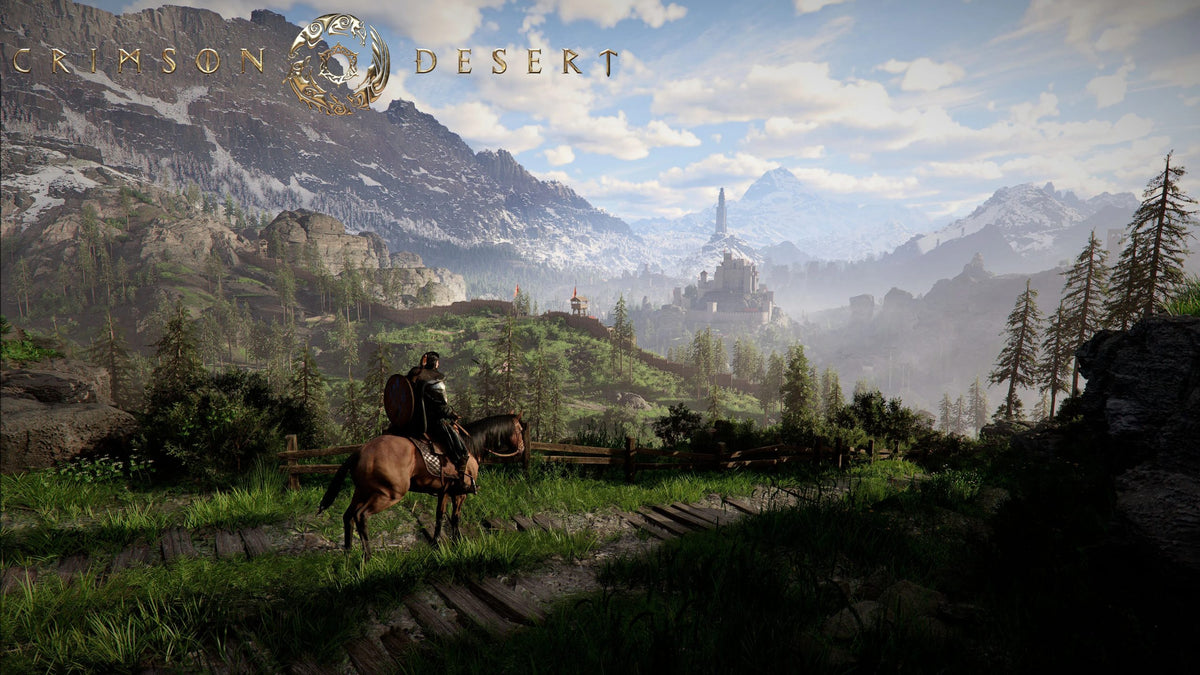
Crimson Desert Patch 1.15.00: What It Means for Choosing a Gaming PC for New Games in Canada
Crimson Desert Patch 1.15.00 may be a smaller bug-fix update, but it highlights something every Canadian PC gamer should pay attention to: modern open-world action-adventure games keep evolving after launch, and the best Gaming PC for New Games is not just the one that runs a title on day one. It is the system that stays smooth after patches, handles HDR, open-world streaming, combat effects, future updates, streaming software, creative apps, and the next wave of demanding releases without forcing you into another upgrade too soon.
Pearl Abyss has released Title Update 1.15.00 for Crimson Desert, focusing on fixes across content, controls, combat, graphics, localization, crashes, and general gameplay stability. The patch addresses issues like transparent bosses during battle, HDR UI colour and transparency problems, Wyvern summoning in midair, Aerial Roll distance after Aerial Maneuver, camera zoom problems while swimming, crop growth and harvesting bugs, and a crash that could happen when loading cross-save data. For players, that means a more polished experience. For PC buyers, it is also a reminder that the games you care about are moving targets.
So the bigger question is not only, “Can my current PC run Crimson Desert?” It is, “What do I want my next PC to be ready for?” Do you want a budget gaming computer for 1080p? A 1440p gaming PC with high FPS? A 4K gaming PC for cinematic open-world visuals? A streaming and editing PC for YouTube, Twitch, TikTok, or OBS? Or a stronger custom workstation that can handle gaming, video editing, photo editing, graphic design, and 3D modeling without compromise?
That is where Groovy Computers comes in. As a Canadian custom PC builder, Groovy Computers helps gamers, creators, students, streamers, designers, and professionals choose the right system based on real use, not generic spec sheets. If a patch note about HDR, camera behaviour, crashes, and open-world traversal makes you wonder whether your current setup is falling behind, this guide will help you understand what tier of custom PC makes sense before you buy.
Why Crimson Desert Patch 1.15.00 Matters Beyond the Patch Notes
On paper, Crimson Desert Patch 1.15.00 is not a massive content expansion. It is a maintenance-focused update that improves gameplay reliability and fixes specific issues. But for PC gamers, even smaller patches can reveal what modern games demand from hardware and why a balanced custom build matters.
The patch includes fixes for combat behaviour, controls, HDR display output, camera issues, gameplay objectives, boss rendering, cross-save crashes, mount posture, disappearing wagons, crop systems, and localization. That range matters because modern games are not simple linear programs. They are huge interactive systems with graphics pipelines, physics, animation blending, streaming assets, UI layers, save systems, network-connected features, and ongoing post-launch support.
If you are shopping for a Gaming PC for New Games, this is exactly the kind of reality you need to plan around. New games are not only asking your GPU to draw pretty scenes. They are asking your CPU, RAM, SSD, GPU, drivers, display, and operating system to work together under constant load.
Ask yourself: when a game receives a patch that improves HDR, fixes crashes, adjusts camera behaviour, and corrects combat interactions, do you want your PC to feel stable and ready, or do you want every update to feel like a new gamble?
What the Crimson Desert Patch Fixes Tell Us About Modern PC Gaming
The patch notes point to several key areas that matter when choosing a gaming desktop in Canada. Here is what buyers can learn from the update.
1. HDR and UI Fixes Show Why Display and GPU Choices Matter
One of the graphics-related fixes addresses colours and transparency of certain UI elements when HDR is enabled. HDR gaming can look incredible on the right monitor, but it also adds complexity. You need the right display, the right GPU output, properly configured Windows HDR settings, and enough graphics horsepower to keep performance smooth while visual quality is high.
Do you plan to play cinematic games with HDR enabled? Are you buying a new monitor with your PC? Do you want a system built for visual immersion, not just basic frame rates? If so, your GPU tier, display output, and overall configuration matter more than they would for basic 1080p gaming.
2. Camera, Swimming, Mount, and Traversal Fixes Highlight Open-World Complexity
Crimson Desert Patch 1.15.00 fixes a camera issue where the view could remain zoomed in while swimming, plus posture problems while riding a mount and a problem with Wyvern summoning in midair. These are gameplay fixes, but they also reflect the complexity of modern open-world action games.
Open-world titles constantly stream terrain, animations, water effects, enemies, physics objects, weather, lighting, and NPC behaviour. If you are planning to play games like Crimson Desert and other large open-world AAA titles, you should think beyond the minimum requirements. A fast SSD, enough RAM, a strong CPU, and a capable GPU all contribute to a smoother experience.
What kind of world do you want to explore: one that feels fluid and responsive, or one that constantly reminds you your hardware is struggling?
3. Crash Fixes Remind Buyers That Stability Matters
The patch also fixes an issue where the game could occasionally crash when loading cross-save data. Some crashes are software-side and cannot be solved by hardware alone, but a properly built, tested, and cooled PC can reduce avoidable instability. Weak power supplies, overheating CPUs, mismatched RAM, poor airflow, and bargain-bin components can turn demanding games into frustrating experiences.
This is one reason Groovy Computers focuses on custom builds, proper component matching, stress testing, and a 1-year warranty. A gaming PC is not just a box of parts. It is a complete system that should be built to perform reliably under load.
What Do You Want Your Next PC to Do for You?
Before choosing a system, pause and ask a more useful question: what do you actually want your next PC to do for you?
Do you want to play Crimson Desert and other new games at 1080p with stable performance? Do you want 1440p gaming with high settings and high refresh rates? Are you aiming for 4K gaming, ray tracing, HDR, and ultra settings? Do you want to stream gameplay to Twitch or YouTube while keeping your frame rate high? Do you edit videos in Adobe Premiere Pro, DaVinci Resolve, CapCut, or After Effects? Do you use Photoshop, Lightroom, Illustrator, Canva, Blender, Unreal Engine, AutoCAD, Revit, SolidWorks, or other demanding creative software?
Your answer changes the right build dramatically. A budget gaming computer can be a smart choice for casual 1080p gaming, but it may not be ideal if you also want to stream, record, edit, and render. A premium RTX gaming PC can be excellent for 1440p, 4K, ray tracing, and content creation, but not every buyer needs the highest tier. A custom creator PC may prioritize RAM, CPU cores, SSD capacity, and GPU acceleration differently than a pure esports gaming desktop.
The best PC is not always the most expensive one. It is the one matched to your games, software, monitor, budget, and upgrade timeline.
Gaming PC for New Games: Which Performance Tier Fits You?
Choosing a Gaming PC for New Games becomes much easier when you match the system to your target resolution, frame rate, and workload. Instead of asking only, “What is the cheapest PC that can run this game?” ask, “What experience do I want for the next few years?”
Budget Gaming PC Canada: Best for 1080p and First-Time PC Gamers
A budget gaming PC in Canada is ideal for players who want strong value, reliable 1080p gaming, and a practical entry into modern PC gaming. This tier is usually best for students, casual gamers, families, and buyers who play a mix of esports titles and newer games without demanding 4K ultra settings.
This may be the right fit if you are asking:
- How much should I spend on a gaming PC?
- Can a budget gaming PC play new games?
- Is a budget gaming PC worth it if I mostly play at 1080p?
- Should I buy a cheaper system now or finance a stronger one?
A value-focused gaming desktop can still feel excellent when it is built correctly. The key is avoiding weak component combinations that limit future upgrades. A low-end power supply, insufficient RAM, small SSD, or poorly cooled case can make an affordable PC feel outdated sooner than it should.
1440p Gaming PC Canada: The Sweet Spot for Many Modern Players
For many gamers, 1440p is the modern sweet spot. It offers a major visual upgrade over 1080p without the extreme demands of 4K. If you want Crimson Desert-style open-world visuals, high settings, smoother camera movement, and better long-term performance, a 1440p gaming PC is often the smartest balance.
This tier is ideal if you want:
- High FPS in new games at 1440p
- Better visual detail for open-world titles
- Strong performance for competitive games
- Enough GPU power for streaming, recording, or light editing
- A system that will not feel outdated after one big release cycle
What PC do you need for 1440p gaming? The answer depends on the game, settings, refresh rate, and whether you are streaming or creating content. But as a category, a well-built 1440p gaming PC Canada buyer should look for a balanced CPU, a capable modern GPU, enough RAM for current games, and fast SSD storage for large game installs and smooth loading.
4K Gaming PC Canada: For Ultra Settings, HDR, and Premium Immersion
If you want the most cinematic experience, 4K gaming is where premium builds shine. A 4K gaming PC in Canada is built for players who want maximum visual quality, larger monitors, HDR, high-detail textures, ray tracing where supported, and enough GPU strength to avoid constant settings compromises.
Ask yourself: do you want to play open-world games on a high-end display and keep settings high for years, or are you comfortable lowering details when new titles become more demanding? If you are buying for 4K, it is usually better to build stronger from the start than to underbuy and upgrade quickly.
A premium gaming PC can also double as a strong creative workstation. If you game at 4K, edit 4K video, work with large Photoshop files, render in Blender, or use Unreal Engine, your system needs more than a basic gaming configuration.
High FPS Esports and Competitive Gaming PC
Not every gamer cares about cinematic visuals first. Some want high FPS, low latency, and competitive responsiveness in games like shooters, battle royales, MOBAs, and esports titles. In that case, the CPU, GPU, monitor refresh rate, cooling, and system tuning all matter.
If your priority is competitive performance, ask: am I trying to win more fights, stream at the same time, or simply enjoy smoother gameplay? A high FPS gaming PC Canada buyer may not need the same parts as a 4K ultra-settings player, but they still need a reliable, well-balanced system.
Should You Buy Before a Major Game Release, Patch Cycle, or Price Spike?
New games, major patches, seasonal sales, hardware announcements, and component availability can all affect PC buying decisions. Waiting can sometimes help, but waiting can also backfire when demand rises, GPU availability tightens, memory pricing shifts, or a major release pushes more buyers into the market at the same time.
If you are planning around a specific game, ask yourself: do I want my PC ready before launch week, or am I comfortable scrambling after reviews, patches, and demand spikes? Do I want time to set up Windows, install games, update drivers, configure OBS, transfer files, and test my monitor settings before the game everyone is talking about arrives?
Canadian buyers also need to think about shipping time, exchange-rate pressure, component replacement costs, and the reality that the best deal is not always available exactly when you want it. If you wait until your current system fails or a major release is already dominating social media, you may have fewer choices.
For many buyers, the smarter move is not panic-buying. It is planning. Choose the right tier early, understand what you need, and secure a custom build that makes sense before demand or replacement costs move against you.
Could Financing Help You Secure a Stronger PC Before Replacement Costs Rise?
Financing is not about buying more than you need. It is about choosing the right system at the right time without being forced into a weaker build because of one upfront payment. Groovy Computers offers financing options up to 4 years, which can help Canadian customers build around their actual needs instead of compromising too heavily today and upgrading too soon tomorrow.
Should you finance a gaming PC? The answer depends on your budget, workload, and timeline. If a lower-cost system will truly meet your needs for years, that may be the right choice. But if you already know you want 1440p, 4K, streaming, video editing, or workstation performance, financing may help you secure a better-balanced system before component prices or replacement costs change.
Consider financing if you are asking:
- Should I finance a better PC instead of buying a cheaper one?
- Can I finance a gaming PC in Canada?
- Is now a good time to buy a gaming PC before prices go up?
- Would a stronger GPU, more RAM, or a larger SSD save me from upgrading too soon?
- Am I buying before a major game release, software upgrade, school term, creator project, or business deadline?
A stronger system can be more than a luxury. For gamers, it can mean smoother performance and fewer compromises. For streamers, it can mean stable OBS recording and fewer dropped frames. For video editors, it can mean faster exports. For 3D artists, it can mean shorter render times. For professionals, it can mean less downtime.
If you are wondering whether a monthly payment gaming PC makes sense, the practical question is this: would the right build now save you money, time, or frustration over the next several years?
Gaming, Streaming, Editing, Design, or 3D Work: What Are You Really Building For?
Many people start by shopping for a gaming PC, then realize they need much more than gaming. Crimson Desert may be the reason you are thinking about an upgrade today, but your PC might also need to handle school, work, content creation, and side projects.
Gaming and Streaming PC Canada
If you want to stream gameplay, your PC needs to run the game and the broadcast workflow at the same time. OBS, Streamlabs, overlays, browser sources, chat windows, webcam feeds, alerts, recording software, and background apps all add load.
What PC do you need for streaming? A good gaming and streaming PC Canada buyer should consider a strong modern GPU for encoding, a capable CPU, enough RAM for multitasking, and fast storage for recorded footage. If you want to stream at 1080p or 1440p while playing demanding games, do not build as if you are only gaming.
Ask yourself: are you playing privately, or are you trying to build a channel? Are you recording clips for TikTok and YouTube Shorts? Do you want to edit after you stream? If yes, your PC should be planned as a creator system, not just a gaming box.
Video Editing PC Canada
A video editing PC has different priorities than a basic gaming desktop. Adobe Premiere Pro, DaVinci Resolve, After Effects, and CapCut can benefit from strong CPUs, GPU acceleration, plenty of RAM, and fast SSDs. If you work with 4K footage, multiple video layers, colour grading, effects, motion graphics, or long exports, underbuying can cost hours.
What PC do you need for video editing? If you edit casually, a mid-range gaming PC may be enough. If you edit professionally or want fast export performance, you should consider a custom video editing PC Canada build with more RAM, stronger storage planning, and a GPU suited for accelerated effects.
Is a gaming PC good for video editing? Sometimes, yes. But the best gaming PC is not automatically the best editing workstation. Groovy Computers can help match the build to your software, footage type, timeline complexity, and budget.
Photo Editing and Graphic Design PC
Photographers and designers need a PC that feels fast in everyday creative work. Photoshop, Lightroom Classic, Capture One, Illustrator, InDesign, Canva, CorelDRAW, and Affinity apps can benefit from high clock speed, strong single-core performance, enough RAM, fast SSDs, and a reliable display setup.
Do photographers need a dedicated GPU? It depends on the workflow, but AI tools, high-resolution files, GPU-accelerated filters, and multi-monitor setups can make a dedicated GPU valuable. How much RAM do you need for Lightroom or graphic design? It depends on file size, batch exports, multitasking, and whether you use other creative software at the same time.
If you are choosing between a gaming PC and a custom creator PC, ask: am I mainly playing games, or am I making money with this machine? If client work, school projects, branding, marketing design, or photography is part of the plan, build for reliability and productivity.
3D Modeling PC Canada and Rendering Workstations
For Blender, Unreal Engine, Unity, Maya, 3ds Max, Cinema 4D, ZBrush, SketchUp, AutoCAD, Revit, and SolidWorks, the right PC can change your workflow dramatically. 3D modeling and rendering can demand strong CPU performance, powerful GPUs, large amounts of RAM, fast storage, and good cooling.
What PC do you need for Blender or 3D rendering? The answer depends on whether you model, animate, sculpt, simulate, render on CPU, render on GPU, work with massive scenes, or use real-time engines. A gaming PC can sometimes be good for Blender, but a true 3D modeling PC Canada build should be planned around your software, render engine, file sizes, and deadlines.
If you are a 3D artist, architecture student, product designer, game developer, or visualization professional, the wrong build does not just lower frame rates. It slows production.
Why Custom Builds Matter More Than Generic Prebuilts
When a new game or patch makes you think about upgrading, it can be tempting to buy the first prebuilt gaming PC that looks powerful. But generic prebuilts often hide compromises: weak cooling, limited airflow, low-quality power supplies, mismatched RAM, tiny SSDs, restricted motherboards, poor cable management, or upgrade paths that are harder than expected.
A custom PC builder Canada buyer should look beyond the headline GPU and CPU. The full system matters. A powerful graphics card in a poorly cooled case can throttle. A strong CPU paired with slow storage can still feel sluggish. A cheap power supply can limit future upgrades. A small SSD can fill up fast with modern game installs, video footage, and creative projects.
Groovy Computers builds custom gaming PCs, creator PCs, and workstation PCs with the full configuration in mind. That means choosing parts that work together, testing the finished system, and helping customers understand what they are actually buying.
Is a custom gaming PC worth it? If you care about performance, reliability, upgrade paths, and getting a system matched to your real use, the answer is usually yes. The goal is not to overbuild for bragging rights. The goal is to avoid the wrong build.
What Should Canadian Buyers Consider Before Choosing a PC?
Canadian PC buyers face a different market than buyers in larger regions. Component pricing, shipping, currency pressure, availability, taxes, and support all matter. A system that looks like a deal at first glance may not be the best value once you consider warranty, build quality, shipping reliability, and future upgrades.
Groovy Computers serves Canadian customers looking for gaming computers Canada wide, including buyers in Nova Scotia, Atlantic Canada, and beyond. Whether you are searching for a custom gaming PC Nova Scotia option, a gaming PC builder Nova Scotia customers can trust, or a Canadian custom PC builder that can ship systems across the country, the priorities remain the same: proper parts, careful assembly, stress testing, and support after purchase.
Before buying, ask:
- What games or software do I need this PC to handle?
- Do I want 1080p, 1440p, or 4K performance?
- Do I need ray tracing, HDR, high FPS, or ultra settings?
- Will I stream, record, edit, design, render, or multitask?
- How long do I want this PC to last before a major upgrade?
- Would financing help me buy the right tier now instead of upgrading too soon?
- Do I want a tested system with a 1-year warranty from a Canadian gaming PC company?
How Pricing Volatility Affects the Real Cost of Waiting
PC pricing can shift quickly. GPUs, CPUs, RAM, SSDs, power supplies, cases, and cooling hardware all move through changing supply and demand cycles. A major game release can increase demand for gaming desktops. Creator software updates can push professionals toward stronger hardware. New GPU launches can affect availability. Memory and storage pricing can change with global supply conditions.
Waiting is not automatically wrong. But waiting without a plan can cost you. If you know your current PC is already struggling, if you are planning to stream or edit more seriously, or if you want to be ready for a major release, delaying until the last minute can reduce your options.
Think about your replacement timeline. Is your current PC already showing stutters, crashes, long load times, overheating, or storage limits? Are you lowering settings in every new game? Are exports taking too long? Are you avoiding creative projects because your machine feels slow? These are signs that the cost of waiting may be more than the price of the PC.
A future-proof gaming PC Canada buyer should not chase unrealistic promises. No PC is future-proof forever. But a smart custom build can extend the useful life of your system by choosing the right performance tier, leaving upgrade room, and avoiding components that become bottlenecks too soon.
Questions to Ask Before Buying or Financing a Custom PC
Before you click buy or apply for financing, use these questions to narrow the right system. They are simple, but they prevent expensive mistakes.
What Games Are You Buying For?
Are you upgrading for Crimson Desert, other open-world action games, competitive shooters, survival games, racing sims, RPGs, or upcoming AAA releases? A PC for esports does not need the same configuration as a PC for 4K cinematic gaming. A gaming PC for new games should be chosen around the most demanding titles you expect to play, not only the games you already own.
What Resolution and Refresh Rate Do You Want?
Are you using a 1080p monitor, a 1440p high-refresh display, an ultrawide, or a 4K HDR screen? Your monitor determines how hard your GPU needs to work. Buying a 4K monitor with an entry-level gaming PC can lead to disappointment. Buying a premium GPU for a basic 1080p display may be more than you need unless high FPS or future monitor upgrades are part of the plan.
Will You Stream or Create Content?
If you want a PC for OBS streaming, YouTube content creation, TikTok clips, podcast editing, Photoshop, Lightroom, Premiere Pro, DaVinci Resolve, or Blender, your system should be built for more than gaming. A gaming streaming editing PC Canada customer should think about RAM, CPU, GPU encoding, SSD capacity, and multi-monitor support.
How Much Storage Do You Really Need?
Modern games can be large. Video footage can consume storage quickly. RAW photo libraries, 3D assets, project files, and game captures add up. A fast SSD improves loading and responsiveness, but capacity matters too. If you are buying a custom PC, storage planning is one of the easiest ways to avoid frustration later.
Do You Want to Avoid Upgrading Too Soon?
If you are already worried that a cheaper build may not last, that is a warning sign. Sometimes spending slightly more on the right GPU, more RAM, better cooling, or a larger SSD can extend the lifespan of the system. Financing can make that decision easier by spreading the cost over time.
Why Groovy Computers Is a Strong Fit for Canadian Gamers and Creators
Groovy Computers is built around a simple idea: customers should get a PC matched to what they actually do. Whether you need a budget gaming PC Canada option, a premium 4K gaming PC, a custom creator PC, a video editing workstation, a graphic design desktop, or a 3D rendering workstation, the goal is to build a system that feels right on day one and stays useful over time.
With Groovy Computers, buyers can expect a custom-PC-focused experience, component matching, careful assembly, rigorous testing, and a 1-year warranty. That matters because modern gaming and creative workloads are demanding. A system should not only look good in a product photo. It should perform under real load.
Canadian buyers also benefit from working with a company that understands the local market. Whether you are in Nova Scotia, Halifax, New Glasgow, Trenton, Atlantic Canada, Ontario, Alberta, British Columbia, or elsewhere in Canada, choosing a Canadian custom PC builder can make the process clearer and more personal than guessing your way through generic listings.
If you are unsure what to choose, Groovy Computers can help you compare performance tiers, understand where your money matters most, and decide whether financing up to 4 years makes sense for your situation.
CTA: What Should Your Next Gaming PC Be Ready For?
If Crimson Desert Patch 1.15.00 has you thinking about smoother open-world gameplay, HDR visuals, fewer crashes, better performance, or getting ready for the next wave of demanding PC games, now is the right time to ask: what should your next PC be ready for?
Do you want a Gaming PC for New Games that can handle 1080p today? Do you want a 1440p gaming PC that gives you a stronger long-term sweet spot? Are you ready for 4K, ray tracing, streaming, editing, or 3D rendering? Would financing help you secure a stronger system before prices, availability, or your workload change?
Visit GroovyComputers.ca to explore custom gaming PCs, creator PCs, workstation builds, and financing options designed for Canadian buyers who want confidence before they commit.
Final Thoughts: A Small Patch, a Bigger Buying Lesson
Crimson Desert Patch 1.15.00 is a reminder that modern PC gaming never stands still. Games receive updates. Visual features improve. Bugs get fixed. Workloads change. Players start streaming. Creators begin editing. Students take on heavier software. Professionals need more reliable machines. The right PC should be chosen with that full picture in mind.
If you only buy for the lowest possible requirement, you may save money upfront but lose flexibility later. If you buy blindly for maximum specs, you may overspend in places that do not matter for your use. The smarter approach is to choose a custom system based on your monitor, games, software, workflow, budget, and upgrade timeline.
For Canadian gamers and creators, Groovy Computers is ready to help you make that decision with practical guidance, custom builds, financing options, rigorous testing, and 1-year warranty confidence. Whether you need a budget gaming computer, a premium RTX gaming PC, a streaming PC Canada setup, a video editing PC, a content creation PC, or a 3D modeling workstation, the goal is the same: build the PC that fits what you actually want to do next.
A better gaming experience starts before you launch the game. It starts with choosing the right hardware, the right builder, and the right timing.
#GamingPCForNewGames #CustomGamingPCCanada #GamingComputersCanada #1440pGamingPC #4KGamingPC #StreamingPCCanada #CreatorPCCanada #GamingPCFinancingCanada #GroovyComputers
Groovy Computers | All Rights Reserved


Leave a comment
This site is protected by hCaptcha and the hCaptcha Privacy Policy and Terms of Service apply.