



















Gaming PC for New Games: What Crimson Desert’s Charting the Unknown DLC Means for Canadian PC Buyers
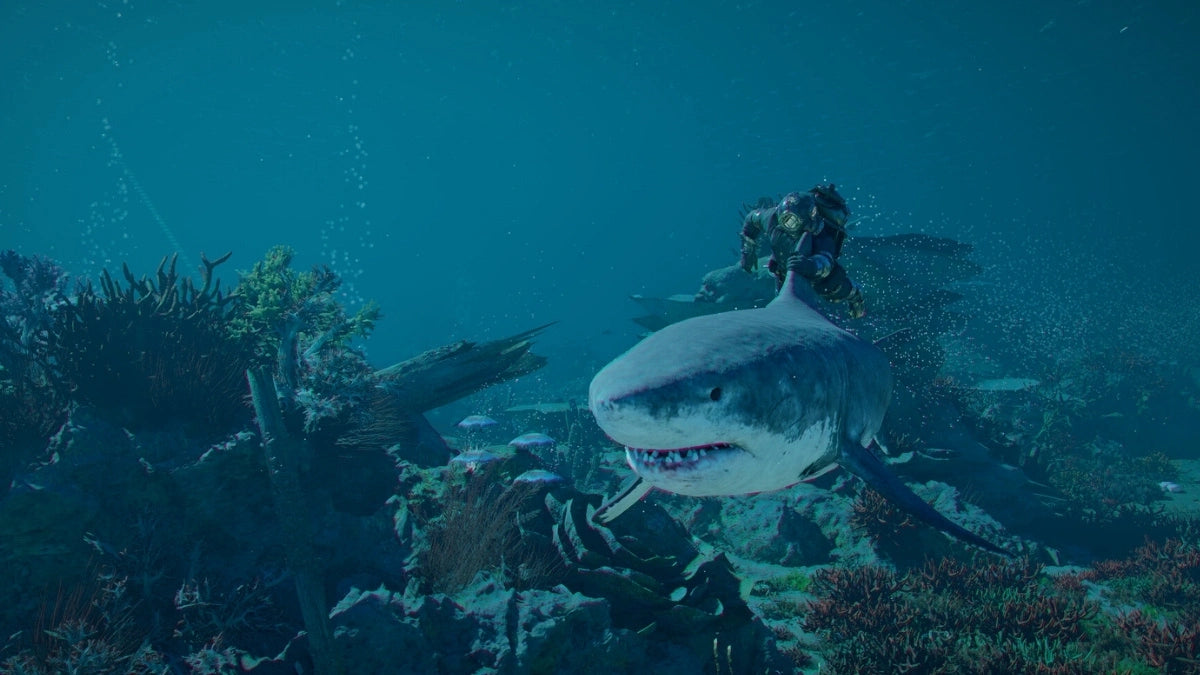
Crimson Desert’s first DLC, Charting the Unknown, is officially set for 15 October 2026, and it is exactly the kind of release that makes players ask a practical question: is your current PC ready for the next wave of open-world AAA gaming? Pearl Abyss has positioned Charting the Unknown as a major expansion arriving just under seven months after the base game, with new stories, new threats, underwater exploration, expanded locations, and an upgraded housing mode that has already caught the attention of players who love customization-heavy games. For Canadian gamers, streamers, creators, and workstation users, this is more than another DLC announcement. It is a reminder that choosing the right Gaming PC for New Games is becoming less about meeting minimum requirements and more about building a system that can handle larger worlds, higher-resolution textures, ray tracing, recording, multitasking, and future updates without forcing another upgrade too soon.
At Groovy Computers, we look at announcements like this through a buyer-focused lens. A new AAA open-world expansion does not only create hype; it creates demand. Players who want to enjoy Crimson Desert on PC may start thinking about 1080p, 1440p, 4K, high refresh rates, streaming, content creation, and whether their current desktop can keep up. If you are in Canada and you are planning your next custom gaming PC, the timing matters. Game releases, component pricing, GPU demand, memory costs, and seasonal buying cycles can all affect what kind of system you can secure for your budget.
So before Charting the Unknown arrives, it is worth asking: do you want a PC that simply runs the game, or do you want a machine that makes open-world gaming feel smooth, sharp, immersive, and future-ready?
Why Crimson Desert: Charting the Unknown Is a Big Deal for PC Gamers
According to the announcement, Charting the Unknown is the first downloadable content release for Crimson Desert, launching on PC, PlayStation 5, and Xbox Series X/S. The expansion is expected to retail at roughly $35 CAD, depending on exchange rates, platform pricing, and taxes. The reveal highlighted several major additions: new threats, new regions, underwater exploration, expanded stories across Pywel, and a more advanced housing mode that players have compared to life-sim style home customization systems.
That combination matters because it signals a broader trend in modern games. New games are not only asking your PC to render large landscapes. They are asking your system to handle dense environments, physics, character animation, dynamic lighting, water rendering, cinematic cutscenes, fast traversal, open-world asset streaming, and potentially heavier post-launch content over time. If a base game already pushes hardware, a major DLC can make performance feel even more demanding depending on optimization, new areas, and visual upgrades.
Are you planning to explore Crimson Desert casually after work, or are you the type of player who wants every setting turned up, a high frame rate, and smooth gameplay while Discord, browser tabs, recording software, and maybe OBS are running in the background?
That difference is exactly why a one-size-fits-all gaming desktop is rarely the best answer. A budget gaming computer can be excellent for the right customer. A premium RTX gaming PC can be the right move for someone chasing 4K visuals, ray tracing, or long-term performance. A custom creator PC may be ideal for players who also edit gameplay clips, stream, design thumbnails, or produce YouTube content. The right answer depends on what you want your next PC to do.
Gaming PC for New Games: Why Minimum Specs Are Not the Whole Story
When players search for a Gaming PC for New Games, they often start with the most basic question: “Can my PC run it?” That is useful, but it is not the question that determines whether you will enjoy the experience. Minimum specifications are usually designed to define the lowest functional entry point. They do not necessarily represent the performance most players want from a modern AAA game.
A better buying question is: what kind of experience do you want?
- Do you want 1080p gaming with reliable performance and strong value?
- Do you want 1440p gaming, where the image looks sharper and the GPU has more work to do?
- Do you want 4K gaming, where textures, lighting, and scenery become far more demanding?
- Do you care about ray tracing, advanced lighting, shadows, reflections, or cinematic visuals?
- Do you want to stream or record gameplay while maintaining high FPS?
- Do you want your PC to last several years without feeling outdated after one or two major releases?
These questions matter because Crimson Desert is not a small esports title designed mainly around maximum FPS on low settings. It is an open-world action adventure with cinematic presentation, large environments, and visual ambition. Charting the Unknown appears to expand that world further, including underwater areas and new story-driven content. That makes GPU choice, CPU balance, RAM capacity, storage speed, and cooling all part of the buying decision.
What Do You Want Your Next PC to Do for You?
Before choosing a gaming computer, pause for a moment and ask the most important question: what do you want your next PC to do for you?
Do you want it mainly for Crimson Desert and other open-world AAA games? Do you also play competitive titles where high FPS matters more than maximum graphics settings? Do you want to stream on Twitch or YouTube? Are you editing TikTok clips, YouTube Shorts, long-form gameplay videos, or 4K footage? Are you using Photoshop, Lightroom, Illustrator, Blender, Unreal Engine, AutoCAD, Revit, SolidWorks, or other creative and workstation software?
A gaming PC can also be a powerful content creation PC when it is built correctly. The same graphics card that helps drive high FPS can accelerate video editing, rendering, AI-assisted creative tools, and GPU-based workflows. The same fast SSD that reduces game load times can help with large project files. The same high-core-count processor that improves multitasking can make streaming, exporting, and background tasks feel smoother.
That is why Groovy Computers focuses on the complete use case, not just a parts list. If you tell us you want to play Crimson Desert at 1440p, stream with OBS, edit videos in DaVinci Resolve, and avoid upgrading next year, that points to a different build than someone who wants an affordable 1080p gaming desktop for casual play.
What PC Do I Need for 1440p Gaming in Crimson Desert and Other AAA Titles?
What PC do I need for 1440p gaming? This is one of the most common questions Canadian buyers ask because 1440p has become the sweet spot for many gamers. It offers a big visual upgrade over 1080p without demanding the same extreme GPU power as 4K. For a visually ambitious open-world game like Crimson Desert, a 1440p Gaming PC Canada buyer should prioritize a strong modern GPU, a capable multi-core CPU, 32GB of RAM where budget allows, and a fast NVMe SSD.
At 1440p, your graphics card usually becomes the most important component for high settings, stable frame pacing, and advanced effects. A balanced system should avoid pairing a powerful GPU with a weak CPU, underpowered cooling, low-quality power supply, or insufficient RAM. You also want a case and cooling setup that can manage heat during long play sessions, especially in open-world games that can keep both CPU and GPU active for extended periods.
If you are coming from an older gaming PC, ask yourself: do you want a system that plays today’s game acceptably, or do you want something that still feels strong when the next expansion, graphics patch, or major AAA release arrives?
Is a 4K Gaming PC Worth It for Open-World Games?
A 4K Gaming PC Canada build is for players who want the most cinematic experience. Open-world games benefit from 4K because distant landscapes, environmental detail, character models, water effects, and textures can look dramatically sharper. For Crimson Desert and similar games, 4K can make exploration feel more immersive, especially if you have a large monitor or premium display.
But 4K is demanding. If you want high settings, ray tracing, and smooth frame rates, you need a stronger GPU tier, more careful airflow planning, and a system built with long-term power delivery in mind. This is where a custom build becomes especially valuable. A generic prebuilt may advertise a high-end graphics card, but the details matter: cooling quality, motherboard selection, memory configuration, SSD speed, case airflow, power supply quality, and stress testing can all affect the final experience.
Ask yourself: are you buying a PC for “good enough” gaming, or are you building around a premium monitor and expecting a premium experience?
If the answer is premium, a custom high-end gaming PC can be a better long-term investment than buying a cheaper system now and replacing major components too soon.
Ray Tracing, Ultra Settings, and Visual Fidelity: Do You Need a Premium RTX Gaming PC?
Many modern PC buyers are not just asking whether a game runs. They are asking whether it runs beautifully. If you care about realistic lighting, reflections, shadows, cinematic ambience, and visual immersion, a Ray Tracing Gaming PC Canada build may be the right category to consider.
Ray tracing and high-end visual settings can change the way a game feels, but they also increase GPU demand. That is why premium GPU selection matters for players who want to keep settings high at 1440p or 4K. Technologies such as modern upscaling and frame generation can help, but they are not a replacement for a well-balanced system. They work best when your PC already has the horsepower, memory, and cooling to support the workload.
Do you want to capture cinematic screenshots? Do you want to stream visually impressive gameplay? Do you want your system to be ready for future titles that continue pushing real-time lighting and asset quality? If so, the GPU tier you choose today can affect how soon you feel the urge to upgrade.
Budget Gaming PC or Premium Gaming PC: Which Performance Tier Fits You?
Not every gamer needs a flagship system. The right PC is the one that fits your games, monitor, workflow, budget, and upgrade expectations. Here is a practical way to think about performance tiers when shopping for a Gaming PC for New Games in Canada.
Entry-Level and Budget Gaming PC Tier
A budget gaming PC is a strong choice if you primarily play at 1080p, want good value, and do not need every setting maxed out. This tier can be ideal for students, first-time PC gamers, families, casual players, and anyone who wants access to modern games without overspending.
Ask yourself: are you okay adjusting settings to keep performance smooth, or do you want the game to look as close to its trailers as possible?
If you are mainly playing esports games, older titles, indie games, or casual open-world games, a value-focused system can make sense. But if Crimson Desert, future AAA releases, ray tracing, 1440p, streaming, and video editing are all on your list, you may outgrow a low-cost system faster than expected.
Mainstream 1440p Gaming PC Tier
This is the sweet spot for many Canadian buyers. A mainstream 1440p gaming build offers a stronger GPU, better multitasking, more room for future games, and a sharper visual experience than 1080p. If you are asking “what gaming PC do I need?” and you want a balanced answer for modern AAA titles, this category is often the best place to start.
This tier is especially attractive if you want strong performance in open-world games while also keeping the budget under control. With the right parts, it can handle gaming, streaming, schoolwork, productivity, and light-to-moderate content creation.
High-End 4K and Ultra Settings Tier
A high-end gaming PC is built for players who want 4K, ultra settings, ray tracing, heavy multitasking, high refresh monitors, content creation, or long-term performance. This category is also a better fit for gamers who dislike upgrading often.
How long do you want your next PC to last? If your answer is “as long as possible,” it may be smarter to invest in the stronger platform now instead of buying a lower-tier machine and replacing it sooner. This is where financing can become a practical strategy, especially when pricing or supply conditions are uncertain.
Should You Buy Before a Major Game Release, Hardware Shortage, Sale Period, or Price Spike?
Is it better to buy a gaming PC now or wait? That question becomes more important whenever major games, new expansions, hardware cycles, or seasonal sales are on the horizon. Game launches can increase demand for GPUs and complete gaming desktops. Sale periods can create temporary inventory pressure. Component pricing can shift due to supply constraints, currency exchange, memory pricing, storage pricing, or manufacturer changes.
Canadian buyers also have to think about exchange rates, shipping costs, import costs, and availability. A part that looks affordable one month may become harder to source later. A popular GPU tier can sell through quickly when multiple anticipated games arrive around the same time. RAM and SSD pricing can also move, especially when demand rises across gaming, AI, creator, and professional workstation markets.
That does not mean every customer should panic-buy. It means timing should be part of the decision. If you already know you want to play Crimson Desert: Charting the Unknown, upcoming AAA games, or new creator software updates, waiting until the last minute may leave you with fewer build options, longer lead times, or higher replacement costs.
Ask yourself: do you want to be shopping for a new PC after everyone else starts upgrading, or do you want your system ready before the next demand spike?
Should You Finance a Better PC Instead of Buying a Cheaper One?
Should I finance a better PC instead of buying a cheaper one? For many customers, this is not about buying the most expensive computer possible. It is about avoiding the common mistake of buying too little performance, then paying again later to fix the problem.
Gaming PC financing can make sense when it helps you secure the performance tier you actually need. If your choices are a lower-end system that may struggle with 1440p gaming and creator workloads, or a stronger custom build that fits your needs for several years, monthly payments may be the more practical route. Groovy Computers offers financing options up to 4 years, which can help Canadian buyers spread out the cost of a better system instead of compromising on the components that matter most.
Financing is especially worth considering if you are buying before a major game release, before a likely hardware price shift, or before your current system becomes a bottleneck for school, work, editing, streaming, or professional projects. A stronger PC can save time, reduce frustration, and delay the next upgrade cycle.
The key question is not “can I buy the cheapest PC today?” The better question is: will this PC still feel fast enough for the games, software, and workloads I care about two or three years from now?
Gaming, Streaming, Editing, and Creation: Are You Building for More Than Crimson Desert?
Many customers start shopping because of one game, then realize their next PC needs to handle much more. Crimson Desert may be the trigger, but your system might also need to handle streaming, video editing, photo editing, graphic design, 3D modeling, school projects, business work, or remote productivity.
If you stream, you need to think about OBS, bitrate, encoder choice, CPU load, GPU encoding, microphone software, camera software, browser tabs, chat, overlays, alerts, and sometimes a second monitor. A Gaming and Streaming PC Canada build should be configured differently than a basic gaming desktop because you are asking the system to play and broadcast at the same time.
If you edit video, you need fast storage, enough RAM, a strong CPU, and a GPU that can accelerate your editing software. A Video Editing PC Canada buyer using Adobe Premiere Pro, DaVinci Resolve, After Effects, or CapCut should care about timeline smoothness, export speed, codec support, and project storage. If you are recording Crimson Desert gameplay in high resolution, editing clips, and uploading content, your PC needs to handle the entire workflow.
If you work with photography or design, a strong CPU, fast SSD, high RAM capacity, and responsive creative software performance can matter just as much as gaming FPS. Photoshop, Lightroom, Illustrator, InDesign, Canva, and other creative tools benefit from a system that stays responsive while handling large files and multiple applications.
If you use Blender, Unreal Engine, Unity, Maya, Cinema 4D, AutoCAD, Revit, or SolidWorks, you may need a 3D Modeling PC Canada or workstation-grade configuration. Game assets, architectural visualization, product rendering, animation, and GPU rendering can place very different demands on your PC than gaming alone.
So what do you actually use every week? Just games? Games plus streaming? Games plus editing? Games plus 3D rendering? Your answer should shape the build.
Is a Gaming PC Good for Content Creation?
Yes, a gaming PC can be good for content creation, but only if it is configured with your creative workload in mind. A gaming-first build might prioritize the GPU and frame rates. A creator-first build might prioritize CPU cores, RAM, storage layout, GPU acceleration, and quiet sustained performance. A hybrid gaming and creator PC needs to balance both.
If you are a YouTuber, TikTok creator, streamer, photographer, designer, or 3D artist, your PC should not be chosen by looking at game FPS alone. Ask these questions before you buy:
- Do you edit 1080p, 4K, 6K, or 8K video?
- Do you use Adobe Premiere Pro, DaVinci Resolve, After Effects, Photoshop, Lightroom, Illustrator, Blender, Unreal Engine, or CAD software?
- Do you record gameplay while playing?
- Do you need multiple monitors for timeline editing, chat, references, or productivity?
- Do you work with large RAW photo libraries, layered PSD files, or 3D scenes?
- Do you need quiet operation for voiceover, streaming, podcasting, or home office work?
If the answer to several of those questions is yes, a custom creator PC may be a better fit than a basic gaming desktop. Groovy Computers can help match your system to your real workflow, not just one headline game.
Why Custom Builds Matter More for AAA Open-World Gaming
Open-world games can expose weaknesses in a poorly balanced PC. A system might look powerful on paper but still struggle with heat, storage bottlenecks, unstable power delivery, poor airflow, or mismatched components. This is one of the reasons Canadian Custom PC Builders matter.
A good custom gaming PC is not just a pile of expensive parts. It is a complete system where each component supports the rest. CPU and GPU pairing should make sense. The power supply should be appropriate for the hardware. The case should allow proper airflow. The cooling should be built for sustained gaming loads. The RAM should be sufficient for current and upcoming workloads. The SSD should be fast enough for modern game asset streaming and large project files.
Testing also matters. At Groovy Computers, systems are built with performance and reliability in mind, and rigorous testing helps catch issues before the PC reaches the customer. When you are investing in a custom gaming PC, creator PC, or workstation PC, that confidence is important. A 1-year warranty adds another layer of support for buyers who want their system built properly and backed by a Canadian company.
Why take a chance on a random marketplace PC when your gaming, school, work, creative projects, and entertainment all depend on the same machine?
Crimson Desert’s DLC Timing: Why Seven Months After Launch Matters
Charting the Unknown arriving roughly seven months after Crimson Desert’s base launch is a fast turnaround for a major DLC. That matters because it suggests the game may continue receiving meaningful content, improvements, and reasons for players to return. If you are building a PC around this game, you may not only be preparing for one release. You may be preparing for a longer content cycle.
For PC buyers, ongoing content can be a good thing. It keeps a game alive, gives players new reasons to explore, and can extend the value of a strong gaming build. But it can also mean your system needs to handle evolving requirements. New zones, underwater environments, visual effects, patches, and expansions can shift how demanding a game feels over time.
That is why future-proofing should be discussed honestly. No PC is truly future-proof forever, but a well-chosen custom build can extend the time before you feel limited. More GPU headroom, adequate RAM, fast storage, and a quality power supply can make future upgrades easier and reduce the chance that your system feels obsolete too quickly.
Canadian Buying Context: Why Local Support and Canada-Wide Shipping Matter
Buying a gaming PC in Canada is not the same as buying in a larger U.S. market. Canadian customers face different pricing, taxes, exchange rates, availability patterns, and shipping realities. A system that looks affordable in another market may not translate cleanly once currency conversion, duties, shipping, and support are considered.
Groovy Computers is a Canadian custom PC builder with a focus on gaming computers, creator PCs, and workstation systems for Canadian buyers. Whether you are in Nova Scotia, Atlantic Canada, Ontario, Alberta, British Columbia, or elsewhere in the country, buying from a Canadian gaming PC company can make the process more straightforward.
For local trust, Groovy Computers is especially relevant to customers searching for a Custom Gaming PC Nova Scotia, Gaming Computers Trenton, Gaming Computers New Glasgow, Gaming Computers Halifax, or a Gaming PC Atlantic Canada. For customers outside the region, Groovy Computers also supports buyers looking to buy gaming PCs online in Canada with Canada-wide relevance.
Do you want a system built by people who understand Canadian pricing, Canadian buyers, Canadian shipping, and the importance of practical support after the sale?
What Parts Matter Most for a Crimson Desert-Ready Gaming PC?
When shopping for a gaming PC for Crimson Desert, Charting the Unknown, and other upcoming AAA releases, it helps to understand the role of each major component. You do not need to memorize every specification, but you should know what affects your experience.
Graphics Card
The GPU is the heart of most modern gaming PCs, especially at 1440p and 4K. It affects resolution, texture quality, ray tracing, frame rates, and support for modern visual technologies. If you want high settings in demanding open-world games, this is one of the areas where cutting too deeply can shorten the useful life of your system.
Processor
The CPU affects frame pacing, simulation, background tasks, streaming, editing, and multitasking. A strong gaming CPU helps reduce bottlenecks, especially in large environments or when you are running multiple applications. For creators, CPU choice can also affect export times, rendering performance, and general responsiveness.
Memory
For many modern gaming and creator systems, 32GB of RAM is becoming a comfortable target. Some budget gaming builds can still function with less, but if you stream, edit, create, multitask, or want more headroom, higher memory capacity can be worth it. Workstation users, video editors, and 3D artists may benefit from 64GB or more depending on project size.
Storage
Modern games can be large, and open-world titles often benefit from fast NVMe SSD storage. Faster storage improves load times, system responsiveness, project access, and overall workflow. If you install multiple AAA games, record footage, and store creative projects, capacity matters too.
Cooling and Airflow
Performance is not only about the parts you choose; it is also about how well they run under load. Poor cooling can lead to noise, heat buildup, throttling, and reduced long-term comfort. A custom gaming PC should be built with airflow, component spacing, and sustained performance in mind.
Power Supply and Upgrade Path
A quality power supply is essential for reliability and future upgrades. If you plan to upgrade the GPU later, choosing the right power supply now can save money and frustration. This is another area where a custom PC builder can help you avoid short-term decisions that limit long-term flexibility.
Custom PC vs Prebuilt PC Canada: Which Is Better for This Kind of Game?
Custom PC vs prebuilt PC Canada is a real decision for many buyers. A prebuilt gaming PC can be convenient, especially if it is available quickly and configured well. But not every prebuilt is created equally. Some systems prioritize flashy specs while cutting corners on cooling, power supply, motherboard quality, storage, or upgrade flexibility.
A custom gaming PC gives you more control. You can choose the performance tier, appearance, cooling, storage capacity, RAM, GPU, CPU, and upgrade path around your actual needs. If you are buying for Crimson Desert, future open-world games, streaming, and editing, that control can matter a lot.
Ask yourself: do you want a PC chosen for a shelf, or a PC chosen for your games, monitor, software, budget, and upgrade expectations?
That is the advantage of working with Groovy Computers. You can browse builds, request guidance, discuss financing, and choose a system that makes sense for how you actually use your computer.
Questions to Ask Before Buying or Financing a Gaming PC
Before you buy or finance a gaming PC, use these questions to clarify what performance level you really need:
- What games do I want to play over the next two years?
- Am I buying mainly for Crimson Desert, or for multiple upcoming AAA games?
- Do I want 1080p, 1440p, or 4K gaming?
- Do I care about ray tracing, ultra settings, and cinematic visuals?
- Do I play competitive games where high FPS and low latency matter?
- Will I stream to Twitch, YouTube, TikTok Live, or record gameplay clips?
- Do I edit videos in Adobe Premiere Pro, DaVinci Resolve, After Effects, or CapCut?
- Do I edit photos in Photoshop, Lightroom, Capture One, or similar software?
- Do I use graphic design tools such as Illustrator, InDesign, Canva, CorelDRAW, or Affinity Designer?
- Do I use Blender, Unreal Engine, Unity, Maya, AutoCAD, Revit, SolidWorks, or other 3D and workstation software?
- How much storage do I need for games, recordings, and projects?
- Do I want to avoid upgrading too soon?
- Would financing help me secure the right build before prices or availability change?
- Do I want help choosing a build from Groovy Computers instead of guessing?
If you are unsure about several answers, that is normal. Most customers do not need to become PC hardware experts. They need a builder who can translate their goals into the right system.
Who Should Choose a Budget Gaming Computer?
A budget gaming computer makes sense if you want strong value and mostly play at 1080p. It is also a good option if you are buying a first gaming PC, setting up a student desktop, replacing an older family computer, or focusing on less demanding titles.
For Crimson Desert and other visually rich games, a budget system may require graphics settings adjustments. That can still be perfectly enjoyable if your expectations are realistic. The key is to avoid buying a system that is too underpowered for your monitor or future plans.
If your budget is limited, ask: would I rather buy the lowest-cost system now, or finance a stronger build that gives me more useful years before the next upgrade?
Who Should Choose a Premium RTX Gaming PC?
A premium RTX gaming PC is the better fit if you want 1440p high refresh, 4K gaming, ray tracing, ultra settings, streaming, editing, or long-term headroom. It is also a smart choice if you use your PC daily for both entertainment and productivity.
If you are the kind of player who notices frame drops, dislikes lowering settings, and wants open-world games to look as impressive as possible, a high-end gaming PC may be the right investment. The same applies if you are building around a premium monitor. There is no point buying a beautiful 4K or high-refresh display if your PC cannot drive it properly.
Ask yourself: is your next PC just for one game, or is it the main machine you will use for gaming, work, school, creativity, communication, and entertainment every day?
Who Should Choose a Custom Creator PC?
A custom creator PC is the right category if you want strong gaming performance plus serious creative power. This is ideal for streamers, YouTubers, TikTok creators, video editors, photographers, graphic designers, podcasters, and social media teams.
If you play Crimson Desert, record cinematic footage, edit clips, design thumbnails, create overlays, batch process photos, and stream live, your PC needs to be built for more than frame rates. It needs enough RAM, fast storage, strong CPU performance, GPU acceleration, and reliable cooling.
For creators, time is money. Faster exports, smoother timelines, quicker photo processing, and fewer crashes can make a stronger PC feel valuable every single week.
Who Should Choose a 3D Modeling or Workstation PC?
A 3D modeling workstation is for users who work with complex scenes, rendering, animation, game development, product design, CAD, architectural visualization, or simulation. If you use Blender, Unreal Engine, Unity, Maya, 3ds Max, Cinema 4D, SketchUp, ZBrush, AutoCAD, Revit, or SolidWorks, you should not choose a PC based on gaming benchmarks alone.
A workstation PC may need more RAM, higher CPU core counts, stronger GPU compute performance, additional storage, and careful thermal planning. Some users need GPU rendering power. Others need CPU rendering strength. Some need both. A gaming PC can sometimes be good for Blender or Unreal Engine, but only when it is configured properly for those applications.
What PC do you need for 3D rendering? The honest answer depends on your scene complexity, renderer, software, deadlines, and budget. Groovy Computers can help you choose a custom workstation PC that fits your actual work instead of forcing you into a generic gaming build.
Why Waiting Can Cost More Than You Expect
Waiting can be the right choice if your current PC still meets your needs and you are not under pressure. But waiting can also create hidden costs. If your current system struggles with new games, editing tasks, or professional software, the cost is not only measured in dollars. It is measured in stutter, slow exports, crashes, missed opportunities, wasted time, and frustration.
Hardware pricing can also change. GPU demand can rise around major game releases, creator software trends, AI workloads, and seasonal buying periods. Memory and SSD pricing can fluctuate. A system that is available today may not be available at the same configuration or price later. Canadian buyers can also be affected by currency movement and supply chain changes.
If you know you will need a better PC soon, the question becomes: are you waiting for a real advantage, or are you delaying until the buying conditions become worse?
How Groovy Computers Helps Canadian Buyers Choose the Right Build
Groovy Computers is built around a simple idea: the right PC should match the customer, not just the marketing headline. Whether you need a budget gaming computer, a 1440p gaming PC, a 4K gaming PC, a custom creator PC, a video editing workstation, a graphic design desktop, or a 3D rendering workstation, the build should reflect your goals.
That means helping customers think through the practical details: what games they play, what monitor they use, whether they stream, what software they rely on, whether they want RGB, whether they care about quiet operation, how much storage they need, and how long they want the system to last.
Groovy Computers also offers financing options up to 4 years, making it easier for customers to secure the right system before component prices, availability, or personal workload demands change. Every build decision should be practical, transparent, and focused on long-term satisfaction.
Looking for a Gaming PC for New Games before Crimson Desert: Charting the Unknown arrives? Visit GroovyComputers.ca to browse custom gaming PCs, explore financing options, or ask for help choosing a build that fits your games, software, monitor, and budget.
Final Buying Advice: Build for the Experience You Actually Want
Crimson Desert: Charting the Unknown is a timely reminder that modern PC gaming is moving fast. New expansions, new open-world environments, underwater exploration, housing systems, cinematic storytelling, and visual upgrades all place more attention on hardware readiness. If you are excited for the DLC, now is a smart time to think about whether your current system is still aligned with the games and workloads you care about.
A Gaming PC for New Games should not be chosen only by looking at the lowest price or the minimum spec line. It should be chosen by asking better questions. What resolution do you want? Do you stream? Do you edit? Do you create? Do you model in 3D? Do you want ray tracing? Do you want to avoid upgrading too soon? Would financing help you buy the system you actually need instead of settling for one you may outgrow?
For Canadian gamers and creators, Groovy Computers offers a practical path forward: custom builds, expert guidance, rigorous testing, 1-year warranty support, and financing options designed to help you secure the right PC with confidence. Whether you are preparing for Crimson Desert, the next major AAA release, a creator workflow upgrade, or a full workstation replacement, the best time to plan your build is before the pressure hits.
#GamingPCForNewGames #CustomGamingPCCanada #GamingPCBuilderCanada #1440pGamingPC #4KGamingPC #CrimsonDesert #GamingComputersCanada #GroovyComputers
Groovy Computers | All Rights Reserved

Leave a comment
This site is protected by hCaptcha and the hCaptcha Privacy Policy and Terms of Service apply.