



































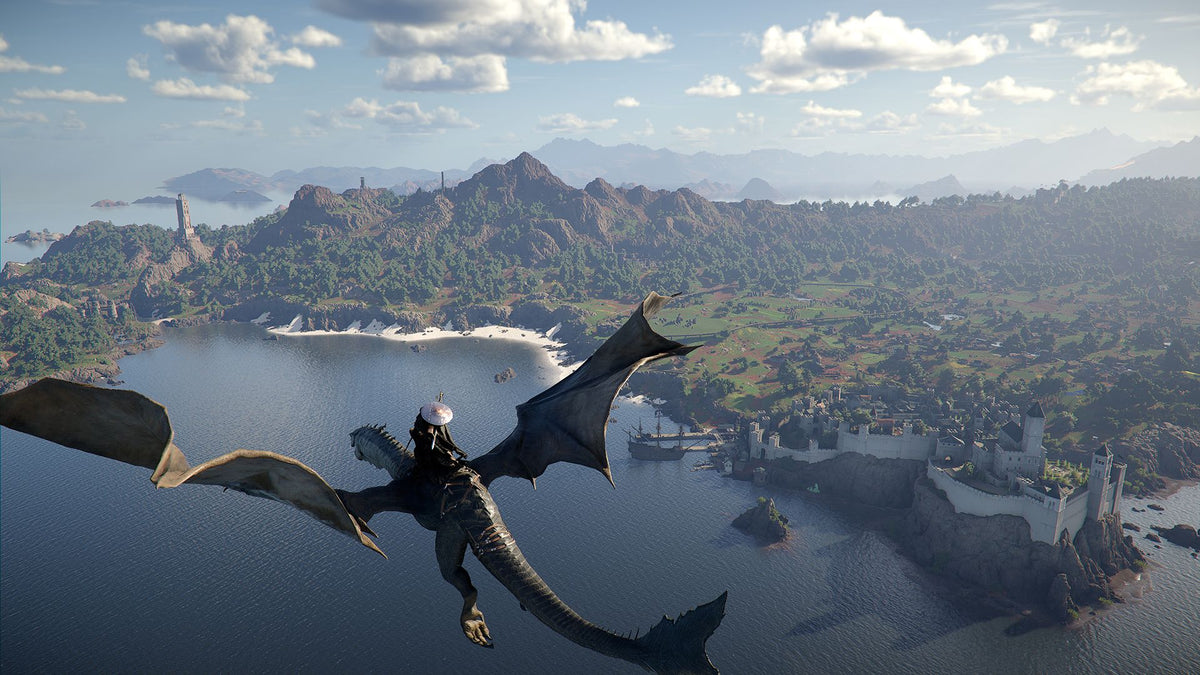
Gaming PC for New Games: What Crimson Desert’s Expanding Open World Means for Canadian PC Buyers
Gaming PC for New Games is no longer just a search term for players who want higher frame rates. It is becoming a serious buying question for anyone watching the scale of modern open-world games grow through weekly updates, new systems, larger environments, extra customization, improved character features, and more demanding post-launch content. The latest Crimson Desert update is a perfect example of why Canadian gamers should think carefully about the PC they buy next, especially if they want a system that can handle today’s AAA games and tomorrow’s bigger updates without feeling outdated too quickly.
Pearl Abyss has continued expanding Crimson Desert with a new weekly update that adds meaningful changes for players exploring Pywel. According to the update details, Damiane and Oongka can now equip the Visione, access memories throughout the world, and use Blackstar as a mount. The update also expands housing with 58 new house items, improves decoration options around the home, adds crafting-related stations in specific locations, introduces five new headgear pieces, and brings new armor options including the Greymane Light Armor for Kliff and Honorary Greymane Cloth Gloves for Damiane. On top of that, Version 1.12.00 includes loading improvements, rematch changes, knowledge entry fixes, logging adjustments, and other quality-of-life refinements.
For players, that sounds like more content, more mobility, more customization, and more reasons to keep exploring. For PC buyers, it highlights something bigger: modern games are not static anymore. They evolve. They add systems. They receive optimization passes. They expand character options, environment interaction, crafting, progression, and visual variety. So the real question becomes: is your current PC ready for where new games are going, not just where they are today?
Why Crimson Desert’s Update Matters for Anyone Shopping for a Gaming PC for New Games
Crimson Desert is the kind of open-world action-adventure game that attracts players who care about exploration, cinematic visuals, character movement, combat, mounts, world detail, and long-term content support. When an update improves character flexibility and lets Damiane and Oongka use key features like the Visione and Blackstar, the experience becomes more seamless. Players can spend more time playing the characters they enjoy instead of switching awkwardly back to another character just to access important travel or progression tools.
That kind of design shift matters because it keeps players in the world longer. The more time a player spends exploring, crafting, customizing, revisiting areas, chasing knowledge entries, or taking on post-game content, the more they notice performance issues. Stutters during traversal, long loading screens, weak frame pacing, texture pop-in, noisy cooling, insufficient storage, and low graphics settings become harder to ignore when a game becomes part of your weekly routine.
If you are shopping for a Gaming PC for New Games, ask yourself this: are you buying for the first 10 hours of a game, or are you buying for the hundreds of hours that may come after patches, expansions, DLC, mods, creator content, and higher-resolution displays?
That distinction is important. A basic computer may launch a game. A properly selected custom gaming PC can make the game feel smooth, responsive, beautiful, and reliable over time.
What the Crimson Desert Update Gets Right: More Freedom, More Customization, More Long-Term Play
The update’s biggest changes focus on reducing friction. Damiane and Oongka being able to use Visione and Blackstar is not just a small convenience. It helps make alternate character play feel more complete. For players in late-game or post-game content, that matters because switching characters should feel like a real choice, not a penalty.
The housing update also says a lot about where open-world games are going. Adding 58 new house items and allowing decoration around the immediate surroundings of a house suggests that the game is leaning further into personalization. Modern players do not only want to complete quests. They want to shape spaces, collect items, show off choices, and build a persistent identity inside the world.
Why should a Canadian PC buyer care about that? Because personalization-heavy games often encourage longer sessions and broader gameplay habits. One night you may be fighting enemies. The next you may be crafting, decorating, exploring, recording footage, streaming to friends, or taking screenshots. A gaming PC that only barely meets minimum expectations may not feel good across all of those activities.
Do you want a PC that can simply run a game, or do you want a PC that can let you enjoy everything the game becomes?
Canadian Buyers Should Think Differently About Open-World PC Performance
In Canada, buying a gaming PC is not just about picking a graphics card and hoping for the best. Canadian buyers also have to think about component availability, shipping times, exchange-rate pressure, seasonal sales, demand spikes around major game releases, and the reality that replacement costs can change quickly. If a game like Crimson Desert keeps expanding and more players decide they want a stronger machine, demand for mid-range and high-end gaming hardware can tighten fast.
That is why Groovy Computers approaches the buying process differently. As a Canadian custom PC builder, Groovy Computers focuses on matching the system to the customer’s real use case. Are you playing at 1080p, 1440p, or 4K? Do you want high frame rates? Do you care about ray tracing? Will you stream? Will you edit gameplay clips? Will you use the same system for school, work, design, content creation, or 3D modeling?
A strong Gaming PC Canada buying decision should not be based on the cheapest parts that appear today. It should be based on what you actually want your computer to do for the next several years.
What Do You Want Your Next PC to Do for You?
Before choosing a system, take a moment to answer the most important buying question: what do you want your next PC to do for you?
Do you want to explore Crimson Desert, upcoming AAA games, and open-world RPGs at smooth 1080p without overspending? Do you want a 1440p Gaming PC Canada buyers would consider the sweet spot for sharper visuals and higher frame rates? Are you aiming for a 4K Gaming PC Canada experience with ultra settings, large monitors, cinematic detail, and stronger long-term performance?
Or is your use case bigger than gaming? Maybe you want to stream on OBS, record gameplay, edit YouTube videos, create TikToks, design thumbnails, manage photography, work in Adobe Creative Cloud, build game assets, or render projects in Blender. If so, your PC should be planned as more than a gaming box. It should be a reliable performance platform.
Ask yourself:
- What games do I play now, and what major releases am I waiting for?
- Do I want 1080p, 1440p, or 4K gaming performance?
- Do I care about ray tracing, ultra settings, or high FPS?
- Will I stream to Twitch, YouTube Live, TikTok Live, or record gameplay?
- Will I edit video in Premiere Pro, DaVinci Resolve, CapCut, or After Effects?
- Will I edit photos in Photoshop, Lightroom Classic, Capture One, or similar tools?
- Will I use graphic design apps like Illustrator, Canva, InDesign, or Affinity Designer?
- Will I work with 3D modeling, rendering, Unreal Engine, Blender, CAD, or animation?
- Do I want to avoid upgrading again in a year or two?
- Would financing help me secure a stronger system now before prices or availability change?
These questions are not just technical. They help determine whether you should buy a budget gaming computer, a premium RTX gaming PC, a custom creator PC, an editing workstation, or a 3D modeling workstation.
Which Performance Tier Fits You Best?
Not every gamer needs the same PC. A competitive esports player, an open-world RPG fan, a streamer, a photographer, and a 3D artist all put different pressure on the system. The best gaming PC for new games is the one that matches your monitor, your workload, your upgrade timeline, and your budget.
Entry-Level and Budget Gaming: Is a Budget Gaming PC Enough?
A Budget Gaming PC Canada buyer is usually looking for strong value, dependable 1080p performance, and a system that can play popular titles without paying for unnecessary extras. This tier can make sense if you mostly play esports games, lighter multiplayer titles, older AAA games, or you are comfortable adjusting settings in heavier games.
But open-world games with large environments, detailed textures, complex character systems, and expanding updates can push budget systems harder. If you are looking at games like Crimson Desert and asking, “Can a budget gaming PC play new games?” the honest answer is: yes, but with expectations. You may need to lower some settings, avoid heavy ray tracing, and accept that future updates may increase performance demands.
This tier is ideal if you want:
- Reliable 1080p gaming
- Good value for students or first-time PC gamers
- Lower upfront cost
- A practical entry into PC gaming
- A system that can be upgraded later with the right planning
If you are trying to decide between buying the cheapest possible PC or financing a stronger one, ask yourself: would a slightly better system save you from upgrading too soon?
Mid-Range Gaming: Is 1440p the New Sweet Spot?
For many Canadian gamers, 1440p is the most balanced target. It looks much sharper than 1080p, does not demand as much hardware as 4K, and pairs beautifully with modern high-refresh monitors. A well-built 1440p gaming PC can handle open-world games, RPGs, shooters, survival games, and action titles with a strong mix of visual quality and frame rate.
If you are asking, “What PC do I need for 1440p gaming?” this is where a custom build becomes especially useful. The right CPU and GPU pairing matters. So does RAM speed, storage choice, cooling, airflow, and power supply quality. A mismatched system can leave performance on the table even if one part looks impressive on paper.
This tier is ideal if you want:
- Smooth 1440p gaming in modern titles
- High FPS for competitive games
- Better texture quality and visual clarity
- Enough headroom for streaming or recording
- A stronger long-term value than a bare-minimum build
For many buyers, this is the point where a Gaming PC for New Games starts to feel truly future-ready without jumping into premium pricing.
High-End and Premium Gaming: Do You Want 4K, Ray Tracing, and Ultra Settings?
A High End Gaming PC Canada buyer is usually thinking beyond “good enough.” This customer wants 4K gaming, ultra settings, advanced lighting, ray tracing, high-refresh displays, premium cooling, quieter operation, and long-term power. If you want the most cinematic version of modern open-world games, this is the tier that makes sense.
Crimson Desert’s visual style, world scale, character movement, and ongoing updates make it exactly the type of game that premium PC buyers watch closely. When a game keeps adding reasons to explore, travel, decorate, craft, fight, and revisit areas, visual quality matters. So does stability. If you are spending hours in a world, the difference between medium settings and a smooth high-end experience can be significant.
This tier is ideal if you want:
- 4K gaming performance
- Ultra settings in demanding games
- Ray tracing where supported
- High-end RTX gaming PC performance
- Longer useful system life before major upgrades
- More room for streaming, editing, and multitasking
If you are wondering, “How long will a high-end gaming PC last?” the answer depends on your settings expectations and future game demands. But buying more performance than you need today can help delay the point where your system starts to feel limiting.
Is a Gaming PC Good for Streaming, Editing, and Content Creation?
Many customers start by shopping for a gaming computer, then realize they also want to create with it. That could mean livestreaming gameplay, recording clips, editing YouTube videos, designing thumbnails, managing photo libraries, or building social media content. In that case, a gaming PC can be excellent for content creation, but only if it is configured properly.
A Streaming PC Canada buyer should think about more than raw FPS. Streaming adds workload. OBS, Streamlabs, browser tabs, chat tools, audio software, overlays, alerts, and recording can all run at the same time. GPU encoding can help, especially in RTX-based systems, but CPU, RAM, and storage still matter.
If you are asking, “What PC do I need for streaming?” start with these questions:
- Will you stream at 1080p or 1440p?
- Will you stream and record at the same time?
- Will you use one monitor or a dual-monitor setup?
- Will you edit your streams into shorter clips afterward?
- Do you need quiet cooling for microphone quality?
A Content Creation PC Canada buyer should also consider whether gaming performance and creator performance are equally important. For example, a gamer who edits clips in CapCut has different needs than a full-time YouTuber using Premiere Pro, After Effects, Photoshop, and DaVinci Resolve every week.
What If You Also Need Video Editing, Photo Editing, Graphic Design, or 3D Modeling Performance?
Crimson Desert’s update is gaming news, but it connects directly to a bigger trend: players are also creators. Many gamers now record their gameplay, stream their reactions, create build guides, design overlays, edit highlight reels, make thumbnails, and post short-form content. If you want your PC to do more than play, the buying decision changes.
Video Editing PC Canada: Are You Editing 1080p, 4K, or Higher?
A Video Editing PC Canada buyer should think about timeline smoothness, export speed, codec support, GPU acceleration, RAM capacity, scratch storage, and long project reliability. If you are editing gameplay from Crimson Desert or other open-world games, large files can build up quickly. A fast SSD and enough RAM are not luxuries; they can directly affect your workflow.
Ask yourself: what PC do you need for video editing if you are working with 4K gameplay footage, multiple audio tracks, colour correction, transitions, and effects? A basic gaming PC might edit simple clips, but a custom video editing PC gives you more confidence when deadlines, client work, or consistent content output matter.
Photo Editing PC Canada: Are You Working with RAW Files and AI Tools?
Photographers and screenshot artists also benefit from the right desktop. A Photo Editing PC Canada build should prioritize responsive software performance, fast storage, strong CPU capability, enough RAM, and GPU acceleration where useful. Lightroom Classic, Photoshop, Capture One, and modern AI photo tools can all benefit from a balanced system.
If you are asking, “Is a gaming PC good for Photoshop?” the answer is often yes, but a custom photo editing PC can be tuned more intelligently for your specific workflow. Do you batch export hundreds of RAW files? Do you use AI denoise or generative tools? Do you run multiple monitors? Those details matter.
Graphic Design PC Canada: Do You Need Smooth Creative Cloud Performance?
A Graphic Design PC Canada buyer may not need the same GPU power as a 4K gamer, but they still need responsiveness. Photoshop, Illustrator, InDesign, Canva, CorelDRAW, Affinity Designer, and Adobe Creative Cloud workflows can become frustrating on slow systems, especially when working with large files, many layers, high-resolution assets, and multiple displays.
If your PC is both for gaming and design work, the goal is balance. You want enough graphics power for games, enough RAM for large projects, fast SSD storage for file access, and stable cooling so the system stays responsive during long work sessions.
3D Modeling PC Canada: Are You Using Blender, Unreal Engine, CAD, or Rendering Tools?
A 3D Modeling PC Canada or 3D Rendering PC Canada buyer needs to think carefully about GPU rendering, CPU rendering, RAM capacity, VRAM, viewport performance, and project complexity. If you are working in Blender, Unreal Engine, Unity, Maya, 3ds Max, Cinema 4D, SketchUp, ZBrush, AutoCAD, Revit, or SolidWorks, a generic gaming PC may not be the ideal choice.
Is a gaming PC good for Blender? It can be, especially if it has the right GPU and enough RAM. But a workstation-focused build may be better if rendering time, project stability, and professional reliability matter. This is where Groovy Computers can help you decide whether your system should lean gaming-first, creator-first, or workstation-first.
Why Loading Improvements and Optimization Still Do Not Replace Strong Hardware
The Crimson Desert update includes improvements to character loading screens and loading optimization. That is good news for players. Developers improving load times and quality-of-life systems can make a game feel better. But software optimization does not eliminate the need for capable hardware.
Fast NVMe SSD storage can dramatically improve how a modern PC feels. Enough RAM helps prevent slowdowns when games, browsers, chat apps, launchers, recording tools, and creative programs are open. A strong CPU helps with simulation, background tasks, streaming, editing, and frame pacing. A capable GPU drives resolution, texture quality, ray tracing, and high frame rates.
If you are buying a Gaming PC for New Games, do not think of hardware as a single part. Think of it as a full system. A powerful GPU in a poorly cooled case, with weak storage, limited RAM, or an undersized power supply, is not the same as a properly engineered custom gaming PC.
Should You Buy a Gaming PC Now or Wait?
One of the most common questions Canadian customers ask is: is it better to buy a gaming PC now or wait? The honest answer depends on your current system, your budget, and your tolerance for price changes. But there are reasons not to delay too long if you already know your current PC is struggling.
Modern PC pricing can be affected by GPU demand, memory pricing, SSD supply, exchange rates, shipping costs, seasonal demand, and major game releases. When more players start preparing for big AAA launches, demand can rise. When creators upgrade for new software features or AI-assisted workflows, demand can rise. When component supply tightens, replacement costs can increase.
Waiting can make sense if your current PC is still performing well. But if you are already lowering settings, dealing with stutters, running out of storage, fighting slow exports, or avoiding new games because your system is too old, waiting may simply delay the inevitable.
Ask yourself:
- Is my current PC already struggling with the games I play?
- Am I avoiding new releases because I am unsure if my PC can run them?
- Do I need a stronger system before a major game release, software upgrade, school term, work project, or creator schedule?
- Would buying now help me avoid higher replacement costs later?
- Would financing let me choose the system I actually need instead of settling for one I will outgrow quickly?
Could Financing Help You Secure a Stronger System Before Prices Change?
For many Canadian buyers, financing is not about buying recklessly. It is about matching the PC to the real workload instead of compromising too heavily because of upfront cost. If you need a stronger GPU, more RAM, better storage, or a more capable CPU, financing can help spread the cost over time while giving you the performance you need now.
Groovy Computers offers financing options up to 4 years, which can be helpful for gamers, students, streamers, creators, and professionals who want to secure a better system before prices, availability, or personal workload demands change. The key question is not only “Can I afford the cheapest PC today?” It is also: should I finance a better PC instead of buying a cheaper one that may need replacing sooner?
A stronger custom system may help you:
- Play new games at better settings for longer
- Move from 1080p to 1440p or 4K with confidence
- Stream and record without sacrificing gameplay smoothness
- Edit video faster and reduce export delays
- Handle larger photo, design, or 3D projects
- Avoid paying twice because the first system was underpowered
If you are wondering whether Gaming PC Financing Canada options make sense for your situation, the best starting point is to identify the performance tier you actually need. Then decide whether monthly payments help you get there responsibly.
Custom PC vs Generic Prebuilt: Why the Difference Matters More for New Games
When games keep expanding, PC reliability matters. A generic prebuilt may look attractive because it lists a recognizable GPU or CPU, but the full system quality is what determines the long-term experience. Cooling, airflow, motherboard quality, power supply selection, RAM configuration, storage speed, cable management, BIOS settings, driver setup, stress testing, and warranty support all matter.
A Custom PC Builder Canada approach gives you better control over the system. Instead of buying a one-size-fits-all machine, you can build around your actual goals. A competitive shooter player may prioritize high FPS. A Crimson Desert player may prioritize open-world smoothness and visual quality. A streamer may need encoder support and multitasking headroom. A creator may need more RAM, faster SSDs, and workstation-grade stability.
Custom does not have to mean confusing. At Groovy Computers, the goal is to help Canadian customers understand what parts make sense, what parts are unnecessary, and where the money should go for the best real-world performance.
Why Testing, Warranty, and Canadian Support Matter
A PC is not truly ready just because it turns on. A gaming computer should be tested under load, checked for stability, configured properly, and built with parts that make sense together. This is especially important when the system will be used for demanding games, livestreaming, editing, rendering, or professional workloads.
Groovy Computers builds custom systems with rigorous testing and includes a 1-year warranty, giving Canadian buyers more confidence than a random marketplace listing or mystery configuration. When you are investing in a gaming PC, creator PC, or workstation PC, support matters. If something needs attention, you want a builder who understands the full system and can help.
For customers in Nova Scotia, Atlantic Canada, and across the country, Groovy Computers offers a Canadian-focused buying experience. Whether you are in Trenton, New Glasgow, Halifax, elsewhere in Nova Scotia, or ordering Canada-wide, the goal is the same: get a reliable, well-matched PC that fits your games, software, and budget.
What Kind of Buyer Are You?
If you are still unsure which PC category fits you, start with your main use case. Most buyers fall into one of these groups.
The Open-World Gamer
You want to explore large games like Crimson Desert, play new AAA releases, enjoy strong visuals, and avoid constant settings compromises. You should focus on a balanced gaming PC with a strong GPU, capable CPU, fast SSD, and enough RAM for modern titles.
The Competitive Gamer
You care about high FPS, low latency, and smooth gameplay in esports titles. You may not need the most expensive graphics card, but you do need the right CPU and GPU combination for high-refresh monitors.
The Streamer
You want to game, stream, manage chat, run overlays, record clips, and stay smooth on camera. You should look for a gaming and streaming PC with strong multitasking, GPU encoding support, reliable cooling, and enough RAM.
The Video Creator
You edit YouTube videos, shorts, gameplay clips, tutorials, or client projects. You need a custom creator PC or video editing workstation with a strong CPU, capable GPU, fast SSD storage, and enough RAM for your footage resolution.
The Designer or Photographer
You work in Photoshop, Lightroom, Illustrator, Canva, InDesign, or similar tools. You need a responsive desktop with fast storage, strong single-core performance, enough memory, and display support for creative work.
The 3D Artist or Workstation User
You render, model, animate, use CAD, or build in Unreal Engine or Blender. You should consider a custom 3D workstation or rendering PC with the right GPU, VRAM, CPU, RAM, and cooling for sustained workloads.
Questions to Ask Before Buying Your Next Custom Gaming PC
Before you buy or finance a system, ask the questions that actually shape performance:
- What resolution will I play at: 1080p, 1440p, or 4K?
- Do I want high FPS, ultra settings, ray tracing, or a balanced experience?
- Will I stream, record, or edit content?
- How much storage do I need for modern game installs and creative files?
- Will I upgrade my monitor soon?
- Do I want a quiet PC for streaming, recording, or office use?
- How long do I want this system to feel strong before upgrading?
- Am I buying before a major game launch, school term, work deadline, sale period, or possible price spike?
- Would financing help me choose a system that fits my real needs?
- Do I want help from a Canadian custom PC builder instead of guessing alone?
These questions make the decision easier because they move you away from vague specs and toward actual outcomes. A PC should be built around what you want to do, not just what sounds impressive in a product title.
Why Crimson Desert Is a Reminder to Build for the Future, Not Just the Minimum
Crimson Desert’s latest update shows how modern games can become larger and more feature-rich over time. New character options, travel flexibility, housing features, crafting support, cosmetics, armor, knowledge entry fixes, loading improvements, and ongoing content plans all reinforce the same point: the games you buy today may be more demanding, more content-rich, and more replayable tomorrow.
If you only buy for minimum requirements, you may get into the game but miss the experience you actually wanted. If you buy a system with better headroom, you have more flexibility for future updates, higher settings, streaming, recording, and creative projects.
A Gaming PC for New Games should not be a short-term patch for an old computer problem. It should be a smart investment into the way you want to play, create, and work over the next several years.
Ready to Choose the Right Gaming PC for New Games?
If you are asking, “What gaming PC do I need?” or “Should I buy now before prices go up?” Groovy Computers can help you make the decision with confidence. Whether you need a budget gaming computer, a 1440p gaming PC, a premium RTX gaming PC, a streaming PC, a custom creator PC, a video editing workstation, or a 3D rendering workstation, the right build starts with your goals.
Do you want smoother open-world gameplay, better visuals, faster exports, quieter streaming, more reliable multitasking, or a system that will not feel outdated too soon? Visit GroovyComputers.ca to browse custom gaming PCs, explore financing options, or get help choosing a build that fits your games, software, budget, and future upgrade plans.
The Bottom Line for Canadian Gamers and Creators
The latest Crimson Desert update is exciting for players because it adds convenience, customization, and more reasons to keep exploring. For Canadian PC buyers, it is also a reminder that gaming hardware decisions should be made with future content in mind. New games are bigger, updates are more frequent, creator workflows are heavier, and component pricing can shift faster than many buyers expect.
If your current PC is already holding you back, waiting may not save you money. It may simply leave you with weaker performance during the games, projects, and releases you care about most. A properly selected Gaming PC for New Games from Groovy Computers gives you a smarter path forward: custom-built performance, Canadian support, rigorous testing, 1-year warranty confidence, and financing options that can help you secure the right system before replacement costs change.
#GamingPCForNewGames #GamingPCCanada #CustomGamingPCCanada #1440pGamingPC #4KGamingPC #StreamingPCCanada #ContentCreationPCCanada #GroovyComputers
Groovy Computers | All Rights Reserved



Leave a comment
This site is protected by hCaptcha and the hCaptcha Privacy Policy and Terms of Service apply.