



































Ray Tracing Gaming PC Canada: What Crimson Desert’s DLSS vs FSR Debate Means Before You Buy Your Next Custom PC
Ray Tracing Gaming PC Canada searches are heating up for a reason: modern games are no longer judged by raw FPS alone. Players are now comparing image reconstruction, ray-traced reflections, water rendering, upscaling quality, frame generation, latency, texture clarity, and long-term driver support before deciding what kind of gaming computer is actually worth buying.
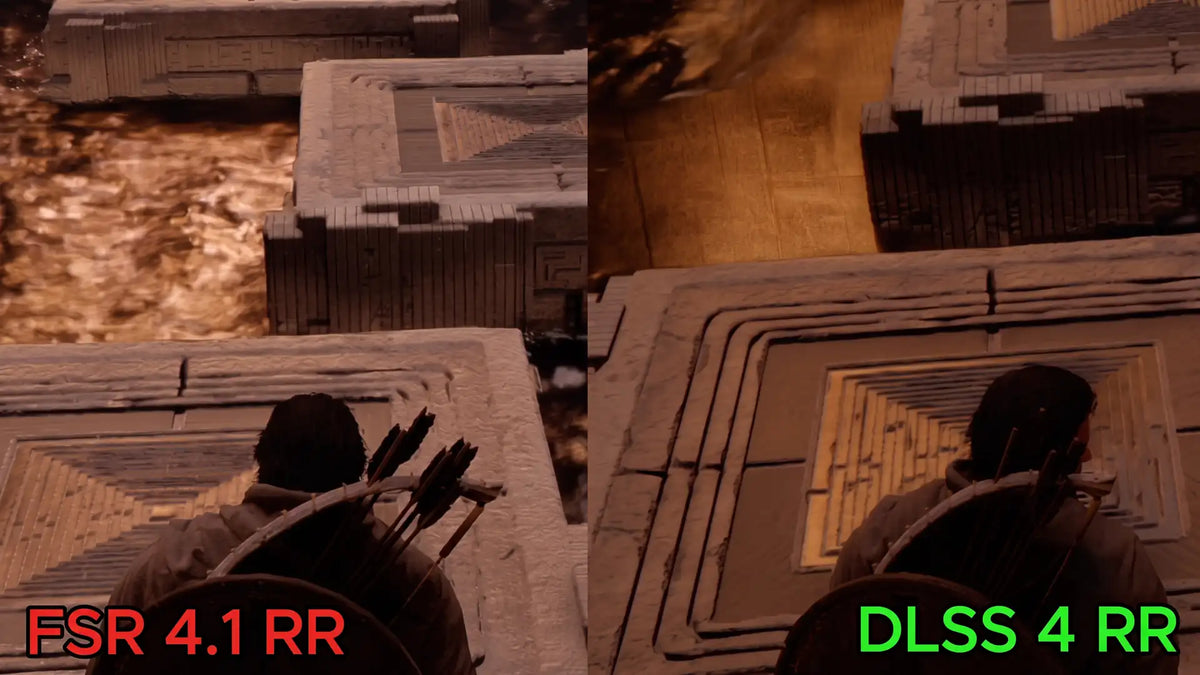
A recent player-led comparison around Crimson Desert has put that conversation under the spotlight. According to the source report, community testers compared NVIDIA DLSS 4.0 Ray Reconstruction against AMD FSR Ray Reconstruction versions discussed as 1.1 and 1.2 in complex in-game scenes. The most talked-about issue was water rendering: players reported that DLSS Ray Reconstruction struggled with benchmark-standard ripples, distorted reflections, and visual artifacts, while FSR Ray Reconstruction produced more accurate reflections and better water texture structure in those specific scenes. The report also noted that FSR’s newer implementation still required manual troubleshooting from enthusiasts to fully clear up ray-casting glitches.
For Canadian PC buyers, the bigger takeaway is not simply “DLSS versus FSR.” The real lesson is this: if you are buying a gaming PC for new AAA games, ray tracing, 1440p, 4K, streaming, video editing, or creator workloads, the right build needs to be selected around your real use case, not just a logo on the graphics card box.
So what do you actually want your next PC to do for you? Do you want a smooth 1080p gaming desktop for esports and school? A 1440p high-FPS gaming PC for open-world titles? A premium 4K ray tracing system? A gaming and streaming PC for Twitch or YouTube? A Creator PC Canada setup for Premiere Pro, DaVinci Resolve, Photoshop, Blender, and Unreal Engine? Or do you want one system that can handle everything without forcing you into another upgrade too soon?
That is where Groovy Computers comes in. As a Canadian custom PC builder, Groovy Computers helps buyers match the right CPU, GPU, RAM, storage, cooling, case airflow, power supply, and upgrade path to the games and software they actually use. In a market where game engines, AI-enhanced graphics, upscaling technologies, and component costs can shift quickly, buying the right custom gaming PC now can be smarter than buying the cheapest system and replacing it sooner than expected.
Why the Crimson Desert DLSS and FSR Ray Reconstruction Debate Matters
The source report describes a detailed community comparison in Crimson Desert, focusing on how different ray reconstruction technologies handled difficult graphical scenes. The standout claim was that DLSS 4.0 Ray Reconstruction struggled with water surfaces, replacing expected ripple behaviour with artifacts and distorted reflections, while FSR Ray Reconstruction delivered more accurate-looking reflections in the tested scenes.
That matters because ray reconstruction is supposed to improve ray-traced visuals by intelligently rebuilding lighting, reflections, and denoised image detail. When it works well, it can make ray tracing look cleaner and more stable. When it struggles, players may see ghosting, shimmer, broken reflections, strange water behaviour, flickering, or detail loss.
But here is the question Canadian buyers should ask: are you buying a PC based on one feature, or are you buying a system that gives you options when a game, driver, patch, or upscaler behaves differently than expected?
Modern gaming PCs need flexibility. A smart build should let you choose between native rendering, DLSS, FSR, XeSS where supported, frame generation where appropriate, raster performance, ray tracing modes, and game-specific settings. If one feature disappoints in a specific title, your PC should still be powerful enough to deliver a great experience through another path.
Ray Tracing Gaming PC Canada Buyers Should Focus on the Whole System, Not One Upscaling Brand
A great Ray Tracing Gaming PC Canada build is not only about whether a game supports DLSS or FSR. It is about whether your system has enough GPU horsepower, CPU performance, memory, SSD speed, cooling, and power delivery to run demanding games smoothly when visual technologies are imperfect.
Do you want to rely on upscaling because your hardware is barely keeping up, or do you want upscaling to be an optional bonus that improves performance without saving an underpowered build?
That distinction is important. Upscaling and ray reconstruction can be excellent tools, but they should not be used as an excuse to buy too little GPU for the resolution you actually want. If your goal is 1440p ultra settings, ray tracing, and high refresh rates, your GPU tier should be chosen for that target. If your goal is 4K gaming with ray-traced lighting, reflections, and cinematic quality, you need a stronger graphics card, more VRAM headroom, better cooling, and a power supply that leaves room for sustained load.
Many shoppers start with a simple question: “What gaming PC do I need?” The better version is: “What gaming PC do I need for the games, resolution, refresh rate, streaming software, editing workload, and upgrade timeline I actually care about?”
What Games, Software, or Creative Workloads Do You Want Your Next PC to Handle?
Before choosing between a budget gaming computer, a premium RTX gaming PC, a custom creator PC, or a workstation, ask yourself what your PC has to do every week, not just on launch day.
- Are you mainly playing competitive games? If you play Valorant, Counter-Strike 2, Fortnite, Call of Duty, Apex Legends, Rocket League, or other esports titles, you may care more about high FPS, low latency, and a strong CPU than maximum ray tracing.
- Are you playing cinematic AAA games? If you want open-world games, ray-traced lighting, detailed reflections, and ultra textures, your GPU and VRAM matter much more.
- Are you buying for upcoming games? If you want a Gaming PC for New Games, do you want to be ready before a major launch creates a demand spike?
- Are you streaming? If OBS, Twitch, YouTube Live, TikTok Live, or recording gameplay matters, you need a Gaming and Streaming PC Canada build with the right encoding support, CPU headroom, and RAM.
- Are you editing video? If you use Adobe Premiere Pro, DaVinci Resolve, After Effects, CapCut, or YouTube editing workflows, your CPU, GPU, RAM, and SSD configuration should be selected differently than a gaming-only build.
- Are you editing photos or designing graphics? Photoshop, Lightroom, Illustrator, InDesign, Canva, Capture One, and other creative apps benefit from fast storage, strong single-core CPU performance, enough RAM, and a stable display workflow.
- Are you doing 3D modeling or rendering? Blender, Unreal Engine, Unity, Maya, Cinema 4D, 3ds Max, SketchUp, ZBrush, AutoCAD, Revit, and SolidWorks can push both CPU and GPU depending on the workload.
- Are you building a workstation? If your PC earns money, saves client time, or supports business productivity, reliability and performance consistency matter as much as benchmark numbers.
What do you need most: more FPS, better image quality, faster exports, smoother multitasking, better streaming stability, or a longer upgrade cycle?
What PC Do I Need for 1440p Gaming?
If you are asking, “What PC do I need for 1440p gaming?”, you are already in the sweet spot for many Canadian gamers. A 1440p Gaming PC Canada build offers a major clarity upgrade over 1080p without the extreme GPU demands of 4K. It is ideal for high-refresh monitors, competitive shooters with sharp visuals, and AAA games where texture quality and lighting matter.
For 1440p, the GPU becomes a serious priority. You want enough graphics power to handle high settings today and enough VRAM to avoid texture compromises as newer games become more demanding. The CPU still matters, especially for high-FPS esports and simulation-heavy games, but the graphics card usually determines whether you can keep settings high while using ray tracing or advanced upscaling.
Would you rather buy a cheaper PC now and lower settings within a year, or invest in a stronger custom gaming PC that holds up better as new patches, game engines, and visual features become more demanding?
Groovy Computers can help you choose a 1440p-focused gaming desktop that balances GPU tier, CPU value, RAM capacity, airflow, SSD speed, and power supply quality so the system feels fast in real gameplay, not just on a spec sheet.
What PC Do I Need for 4K Gaming and Ray Tracing?
If your goal is 4K, ray tracing, ultra settings, and long-term performance, your buying decision changes. A 4K Gaming PC Canada build needs more than a mid-range graphics card and optimistic upscaling. It needs serious GPU horsepower, enough VRAM, strong cooling, and a platform that can sustain high power draw during long gaming sessions.
Ray tracing is one of the most demanding features in modern gaming. Reflections, shadows, global illumination, path tracing, and ray-reconstructed lighting can transform image quality, but they can also expose weak hardware quickly. When a game’s reconstruction technology has issues, as players reported in Crimson Desert, native performance and raw GPU strength become even more important.
Do you want a 4K system that only feels good when the game’s upscaler behaves perfectly, or do you want a high-end gaming PC with enough raw performance to stay enjoyable even when a patch, driver, or feature needs adjustment?
For premium buyers, the answer is often a carefully configured High End Gaming PC Canada build. That does not always mean buying the most expensive part available. It means matching the right class of GPU, CPU, RAM, SSD, cooling, and case design to your target resolution and the number of years you want the system to remain satisfying.
DLSS, FSR, Ray Reconstruction, and Frame Generation: What Should Buyers Actually Care About?
DLSS, FSR, frame generation, and ray reconstruction are now part of the gaming PC buying conversation. They can improve performance, smooth out demanding scenes, and make ray tracing more practical. But they also vary by game, driver, implementation quality, and personal sensitivity to artifacts.
The Crimson Desert discussion is a reminder that software features are not magic. One game may favour one technology. Another game may favour another. A patch may improve quality, introduce issues, or change performance. Community fixes may appear before official updates. That is why smart PC buyers should think in terms of flexibility.
- Raw GPU performance still matters. Upscaling helps, but it should not be the only reason a system performs well.
- VRAM headroom matters. Higher-resolution textures, ray tracing, mods, and creator apps can all consume video memory.
- CPU balance matters. A powerful GPU can be held back by a weak CPU in high-FPS games, strategy titles, simulation games, and streaming workflows.
- RAM capacity matters. 16GB may be enough for some gaming, but 32GB is increasingly attractive for gaming plus multitasking, streaming, and creator work. Heavy editing, 3D, and workstation use may justify 64GB or more.
- SSD speed and capacity matter. Large games, footage, project files, and asset libraries quickly punish small or slow storage setups.
- Cooling and power delivery matter. A high-performance PC is only as good as its ability to stay stable under sustained load.
Are you choosing parts for the best-case scenario, or for the real world where games get patched, software grows heavier, and workloads evolve?
Why Canadian Buyers Should Think Differently About Timing
Canadian PC buyers face a different reality than shoppers reading international headlines. Exchange rates, shipping costs, component availability, seasonal demand, new game launches, back-to-school buying, holiday sales, and GPU supply pressure can all affect what a system costs by the time you are ready to buy.
Is it better to buy a gaming PC now or wait? The honest answer depends on what you own today, what games you want to play next, and whether waiting could force you into a weaker build later if prices move the wrong way.
When a major game release gets close, demand for Gaming PC for Upcoming Games builds can rise. When new GPUs launch, older models may disappear quickly or shift in price. When RAM and SSD pricing changes, full-system costs can move even if the graphics card price looks stable. When creator software updates add AI tools, heavier effects, or higher-resolution workflows, yesterday’s “good enough” system can start to feel limiting.
That does not mean every buyer should rush. It means buyers should be intentional. If your current PC already struggles with new games, editing timelines, streaming stability, or 3D workloads, waiting may not save you money if it leads to missed productivity, lower settings, frustration, or a more expensive replacement later.
Could Financing Help You Secure a Stronger System Before Replacement Costs Rise?
One of the most practical questions is: should I finance a better PC instead of buying a cheaper one? For many buyers, financing is not about overspending. It is about avoiding the trap of underbuying.
A weaker budget system can look attractive at checkout, but if it cannot handle your target resolution, stream quality, editing workload, or software upgrades, you may end up replacing parts earlier than planned. That can cost more over time than choosing a better-balanced system from the start.
Groovy Computers offers financing options up to 4 years where available, making it easier for Canadian buyers to consider a stronger custom gaming PC, creator PC, or workstation without paying the full amount upfront. If your goal is to buy before a major game release, hardware shortage, sale period ending, software upgrade, or price spike, financing can help you secure the right tier sooner.
Can I finance a gaming PC in Canada? With Groovy Computers, Canadian customers can explore financing while shopping for a system that fits real needs instead of settling for the cheapest configuration. If a better GPU, more RAM, a larger SSD, or stronger cooling would extend the useful life of your PC, monthly payments may be worth comparing against the cost of upgrading too soon.
If you are wondering whether a stronger build is realistic, visit GroovyComputers.ca and look at the custom PC options, ready-to-ship gaming PCs, and financing possibilities designed for Canadian buyers.
Which Performance Tier Fits You Best?
Not every buyer needs the same PC. The right tier depends on your games, monitor, software, budget, and how long you want the system to feel fast. Use the guide below as a practical starting point.
Budget Gaming PC Canada Tier: Best for 1080p, Esports, Students, and First Gaming PCs
A Budget Gaming PC Canada build is ideal if you mostly play esports, lighter games, school-friendly titles, or mainstream multiplayer games at 1080p. This tier is often a strong fit for students, first-time PC gamers, family gaming setups, and buyers who want good value without chasing ultra settings.
Ask yourself: do you need maximum ray tracing, or do you mainly want smooth FPS in the games you already play? If you are not chasing 4K or heavy creator workloads, a well-built budget system can be a smart purchase. The key is making sure the power supply, cooling, SSD, and motherboard are not cut too aggressively, because those choices affect reliability and upgrade potential.
1440p Gaming PC Canada Tier: Best for High-FPS AAA Gaming and Long-Term Value
A 1440p build is the performance sweet spot for many gamers. It gives you sharper image quality than 1080p, better monitor options, and strong performance without the extreme demands of 4K. If you want a Gaming PC for New Games and you care about high settings, this is often where the best balance begins.
Ask yourself: do you want to avoid upgrading too soon? If yes, stepping up to a stronger GPU, 32GB of RAM, and a quality SSD can make the system feel better for longer. This is also a good tier for players who stream occasionally, edit light content, or multitask while gaming.
Ray Tracing and Premium Gaming PC Tier: Best for Ultra Settings, 4K, and Visual Showcase Builds
A premium ray tracing gaming PC is for buyers who want the best experience in cinematic games, open-world titles, heavily modded games, and high-end displays. This is where 4K, ultra textures, ray-traced reflections, high-end cooling, and stronger power delivery become important.
Ask yourself: are you buying for what you play today, or for the games you expect to play over the next several years? If you want a system that feels premium beyond the next big release, this tier deserves serious consideration.
Gaming and Streaming PC Canada Tier: Best for OBS, Twitch, YouTube, and Recording
If you stream or record gameplay, your PC has to do more than render the game. It must encode video, handle browser sources, overlays, chat, alerts, Discord, capture software, and sometimes a second monitor. A Gaming and Streaming PC Canada build should be chosen with CPU threads, GPU encoder support, RAM, and storage capacity in mind.
Ask yourself: what PC do I need for streaming if I want gameplay to stay smooth while the stream looks clean? The answer is usually a balanced system with more headroom than a gaming-only build. A cheaper PC may run the game, but that does not mean it will stream the game well.
Creator PC Canada Tier: Best for Video Editing, Photo Editing, Graphic Design, and Social Content
A Creator PC Canada system is ideal for people who use their computer for gaming plus productivity. If you edit YouTube videos, cut short-form content, manage RAW photo libraries, design graphics, run Adobe Creative Cloud, or create social media content, your PC should be configured around time saved.
Ask yourself: how much is faster exporting, smoother playback, quicker batch processing, and fewer crashes worth to you? For creators, a stronger PC can directly affect output, deadlines, client work, and creative momentum. A gaming PC can be good for content creation, but a custom creator PC is better when the parts are selected for both gaming and software acceleration.
3D Modeling PC Canada and Workstation Tier: Best for Blender, Unreal Engine, CAD, Rendering, and Professional Work
A 3D Modeling PC Canada or workstation build requires careful planning. Blender, Unreal Engine, Unity, Maya, 3ds Max, Cinema 4D, SketchUp, ZBrush, AutoCAD, Revit, and SolidWorks can demand powerful CPUs, strong GPUs, large RAM capacity, fast storage, and reliable cooling.
Ask yourself: is a gaming PC good for Blender or workstation use? Sometimes yes, but not always. A gaming PC may have a strong GPU, but a workstation may need more RAM, different storage planning, stronger multi-core CPU performance, or a more stability-focused configuration. If the PC is part of your income, the safest choice is a system designed around your actual software.
Why Custom Builds Matter More When Game Technology Is Changing Fast
The Crimson Desert ray reconstruction debate shows why PC buying cannot be reduced to a single benchmark screenshot. Game performance changes with settings, drivers, updates, engines, and visual reconstruction methods. A generic prebuilt may look impressive in a short product listing, but it may hide compromises in cooling, motherboard quality, power supply selection, RAM configuration, SSD capacity, airflow, or upgrade room.
Custom PC vs prebuilt PC Canada is not only about aesthetics. It is about matching parts properly. A graphics card needs the right CPU partner. A high-end CPU needs proper cooling. Fast storage needs enough capacity. A premium GPU needs a reliable power supply. A small case needs careful airflow. A creator system needs enough RAM. A workstation needs stability under long loads.
Groovy Computers builds systems around the customer’s goals, not just a generic spec list. That matters whether you are buying a Custom Gaming PC Canada setup, a streaming desktop, a custom video editing PC, a graphic design workstation, or a 3D rendering system.
Why Testing, Warranty, and Support Should Be Part of Your Buying Decision
When a PC is expected to handle ray tracing, high-FPS gaming, streaming, editing, rendering, and multitasking, testing matters. A system may turn on and still have hidden instability under real load. That is why stress testing, thermal checks, cable management, BIOS configuration, driver readiness, and quality control are important parts of the buying experience.
Groovy Computers emphasizes custom builds, rigorous testing, and a 1-year warranty where applicable, giving Canadian buyers more confidence than a random marketplace listing or mystery configuration. When your PC is built for gaming, content creation, or professional work, reliability is not a luxury. It is part of the value.
Would you rather troubleshoot crashes, overheating, and random performance drops yourself, or start with a tested gaming PC from a Canadian Gaming PC Company that understands the full build?
How the DLSS vs FSR Conversation Connects to Creators, Not Just Gamers
Ray reconstruction may sound like a gaming-only topic, but the underlying lesson applies to creators too. Software acceleration is powerful, but it varies by application, driver, plugin, codec, and workflow. A PC for Adobe Premiere Pro Canada may need different priorities than a PC for DaVinci Resolve Canada. A PC for Photoshop Canada may not need the same GPU tier as a PC for Blender Canada. A graphic designer may need excellent responsiveness and multi-monitor support, while a 3D artist may need GPU rendering horsepower and large RAM capacity.
If you create videos, photos, designs, animations, models, or livestreams, ask yourself: where does my current PC slow me down most?
- Timeline lag? You may need a stronger CPU, GPU acceleration, more RAM, or faster project storage.
- Slow exports? You may benefit from more CPU cores, better GPU support, and proper thermal performance.
- Large RAW photo libraries? You may need fast SSD storage, enough RAM, and strong single-core performance.
- Heavy Photoshop or Illustrator files? You may need more RAM, reliable storage, and a responsive CPU.
- Blender or Unreal Engine scenes? You may need a stronger GPU, more VRAM, and larger system memory.
- Streaming while gaming? You may need GPU encoding, CPU headroom, and enough RAM for multitasking.
The best PC for content creation is not always the same as the best PC for pure gaming. Groovy Computers can help Canadian buyers choose the correct balance so one system can serve both play and productivity.
Should You Buy Before a Major Game Release, Hardware Shortage, Sale Period, or Price Spike?
This is one of the most important questions for anyone planning a new gaming desktop. If your current system is already struggling, waiting until the exact week a major release lands can be risky. Demand often rises when players suddenly realize their PC cannot handle the game they want to play. At the same time, component availability and pricing can shift quickly.
Are you planning around a specific game, a new monitor, a school semester, a work contract, a content schedule, or a software upgrade? If so, your buying timeline should be based on when you need the system ready, not just when you hope prices might drop.
A Gaming PC for New Games should be ordered with enough time for configuration, testing, shipping, setup, and any software installation you need. If you are buying from Nova Scotia, Atlantic Canada, Ontario, Alberta, British Columbia, or anywhere else in Canada, planning ahead can help you avoid last-minute compromises.
For buyers who do not want to pay everything upfront, financing can make timing easier. Instead of buying a weaker PC because you need it immediately, you may be able to finance a stronger build that better fits your long-term target.
Questions to Ask Before Buying or Financing a Custom PC
Before you commit to a build, take a moment to answer the questions that actually shape performance and value.
- What games do I play most? Competitive esports, AAA open-world games, simulation games, racing games, RPGs, and ray tracing showcases all place different demands on a PC.
- What resolution do I want? 1080p, 1440p, ultrawide, and 4K each require different GPU planning.
- What refresh rate do I want? A 60Hz monitor has different needs than 144Hz, 165Hz, 240Hz, or higher.
- Do I care about ray tracing? If yes, choose a GPU tier with enough performance headroom for advanced lighting and reconstruction features.
- Will I stream or record? OBS, Twitch, YouTube, and gameplay recording benefit from extra CPU, GPU, RAM, and storage planning.
- Will I edit videos? 4K editing, colour grading, effects, and exports can justify a stronger creator-focused configuration.
- Will I edit photos or design graphics? Photoshop, Lightroom, Illustrator, InDesign, and Canva benefit from responsiveness, RAM, and fast SSDs.
- Will I do 3D modeling or rendering? Blender, Unreal Engine, CAD, and animation work may require a true workstation mindset.
- How long do I want to avoid upgrading? Spending slightly more today can sometimes delay a costly upgrade later.
- Would financing help me choose the right tier? If monthly payments let you avoid underbuying, financing may be worth exploring.
- Do I want help choosing parts? If yes, a Custom PC Builder Canada approach can reduce guesswork and improve long-term satisfaction.
Why Groovy Computers Is a Strong Fit for Canadian PC Buyers
Groovy Computers is built around a simple idea: customers should not have to decode every GPU chart, driver debate, software requirement, and component compatibility issue alone. Whether you are shopping for a Ray Tracing Gaming PC Canada build, a 1440p gaming desktop, a premium 4K system, a streaming PC, a creator PC, or a workstation, the goal is to match the machine to your actual life.
Canadian buyers benefit from dealing with a Canadian custom PC company that understands local pricing pressure, Canada-wide shipping needs, warranty expectations, and the importance of real support. Groovy Computers serves customers looking for custom gaming PCs in Canada, including buyers in Nova Scotia, Trenton, New Glasgow, Halifax, Atlantic Canada, and beyond.
When you shop with Groovy Computers, you can focus on what matters most: the games you want to play, the content you want to create, the deadlines you need to hit, and the performance level you want to enjoy without constantly second-guessing your build.
What Should Your Next PC Do for You?
Here is the most important question in this entire buying guide: what should your next PC do for you that your current computer cannot?
Do you want smoother FPS in new games? Better ray tracing? A stable 1440p experience? True 4K gaming? Faster video exports? Cleaner livestreams? Better Photoshop and Lightroom performance? More responsive graphic design work? Faster Blender renders? A workstation that can handle client projects without slowing down?
Your answer should guide the build. Not hype. Not a single feature comparison. Not one game patch. Not the cheapest spec list. The right PC is the one that gives you the performance, reliability, upgrade path, and confidence you need for the way you actually use it.
If you are unsure where you fit, that is normal. Many buyers are between categories: gamer and student, streamer and editor, designer and photographer, 3D artist and game developer, business owner and content creator. A custom build can be designed around that mix instead of forcing you into a one-size-fits-all desktop.
Conclusion: A Ray Tracing Gaming PC Canada Build Should Be Flexible, Powerful, and Built for Your Real Needs
The Crimson Desert DLSS versus FSR Ray Reconstruction discussion is a reminder that game technology is moving fast, and not every visual feature works perfectly in every title. Players reported that FSR Ray Reconstruction looked better than DLSS Ray Reconstruction in specific water and reflection scenes, while also noting that manual troubleshooting was still needed for the newer FSR implementation. That kind of debate will not be the last one.
For Canadian buyers, the best response is not panic or brand loyalty. It is smart planning. A strong Ray Tracing Gaming PC Canada build should have enough raw performance, the right GPU tier, balanced CPU power, proper RAM, fast SSD storage, reliable cooling, and the flexibility to handle games and software as they evolve.
If you are shopping for a budget gaming computer, a 1440p gaming PC, a 4K gaming PC, a premium RTX gaming PC, a gaming and streaming PC, a custom creator PC, a video editing workstation, a graphic design desktop, or a 3D modeling workstation, Groovy Computers can help you choose the right system before prices, demand, or workload requirements change.
Ready to stop guessing and start building around what you actually play, stream, edit, design, render, and create? Visit GroovyComputers.ca to explore custom gaming PCs, creator PCs, workstation options, Canada-wide availability, and financing that can help you secure a stronger system before you are forced into another upgrade.
#RayTracingGamingPCCanada #CustomGamingPCCanada #GamingPCCanada #1440pGamingPC #4KGamingPC #CreatorPCCanada #GamingPCFinancingCanada #GroovyComputers
Groovy Computers | All Rights Reserved



Leave a comment
This site is protected by hCaptcha and the hCaptcha Privacy Policy and Terms of Service apply.