




















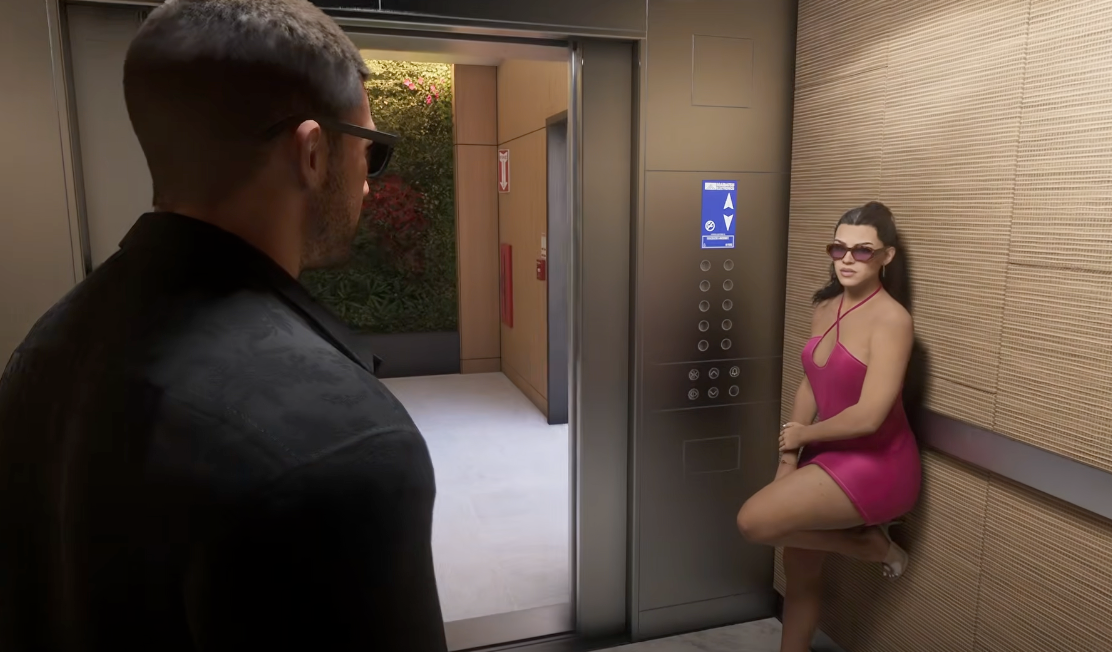
GTA 6 Romance System News Is Really a PC Buying Question: What Kind of Gaming PC in Canada Do You Need for Big Open-World Games?
The latest GTA 6 romance system news is about player choice, but for Canadian buyers, it also highlights a much bigger question: what kind of PC are you going to need for modern blockbuster games that blend story systems, open-world scale, AI-driven behaviour, and heavier performance demands? If a major release is adding optional relationship mechanics, deeper character interactions, morality-style systems, giant map design, and long campaign length, that is usually a signal that hardware expectations are only moving in one direction: up.
The source report explains that GTA 6 lets players decide how much they want to engage with the relationship between Jason and Lucia. That matters because it shows how modern AAA games are becoming wider, denser, and more reactive. Optional systems still require development resources, memory overhead, simulation logic, animation work, and more world detail. Even when a feature is not mandatory, the game surrounding it is often far more demanding than older open-world titles. So while headlines may focus on romance, Canadian gamers should be asking a more practical question: is your current system ready for the next generation of massive open-world gaming?
That is where Groovy Computers comes in. For buyers across Canada looking at upcoming releases and wondering whether now is the right time to upgrade, this is the moment to think seriously about performance tier, long-term value, and whether a custom build makes more sense than settling for a generic low-spec machine that will need replacing too soon.
What does the GTA 6 romance system tell us about modern game performance?
At first glance, a romance system might sound like a story feature, not a hardware issue. But look closer. Optional social mechanics usually mean more dialogue states, more animations, more scripted interactions, more environmental variation, and more systems running under the hood. Add that to a giant open world, advanced lighting, vehicle density, NPC simulation, wanted-level systems, and long-form mission design, and the real message becomes obvious: new AAA games are asking more from your CPU, GPU, RAM, and storage at the same time.
That matters if you are trying to decide whether your current PC can hold on for another year. Are you already lowering settings in newer games? Are you stuck choosing between smoother FPS and better image quality? Are load times starting to feel old? Are background apps, Discord, browser tabs, or recording software causing stutter while you play? Those are the warning signs buyers should pay attention to before a game launch wave pushes demand even higher.
The source article also references a huge map, long playtime, and additional gameplay systems. For PC buyers, that combination usually points toward stronger GPUs, modern multi-core CPUs, faster NVMe SSDs, and enough RAM to keep gameplay smooth during traversal, cutscenes, streaming, and multitasking.
Why should Canadian buyers read this as a custom gaming PC Canada story instead of just game news?
Because game hype changes buying behaviour fast. Every time a major title captures attention, a wave of buyers suddenly starts shopping for upgrades at the same time. That can affect graphics card availability, pricing pressure, turnaround times, and the overall cost of building a stronger machine later instead of sooner. Canadian customers also have to think about shipping, exchange pressure on imported components, and replacement cost risk when high-demand parts tighten up.
If you are in Nova Scotia, Atlantic Canada, Ontario, Alberta, British Columbia, or anywhere else in the country, the question is not just whether a game looks exciting. The question is whether waiting puts you in a worse buying position. If your plan is to play major releases at 1440p, enjoy ray tracing, or keep your system for several years, buying too late can mean paying more for less performance.
That is why a custom gaming PC Canada strategy matters. A properly matched system gives you balanced performance, cleaner upgrade paths, tested parts compatibility, and a better chance of staying happy with your purchase long after the launch hype has passed.
What do you want your next PC to do for you?
Before you compare parts, ask the real question. What do you want your next PC to do for you over the next three to five years?
Do you want a system mainly for open-world gaming? Do you also want to stream to Twitch or YouTube? Will you edit clips for TikTok, YouTube Shorts, or long-form video after gaming sessions? Are you also using Photoshop, Lightroom, Illustrator, Blender, or Premiere Pro? Do you want one machine that handles school, work, gaming, and content creation without feeling stretched?
If you are only asking, “Can it run the game?” you may be undershooting your actual needs. A lot of customers do not need just a gaming computer. They need a gaming and creator machine. Or a streaming-capable setup. Or a system that can game smoothly at night and render projects during the day. Once you look at the full picture, the right build category becomes much clearer.
Are you a pure gamer?
If your top priority is strong in-game performance, your buying decision should focus on resolution, refresh rate, and how much visual quality you actually care about. Are you aiming for 1080p high FPS? 1440p ultra settings? 4K with ray tracing? Competitive shooters and giant cinematic games place very different demands on hardware.
Are you a gamer who also streams or records?
If you plan to stream, record gameplay, use OBS, keep browser tabs open, run chat tools, and maybe cut content after, you need more than a gaming-only build. A gaming and streaming PC Canada buyer should prioritize a stronger CPU, enough RAM, and a GPU that supports efficient modern encoding.
Are you a creator first and a gamer second?
If your workflow includes Premiere Pro, DaVinci Resolve, Photoshop, Lightroom, Illustrator, After Effects, or Blender, your ideal build may not match a standard gaming-first recommendation. You may need more cores, more RAM, more storage, and stronger sustained cooling for long exports or render sessions.
What PC do I need for big open-world games like GTA 6?
This is one of the biggest search questions Canadian buyers will ask as AAA launches get closer. The answer depends on what kind of experience you want, not just the minimum spec mentality that leaves buyers disappointed.
Entry performance tier: 1080p gaming
If you want solid 1080p performance in modern titles with sensible settings, this is the budget-conscious tier. It fits buyers who want strong value, esports performance, and enough power for newer games without chasing every premium visual feature. But ask yourself: are you going to be satisfied if a major launch pushes you to medium settings sooner than expected?
This tier can be smart for first-time PC buyers, students, or buyers moving from console who want flexibility and upgrade room. But if open-world AAA gaming is your main goal, you should be careful not to buy too close to the floor. A machine that barely clears launch requirements can age quickly.
Mainstream enthusiast tier: 1440p gaming
For many buyers, this is the sweet spot. A 1440p gaming PC Canada setup often delivers the best balance of sharp visuals, strong frame rates, and better longevity for premium single-player games. If you want a gaming PC for GTA 6-style experiences, 1440p is where many customers should start their serious search.
Do you want to enjoy denser worlds, better textures, smoother frame pacing, and room for future titles without feeling immediate pressure to upgrade again? Then this tier makes sense. It is often the best answer for customers who ask, “What gaming PC do I need if I want the game to look good and stay relevant for years?”
Premium tier: 4K, ray tracing, ultra settings
If you want the most cinematic experience possible, especially on a large display, a 4K gaming PC Canada build is the premium path. This tier is for buyers who care about image quality, stronger ray tracing, higher texture budgets, and long-term top-end capability. It is also for buyers who know they will play other demanding releases beyond one headline game.
But be honest with yourself. Are you actually using a 4K monitor or TV? Do you want maximum visual quality more than maximum value? Do you want a system that remains near the top of the performance stack for longer? If yes, a high-end custom build is often the better financial decision than buying mid-range now and replacing earlier than planned.
Is a budget gaming PC enough, or will you regret going too cheap?
This is where many buyers get stuck. A budget gaming PC Canada option can absolutely make sense, but only if it matches your expectations. If your goal is competitive gaming at 1080p, lighter creator work, and practical value, budget-focused systems are a strong entry point.
If your real goal is upcoming open-world AAA games, ray tracing, streaming, editing, and multiple years of comfortable performance, the cheapest path can become the most expensive one. Why? Because replacing a weak GPU early, adding RAM later, swapping power supplies, or rebuilding around an outdated platform often costs more than choosing the right tier up front.
So ask yourself a blunt question: are you shopping for the lowest checkout total today, or the best ownership experience over time?
What if you also want to stream, edit, or create content?
The source article may be gaming news, but the buying opportunity around it extends far beyond gaming. Major titles drive streaming clips, reaction videos, walkthroughs, thumbnails, mod discussions, social content, and creator demand. If that sounds like you, then your next system should probably be more than just a game box.
Gaming and streaming PC Canada buyers
If you want to game and stream at the same time, system balance matters. A stronger CPU helps with multitasking and background workloads. A capable GPU helps with both game performance and hardware-assisted streaming. RAM matters more than many buyers think once you add OBS, browsers, launchers, chat apps, and overlays.
Are you planning single-PC streaming? Do you want clean 1080p streams while keeping gameplay smooth? Do you record locally while streaming live? Those use cases all move you out of entry-level territory.
Video editing PC Canada buyers
If your gaming sessions turn into edited content, then export speed, timeline responsiveness, and storage configuration become important. A good gaming machine can help with editing, but a properly planned creator build performs better under heavier workloads. If you work in Premiere Pro or DaVinci Resolve, ask yourself how much your time is worth. Are you okay waiting on every export, proxy generation, and effect-heavy playback session?
For a serious editing workflow, more CPU power, more RAM, fast scratch storage, and a stronger GPU can make a noticeable real-world difference. If you are searching for a PC for Adobe Premiere Pro Canada or a PC for DaVinci Resolve Canada, your ideal system may not look exactly like a gaming-first build.
Photo editing and graphic design buyers
If you use Photoshop, Lightroom, Illustrator, or InDesign, your system still benefits from fast storage, strong single-core performance, enough RAM, and reliable cooling. Do you work with large RAW libraries? Do you export batches? Do you run multiple Adobe apps at once? Those details matter.
A photo editing PC Canada or graphic design PC Canada setup should feel quick, dependable, and comfortable over long work sessions. It should not become sluggish the moment you switch from game mode to client work.
3D modeling and workstation buyers
If your interest in game worlds overlaps with Blender, Unreal Engine, game asset creation, 3D rendering, CAD, or professional workstation tasks, then your buying logic changes again. A 3D modeling PC Canada or workstation PC Canada build often needs more RAM capacity, heavier sustained cooling, and hardware selected specifically for rendering and viewport workflows.
Do you need one PC that can game at night and build worlds during the day? Then a custom workstation-inspired gaming system may be the smarter route.
What performance tier fits you best?
Choosing a tier gets easier when you stop thinking in vague labels and start thinking in outcomes.
- Choose entry-level value if you want 1080p gaming, lighter new titles, esports, school use, and the lowest barrier to entry without expecting top-tier visuals in every future release.
- Choose mid-range enthusiast if you want 1440p gaming, stronger longevity, smoother AAA performance, and enough overhead for some streaming or creative work.
- Choose upper-tier premium if you want high-refresh 1440p or entry 4K, better ray tracing, stronger multitasking, and a more future-proof experience.
- Choose flagship performance if you want 4K gaming, ultra settings, premium creator performance, demanding software acceleration, or long-term top-end ownership.
Still unsure? Ask yourself these questions:
- What resolution do I actually play at today?
- Will I upgrade my monitor soon?
- Do I care more about FPS or visual quality?
- Will I stream or edit content within the next year?
- How long do I want this PC to last before I feel pressured to upgrade?
- Am I buying around a major game release window where demand could rise?
Is it better to buy a gaming PC now or wait?
This is one of the most important buying questions in Canada. Waiting can work if your current PC still meets your needs comfortably and your target build category is stable. But many buyers wait for a perfect moment that never really comes.
When game hype surges, hardware demand often follows. GPU pricing pressure, memory cost movement, SSD fluctuations, and broader supply shifts can all change the economics of your upgrade. If your current machine is already struggling, waiting may simply mean spending more later while getting months of lower performance in the meantime.
Are you buying before a major release? Before holiday demand ramps up? Before your editing workload increases? Before your current system fails out of warranty or starts forcing compromises in every new title? Those are practical timing questions, not panic questions.
For many customers, the smarter move is buying once, buying properly, and avoiding the trap of repeated small upgrades that never fully solve the problem.
Could financing help you secure a stronger build before prices change?
For some buyers, this is the most useful question of all. If the choice is between buying a weaker machine in cash now or getting the right system with manageable payments, financing can be the difference between short-term compromise and long-term satisfaction.
Would a stronger GPU save you from upgrading too soon? Would extra RAM help with streaming, editing, and future games? Would better cooling and a better power supply give you a healthier upgrade path later? If so, spreading out the cost can make strategic sense.
Groovy Computers offers financing options up to 4 years, which can be especially helpful for customers who want to lock in a stronger build before replacement costs rise further. That matters whether you are shopping for a gaming PC, a creator system, or a workstation-class machine. The goal is not just affordability today. It is buying the right level of performance for how you will actually use the system.
Would you rather settle now and replace sooner, or finance the build that actually fits your next few years?
Why does a custom PC matter more when big games get bigger?
Because generic specs do not tell the whole story. A custom gaming PC Canada buyer benefits from better part matching, better cooling logic, cleaner component quality decisions, and clearer upgrade planning. That matters even more when games become more demanding, more complex, and more sensitive to weak links in a build.
A poorly balanced machine can have a decent GPU but insufficient RAM. Or a strong CPU paired with weak airflow. Or fast components held back by entry-level storage and thermal limits. On paper it may look acceptable. In real use, it can feel inconsistent.
With a custom system, the build can be matched to your actual workload. If you are focused on 1440p gaming, your money can go where it matters. If you need a streaming and editing PC, the configuration can reflect that. If you want a workstation that also handles premium gaming, that can be planned from the start instead of improvised later.
Why should Canadian buyers care about testing and warranty support?
Because reliability matters just as much as performance. Buying a custom PC is not only about getting good parts. It is about getting a complete, tested machine you can trust.
Groovy Computers builds systems for Canadian customers with rigorous testing and a 1-year warranty, which adds confidence at a time when buyers are trying to avoid mistakes, downtime, and expensive trial-and-error purchases. If you are ordering a PC for a major game launch, streaming schedule, school year, or client workload, peace of mind matters.
Ask yourself: if something goes wrong, do you want to deal with random marketplace uncertainty, mismatched support, and vague quality control? Or do you want a Canadian custom PC builder that understands complete system reliability?
What kind of buyer should choose each Groovy Computers category?
Choose a budget-focused gaming build if:
- You want strong 1080p value
- You mainly play esports or lighter-demand titles
- You need a first gaming PC without overspending
- You understand that future AAA settings may require compromise sooner
Choose a mainstream gaming build if:
- You want a gaming PC for new games at 1440p
- You want stronger longevity
- You want room for multitasking and occasional content creation
- You want a better balance between cost and future readiness
Choose a premium RTX gaming PC if:
- You want ray tracing and high visual settings
- You want high refresh gaming in demanding titles
- You plan to keep the system longer
- You may stream, record, or edit on the same machine
Choose a creator PC or workstation if:
- You game and edit regularly
- You use Adobe Creative Cloud, DaVinci Resolve, Blender, or Unreal Engine
- You need more RAM, more storage, and more sustained performance
- You want one powerful desktop for both entertainment and professional output
What questions should you ask before buying your next system?
Before you commit, ask yourself the questions many buyers skip:
- What games or software will I actually use every week?
- Am I targeting 1080p, 1440p, or 4K?
- Do I care about ray tracing or just strong frame rates?
- Will I stream, record, or edit content this year?
- Do I need a gaming PC, a creator PC, or a workstation-style build?
- How long do I want this system to last before upgrading?
- Would financing a stronger system save me money versus replacing a weak one early?
- Do I want support from a Canadian builder that tests systems properly?
If you cannot answer those confidently, that is exactly why working with a specialist matters.
What does this mean for GTA 6 fans and open-world gamers in Canada?
It means the headline is not just about an optional romance feature. It is about the continuing evolution of massive games with deeper simulation, bigger worlds, and more demanding system expectations. Whether you engage with every mechanic or not, these are the types of releases that push buyers to reassess their hardware.
If you are planning for the next era of blockbuster gaming, now is the time to think beyond minimum requirements. Think about the monitor you want to use. Think about whether you will stream or create content. Think about whether your current PC already feels one generation behind. Think about whether waiting really helps you, or just delays the inevitable while pricing risks stay in play.
Need help choosing the right build?
If you are asking, “What gaming PC do I need?” or “Should I go with a gaming PC, creator PC, or workstation?” the best next step is to talk to a builder that can match your budget to your actual goals. Whether you want a budget-friendly 1080p machine, a 1440p sweet-spot system, a premium RTX setup, or a custom creator desktop, Groovy Computers can help you choose a better-fit solution for gaming, streaming, editing, design, and workstation use in Canada.
Want to avoid upgrading too soon? Want a custom build that is tested, balanced, and backed by a 1-year warranty? Want to see whether financing up to 4 years could help you secure the right system before costs shift again? Visit GroovyComputers.ca and explore your options with a Canadian custom PC builder focused on performance, reliability, and long-term value.
Final thoughts: the GTA 6 romance system story is really about player choice, and your next PC should be too
The source story makes one thing clear: players can engage with GTA 6 the way they want. That same principle should guide your next hardware purchase. You should not be forced into a one-size-fits-all PC when your needs may include AAA gaming, streaming, content creation, editing, or professional software.
The smarter move is to buy for the experience you actually want. If you want a custom gaming PC Canada buyers can trust for modern open-world titles, stronger multitasking, and better long-term value, choose a system built around your real use case. That is how you avoid underbuying, avoid rushed upgrades, and get more from every dollar you spend.
#CustomGamingPCCanada #GamingPCForNewGames #1440pGamingPCCanada #4KGamingPCCanada #CreatorPCCanada #VideoEditingPCCanada #StreamingPCCanada #WorkstationPCCanada #CanadianCustomPCBuilders #NovaScotiaBusiness
Groovy Computers | All Rights Reserved


Leave a comment
This site is protected by hCaptcha and the hCaptcha Privacy Policy and Terms of Service apply.