






















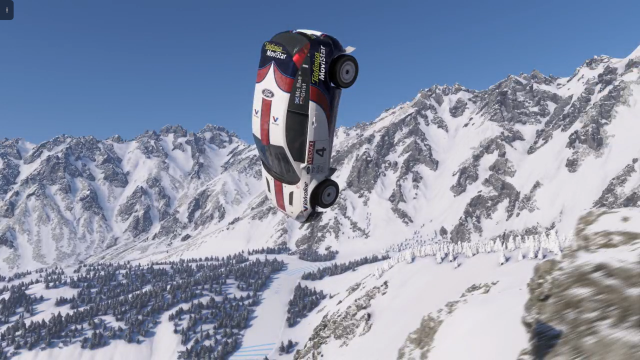
Forza Horizon 6 Festival Playlist Challenges Guide: What Kind of PC Do You Really Need for Forza, Racing Games, and Everything Else You Want to Play?
The latest Forza Horizon 6 Festival Playlist Challenges Guide puts the spotlight on exactly why modern racing games keep pushing players to think beyond a simple console-style checklist. Seasonal content, rotating objectives, online events, fast loading, smooth high-speed rendering, and the growing expectation of better visuals all raise an important question: if you love Forza, what should your next PC actually be built to do? For Canadian buyers, that question matters even more when you factor in current hardware pricing pressure, long-term upgrade costs, and the difference between settling for “good enough” versus buying a system that will still feel strong a few years from now.
The source material focuses on the Winter season of Series 2 in Forza Horizon 6, highlighting challenge types, reward cars, event restrictions, recommended vehicle setups, and the fastest ways to earn playlist points. That is useful for players already deep into the game. But for Groovy Computers readers, there is a bigger opportunity here: use that kind of game-specific demand to make a smarter PC buying decision.
If a game like Forza Horizon 6 is already pulling you in every week with seasonal championships, speed zones, drift zones, photo challenges, online race requirements, and time-sensitive rewards, are you still trying to enjoy that experience on aging hardware? Are you planning around low settings, stutter, weak frame pacing, or slow load times when you could be driving on a properly matched custom system instead?
Why the Forza Horizon 6 Festival Playlist Challenges Guide matters for PC buyers
On the surface, a playlist guide is about in-game rewards. In reality, it reveals how people actually use their gaming setups. Forza Horizon 6 is not just a one-and-done racing title. It is the kind of game players return to constantly. That means your system is not only running a visually rich open-world racer once in a while. It is supporting a recurring routine of:
- Open-world exploration
- Weekly seasonal challenge completion
- Fast event switching
- Competitive driving precision
- Online connectivity and social play
- Screenshot and clip capture
- Potential streaming or content creation around gameplay
That last part matters. A lot of players do not just play racing games anymore. They clip wins, post liveries, create TikToks, upload tuning breakdowns, stream challenge runs, or edit highlight reels for YouTube. So the real buying question is no longer just, “Can my PC run Forza?” It becomes, what gaming PC do I need if I want racing performance, streaming flexibility, faster storage, and room for future games too?
What does Forza Horizon 6 demand from a modern gaming PC?
Even without turning this into a dry requirements sheet, one thing is clear: open-world racing games reward strong hardware. Speed matters, but so does consistency. Racing at high velocity through dense environments exposes weak systems quickly. Frame drops feel worse in a racing game than in many slower genres. Stutter can wreck braking points, corner exits, drift lines, and reaction timing.
A strong Gaming PC Canada buyer should think about Forza Horizon 6 in terms of total experience, not just minimum launchability. That means considering:
- Stable frame rates during high-speed driving
- Fast texture and environment loading
- Strong GPU performance for high or ultra settings
- A CPU that can handle simulation, background tasks, and online play smoothly
- Enough RAM for gaming plus browser tabs, Discord, capture tools, and overlays
- SSD speed for quicker game launches and less waiting between events
If you are chasing seasonal rewards every week, do you want to spend that time actually racing, or sitting through long loads and tweaking settings just to keep the game smooth?
If you play Forza Horizon 6, what do you want your next PC to do for you?
This is the most important section in the whole buying process, because racing games are often the start of the conversation, not the end of it.
Do you want a system mainly for 1080p gaming at high frame rates? Do you want to move into 1440p gaming for sharper visuals and better immersion? Are you thinking about 4K gaming PC Canada territory because you want premium detail, stronger lighting, and long-term headroom? Or are you really buying one PC that also needs to handle streaming, editing, Photoshop, thumbnail design, OBS, and maybe even Blender later on?
It is common for buyers to start with one game in mind and then realize they need a much more versatile machine. Someone shopping for a Gaming PC for Forza often ends up needing a system that can also run other AAA games, manage mods, capture gameplay, edit footage, and stay relevant through future releases.
So ask yourself:
- Will this PC only play games, or will it also record and stream them?
- Do you care more about maximum FPS or better image quality?
- Are you planning to stay at 1080p, or do you know you will want 1440p soon?
- Do you want ray tracing-ready performance for newer games?
- Will you also use Adobe apps, DaVinci Resolve, or content creation tools?
- Are you buying for this year only, or trying to avoid another upgrade too soon?
Which performance tier fits your racing and gaming goals?
Not every player needs the same build. A smart Custom Gaming PC Canada purchase starts by matching your resolution, refresh rate, and broader workload to the right tier.
Entry-level to value-focused: best for 1080p racing and general gaming
If your priority is smooth 1080p gameplay, strong value, and access to current games without jumping into premium pricing, a Budget Gaming PC Canada approach can make a lot of sense. This tier is ideal for players who want to enjoy Forza Horizon 6 at solid settings, get fast SSD performance, and still leave room in the budget for a monitor or accessories.
This is a smart tier if you are asking, how much should I spend on a gaming PC without overbuying. It also suits first-time gaming desktop buyers, students, and players moving off older hardware.
But here is the question: if you already know you are likely to move to higher refresh gaming, newer AAA releases, or multitasking with Discord, recording, and browser-heavy use, would a bare-minimum build really save you money in the long run?
Mid-range sweet spot: ideal for 1440p gaming and better longevity
For many Canadian buyers, this is the smartest zone. A 1440p Gaming PC Canada build hits an excellent balance between visual quality, long-term usefulness, and price control. It is often the best answer for players who love open-world games, racing titles, shooters, and big single-player releases.
If you are reading a Forza playlist guide every week, you are probably not a casual once-a-month player. You are likely someone who notices smoothness, responsiveness, texture quality, and whether your system feels current. Mid-range custom builds are often the best fit for that kind of buyer.
This tier is especially strong if you want:
- Sharp 1440p visuals
- Higher graphics settings
- More stable performance in future games
- A better experience across racing, shooters, RPGs, and action titles
- Enough system strength for light editing or streaming
Premium tier: for ultra settings, 4K ambitions, streaming, and future-proofing
If you want your machine to feel powerful now and stay powerful through major upcoming game cycles, a High End Gaming PC Canada build is where long-term confidence starts to show. This is for buyers who want more than just “playable.” They want premium frame delivery, stronger visual headroom, creator flexibility, and less pressure to upgrade again soon.
Are you the type of player who wants Forza today, but also wants to be ready for whatever major racing, open-world, ray tracing, or competitive releases come next? Do you want one machine that can game hard, stream cleanly, and edit content without compromise?
If yes, then a stronger custom build can often be the better value over time than buying cheaper now and replacing sooner.
What PC do you need for 1080p, 1440p, or 4K racing games?
This is where many buyers get stuck. They know the game they want to play, but not the right system category.
1080p gaming PC buyers
If your monitor is 1080p and you mainly want strong everyday gaming with Forza, esports titles, and popular multiplayer games, an entry-to-mid build can be ideal. But even here, quality matters. The wrong low-end combination may run today’s games while leaving very little margin for tomorrow’s.
Ask yourself: are you buying a system for current settings only, or for the next two to four years of releases too?
1440p gaming PC buyers
This is often the strongest enthusiast choice. A Best Gaming PC Canada conversation frequently lands here because 1440p gives a major visual upgrade without demanding the same budget as top-end 4K hardware. Forza-style games look fantastic at this level, and it is often the ideal balance for players who want both quality and value.
If you are wondering, what PC do I need for 1440p gaming, the answer is usually a thoughtfully balanced custom system with a strong modern GPU, enough CPU muscle for future titles, and RAM and SSD capacity that do not feel cramped after six months.
4K and ultra settings buyers
If your goal is high-end visual fidelity, larger displays, premium image quality, and longer-term flagship-level performance, then your build decisions matter even more. A serious 4K Gaming PC Canada customer should not be looking at parts in isolation. Cooling, PSU quality, case airflow, motherboard stability, and testing all matter when you invest in premium hardware.
That is where the difference between a random parts list and a professionally matched custom build becomes very real.
Is a racing game buyer also secretly a streaming or creator PC buyer?
In many cases, yes.
A lot of players shopping for a gaming system are not just gamers anymore. They are hybrid users. They might stream races to friends, record challenge clears, edit social clips, post screenshots, design channel graphics, or build a YouTube presence around gameplay. That means a pure gaming-only mindset can lead to underbuying.
If that sounds like you, it may be smarter to consider a Gaming and Streaming PC Canada or even a Content Creation PC Canada rather than a basic gaming box.
Helpful questions to ask yourself:
- Do you want to stream with OBS while gaming?
- Will you record gameplay for later editing?
- Do you need fast exports for YouTube or social media?
- Do you use Photoshop for thumbnails or branding?
- Do you want one PC for gaming, editing, and streaming instead of buying twice?
If even two or three of those are true, your ideal system may need more than entry-level specs.
What if you also edit videos, photos, or graphics between gaming sessions?
This is where a lot of Canadian buyers can make better decisions by thinking ahead. Maybe Forza Horizon 6 is the reason you started researching hardware. But if you also touch Adobe Creative Cloud, Lightroom, Illustrator, DaVinci Resolve, or similar tools, then your PC decision should reflect that broader workflow.
For video editing
If you cut gameplay, create reels, post YouTube videos, or export high-resolution footage, a Video Editing PC Canada approach matters. Fast storage, enough RAM, GPU acceleration, and a capable CPU can save real time every week. If your current setup makes editing feel slow, that is not just inconvenient. It directly affects how much content you can produce.
Are you asking yourself, what PC do I need for video editing? If your footage is growing in quality and volume, gaming-first specs alone may not be enough. A balanced creator build can be the smarter path.
For photo editing
If your workflow includes screenshots, photography, social graphics, RAW files, or promotional content, a Photo Editing PC Canada build offers real advantages. Smooth catalog browsing, better batch exports, responsive AI tools, and multitasking headroom all help.
Do you need a system that can race at night in Forza and still handle Lightroom or Photoshop efficiently the next morning? That is exactly why custom configuration matters.
For graphic design
If you make thumbnails, logos, social posts, overlays, sponsor graphics, or brand assets, you may be better served by a Graphic Design PC Canada or hybrid creator system. Multi-monitor support, RAM headroom, fast SSDs, and stable all-day use become more important here than simply chasing one benchmark number.
For 3D modeling and rendering
Some buyers come in through gaming, then expand into Blender, Unreal Engine, or game asset work. If that sounds familiar, a 3D Modeling PC Canada or Workstation PC Canada path may be the right long-term move.
Are you only playing games today, or are you also starting to create in 3D, render scenes, or learn digital production? If your ambitions are growing, your PC should not hold them back.
Should you buy now or wait if you want a stronger gaming PC in Canada?
This is one of the most important buyer-intent questions in the market right now: is it better to buy a gaming PC now or wait?
There is no universal answer, but there is a practical one. Waiting only makes sense if you are confident your current system still meets your needs and you are not likely to spend more later for the same or weaker value. The problem is that hardware conditions rarely stay still. GPU demand can shift. Storage prices can climb. Memory markets can tighten. New game launches can spike demand. New software features can push system requirements higher than expected.
If you already know you need a better build for Forza, other upcoming games, or creator workloads, waiting can mean:
- Higher replacement costs later
- Less enjoyable gaming in the meantime
- Compromising on settings for months longer
- Buying reactively during a demand spike instead of proactively
- Needing to upgrade twice because you bought too low the first time
So ask yourself honestly: are you waiting because it is strategically smart, or because you are hoping the decision goes away on its own?
Could financing help you secure a better system before prices shift again?
For many buyers, this is where the decision becomes much easier. Instead of forcing your purchase into the smallest possible upfront spend, financing can let you buy the right machine now rather than a weaker machine you outgrow too quickly.
A lot of customers start by trying to fit into a tight budget, then realize the jump to a much better long-term build may be manageable with monthly payments. That is why Gaming PC Financing Canada matters. It is not about overspending. It is about buying more intelligently.
Would financing a stronger PC now help you avoid replacing parts sooner? Would it let you move from entry-level to a much better 1440p setup? Would it let you buy a hybrid gaming and creator system instead of settling for a build that struggles the moment you start editing or streaming?
For Canadian buyers looking at performance and timing together, financing can be especially useful when replacement costs are unpredictable. Groovy Computers can help customers explore stronger custom options without needing to delay every upgrade until the “perfect” market moment arrives.
That leads to another practical question: should I finance a better PC instead of buying a cheaper one? If the better machine lasts meaningfully longer, supports more of your workloads, and reduces near-term upgrade pressure, the answer is often yes.
Custom PC vs prebuilt PC Canada: why does it matter for a game like Forza?
When a game is visually demanding and consistently played, system quality matters more than spec-sheet shortcuts. A proper Custom PC Builder Canada approach is not just about flashy part names. It is about part matching, airflow, reliability, upgrade path planning, and making sure the build performs the way it should under real use.
That matters for racing games because smoothness is not just about average FPS. It is about stable behaviour during long sessions, heat control, storage responsiveness, and avoiding the kinds of mismatched builds that look fine in listings but disappoint in practice.
Why buy from a Canadian custom builder instead of a generic mass-market option?
- Better alignment between your goals and the actual build
- More sensible component balancing
- Cleaner upgrade planning
- More confidence in testing and reliability
- Support from a company that understands enthusiast and creator buyers
If you are wondering, is a custom gaming PC worth it, the answer becomes clearer the moment your needs go beyond “just run the game.”
What kind of buyer should choose a budget gaming PC, and who should move up?
There is nothing wrong with a value-first build when it fits the job. The key is being honest about your real usage.
Choose a budget-focused build if:
- You game at 1080p
- You mostly play lighter or older titles alongside Forza
- You are a first-time desktop buyer
- You want a clear upgrade path later
- You do not stream, edit, or multitask heavily
Move to a stronger mid-range or premium build if:
- You want 1440p or 4K gaming
- You play lots of new AAA releases
- You care about ultra settings or high refresh smoothness
- You record or stream gameplay
- You also use editing or design software
- You want to avoid upgrading again too soon
This is where many buyers answer their own question: what gaming PC do I need? The answer depends less on one game title and more on how wide your use case really is.
What should Canadian buyers ask before ordering their next gaming or creator PC?
Before you commit, ask these questions:
- What resolution and monitor refresh rate am I building around?
- Do I only play games, or do I also stream, record, or edit?
- Am I buying for current needs only, or do I want this system to stay strong for years?
- Would one better build save me from multiple smaller upgrades?
- Do I want a machine that feels balanced, tested, and ready instead of pieced together for the lowest upfront number?
- If hardware costs rise again, would I regret not securing a stronger system sooner?
- Would financing make the right build more realistic right now?
Those questions are especially important if your interests now span gaming, streaming, editing, and creative work. A Custom Creator PC Canada or mixed-use build can often deliver better value than buying one limited gaming machine now and a second productivity machine later.
Why Groovy Computers makes sense for Canadian buyers following gaming trends like Forza Horizon 6
Groovy Computers is positioned for the buyer who wants more than random specs and generic listings. If you are in Canada and want a custom system built around how you actually use your computer, that matters. Whether you need a gaming-first build, a gaming-and-streaming machine, a creator-focused desktop, or a more serious workstation, the goal is the same: match the build to the workload properly.
Groovy Computers speaks directly to the real concerns buyers have today:
- Choosing the right performance tier without wasting money
- Avoiding low-quality shortcuts that hurt longevity
- Getting a custom-built system that is rigorously tested
- Buying with more confidence through a 1-year warranty
- Exploring financing options, including terms up to 4 years where applicable
- Working with a Canadian custom PC company that understands gaming and creator demand
For buyers in Nova Scotia, Atlantic Canada, and across the country, that trust factor matters. So does clarity. Not everyone needs the same system. Some need a strong Budget Gaming PC Canada option. Some need a premium RTX-ready machine. Others need one system that handles racing games, OBS, Adobe apps, and multi-task-heavy workflows.
Need help choosing a build based on Forza, streaming, editing, or all of the above?
If the latest Forza Horizon 6 Festival Playlist Challenges Guide has you thinking about smoother gameplay, faster load times, better visuals, or finally upgrading before the next wave of game releases lands, the smartest next step is to choose a build around your real goals.
Do you want a budget-friendly 1080p racer? A sharper 1440p gaming setup? A premium system for ultra settings and long-term headroom? A hybrid machine for gaming, streaming, and editing? Or a stronger creator or workstation desktop because your hobby is turning into serious content work?
If you are asking those questions, it is time to talk to a builder that can help you make the right call. Explore your options at GroovyComputers.ca and find out which custom system fits your games, your workflow, your budget, and your timing best.
Final thoughts: Forza today, future performance tomorrow
The latest seasonal Forza guide is a reminder that modern gaming is ongoing, demanding, and increasingly tied to broader digital habits. Weekly playlists, visual expectations, online events, content creation, and overlapping workloads all point to the same conclusion: buying the right PC is no longer just about one title. It is about building for the way you actually play and create.
If your current system feels like it is barely keeping up, if you know you want a stronger 1440p or 4K experience, or if you are wondering whether now is the right moment to lock in a more capable build, then do not reduce the decision to minimum specs alone. A smarter Forza Horizon 6 Festival Playlist Challenges Guide takeaway is this: use the game that got your attention to choose a PC that serves your next few years, not just your next few weeks.
#ForzaHorizon6 #GamingPCCanada #CustomGamingPCCanada #GamingPCBuilderCanada #BudgetGamingPCCanada #1440pGamingPCCanada #4KGamingPCCanada #GamingAndStreamingPCCanada #ContentCreationPCCanada #VideoEditingPCCanada #CanadianCustomPCBuilders #GroovyComputers
Groovy Computers | All Rights Reserved


Leave a comment
This site is protected by hCaptcha and the hCaptcha Privacy Policy and Terms of Service apply.