






















Resident Evil Survival Unit x Monster Hunter: What This Crossover Says About Buying the Right Gaming PC in Canada
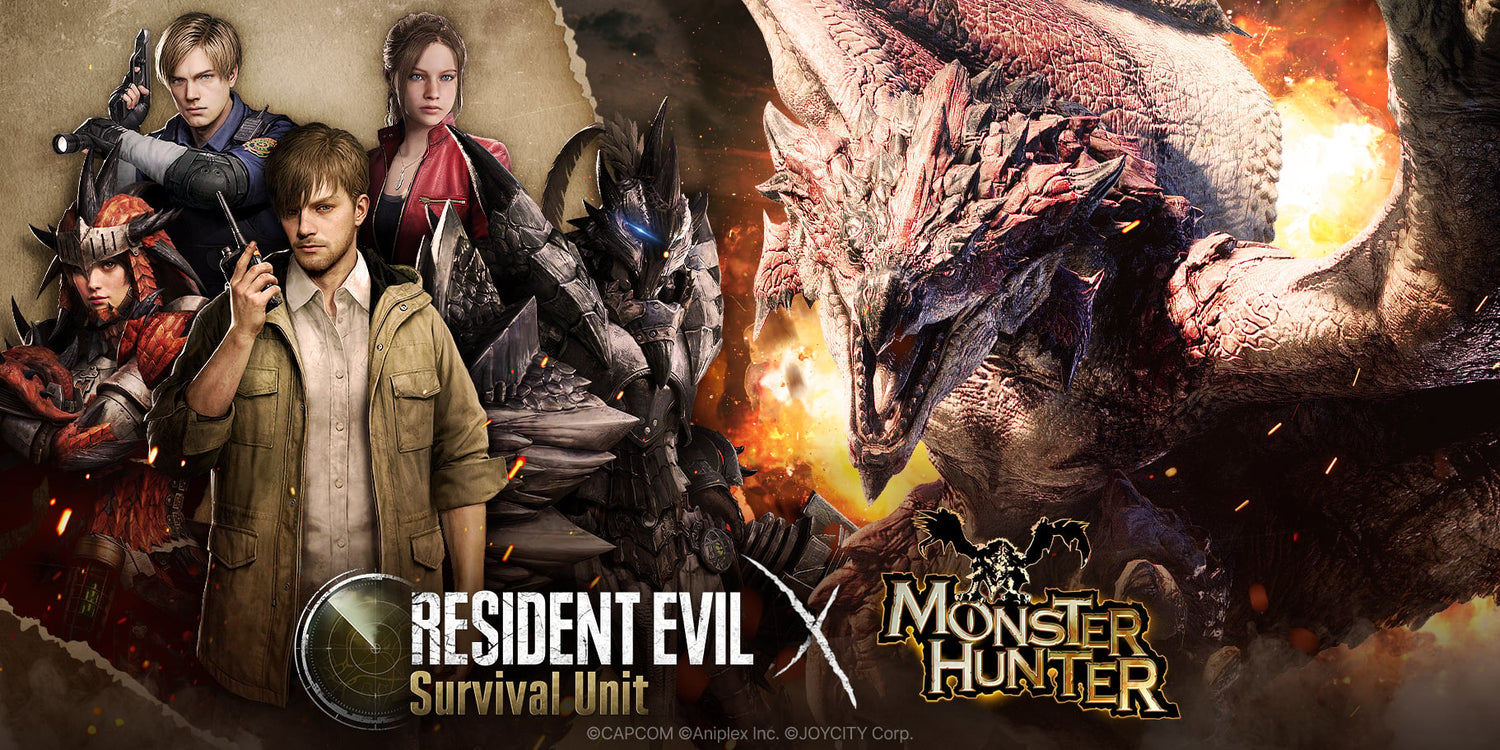
The new Resident Evil Survival Unit crossover with Monster Hunter is more than a mobile gaming headline. It is another reminder that major game franchises are expanding across platforms, reaching more players, driving more engagement, and keeping gaming communities active all year long. For Canadian buyers, that matters because every time a franchise gets hotter, more people start asking the same question: is my current system still good enough for the games I actually want to play next?
According to the source material, the event runs through most of July and introduces iconic Monster Hunter-inspired content into Resident Evil Survival Unit, including monsters like Rathalos and Yian Kut-Ku, themed heroes, a meat-grilling reward mechanic, and additional cosmetic content. It is a smart crossover because it combines two recognizable gaming brands and gives players a reason to log in, grind rewards, and stay invested. But for PC buyers, the bigger story is this: crossovers like this keep gaming interest high, and high gaming interest often pushes people toward a hardware upgrade.
If you have been following game launches, franchise events, and platform crossovers lately, you have probably noticed the same trend. Players do not just want to play one title anymore. They want a system that can handle multiple types of gaming including mobile tie-ins, PC ports, AAA games, competitive multiplayer, content creation, streaming, and social clips. So what should your next PC actually be built for?
Why does a mobile crossover matter if you are shopping for a gaming PC in Canada?
Because gaming demand rarely stays in one lane. A mobile event like Resident Evil Survival Unit x Monster Hunter keeps both communities engaged, creates fresh hype around established franchises, and often leads players to revisit older titles, try related games, or prepare for upcoming releases on stronger hardware. That is when buyers begin asking practical questions.
Are you only playing mobile games now, or are you also thinking about PC gaming at 1080p or 1440p?
Do you want to revisit survival horror games, action RPGs, open-world titles, or modern ray tracing games that push hardware much harder than a phone ever will?
Are you planning to stream gameplay, record clips, edit videos, or run Discord, OBS, browsers, and mods at the same time?
If the answer is yes, then this kind of gaming news becomes surprisingly relevant to your next desktop decision. A crossover event may start as entertainment, but it often turns into a buying trigger.
What the source article gets right about Resident Evil Survival Unit
The source highlights the exact elements that make crossover events effective: recognizable monsters, limited-time gameplay hooks, franchise-themed cosmetics, and free unlockable content. Those are not small details. They are the same retention mechanics that keep players invested across gaming ecosystems.
When players stay active in one franchise, they tend to explore more games around it. Someone pulled into Resident Evil Survival Unit by Monster Hunter may end up looking at PC-friendly action games, survival games, co-op hunts, horror shooters, or even emulation, recording, and content-sharing workflows. That creates a wider performance need than the original mobile article covers.
From a buying perspective, the headline is not just about one event. It is about how gaming habits evolve. Today it is a mobile collab. Tomorrow it is a Steam sale, a big DLC, a remaster, a multiplayer season update, or a new AAA release that exposes how outdated your current PC really is.
What do you want your next PC to do for you?
This is the most important question in the entire buying process, and too many shoppers skip it.
Do you want a system that simply plays today’s games at good settings, or do you want something that still feels fast when your tastes change six months from now?
Do you want a budget-friendly gaming machine for esports and lighter titles, or are you shopping for a stronger desktop that can handle modern cinematic games, streaming, and editing without needing another upgrade too soon?
Are you buying for one game, or for your whole lifestyle around gaming?
At Groovy Computers, that distinction matters. A customer who only wants entry-level 1080p gaming should not be pushed into a workstation they do not need. But a customer who wants to game, stream, clip highlights, edit for YouTube, and keep the system for years should not be sold something that will feel cramped almost immediately.
What gaming performance tier fits you best?
One of the best ways to shop intelligently is to match your performance tier to your real use case. Not the marketing hype. Not the loudest spec list online. Your actual workload.
Entry gaming tier: Is a budget gaming computer enough?
If you mostly play lighter games, older AAA titles, indie releases, MOBAs, or competitive titles at 1080p, an entry gaming build can still make a lot of sense. This tier is ideal for buyers asking questions like: How much should I spend on a gaming PC? or Can a budget gaming PC play new games?
This kind of system is often a strong fit for:
- 1080p gaming
- Esports titles
- General home use
- Light streaming or recording
- Students buying a first gaming PC in Canada
But ask yourself something important: if your interest in Resident Evil, Monster Hunter, or other big franchises grows, will a basic system still satisfy you next year?
Mid-range gaming tier: Is this the sweet spot for most Canadian buyers?
For many shoppers, yes. If you want smoother frame rates, stronger 1440p performance, better multitasking, and a system that feels more future-ready, mid-range is often the value zone. This is where gaming starts to feel less compromised and more flexible.
This tier is ideal if you want:
- 1440p gaming at strong settings
- Better support for modern AAA games
- Gaming plus Discord, browser tabs, and background apps
- Basic creator work like clips, social content, and YouTube uploads
- A more balanced upgrade path
If you are asking what gaming PC do I need for current and upcoming games without overspending, this is often the first category worth serious attention.
High-end gaming tier: Do you want 4K, ray tracing, or long-term headroom?
If your answer is yes, a stronger custom gaming PC becomes easier to justify. Premium systems are for buyers who care about ultra settings, higher refresh displays, ray tracing, demanding game engines, and staying ahead of future releases rather than barely meeting them.
This tier makes sense for:
- 1440p high refresh or 4K gaming
- Ray tracing performance
- Streaming while gaming
- Advanced modding
- Longer ownership with fewer compromises
Are you the kind of buyer who gets frustrated when a PC needs settings cutbacks too quickly? If so, buying a little stronger now can be cheaper than replacing a weak system earlier than expected.
Thinking beyond gaming: will you stream, edit, design, or create too?
One of the biggest mistakes buyers make is assuming a gaming desktop only needs to be judged by game FPS. In reality, many people who come in looking for a gaming machine are also doing creator work, even if they do not label it that way.
Are you posting short-form clips? That is content creation.
Are you editing gameplay for YouTube? That is creator workflow.
Are you making thumbnails in Photoshop or Canva, building overlays, cutting audio, or rendering highlight reels? Your PC needs are already bigger than gaming alone.
Do you need a gaming and streaming PC?
If you want to stream your gameplay, especially while running voice chat, alerts, overlays, capture software, and browser sources, you need more than bare-minimum specs. A proper streaming PC Canada buyer should be thinking about CPU strength, GPU encoder performance, RAM headroom, and stable cooling.
Ask yourself:
- Will you stream casually or on a schedule?
- Are you using OBS or similar software?
- Do you want clean gameplay while streaming at the same time?
- Will you also edit your streams into clips afterward?
If yes, a gaming-only spec target may undershoot your needs.
Do you need a creator PC instead?
If your workflow includes Adobe Creative Cloud, video editing, Photoshop, Lightroom, graphic design, or audio work, then a Creator PC Canada approach often makes more sense than chasing gaming specs alone.
A creator-focused custom build can be a better fit if you need:
- Fast exports in Premiere Pro or DaVinci Resolve
- Smoother timeline playback
- Better multitasking with many apps open
- More RAM for large projects
- Fast SSD storage for footage, game captures, and assets
Is a gaming PC good for video editing? Sometimes, yes. But the right answer depends on how serious the editing workload is. If your “gaming PC” is also your work machine, there is no reason to treat those as separate decisions.
What if your workload is heavier than content creation?
Then you may be in workstation territory. If you use Blender, Unreal Engine, CAD applications, 3D rendering tools, or engineering and modeling software, you need to think in terms of system balance, render speed, memory capacity, and reliability under long-duration loads.
That is where a custom workstation from Groovy Computers can make a real difference. Not everyone needs one, but the buyers who do usually know the pain of crashes, waiting on renders, or running out of memory at the worst time.
Why Canadian buyers should think differently right now
Gaming headlines create excitement, but Canadian buyers also have to think practically. Hardware prices can shift. Availability can change. Demand can rise around major launches, seasonal sales, and new GPU cycles. Even if one specific mobile event does not directly change desktop pricing, the larger gaming market absolutely affects how and when people buy.
That is why timing matters.
Are you waiting for the “perfect time” to upgrade, even though your current system is already holding you back?
Are you putting off a replacement while continuing to lose time to slow loads, stutter, weak multitasking, or poor creator performance?
Are you trying to squeeze another year out of a PC that no longer matches the games and software you actually use?
For many customers in Canada, the right answer is not waiting endlessly. It is securing a system that meets today’s needs and still gives them room to grow.
Is it better to buy now or wait?
This is one of the most common questions in PC shopping, and there is no universal answer. But there is a useful framework.
You should think seriously about buying now if:
- Your current PC is already affecting your gaming enjoyment
- You want to be ready for upcoming games instead of reacting too late
- You also need the system for work, streaming, or editing
- You want to avoid panic-buying during demand spikes
- You would rather buy once properly than upgrade in frustration later
You may be able to wait if:
- Your current system still meets your real needs comfortably
- You are not planning to play more demanding games soon
- You have no creator or productivity pressure on the machine
- You are still deciding what category of PC you truly need
But here is the key buying question: is waiting actually saving you money, or just delaying a necessary purchase while your replacement options become more expensive?
Could financing help you buy the stronger system you actually need?
For many buyers, yes. A lot of customers make the mistake of shopping only by immediate cash limit rather than by long-term value. That often leads to buying too weak, upgrading too soon, and paying more in the end.
If a stronger system would better fit your gaming, streaming, or creator workload, then financing can be a practical tool rather than an impulse decision. Groovy Computers offers options that can help qualified Canadian buyers spread out the cost over time, including financing up to 4 years where applicable.
Ask yourself:
- Should I finance a better PC instead of buying a cheaper one that I will outgrow?
- Would monthly payments let me step into a more capable GPU or CPU tier?
- Am I trying to force a gaming and creator workload onto a budget system that will age badly?
- Would it be smarter to secure the right custom build before replacement costs rise?
These are not just payment questions. They are ownership questions. The wrong PC can cost more through lost performance, faster obsolescence, and earlier replacement.
Custom PC vs generic prebuilt: what matters most?
Specs on paper are only part of the story. When you buy a custom-built system, the goal is not just getting parts in a box. The goal is getting a machine where the components make sense together for your exact use case.
That means asking:
- Is the CPU matched properly to the GPU?
- Is there enough RAM for gaming plus multitasking?
- Is the SSD fast enough and large enough for modern game installs?
- Is cooling appropriate for sustained performance?
- Is the power supply quality where it should be?
- Will the system be easy to upgrade later?
At Groovy Computers, the value of a custom build is not just customization for its own sake. It is confidence. A system built around your actual goals is more likely to stay satisfying longer than a random off-the-shelf machine optimized for marketing bullet points.
Why testing and warranty matter more than many buyers realize
When a gaming franchise heats up, people rush to buy hardware. That can lead to shortcuts in the market. But your PC is too important to gamble on.
A properly tested custom build matters because stability matters. Gaming sessions, streams, editing exports, and render jobs all expose weak cooling, unstable memory, bad component choices, or poor assembly decisions. That is why rigorous testing should be part of the buying decision, not an afterthought.
Groovy Computers emphasizes carefully built and tested systems backed by a 1-year warranty. For Canadian buyers, that trust factor matters. Especially if you are ordering online and want confidence that the system arriving at your door is built for performance, reliability, and real-world use.
If you are a gamer first, what should you prioritize?
Start with the display target and game type.
- If you want 1080p and competitive responsiveness, prioritize a balanced CPU/GPU combo with enough RAM and a fast SSD.
- If you want 1440p with modern AAA games, put more budget into the GPU and overall system balance.
- If you want 4K or ray tracing, be realistic: this is premium territory, and underbuying here leads to disappointment.
Also ask whether your gaming style is changing. A player interested in a crossover event today may be deep into demanding single-player titles, co-op action games, and recorded content tomorrow. Buy for where you are going, not only for where you were six months ago.
If you are also a creator, what should you prioritize?
If your PC doubles as a creator machine, then your part priorities shift.
- More RAM becomes more important
- Storage planning becomes more important
- CPU choice matters more for export-heavy workloads
- GPU acceleration matters for many modern creator apps
- Thermals and stability matter more under sustained use
What PC do content creators need? The honest answer is that it depends on the software stack. A person editing social clips and thumbnails has different needs than someone handling 4K footage, After Effects comps, live streaming, and game capture archives. That is exactly why custom guidance matters.
What if you are not sure whether you need gaming, creator, or workstation performance?
That uncertainty is normal. Many buyers fall between categories.
You might need:
- A gaming desktop that can also stream
- A creator PC that can also game well
- A workstation that still handles modern titles after hours
- A balanced family or student system that does a bit of everything
If that sounds like you, the best next step is not guessing. It is getting matched to the right class of custom build. The better your system fits your mixed workload, the less likely you are to overspend in the wrong area or underspend where it counts.
How does this gaming headline connect to real purchase intent?
A lot of people read gaming news casually and then, quietly, start planning an upgrade. That process usually begins with one of these thoughts:
- My current PC will not handle the games I want next
- I want better visuals and frame rates
- I want to stream or record without performance drops
- I need one machine for gaming and creator work
- I do not want to buy the wrong prebuilt and regret it
That is why posts like this are useful. The crossover itself may be mobile-focused, but the buying psychology around it is broader. Excitement around major franchises leads people to reassess their hardware. When that happens, the smartest move is not chasing hype. It is making a better purchasing decision.
Why Groovy Computers is a strong fit for Canadian buyers
Groovy Computers is positioned for the buyer who wants more than generic specs and vague promises. Whether you need a gaming desktop, a streaming-ready build, a creator-focused machine, or a heavier workstation, the advantage of shopping with a Canadian custom PC builder is getting a more intentional system.
That means:
- Custom builds matched to your real use case
- Balanced part selection instead of random spec inflation
- Rigorous testing before the system reaches you
- 1-year warranty confidence
- Canadian support and Canada-wide ordering relevance
- Financing options that can help you secure a stronger system sooner
For buyers in Nova Scotia, Atlantic Canada, and across the country, that combination of customization, testing, and trust can make the difference between a smart long-term purchase and a rushed compromise.
Ready to stop guessing and choose the right performance tier?
If a headline like Resident Evil Survival Unit x Monster Hunter has you thinking about what you really want to play next, that is a good time to step back and evaluate your hardware honestly. Do you need an affordable 1080p gaming desktop, a stronger 1440p machine, a premium ray tracing setup, or a custom creator PC that handles gaming and editing together?
If you are also wondering whether financing could help you buy the right build now instead of settling for too little, this is the moment to explore your options. Visit GroovyComputers.ca to browse custom systems, compare categories, and get closer to a PC that actually fits your games, your workflow, and your budget.
Final thoughts: Resident Evil Survival Unit hype is temporary, but your PC purchase is not
The crossover event covered in the source article is a smart piece of gaming fan service. It gives players a limited-time reason to engage with Resident Evil Survival Unit and enjoy Monster Hunter-inspired content in a mobile format. But the larger takeaway for buyers is more practical. Franchise hype comes and goes. Your hardware decision stays with you for years.
So before the next wave of releases, updates, and gaming demand pushes you into a rushed upgrade, ask yourself one final question: what kind of experience do I actually want from my next system? If the answer includes better gaming, smoother streaming, faster editing, stronger multitasking, and more confidence in your purchase, then a properly matched custom build is the smartest next step. For Canadians looking for a Gaming PC Canada solution that is built with real performance goals in mind, Groovy Computers is worth your attention.
#GamingPCCanada #CustomGamingPCCanada #GamingPCBuilderCanada #GamingComputersCanada #CreatorPCCanada #StreamingPCCanada #VideoEditingPCCanada #CustomPCBuilderCanada #NovaScotiaTech #CanadianCustomPCBuilders
Groovy Computers | All Rights Reserved


Leave a comment
This site is protected by hCaptcha and the hCaptcha Privacy Policy and Terms of Service apply.