



































Forza Horizon 6 Festival Playlist Challenges Guide: What Kind of PC Do You Need to Enjoy Seasonal Racing at Its Best?
The latest Forza Horizon 6 Festival Playlist Challenges Guide does more than tell players where to drive, what to photograph, and which events offer the quickest points. It also highlights something PC buyers across Canada should be thinking about right now: modern open-world racing games are becoming a serious test of your system. If you are planning to jump into weekly playlist events, chase smooth frame rates, stream your races, edit gameplay clips, or prepare for the next wave of demanding AAA releases, this is exactly the right time to think about whether your current computer is truly ready.
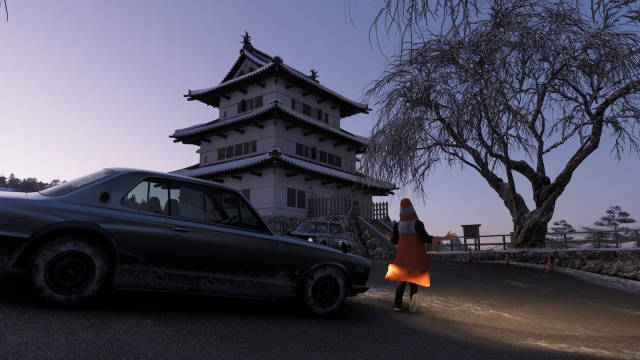
The source article focuses on Series 3 Winter in Forza Horizon 6, with snow-covered roads, point rewards, event-specific cars, tune recommendations, and time-limited challenges. That is useful for players. But for Canadian buyers, there is a bigger question underneath it all: what kind of PC should you actually buy if Forza Horizon 6 is the sort of game you want to play well for the next few years?
At Groovy Computers, we look at trends like this through a different lens. A game such as Forza Horizon 6 is not just another title on a release calendar. It is a signal. It shows how much modern racing games now ask from your CPU, your GPU, your storage speed, your RAM capacity, and even your cooling if you want stable long sessions. Add winter weather effects, dense world detail, traffic, lighting, reflections, online events, captures, background apps, and creator tools, and the difference between an average machine and a properly built custom system becomes very real.
Why does the Forza Horizon 6 Festival Playlist matter for PC buyers in Canada?
Because weekly playlist systems change how people actually play games. You are no longer launching a racing game once in a while for a few quick races. You are checking in every week, completing rotating objectives, trying specific event types, chasing rewards, and often playing online with friends. That means your PC is no longer being judged on whether it can merely launch the game. It is being judged on whether it can deliver a smooth, reliable experience over time.
If your current system stutters when weather effects ramp up, if load times interrupt the flow of events, if your frame pacing drops during crowded races, or if your computer gets loud and hot during extended sessions, then the real issue is not just game performance. It is ownership frustration. And once frustration starts, most buyers begin asking the next practical question: should I keep patching this old machine together, or should I move to a stronger custom PC that will last?
That is where Groovy Computers comes in for buyers across Nova Scotia and Canada-wide. We build systems around real use cases, not generic marketing promises. If the game you care about is Forza Horizon 6, that matters. If your next priority is streaming, editing clips, making thumbnails, or future-proofing for the next major release, that matters too.
What the source guide gets right about Forza Horizon 6
The source article clearly shows the shape of the current seasonal content: Winter conditions, a new set of weekly and daily objectives, road racing, street racing, trial events, stunts, treasure hunts, a photo challenge, and online Horizon activities. It also emphasizes time-sensitive participation. Players are encouraged to jump in now, earn Playlist Points efficiently, and secure seasonal reward cars before the reset.
That urgency is important. Limited-time events change buying behaviour in gaming. Many players suddenly realize their current machine is holding them back right when they want to participate the most. Maybe your older GPU handled last year's games reasonably well at 1080p, but now ray tracing, higher texture settings, improved environmental effects, and heavier CPU loads are exposing weaknesses. Maybe you can still play, but not in the way you want.
And that leads to the buyer question Groovy Computers hears all the time: What gaming PC do I need if I want to enjoy new games like Forza Horizon 6 properly instead of just barely running them?
What do you want your next PC to do for you?
Before talking parts, budgets, or performance tiers, it helps to ask a more useful question: what do you want your next PC to actually do?
Do you want a system that simply runs racing games at good settings?
Do you want a 1440p gaming experience with high frame rates and stronger visual quality?
Do you want 4K racing with better lighting, sharper image quality, and enough GPU headroom for upcoming games too?
Do you want to stream your playlist runs on Twitch or YouTube while keeping gameplay smooth?
Do you want to record footage, edit clips for social media, build highlight reels, or cut together a full YouTube video after your session?
Do you also use Adobe Photoshop, Lightroom, Illustrator, Premiere Pro, DaVinci Resolve, Blender, or other demanding creative software?
If you are a student, content creator, designer, or 3D artist who also games, the smartest buy is usually not the cheapest gaming-only machine. It is a balanced custom build that supports both play and productivity without forcing you into another upgrade too soon.
The real PC demands behind modern open-world racing games
Forza-style racing games often look deceptively easy to run because they can be well optimized. But buyers should not confuse optimization with low demand. A modern open-world racing title still benefits heavily from the right hardware mix.
GPU performance matters more than many buyers expect
If your goal is 1080p with decent settings, you can stay in a more accessible performance tier. But if you want 1440p with higher visual fidelity, smoother frame rates, better effects, and stronger longevity, your graphics card becomes a major factor. And if you are eyeing 4K, ultra settings, or advanced visual features, you are in premium territory whether you planned on it or not.
This is why a custom build matters. Too many off-the-shelf systems look attractive on paper but hide weak GPU choices behind flashy case photos or oversized storage claims. A proper Gaming PC Canada buyer should be looking at balanced allocation: enough GPU power to support your target resolution, enough CPU to avoid bottlenecks, enough cooling for consistency, and enough fast storage to keep the entire experience responsive.
CPU performance still matters in racing games
Open-world systems, AI traffic, physics calculations, background streaming of assets, event loading, online synchronization, and creator multitasking can all lean on the processor. If you are gaming while Discord, browser tabs, capture software, launcher processes, and streaming apps are running, a weak CPU can quietly become the problem even when buyers assume the GPU is the only thing that matters.
So ask yourself: are you buying for today's frame rate average, or for the real way you use your PC?
SSD speed changes the experience more than many first-time buyers realize
Fast NVMe storage improves boot speed, load times, game responsiveness, file transfers, and creator workflows. In a game with weekly repeat visits, seasonal event hopping, and open-world travel, storage speed contributes directly to quality of life. If you also capture gameplay and edit footage, that speed matters twice.
RAM is not the place to cut corners anymore
Modern gaming plus background apps plus creator tools can overwhelm older memory capacities quickly. If you are trying to future-proof your next build and avoid an early upgrade cycle, sensible RAM capacity is one of the easiest ways to improve system longevity.
What PC do I need for 1080p, 1440p, or 4K racing games?
This is one of the most important buying questions, and it deserves a clear answer.
1080p gaming PC tier
If you mainly want smooth 1080p gameplay, strong value, and good results in modern racing games without going all-in on premium pricing, a Budget Gaming PC Canada tier build can still make sense. This is often the right fit for first-time buyers, students, younger gamers, or households that want a capable entry point.
But ask yourself something important: do you only want to play today's games at 1080p, or do you want some breathing room for next year's titles too? If you buy too close to the minimum today, tomorrow's upgrade pressure arrives fast.
1440p gaming PC tier
For many buyers, this is the sweet spot. A 1440p Gaming PC Canada build can deliver the visual step up people actually notice while still being more cost-efficient than a full 4K-focused flagship system. If Forza Horizon 6 is the type of game you enjoy, 1440p often offers the best balance between sharpness, speed, and value.
This is also the tier where gaming starts blending naturally into content creation. If you want to play, record, stream, and edit without feeling boxed in, a mid-to-upper-tier custom build is often the smartest long-term purchase.
4K and premium performance tier
If you want a 4K Gaming PC Canada experience, high settings, stronger ray tracing capability, and headroom for upcoming AAA titles, you are shopping for a premium gaming system. This is the right path for enthusiasts who do not want to compromise much, especially if they are buying a machine to last multiple years.
And here is the question serious buyers should ask: is it cheaper to buy exactly enough today, then upgrade again sooner than expected, or is it smarter to secure a stronger system now while parts and replacement costs remain uncertain?
Are you just gaming, or are you also streaming and creating content?
Many buyers start by searching for a gaming desktop, then realize their actual workflow is broader. If you are planning to stream Forza Horizon 6 playlist events, upload guides, record clips, make thumbnails, or edit long-form videos, your ideal build may not be a standard gaming-only configuration.
A proper Streaming PC Canada or Gaming and Streaming PC Canada setup needs enough CPU and GPU flexibility for both gameplay and encoding. It also benefits from more memory, stronger storage planning, and cleaner thermal design. The difference between a system that games well and a system that games and streams well can be significant once you move beyond casual use.
So what PC do you need for streaming? That depends on whether you are doing basic 1080p streaming, high frame rate gameplay capture, dual-monitor workflows, or simultaneous gaming and editing. If your goal is to create content consistently, a smarter buy is often a Creator PC Canada style build with gaming strength built in.
Could this same kind of build help with video editing, photo editing, and graphic design?
Absolutely. That is one of the biggest reasons buyers come to Groovy Computers instead of settling for generic big-box systems. A thoughtfully configured custom build can support gaming and creator work far better than a one-size-fits-all desktop.
For video editing
If you cut gameplay footage, YouTube videos, or social media content, a Video Editing PC Canada build becomes extremely attractive. Editing workloads benefit from stronger CPUs, capable GPUs, faster storage, and enough RAM to handle larger projects. If you are working in Premiere Pro or DaVinci Resolve, hardware choices directly affect timeline smoothness, render times, and export speed.
Ask yourself: are you buying a PC that only plays games, or one that saves you time every week?
For photo editing
If you also use Photoshop or Lightroom, a gaming-capable custom build can be configured into an excellent Photo Editing PC Canada option. High-resolution image workflows, batch exports, AI tools, and multitasking all benefit from a strong system. The right desktop for photography work is not always wildly different from the right desktop for modern gaming, but the details matter.
For graphic design
Buyers using Illustrator, Photoshop, InDesign, Canva, or other creative tools should think beyond gaming specs alone. A proper Graphic Design PC Canada or Custom Creator PC Canada build should prioritize responsiveness, storage speed, memory capacity, and stable multi-app workflow performance. If you are building branding assets, client work, social graphics, or print materials, reliability matters as much as raw speed.
For content creation
If your daily use blends gaming, editing, design, streaming, and AI-assisted workflows, then you are in true Content Creation PC Canada territory. This is where custom configuration really pays off. Instead of buying one machine for gaming and another for work later, many customers are better served by a single stronger system designed around everything they actually do.
What if you also work in Blender, Unreal Engine, or 3D tools?
Then your needs may extend beyond a gaming tower entirely. Many buyers discover that the same interest in visually advanced games leads naturally into creative 3D work, modding, rendering, animation, or technical workloads.
If you are using Blender, Unreal Engine, Maya, Cinema 4D, AutoCAD, Revit, or similar tools, you may need a 3D Modeling PC Canada, 3D Rendering PC Canada, or Workstation PC Canada build instead of a basic gaming-first setup. These workloads can demand more VRAM, more CPU threads, more RAM, larger project storage, and a more serious cooling and stability strategy.
So ask yourself honestly: is your next desktop just for racing games, or is it also the machine you want to model, render, animate, learn, and earn with?
Which performance tier fits you best?
One of the biggest mistakes PC buyers make is choosing based on a single advertised part instead of their real target experience. Here is a more practical way to think about it.
- Entry/value tier: Best for 1080p gaming, esports, lighter modern titles, first-time buyers, and people with strict budgets who still want a proper desktop foundation.
- Mainstream performance tier: Best for strong 1080p or very capable 1440p gaming, better multitasking, longer relevance, and more comfortable everyday use.
- Enthusiast tier: Best for higher settings at 1440p, stronger streaming, better creator performance, and more future-proofing against upcoming game demands.
- Premium tier: Best for 4K ambitions, ultra settings, demanding AAA releases, creator-heavy workflows, and buyers who want a longer useful lifespan from one purchase.
- Workstation/creator tier: Best for customers whose gaming desktop also needs to handle serious editing, design, rendering, modeling, or professional software use.
If you are unsure where you belong, ask a simpler question: how disappointed will you be if your new system feels limited in 12 to 18 months? That usually tells you whether value, balance, or premium longevity should lead the decision.
Is it better to buy now or wait?
This is one of the most searched buyer questions in the custom PC market, and there is no universal answer. But there is a practical one.
If your current PC already feels weak in the kinds of games you care about, waiting often means paying more later for a problem you are already experiencing today. Component markets can shift. GPU demand can tighten. Memory and SSD pricing can move. New game launches can drive seasonal buying spikes. Software updates can also increase system pressure over time.
And there is another side many shoppers ignore: the cost of waiting is not only financial. It is also time, missed enjoyment, delayed projects, slower exports, more frustration, and another season of trying to squeeze life from hardware that no longer matches your needs.
So should you buy before the next major release, sale window, or demand spike? If you already know the answer is eventually yes, then the smarter question may be this: what am I gaining by delaying, and what am I risking by doing so?
Could financing help you secure a better PC without compromising too much?
For many Canadian buyers, yes. Financing changes the conversation from “what is the cheapest system I can tolerate?” to “what is the right system I can manage responsibly?”
That matters because buying too low can create a false economy. A cheaper machine might save money upfront, but if it pushes you into an early GPU upgrade, more RAM, storage replacement, or a full system swap sooner than expected, it may not have saved much at all.
At Groovy Computers, this is where a customer-first approach matters. If financing up to 4 years helps you move from a bare-minimum desktop into a properly balanced custom build with better longevity, stronger performance, and less upgrade pressure, then it can be a sensible decision. Not because bigger is always better, but because the right system now can be more cost-effective than the wrong system twice.
Should you finance a gaming PC instead of buying the weakest possible tower outright? If the stronger system meaningfully improves lifespan, usability, and your day-to-day experience, that question deserves serious consideration.
Why custom matters more when games and workloads keep getting heavier
A custom system is not just about choosing parts. It is about matching performance to your real target. That is especially important for buyers looking at modern racing games, online seasonal events, creator workflows, and future software demands.
With a custom build, you can prioritize what matters most:
- Gaming-first balance for players focused on frame rate, visual quality, and resolution targets
- Streaming balance for those who want clean gameplay while live broadcasting or recording
- Creator balance for buyers who need editing, design, and multitasking alongside gaming
- Workstation balance for professional applications, rendering, and technical software
- Upgrade-aware planning for people who want to avoid replacing major components too soon
That is the difference between buying a random spec sheet and getting a PC built around your use case. At Groovy Computers, systems are built with rigorous testing and backed by a 1-year warranty, giving buyers more confidence than uncertain marketplace listings or vague mass-produced desktops.
What should Canadian buyers ask before ordering a new gaming or creator PC?
Before you buy, it helps to ask the right questions.
- What games do I actually play now, and what big releases am I planning for next?
- Am I targeting 1080p, 1440p, or 4K?
- Do I care about ray tracing, ultra settings, or high FPS?
- Will I be streaming, recording, or editing my gameplay?
- Do I also use software like Premiere Pro, Photoshop, Lightroom, Illustrator, Blender, or Unreal Engine?
- How soon do I want to upgrade again after this purchase?
- Would financing a stronger system now actually save me from a weaker buy and earlier replacement later?
- Do I want a tested, warranty-backed Canadian custom build instead of a generic off-the-shelf compromise?
These are not small questions. They are the questions that separate a satisfying PC purchase from an expensive near-miss.
Why Groovy Computers is a smart fit for Canadian custom PC buyers
Groovy Computers is built around what many buyers actually want but struggle to find: real guidance, custom build flexibility, Canada-focused service, tested systems, and the ability to choose a machine that matches both current needs and future plans.
Whether you need a custom gaming desktop for Forza Horizon 6, a stronger all-around creator machine, or a workstation-class system for editing and 3D workloads, the value is in getting the balance right. Not overbuying blindly. Not underbuying regretfully. Getting it right.
For buyers in Nova Scotia, Atlantic Canada, and across the country, that combination of custom configuration, stress-aware component selection, rigorous testing, 1-year warranty support, and financing flexibility makes a real difference.
And that matters even more when performance expectations keep climbing.
So what should your next PC be built for?
If reading a Forza Horizon 6 Festival Playlist Challenges Guide has you thinking less about tune codes and more about whether your current computer is keeping up, that is a useful realization. Maybe you need a value-focused 1080p gaming desktop. Maybe you need a 1440p-ready custom system that can handle modern racing games properly. Maybe you need a premium build for 4K gaming, streaming, and editing. Maybe you need a creator or workstation setup because gaming is only one part of your workload.
The important thing is not guessing alone.
If you are asking yourself what PC you need for racing games, what performance tier fits your budget, whether a gaming system can also support content creation, or whether financing a better custom build makes more sense than settling for less, Groovy Computers is exactly where that conversation should continue.
Want help choosing the right build for gaming, streaming, editing, design, or 3D work before prices shift again? Visit GroovyComputers.ca and explore a custom PC that fits what you actually want your next machine to do.
In the end, the seasonal urgency inside this week's playlist mirrors the buying reality outside of it: opportunities are time-sensitive, performance expectations keep rising, and the best moment to secure the right system is usually before your old one forces the issue. If Forza Horizon 6 Festival Playlist Challenges Guide coverage has reminded you how fast modern gaming is moving, let it also help you make a smarter hardware decision now instead of a more expensive one later.
#ForzaHorizon6 #GamingPCCanada #CustomGamingPCCanada #GamingPCBuilderCanada #1440pGamingPCCanada #4KGamingPCCanada #CreatorPCCanada #VideoEditingPCCanada #StreamingPCCanada #CanadianCustomPCBuilders #NovaScotiaTech #GroovyComputers
Groovy Computers | All Rights Reserved


Leave a comment
This site is protected by hCaptcha and the hCaptcha Privacy Policy and Terms of Service apply.