






















Forza Horizon 6 Series 2 Week 2 Trial Guide: What PC Do You Need for Forza Horizon 6 in Canada?
If you landed here after looking for a Forza Horizon 6 Series 2 Week 2 Trial guide, you are probably trying to do two things at once: beat one of the tougher co-op playlist events in the game, and figure out whether your current computer is still good enough for modern racing games. That is exactly where this guide helps. The source strategy is simple and effective: unlock The Trial, use the right 1990s Retro Supercar, tune smart, race cleanly, and help your team. But for Canadian PC buyers, there is a bigger question behind the race line and car choice: is your system ready not just for this week’s event, but for the next wave of driving games, competitive titles, streaming, and creator workloads too?
At Groovy Computers, we look at game guides a little differently. A challenge like The Trial in Forza Horizon 6 is not just about winning one event. It is also a real-world reminder that newer games reward fast loading, stable frame rates, responsive controls, and enough graphics power to keep visual quality high without stutter. If your rig struggles when races get chaotic, when effects stack up, or when you try to stream your gameplay while racing, that is often a sign that it may be time to move toward a stronger custom desktop.
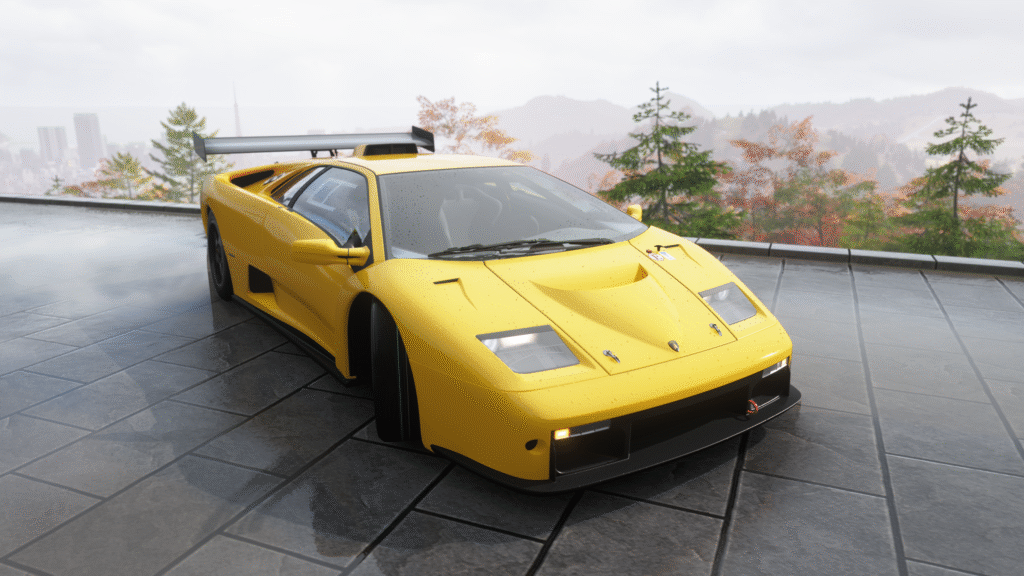
The source material highlights a few key points: The Trial is gated behind progression, teamwork matters more than solo heroics, and the recommended 1997 Lamborghini Diablo SV tuned to A-Class 700 PI is one of the best value picks for this week’s event. That is useful in-game advice. But what should Canadian buyers take from that outside the game? Performance consistency matters. Preparation matters. Using the right tool matters. The same logic applies when choosing your next PC.
What is happening in the Forza Horizon 6 Series 2 Week 2 Trial?
This week’s Trial, “Driving in the 90’s,” is a co-op championship format where a team of human players faces Unbeatable-level AI in a best-of-three race set. The event requires the Gold Wristband and access to later-game content, and it limits players to A-Class 700 PI 1990s Retro Supercars. The reward is the 1999 Lamborghini Diablo GTR, which gives players a strong incentive to complete the event even if they normally skip harder playlist content.
The strategy angle is straightforward. A tuned Diablo SV gives players strong acceleration and speed, helping them get ahead early. Clean starts, fewer mistakes, and tactical blocking against AI opponents can make the difference between a failed run and a win. The source also correctly emphasizes that team outcomes matter more than individual placement. Even if one player finishes first, a weak overall team finish can still cost the event.
Now ask yourself: if you are playing modern open-world racing games with heavier visuals, denser environments, and more online activity, is your current system still delivering smooth performance when it matters most?
Why does a Forza Horizon 6 Trial guide matter when you are shopping for a Gaming PC Canada build?
Because racing games expose weaknesses fast. Open-world streaming, weather effects, high-speed traversal, detailed car models, and sharp environment assets all put pressure on your hardware. If your desktop is old, underpowered, running out of memory, or relying on a weaker graphics card, you may notice inconsistent frame pacing, texture pop-in, slow load times, or background stutter while Discord, recording software, or browser tabs run in the background.
A lot of buyers tell themselves their PC is “fine” because it still launches the game. But is launching enough? Or do you want your next system to feel properly current?
If you are shopping for a Gaming PC Canada setup, a racing title like Forza Horizon 6 is a useful test case. It helps you think beyond minimum requirements and toward the experience you actually want. Do you want smooth 1080p with high settings? Do you want 1440p with higher visual fidelity and stronger long-term value? Are you thinking about ultrawide racing, streaming to Twitch or YouTube, or capturing clips for social content? Those questions change the kind of system you should buy.
What does your next PC need to do for you?
Before talking parts and performance tiers, it helps to get specific. Do you only want a better machine for Forza and other games, or do you want one desktop that can handle everything?
- Gaming only: Forza Horizon 6, shooters, action games, competitive titles, open-world releases
- Gaming plus streaming: OBS, Discord, webcam, overlays, clips, background apps
- Gaming plus editing: highlight reels, YouTube videos, TikTok clips, short-form content
- Creator workflow: Photoshop, Lightroom, Premiere Pro, DaVinci Resolve, Illustrator, After Effects
- 3D or workstation use: Blender, Unreal Engine, rendering, asset work, CAD-style workloads
If you are only asking, “Can my PC run Forza Horizon 6?” you may miss the better buying question: What do I want my next PC to do for me over the next three to five years?
What PC do I need for Forza Horizon 6 at 1080p, 1440p, or 4K?
This is where many buyers either overspend without a plan or underspend and regret it. The right answer depends on your target resolution, refresh rate, visual settings, and whether you multitask while gaming.
1080p gaming: Who is this for?
If you mainly want smooth gameplay in racing games, shooters, esports titles, and mainstream AAA games at 1080p, a balanced entry-to-midrange custom gaming system makes sense. This is a strong fit for first-time PC buyers, students, and players moving from an older desktop or console. A good 1080p system should not just “run” Forza Horizon 6. It should also feel responsive in menus, load quickly, and maintain consistency in dense environments.
Are you trying to stay on budget, but still want enough power to avoid replacing your PC too soon? That is where a properly configured custom build matters more than chasing the lowest sticker price.
1440p gaming: Is this the smart sweet spot?
For many Canadian gamers, 1440p is the best value tier. It gives a major image-quality upgrade over 1080p while staying more realistic than a full 4K target for price-conscious buyers. If you want stronger visual detail in Forza Horizon 6, smoother racing on a high-refresh display, and enough graphics headroom for newer titles, a 1440p-focused system is often the sweet spot.
Do you want your PC to feel like a clear step up, not just a minor upgrade? If yes, this is often the tier to consider first.
4K gaming: Do you really need it?
4K looks fantastic in racing games, especially with detailed vehicles, lighting, landscape draw distance, and rich environmental design. But 4K also raises the hardware bar substantially. If you want ultra settings, stronger ray tracing support in supported games, and high frame rates, you are moving into premium GPU territory.
So ask the honest question: do you want maximum image quality today, or do you want the strongest balance of price and longevity? A high-end build can absolutely be worth it, but only if it matches how you actually play.
Why open-world racing games can reveal when it is time to upgrade
Unlike lighter competitive games, modern racing titles can hit several hardware areas at once. They can demand graphics horsepower, fast storage for streaming assets, enough system memory for background tasks, and CPU stability for simulation, AI, and world management. If your current PC struggles in any of these areas, the experience can feel worse than a simple frame-rate number suggests.
Common warning signs include:
- Long load times before races or when moving through the map
- Microstutter during high-speed driving
- Frame drops when weather, traffic, or effects intensify
- Poor performance while recording or streaming
- System slowdowns when Discord, Chrome, launchers, and capture tools are open
- Running out of storage space on a slow older drive
If any of that sounds familiar, the issue may not be “the game is badly optimized.” It may be that your hardware is now below the experience level you actually expect.
Should you buy a budget gaming desktop or move up one performance tier?
This is one of the most important buying decisions. A lot of buyers start by looking for the cheapest path into PC gaming. That is understandable. But cheaper does not always mean better value.
If you buy a system that only barely handles current games, what happens when the next major release pushes harder on VRAM, CPU threads, or storage speed? What happens when you decide to stream, edit clips, or hook up a 1440p monitor later? Many buyers end up paying twice: once for the budget system, and again for the upgrade they need much sooner than expected.
That is why moving up one sensible tier can often be the better long-term decision. The goal is not overspending. The goal is buying enough performance to stay happy longer.
How do Canadian buyers decide which PC tier fits best?
Here is a practical way to think about it when shopping with Groovy Computers.
Entry tier: Good for value-focused gaming
Best for buyers who want 1080p gaming, strong everyday speed, and a better overall experience than an aging desktop. This tier works well if your focus is gaming first and light multitasking second. It is ideal if you want a budget gaming PC Canada style build without dropping into weak, short-lived specs.
Ask yourself: are you mainly playing racing games, esports titles, and general AAA releases without heavy streaming or editing?
Midrange tier: Best for most gamers
This is often the strongest all-around choice. It suits 1080p high-refresh users and many 1440p gamers, especially those who want a more premium feel in newer games. It also makes more sense if you use Discord, browser tabs, background launchers, and occasional recording while gaming.
If you keep wondering, “What gaming PC do I need for 1440p gaming?” this is usually where the answer starts to get comfortable rather than compromised.
Performance tier: Gaming plus streaming and editing
If you want to race in Forza Horizon 6, stream your runs, record clips, edit videos, and keep your machine relevant longer, a stronger CPU/GPU combination is worth considering. This level is ideal for buyers who are half gamer, half creator. It is also where a gaming and streaming PC Canada build becomes more attractive than a gaming-only machine.
Do you want one PC that can game at a high level and also handle OBS, Premiere Pro, and fast exports? If yes, this tier often makes the most sense.
High-end tier: Premium gaming and creator headroom
This tier is for buyers targeting 1440p ultra or 4K gaming, premium visuals, demanding multitasking, heavier editing, or advanced creator work. If you are the kind of buyer who hates compromise and wants a machine with more long-term headroom, this is where custom configuration becomes especially important.
Would you rather buy one stronger machine now and keep it longer, instead of settling for a lower tier and upgrading earlier?
What if you also stream, edit videos, or create content?
That changes the buying conversation quickly. A lot of gaming buyers are not just gamers anymore. They clip highlights, upload race setups, stream events, edit YouTube content, design thumbnails, or run side projects that need more than a simple gaming desktop.
If that sounds like you, then your next machine may be less of a pure gaming system and more of a content creation PC Canada or creator PC Canada build. That means thinking about more than frame rates.
- Do you edit in Premiere Pro or DaVinci Resolve?
- Do you create thumbnails in Photoshop or Canva?
- Do you use Illustrator for branding or overlays?
- Do you want faster exports and smoother timeline playback?
- Do you want enough RAM to game, stream, and multitask comfortably?
A stronger custom desktop can save time every single day, not just add FPS. For many buyers, that time savings is more valuable than any benchmark chart.
Is a gaming PC good for video editing, photo editing, and graphic design?
Sometimes yes, but only if it is built properly. A good gaming system can overlap well with creator workloads, especially if it includes a strong CPU, enough RAM, fast SSD storage, and a capable GPU. But not every gaming desktop is automatically a good creator machine.
If your workflow includes PC for Adobe Premiere Pro Canada style use, 4K timeline editing, Photoshop, Lightroom, or Illustrator, then balancing the parts becomes critical. Too little memory, too little storage, or a weak processor can make a “gaming-first” machine feel frustrating in creative work.
That is one of the biggest advantages of buying from a custom builder. Instead of settling for a generic one-size-fits-all box, you can match the system to how you actually use it.
What if your next system needs to handle Blender, Unreal Engine, or workstation use too?
Not every reader here is only shopping for games. Some are using game guides as part of a broader upgrade decision because their PC also handles school, freelance work, rendering, or technical software. If that is you, the right fit may be closer to a 3D modeling PC Canada or workstation PC Canada configuration than a basic gaming desktop.
Do you need your next machine to do any of the following?
- Render scenes in Blender
- Work in Unreal Engine
- Run heavier multitasking or asset workflows
- Handle large files, multiple apps, and long sessions reliably
- Support professional or semi-professional work alongside gaming
If yes, then future-proofing becomes more important. Gaming performance still matters, but system stability, cooling, RAM capacity, and storage layout matter just as much.
Why timing matters: should you buy now or wait?
This is always one of the most searched questions in PC buying. And the truth is, there is no universal answer. But there is a practical answer.
If your current system is already holding back the games or workloads you care about, waiting can cost you more than money. It can cost you time, enjoyment, performance, and flexibility. It can also push you into worse buying conditions later if specific GPU tiers, memory pricing, or storage costs tighten.
Ask yourself a few useful questions:
- Are you buying before a major game release or busy gaming season?
- Are you planning to start streaming or creating content soon?
- Is your current PC forcing lowered settings, reduced frame rates, or skipped creative projects?
- Would delaying the purchase just mean buying a replacement under more pressure later?
Many buyers wait for a “perfect” time that never really arrives. A better strategy is to buy when your current machine is no longer a good fit for your goals.
Could financing help you secure a stronger system before replacement costs rise?
For some customers, yes. Financing is not about buying irresponsibly. It is about matching your purchase structure to your actual needs. If a slightly stronger system today helps you avoid an early upgrade, saves time in editing, improves stream stability, or keeps you happier for longer, monthly payments can be the more rational path.
That is especially true if you are comparing a too-cheap build against a more balanced system that better matches modern game and software demands. Would you rather settle now and replace sooner, or spread the cost of a better machine over time and enjoy the stronger experience from day one?
Groovy Computers offers options that can help Canadian buyers think more strategically about the purchase. If you are weighing whether to stretch into a better gaming desktop, creator system, or workstation, this is exactly the kind of question worth asking before checkout.
What should you look for in a custom gaming PC for Forza and modern games?
You do not need to obsess over every single component model to make a good decision, but you should care about overall system balance. A proper custom system for modern racing games should focus on:
- Graphics strength: Enough GPU power for your target resolution and settings
- CPU headroom: Smooth open-world performance, strong general responsiveness, better multitasking
- Memory capacity: Enough RAM for modern gaming and background applications
- Fast SSD storage: Faster loading, better overall snappiness, more room for large games
- Cooling and airflow: Better stability over long sessions
- Upgrade path: A machine that will not box you in too soon
This is where many off-the-shelf systems disappoint. They may look good on paper but cut corners in cooling, power delivery, storage, motherboard quality, or future upgrade flexibility.
Why does a custom build make more sense than a random generic prebuilt?
Because your needs are not generic. Maybe you want a system mainly for racing games and shooters. Maybe you want gaming plus streaming. Maybe you want one machine for Forza, Photoshop, Premiere Pro, and Blender. Those are not the same buyer profiles, and they should not be forced into the same configuration.
A proper custom build gives you a better fit in several ways:
- Parts chosen for your actual workloads
- Fewer compromises in cooling and power balance
- Cleaner upgrade planning
- Better reliability than mystery-spec mass systems
- More confidence when spending real money on a long-term purchase
If you have ever asked, “Custom PC vs prebuilt PC Canada?” the answer often comes down to control, quality, and long-term value. A custom machine can be the smarter buy when it is built by people who understand how gamers and creators actually use their systems.
Why Canadian buyers should care about testing, warranty, and support
Performance is only one part of the story. Reliability matters too. If you are spending on a new desktop, you want confidence that it has been assembled properly, tested properly, and backed properly. That matters even more when you use the machine for gaming, content creation, school, or work and cannot afford random instability.
Groovy Computers is positioned for buyers who want more than a parts list. Canadian customers want a builder they can trust, with systems that are put together carefully, stress tested, and supported with a 1-year warranty. That kind of confidence matters whether you are in Nova Scotia, elsewhere in Atlantic Canada, or ordering for shipping across the country.
Would you rather guess your way through a risky purchase, or buy from a Canadian builder focused on dependable custom systems?
What kind of buyer should choose a Groovy Computers build?
Groovy Computers is a strong fit if you see yourself in any of these groups:
- You want a custom gaming desktop for modern titles instead of a weak entry-level compromise
- You want a system that can handle gaming and streaming without feeling overloaded
- You need a creator PC for editing, graphics, and content work alongside gaming
- You need a workstation-style build for heavier software and future expandability
- You want a Canadian custom PC builder instead of a generic marketplace listing
- You want help choosing the right tier, not just the cheapest listed machine
That matters because many buyers are not really asking for “a PC.” They are asking for a solution to a performance problem. Maybe your old rig cannot keep up with newer games. Maybe exports take too long. Maybe your stream quality dips when you game. Maybe your storage is full and your patience is too. A custom system solves those pain points more effectively when the build is matched to the real problem.
What gaming PC do you need if Forza Horizon 6 is just the start?
This is the real question. If you are reading a weekly challenge guide now, what will you be playing six months from now? What will you want your system to do next year?
If your answer includes more open-world games, more competitive titles, more high-refresh gaming, more streaming, or more editing, then your buying strategy should account for that now. Building only for the game in front of you is short-term thinking. Building for the next phase of your gaming and creator life is smarter.
Do you want a machine that only survives the moment, or one that makes the next few years easier?
Need help choosing the right PC for gaming, streaming, editing, or workstation use?
If you are not sure whether you need a budget gaming desktop, a stronger 1440p system, a premium RTX-focused build, a creator setup, or a workstation-style machine, that is exactly when expert help matters. The right answer depends on your games, your software, your monitor, your budget, and how long you want the system to stay relevant.
Want help narrowing it down? Visit GroovyComputers.ca and start with the question that actually matters: what do you want your next PC to do for you? If you want a better racing experience in Forza Horizon 6, smoother AAA gaming, stronger streaming performance, faster editing, or a more future-ready desktop without the guesswork, Groovy Computers is built for exactly that kind of buyer.
Final thoughts on the Forza Horizon 6 Series 2 Week 2 Trial guide
The in-game takeaway is clear: unlock the event, run an eligible and properly tuned car, drive cleanly, help your team, and avoid costly mistakes. The bigger real-world takeaway is just as useful. A challenge like this reminds players how much better modern games feel on the right hardware. If your current desktop is struggling, forcing compromises, or no longer matching your goals, it may be time to upgrade with a system built around how you actually play and create.
If this Forza Horizon 6 Series 2 Week 2 Trial guide got you thinking about smoother gaming, better visuals, faster loading, stronger multitasking, or a more future-proof desktop, now is a good time to explore your options. Whether you need a gaming machine, streaming build, creator desktop, or workstation-class system, Groovy Computers gives Canadian buyers a smarter path forward with custom builds, rigorous testing, financing options up to 4 years, and support you can trust.
#ForzaHorizon6 #ForzaHorizon6TrialGuide #GamingPCCanada #CustomGamingPCCanada #GamingAndStreamingPCCanada #CreatorPCCanada #WorkstationPCCanada #CanadianCustomPCBuilders #NovaScotiaPCBuilder #GroovyComputers
Groovy Computers | All Rights Reserved



Leave a comment
This site is protected by hCaptcha and the hCaptcha Privacy Policy and Terms of Service apply.