































Grand Theft Auto VI 60 FPS Rumours: What Canadian Buyers Should Know Before Choosing a Gaming PC
The latest Grand Theft Auto VI 60 FPS rumours have sparked exactly the kind of question many players in Canada are already asking: if one of the biggest open-world games ever made may struggle to hit higher frame rates on current consoles, what kind of system should you buy if you want smoother gameplay, stronger graphics, and more flexibility over the next few years? For anyone planning a new setup, this is no longer just a console news story. It is a buying signal. It is a reminder that major releases can quickly expose hardware limits, and that choosing the right custom PC now can help you avoid another upgrade too soon.
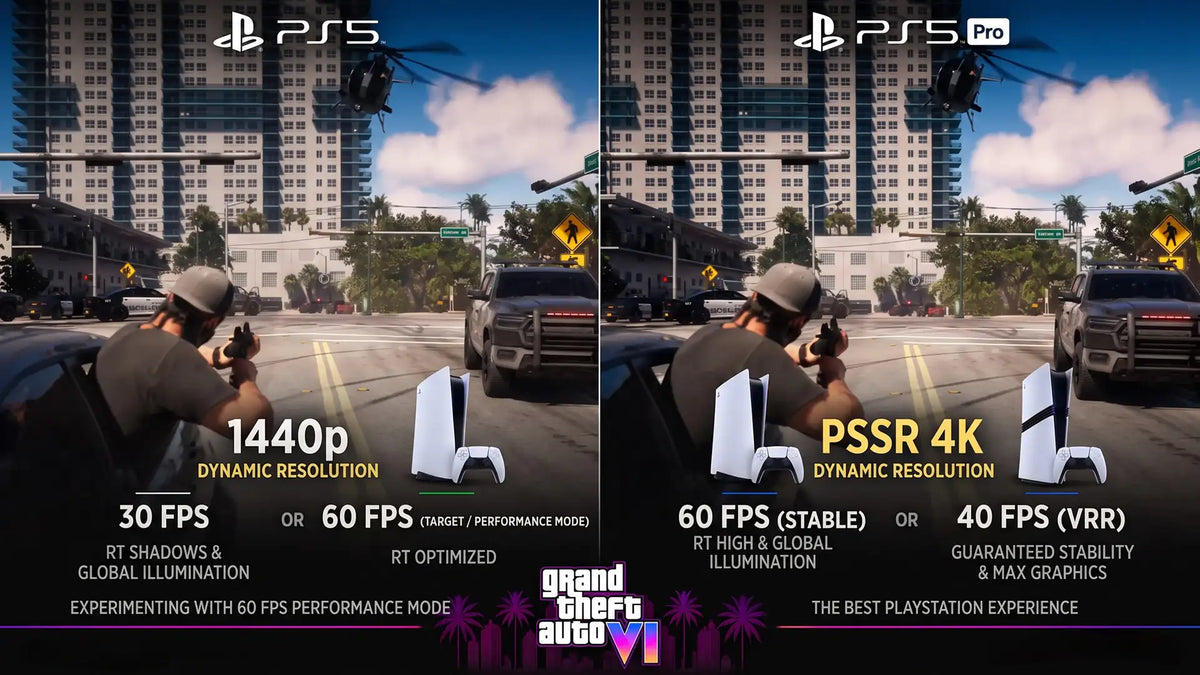
According to the source material, unconfirmed reports suggest that Rockstar may be testing a performance mode that could allow Grand Theft Auto VI to run at 60 frames per second on the base PlayStation 5. The idea is that dynamic resolution scaling, reductions in scene complexity, and adjustments to ray-traced lighting could help the game reach a higher frame rate in at least some form. At the same time, the source also makes it clear that none of this has been officially confirmed, and that 30 FPS at launch remains a realistic possibility.
That matters because Grand Theft Auto VI is exactly the kind of game that pushes both GPU and CPU resources hard. Huge environments, advanced lighting, dense traffic, crowds, simulation systems, and streaming world assets all put pressure on hardware in ways that simpler games do not. If a flagship release needs aggressive optimization to chase 60 FPS on fixed console hardware, what does that mean for Canadian gamers who want higher settings, stronger image quality, smoother frame pacing, streaming headroom, or long-term upgrade flexibility?
It means your next purchase should be based on the games and workloads you actually want to run, not just on a low starting price.
Why the GTA VI performance conversation matters beyond console rumours
Even if the rumoured 60 FPS mode never appears exactly as described, the core message is still important. Big new releases are getting heavier. Open-world games are getting more demanding. Ray tracing continues to grow. Upscaling technologies matter more than ever. And the days of buying a weak machine and expecting premium performance for years are fading fast.
For buyers in Canada, this is especially relevant because hardware pricing can shift quickly when demand rises around major launches. A game like Grand Theft Auto VI does not just sell copies. It moves monitors, GPUs, CPUs, storage, RAM, controllers, and full systems. It influences buying behaviour across the market.
So ask yourself a practical question: are you trying to buy the cheapest machine that can launch a new game, or are you trying to buy a system that will still feel right six months and two major releases later?
That is where a properly matched custom build starts to make more sense than a generic box with mismatched parts.
What does a Grand Theft Auto VI style game actually demand from hardware?
Games in this category tend to hit several performance areas at once. GPU power matters for resolution, ray tracing, texture quality, shadows, reflections, and image reconstruction. CPU strength matters for AI behaviour, traffic, crowd simulation, streaming world data, and maintaining frame consistency. Fast SSD storage matters for loading and asset delivery. RAM matters for modern background usage, multitasking, and preventing bottlenecks in heavier scenes.
In other words, this is not just about one graphics card number on a spec sheet.
If you are shopping for a Gaming PC Canada buyers can actually rely on for new AAA titles, the smartest move is to build around the experience you want:
- Do you want solid 1080p performance and great value?
- Do you want 1440p with higher settings and room for upcoming games?
- Do you want 4K, ray tracing, and premium visual quality?
- Do you also plan to stream, record gameplay, or edit clips for YouTube or TikTok?
- Do you want your PC to cover gaming now and creative work later?
Those are the questions that matter more than reacting to a single rumour.
Could GTA VI be better on PC for performance-focused players?
For many gamers, yes, that is the real takeaway. Console hardware is fixed. A gaming desktop gives you options. You can target higher frame rates, tune settings, upgrade later, choose your monitor resolution, select more storage, increase memory, and build around your own priorities instead of accepting one default performance profile.
If you care about smoothness, one huge benefit of PC is not just maximum FPS. It is choice. A well-balanced custom gaming PC can let you decide whether you want competitive settings for higher refresh gameplay, higher visual quality for cinematic single-player experiences, or a middle ground that feels right for your display.
And if you are already wondering what PC do I need for 1440p gaming or what PC do I need for 4K gaming, this is exactly the moment to think ahead instead of buying for the bare minimum.
What do you want your next PC to do for you?
Before you compare price tags, take a step back and define the job.
Do you want a machine mainly for open-world gaming? Do you want a system that can handle shooters, racing games, esports, and story-driven AAA releases without compromise? Do you want to stream on OBS while gaming? Do you plan to capture footage and edit it later? Do you want one system for gaming at night and creative work during the day?
Many buyers start by searching for a gaming desktop and end up realizing they also need a Creator PC Canada setup in practice. That changes the right CPU, RAM, storage, and cooling decisions dramatically.
If your next computer needs to game, stream, and edit, buying too low now often means spending more later.
Which performance tier fits you best?
Entry tier: for 1080p players who want value without wasting money
This tier makes sense if your focus is esports, older AAA titles, lighter multiplayer games, and sensible settings in new releases. If your question is how much should I spend on a gaming PC and you are trying to stay disciplined, an entry-level custom build can still be a smart choice, but only if it is balanced properly.
This is often the right lane for someone who wants a Budget Gaming PC Canada shoppers can actually grow with, rather than a weak system that feels outdated immediately.
Ask yourself: are you comfortable lowering settings in future blockbusters, or will that frustrate you a few months from now?
Midrange tier: the sweet spot for 1440p and new AAA games
For many Canadian buyers, this is the smartest value point. A strong midrange system is often the sweet spot for modern open-world titles, higher refresh 1080p, and very enjoyable 1440p gaming. It is also a much better place to be if a game launches heavier than expected.
If Grand Theft Auto VI, future action games, and ray tracing-enabled titles are on your radar, this is often where buyer regret starts to drop. You are no longer buying on hope. You are buying with margin.
Are you the kind of player who wants to avoid turning settings down every time a new game arrives? If yes, midrange may be your real starting point.
High-end tier: for 4K, ray tracing, streaming, and longer-term confidence
If you want premium image quality, stronger ray tracing performance, higher refresh targets at 1440p, or a machine built to age more gracefully, a 4K Gaming PC Canada class build or premium RTX-based configuration makes far more sense. This is also where gaming and content creation start to overlap very naturally.
High-end systems are not only for enthusiasts chasing bragging rights. They are also for buyers trying to avoid an early replacement cycle. If you know you will want heavier games, streaming, editing, and stronger multitasking, stretching to the right build once can be cheaper than upgrading in stages.
Would you rather buy one stronger system now or buy twice because the first one was underpowered?
What if you also stream, record, or create content?
That is where this conversation becomes even more important. A demanding open-world game can already use a lot of system resources. Add OBS, browser tabs, Discord, overlays, background applications, webcam input, and recording, and weak systems start to show their limits quickly.
If you are planning to stream your gameplay, upload clips, or build a channel around major releases, you may not just need a gaming PC. You may need a Gaming and Streaming PC Canada buyers can trust under load.
That changes the recommendation toward:
- Stronger multi-core CPU choices
- More RAM for multitasking and capture workflows
- Fast NVMe SSD storage for footage and game installs
- Reliable cooling for sustained sessions
- A GPU with modern encoding advantages for smoother streaming
So ask yourself honestly: do you just want to play, or do you want to play, stream, record, edit, and post? If your answer includes content creation, your build should reflect that from the start.
Is a gaming PC also good for video editing, photo editing, and graphic design?
Sometimes yes, but only if it is configured properly.
A strong gaming-focused desktop can also become a very effective Video Editing PC Canada customers rely on, especially when paired with the right CPU, memory, storage layout, and GPU acceleration. The same goes for Photoshop, Lightroom, Illustrator, and other Adobe Creative Cloud workflows.
If you are a student, freelancer, designer, creator, or business owner, ask a more useful question than “can it run the game?” Ask: can it run my whole week?
Maybe you game on weekends, but during the week you edit 4K video, batch-export photos, build marketing assets, work in Canva, lay out print files, or manage social content. In that case, a custom build designed around mixed use is a much better fit than a one-dimensional bargain gaming tower.
For video editing
If you work in Premiere Pro, DaVinci Resolve, After Effects, or CapCut, your PC needs enough CPU power, GPU acceleration, RAM, and scratch storage to keep timelines responsive and exports efficient. If you have been asking what PC do I need for video editing, the answer depends on whether you are editing 1080p clips occasionally or working with 4K footage regularly.
For photo editing
For Photoshop and Lightroom users, storage speed, RAM capacity, CPU responsiveness, and display quality all matter. A good Photo Editing PC Canada build should feel smooth with RAW files, AI tools, and larger catalogs. If photography is part of your workflow, there is no benefit in buying a machine that only looks good in gaming ads.
For graphic design
Designers working in Illustrator, InDesign, Photoshop, Canva, or broader Adobe Creative Cloud workflows benefit from fast storage, enough RAM for multitasking, and quiet, reliable operation. If that sounds like you, a Graphic Design PC Canada style build may be more appropriate than an entry gaming setup.
For 3D modeling and rendering
If your work includes Blender, Unreal Engine, CAD, animation, or rendering, you are likely in workstation territory. That means your ideal system may need more memory, more cores, or stronger GPU rendering capability than a game-first build. If you are wondering is a gaming PC good for Blender, sometimes it is, but not always in the most efficient way.
Why Canadian buyers should think about timing now
Whenever one of the world’s biggest game launches gets closer, hardware attention rises with it. Buyers begin upgrading. Inventory tightens in some categories. Performance conversations intensify. And people who waited too long often find themselves choosing from what is left instead of what they actually wanted.
Canadian buyers also have to think about the realities of exchange pressure, import costs, part availability, and periodic swings in GPU, RAM, and SSD pricing. You do not need to panic-buy, but you also should not assume today’s build cost will remain flat indefinitely.
Ask yourself: if your current system already struggles with newer games, what happens when a title like GTA VI arrives and raises the baseline again?
Waiting can make sense if your current PC is genuinely strong and well-balanced. But if you are already compromising on settings, dealing with storage limitations, or postponing upgrades because you know the machine is behind, waiting often just shortens the useful life of your next purchase window.
Should you buy now or wait for better pricing?
This is one of the most common buying questions, and the answer depends on your situation.
If your current system handles everything you play and create comfortably, you can afford to be selective. But if you are planning around a major release, entering a busy creator season, starting school, launching a channel, or trying to replace a system that is already frustrating you, delaying may not improve your outcome.
Here are some signs buying sooner may be smarter:
- Your current PC struggles in newer games at the resolution you actually use
- You want to move from 1080p to 1440p or 4K soon
- You plan to stream or edit and your system is already near its limits
- You need more storage, more RAM, and a better GPU all at once
- You want to lock in a stronger build before demand shifts pricing upward
So, is it better to buy a gaming PC now or wait? If your real-world needs are already here, waiting does not always save money. Sometimes it just delays performance while replacement costs keep moving.
Could financing help you secure the right build instead of settling?
For many buyers, this is the part that changes the decision. Instead of choosing a weaker system because of a short-term budget ceiling, financing can make it possible to buy a more appropriate long-term machine now.
If a stronger GPU, better CPU, extra RAM, or larger SSD means the difference between replacing your PC sooner and keeping it longer, then monthly payments may be the more rational path. This is especially true if your system is part gaming machine, part creator tool, part school or work desktop.
A lot of customers ask variations of the same thing: should I finance a better PC instead of buying a cheaper one? If the better system prevents an early upgrade, handles new games more comfortably, and supports your wider workload, the answer can absolutely be yes.
That is where flexible terms matter. Groovy Computers offers options including financing up to 4 years, which can help buyers in Canada move into a stronger tier without trying to absorb the full cost at once.
What kind of buyer should choose which kind of Groovy Computers build?
If you want a first serious gaming setup
You may be looking for a value-focused desktop that can handle today’s games properly without overspending. In that case, a balanced entry or lower-midrange custom gaming build is often the best starting point. The goal is not just to launch games. The goal is to enjoy them.
If you want a GTA-ready AAA gaming machine
You are likely a midrange or upper-midrange buyer. You care about 1440p, stronger settings, smoother frame rates, and enough headroom for demanding titles. This is often the right zone for players asking for the best balance between price and performance.
If you want premium visuals and a longer runway
You likely fit a high-end gaming build with stronger GPU horsepower, better cooling, and a component mix chosen for sustained performance. If you are chasing ray tracing, high refresh, large game libraries, and less compromise, this is where buying up a tier can pay off.
If you also edit, stream, or create content
You should be considering a hybrid gaming and creator configuration. More RAM, smarter storage planning, and a CPU chosen for multitasking become much more important. This kind of customer often gets more long-term value from a mixed-use custom build than from a basic gaming-first system.
If you do professional 3D or workstation tasks
You may need a dedicated Workstation PC Canada solution rather than a mainstream gaming desktop. If your day includes Blender, Unreal, CAD, or rendering, build decisions should prioritize workload stability and efficiency, not just game benchmarks.
Why custom builds matter more when game demands keep rising
When requirements tighten, part matching matters. Cooling matters. Power supply quality matters. Storage planning matters. BIOS setup, memory compatibility, fan curves, airflow, and stress testing all matter more than they did when games were easier to run.
A custom build gives you control over where your money goes. Instead of paying for flashy marketing or weak component choices hidden inside a generic case, you can put budget into the parts that actually affect your experience.
That is especially important if you want to avoid common mistakes like:
- Pairing a strong GPU with too little RAM
- Buying a fast CPU but weak cooling
- Getting minimal storage when modern game sizes are huge
- Choosing a system with poor upgrade paths
- Overbuying one part while bottlenecking another
When buyers ask custom PC vs prebuilt PC Canada, the best answer is usually the one that aligns hardware to actual use. That is where experienced Canadian custom PC builders provide real value.
Why Groovy Computers fits this moment for Canadian buyers
Groovy Computers is built for exactly the kind of customer this news cycle creates: the buyer who wants more than vague performance promises. Whether you need a gaming desktop, a streaming and editing machine, or a custom workstation, the goal is the same: match the system to the workload, build it properly, and deliver confidence with real support.
For customers across Canada, that means access to custom builds designed around how you actually use your machine, not just a generic one-size-fits-all spec list. It also means rigorous testing, thoughtful component selection, and a 1-year warranty for added peace of mind.
If you are in Nova Scotia, Atlantic Canada, or ordering from elsewhere in the country, trust matters. A Canadian Custom PC Builders approach matters. You want a system that is assembled with care, stress tested properly, and supported by a company that understands what modern buyers need from both performance and service.
Questions to ask before you buy your next PC
Before you commit, ask yourself these practical questions:
- What games do I want to play over the next 12 to 24 months?
- Am I targeting 1080p, 1440p, or 4K?
- Do I care about ray tracing or mainly raw frame rate?
- Will I be streaming or recording gameplay?
- Do I also need this system for video editing, photo editing, or graphic design?
- Do I want enough performance headroom to avoid upgrading too soon?
- Would financing a stronger build now make more sense than replacing a weaker one early?
- Do I want help choosing the right custom build from a Canadian company?
If those questions sound familiar, you are already beyond impulse buying. You are in decision mode, and that is exactly when expert guidance matters most.
What should you do if GTA VI is the game that finally pushes you to upgrade?
Use the moment well. Do not just shop by hype. Shop by fit.
If Grand Theft Auto VI is making you think seriously about frame rate, resolution, image quality, and future game readiness, that is a good thing. It means you are thinking ahead before launch pressure and market demand distort your options. Whether your goal is a budget-friendly entry point, a stronger 1440p machine, a premium RTX-based gaming rig, or a hybrid creator setup, the smartest move is to buy for your real use case now.
Want help deciding what your next PC should actually do for you? Visit GroovyComputers.ca to explore custom build options, compare performance tiers, and find out whether a gaming PC, creator PC, or workstation build makes the most sense for your budget and goals. If you are asking what gaming PC you need, whether financing makes sense, or how to avoid upgrading too soon, Groovy Computers is the right place to start.
In the end, the Grand Theft Auto VI 60 FPS rumours matter because they highlight a bigger truth: new games are raising expectations, and weaker systems get exposed fast. For Canadian buyers who want better performance, more flexibility, and a PC that is ready for what comes next, this is a smart time to think carefully, buy strategically, and choose a custom build that fits both today and tomorrow.
#GrandTheftAutoVI #GTA6 #GamingPCCanada #CustomGamingPCCanada #GamingPCBuilderCanada #GamingPCForNewGames #1440pGamingPCCanada #4KGamingPCCanada #CreatorPCCanada #VideoEditingPCCanada #WorkstationPCCanada #CanadianCustomPCBuilders #NovaScotiaTech #GroovyComputers
Groovy Computers | All Rights Reserved



Leave a comment
This site is protected by hCaptcha and the hCaptcha Privacy Policy and Terms of Service apply.