



































Physical Games Are Fading, but Your Gaming PC Buying Strategy Matters More Than Ever in Canada
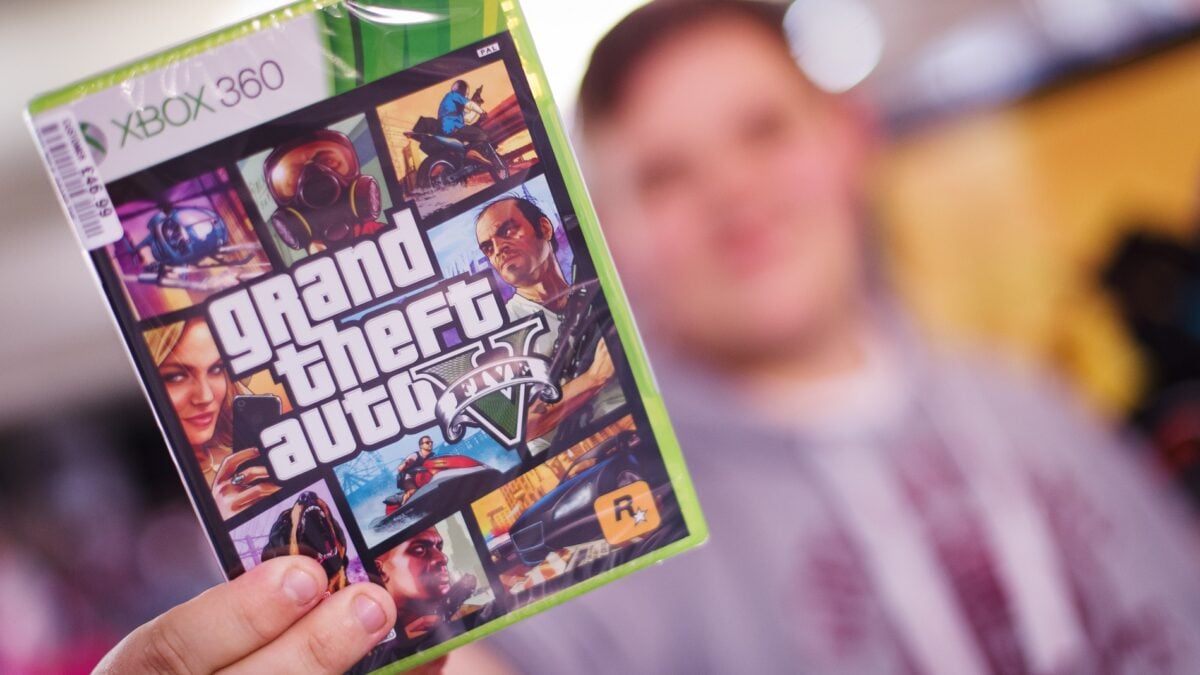
The latest debate around physical games has become much bigger than discs alone. When Dan Houser, known for his work on major open-world releases including Grand Theft Auto V and Red Dead Redemption 2, said companies should provide discs if players want them, he touched a nerve that goes far beyond nostalgia. For Canadian buyers, this shift toward digital-only gaming raises a more practical question: if the industry is changing how games are delivered, what should your next Gaming PC Canada setup look like so you are ready for what comes next?
That is where this conversation gets important for real buyers. Digital-first game launches put more pressure on storage, download speeds, patch management, long-term system performance, and future-proof hardware choices. If you are planning your next setup, are you only thinking about whether a game comes on disc, or are you also thinking about whether your system can handle giant installs, day-one updates, ray tracing, high refresh rates, streaming, recording, and the next wave of AAA releases?
For Groovy Computers, this is not just a culture story. It is a buying guide moment. As physical media declines, the focus shifts directly onto the machine you use every day. A stronger custom PC becomes more valuable when your game library is digital, your storage needs are growing, and new releases demand more from your hardware.
What Dan Houser’s Comments Get Right About Physical Games
The most balanced part of the discussion is simple: if players want physical media, companies should offer it. That view respects customer preference. Some players want ownership they can hold, collect, display, trade, or preserve. Others care more about convenience and like instant downloads, updates, and portability across devices.
Houser also acknowledged something many gamers already know: digital distribution makes it easier for companies to update and fix games. Whether players love that reality or not, it has become a major part of modern gaming. Huge launches now depend on patches, ongoing content updates, performance improvements, and online services.
So what does that mean for someone shopping for a new gaming or creator system in Canada? It means the hardware decision matters even more than before. If the game is digital-only, your PC is no longer just the place where you play. It is also your game library, your install space, your patching platform, your streaming station, your content creation device, and in many cases your long-term entertainment hub.
Why Should Canadian Buyers Think Differently About the Move to Digital-Only Gaming?
Canadian customers deal with a different buying environment than many headline-driven gaming stories reflect. Hardware pricing pressure, exchange-rate effects, shipping realities, regional availability, and replacement costs can all hit harder here. That means waiting too long for the “perfect time” to buy can backfire if GPU demand tightens or storage and memory costs rise.
If game launches continue trending toward large digital downloads, one of the first upgrade pain points will be storage. If your current system only has a smaller SSD, how quickly will it fill up once you install several modern AAA games, capture footage, store mods, and keep creator apps on the same drive?
Another Canadian consideration is value over time. Are you trying to get by with a machine that barely meets today’s needs, only to replace it sooner? Or would it make more sense to move into a properly balanced custom build now, especially if financing helps you avoid compromising too hard on GPU power, RAM, or SSD capacity?
What Do You Want Your Next PC to Do for You?
This is the question that matters most, and it is the one too many buyers skip.
Do you want a PC mainly for big upcoming games? Do you want high-FPS esports performance at 1080p? Are you aiming for 1440p ultra settings? Do you want 4K gaming with ray tracing? Are you planning to stream on Twitch or YouTube while gaming? Do you also edit videos, cut short-form clips, design thumbnails, work in Photoshop, or render 3D scenes in Blender?
If you are asking, What gaming PC do I need? the answer depends less on brand hype and more on workload. A good buying decision starts with what you expect the system to handle over the next several years, not just what you are playing this month.
That is why Groovy Computers approaches buying guidance from a practical angle. A system for competitive shooters is not the same as a system for cinematic open-world games. A gaming-and-streaming build is not the same as a dedicated Creator PC Canada workflow machine. A general-purpose desktop is not the same as a rendering workstation.
Why Digital-Only Releases Make Storage and System Balance More Important
When physical copies disappear, every part of the digital experience matters more. Download sizes grow. Patch sizes grow. Shader caches grow. Captured gameplay files pile up. Mods take space. Creator software and project files compete with your game library. Suddenly, the “I will just add storage later” plan becomes expensive, inconvenient, or both.
A modern custom gaming PC should not be chosen by GPU alone. Yes, graphics performance matters. But if your SSD setup is weak, your RAM is too limited, your cooling is underbuilt, or your CPU cannot keep up with background tasks, the overall experience suffers.
Ask yourself: are you building a PC just to launch a game, or are you building a system that feels fast every day? Do you want room for several major titles at once? Do you need enough storage for video editing caches and game recordings? Do you want your Windows environment, launchers, apps, and projects all on fast solid-state storage instead of constantly juggling files?
If You Are Buying for New Games, What Performance Tier Fits You?
One of the smartest ways to shop is by target experience rather than raw specs. Here is a practical way to think about it.
Entry-Level and Budget Gaming
If your goal is 1080p gaming, esports titles, lighter AAA settings, and strong value, you may not need the most expensive GPU tier. This is where a Budget Gaming PC Canada buyer should think carefully about balance. A good entry-level build can still deliver smooth frame rates, quick load times, and upgrade flexibility without overspending.
But here is the real question: are you buying a lower-cost PC because it truly fits your needs, or because you are trying to avoid a higher upfront cost today? If the cheaper build leaves you wanting a GPU upgrade in a year, was it actually the better value?
Mid-Range Sweet Spot for 1440p Gaming
For many Canadian gamers, 1440p is now the ideal target. It offers a major visual upgrade over 1080p without the full cost burden of 4K. If you play large open-world games, shooters, racing games, RPGs, and newer cinematic releases, a 1440p Gaming PC Canada build is often the best blend of image quality, longevity, and overall value.
Do you want strong settings without replacing your system too soon? Do you want enough headroom for future titles instead of building to the minimum? This is where a carefully chosen CPU, capable RTX-class GPU, fast NVMe storage, and enough RAM can make a major difference.
High-End and 4K Gaming
If you want ultra settings, ray tracing, higher refresh rates at high resolutions, and more confidence for future AAA launches, you are in premium territory. A 4K Gaming PC Canada or high-end 1440p build is not just about bragging rights. It is about preserving performance as game requirements rise.
Are you buying the system for this year only, or for the next several hardware cycles? Are you the kind of player who notices frame pacing, texture settings, RT effects, and large-world streaming performance? If so, a premium GPU tier can make sense, especially if you also plan to stream, record, or edit footage on the same machine.
Do You Also Want to Stream, Record, or Create Content?
The physical-versus-digital debate may start with games, but many buyers today need more than a gaming machine. If your next PC also needs to handle OBS, clip editing, thumbnail design, short-form social media content, and multitasking, then you may not want a gaming-only build at all.
A strong Gaming and Streaming PC Canada setup should account for CPU overhead, GPU encoding support, cooling, RAM capacity, and storage planning. Streaming while gaming can expose weak system balance fast. So can recording gameplay while keeping browser tabs, chat tools, music apps, and creator software open.
What PC do you need for streaming? That depends on your output goals. Are you streaming at 1080p? Recording locally at higher bitrate? Running dual monitors? Editing those files later in Premiere Pro or DaVinci Resolve? If that sounds like your workflow, it may be smarter to step into a hybrid gaming-and-creator build from the start.
Are You Buying a Gaming PC, a Creator PC, or a Workstation Without Realizing It?
Many customers begin by shopping for a “gaming PC” and only later realize their real needs are broader. If you are editing 4K video, batch-processing RAW photos, building brand assets, or rendering 3D scenes, your priorities start to shift.
A Video Editing PC Canada buyer should ask different questions than a pure gamer. How many streams of footage are you working with? Are you using Premiere Pro, DaVinci Resolve, or After Effects? How much RAM do you need for video editing? How important are export times, timeline responsiveness, and SSD speed?
A photo workflow buyer may need a Photo Editing PC Canada or PC for Photoshop Canada setup with fast storage, enough memory for large files, and smooth multitasking for Lightroom, Photoshop, and AI-assisted editing tools.
Graphic designers should think about Adobe Creative Cloud responsiveness, colour workflow, multitasking, and display support. If that is you, a Graphic Design PC Canada build often benefits from strong single-core performance, enough RAM, and a reliable GPU for acceleration across modern design apps.
If you work in Blender, Unreal Engine, CAD, rendering, animation, or product visualization, you may need a 3D Modeling PC Canada or Workstation PC Canada approach instead of a standard gaming tower. What PC do you need for Blender? What PC do you need for 3D rendering? The answer usually involves more RAM, heavier cooling, stronger sustained performance, and hardware selected specifically for your software stack.
Is It Better to Buy a Gaming PC Now or Wait?
This is one of the most common questions in the market, and it becomes even more important when a major game cycle is approaching. Waiting can sometimes save money, but it can also leave you buying under pressure, especially when hype around upcoming games drives demand.
If your current machine is already struggling, what are you really waiting for? Lower pricing is never guaranteed. In Canada, system costs can be affected by GPU availability, memory trends, SSD pricing shifts, and general import pressure. If the machine you need today also helps you avoid replacing half your setup later, then waiting may not be the low-risk option it seems.
Are you buying before a major game release? Before a busy back-to-school season? Before holiday demand? Before another jump in replacement costs? These are practical timing questions, especially for customers who want a system that is tested, supported, and ready rather than assembled in a last-minute rush.
Should You Finance a Better PC Instead of Settling for a Weaker One?
For many buyers, this is the most useful question in the entire process. Not everyone wants to pay the full amount upfront, especially when moving from an older system to something truly future-ready. In that situation, financing can be less about stretching your budget recklessly and more about avoiding a false economy.
If you buy too low, will you need more storage in six months, more RAM in a year, and a stronger GPU not long after that? If so, a stronger build from the beginning may be more efficient. That is why many customers explore Gaming PC Financing Canada options or consider whether financing up to 4 years makes sense for a more capable long-term system.
Should you finance a gaming PC? If financing helps you move from “barely enough” to “properly equipped,” the answer can be yes. The smarter build can reduce upgrade churn, improve daily performance, and keep you ready for both new games and creator workloads.
For some shoppers, the better question is this: would you rather replace a weak PC sooner, or secure a stronger custom build now with a monthly payment structure that fits your budget?
What Questions Should You Ask Before Buying or Financing a Custom PC?
Before you choose a system, ask yourself the questions that actually shape long-term satisfaction.
- What games or software will I use most? AAA gaming, esports, streaming, Premiere Pro, Photoshop, Blender, CAD, or a mix?
- What resolution am I targeting? 1080p, 1440p, or 4K?
- Do I care about ray tracing and ultra settings? Or do I mainly want smooth frame rates for competitive play?
- Will I stream or record gameplay? If yes, is my build balanced for that?
- Do I need more than gaming performance? Am I also editing, designing, rendering, or multitasking heavily?
- How soon do I want to upgrade again? Am I buying for one year or several?
- Would financing help me buy the right PC instead of the cheapest one?
- Do I want a tested, warrantied Canadian-built system instead of a random marketplace gamble?
Why Custom PC Builds Matter More When Game Delivery Changes
As games become more digital, larger, and more frequently updated, generic one-size-fits-all systems become less appealing. Your use case matters too much. That is why Custom Gaming PC Canada demand continues to make sense for buyers who want performance matched to their actual goals.
Custom build selection affects cooling, power delivery, upgrade flexibility, drive layout, noise levels, memory capacity, and long-term reliability. It also affects whether your system feels fast under real load instead of just sounding good on a product sticker.
Custom PC vs prebuilt PC Canada is not only about aesthetics or branding. It is about whether the parts are chosen to work together properly. Are you getting enough SSD space for modern digital libraries? Enough airflow for sustained gaming sessions? Enough RAM for current and near-future workloads? Enough GPU power for your target resolution without overspending in the wrong places?
Why Groovy Computers Fits This Moment for Canadian Buyers
Groovy Computers is built around the reality that buyers do not all need the same machine. Some want a first gaming desktop that offers genuine value. Some want a premium RTX gaming system ready for demanding new releases. Some need a Custom Creator PC Canada build for editing, streaming, and design. Others need a workstation-class setup for 3D modeling, rendering, and serious productivity.
What makes that especially important now is confidence. When pricing is volatile and new game requirements keep climbing, customers benefit from a system that is custom built, rigorously tested, and backed by a 1-year warranty. That combination matters whether you are shopping from Nova Scotia or ordering a system shipped elsewhere in Canada.
Are you in Atlantic Canada and want a builder that understands the Canadian market? Are you outside the region and still want a Canadian Custom PC Builders option with a stronger customer-focused approach? Groovy Computers is positioned for buyers who want expert guidance rather than guesswork.
What Kind of Buyer Should Choose Which Groovy Computers Category?
Choose a Budget-Focused Gaming Build If:
You mainly play esports or lighter AAA titles at 1080p, want good value, and need a clean entry point without paying for premium features you will not use. This is often the right path for students, first-time PC gamers, or households adding a secondary gaming setup.
Choose a Mid-Range Gaming Build If:
You want strong 1440p performance, room for newer games, smoother multitasking, and better longevity. This is the sweet spot for many buyers who want a Best Gaming PC Canada style experience without jumping immediately to the top-end budget bracket.
Choose a Premium RTX Gaming PC If:
You are aiming for high settings, ray tracing, demanding AAA titles, streaming overhead, or 4K ambitions. If you are asking what PC do I need for 4K gaming, this is likely where the answer starts.
Choose a Creator PC If:
You need one machine for gaming plus editing, streaming, Photoshop, Illustrator, short-form content, or YouTube production. If your day moves between play and production, a hybrid content-focused build may be the smartest investment.
Choose a Workstation or 3D Build If:
Your system needs to support Blender, Unreal Engine, CAD, rendering, animation, or other professional workloads where stability and sustained performance matter as much as frame rates.
Do You Want to Avoid Upgrading Too Soon?
This is one of the most overlooked parts of PC buying. The wrong build can feel expensive even if the sticker price is lower. Why? Because early compromises often create follow-up costs. First comes the extra storage purchase. Then a RAM upgrade. Then cooling changes. Then the realization that the GPU tier should have been higher from the start.
If you want your next system to stay relevant longer, ask what will still matter in two to four years. More digital-only game delivery means bigger installs. More ray tracing means greater GPU pressure. More creator tools use AI acceleration and GPU-assisted workflows. More multitasking means RAM and SSD choices matter more.
A well-planned system can save money by reducing how quickly you outgrow it.
What If You Need Help Choosing the Right Build?
You do not need to figure it all out alone. One of the biggest advantages of working with a specialist builder is getting matched to the right category instead of overspending blindly or undershooting your needs.
If you are asking yourself questions like these, you are exactly the kind of buyer who benefits from expert guidance:
- What gaming PC do I need for upcoming AAA games?
- How much should I spend on a gaming PC in Canada?
- Is a gaming PC good for video editing?
- What PC do I need for streaming and recording?
- Should I buy a cheap gaming PC or finance a better one?
- What specs do I need so I do not have to upgrade again too soon?
If those questions sound familiar, the next step is simple: visit GroovyComputers.ca and explore the build category that matches what you actually want your PC to do.
The Bigger Takeaway From the Physical Games Debate
The shift away from discs is not just a culture war topic. It is a buying signal. Games are becoming more digital, more demanding, more storage-heavy, and more dependent on post-launch updates. That means your hardware decision matters more, not less.
So ask yourself one last practical question: if the industry is moving forward whether you like discs or not, is your current system ready for the next stage of gaming and creation?
If the answer is no, this is a strong time to think seriously about a custom build that matches your target resolution, workload, budget, and timeline. Whether you need a gaming machine, streaming setup, editing tower, creator desktop, or workstation, the smartest move is choosing the right system before urgency forces a rushed decision.
Need help deciding between a budget gaming computer, a premium RTX build, a content creation system, or a workstation-class setup? Want to know whether financing could help you secure a stronger PC before replacement costs rise? Start with Groovy Computers and get matched to a system built for how you actually play and work.
#GamingPCCanada #CustomGamingPCCanada #GamingPCBuilderCanada #GamingPCForNewGames #CreatorPCCanada #VideoEditingPCCanada #StreamingPCCanada #WorkstationPCCanada #CanadianCustomPCBuilders #NovaScotiaBusiness
Groovy Computers | All Rights Reserved


Leave a comment
This site is protected by hCaptcha and the hCaptcha Privacy Policy and Terms of Service apply.