






















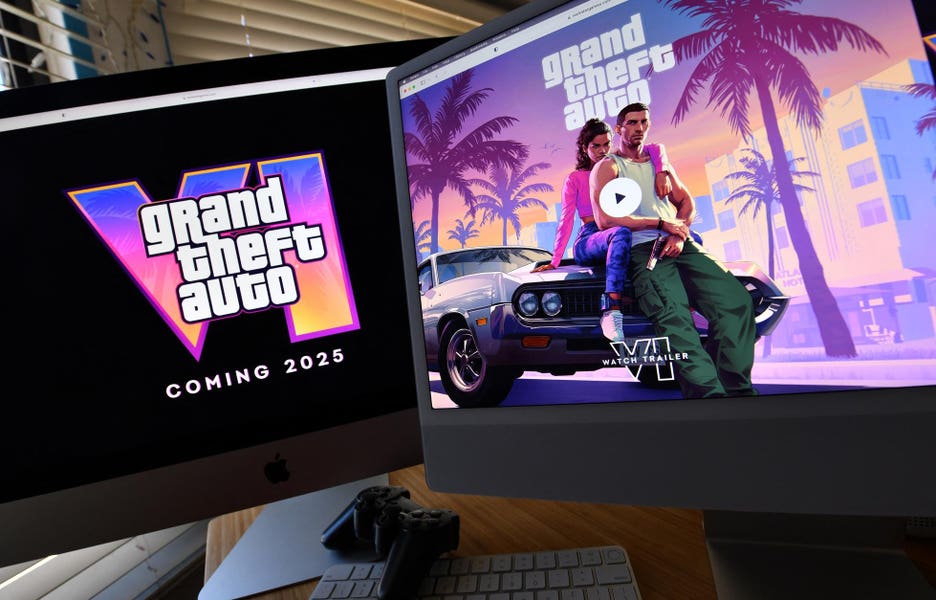
Gaming PC for GTA 6: What Take-Two’s Blockbuster Strategy Means for Canadian Buyers Choosing Their Next Custom PC
The hype around Grand Theft Auto 6 is bigger than a normal game launch. It is a market event. The source article highlights why: Take-Two built a business around massive, polished blockbuster releases, long development cycles, cinematic world-building, and strategic revenue hedges. For Canadian buyers, that matters because a game like GTA 6 does not just drive headlines. It drives hardware demand, GPU pressure, upgrade urgency, and a fresh wave of buyers searching for the right gaming PC for GTA 6.
If you have been asking yourself whether your current system will be enough, whether now is the right time to upgrade, or whether a custom build makes more sense than settling for a generic machine, this is the conversation to have before demand peaks. And if your needs go beyond gaming into streaming, video editing, photo editing, graphic design, content creation, or 3D workloads, the right decision is not just about buying a PC. It is about buying the right performance tier before replacement costs climb.
Why does Take-Two’s strategy matter if you are shopping for a gaming PC in Canada?
The Forbes piece makes a strong point: Take-Two’s success is not random. It refined a repeatable blockbuster formula. That formula combines controversy, cinematic immersion, massive production budgets, and the freedom to delay until the product hits the standard they want. From a consumer hardware perspective, that usually means one thing: when the title finally arrives, millions of players want to be ready at the same time.
That kind of launch pressure often changes the PC buying landscape. More shoppers begin searching for a Gaming PC Canada solution that can handle open-world environments, high settings, ray tracing, modern streaming tools, fast storage, and long gaming sessions without bottlenecks. It also creates a second effect: buyers who were planning to wait start moving earlier because they do not want to be caught shopping during a rush.
Are you looking at GTA 6 as your next must-play game, or is it the title finally forcing you to admit your current PC is aging out?
That is an important difference. If GTA 6 is simply the trigger, then your best move may be to choose a more versatile custom system that also supports OBS, Adobe apps, Blender, CAD tools, or long-term 1440p and 4K gaming. A launch-driven buying decision becomes smarter when it is tied to everything you actually want your PC to do over the next several years.
What the source article gets right about blockbuster products and buying timing
The source article explains that Take-Two balances its huge releases with hedges like recurring revenue, annual sports titles, and mobile games. For hardware buyers, there is a useful lesson hidden in that strategy: great products often come from long cycles, but long cycles create demand spikes when the product finally lands.
That is especially relevant in custom PC buying. New AAA games, creator software updates, AI-assisted workflows, texture-heavy open worlds, and ray tracing features all put pressure on the same categories of hardware:
- GPUs for gaming performance, ray tracing, streaming encoders, rendering, and AI-assisted tools
- CPUs for game logic, simulation-heavy titles, exports, multitasking, and creator workloads
- RAM for modern open-world games, browser-heavy multitasking, editing, and 3D work
- SSDs for fast boot times, game load times, asset streaming, project files, and exports
- Cooling and power delivery for sustained performance and long-term reliability
When a major release gets close, buyers often focus only on the graphics card. That is a mistake. A weak CPU, too little memory, slow storage, cheap cooling, or poor airflow can turn an expensive upgrade into a disappointing experience.
So what should you really be asking? Not just “Can my PC run it?” Ask: Can my PC run it the way I want to play it?
What do you want your next PC to do for you?
Before you compare parts, pricing, or financing, define the outcome.
Do you want a budget-friendly system for 1080p gaming? A stronger 1440p build with room for future AAA releases? A premium RTX system for 4K, high refresh rates, and ray tracing? A hybrid gaming-and-streaming setup? Or a creator-focused workstation that can game at night and edit, render, or design during the day?
Many buyers in Canada are no longer purchasing a one-purpose desktop. They want one machine that handles:
- AAA games and esports titles
- Twitch or YouTube streaming
- OBS recording and content capture
- Adobe Premiere Pro or DaVinci Resolve editing
- Photoshop and Lightroom work
- Illustrator, InDesign, Canva, and brand design workflows
- Blender, Unreal Engine, CAD, and rendering tasks
- Heavy multitasking for work, school, and business use
If that sounds like you, then your decision should not be built around minimum requirements. It should be built around comfort, longevity, and the question most buyers forget to ask: how soon do I want to upgrade again?
What kind of gaming PC for GTA 6 makes sense for your performance target?
If your main goal is a gaming PC for GTA 6, the right answer depends on your monitor, your settings expectations, and whether you want this system to stay relevant for future releases.
1080p gaming: are you aiming for playable performance or strong headroom?
A 1080p build can still make sense for players using standard monitors, budget setups, or mixed-use desktops. But there is a big difference between “it runs” and “it runs well for the next few years.”
A good 1080p-focused system should prioritize:
- A modern multi-core CPU with strong gaming performance
- A capable dedicated GPU with enough VRAM for modern textures
- At least 16GB of RAM, with 32GB becoming a smarter value choice for long-term use
- NVMe SSD storage so large modern games load quickly
Are you buying a first gaming PC, a student setup, or a value-focused desktop that still needs to handle newer games without feeling outdated too quickly? Then a smartly configured entry-to-mid tier custom build is often better than chasing the cheapest possible prebuilt.
1440p gaming: is this the real sweet spot for most Canadian buyers?
For many shoppers, yes. A 1440p Gaming PC Canada build is often the best balance of image quality, frame rate, and long-term value. Open-world games, cinematic titles, racing games, and multiplayer shooters all benefit from the extra detail and screen space, especially if you are already using a higher refresh monitor.
If GTA 6 is the type of game you want to experience with visual quality turned up, 1440p is where many buyers should focus. This tier is also ideal if you want to stream, browse, use Discord, capture footage, and keep other apps running without your system feeling stretched.
Ask yourself: do you want your next PC to feel like a meaningful upgrade, or just a temporary catch-up purchase?
4K and ray tracing: are you buying for wow factor, longevity, or both?
If your goal is ultra settings, high-resolution textures, visual effects, and a premium single-player experience, then you are looking at the upper end of the market. A 4K Gaming PC Canada or Ray Tracing Gaming PC Canada class build is for buyers who want less compromise and more time before the next major overhaul.
This tier matters because blockbuster games are often designed to sell immersion. Dense cities, advanced lighting, environmental detail, and cinematic presentation all push premium hardware harder. If you want your system to stay comfortable through GTA 6 and the next wave of demanding games, this is where custom configuration becomes especially important.
Are you only gaming, or do you also want to stream and create content?
The source article focuses on Take-Two’s release strategy, but modern players do not just play blockbuster games. They clip them, stream them, edit them, post them, and turn them into channels, side hustles, and full content workflows.
That changes what the right PC looks like.
If you are also considering Twitch, YouTube, TikTok, or long-form gameplay capture, your system should be chosen as a Gaming and Streaming PC Canada setup, not just a pure gaming tower. That means thinking about:
- Extra CPU headroom for multitasking
- A GPU with strong encoder support for smoother streaming
- 32GB or more of RAM for gaming, OBS, browser tabs, chat tools, and background apps
- Fast SSD storage for recordings and game installs
- Cooling that supports long sessions under load
Do you want to go live in 1080p while gaming smoothly? Do you want to record locally at high quality for later editing? Do you want one machine instead of managing a separate streaming PC? Those are the kinds of questions that should shape the build.
Could the same upgrade also solve your video editing, photo editing, or design workload?
Many buyers begin with one intent and discover they actually need a broader solution. Someone searching for a gaming desktop often realizes they also need a Video Editing PC Canada build for Premiere Pro, a Photo Editing PC Canada system for Lightroom and Photoshop, or a Graphic Design PC Canada machine for Illustrator and InDesign.
If that is your situation, it is usually better to buy once and buy properly.
Video editing: do you need smoother timelines and faster exports?
If you edit gameplay, YouTube videos, reels, short-form clips, podcasts, or client projects, your build should be selected with creator performance in mind. A proper creator-focused system can improve:
- Timeline responsiveness
- Playback at higher resolutions
- Effects performance
- Render and export times
- Multitasking between editing, uploads, and asset management
Are you cutting 1080p clips, or are you moving into 4K editing? Are you working in Premiere Pro, DaVinci Resolve, or After Effects? Do you need lots of storage for footage, cache, and exports? The answers will directly affect your CPU, RAM, SSD, and GPU balance.
Photo editing and graphic design: do you need speed, colour workflow support, and multitasking?
For photographers and designers, performance is not just about games. It is about RAW imports, catalog responsiveness, AI-assisted edits, high-resolution canvases, batch exports, and smooth use across Adobe Creative Cloud apps.
If you use Photoshop, Lightroom, Illustrator, InDesign, Canva, or related tools, a strong desktop can save time every day. Do you work on one monitor or two? Do you handle massive image libraries? Do you need more RAM because your current machine slows down when several creative apps are open together? Those details matter more than buzzwords.
Content creation: do you want one PC that does everything well?
A Content Creation PC Canada build is often the smartest fit for buyers who game, stream, edit, design, and manage social media content on a single desktop. Instead of compromising with a lowest-common-denominator build, you get a machine tailored for mixed workloads.
If your week includes gaming at night, editing on weekends, and work or school during the day, a custom creator PC is often the best value over time.
What if your workload goes beyond gaming and content into 3D or workstation use?
The blockbuster lesson from Take-Two is scalability. They built a formula and applied it across products. Your PC choice should follow the same logic: choose a platform that fits not only what you do now, but what you may grow into next.
If you use Blender, Unreal Engine, AutoCAD, Revit, SolidWorks, Maya, Cinema 4D, or other professional tools, then you may need a 3D Modeling PC Canada or Workstation PC Canada approach rather than a gaming-first build.
Ask yourself:
- Are you rendering scenes or animations?
- Are you building game assets?
- Are you working on architecture, product visualization, or CAD files?
- Do you need high RAM capacity and stronger sustained workloads?
- Would a gaming-focused build leave productivity on the table?
A workstation-oriented custom build can still deliver excellent gaming performance, but it will be balanced more intelligently for your actual software use. That is the difference between buying for headlines and buying for your life.
Is it better to buy now or wait for a major game launch?
This is one of the most important questions in the market, and it is where excitement can work against buyers.
Waiting sounds smart in theory. But in practice, waiting until a blockbuster release window can expose you to:
- Higher demand for gaming GPUs
- Reduced stock on desirable parts
- Less pricing flexibility on complete systems
- Longer turnaround times during busy periods
- More rushed, less researched buying decisions
And the issue is not just one game. Demand stacks. New games, software updates, student buying seasons, holiday periods, creator hardware demand, and general component volatility can all overlap.
If you already know your current PC is borderline, what exactly are you waiting for? A better deal, or a more stressful shopping window?
For many buyers, the better strategy is to lock in the right system before urgency becomes universal. That is especially true if you need a more powerful configuration than your current cash budget comfortably allows.
Should you finance a stronger PC instead of buying a weaker one now?
This is where a lot of Canadian buyers make the wrong compromise.
They buy too low because they focus only on the upfront number, then end up replacing or upgrading too soon. In a market where demanding games, creator software, and component pricing can all shift, stretching into a more suitable system can be the smarter move.
That is why many shoppers exploring a custom gaming or creator desktop also start asking whether financing makes sense.
If financing helps you secure:
- A better GPU tier
- More RAM now instead of later
- Faster storage from day one
- Better cooling and power quality
- A longer useful lifespan before your next upgrade
then the value is not just convenience. It is avoiding the cost of underbuying.
Would a monthly payment on the right system be more practical than buying a cheaper build that struggles with your next game, your editing workload, or your multitasking needs? If that sounds familiar, it may be worth looking at options to finance a custom PC rather than settling for a machine you will outgrow.
Groovy Computers helps Canadian buyers explore stronger custom builds with financing options up to 4 years, which can be especially useful if you are trying to secure a better-performance system before market conditions change again.
Which performance tier fits you best?
If you are unsure where you fit, use this decision guide.
Entry-level to value tier
This tier makes sense if you want a Budget Gaming PC Canada style build for esports, lighter AAA settings, school use, and everyday computing. It can also suit first-time desktop buyers who play at 1080p and do not need demanding creator workflows.
Best for buyers asking:
- What gaming PC do I need for 1080p?
- Can a budget gaming PC play new games?
- How much should I spend on a gaming PC?
Mid-range performance tier
This is the sweet spot for many customers. It is ideal for 1080p high refresh or 1440p gaming, mixed content creation, light streaming, and better long-term value. If you want a Custom Gaming PC Canada build that feels modern for years rather than months, this is often the smartest category.
Best for buyers asking:
- What PC do I need for 1440p gaming?
- Is a gaming PC good for video editing?
- Can one desktop handle gaming and streaming?
High-end gaming and creator tier
This tier is for buyers who want excellent 1440p performance, serious streaming capability, stronger editing performance, more RAM, premium cooling, and room for demanding future titles. It is also a smart fit for people who know they will keep the system for years.
Best for buyers asking:
- Should I buy a better PC now instead of upgrading again soon?
- Do I need 32GB or 64GB of RAM?
- What PC do I need for gaming, editing, and multitasking?
Flagship and workstation tier
This is where you go if you want 4K gaming, premium ray tracing, serious creator work, heavy rendering, advanced 3D software, or top-tier multitasking without compromise. It is for customers who care about sustained performance and platform longevity.
Best for buyers asking:
- What PC do I need for 4K gaming?
- Should I finance a high-end gaming PC?
- What PC do I need for Blender, Unreal Engine, or professional rendering?
Why custom builds matter more when demand is high
When blockbuster launches dominate the market, many buyers end up chasing whatever is available instead of what is right. That is where custom PC building has a real advantage.
A properly built custom system is not just about choosing parts. It is about balancing the whole machine around your use case:
- The right CPU and GPU pairing
- The right RAM capacity for your software and gaming habits
- The right storage layout for games, apps, and project files
- The right cooling for sustained performance
- The right power supply for reliability and future upgrades
- The right case airflow and build quality for long-term confidence
If you are buying a system meant to carry you through GTA 6, future AAA releases, streaming sessions, Adobe work, or 3D workloads, part matching matters. So does testing.
Would you rather gamble on a generic machine with unknown build priorities, or buy from a Canadian custom PC builder that is focused on workload fit, stability, and quality control?
Why testing and warranty support should be part of the buying decision
Performance matters, but confidence matters too. A fast PC that is poorly assembled, poorly cooled, or not properly stress tested can become an expensive headache.
That is why serious buyers should care about more than headline specs. They should ask:
- Has this system been rigorously tested?
- Is it built with upgrade paths in mind?
- Will cooling hold up under long gaming or rendering sessions?
- Is there warranty support if something goes wrong?
- Am I buying from a company that understands custom PC use cases?
Groovy Computers builds custom systems for Canadian buyers who want that extra confidence. Rigorous testing and a 1-year warranty matter more when hardware is expensive and expectations are high. That is especially true if your next PC is not just a toy, but also a tool for work, study, content, or client projects.
Why Canadian buyers should think differently about pricing
The original article discusses billion-dollar entertainment economics, but Canadian shoppers live in a different reality. Our buyers have to think about Canadian pricing, part availability, shipping, exchange pressure, and the fact that even small component shifts can make a full-system quote look very different a few weeks later.
That does not mean panic buying. It means informed buying.
If your system plan already includes a stronger GPU, more memory, better storage, or creator-grade multitasking capability, delaying can sometimes mean paying more later for the same class of performance. And if your current machine is already limiting what you can play or produce, waiting has a cost too.
Are you postponing an upgrade because you truly do not need it yet, or because decision fatigue is making the choice harder than it needs to be?
What should you ask before buying your next custom PC?
Before you commit, ask yourself these practical questions:
- What games do I actually want to play over the next 2 to 4 years?
- Am I targeting 1080p, 1440p, or 4K?
- Do I care about ray tracing, ultra settings, or high FPS competitive play?
- Will I be streaming, recording, or editing content?
- Do I use Premiere Pro, DaVinci Resolve, Photoshop, Lightroom, Illustrator, Blender, or CAD tools?
- How much RAM and storage will I realistically need?
- Would I rather buy once properly than upgrade too soon?
- Would financing help me get into the right performance tier now?
- Do I want a custom build matched to my exact use case?
Those are the questions that lead to a better desktop, not just a faster checkout.
Why Groovy Computers is a smart fit for buyers preparing for the next wave of demanding PC use
Whether you are shopping for a gaming PC for GTA 6, a streaming setup, a creator desktop, or a workstation-class machine, Groovy Computers is built around the decision modern buyers actually face: choosing the right custom system in Canada before demand, software expectations, or pricing move against them.
Groovy Computers serves customers in Canada with custom PC solutions designed for real-world use cases, not generic one-size-fits-all specs. That includes gaming desktops, creator PCs, editing systems, graphic design builds, 3D workstations, and balanced hybrid machines for people who do more than one thing on their computer.
If you are in Nova Scotia, Atlantic Canada, or ordering from elsewhere in the country, the value is the same: custom configuration, rigorous testing, thoughtful part selection, and a 1-year warranty for extra confidence.
Do you want help choosing between a budget gaming computer, a premium RTX gaming PC, a custom creator PC, or a workstation build that can handle both professional work and serious gaming? Then the next step is simple: visit GroovyComputers.ca and start with the system that matches what you actually need, not just what is easiest to find.
Final takeaway: blockbuster games create hype, but smart buyers create a plan
The source article shows that Take-Two wins by combining a refined blockbuster formula with strategic hedges. Canadian PC buyers can learn from that. Do not make your next desktop decision based only on hype, delay, or minimum specs. Build a smarter plan around your real use case, your desired performance tier, and your timeline.
If GTA 6 is the moment that has you reconsidering your current machine, use that moment well. Think about whether you need a stronger gaming PC for GTA 6, a more versatile creator desktop, a better streaming setup, or a workstation that carries you further before your next upgrade. And if budget is the obstacle, consider whether financing the right build now could save you from underbuying in a market that rarely stays still for long.
Ready to stop guessing what your next PC should be? Visit GroovyComputers.ca to explore custom builds, ask about performance tiers, and find out whether a gaming, creator, or workstation system is the right move for you right now.
#GamingPCforGTA6 #GamingPCCanada #CustomGamingPCCanada #GamingPCBuilderCanada #ContentCreationPCCanada #VideoEditingPCCanada #3DModelingPCCanada #WorkstationPCCanada #CanadianCustomPCBuilders #NovaScotiaComputers
Groovy Computers | All Rights Reserved

Leave a comment
This site is protected by hCaptcha and the hCaptcha Privacy Policy and Terms of Service apply.