




































GTA 6 DualSense Preorders Signal Bigger Demand: What Canadian Buyers Should Ask Before Choosing a Gaming PC for GTA 6
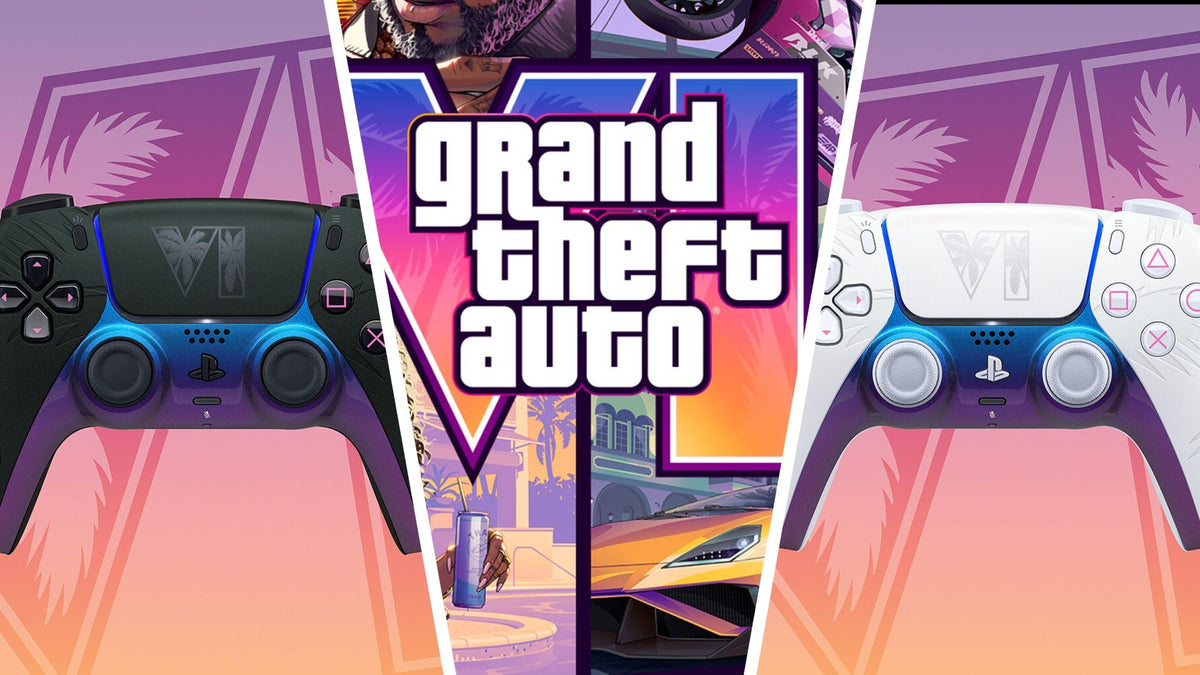
The GTA 6 DualSense preorder rush is more than accessory news. It is another clear sign that demand around Grand Theft Auto VI is going to push hardware conversations into the mainstream again, and for many buyers in Canada, that means it is time to think seriously about a Gaming PC Canada purchase before the biggest wave of launch hype arrives. If gamers are scrambling for limited-edition controllers, what do you think will happen when more players start pricing out full systems for GTA 6, open-world ray tracing, streaming, recording, and next-gen performance expectations?
The source report highlighted several important points: Sony confirmed limited-edition black and white GTA 6 DualSense controllers, the black version is harder to get in some markets due to storefront restrictions, pricing carries a premium for the themed finish, and demand is expected to be intense. For Canadian shoppers, the exact accessory itself may be only part of the story. The bigger takeaway is that GTA 6 is already creating a buying environment driven by scarcity, urgency, collector behaviour, and fear of missing out. Those same pressures often spill into GPUs, CPUs, SSDs, monitors, and complete gaming systems.
That is where a smart buyer has to zoom out. Are you only trying to grab themed accessories, or are you also making sure your setup is actually ready for the type of game GTA 6 is expected to be? Are you planning for 1080p today but secretly hoping for 1440p ultra settings tomorrow? Do you want smooth gameplay only, or do you also want to stream, edit clips, make TikToks, upload YouTube videos, and avoid replacing your PC too soon?
What the GTA 6 DualSense Preorder Story Really Tells Us
The immediate headline is simple: limited product, heavy demand, one variant likely harder to secure, and a major launch date driving consumer urgency. But under that surface is a familiar pattern in gaming hardware culture. Big game releases do not just sell copies of the game. They sell entire ecosystems around the game: controllers, storage, displays, capture gear, upgraded consoles, and, very often, new gaming desktops.
That matters because GTA 6 is not just another annual release. It is one of those rare blockbuster launches that can change buyer behaviour for months. People who have been postponing upgrades suddenly start asking whether their current machine is enough. Others begin wondering whether this is finally the moment to move from entry-level performance to something stronger. Some decide a console is enough, while others realize they want better frame rates, more flexibility, easier streaming, superior multitasking, and a machine that can do much more than one game.
When accessory preorders are already drawing this much attention, the message for Canadian PC buyers is straightforward: major gaming demand is building early. If you were already considering a custom gaming desktop, waiting until every buyer is rushing at once may not put you in the strongest position.
Why Canadian Buyers Should Think Differently About GTA 6 Hardware Hype
Canadian customers face a different shopping reality than U.S.-centric coverage usually reflects. Pricing shifts are not only about launch-day retail demand. They are also affected by exchange rates, freight, regional availability, model-specific distribution, and the way high-interest gaming hardware gets snapped up during hype cycles. Even when the original report references an accessory price around the mid-$80 USD range, Canadian buyers should think in Canadian-dollar terms, taxes included, and apply that same mindset to larger purchases like gaming PCs and creator systems.
In practical terms, a launch-driven accessory premium can feel small. But when excitement spreads from accessories to full-system upgrades, the difference between “buy later” and “buy now” can become far more expensive. A modest increase in graphics card cost, memory pricing, or SSD availability can move a full build upward fast. Have you priced a gaming PC once, then checked again a few weeks later during heavy demand and found the same performance tier suddenly less attractive for the money? That happens more often than many shoppers expect.
For buyers in Nova Scotia and across Canada, there is also a trust question. Do you want to chase fluctuating stock and generic mass-market systems, or would you rather work with a Canadian custom PC builder that can guide you toward the right balance of gaming power, cooling, upgrade path, and reliability?
Are You Buying for GTA 6 Alone, or for the Next Few Years of Gaming?
This is one of the most important questions in the entire buying process. A lot of people search for a gaming PC for GTA 6, but what they really mean is something broader: they want a PC that can handle big open-world releases, strong visuals, multiplayer titles, future updates, and maybe a bit of ray tracing without feeling outdated too quickly.
If that sounds like you, it helps to think beyond one launch title. What else do you play? Competitive games at high FPS? Story-driven AAA releases? Racing games? Modded sandbox titles? Do you care more about smooth 1080p performance, or are you aiming for 1440p because that is where visual quality and value often meet best for serious PC gaming? Are you tempted by 4K, or do you want the smarter middle ground where high settings and strong frame rates coexist more comfortably?
A good buying guide should not just react to hype. It should help you define what kind of machine will still feel satisfying after the hype cools down.
What Do You Want Your Next PC to Do for You?
Before choosing parts, price range, or financing, ask the bigger question: what job does your next PC need to do?
- Only gaming: You want a clean, powerful desktop built for modern titles, strong FPS, and reliable cooling.
- Gaming plus streaming: You want to play and broadcast smoothly using OBS or similar software without wrecking your frame rates.
- Gaming plus editing: You want to clip gameplay, render videos, and export content for YouTube, TikTok, or social media.
- Creator-first with gaming on the side: You use Premiere Pro, DaVinci Resolve, Photoshop, Illustrator, or Lightroom and still want a strong gaming experience.
- 3D or workstation use: You need a system that can handle Blender, Unreal Engine, rendering, CAD, or demanding multitasking along with gaming.
The right answer changes the build. A buyer who only wants a budget-friendly system for 1080p gaming should not be pushed into a workstation-class setup. At the same time, someone who wants to stream, edit, and game for years should not be boxed into a machine that feels underpowered six months later.
So what do you want your next PC to do for you: just run the game, or become the centre of your gaming and creator setup?
What Gaming PC Do I Need for GTA 6 and Other New AAA Games?
Even without inventing unsupported official PC requirements, we can still make smart buying decisions based on how modern blockbuster games tend to behave. Titles built around massive environments, dense effects, advanced lighting, heavy textures, and long-term content support usually reward buyers who leave some headroom in their system. That means enough GPU power, enough CPU strength, enough RAM, and fast storage that keeps the entire experience feeling modern.
Entry-Level 1080p Buyers
If your goal is solid 1080p performance on a practical budget, you are likely looking for a balanced system that emphasizes value without becoming disposable. This type of buyer often asks, Can a budget gaming PC play new games well? The answer is yes, if expectations are realistic and the build is chosen carefully.
An entry-level GTA 6-ready approach should focus on:
- A modern multi-core CPU that will not bottleneck newer titles too quickly
- A dedicated graphics card suitable for current AAA gaming
- At least 16GB of RAM, with 32GB worth considering for longevity
- A fast NVMe SSD so game loads and system responsiveness stay sharp
- Reliable airflow and power delivery, not just flashy case marketing
This is often the right tier for students, first-time PC gamers, and buyers who want strong value from a budget gaming desktop in Canada. But ask yourself honestly: if you already know you want higher settings, a nicer monitor, or more demanding games next year, are you really saving money by buying too low now?
1440p Gaming Buyers
For many enthusiasts, 1440p is the sweet spot. It delivers a clear upgrade over 1080p in sharpness and visual impact without requiring the same level of spending as true 4K-focused builds. If you are asking, What PC do I need for 1440p gaming? this is often the most sensible target for gamers who care about image quality, long-term value, and strong modern performance.
A 1440p-focused system should typically prioritize:
- A stronger GPU that can handle demanding open-world environments and higher-quality settings
- A CPU with enough headroom for newer engines, background tasks, and longevity
- 32GB of RAM if you multitask, stream casually, or want more breathing room over time
- Fast SSD storage, especially if your library is growing with large modern installs
This is usually where a Custom Gaming PC Canada purchase becomes especially attractive. Why? Because 1440p buyers benefit from careful part matching. You do not want to overpay for one flashy component while another part quietly limits the whole system.
4K and Premium Performance Buyers
If you want 4K, ray tracing, ultra settings, and room for future AAA releases, you are moving into premium territory. These are the buyers asking, What PC do I need for 4K gaming? and How long will a high-end gaming PC last? They are also the buyers most vulnerable to waiting too long, because premium-tier GPUs and top-end supporting components are often the first places where pricing pressure becomes painful.
A premium system is a better fit if you want:
- High-detail gaming on a 4K monitor or TV
- Ray tracing and stronger visual feature support
- Headroom for future releases and larger game updates
- High FPS at higher resolutions
- Better multitasking for capture, streaming, or creator work
But here is the key question: do you genuinely need flagship-level performance, or would a strong upper-mid-range build deliver better value for how you actually play?
Do You Also Want to Stream, Record, or Create Content?
The GTA 6 conversation is not just about playing. It is also about content. Big releases create reaction videos, streams, walkthroughs, shorts, clips, lore breakdowns, mod showcases, and social posts. If your interest in GTA 6 includes Twitch, YouTube, or TikTok, you should not shop like a gaming-only customer.
A Streaming PC Canada buyer needs more than game-ready specs. Streaming introduces extra load from encoding, scene management, audio devices, browser sources, background apps, and sometimes recording at the same time. Ask yourself: do you want to game and stream on one machine? Do you use dual monitors? Do you want reliable OBS performance? Are you trying to avoid frame drops when things get busy?
A gaming and streaming system should generally include:
- A CPU and GPU combo chosen with streaming overhead in mind
- Enough RAM for gameplay, browser tabs, chat tools, alerts, and background apps
- Fast storage for recorded footage
- Cooling and case airflow that support longer sessions under sustained load
If you are a creator, there is another question worth asking: would your next desktop be better if it handled gaming, streaming, and editing all in one? For many buyers, the best answer is not a pure gaming machine but a more flexible creator-focused build.
Is a Gaming PC Good for Video Editing, Photo Editing, and Graphic Design?
Sometimes yes, but not always in the way buyers assume. A gaming PC can overlap with creator work, especially when it includes a capable GPU, strong CPU, good RAM capacity, and fast SSDs. But the best Creator PC Canada or Video Editing PC Canada setup depends on your actual software, project size, and workflow.
If your GTA 6 excitement includes content production, ask yourself these questions:
- Will you edit clips in Premiere Pro or DaVinci Resolve?
- Do you need smooth 4K timeline performance?
- Are you exporting long videos regularly?
- Do you use Photoshop, Lightroom, Illustrator, or Canva for thumbnails and channel graphics?
- Do you want one desktop that handles gaming at night and client work during the day?
A stronger creator-oriented build may make sense if you need:
- More RAM for multitasking and larger projects
- Extra SSD capacity for footage, assets, and scratch space
- A CPU chosen for both responsiveness and heavier production tasks
- A GPU that supports gaming well while also helping with accelerated creative workflows
This is where a custom builder matters. Generic systems often look good on paper but miss the balance that determines whether a PC feels great in real use.
What If You Need Blender, Unreal Engine, or a Workstation Too?
Not every GTA 6 reader is just a gamer. Some are game development students, 3D artists, video teams, architects, designers, or people using demanding software who also happen to follow gaming launches closely. If that sounds like you, a pure gaming-first build may not be enough.
A proper 3D Modeling PC Canada or Workstation PC Canada configuration can make a major difference if you work in Blender, Unreal Engine, CAD tools, simulation, rendering, or large multitasking workflows. Ask yourself: are you rendering scenes, building environments, compiling projects, or training yourself in software that pushes your machine harder than gaming alone?
In that case, the right system may need:
- Higher core-count CPU options depending on workload
- More RAM, often 32GB minimum and potentially much more
- GPU power selected for both viewport performance and rendering benefits
- Storage planning for active projects, cache, exports, and backups
If your machine has to earn money, save time, or support serious creative work, the cheapest route is often not the most economical route.
Is It Better to Buy a Gaming PC Now or Wait?
This is one of the most searched buyer questions for a reason. And the answer depends on your current system, your expectations, and your tolerance for risk. But in a hype cycle like this one, there are a few realities worth considering.
Waiting can make sense if your current desktop already handles everything you need comfortably and you are simply browsing. Waiting can also make sense if you are not sure whether you want gaming, streaming, editing, or workstation capability and need to clarify your use case first.
But waiting can work against you if:
- Your current PC is already struggling in new games
- You know you want to be ready for upcoming AAA releases
- You expect to start streaming or creating content soon
- You are likely to upgrade anyway, just under more pressure later
- You are vulnerable to component-price increases or stock tightening during demand spikes
In other words, if you know an upgrade is coming, delaying that decision does not always create savings. Sometimes it only narrows your options.
Why Pricing Volatility Matters More Than Most Buyers Expect
When gaming demand rises, shoppers tend to focus only on graphics cards. But total system pricing can shift from multiple directions at once. GPUs get the attention, but CPUs, RAM, SSDs, motherboards, and power supplies can all contribute to a more expensive build over time. Add in the pressure that major game releases put on premium hardware interest, and the best-value configuration at one moment may not look as good later.
That is why timing matters. A customer who buys thoughtfully before a full surge may secure a stronger build, better component balance, or a more comfortable financing structure than someone forced into a rushed decision later. Have you ever waited because you hoped to save, then found yourself paying similar money for a weaker compromise? That is exactly the trap many buyers want to avoid.
Should You Choose Budget, Mid-Range, Premium, or Workstation Tier?
If you are unsure which performance tier fits you, use your monitor, game library, and workload as your guide rather than chasing hype alone.
Choose Budget/Value If:
- You mainly want 1080p gaming
- You play a mix of esports and some newer titles
- You need a first gaming desktop or student-friendly option
- You want practical value and realistic settings expectations
Choose Mid-Range If:
- You want stronger 1080p or very good 1440p performance
- You play modern AAA games regularly
- You want a system that feels relevant longer
- You may stream lightly or edit content occasionally
Choose Premium If:
- You want high-refresh 1440p or 4K gaming
- You care about ray tracing and visual quality
- You want substantial future headroom
- You stream, multitask, and expect premium responsiveness
Choose Creator or Workstation Tier If:
- You edit video regularly
- You use Adobe Creative Cloud, DaVinci Resolve, or similar tools heavily
- You work in Blender, Unreal Engine, CAD, or rendering software
- Your system is not just for entertainment but also productivity or income
Still wondering what performance tier you actually need? That is exactly the kind of decision where a proper custom PC consultation saves money and frustration.
Could Financing Help You Secure a Better Build Before Costs Rise?
For many buyers, this is the practical question behind the hype. If a stronger system would better match your goals, but paying all at once pushes you toward a weaker compromise, financing can be a useful tool. It is not about overspending for the sake of it. It is about choosing the right level of performance while conditions are still favourable.
If you are asking, Should I finance a better PC instead of buying a cheaper one? think about long-term use. A too-cheap machine can lead to earlier upgrades, worse experience, resale disappointment, and more total spending. A better-balanced machine financed responsibly may keep you happy longer and help you avoid immediate replacement pressure.
For Canadian shoppers exploring custom builds, financing up to 4 years can make a stronger system more realistic, especially if your use case includes gaming plus streaming, editing, or professional work. The key is to choose the build that matches your real workload rather than buying based on launch-day emotion alone.
Why Custom Builds Matter More During Big Launch Cycles
During major hype periods, many buyers end up in generic systems that look appealing because they are fast to order or heavily marketed. But when demand is high, generic prebuilts often cut corners in places inexperienced buyers do not notice right away: airflow, motherboard quality, power supply standards, memory configuration, SSD choice, and upgrade flexibility.
A custom-built system gives you better control over the parts that actually affect daily ownership. Do you want stable thermals in long gaming sessions? Better upgrade paths? The right amount of RAM for your mix of gaming and editing? Storage that fits modern install sizes? Those things matter more than flashy marketing language.
That is why many buyers prefer Canadian custom PC builders when the market feels uncertain. A properly selected custom build can deliver better balance, less waste, and more confidence than a random off-the-shelf machine.
Why Groovy Computers Is a Strong Fit for Canadian Buyers
Groovy Computers is built around the needs that this moment is exposing so clearly: Canadian buyers want guidance, not guesswork. They want a gaming desktop that actually fits their games, monitor, content goals, and budget. They want systems that are assembled with care, rigorously tested, and backed with real support. And they want to know they are not just paying for hype.
Whether you need a budget-friendly gaming setup, a premium RTX-focused rig, a streaming and editing desktop, or a serious workstation, Groovy Computers helps match the build to the job. That means custom configurations, stress-tested systems, a 1-year warranty, and support from a Canadian custom PC builder that understands how quickly buyer conditions can change.
For shoppers in Nova Scotia, Atlantic Canada, and across the country, that combination of trust, customization, and Canada-wide service matters. If your next machine needs to be more than a random box with RGB, you should be shopping accordingly.
What Questions Should You Ask Before Buying Your Next PC?
Before you make your decision, ask yourself these practical questions:
- What games am I really buying this PC for over the next 2 to 4 years?
- Am I targeting 1080p, 1440p, or 4K?
- Do I care about ray tracing or mostly about high FPS?
- Will I stream, record, or edit gameplay?
- Do I also need the PC for Photoshop, Premiere Pro, DaVinci Resolve, Blender, or design work?
- How much storage will I realistically need for modern game sizes and media files?
- Would 32GB of RAM help me avoid upgrading too soon?
- Is my current PC already limiting the experience I want?
- Would financing let me buy the right build now instead of settling for less?
- Do I want a generic prebuilt, or a custom-tested Canadian system with warranty support?
If those questions feel bigger than the controller preorder story that started this conversation, that is the point. Big gaming launches have a way of revealing what your setup really needs.
The Smart GTA 6 Buying Move Is Not Just About Accessories
The GTA 6 DualSense preorder news may be about limited-edition hardware, storefront exclusivity, and collector urgency, but the broader lesson is about preparation. Massive game launches change buying behaviour. They bring more attention, more demand, and often more pricing pressure. The people who benefit most are usually the ones who decide early, define their needs clearly, and choose a system that fits more than one short-term moment.
If you are asking what kind of Gaming PC Canada setup makes sense for GTA 6, modern AAA releases, streaming, editing, or future-proofing, now is the time to act thoughtfully. Do you want a budget gaming desktop that gets you in the door, a stronger 1440p system that holds up longer, or a premium custom rig that gives you room to grow? Do you want to avoid upgrading again too soon? Do you want help choosing the right custom build instead of guessing?
If so, the next step is simple: visit GroovyComputers.ca and explore a custom gaming PC, creator PC, or workstation build that actually matches the way you play and work. If financing would help you secure the right system before prices shift, this is a smart time to ask about your options rather than waiting for the busiest part of the demand cycle.
#GamingPCCanada #CustomGamingPCCanada #GamingPCForGTA6 #GamingComputersCanada #CanadianCustomPCBuilders #1440pGamingPCCanada #4KGamingPCCanada #StreamingPCCanada #CreatorPCCanada #VideoEditingPCCanada #WorkstationPCCanada #GamingPCFinancingCanada #NovaScotiaBusiness #CanadaWideShipping
Groovy Computers | All Rights Reserved


Leave a comment
This site is protected by hCaptcha and the hCaptcha Privacy Policy and Terms of Service apply.