



















GTA 6 PS5 DualSense Controller News Is Big, but the Bigger Question for Canadian Gamers Is: Is Your PC Ready for GTA 6?
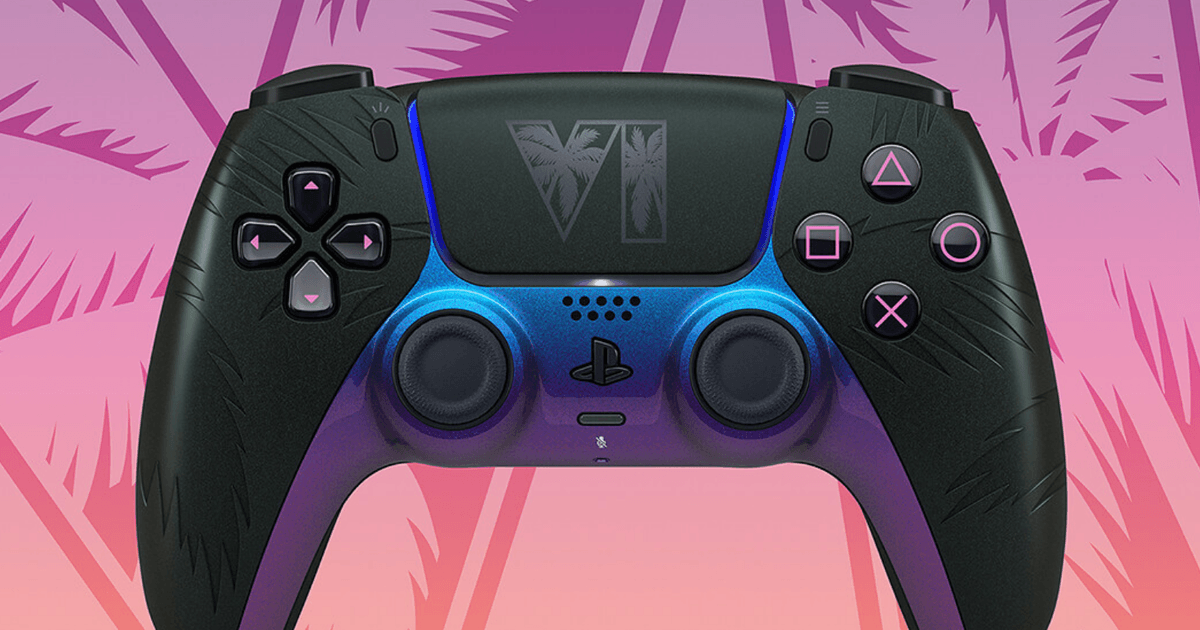
The new GTA 6 PS5 DualSense controller has generated exactly the kind of excitement you would expect from one of the most anticipated game launches in years. Limited-edition hardware, Vice City-inspired styling, launch-day hype, and pre-order urgency all point to one thing: GTA 6 is not just another release. It is a major buying moment. For many players in Canada, that raises a much more important question than which controller colour looks better. What kind of system do you actually need if you want to enjoy GTA 6 at the level this game deserves?
That is where Groovy Computers comes in. If you are thinking beyond console accessories and asking whether now is the time to upgrade to a stronger desktop, plan a new gaming setup, add streaming capability, or move into a custom creator system that can handle gaming and editing in one machine, this is the real conversation worth having.
The source story highlighted two limited-edition controllers inspired by Vice City aesthetics, with palm tree details, a colour-shifting finish, and a premium price point. Those details matter because they show how much momentum is building around GTA 6. But for PC-focused buyers, the deeper takeaway is simple: when a game this big approaches launch, demand for capable gaming hardware often rises with it. If you have been wondering whether to buy now, wait, finance a stronger build, or finally replace an aging setup that is already struggling in modern open-world titles, this is exactly the right time to think carefully.
What the GTA 6 controller announcement really tells gamers
Limited-edition accessories usually appear when a publisher and platform holder know demand is about to peak. In this case, the themed controllers are not just collectibles. They are another signal that GTA 6 is being positioned as a must-play release with broad mainstream attention.
What does that mean for buyers shopping for a Gaming PC Canada audience actually wants? It means interest in open-world gaming performance, high settings, ray tracing, smoother frame rates, and future-proof hardware will likely increase. It also means that waiting until the last minute can leave buyers rushed, underinformed, or stuck settling for weaker specs than they really wanted.
If your current PC already drops frames in demanding games, runs hot, has limited storage, or struggles with multitasking, are you confident it will give you a good GTA 6 experience when the pressure is on?
Why Canadian buyers should think differently about GTA 6 upgrade timing
Canadian PC buyers have to think about more than excitement. You also have to think about value in Canadian dollars, availability, shipping timelines, and how quickly full-system pricing can change when demand increases around a major game release.
The source article listed the controller at £74.99, which roughly translates to a Canadian price in the neighbourhood of about C$130 to C$140 before taxes, depending on final market pricing and retail markup. That is a useful reminder of how quickly gaming-related purchases add up in Canada. A themed controller can feel premium, but it also puts spending decisions into perspective. If you are about to invest in a game, accessories, display upgrades, storage, and maybe a capture setup, does it make more sense to keep putting money into the edges of your setup, or finally put that budget toward the machine that powers everything?
For many Canadian gamers, the smarter move is not buying another accessory first. It is securing the right custom system before pricing pressure gets worse.
What do you want your next PC to do for you?
Before you choose a build, ask yourself a better question than, “What is the cheapest system that can run new games?”
Ask this instead: What do I want my next PC to do for me over the next three to five years?
- Do you want to play GTA 6 and other new AAA releases at 1080p with solid settings and dependable performance?
- Do you want a 1440p gaming system that feels smoother, sharper, and more future-ready?
- Are you aiming for 4K visuals, ultra settings, ray tracing, and high-end immersion?
- Do you also want to stream to Twitch or YouTube while gaming?
- Will you be editing clips, shorts, montages, or full videos after your sessions?
- Do you need Photoshop, Lightroom, Illustrator, Premiere Pro, DaVinci Resolve, OBS, Blender, or Unreal Engine to run well too?
- Are you buying one desktop that needs to handle both entertainment and income-producing creative work?
Your answer changes everything. The right system for one person’s GTA 6 setup might be a budget-friendly gaming desktop. For someone else, it might be a Content Creation PC Canada buyers would choose because it can game, stream, edit, and multitask without compromise.
Is GTA 6 making you realize your current PC is falling behind?
That is happening to a lot of people. Big game launches have a way of exposing bottlenecks buyers have been ignoring. Maybe your GPU was “fine” a year ago. Maybe 16GB of RAM seemed enough. Maybe your SSD space looked manageable until game installs started ballooning. Maybe your CPU handled esports titles well, but open-world games, background apps, browser tabs, Discord, and recording software together have become too much.
If you are already lowering textures, turning off visual features, closing apps in the background, or constantly deleting old games to make room for new ones, are you really buying yourself time by waiting? Or are you just extending the life of a system you already know you want to replace?
What PC do you need for GTA 6-style gaming?
While official long-term PC expectations can change, open-world blockbuster games typically reward balanced systems with a strong GPU, a capable modern CPU, enough RAM, and fast SSD storage. For buyers planning around GTA 6 and similar upcoming titles, here is a practical way to think about performance tiers.
Entry gaming tier: good for 1080p players
This tier makes sense if your goal is straightforward: play modern games smoothly at 1080p, keep settings reasonable, and stay within a controlled budget.
- Best for players who want dependable 1080p gaming
- Good fit for students, first-time desktop buyers, and value-focused shoppers
- Ideal if you mainly play a mix of AAA and competitive titles
- Less ideal if you expect heavy ray tracing, high-refresh 1440p, or serious streaming and editing
If your real question is, Can a budget gaming PC play new games well enough without overpaying? the answer is yes, but only if the parts are selected intelligently. A poorly matched cheap build can become outdated fast. A well-balanced Groovy custom build gives you a better upgrade path and avoids wasting money on weak combinations.
Mainstream performance tier: the sweet spot for 1440p
For many buyers, this is the smartest zone. A properly configured 1440p Gaming PC Canada shoppers choose today often delivers the best balance of visual quality, long-term value, and flexibility.
- Excellent for immersive open-world gaming
- Better headroom for future titles
- Stronger multitasking for Discord, browsers, recording, and voice chat
- A better starting point for gaming plus streaming
If you are wondering, What PC do I need for 1440p gaming? this is likely the category to focus on. It is often the right answer for buyers who do not want to upgrade again too soon.
High-end tier: 4K, ultra settings, ray tracing, and premium longevity
This is for buyers who want their system to feel special every time they sit down. If your expectation is maxed visuals, stronger ray tracing performance, smoother high-resolution gameplay, and more breathing room for tomorrow’s demanding titles, a 4K Gaming PC Canada class build makes sense.
- Best for premium monitors and visually demanding games
- Ideal for buyers who want to hold performance value longer
- Smart for gaming plus editing, capture, or heavier creator workloads
- Often the better fit if you hate the idea of replacing parts too quickly
Are you the kind of buyer who would rather spend once on a stronger system than upgrade twice on a weaker one? If so, this tier deserves serious attention.
Do you want to game only, or also stream and create?
This is where many people choose the wrong system. They shop for gaming alone, then six months later they want to stream, edit clips, start a channel, design overlays, or learn content creation workflows. Suddenly the “gaming PC” they bought is no longer the ideal fit.
If you think there is even a decent chance you will stream or create, it is worth planning for that now.
Gaming and streaming
A Gaming and Streaming PC Canada shoppers should look for needs more than just gaming horsepower. You want enough CPU and GPU overhead for OBS, background applications, and stable performance while live.
Ask yourself: do you want to stream at 1080p while playing demanding games? Do you care about smoother multitasking, cleaner encoding support, or room for dual-monitor workflows? If yes, a stronger mid-range or high-end build is often the smarter buy.
Video editing and creator work
If GTA 6 is also content fuel for your channel, then your desktop should be chosen like a Video Editing PC Canada buyers can trust, not just a gaming box. Editing gameplay footage, rendering shorts, exporting 4K sequences, and running tools like Premiere Pro, DaVinci Resolve, After Effects, or CapCut all benefit from the right balance of CPU, GPU, RAM, and storage.
Are you planning to clip highlights after every session? Edit YouTube videos? Batch-export social content? Work with multiple footage formats? The more often you do that, the more important a creator-focused configuration becomes.
Photo editing and graphic design
Not every GTA 6 buyer is just a gamer. Some also design thumbnails, social graphics, branding assets, and promotional content. If your machine needs to run Photoshop, Lightroom, Illustrator, InDesign, or Canva-heavy browser workflows, your best option may be a custom creator build with stronger multitasking, storage speed, and memory capacity.
Would a little more upfront investment save you from laggy exports, slow project loads, and constant storage frustration later?
3D modeling and advanced workstation use
If your next desktop also needs to run Blender, Unreal Engine, CAD tools, rendering software, or demanding professional workflows, then you are no longer shopping only for a gaming PC. You are looking at a Workstation PC Canada or 3D Modeling PC Canada class system that can still deliver excellent game performance while being built for heavier compute demands.
That kind of buyer should avoid generic off-the-shelf systems. Part matching, cooling, memory configuration, and long-term reliability matter much more.
How much should you spend on a gaming PC before a major game release?
There is no single answer, because the right budget depends on what experience you expect. But there is a wrong approach: spending too little, then replacing or upgrading too soon because the system never met your real goals.
Instead of asking only, “What is the cheapest machine I can get?” ask these better questions:
- How long do I want this PC to stay satisfying?
- Am I targeting 1080p, 1440p, or 4K?
- Do I care about ray tracing?
- Will I stream, record, or edit?
- Do I want room for future games beyond GTA 6?
- Would I rather finance a stronger system now than regret a weaker system later?
That last question matters more than many buyers expect.
Is it better to buy a gaming PC now or wait?
When hype builds around a huge release, waiting can feel safe. But in the PC world, waiting can also mean:
- higher GPU demand
- price pressure on memory and SSDs
- lower stock on desirable configurations
- more rushed buying decisions close to launch
- less time to research the right build properly
If your current computer is already near its limit, waiting does not always save money. Sometimes it just narrows your options.
Are you trying to time the market perfectly, or do you mainly want a reliable, high-performing system you can enjoy through this release cycle and beyond? Most buyers are better served by focusing on fit, build quality, and long-term value rather than trying to predict every shift in hardware pricing.
Should you finance a better PC instead of buying a cheaper one?
For many Canadian buyers, this is the real decision. If the choice is between buying a lower-tier desktop outright today or getting the stronger system you actually want through monthly payments, financing can be the more practical path.
A weaker build can cost less upfront but more over time if it leads to earlier upgrades, disappointment in demanding games, or productivity slowdowns in streaming and editing. A stronger system often lasts longer, performs better under pressure, and gives you more flexibility as your needs grow.
If financing up to 4 years helps you secure a system that is genuinely ready for modern gaming, creator work, or workstation tasks before replacement costs rise further, would that be the smarter long-term move for your budget?
This is especially relevant if you are balancing multiple priorities at once: gaming, streaming, school, work, creative projects, and future software demands. In that situation, settling for “good enough” can be the most expensive compromise.
Which performance tier fits you best?
If you are unsure where you fit, use this simple buyer guide.
You probably want a budget-friendly gaming desktop if:
- You mainly want 1080p gaming
- You are moving from console or an older PC
- You do not need heavy streaming or editing power yet
- You want the best possible value without unnecessary extras
You probably want a mainstream custom gaming PC if:
- You want strong 1440p gaming
- You play new AAA titles and want smoother settings headroom
- You may stream, record, or multitask while gaming
- You want to avoid upgrading too soon
You probably want a premium RTX gaming PC if:
- You want 4K or ultra-settings gaming
- You care about ray tracing and visual immersion
- You want stronger long-term relevance for major new releases
- You are willing to invest more now for a better ownership experience
You probably want a custom creator or workstation PC if:
- You game and edit regularly
- You stream and need stable multitasking performance
- You use Adobe apps, DaVinci Resolve, Blender, or Unreal Engine
- You want one machine for both entertainment and professional output
Why custom PC building matters more during major launch cycles
When buyers rush into the market during a massive game release window, generic systems often look easier than they really are. But this is exactly when custom building becomes more valuable.
A proper custom build is about more than picking parts. It is about choosing components that actually make sense together for your workload, cooling them correctly, testing them properly, and giving you a system with a realistic upgrade path.
At Groovy Computers, that matters because not every buyer is the same. A person shopping for a GTA 6-ready gaming desktop is not necessarily shopping for the same configuration as a streamer, a video editor, a photographer, or a 3D artist. Matching the system to the use case is where real value comes from.
Would you rather have a random spec sheet that looks impressive at a glance, or a custom-built desktop designed around how you will actually use it?
Why testing, support, and warranty should matter to Canadian buyers
When spending on a new system, especially during a period of heavy gaming demand, buyers should not focus only on raw parts. Reliability matters. Stress testing matters. Thermal performance matters. Cable management matters. Shipping confidence matters. Support matters.
Groovy Computers positions that value where it belongs: in the complete ownership experience. A custom machine should not just benchmark well on paper. It should arrive ready to perform, with rigorous testing and the reassurance of a 1-year warranty.
That is particularly important if you are in Nova Scotia, Atlantic Canada, or ordering elsewhere in the country and want confidence from a Canadian builder rather than uncertainty from a random listing.
What should Canadian gamers and creators ask before buying?
Before you buy your next desktop, ask yourself these practical questions:
- What games or software do I actually use most?
- Do I want 1080p, 1440p, or 4K performance?
- Am I interested in ray tracing or just solid frame rates?
- Will I stream, record, or edit content?
- How much storage do I really need for game installs and project files?
- Do I want this system to last through the next wave of major releases?
- Would monthly payments help me buy the right PC instead of the cheapest one?
- Do I want a builder who can help match the system to my goals?
If those questions are making your decision clearer, you are already approaching the purchase the right way.
So, what is the smartest move after all the GTA 6 hype?
The themed controller announcement is fun, stylish, and very on-brand for a launch this big. But from a buying perspective, the bigger opportunity is using this moment to prepare properly. GTA 6 hype is not just about accessories. It is a reminder that your next hardware decision should be based on the experience you want, not just the item that happens to be trending first.
If you are asking whether your current system is enough, whether a budget build will hold up, whether a premium RTX desktop is worth it, whether you should plan for streaming and editing, or whether financing could help you lock in a better machine before market conditions change, Groovy Computers is built for exactly that kind of buyer.
Do you want help choosing a gaming desktop, creator system, or workstation that actually fits your goals? Visit GroovyComputers.ca to explore custom options, compare performance tiers, and get guidance from a Canadian custom PC builder that understands both gaming hype and real-world buying decisions.
In short, the GTA 6 PS5 DualSense controller may be one of the season’s most eye-catching gaming accessories, but the smarter long-term purchase for many players will be the desktop that lets them enjoy GTA 6, future AAA releases, streaming, editing, and creative work without compromise. If your next system needs to do more than just boot a game, now is the time to make that choice carefully.
#GTA6 #GamingPCCanada #CustomGamingPCCanada #GamingPCForGTA6 #1440pGamingPCCanada #4KGamingPCCanada #CreatorPCCanada #VideoEditingPCCanada #StreamingPCCanada #CanadianCustomPCBuilders #NovaScotiaPCBuilder #GroovyComputers
Groovy Computers | All Rights Reserved


Leave a comment
This site is protected by hCaptcha and the hCaptcha Privacy Policy and Terms of Service apply.