





















GTA 6 Visuals Show Why a Custom Gaming PC in Canada Matters More Than Ever
The latest discussion around GTA 6 visuals makes one thing clear: modern blockbuster games are no longer just asking for “a decent PC.” They are pushing character detail, lighting realism, material quality, ray tracing, animation density, and world simulation to a level that separates older hardware from truly capable systems. For Canadian buyers, that matters now, because if you are planning your next setup around major open-world releases, streaming, editing, or creator work, this is exactly the moment to ask whether your current machine is ready or whether it is time to move into a stronger custom build from GroovyComputers.ca.
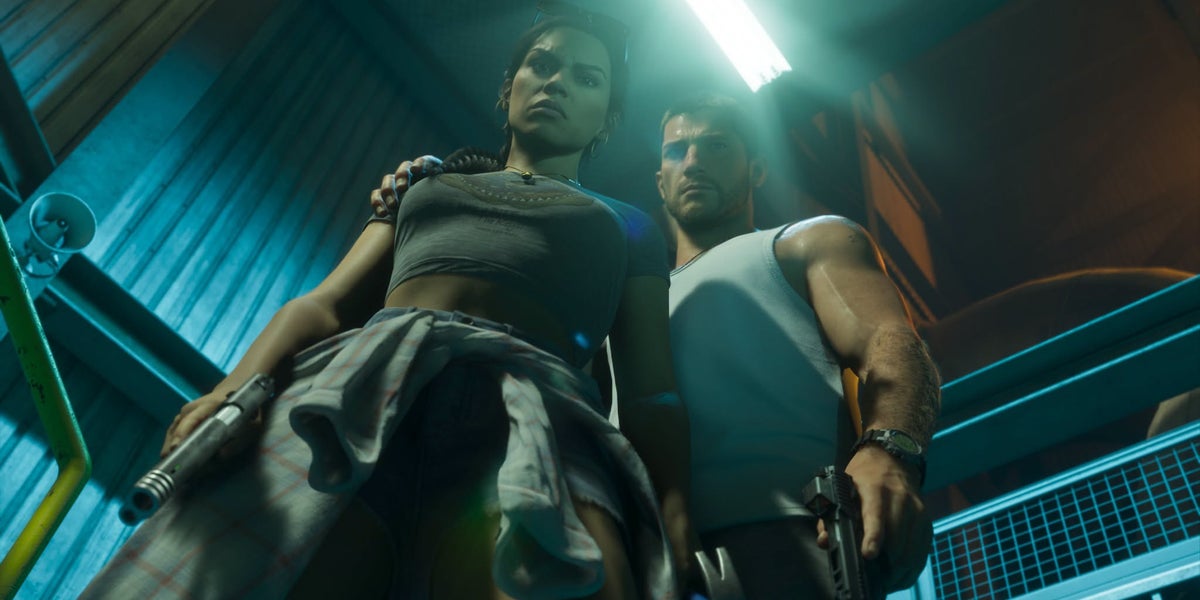
The source analysis highlights how Grand Theft Auto 6 appears to move far beyond GTA 5 Enhanced, especially in facial rendering, strand-based hair, physically based materials, and more advanced global illumination. That is not a minor upgrade. That is the kind of leap that changes what kind of GPU, CPU, cooling, memory, and storage setup actually makes sense for a buyer in 2026 and beyond.
If you are in Canada and watching the next wave of big-budget games closely, the bigger question is not just “Does GTA 6 look better?” The real question is what kind of PC do you need if games are now being built around this level of detail?
What the GTA 6 Visual Leap Really Tells PC Buyers
When a new flagship game shows a generational jump in visuals, it usually means more than prettier screenshots. It often signals that game development expectations have changed across the industry. Better skin shading, improved hair rendering, denser scenes, more accurate reflections, stronger materials, and richer lighting all add up to heavier GPU workloads, larger memory demands, more VRAM pressure, and a greater need for balanced system design.
In practical terms, a game that visually outclasses a heavily enhanced older title is also a warning sign for anyone shopping for a Gaming PC Canada build. Why? Because buying too low today can mean upgrading too soon tomorrow.
Are you buying a PC only for today’s games, or are you trying to stay comfortable through the next several years of major AAA releases?
Do you want high settings at 1080p and solid value, or are you aiming for 1440p ultra settings, ray tracing, and long-term confidence?
Are you interested in a machine that only runs games, or one that can also stream to Twitch, edit YouTube videos, handle Photoshop, and keep up with creator workloads?
How GTA 6 Visuals Compare to GTA 5 Enhanced and Why It Changes Buying Advice
The original comparison focuses on several core technical areas, and each one connects directly to buying decisions for a custom gaming PC.
1. Character Rendering Is Moving Into a New Tier
GTA 5, even enhanced, still carries visual DNA from much older console hardware. Character faces, skin response, and fine detail can only go so far when the original asset foundation comes from an earlier era. GTA 6 appears to take a major leap here with more convincing skin shading, stronger diffuse response, better specular highlights, and much more believable material interaction.
That matters because advanced character rendering tends to reward stronger GPUs and more VRAM. It also matters for people who care about immersion. If your ideal experience is not just “playable” but cinematic, then shopping at the very bottom of the market is usually the wrong move.
2. Hair Technology Is a Serious Performance Signal
One of the most important observations in the source discussion is strand-based hair for main characters and many NPCs. That may sound like a cosmetic detail, but in modern rendering it is a genuine performance indicator. Hair systems can be costly because they involve fine geometry, lighting interaction, movement simulation, and transparency challenges.
If you are planning for a Gaming PC for GTA 6 or similar future-facing open-world titles, details like this are exactly why GPU tier matters. Visual features that look subtle in a trailer can become major reasons why one PC feels current and another already feels compromised.
3. Physically Based Materials Raise the Standard
Another key point is the move to a more modern physically based rendering pipeline. In plain language, surfaces behave more naturally under changing light. Dust, paint, glass, concrete, fabric, metal, skin, and environmental wear all respond more convincingly.
This is a huge deal because it means lighting features like ray-traced reflections and global illumination can finally look more coherent across the whole world. It is also why slapping “ray tracing” onto an older game engine does not necessarily deliver the same result as a title built from the ground up around more modern materials.
For buyers, this means one important thing: if future games are going to be built around higher visual consistency, then the old “I just need something decent” mindset becomes riskier. A weak system may launch the game, but it may not deliver the version of the experience that made you want the game in the first place.
4. Lighting and RTGI Are Becoming Core Expectations
The source article points to stronger ray-traced global illumination and refined lighting consistency in GTA 6. This is the kind of technology that transforms a scene from “good graphics” into a world that feels naturally lit and physically believable.
Do you care about ray tracing, more realistic night scenes, convincing interiors, wet streets, reflective vehicles, and sunlight that behaves properly across the environment?
If the answer is yes, then your next question should be whether your next PC is being chosen for entry-level settings or for next-generation image quality.
Why Canadian Buyers Should Think About This Differently
In Canada, buying a PC is not just about raw specs. It is also about value protection, support, shipping confidence, part selection, warranty, and timing. Large game releases and major visual showcases can increase demand for GPUs and complete systems, especially when buyers suddenly realize their current setup may not be enough.
That is why Canadian customers should not only ask “Can I wait?” but also “What happens if I wait and replacement cost goes up?”
GPU demand pressure, memory pricing volatility, SSD cost fluctuations, and premium CPU availability can all affect the final price of a system. If your plan is already to upgrade, waiting until the release window of a huge title can leave you shopping in a more expensive, more competitive market.
This is where a Custom Gaming PC Canada approach makes more sense than buying a random generic system with unclear airflow, weak power delivery, limited upgrade paths, or questionable part balancing.
What Do You Want Your Next PC to Do for You?
Before you choose a build, ask yourself a better question than “What is the cheapest gaming PC I can get?” Ask this instead: What do I want my next PC to do for me for the next three to five years?
Do you want it to:
- Play new AAA games at 1080p with strong settings and good value?
- Handle 1440p gaming with ray tracing and smoother long-term performance?
- Run 4K gaming on a premium setup without needing an upgrade too soon?
- Game and stream at the same time using OBS?
- Edit gameplay footage for YouTube or TikTok?
- Work as a creator PC for Adobe Premiere Pro, DaVinci Resolve, Photoshop, or Illustrator?
- Support Blender, Unreal Engine, 3D rendering, or workstation-level tasks?
Your answer changes the build category completely. A budget gaming machine is not the same thing as a streaming PC. A streaming PC is not the same as a creator workstation. And a workstation for 3D modeling should not be chosen the same way as a PC meant mainly for esports gaming.
What Performance Tier Fits You Best?
One of the biggest mistakes buyers make is shopping by price before shopping by workload. A better way to buy is to match your performance tier to your actual use case.
Entry-Level Value Tier
This tier makes sense for customers who mainly want a Budget Gaming PC Canada setup for 1080p gaming, lighter multiplayer titles, and sensible spending. It can also work for students or first-time PC buyers who want strong everyday use plus gaming.
Ask yourself: are you mainly playing esports titles, older AAA games, and mainstream releases without expecting max ray tracing settings?
If yes, an entry-level value system may be the right fit. But if GTA 6-style visuals are exactly what got your attention, this may not be the tier you want to stay in for long.
Balanced Mainstream Gaming Tier
This is where many buyers should start if they want a 1440p Gaming PC Canada experience. It is ideal for players who want strong settings, modern GPU features, room for future games, and enough overhead for some streaming or editing.
If you are asking, “What PC do I need for 1440p gaming?” this tier is often the most practical answer. It gives you much better long-term comfort than shopping at the bottom of the stack, especially for heavy open-world games.
High-End Ray Tracing and Ultra Settings Tier
If your goal is a Ray Tracing Gaming PC Canada build for major new releases, this is where things get serious. Buyers in this range want stronger visual settings, better ray tracing performance, more headroom, and less compromise over the next generation of titles.
This tier is a smart fit if you are already thinking about GTA 6, visually advanced story-driven games, large open-world releases, and future-proofing. It is also a better choice for people who dislike upgrading every year or two.
Premium 4K Enthusiast Tier
This is for buyers who want a 4K Gaming PC Canada setup, premium image quality, high-end GPUs, top-tier cooling, and long-term confidence. It is also the right conversation if you are asking whether a flagship RTX build is worth it for cinematic games, content capture, and premium multitasking.
Do you want your next system to feel exciting on day one only, or still feel powerful years later when the next big graphical benchmark arrives?
What If You Also Want to Stream, Record, or Create Content?
Many customers who get excited about games like GTA 6 are not just players. They are streamers, editors, YouTubers, short-form creators, thumbnail designers, or people who want one machine to do everything. That changes the recommendation.
A Streaming PC Canada build needs more than gaming performance alone. If you are running OBS, recording high-bitrate footage, managing overlays, using multiple monitors, or editing clips after your session, you need a system with balanced CPU strength, GPU encoding capability, fast SSD storage, and enough RAM to avoid bottlenecks.
Ask yourself:
- Do you want to game and stream from one PC?
- Do you record long gameplay sessions for later editing?
- Do you create YouTube videos, TikToks, shorts, or livestream highlights?
- Do you need fast render and export times as well as strong in-game performance?
If yes, a gaming-only build may not be enough. A gaming-and-creator system is often the smarter investment.
Is a Gaming PC Good for Video Editing, Photo Editing, or Graphic Design?
Sometimes yes, but only if it is chosen correctly. A powerful gaming PC can overlap with creator performance, but a badly balanced one can fall short in professional tasks. That is why custom configuration matters.
For Video Editing
If you edit gameplay footage, YouTube content, podcasts, ads, interviews, or 4K social content, you may need a Video Editing PC Canada system rather than a pure gaming build. Video editing workflows depend heavily on CPU strength, memory capacity, fast SSDs, and the right GPU acceleration.
What PC do you need for video editing if you also game?
If you use Adobe Premiere Pro, DaVinci Resolve, After Effects, or CapCut, it usually makes sense to build around both gaming and editing needs from the beginning. That way you avoid buying a gaming system now and replacing half of it later.
For Photo Editing
If you work with Lightroom, Photoshop, RAW files, AI photo tools, or batch exports, a Photo Editing PC Canada setup should emphasize system responsiveness, RAM, SSD performance, and display pairing. A gaming GPU can still help, but your buying priorities may be different from someone chasing the highest FPS.
Do you need your computer to open huge image libraries quickly, stay responsive with many layers, and support a colour-conscious workflow? If so, build planning matters more than chasing one flashy component.
For Graphic Design
If you use Illustrator, Photoshop, InDesign, Canva, or Adobe Creative Cloud daily, a Graphic Design PC Canada system should prioritize multitasking, stability, strong storage performance, and enough memory for larger projects and multi-app workflows.
Do you want a machine that can handle branding work in the morning, marketing assets in the afternoon, and gaming at night? That is exactly where a properly selected custom PC shines.
For Content Creation
A Content Creation PC Canada build is ideal for people who combine gaming, editing, design, recording, streaming, and AI-assisted creative work. Instead of compromising in every direction, this kind of setup is designed for mixed workloads.
If you are asking, “Is a gaming PC good for content creation?” the best answer is this: it can be, but the right creator-focused parts and configuration choices make a major difference.
What If You Need 3D Modeling, Unreal Engine, or Rendering Power Too?
Some readers seeing advanced game visuals are not just gamers at all. They are 3D artists, modders, students, developers, animators, or professionals who use Blender, Unreal Engine, Maya, Cinema 4D, Revit, or CAD software.
If that sounds like you, a 3D Modeling PC Canada or workstation-style build may be the better category. Modern game visuals often inspire users who want to create environments, assets, cinematics, or simulations themselves. That requires a different standard of hardware planning.
What PC do you need for Blender?
What PC do you need for Unreal Engine?
What workstation PC do you need if you are rendering, modeling, compiling, baking lighting, and multitasking across multiple creative apps?
In these cases, choosing purely by gaming FPS is usually the wrong path. You may need more RAM, stronger sustained CPU performance, a different GPU tier, larger SSD capacity, and better cooling for long work sessions.
Why Timing Matters If You Are Planning a New PC Around GTA 6 and Other Upcoming Games
There is a practical buying lesson hidden inside every major visual showcase: demand can shift fast. As more customers begin searching for a Gaming PC for New Games, stronger components become more attractive, and weaker value systems become easier to outgrow.
If you already know your current PC is aging, waiting until a major title is almost here can put you in a tougher buying position. Selection pressure rises. Better GPUs can become harder to get. Full-system pricing can change. And many buyers end up settling for whatever is available instead of what is actually right for them.
Is it better to buy a gaming PC now or wait?
If your current system already struggles with modern AAA games, if you want ray tracing, if you plan to stream or edit, or if you are trying to avoid an upgrade again in the near future, buying earlier can be the smarter move. It gives you more room to choose properly rather than react late.
Should You Buy a Cheaper PC or Finance a Better One?
This is one of the most important questions Canadian buyers can ask. If the gap between an “it runs” PC and a truly comfortable long-term build is manageable through monthly payments, financing can be a practical tool rather than an impulse decision.
Should you finance a better PC instead of buying a cheaper one that may feel outdated too quickly?
For many buyers, the answer is yes. If stepping up in GPU class, cooling quality, RAM capacity, or storage speed helps you avoid replacing the system too soon, it can be the more sensible value over time. Groovy Computers offers financing options that can help customers secure a stronger custom system without needing to wait until prices or demand move against them.
If you are considering a custom gaming, creator, or workstation setup and wondering whether monthly payments would let you buy the right machine once instead of buying twice, it is worth exploring your options through GroovyComputers.ca.
Custom PC vs Generic Prebuilt: Why It Matters More for Next-Gen Games
As game visuals become more advanced, weak system design becomes easier to feel. Generic machines often cut corners where newer buyers may not notice at first: airflow, motherboard quality, power supply quality, cooling, case layout, upgrade room, or component balance.
A Custom PC Builder Canada approach matters because modern performance is not just about buying one fast part. It is about selecting the right combination of parts that work together under real load.
That means asking:
- Is the GPU matched properly to the CPU?
- Is there enough cooling for sustained gaming and creator sessions?
- Is the power supply reliable and appropriate for the hardware?
- Will the motherboard support future upgrades?
- Is the SSD fast enough for modern game installs and creator workflows?
- Is the RAM capacity appropriate for gaming only, or gaming plus streaming and editing?
When you buy from Groovy Computers, the value is not just in the parts list. It is in the full build logic, system testing, reliability, and support confidence behind it.
Why Groovy Computers Fits Canadian Buyers Looking for More Than Just Specs
Groovy Computers is built for people who want more than a box with parts inside. Whether you are shopping for a custom gaming PC, a creator machine, or a workstation-grade setup, the advantage is guidance, part matching, rigorous testing, and dependable support from a Canadian custom builder.
For many buyers across Nova Scotia, Atlantic Canada, and the rest of the country, trust matters just as much as raw performance. You want a system that is assembled with care, stress tested, built for the workload you actually have, and backed by a 1-year warranty.
You may also want the flexibility of financing for up to 4 years if that helps you move from a short-term compromise to a system that better fits your long-term plans.
Are you trying to find a Canada-built gaming PC that feels thoughtfully chosen rather than mass-produced?
Do you want help choosing between a budget gaming desktop, a premium RTX gaming system, a custom creator PC, or a workstation for editing and 3D work?
That is exactly the kind of decision support Groovy Computers is positioned to provide.
Which Buyer Should Choose Which Type of Groovy Computers Build?
The Budget-Conscious Gamer
If you mainly play at 1080p, want good everyday value, and are buying your first serious desktop, start with a value-focused gaming build. But be honest with yourself: are you okay lowering settings sooner if games continue moving toward GTA 6-level presentation?
The 1440p Mainstream Gamer
If you want the sweet spot for modern PC gaming, stronger visual settings, and more breathing room for future titles, this is often the smartest category. It is ideal for players who want quality and longevity without jumping straight to flagship pricing.
The High-End Enthusiast
If you want ray tracing, ultra settings, premium responsiveness, and long-term excitement from major game releases, a high-end custom build makes sense. This is especially true if visually advanced open-world games are your priority.
The Streamer and Hybrid Creator
If you game, stream, record, edit, and upload, choose a mixed-use build designed for all of it. Do not force a gaming-only machine into a creator role and then wonder why export times, storage, or multitasking feel limited.
The Video Editor or Creative Professional
If your PC earns money, saves work hours, or supports client deadlines, choose a creator or workstation-focused build. Reliability, memory capacity, fast SSDs, and stable long-session performance matter more than chasing a spec sheet headline.
The 3D Artist or Workstation User
If you are working in Blender, Unreal Engine, CAD, rendering, or technical software, choose a workstation-minded system. Your ideal build may overlap with gaming performance, but your priorities are broader and more demanding.
Questions to Ask Yourself Before You Buy Your Next PC
Before you commit, ask these practical questions:
- What games or software will I use most often over the next few years?
- Am I targeting 1080p, 1440p, or 4K?
- Do I care about ray tracing, high settings, and visual realism?
- Will I stream, record, edit, or create content too?
- Do I need extra RAM or storage for creative workloads?
- Am I trying to avoid upgrading again too soon?
- Would financing a stronger system make more sense than settling for less?
- Do I want a custom-built machine with testing and warranty support from a Canadian builder?
These are better questions than simply asking for the cheapest option. They lead to a system that fits your life, not just your cart total.
The Real Buying Takeaway From GTA 6 Visuals
The real story is not only that GTA 6 looks stunning. It is that this level of game rendering is becoming the benchmark buyers need to think around. More advanced characters, better hair simulation, superior lighting, more believable materials, and denser world presentation all point toward one reality: future games will continue asking more from your PC.
If you are shopping in Canada, the best response is not panic buying. It is smart planning. Choose the right performance tier. Match the system to your actual workload. Think beyond launch-day minimums. And if monthly payments help you secure a much better long-term machine, financing can be the smarter path.
If you are still asking what gaming PC you need, what performance tier fits your goals, or whether a gaming system should also be built for streaming, editing, design, or 3D work, the next step is simple: visit GroovyComputers.ca and get help choosing a custom build that fits what you actually want your next PC to do.
In short, GTA 6 visuals are not just a talking point. They are a buying signal. They tell you that stronger hardware planning, custom system design, and timing your purchase wisely matter more than ever.
#GTAVI #GTA6PC #GamingPCCanada #CustomGamingPCCanada #GamingPCForNewGames #1440pGamingPCCanada #4KGamingPCCanada #RayTracingGamingPCCanada #StreamingPCCanada #VideoEditingPCCanada #ContentCreationPCCanada #3DModelingPCCanada #CanadianCustomPCBuilders #NovaScotiaComputers #GroovyComputers
Groovy Computers | All Rights Reserved

Leave a comment
This site is protected by hCaptcha and the hCaptcha Privacy Policy and Terms of Service apply.