



































Gaming PC for New Games: What Crimson Desert’s Explosive Bomb Backpack Teaches Canadian Players About Choosing the Right Build
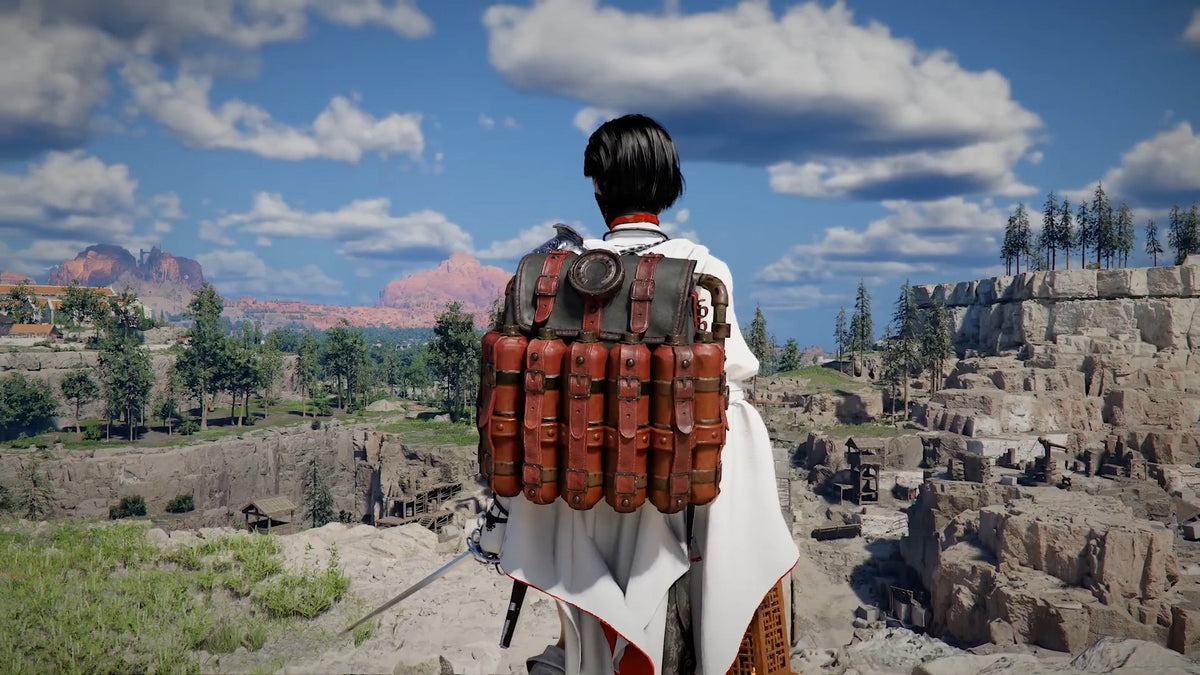
Gaming PC for New Games is not just a search term anymore. It is the real question Canadian players are asking as modern open-world titles continue to push combat effects, particle physics, large environments, high-resolution textures, streaming demands, and creator workflows harder than ever. The latest buzz around Crimson Desert and its ridiculous Bleed Bandits’ Alchemy Explosive Pack is a perfect example: one wild in-game item can turn a battlefield into a storm of bombs, visual effects, enemies, movement, and chaos. That is fun gameplay, but it also highlights a bigger PC-buying truth: if you want the newest games to feel smooth, responsive, and impressive, your computer has to be ready before the action gets heavy.
The source guide explains that players can find the Alchemy Explosive Pack by heading to the Southern Quarry, defeating Bleed Bandits who have the backpack equipped, and grabbing it quickly before a current bug can make it fall through the ground. Once equipped, the item generates bombs when the player takes damage, and certain self-triggered attacks can reportedly cause the pack to dispense bombs without taking the same kind of penalty. In gameplay terms, it is a chaotic tool. In PC-performance terms, it is exactly the type of combat scenario that separates a basic desktop from a properly built gaming machine.
For Groovy Computers, the lesson is simple: the best custom gaming PC is not only about whether a game launches. It is about whether your system stays smooth when the screen fills with explosions, enemies, animation effects, high-speed traversal, and unpredictable open-world moments. Are you buying a PC just to meet minimum requirements, or are you buying a PC that lets you enjoy games the way developers clearly intended?
If you are in Canada and you are planning your next gaming desktop, creator PC, streaming setup, or workstation, this is the time to think beyond one game and one item. What do you want your next PC to do when the hype cycle moves from one major release to the next? Do you want 1080p value gaming, 1440p high-refresh performance, 4K visuals, ray tracing, streaming, video editing, photo editing, graphic design, 3D modeling, or all of the above?
Why a Crimson Desert Bomb Backpack Is Actually a Great PC Buying Lesson
On the surface, the Alchemy Explosive Pack is just a strange and entertaining item. It creates bombs when damage is registered, and players can use specific movement or combat interactions to create a nearly endless supply of explosions. But look at what is happening under the hood in a modern action RPG or open-world game when something like that happens:
- Multiple enemies are active at once, each with AI routines, animations, hitboxes, and pathing.
- Explosions trigger particle effects, lighting changes, smoke, debris, and physics calculations.
- The game world may be streaming assets in the background as the player moves through a quarry or combat zone.
- The camera can shift quickly, forcing the GPU to redraw detailed environments from different angles.
- Combat timing matters, so inconsistent frame pacing can make the game feel worse even if the average FPS looks acceptable.
- If you are recording, streaming, or clipping gameplay, your PC is also encoding video while running the game.
This is why a Gaming PC for New Games should be chosen for real gameplay situations, not just spec-sheet minimums. A game may look fine in an empty field, then feel completely different when an explosive backpack, enemy swarm, weather effect, and finisher animation all happen at once. If you are the type of player who hunts for overpowered items, stacks combat effects, records highlights, or pushes graphics settings upward, you need a build that can handle the spikes.
Ask yourself: when the screen gets busy, do you want to lower settings and hope for the best, or do you want a system that was selected, assembled, tested, and tuned for the way you actually play?
What the Crimson Desert Guide Gets Right About Modern Game Discovery
The original guide is useful because it focuses on what players want immediately: where to go, what enemy to fight, how to avoid losing the item to a bug, and how to trigger its bomb-generation behaviour. That is exactly how modern game discovery works. Players do not just play through a main quest and stop. They watch clips, read guides, test builds, chase unusual items, and share chaotic moments online.
That behaviour changes what your PC needs to handle. You may start by asking, “Can my PC run this game?” But after a few days, the better question becomes, “Can my PC run this game while I am doing the most demanding things players are discovering?”
For example, if you are playing Crimson Desert with bomb-heavy combat, fast traversal, intense enemy encounters, and high settings, the workload can be very different from a simple benchmark scene. If you are streaming the route to the Southern Quarry, recording a guide, or editing a YouTube short afterward, the workload becomes even bigger.
That is why Groovy Computers looks at the full use case. Are you just gaming? Are you gaming and streaming? Are you editing clips for TikTok, YouTube, or Instagram? Are you building a channel around guides, boss fights, speedruns, or hardware comparisons? Your answer affects your CPU, GPU, RAM, storage, cooling, and upgrade path.
What Do You Want Your Next PC to Do for You?
Before choosing a custom build, pause and ask a better question: what do you want your next PC to do for you over the next few years?
Do you want it to be a dedicated gaming desktop for new AAA releases? Do you want it to double as a Streaming PC Canada buyers can rely on for OBS, Twitch, YouTube Live, or recording gameplay? Do you want a Gaming and Creator PC Canada setup that can play demanding games at night and edit client videos or social content during the day? Do you need a PC for Adobe Premiere Pro Canada users, a PC for DaVinci Resolve Canada creators, or even a PC for Blender Canada artists working on 3D assets?
The right system is not always the most expensive system. The right system is the one that matches your actual workload without forcing you into another upgrade too soon. If you buy too low, you may save money today and spend more later. If you buy intelligently, you can get smoother performance, longer usefulness, and better value over time.
Are You Mostly Gaming?
If your main goal is gaming, the core decision is resolution and refresh rate. A 1080p Gaming PC Canada buyer does not need the same GPU tier as someone who wants a 4K Gaming PC Canada build with ultra settings and ray tracing. If you play competitive games, high FPS and low latency may matter more than cinematic settings. If you play open-world action games like Crimson Desert, you may care more about consistent frame pacing, visual quality, and smooth traversal.
Are You Gaming and Streaming?
If you want to stream your bomb-backpack chaos, boss fights, PvP, or new-game reactions, you need to think about encoding. A strong GPU with modern hardware encoding can make a big difference for OBS and live platforms. A proper Gaming PC for Streaming Canada build should also have enough CPU headroom, RAM, and storage speed so the stream does not stutter when the game gets intense.
Are You Creating Content Around Games?
Many players are now part-time creators. They clip guides, edit shorts, create thumbnails, batch-export videos, record voiceover, and run multiple apps at once. A Content Creation PC Canada build should be chosen differently than a simple budget gaming machine. If you use Premiere Pro, DaVinci Resolve, Photoshop, Lightroom, Canva, Illustrator, After Effects, or CapCut, you may need more RAM, more storage, and a stronger CPU/GPU balance.
Are You Working With 3D, Design, or Workstation Software?
If games inspire your creative work, your next system may need workstation strength. A 3D Modeling PC Canada buyer using Blender, Unreal Engine, Unity, Maya, Cinema 4D, AutoCAD, Revit, or SolidWorks should prioritize stability, GPU acceleration, RAM capacity, and cooling. A gaming desktop can be a good foundation, but a true workstation build is configured around project size, render engine, viewport performance, and long-duration reliability.
Which Performance Tier Fits You Best?
One of the biggest mistakes Canadian buyers make is shopping by vague labels like “good,” “fast,” or “high end.” Those words only matter when connected to your monitor, software, games, and expectations. So which tier actually fits you?
Entry-Level and Budget Gaming: Is a Budget Gaming PC Canada Build Enough?
A Budget Gaming PC Canada build can be a smart choice if you are playing at 1080p, focusing on esports, indie games, older titles, or medium settings in newer games. This tier can also work for students or first-time gaming desktop buyers who want a reliable starting point without overspending.
But ask yourself: do you want to play new open-world games at higher settings, or are you comfortable turning down graphics options? Do you plan to keep the system for several years, or is this a stepping stone? Are you buying the cheapest option because it fits your needs, or because you have not explored financing a stronger system?
A budget system can absolutely be worth it, but it should still be built with quality components, airflow, testing, and upgrade potential. Cheap parts in the wrong places can create noise, heat, instability, or early replacement costs.
Mid-Range Sweet Spot: What PC Do I Need for 1440p Gaming?
For many players, 1440p is the sweet spot. A good 1440p Gaming PC Canada build can deliver sharper visuals than 1080p without the extreme GPU demands of 4K. If you want new games to look excellent while staying smooth, this is often the category to consider.
What PC do I need for 1440p gaming? The practical answer depends on your target FPS, graphics settings, and whether you use ray tracing. A balanced custom PC in this range should include a capable modern GPU, a strong gaming CPU, enough RAM for current titles and background apps, fast NVMe storage, and cooling that keeps performance consistent.
If you are the type of player who wants to explore games like Crimson Desert with high settings, effects-heavy combat, and room for future titles, a mid-range or upper-mid-range system is often the smarter long-term value than buying the absolute cheapest desktop.
Premium Gaming: Do You Want Ultra Settings, Ray Tracing, or 4K?
A High End Gaming PC Canada build is for players who want fewer compromises. If you are chasing 4K, high refresh rates, ray tracing, ultra textures, or long-term performance, premium GPU and CPU choices matter. This is also the tier where cooling, power supply quality, case airflow, and stress testing become especially important.
Do you want a Ray Tracing Gaming PC Canada setup for cinematic lighting and reflections? Do you want a 4K Gaming PC Canada build that can handle demanding environments without feeling outdated quickly? Do you want to avoid upgrading too soon when the next wave of games arrives?
Premium builds cost more upfront, but they can make sense for players who keep systems longer, play demanding AAA games, stream at high quality, edit video, or use creative software that benefits from powerful hardware.
Creator and Workstation Tier: Is a Gaming PC Good for Content Creation?
A gaming PC can be good for content creation, but only if it is configured properly. Games tend to emphasize GPU performance and fast single-threaded CPU behaviour, while creator software may need more CPU cores, more RAM, additional storage, and better sustained cooling.
If you edit 4K video, work with RAW photos, design in Adobe Creative Cloud, stream while gaming, or render in Blender, you should not buy a gaming PC based on FPS alone. A Custom Creator PC Canada build should consider timeline smoothness, export times, preview performance, scratch disks, project storage, and multitasking.
Ask yourself: do you want your PC to only play the game, or do you want it to help you turn that gameplay into content?
Why Canadian Buyers Should Think Differently About Timing
Canadian PC buyers face a different reality than shoppers reading global hardware headlines. Exchange rates, component availability, shipping costs, supplier inventory, seasonal demand, and sudden price changes can all affect what a build costs in Canadian dollars. A system that looks affordable this month may not have the same replacement cost later if GPU, memory, SSD, or power supply pricing shifts.
That does not mean you should panic-buy. It means you should plan. If you know a major game release, school term, business project, creator workload, or software upgrade is coming, waiting until the last minute can limit your options. Demand spikes tend to happen when everyone starts asking the same question at once: “What gaming PC do I need for this game?”
Is it better to buy a gaming PC now or wait? The answer depends on your current system, your budget, and how soon you need the performance. If your current PC already struggles with newer games, streaming, editing, or multitasking, waiting may simply mean spending more time frustrated. If you are planning a build for a specific release window, ordering earlier can give you more time to choose properly, finance if needed, and avoid rushed decisions.
Should You Finance a Better PC Instead of Buying a Cheaper One?
Financing is not about buying more than you need. It is about matching the system to the workload when paying the full amount upfront would push you into a weaker build. For Canadian customers, Gaming PC Financing Canada options can make sense when a stronger GPU, better CPU, more RAM, or larger SSD will extend the useful life of the computer.
Should I finance a better PC instead of buying a cheaper one? Sometimes, yes. If the cheaper system forces you to upgrade sooner, struggles with the games you actually want, or slows down your content workflow, the “savings” may not be savings at all. A monthly payment approach can help you secure a stronger system before replacement costs rise, especially if you already know you need the computer for gaming, school, work, streaming, or creative projects.
Groovy Computers offers financing options up to 4 years, which can help customers move from a short-term compromise to a more capable custom build. The key is to finance responsibly: choose the tier that fits your real needs, not just the biggest spec list possible.
If you are asking, “Can I finance a gaming PC in Canada?” or “Is buy now pay later worth it for a gaming PC?” the better question may be: what performance problem are you trying to solve, and how long do you want the solution to last?
Why Explosive Open-World Games Push More Than Just the GPU
Many buyers assume the GPU is the only part that matters for gaming. The GPU is extremely important, especially at 1440p, 4K, high settings, and ray tracing. But open-world games also lean on the CPU, RAM, SSD, and cooling system.
GPU: The Visual Engine
Your graphics card handles rendering, resolution, textures, lighting, shadows, effects, and frame output. In a game with explosions, complex environments, and high-speed combat, the GPU is constantly working. If you want 1440p high settings or 4K visuals, GPU selection becomes one of the most important parts of the build.
CPU: The Combat and World Manager
The processor helps manage game logic, physics, AI, background tasks, and frame delivery. When many enemies, effects, and interactions happen at once, CPU strength can influence smoothness. A strong gaming CPU is especially important if you also stream, record, run Discord, browse guides, and keep multiple apps open.
RAM: The Multitasking Buffer
Modern gaming is rarely just gaming. Players run launchers, overlays, browsers, voice chat, recording tools, streaming software, RGB utilities, and sometimes creative apps at the same time. Enough RAM helps prevent slowdowns and hitching. For many gaming builds, 32GB is a strong modern target, while creators, editors, and 3D artists may benefit from 64GB or more depending on workload.
SSD Storage: The Load-Time and Asset-Streaming Advantage
Fast NVMe SSD storage improves load times and can help with asset streaming in large games. It also matters for video editing, photo libraries, project files, cache folders, and game captures. If your PC has only a small drive, you may quickly run into storage management headaches as modern games and creator projects grow.
Cooling and Power: The Parts Buyers Forget Until Something Goes Wrong
A high-performance PC needs stable power and proper cooling. Heat can reduce boost performance, increase noise, and shorten component comfort under load. At Groovy Computers, custom builds are assembled with attention to airflow, compatibility, cable management, and stress testing because real-world reliability matters more than a flashy part list.
Custom PC vs Prebuilt PC Canada: Why the Difference Matters
Custom PC vs prebuilt PC Canada is one of the most important questions for buyers who want value without regret. A generic prebuilt may look attractive because the headline specs are easy to compare. But the hidden details often matter just as much: motherboard quality, power supply rating, airflow, case design, RAM configuration, SSD selection, thermal performance, and testing standards.
A custom build lets you match the PC to the purpose. A player focused on competitive esports should not be configured the same way as a 4K RPG fan. A YouTube creator needs different priorities than someone who only plays at 1080p. A Blender artist or CAD user needs a different plan again.
Groovy Computers builds custom systems for Canadian customers who want the right mix of performance, reliability, upgrade path, and support. Whether you need a Custom Gaming PC Canada setup, a Streaming and Editing PC Canada build, a Video Editing PC Canada workstation, or a Custom Workstation PC Canada system, the value comes from matching the hardware to the job.
A good gaming PC is not just a list of expensive parts. It is a balanced system designed around your games, your monitor, your software, your budget, and your upgrade timeline.
What Kind of Player Are You?
The right PC depends on how you play. Use these categories to narrow your direction before buying.
The 1080p Value Player
You want a reliable gaming desktop for popular games, esports titles, and new releases at sensible settings. You care about price, but you still want quality parts and a system that does not feel disposable. A well-built budget or mid-range system may be the best fit.
The 1440p Mainstream Enthusiast
You want sharper visuals, smooth frame rates, and strong performance in new games without paying for extreme 4K hardware. This is one of the best categories for players who want a system that feels modern, capable, and balanced.
The 4K and Ray Tracing Player
You want premium visuals, high settings, ray tracing where supported, and a system that stays relevant longer. You should be looking at stronger GPU tiers, premium cooling, high-quality power delivery, and a build strategy that avoids bottlenecks.
The Streamer
You want your gameplay to look good to viewers while staying smooth for you. You need a system that can handle the game, OBS or Streamlabs, chat, browser sources, audio tools, camera input, and recording. A proper Gaming PC for Streaming Canada build should be planned as a whole workflow, not just a gaming tower.
The Creator-Gamer
You play games, record footage, edit videos, create thumbnails, manage social platforms, and maybe run Adobe Creative Cloud. You need a stronger CPU/RAM/storage plan than a pure gaming buyer. A Creator PC Canada build can save time every week if it reduces lag, export waits, and project slowdowns.
The 3D Artist or Workstation User
You may game, but your serious workload involves Blender, Unreal Engine, CAD, animation, rendering, product visualization, or architecture. You should be thinking about GPU VRAM, CPU performance, RAM capacity, storage layout, thermal stability, and workstation reliability.
What Games, Software, or Creative Workloads Do You Want to Use?
This is the question every buyer should answer before choosing a PC. Not “what is the best PC?” but “what is the best PC for my games and software?”
Are you buying for Crimson Desert, GTA-style open worlds, ray tracing games, competitive shooters, Minecraft with shaders, or upcoming AAA releases? Are you also using OBS Studio, Premiere Pro, DaVinci Resolve, Photoshop, Lightroom, Illustrator, Canva, Blender, Unreal Engine, Unity, AutoCAD, Revit, or SolidWorks?
If the answer is “a bit of everything,” say that upfront when shopping. A multi-purpose system needs a different balance than a single-use machine. Groovy Computers can help Canadian buyers choose a build that fits the real workload instead of guessing based on generic online advice.
How to Choose a Gaming PC for New Games Without Overbuying
A strong Gaming PC for New Games should be planned around the experience you want, not just the name of the game. Here is a practical decision path:
- Choose your monitor target. Are you playing at 1080p, 1440p, or 4K? Higher resolution usually requires a stronger GPU.
- Choose your smoothness target. Do you want 60 FPS, 100+ FPS, 144 FPS, or high-refresh competitive performance?
- Choose your settings target. Are you comfortable with medium/high settings, or do you want ultra settings and ray tracing?
- List your background tasks. Will you run Discord, OBS, browsers, capture software, music, and overlays while gaming?
- List your creator software. Editing, streaming, photo work, design, and 3D rendering all change the build recommendation.
- Decide how long you want to avoid upgrading. A slightly stronger system now can sometimes delay a costly upgrade later.
- Consider financing if the better build is the smarter long-term option. Monthly payments can make a more capable system accessible without forcing the cheapest possible configuration.
If you are unsure where you fit, that is normal. Many customers know the games they want to play but not the parts required. That is exactly where a custom PC builder can help.
Why Waiting Can Cost More Than You Think
PC pricing can move quickly. GPUs may face demand spikes around major game launches or creator software trends. Memory and storage pricing can shift. Exchange rates can affect Canadian replacement costs. Seasonal demand can reduce availability. Even when one component drops, another can rise.
Should I buy a gaming PC before prices go up? If you already need the performance, waiting for a perfect market can become a trap. The better strategy is to buy when the system solves your real problem at a price and payment plan you can manage.
For gamers, the cost of waiting can be missing launch windows, playing at poor settings, dealing with stutters, or being unable to enjoy new mechanics smoothly. For creators, the cost of waiting can be slower exports, missed deadlines, and wasted hours. For students and professionals, the cost can be productivity loss.
There is also a psychological cost: constantly fighting an underpowered computer makes gaming and creative work feel less enjoyable. If your current PC is already struggling, a well-chosen upgrade can feel like a major quality-of-life improvement.
Why Groovy Computers Is Built for Canadian PC Buyers
Groovy Computers is a Canadian custom PC builder focused on helping customers choose the right desktop for gaming, streaming, editing, content creation, design, 3D modeling, and workstation use. We understand that Canadian buyers are not just comparing parts; they are comparing trust, support, shipping, warranty, financing, and long-term value.
When you order from Groovy Computers, you are not buying a random marketplace tower with unknown compromises. You are working with a Canadian Gaming PC Company that builds systems with care, tests them before delivery, and supports customers after purchase. Our systems include a 1-year warranty, and our team can help you think through performance tiers, budget, financing, and upgrade paths.
For customers in Nova Scotia, Atlantic Canada, and across the country, Groovy Computers offers a Canadian-focused alternative for buyers who want custom builds without the confusion of choosing every part alone. Whether you are looking for Gaming Computers Canada wide, a Custom Gaming PC Nova Scotia option, a gaming desktop shipped across Canada, or a creator workstation that can handle serious workloads, the goal is the same: the right computer for what you actually do.
Ready to Choose a Gaming PC for New Games?
If the latest Crimson Desert discoveries have you thinking about your own setup, ask yourself one simple question: when the next big game, patch, content trend, or creator project arrives, will your PC be ready?
If you want help choosing a Gaming PC for New Games, a budget gaming computer, a premium RTX gaming PC, a custom creator PC, a video editing workstation, or a 3D modeling workstation, visit GroovyComputers.ca. Groovy Computers can help you compare performance tiers, explore financing up to 4 years, and choose a build that makes sense before pricing, availability, or your workload changes again.
Do you want to buy the cheapest system today and risk upgrading sooner, or do you want a custom-built PC that gives you more room to play, stream, edit, design, and create? If you are ready to Buy Gaming PC Online Canada with confidence, Groovy Computers is ready to help you build smarter.
Final Takeaway: Build for the Chaos, Not the Loading Screen
The Alchemy Explosive Pack in Crimson Desert is funny, powerful, and chaotic, but it also represents where modern gaming is heading: bigger worlds, more effects, more player-driven experimentation, and more pressure on your hardware. A PC that only meets the bare minimum may technically run a game, but it may not deliver the experience you want when combat gets intense.
A great gaming PC should be ready for the moment the screen fills with explosions. A great creator PC should be ready when you turn that gameplay into content. A great workstation should be ready when your project becomes more complex than expected. That is why choosing the right build now matters.
For Canadian buyers, the smartest path is not guessing. It is matching your games, software, monitor, budget, and future plans to a properly built and tested system. Whether you want a 1440p gaming desktop, a 4K powerhouse, a streaming and editing setup, or a serious workstation, Groovy Computers can help you choose a system that is built for what comes next.
#GamingPCForNewGames #GamingPCCanada #CustomGamingPCCanada #1440pGamingPC #4KGamingPC #StreamingPC #CreatorPCCanada #GroovyComputers
Groovy Computers | All Rights Reserved



Leave a comment
This site is protected by hCaptcha and the hCaptcha Privacy Policy and Terms of Service apply.