























Gaming PC for New Games: What Crimson Desert’s Immersive UI Update Teaches Canadian Buyers About Choosing the Right Custom PC
A Gaming PC for New Games is no longer just about launching a title and hoping the settings menu behaves. Modern open-world games are pushing players toward higher resolutions, cleaner visuals, smoother frame rates, and more immersive play styles. Crimson Desert’s option to hide the minimap, HP bar, and status icons is a perfect example of where PC gaming is heading: fewer distractions, bigger worlds, better visuals, and a stronger need for hardware that can keep up when the screen is no longer covered by interface elements.
For Canadian gamers, creators, streamers, and workstation buyers, this is more than a small gameplay setting. It is a useful reminder that the right PC should match how you actually want to experience your games and software. Do you want 1080p high-FPS gameplay? Do you want a 1440p gaming PC in Canada that makes open-world environments feel sharp and responsive? Are you targeting 4K, ray tracing, streaming, video editing, photo editing, graphic design, or 3D modeling on the same machine? Or are you trying to buy before a major release, seasonal demand spike, hardware shortage, or price increase makes the same system more expensive?
At Groovy Computers, we look at topics like this through the lens of real buying decisions. A cleaner in-game HUD sounds simple, but it changes what players notice. When the minimap disappears, the world has to carry the experience. When the HP bar is gone, performance consistency matters more because combat must feel responsive. When status icons are hidden, stutters and input delay become more noticeable because the player is relying on motion, sound, and visual feedback instead of UI clutter. If your PC is struggling, “immersive mode” stops feeling cinematic and starts feeling frustrating.
What Crimson Desert’s Hide Minimap and Status Feature Actually Does
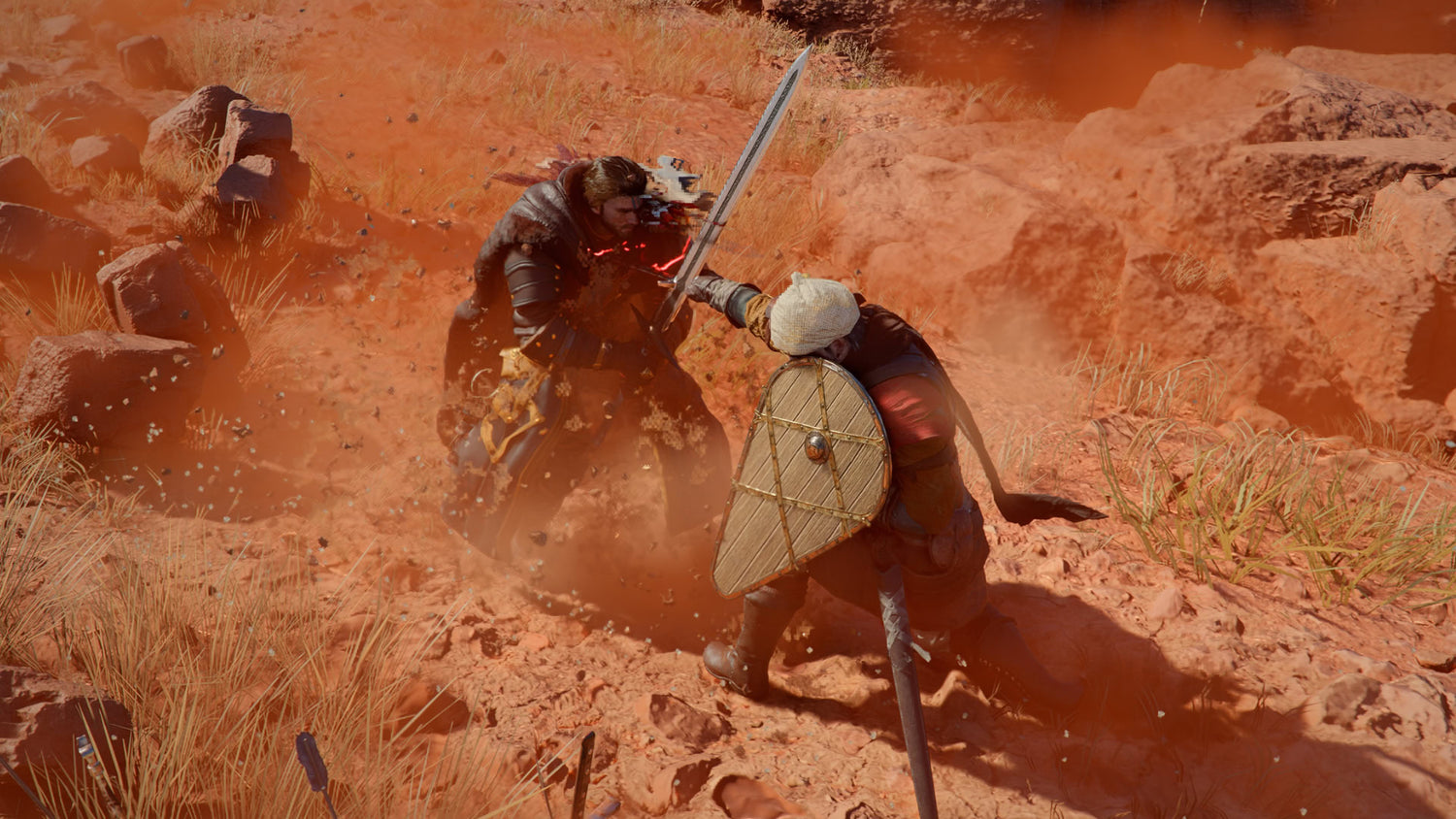
The source topic focuses on a Crimson Desert setting introduced with Patch 1.13.00 that allows players to hide several static interface elements. When enabled, the setting removes the minimap, time-of-day display, tracked quest text, HP bar, food quick slot icon, equipment skill icon, stamina indicator, and elemental effect status icons from the regular gameplay view.
What stays visible? Temporary prompts still appear when needed. Interaction prompts, NPC names, quest-area hints, challenge notifications, subtitles if enabled, mission notifications, mount commands, and other context-driven pop-ups continue to show up. In other words, the feature does not turn the game into a completely blind experience. It removes persistent UI clutter so players can focus on the world itself.
That matters because Crimson Desert is built around exploration, traversal, combat, open landscapes, weather, visual detail, and cinematic presentation. If you are the type of player who wants to ride through a storm, explore forests, climb ruins, and fight enemies without a minimap constantly pulling your eye away from the scene, this setting is a major immersion upgrade.
But there are trade-offs. Without the HP bar, you may not know exactly how close you are to being defeated. Without the minimap, you lose a constant directional reference. Without cooldown and status icons, you may need to rely on memory, sound cues, timing, and muscle memory. That kind of play style rewards a smooth, responsive system. If your PC drops frames during combat, if your storage causes streaming hitches, or if your CPU struggles with open-world simulation, the lack of UI can make those issues feel even worse.
Why a Gaming PC for New Games Matters More When You Play Without UI Clutter
A Gaming PC for New Games needs to do more than hit a minimum requirement. Minimum specs may start the game, but they rarely deliver the kind of cinematic, clean-screen experience players imagine when they see high-end gameplay footage. Once the HUD is hidden, you are paying more attention to terrain detail, lighting, animation, draw distance, weather effects, texture quality, and motion smoothness.
Ask yourself this: if you remove the minimap, are you doing it because you want the game to look like a living world? If the answer is yes, then your PC should be built to make that world look and feel convincing.
For open-world AAA games, performance is usually shaped by several parts working together:
- GPU power for resolution, ray tracing, texture quality, shadows, lighting, and high settings.
- CPU performance for world simulation, physics, NPC activity, combat responsiveness, and minimum frame rates.
- RAM capacity for modern game assets, background apps, browsers, launchers, Discord, OBS, and creator software.
- Fast NVMe SSD storage for loading, asset streaming, texture pop-in reduction, and overall system responsiveness.
- Cooling and airflow for sustained performance during long gaming sessions.
- Power supply quality for stability, upgrade headroom, and reliability under GPU-heavy loads.
What PC do you need for this game if you care about immersion? The answer depends on your target resolution, refresh rate, and whether you want to stream, record, edit, or create content around your gameplay.
What Do You Want Your Next PC to Do for You?
Before choosing a build, take a step back and ask a better question: what do you want your next PC to do for you over the next several years?
Do you want a system mainly for Crimson Desert, upcoming open-world games, and high settings at 1080p? Do you want a 1440p Gaming PC Canada buyers can rely on for smoother visuals and higher refresh-rate monitors? Are you aiming for a 4K Gaming PC Canada setup with ultra settings, premium textures, and ray tracing where supported? Do you also want to stream to Twitch or YouTube, record gameplay, edit videos, manage a design business, process RAW photos, or work in Blender, Unreal Engine, AutoCAD, Revit, or other demanding software?
These questions matter because the best gaming PC is not always the most expensive PC. It is the build that matches your real workload. A competitive esports player may prioritize high FPS and low latency at 1080p. An open-world RPG fan may care more about 1440p visual quality and consistent frame pacing. A creator may need more RAM, stronger CPU performance, and additional storage. A 3D artist may need a GPU-focused workstation. A streamer may need a balanced Gaming and Streaming PC Canada setup that can play, encode, record, and multitask without choking.
If you want help matching your goals to a build, Groovy Computers can guide you through the decision instead of leaving you to guess from generic spec sheets.
What the Source Topic Gets Right: Immersion Is a Real Performance Category
The original guide correctly highlights the main appeal of hiding the minimap and status UI: immersion. When static interface elements disappear, the game world feels larger, cleaner, and more cinematic. That is not just an aesthetic preference. It changes how players experience the hardware behind the game.
When UI clutter is visible, your eyes bounce between icons, quest markers, health information, minimap indicators, and cooldowns. When the UI is hidden, your attention shifts to the environment. You notice textures. You notice lighting. You notice foliage density. You notice weather. You notice how smooth the camera feels during horseback travel or fast combat. You notice if the game stutters when entering a town or turning quickly in a dense area.
That is why “good enough” hardware often stops feeling good enough in modern games. A budget system might run the game, but will it preserve the atmosphere? A mid-range system might play smoothly at 1080p, but will it still feel sharp on a 1440p monitor? A premium RTX gaming PC might cost more upfront, but will it help you avoid upgrading too soon when new games, patches, texture packs, ray tracing options, and creator workloads become heavier?
Immersion is not only about graphics settings. It is about consistency. A high average FPS number does not help if your lows are poor, your storage hitches, your thermals throttle, or your PC becomes loud and unstable after an hour of play. That is where a properly tested custom build matters.
What PC Do I Need for 1440p Gaming?
If you are asking, “What PC do I need for 1440p gaming?” you are already thinking like a modern PC buyer. For many Canadian gamers, 1440p is the sweet spot because it offers a major sharpness improvement over 1080p without demanding the same extreme GPU power as 4K.
A strong 1440p gaming PC should be built around a capable modern graphics card, a fast gaming CPU, 32GB of RAM for smoother multitasking, and a fast NVMe SSD. This kind of system is ideal for open-world games, RPGs, shooters, action-adventure titles, racing games, and visually rich single-player releases. It also gives you more flexibility if you want to stream, record clips, run Discord, keep browser tabs open, or edit short-form content.
Is 1440p worth it if you currently play at 1080p? For many players, yes. Once you hide the HUD in a game like Crimson Desert, the added clarity helps landscapes, character models, and environmental detail stand out. A 1440p display paired with the right GPU can make exploration feel more premium without forcing you into the highest possible system cost.
A 1440p build is often the right choice if you want:
- Smoother visuals than 1080p without jumping to full 4K cost.
- High or ultra settings in many current games.
- A balanced system for gaming, streaming, and light editing.
- Better long-term value than an entry-level gaming PC.
- A monitor upgrade path that feels meaningful.
If you want a Gaming PC for New Games that feels current without going all the way to flagship pricing, 1440p is one of the smartest targets.
What PC Do I Need for 4K Gaming?
4K gaming is where expectations rise sharply. If your goal is to play visually ambitious open-world titles with maximum detail, high-resolution textures, ray tracing where available, and a large monitor or TV-style setup, then a 4K Gaming PC Canada configuration needs a much stronger GPU and a carefully balanced supporting platform.
At 4K, the graphics card does most of the heavy lifting. However, the rest of the system still matters. A weak CPU can reduce minimum FPS. Insufficient RAM can limit multitasking and newer games. Slow storage can increase load times and asset streaming issues. Poor cooling can prevent expensive components from maintaining boost clocks. A low-quality power supply can become a long-term liability.
Should you buy a 4K gaming PC if you mainly play competitive esports? Maybe not. Many competitive players still prefer 1080p or 1440p with very high refresh rates. But if you play cinematic open-world games, story-driven RPGs, simulation titles, racing games, or visually rich single-player experiences, 4K can be spectacular when paired with the right hardware.
Ask yourself: do you want maximum visual quality, or do you want maximum FPS? Do you want ray tracing and ultra settings, or would you rather lower a few settings to maintain higher frame rates? Do you want the PC to double as a video editing workstation or 3D rendering PC? These choices affect the build.
Should You Care About Ray Tracing, Upscaling, and Premium GPUs?
Ray tracing can dramatically improve lighting, shadows, reflections, and atmosphere in supported games, but it also increases GPU demand. Upscaling technologies can help boost performance at higher resolutions, but they are not a replacement for choosing the right hardware tier in the first place.
A Ray Tracing Gaming PC Canada buyer should think about the full experience. Are you chasing screenshots and cinematic exploration? Are you streaming gameplay? Are you recording high-quality footage for YouTube? Are you playing on a 144Hz or 165Hz monitor? The answers determine whether you should focus on a strong mid-range GPU, a high-end GPU, or a flagship-class build.
Premium GPU choices can make sense when you want 4K, ray tracing, heavy texture settings, VRAM headroom, game capture, video editing acceleration, or 3D rendering performance. But not every buyer needs the highest-end card available. The best custom PC builder helps you avoid both underbuying and overspending.
That is where Groovy Computers’ custom approach matters. Instead of pushing one generic configuration, we help Canadian buyers match the GPU, CPU, RAM, storage, cooling, case airflow, and power supply to the experience they actually want.
Which Performance Tier Fits You Best?
Choosing a gaming PC becomes easier when you think in tiers rather than random part names. The right tier depends on your monitor, your games, your software, and how long you want the system to remain satisfying.
Entry-Level and Budget Gaming PC Canada Buyers
A budget gaming PC is best for players who want solid 1080p performance, esports titles, lighter games, older AAA games, school use, web browsing, and entry-level content creation. This tier can be a smart choice for students, first-time PC gamers, or families buying a first gaming desktop.
But ask yourself: are you buying for today only, or do you want to avoid upgrading too soon? If you already know you want new AAA games, high settings, streaming, or 1440p, buying too low can cost more later. Sometimes a slightly stronger system financed over time is a better value than a cheaper PC that needs upgrades almost immediately.
Mid-Range 1440p Gaming PC Canada Buyers
This is the sweet spot for many players. A mid-range custom gaming PC can target 1440p, high settings, strong frame rates, and better longevity. It is well suited for open-world games, RPGs, shooters, racing games, survival games, and general gaming with Discord, browsers, and launchers running in the background.
This tier is also a strong match for casual streaming, YouTube clips, photo editing, light graphic design, and basic 4K video editing with smart project settings. If you want one PC for gaming and everyday creative work, this is often where value becomes very compelling.
High-End Gaming PC Canada Buyers
A high-end gaming PC is built for players who want premium 1440p, ultrawide gaming, high-refresh gameplay, ray tracing, and entry-to-strong 4K performance depending on the GPU. This is the tier where you start prioritizing better cooling, stronger CPUs, more storage, premium cases, and more upgrade headroom.
Do you want to play new releases without constantly worrying about settings? Do you want a system that still feels powerful after several major game launches? Do you want streaming, editing, and gaming on the same desktop? This tier may be the right balance.
Premium 4K and Flagship Gaming PC Buyers
A premium gaming PC is for buyers who want the best visual experience they can reasonably build: 4K, ray tracing, ultra settings, high-end monitors, content creation, large project files, rendering, and longer-term headroom. This tier is also useful for creators who game and work on the same system.
Should you finance a high-end gaming PC instead of compromising? If the stronger system will delay upgrades, improve your work output, support your creative income, or help you secure parts before prices rise, financing can be a practical strategy. Groovy Computers offers financing options up to 4 years, making higher-performance builds more accessible for Canadian buyers who do not want to pay the full amount upfront.
Is a Gaming PC Good for Streaming and Content Creation?
Yes, a properly configured gaming PC can be excellent for streaming and content creation. The key phrase is “properly configured.” A random gaming desktop may have a strong GPU but not enough RAM, storage, cooling, or CPU power for heavier creator workloads. A custom build can be balanced around your actual use.
If you want a Gaming and Streaming PC Canada setup, ask yourself what platform you plan to use. Are you streaming to Twitch, YouTube Live, TikTok Live, or recording through OBS Studio? Do you want to stream at 1080p while gaming at 1440p? Do you need a dual-monitor setup? Are you recording high-bitrate footage for editing later?
A strong streaming PC usually benefits from:
- A modern GPU with efficient hardware encoding.
- A capable multi-core CPU for gaming, streaming software, alerts, browser sources, and background apps.
- 32GB of RAM as a practical modern baseline for gaming and streaming.
- Fast NVMe storage for games, recordings, clips, cache files, and software.
- Quiet cooling so the PC does not become distracting during microphone recording.
If you want to hide the UI in a game like Crimson Desert and record cinematic footage, your system needs enough performance to handle the game and the capture workload at the same time. Otherwise, your “clean” footage may be filled with stutters, dropped frames, or poor encoding quality.
What PC Do Content Creators Need If They Also Game?
Content creators often need more than a standard gaming PC. A Creator PC Canada buyer may use Premiere Pro, DaVinci Resolve, After Effects, Photoshop, Lightroom, Illustrator, Canva, OBS, CapCut, Blender, Unreal Engine, or multiple tools in the same workflow. That changes the build priorities.
Are you editing YouTube videos from your gameplay? Are you making TikToks or Instagram Reels? Are you designing thumbnails, overlays, logos, or social media graphics? Are you working with RAW photos, 4K footage, motion graphics, or 3D assets? If yes, you should not choose your PC based only on game FPS.
For video editing, CPU performance, GPU acceleration, RAM, and storage speed all matter. A Video Editing PC Canada configuration may need 32GB of RAM for light to moderate work, 64GB for heavier 4K editing and multitasking, and even more for serious After Effects or high-resolution workflows. Fast storage is critical because editing projects can become huge quickly.
For photo editing, a Photo Editing PC Canada setup should emphasize a fast CPU, enough RAM, a fast SSD, and a GPU that supports modern acceleration features. Lightroom, Photoshop, Capture One, and AI photo tools can benefit from a balanced system, especially when working with high-resolution RAW files and batch exports.
For graphic design, a Graphic Design PC Canada buyer should think about multi-monitor support, fast responsiveness in Adobe Creative Cloud, smooth Photoshop and Illustrator performance, and enough memory for large files. A dedicated GPU may be useful, especially if design work overlaps with video, 3D, AI tools, or motion graphics.
For 3D modeling and rendering, a 3D Modeling PC Canada or 3D Rendering PC Canada configuration can require far more GPU power, VRAM, RAM, and cooling than a basic gaming build. Blender, Unreal Engine, Unity, Maya, 3ds Max, Cinema 4D, SketchUp, ZBrush, AutoCAD, Revit, and SolidWorks all have different performance profiles. A custom workstation can be designed around the software you actually use.
Gaming PC vs Creator PC: Which One Should You Buy?
A gaming PC and a creator PC can overlap, but they are not always the same. A pure gaming PC may prioritize GPU performance and frame rates. A creator PC may prioritize CPU cores, RAM capacity, storage configuration, GPU acceleration, quiet operation, and reliability under sustained workloads.
If you only game, the build can be optimized around your resolution and FPS target. If you game and stream, the system needs additional encoding and multitasking headroom. If you game and edit, the system needs more memory and storage planning. If you game and render, GPU selection and VRAM become more important. If you use CAD, architecture, product design, or 3D rendering software, you may need a Custom Workstation PC Canada configuration rather than a typical gaming build.
So which one should you buy? Ask what would hurt more: slightly lower FPS in one game, or losing hours every week to slow exports, laggy timelines, long renders, and unstable multitasking? If your PC supports school, work, business, or content income, the right answer may be a custom creator or workstation build rather than a basic gaming desktop.
Why Canadian Buyers Should Think Differently About Timing
Canadian PC buyers face a unique combination of currency movement, shipping costs, supply shifts, seasonal demand, new game hype, GPU demand pressure, memory pricing, storage pricing, and sudden changes in availability. Waiting can sometimes help, but it can also backfire when demand rises before major game launches, holiday seasons, back-to-school periods, tax-return buying windows, or creator software upgrade cycles.
Is it better to buy a gaming PC now or wait? The honest answer depends on your current system, your target games, and your tolerance for risk. If your current PC already struggles with newer releases, waiting may mean spending months with poor performance only to face higher prices or limited stock later. If you need the system for work, school, editing, streaming, or client projects, delaying the purchase can also cost time and productivity.
Component pricing can be volatile. GPUs are especially sensitive to demand because they serve gamers, streamers, editors, AI users, 3D artists, and workstation buyers. RAM and SSD pricing can shift as manufacturing cycles change. Cases, power supplies, coolers, and motherboards can also move in price depending on supply and exchange rates.
That is why financing can be worth considering. If monthly payments allow you to secure the right build now instead of settling for an underpowered system, the long-term value can be stronger. Groovy Computers offers financing up to 4 years, giving Canadian buyers another way to access a better gaming PC, creator PC, or workstation without paying the full amount upfront.
Should I Finance a Better PC Instead of Buying a Cheaper One?
This is one of the most important questions a buyer can ask. A cheaper PC can look attractive at checkout, but if it underperforms in the games or software you actually use, the savings may disappear quickly. You may end up upgrading the GPU, adding RAM, replacing storage, improving cooling, or buying a whole new system sooner than expected.
Financing is not about buying more than you need. It is about avoiding a bad compromise when the better build is the one that actually fits your goals. If you are a student playing esports at 1080p, a value-focused system may be perfect. If you are a creator editing 4K footage, a low-cost gaming PC may slow you down every day. If you are a gamer targeting 1440p ultra settings in new open-world releases, an entry-level build may not provide the experience you want.
Ask yourself:
- Will this PC still feel good two or three years from now?
- Will I regret not choosing more RAM, storage, or GPU power?
- Am I buying before a major game release or creator workload upgrade?
- Would monthly payments help me secure a stronger system before replacement costs rise?
- Am I choosing the cheapest option because it is enough, or because I have not explored financing?
If the right PC is slightly above your immediate cash budget, financing may help you avoid buying twice.
Why Custom Builds Matter More Than Generic Prebuilt PCs
A generic prebuilt PC can look good on paper, but the full parts list matters. Two systems with the same GPU name can perform differently depending on CPU pairing, cooling, airflow, RAM configuration, SSD quality, motherboard features, power supply quality, and how well the system was assembled and tested.
With a custom PC from Groovy Computers, the goal is not just to put parts in a case. The goal is to create a balanced system for your use case. A quiet creator workstation should not be treated the same as a high-airflow esports build. A 4K gaming PC should not be configured like a budget office desktop with a powerful graphics card added as an afterthought. A streaming PC needs attention to encoding, storage, USB connectivity, monitor support, and thermal stability.
Why testing matters in a gaming PC is simple: modern components are powerful, but they also draw significant power and heat under load. A system can boot to Windows and still fail under real gaming, rendering, or streaming pressure. Stress testing helps catch instability, thermal issues, configuration problems, and performance inconsistencies before the PC reaches the customer.
Groovy Computers builds custom systems for Canadian customers, performs rigorous testing, and provides a 1-year warranty for confidence after purchase. For buyers in Nova Scotia, Atlantic Canada, and across the country through Canada-wide service, that combination of custom selection, testing, support, and warranty protection is a major advantage over guessing alone.
What Should Canadian Buyers Ask Before Choosing a Gaming PC for New Games?
If you are shopping for a Gaming PC for New Games, do not start with the question, “What is the cheapest PC that can run it?” Start with the better question: “What experience do I want, and how long do I want that experience to last?”
Here are the questions that can save you from buying the wrong system:
- What games do I actually play? Esports, open-world RPGs, shooters, racing games, survival games, simulation titles, and cinematic single-player games all stress hardware differently.
- What resolution do I want? 1080p, 1440p, ultrawide, and 4K require different GPU tiers.
- Do I care more about high FPS or ultra graphics? Competitive players and cinematic gamers often need different builds.
- Will I stream or record gameplay? OBS, YouTube, Twitch, and recording software add extra workload.
- Will I edit videos or photos? Premiere Pro, DaVinci Resolve, Photoshop, and Lightroom benefit from balanced CPU, GPU, RAM, and SSD choices.
- Will I use design or 3D software? Illustrator, InDesign, Blender, Unreal Engine, CAD, and rendering tools may require workstation-level planning.
- How much storage do I need? Modern games, 4K footage, project files, and recordings can fill a small SSD quickly.
- Do I want to upgrade later? A better motherboard, PSU, case, and cooling setup can make future upgrades easier.
- Am I buying before demand rises? Game launches, holiday demand, and component shortages can change availability quickly.
- Would financing help me buy the right PC instead of settling? Monthly payments may make a stronger system more practical.
How UI-Free Gaming Changes What You Notice About Your PC
Crimson Desert’s hidden UI option is a small feature with a big lesson: the better the game world looks, the more obvious your PC’s strengths and weaknesses become. If your build is smooth, quiet, and powerful, immersive mode feels like stepping into the world. If your build is underpowered, the missing UI may simply reveal stutters, low detail settings, blurry upscaling, uneven frame pacing, and slow loading.
Think about horseback travel across a large landscape. A strong system can keep motion smooth and detail consistent. A weak system may show pop-in, hitching, and frame drops. Think about combat with the HP bar hidden. A responsive system helps you react naturally. A laggy system makes every dodge, parry, and camera movement feel less reliable. Think about weather and lighting. A strong GPU lets you enjoy the atmosphere, while an underpowered build may force settings so low that the cinematic appeal disappears.
If you are excited about games that invite you to hide the UI and explore, you should be equally intentional about the PC that powers that experience.
What About Monitors, Peripherals, and the Rest of the Setup?
Your gaming PC is the heart of the setup, but the monitor determines what performance you can actually see. A powerful PC paired with a basic 1080p 60Hz monitor may be underused. A 4K high-refresh monitor paired with a budget GPU may be unrealistic. The right build and display should match.
If you want a 1080p esports experience, high refresh rate matters. If you want immersive open-world gaming, 1440p or ultrawide may be more satisfying. If you want cinematic visuals, 4K can be excellent with the right GPU. If you stream, a second monitor can make chat, alerts, OBS, and browsing far easier. If you edit photos or design graphics, colour accuracy may matter as much as frame rate.
Do you want one system for gaming after work, editing on weekends, and streaming when a new release drops? Then your build should account for monitors, storage, audio, capture workflow, and future expansion rather than focusing only on the tower price.
Budget, Value, or Premium: How Much Should You Spend?
How much should you spend on a gaming PC? The most useful answer is based on your target experience, not a random number. A budget gaming computer can be perfect for 1080p and lighter workloads. A mid-range system offers stronger 1440p value. A premium build is justified when you want 4K, ray tracing, heavy creation, long-term headroom, or professional reliability.
Instead of asking only, “What is the lowest price?” ask:
- What would make this purchase feel successful six months from now?
- What settings am I unwilling to compromise on?
- Will I be disappointed if I cannot play at 1440p or 4K?
- Will I need more storage within the first year?
- Will I use the PC for school, work, business, editing, design, or content creation?
- Would a stronger system save me time or prevent an early upgrade?
A good PC buying decision balances price, performance, reliability, and lifespan. The cheapest system is not always the best value, and the most expensive system is not always necessary. The right custom build sits at the intersection of what you want to do now and what you want to avoid replacing too soon.
Why Groovy Computers Is a Strong Choice for Canadian Custom PC Buyers
Groovy Computers is built around helping Canadian customers choose the right custom PC for gaming, streaming, video editing, photo editing, graphic design, content creation, 3D modeling, and workstation use. Whether you are shopping from Nova Scotia, Atlantic Canada, or elsewhere in Canada, the goal is to make the buying process clearer, safer, and more performance-focused.
When you buy from Groovy Computers, you are not just buying a list of components. You are buying guidance, assembly quality, testing, warranty support, and a system designed around your needs. That matters when you are investing in a PC that may power your gaming, work, school, streaming channel, photography business, design projects, or 3D portfolio.
Groovy Computers offers:
- Custom gaming PCs for 1080p, 1440p, 4K, ray tracing, esports, and AAA games.
- Creator PCs for YouTube editing, Adobe Creative Cloud, DaVinci Resolve, Photoshop, Lightroom, and design work.
- Streaming PCs for OBS, Twitch, YouTube Live, recording, and multi-monitor setups.
- Workstation PCs for 3D modeling, rendering, CAD, Unreal Engine, Blender, and professional productivity.
- Rigorous testing before delivery.
- A 1-year warranty for added confidence.
- Financing options up to 4 years for buyers who want stronger performance without paying all at once.
If you are asking, “What gaming PC do I need?” or “Should I finance a better PC instead of buying a cheaper one?” Groovy Computers can help you compare the practical trade-offs.
Ready to Choose a Gaming PC for New Games Without Guessing?
If Crimson Desert’s immersive UI setting has you thinking about cleaner gameplay, better visuals, and a more cinematic setup, it may be time to look at your current PC honestly. Can it handle the games you are excited about? Can it deliver the resolution you want? Can it stream, record, edit, or render without slowing you down? Can it last through the next wave of demanding releases?
A Gaming PC for New Games should be built around your goals, not a generic spec sheet. Whether you need a budget gaming computer, a premium RTX gaming PC, a custom creator PC, an editing workstation, or a 3D modeling workstation, the right choice starts with understanding what you want the system to do every day.
Want help choosing before prices shift, parts become harder to source, or the next major release pushes demand higher? Visit GroovyComputers.ca to explore custom builds, financing options, and Canadian-built systems designed for real gaming and creator performance.
Final Thoughts: Immersion Starts With the Right Hardware
Crimson Desert’s hidden minimap, HP bar, and status icon option is a reminder that modern PC gaming is becoming more cinematic, more demanding, and more personal. Players want worlds that feel alive. Creators want systems that can capture and edit those worlds. Streamers want smooth performance while broadcasting. Professionals want hardware that saves time instead of creating bottlenecks.
The right PC makes all of that easier. The wrong PC turns every new release into a settings compromise. If you want to enjoy new games at the quality they deserve, avoid upgrading too soon, and build around your real workload, Groovy Computers is ready to help you choose a custom system that fits your goals in Canada.
#GamingPCForNewGames #GamingPCCanada #CustomGamingPCCanada #1440pGamingPC #4KGamingPC #StreamingPCCanada #CreatorPCCanada #VideoEditingPCCanada #GroovyComputers
Groovy Computers | All Rights Reserved


Leave a comment
This site is protected by hCaptcha and the hCaptcha Privacy Policy and Terms of Service apply.