



































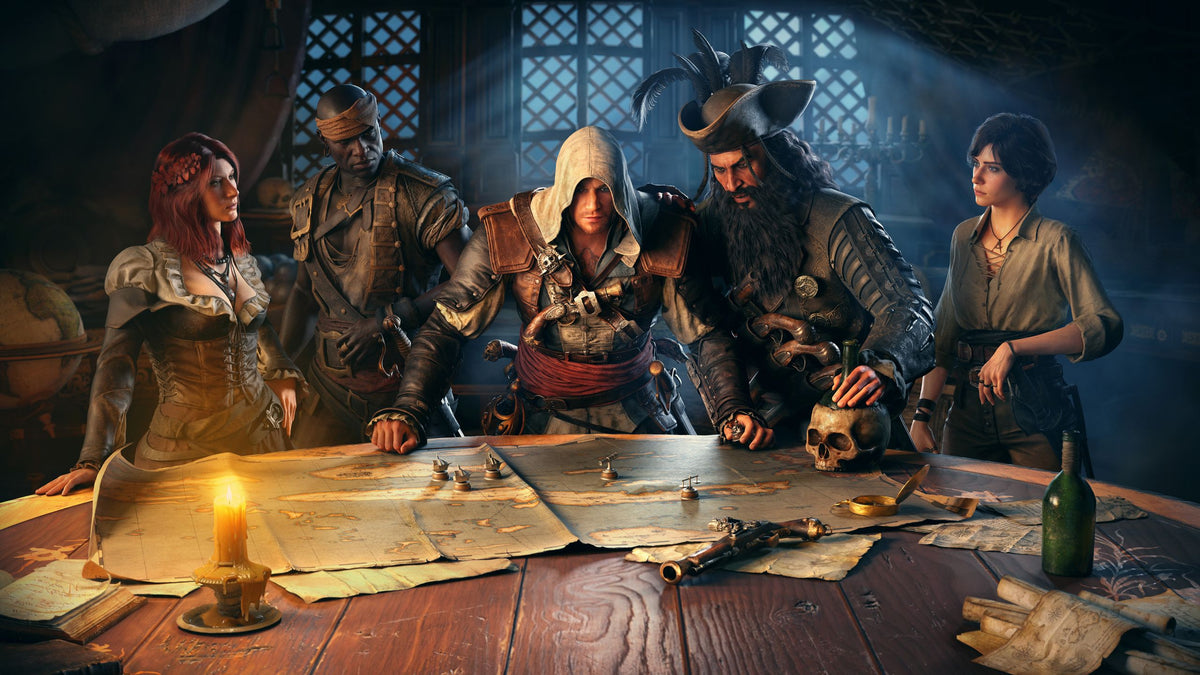
Assassin’s Creed Black Flag Resynced Shows Why a Custom Gaming PC in Canada Matters More Than Ever
The latest Assassin’s Creed Black Flag Resynced news is simple on the surface: the game’s director would not officially confirm broader post-launch content, but did say that ongoing support, bug fixes, and quality-of-life improvements are a very reasonable expectation. He also joked that he hopes players keep playing even after GTA 6 arrives. For Canadian buyers, that matters for one big reason: major game releases do not just drive hype, they change hardware buying behaviour. If you are thinking about a custom gaming PC in Canada, this is exactly the kind of moment when choosing the right build now can save you from underpowered performance, rushed upgrades, and rising replacement costs later.
At Groovy Computers, we see this pattern every time a high-profile release starts dominating gaming conversations. A remake or remaster with upgraded visuals gets players asking one question, then a much bigger one follows. First: Can my current PC run it well? Then: If I’m upgrading for this game, should I also upgrade for the next wave of AAA games too? That is where a smart custom PC decision becomes more important than simply buying whatever is cheapest in the moment.
What does the Assassin’s Creed Black Flag Resynced update really tell buyers?
The source story points to three things that matter beyond one title. First, developers expect to support modern PC and console releases after launch. Second, bug fixes and quality-of-life updates are now part of the normal post-launch cycle. Third, publishers know that blockbuster launches like GTA 6 can completely shift player attention and hardware demand.
Why should that matter if you are shopping for a gaming desktop in Canada? Because if one game pushes you to upgrade, the next game often pushes you further. A system that feels “good enough” for one release may feel limited once new patches, higher texture settings, ray tracing features, larger open worlds, or streaming demands pile on.
If you are already asking whether your current PC can handle open-world action games smoothly, that is a sign to think beyond one title. Are you building for just one launch weekend, or do you want a system that still feels strong six months from now? Do you want stable 1080p performance, or are you aiming for 1440p high refresh gaming? Are you the kind of player who turns down settings just to stay playable, or do you want a system that lets you enjoy the visuals you are actually paying for?
Why Canadian buyers should think differently about major game releases
In Canada, the buying decision is not just about frame rates. It is also about timing, part availability, shipping, taxes, value retention, and whether your next PC will need an expensive mid-cycle upgrade. When a major release window approaches, many buyers suddenly start searching for the same things at once: a better GPU, more RAM, a faster SSD, or a complete gaming PC for new games.
That rush can create pressure across the market. High-demand GPUs can become less available. Popular CPU and GPU pairings can tighten up. Better-value preconfigured systems can sell faster. Buyers who wait too long may end up settling for weaker specs, paying more, or buying a machine that already feels one tier behind.
That does not mean everyone should panic-buy. It means buyers should plan properly. If you already know you want to play modern AAA games, try ray tracing, record gameplay, stream to Twitch or YouTube, or keep your PC for years instead of months, waiting without a plan can cost more than deciding early.
For Canadian shoppers, especially those wanting a reliable system shipped within Canada, the smarter move is often to choose a tested custom build from a trusted Canadian PC builder before demand spikes harder. That is not hype. That is basic buying strategy.
What do you want your next PC to do for you?
Before you compare specs, ask the right question: What do you want your next PC to do for you?
Do you want to play story-heavy open-world games at high settings without stutter? Do you want a machine that handles Assassin’s Creed Black Flag Resynced, GTA 6, and future AAA launches without making you drop to low settings in a year? Do you want to stream while gaming? Edit YouTube videos after recording gameplay? Work in Photoshop, Illustrator, Premiere Pro, DaVinci Resolve, Blender, or Unreal Engine after hours?
Some buyers need a straightforward gaming machine. Others actually need a hybrid system that can game, stream, edit, render, and multitask. A lot of customers think they need “just a gaming PC,” but once they describe what they really do, they are closer to needing a creator PC or even a workstation PC.
If your next desktop needs to do more than one thing well, that is where custom planning matters. A mismatched system can leave performance on the table. The right custom system can give you smoother gaming, better thermals, stronger upgrade flexibility, and a longer useful lifespan.
What gaming performance tier fits you best?
Not every buyer needs the same level of hardware. The right tier depends on what you play, what monitor you use, and how long you want your PC to stay relevant.
1080p gaming: Are you buying for smooth play or maximum value?
If you mainly play at 1080p, a balanced entry or mid-range build may be enough. This is often the sweet spot for buyers who want strong value, esports performance, and solid results in modern games without overspending. But even here, it is worth asking: are you only playing lighter games, or are you buying for increasingly demanding open-world titles too?
A buyer focused on esports can often prioritize fast response and high FPS. A buyer focused on cinematic single-player games will care more about texture quality, lighting, frame consistency, and room for future releases. If your library is shifting toward larger and more demanding titles, it may be smarter to buy above the minimum now rather than upgrade too soon.
1440p gaming: Is this the real sweet spot for your next build?
For many Canadian buyers, 1440p is where a custom gaming PC in Canada really starts to make sense. It offers a major visual jump over 1080p without the full cost pressure of a dedicated 4K-first setup. If you want stronger image quality, smoother high-refresh gaming, and better long-term relevance for upcoming titles, this tier is often the best balance.
Are you planning to play open-world games with higher settings and better visual fidelity? Are you considering a monitor upgrade soon? Do you want your next system to feel powerful now without becoming “just okay” too quickly? If so, 1440p planning is often the smarter target than building only for today’s minimum needs.
4K and ray tracing: Are you building for premium gaming or just chasing a spec sheet?
If your goal is 4K gaming, ray tracing, ultra settings, and stronger future-proofing, you are in premium territory. That does not just mean a faster graphics card. It means a more carefully balanced system overall, including CPU strength, cooling, airflow, RAM capacity, and storage speed. Buyers at this level should think in terms of total system quality, not just one headline GPU.
Do you want your games to look spectacular on a large display? Do you care about visual immersion as much as raw FPS? Do you want a premium rig that lasts longer before feeling outdated? Then a high-end custom build may be the right call. But if you are stretching your budget too tightly, financing a better balanced system may make more sense than buying a top-heavy machine with compromises elsewhere.
Planning to play Black Flag Resynced, GTA 6, and future AAA games?
This is where buying logic becomes more practical. A lot of players are not really shopping for one game. They are shopping for a launch cycle. If you are interested in Assassin’s Creed Black Flag Resynced, there is a good chance you also care about other visually demanding games, open-world releases, post-launch updates, texture-heavy worlds, and next-wave graphics features.
So ask yourself: are you buying a PC for this game alone, or for the next several major releases? If you already know your wish list includes games like GTA 6, future action-adventure titles, newer ray tracing-heavy releases, or high-detail modding, then it makes sense to choose a system with enough headroom now.
A gaming PC for new games should not just “run” them. It should run them in a way that feels worth the investment. That means responsive load times, strong frame pacing, enough VRAM for modern settings targets, sufficient RAM for background tasks, and storage space that does not fill up immediately after a handful of large installs.
Do you also stream, edit, or create content?
This is one of the biggest decision points buyers overlook. If you game and stream, your needs are different from someone who only plays. If you game, record footage, and edit for YouTube or TikTok, your needs change again. If you also use Photoshop, Lightroom, Illustrator, Premiere Pro, DaVinci Resolve, Blender, or Unreal Engine, you are no longer choosing only between “budget” and “premium.” You are choosing the right workflow machine.
Gaming and streaming PC buyers
Do you want to play and stream from the same desktop? Do you use OBS or Streamlabs? Do you want smooth gameplay while recording at good quality? Then your CPU, GPU encoding capability, RAM, and cooling matter more than many generic gaming PC listings suggest.
A proper gaming and streaming PC in Canada should be built for multitasking, not just benchmark screenshots. You want enough horsepower to keep your game smooth while your stream remains stable. If your current PC bogs down when you open OBS, Discord, a browser, music, and your game at the same time, you are seeing the limits of an underbuilt system.
Video editing and creator buyers
Are you cutting 1080p clips, editing 4K footage, colour grading, adding effects, or exporting long-form content? A video editing PC in Canada needs different priorities than a pure gaming build. Fast storage, more RAM, a capable processor, and the right GPU acceleration can dramatically improve timeline responsiveness and export speed.
If you are wondering, Is a gaming PC good for video editing? the answer is sometimes, but not always. A well-configured custom creator PC can absolutely handle both. The key is choosing the right balance rather than buying a gaming-first system that struggles once your editing projects become more demanding.
Photo editing and graphic design buyers
Do you work in Photoshop or Lightroom? Are you building social graphics, brand packages, print layouts, or large layered files? Then a photo editing PC or graphic design PC may need more RAM, faster storage, quiet cooling, and a smoother multitasking experience over flashy gaming-focused part choices.
Graphic designers and photographers often underestimate how much daily friction comes from an underpowered machine. Lag while switching files, slower previews, export delays, and poor multitasking all add up. A proper creator desktop should feel responsive under real workloads, not just while idling on a desktop wallpaper.
3D modeling and workstation buyers
Are you working in Blender, Unreal Engine, Maya, Cinema 4D, CAD, or rendering software? If so, the conversation shifts even further toward a 3D modeling PC or custom workstation PC in Canada. These workloads can punish weak cooling, limited memory, slow storage, and poor component balancing.
What matters most to you: viewport performance, render speed, simulation handling, scene complexity, or multitasking across creative applications? The more professional your workload becomes, the more important build quality, thermals, reliability, and support become.
Should you buy now or wait?
This is one of the most common questions in the market, and it is a fair one. But the better question is usually this: What are you waiting for?
Are you waiting for a game release to force your decision? Waiting for your current PC to fail? Waiting for a sale that may not match the exact specs you need? Waiting while GPU demand rises, software gets heavier, and your existing system keeps wasting your time?
Sometimes waiting makes sense if your needs are uncertain. But if you already know your current system is falling behind, waiting can simply mean paying later for a machine you needed earlier. For gamers, the cost is missed performance and a weaker experience. For creators, the cost is time, frustration, and lost productivity.
Another question worth asking: if your current PC already struggles, how much value are you really getting by delaying? Cheaping out now often leads to buying twice. That is rarely the budget move people think it is.
How do pricing swings affect the real cost of your next PC?
PC pricing does not move in one simple line. Different categories can tighten at different times. Graphics cards can become more expensive or harder to source. Fast DDR memory can vary in cost. SSD prices can shift. New games and software features can raise the practical spec floor for what buyers consider acceptable performance.
That means the real cost of “waiting for later” is not only the sticker price. It can also mean losing out on a better performance tier at the same budget. A buyer who could have secured a stronger build earlier may later end up choosing between paying more or accepting lower specs.
Canadian buyers feel this especially clearly because total system costs include the realities of our market, and good-value, properly configured machines can move quickly during periods of strong demand. When your goal is long-term value, a tested and balanced custom build often beats chasing random short-term deals that do not fit your needs.
Would financing help you secure a better system before costs rise?
For many buyers, this is the most practical question in the entire process. If you know you need a stronger desktop, does it make more sense to buy a weaker system outright today, or finance a better one that lasts longer and performs better from day one?
Financing is not about overspending for the sake of it. Used properly, it can help you avoid buying too low and replacing too soon. If your ideal system is just above what you want to pay all at once, financing up to 4 years can help you step into a more capable gaming PC, creator PC, or workstation before prices move further or your current machine becomes an even bigger bottleneck.
Ask yourself honestly: would a stronger system save you money by lasting longer? Would it stop you from making another upgrade in 12 months? Would it let you play at your target settings now instead of settling? Would it help you stream, edit, or render without constant compromise?
If the answer is yes, then financing may be the smarter value play, not the riskier one. Especially for buyers comparing a budget system against a much more balanced mid-range or upper-mid-range machine, monthly flexibility can make the better long-term choice easier to reach.
What kind of buyer should choose which system category?
Here is the practical breakdown many shoppers need.
Choose a budget gaming PC if:
You mainly play at 1080p.
You want good value without chasing ultra settings.
You mostly play esports, lighter multiplayer titles, or less demanding games.
You understand that future AAA games may require more settings compromises sooner.
Choose a mid-range to upper-mid gaming PC if:
You want strong 1440p performance.
You play modern open-world and visually demanding games.
You want better longevity and fewer near-term upgrade pressures.
You may also stream, multitask, or record gameplay.
Choose a premium RTX gaming PC if:
You want 4K or high-end 1440p gaming with stronger visual settings.
You care about ray tracing, high refresh rate performance, and longer-term relevance.
You want a flagship-style experience rather than a minimum-viable machine.
You prefer paying once for a stronger platform instead of upgrading piece by piece too soon.
Choose a custom creator PC if:
You game and also edit video, create content, stream, or work in Adobe apps.
You need better multitasking, more RAM, and fast storage behaviour.
You want one machine that supports both entertainment and serious workflow use.
Choose a workstation or 3D modeling system if:
You use Blender, Unreal Engine, CAD, rendering tools, or simulation-heavy software.
You need reliability under sustained heavy loads.
You want cooling, memory capacity, and component matching designed around work, not just gaming.
What questions should you ask before buying your next custom PC?
Before you commit, slow down and ask the questions that actually affect your long-term satisfaction.
What games or software do I really use every week?
Am I buying for 1080p, 1440p, or 4K?
Do I care about ray tracing or just smooth frame rates?
Will I stream or record gameplay?
Do I edit video, photos, or graphics on the same machine?
Do I want this PC to last several years without feeling outdated too fast?
Would a better CPU, more RAM, or a stronger GPU save me from upgrading too soon?
Am I choosing based on value, longevity, performance, or monthly affordability?
Would financing a stronger build be smarter than settling for a cheaper one now?
Do I want a tested system with warranty support from a Canadian custom PC builder?
These are the questions that separate an impulse buy from a smart investment.
Why choose Groovy Computers for a custom gaming or creator PC in Canada?
Groovy Computers is built around what Canadian buyers actually need: custom systems tailored to real use, reliable part matching, proper testing, support you can trust, and a smoother buying path when you are trying to decide between budget, premium, creator, or workstation performance.
Instead of forcing every customer into the same generic box, Groovy Computers helps buyers connect the workload to the right build category. That matters whether you need a gaming desktop for upcoming AAA titles, a streaming rig, a creator machine for editing and design, or a workstation for heavier 3D and production work.
There is also real peace of mind in buying from a Canadian custom PC company that understands the local customer. Groovy Computers offers rigorous testing, a 1-year warranty, and systems built with practical upgrade logic in mind. For many buyers across Nova Scotia and across Canada, that is a much safer choice than gambling on a random marketplace listing or a poorly balanced mass-market machine.
If you are in Nova Scotia, Atlantic Canada, or shopping from elsewhere in the country, the value proposition is the same: get a PC that is built for your real goals, not just advertised with generic buzzwords.
Need help choosing the right performance tier?
If you are still unsure, start with this question: What do you want your next PC to feel like?
Do you want it to simply run the game, or do you want it to feel smooth, stable, and ready for what comes next? Do you want a machine that only gets you through today, or one that still feels capable after the next big release cycle? Do you want a desktop that can game now and create later? Do you want to stop worrying about whether every new title will force another upgrade?
The right answer is different for every buyer, but the wrong answer is usually the same: buying too little performance for what you already know you want.
Final takeaway: Black Flag Resynced is a reminder to buy smarter, not later
The recent Assassin’s Creed Black Flag Resynced comments are not just gaming news. They are another reminder that modern games keep evolving after launch, player expectations keep rising, and the next major release is always closer than it looks. If you are already thinking about upgrading, this is the time to ask better questions about performance tier, longevity, streaming, editing, and whether financing a stronger system now makes more sense than replacing a weaker one later.
If you are wondering what PC you need for Black Flag Resynced, GTA 6, 1440p gaming, streaming, video editing, or a full creator workflow, the best next step is to speak with a builder that understands all of those needs in one place. Visit GroovyComputers.ca and ask yourself one last question: Do you want your next PC to merely keep up, or do you want it built to stay ahead?
#CustomGamingPCCanada #GamingPCCanada #CanadianCustomPCBuilders #GamingPCForNewGames #1440pGamingPCCanada #4KGamingPCCanada #CreatorPCCanada #VideoEditingPCCanada #StreamingPCCanada #3DModelingPCCanada #WorkstationPCCanada #NovaScotiaPCBuilder #GroovyComputers
Groovy Computers | All Rights Reserved


Leave a comment
This site is protected by hCaptcha and the hCaptcha Privacy Policy and Terms of Service apply.