






















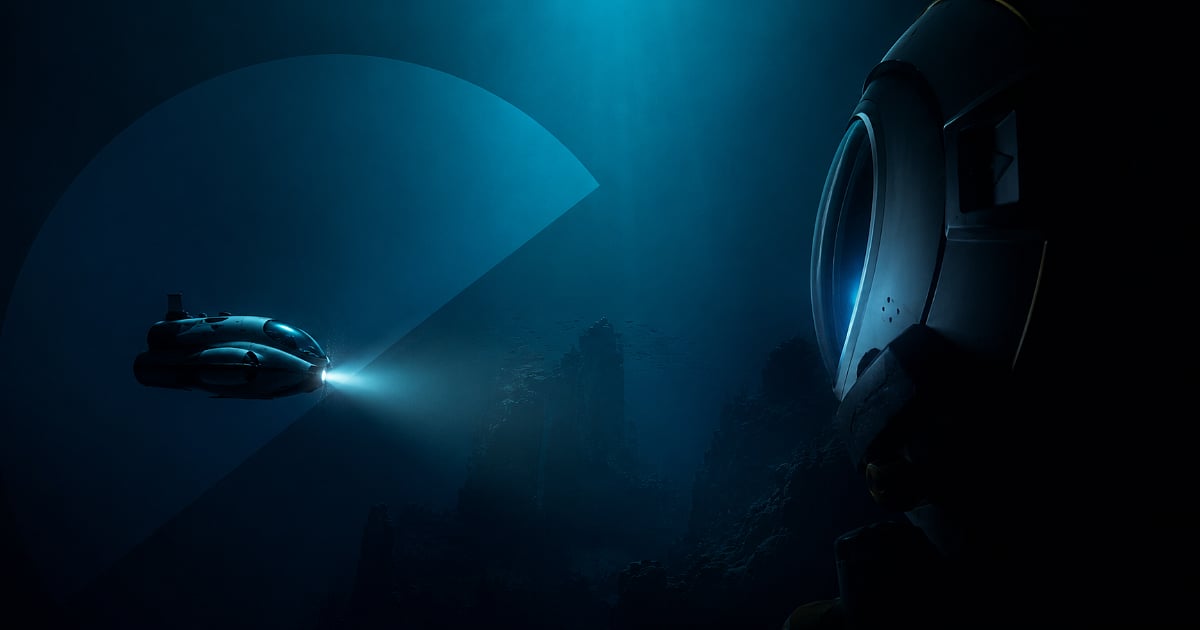
Subnautica 2 Lawsuit Settlement: What It Means for Buying the Right Gaming PC in Canada
The Subnautica 2 lawsuit settlement is more than a game-industry legal headline. It is also a timely reminder that major game releases can shift suddenly, development timelines can change, and hardware-buying decisions often become more important when anticipation builds around a demanding new PC title. For Canadian gamers, streamers, and creators, this kind of news raises a practical question: is your current PC actually ready for the next wave of open-world and visually ambitious games? If not, now is the right time to think carefully about what kind of custom system makes sense before demand, pricing, or upgrade pressure moves against you.
The source report explains that Krafton and Unknown Worlds have settled their legal dispute over Subnautica 2, ending court proceedings and keeping development moving forward with publisher support. The settlement also expands employee bonus payouts and confirms leadership changes at the studio. For fans, that brings stability. For PC buyers, it brings something just as important: renewed confidence that Subnautica 2 remains a live, active project that could become a serious target title for your next build.
If you have been waiting for a major release to justify upgrading, this is exactly the kind of headline that should get your attention. Are you planning for 1080p survival gaming? Do you want 1440p with high settings and strong frame consistency? Are you hoping for a 4K-capable system that also handles streaming, editing, and long-term AAA gaming without feeling outdated too soon?
What happened in the Subnautica 2 legal battle?
Based on the source material provided, Krafton settled its dispute with Unknown Worlds Entertainment and former studio leaders Charlie Cleveland, Ted Gill, and Max McGuire. The conflict centered on a disputed earnout reportedly worth about C$340 million when converted from the original U.S. figure. The founders had alleged that the planned Early Access timing for Subnautica 2 was delayed in a way that affected that payout, while Krafton denied the accusations and argued the game needed more time.
The settlement closes the legal chapter and confirms that Subnautica 2 will continue development with support in place. It also changes bonus distribution across the wider studio team and sets the stage for a new external CEO search. That matters because the conversation now shifts away from courtroom uncertainty and back toward what players care about most: the game itself, when it arrives, and how well their systems will handle it.
Why does the Subnautica 2 lawsuit settlement matter to PC buyers in Canada?
Game-development news affects buying behaviour. When a high-interest title regains momentum, more players start planning upgrades. Some wait until launch day and then rush into the market. Others buy too cheaply and regret it when the game demands more GPU power, more VRAM, faster storage, or a better CPU than expected. The smarter move is usually to decide early what you want your next PC to do and choose a build that fits both your current library and the next few years of releases.
For Canadian buyers, timing matters even more. Full-system costs can shift due to GPU availability, memory pricing, SSD fluctuations, shipping pressure, and exchange-rate effects. Even if one specific game gets delayed, broader market demand does not disappear. It often builds. So the better question is not simply, when does this game launch? The better question is, what kind of machine do you want to have ready when it does?
What do you want your next PC to do for you?
Before you shop on specs alone, stop and ask the most useful question in the entire buying process: what do you want your next PC to do for you?
Do you want a system mainly for immersive gaming in titles like Subnautica 2 and other atmospheric AAA releases? Do you also want to stream to Twitch or YouTube? Will you be editing gameplay in Adobe Premiere Pro or DaVinci Resolve? Are you creating thumbnails in Photoshop, working in Illustrator, or building 3D assets in Blender or Unreal Engine?
A lot of buyers still shop as if gaming, editing, streaming, and design are separate worlds. They are not. Many Canadian customers now want one machine that can handle multiple roles well. That is where a properly chosen custom PC has real value. Instead of overpaying for the wrong parts or underbuying and upgrading too soon, you can match your build to your actual workload.
If you are buying for Subnautica 2, what gaming performance tier fits you?
Not every player needs the same class of system. A survival exploration game with large environments, advanced lighting, atmospheric effects, and future content updates can push hardware differently than a basic esports title. That is why choosing the right performance tier matters.
Entry-level tier: Is a budget gaming PC enough?
If your goal is straightforward 1080p gaming with sensible settings, a budget gaming PC Canada buyer can still make a smart purchase. This tier is best for players who want smooth performance, fast boot times, and a reliable path into newer releases without chasing ultra settings.
Ask yourself: do you mostly play at 1080p? Are you comfortable turning down a few graphics settings if a future game is heavier than expected? Do you want the best value now without replacing the whole system next year?
This tier makes sense for first-time buyers, students, and gamers who prioritize value. But it has to be selected carefully. A weak GPU, too little RAM, or a tiny SSD can make a supposedly affordable system feel restrictive very quickly.
Mid-range tier: Do you want the sweet spot for 1440p gaming?
For many buyers, this is the smartest target. A strong 1440p gaming PC Canada setup often delivers the best balance of image quality, longevity, and overall value. If you want a machine ready for modern open-world games, better textures, stronger lighting, smoother frame rates, and room for multitasking, mid-range can be the sweet spot.
Are you the kind of player who wants high settings without jumping all the way into flagship pricing? Do you want enough CPU and GPU headroom for Discord, browser tabs, background apps, and maybe even light recording while gaming? Are you trying to avoid the feeling that your brand-new PC is already just barely enough?
For many Canadian customers, the answer is yes. That is why this category remains one of the most practical choices for gaming and mixed use.
High-end tier: Are you aiming for 4K, ray tracing, and long-term overhead?
If you want premium visuals, stronger ray tracing capability, better high-resolution performance, and longer useful life before your next major upgrade, a high end gaming PC Canada build may be the right move. This is where players start thinking less about “can it run the game?” and more about “how well can it run this generation of games for years?”
Do you want a 4K gaming PC Canada setup? Do you care about maxing out visual quality in upcoming AAA releases? Do you want stronger streaming and creator flexibility at the same time? If so, premium builds become easier to justify, especially if you are trying to buy once and buy properly.
What PC do you need if you also stream or create content?
A growing number of gamers are not just players. They are streamers, clip editors, YouTubers, modders, community managers, and social content creators. If that sounds like you, then the right answer may not be a pure gaming machine at all. It may be a content creation PC Canada or gaming and streaming PC Canada build that balances GPU power, CPU strength, memory capacity, and storage speed more intelligently.
Are you planning to stream your next survival playthrough? Do you want to record high-bitrate footage while you game? Will you cut shorts, TikToks, or long-form YouTube episodes after each session? If yes, then ask another important question: is your next PC supposed to save you time as well as deliver frames?
That matters because creators do not just feel slow hardware in-game. They feel it in exports, timeline playback, proxies, multitasking, thumbnail work, and background rendering.
When does a streaming PC make more sense?
A dedicated streaming PC Canada or hybrid gaming-and-streaming build makes sense when you want smoother live broadcasting, cleaner recordings, and stronger multitasking overhead. If you are using OBS, managing scenes, running a webcam, handling chat tools, and gaming at the same time, system balance becomes critical.
What PC do you need for streaming if you want stable 1080p output? Do you want to stream at higher quality while keeping your in-game experience responsive? Are you trying to avoid the stutter and dropped frames that come from buying a gaming PC that looks good on paper but is not built for broadcasting?
That is where a properly matched CPU, enough RAM, and the right GPU encoder support can make a big difference.
When should you consider a creator or editing PC instead?
If your workflow includes Adobe Premiere Pro, DaVinci Resolve, After Effects, Photoshop, Lightroom, Illustrator, or CapCut, then a creator PC Canada or video editing PC Canada may be the smarter path. Many customers ask whether a gaming PC is good for editing, and the honest answer is that some are. But not all gaming-oriented builds are optimized for sustained creator workloads.
What PC do you need for video editing if you handle 4K footage? How much RAM do you need for video editing if you keep multiple apps open? Are you building around faster exports, smoother scrubbing, and more reliable project performance instead of just gaming benchmarks?
If content creation is part of your daily routine, choosing your system based only on game FPS can be shortsighted. The right build should support both your hobbies and your output.
Could a custom workstation matter even if you came here for gaming news?
Yes, especially if your work extends beyond play. A lot of customers first start looking at a new gaming desktop and then realize they also need stronger performance in Blender, Unreal Engine, CAD, rendering, product visualization, or design software. In those cases, a workstation PC Canada or 3D modeling PC Canada build can be the better long-term investment.
What PC do you need for Blender? Are you rendering scenes, simulating assets, or learning 3D for game-adjacent creative work? Do you need more VRAM, more system memory, better cooling, or a CPU that can handle heavy parallel workloads? If so, a gaming-first spec list may not go far enough.
This is one of the biggest advantages of buying from a true custom builder. You are not forced into a generic one-size-fits-all machine. You can choose a system that reflects how you actually use your computer.
Why this headline should make buyers think about timing
The source article is about a legal settlement, but the practical takeaway is momentum. As soon as a major game regains development clarity, interest rises. More wishlists, more discussion, more benchmark speculation, and eventually more buying. That can influence the market around GPUs, complete gaming desktops, creator systems, and upgrade components.
Are you buying before a major release cycle? Are you trying to get ahead of a demand spike, seasonal sale rush, or hardware shortage? Do you need your PC ready before your current setup becomes the bottleneck?
Waiting can feel safe, but waiting also has costs. You may lose weeks or months of use. You may miss a better-value window. You may end up settling for whatever is available when everyone else starts shopping at once.
Should you buy now or wait for better prices?
This is one of the most common questions in the Canadian market, and there is no universal answer. But there is a practical one: if your current PC already feels behind for the games and software you want to run, delaying the decision does not automatically improve the outcome.
Is it better to buy a gaming PC now or wait? That depends on your situation. If your current system struggles with newer games, lacks modern storage speed, has limited RAM, or forces settings cuts you are tired of making, then the value of upgrading now is immediate. You improve your experience today, not just sometime later.
If you are close to a major release, content deadline, back-to-school buying period, or seasonal price swing, the argument for acting earlier becomes stronger. This is especially true if you are trying to move up a tier and secure more performance before replacement costs rise.
How do pricing shifts affect full PC builds in Canada?
Canadian buyers have to think about more than the sticker price of a graphics card. Full-system value can move when GPU supply tightens, memory pricing changes, SSD demand increases, or new releases push shoppers toward higher tiers. Even if one component stays relatively stable, the complete build can still cost more once better parts become harder to source together.
Have you noticed how often shoppers end up “just upgrading one thing” and then discover they also need a stronger power supply, more cooling, a bigger SSD, or a newer CPU platform? That is one reason custom full-system planning matters. A balanced machine can reduce wasted spending and help you avoid serial upgrades that add up poorly over time.
It also helps to remember that replacement cost matters. If a future equivalent build costs more than it does today, waiting may not save money at all.
Could financing help you secure the right PC instead of a compromise build?
For many buyers, yes. The issue is not always whether they can afford a PC. The issue is whether they can comfortably afford the right PC all at once. That is why financing can be a strategic option rather than an impulse decision.
Should you finance a better PC instead of buying a cheaper one? If the stronger system saves you from upgrading too soon, handles your games and software properly, and gives you better useful life, financing can make a lot of sense. It can help you secure more GPU performance, more RAM, better storage, or a more capable CPU before the market shifts again.
For a customer choosing between an underpowered entry build and a properly balanced mid-range or premium setup, the long-term value difference can be substantial. A better system may last longer, perform more consistently, and support more workloads without forcing another purchase too early.
That is especially relevant if you want gaming plus streaming, gaming plus editing, or gaming plus design work. Those mixed-use needs often justify stepping up one tier.
Which type of Groovy Computers build fits your situation best?
One of the best ways to turn industry news into a useful buying decision is to match yourself to a buyer profile. Which one sounds most like you?
The value-focused gamer
You want dependable 1080p performance, fast day-to-day responsiveness, and sensible pricing. You may be shopping for your first serious desktop or replacing an aging machine that can no longer keep up. A balanced entry or lower-mid configuration may be ideal if your priority is strong value without sacrificing core reliability.
The 1440p gamer who wants longevity
You want the sweet spot. You care about visual quality, smoother gameplay, and room for upcoming titles. You do not want to buy too cheaply and regret it a year from now. This customer usually benefits from a well-chosen mid-range custom gaming PC Canada build with enough headroom for modern AAA gaming and multitasking.
The premium enthusiast
You want a machine built for high settings, stronger ray tracing, premium frame delivery, and future confidence. You may be gaming on a higher-refresh 1440p monitor or aiming at 4K. You probably know that buying once at a higher tier can be more satisfying than repeatedly upgrading around a weak core system.
The gamer-creator hybrid
You game, stream, edit, design, or produce content. You need a machine that can handle OBS, Photoshop, Premiere Pro, DaVinci Resolve, and modern games without turning every session into a resource-management exercise. This is where a custom creator PC Canada approach shines.
The workstation buyer
You may have arrived because of game news, but your real needs include Blender, Unreal Engine, CAD, rendering, or heavier business productivity. In that case, your ideal system may look more like a high-performance workstation than a pure gaming desktop.
What questions should you ask before choosing your next PC?
Before you buy, ask yourself these practical questions:
- What games do I want to play over the next two to three years?
- Am I targeting 1080p, 1440p, or 4K?
- Do I care about ray tracing or ultra settings?
- Will I stream, record, or edit content on the same machine?
- Do I need more RAM and storage than a basic gaming build usually includes?
- Am I buying before a major game release, software upgrade, sale period, or price spike?
- Would financing a stronger system help me avoid buying twice?
- Do I want a generic spec sheet, or do I want a custom build matched to how I actually use my PC?
These are not filler questions. They are the difference between buying reactively and buying intelligently.
Why custom builds matter more when game demand and hardware pressure rise
When the market gets noisy, generic systems become riskier. A pre-configured machine can look attractive until you notice the weak motherboard, limited airflow, undersized storage, mismatched CPU-GPU pairing, or poor upgrade path. That is why Canadian custom PC builders matter most when buying conditions become less predictable.
A proper custom build gives you control over the performance balance. It also helps ensure that the system you buy for one major title still makes sense for the next several. If Subnautica 2 is one of the games pushing you toward an upgrade, that same system should also be able to handle other open-world, creator, and productivity demands in your life.
Why Groovy Computers is a strong fit for Canadian buyers
Groovy Computers serves the kind of customer who wants more than a random parts list. If you are shopping for a Gaming PC Canada solution, a creator desktop, or a workstation-class custom build, the real value comes from getting a system that is assembled with purpose, tested properly, and backed with confidence.
That means rigorous testing, thoughtful part matching, and a 1-year warranty that gives buyers added peace of mind. It also means support from a Canadian custom PC company that understands what local buyers care about: reliability, real performance, upgrade logic, and the confidence to order a system that can be shipped across Canada.
For customers in Nova Scotia, Atlantic Canada, and across the country, that combination matters. You are not just buying parts. You are buying a complete system experience with better planning behind it.
Need help deciding between a budget gaming PC, premium RTX build, creator system, or workstation?
If this headline has you thinking about your next upgrade, the best next step is to get specific. What gaming PC do you need? What PC do you need for 1440p gaming? Do you need a stronger GPU for future AAA titles, or more RAM and storage for editing and streaming? Are you trying to choose between value now and longevity later?
If you want help choosing the right system, visit GroovyComputers.ca. Whether you need a budget-friendly gaming desktop, a premium RTX-ready machine, a custom creator PC, or a heavier-duty workstation, Groovy Computers can help you move toward a build that actually fits your goals.
The bigger takeaway from the Subnautica 2 lawsuit settlement
The biggest lesson from the Subnautica 2 lawsuit settlement is not only that one legal battle ended. It is that momentum around a major game can return quickly, and buyers who plan ahead usually make better PC decisions than buyers who wait until hype turns into a rush. If your current machine is already limiting what you play, stream, edit, or create, this is the right moment to think beyond the headline and focus on your hardware strategy.
Do you want a system that just gets by, or one that feels ready? Do you want to gamble on timing, or secure a custom-built PC that gives you more performance headroom before the next demand spike arrives? For Canadian customers who want clarity, quality, and a smarter upgrade path, Groovy Computers is the place to start.
#Subnautica2 #GamingPCCanada #CustomGamingPCCanada #GamingPCBuildsCanada #CreatorPCCanada #VideoEditingPCCanada #StreamingPCCanada #WorkstationPCCanada #CanadianCustomPCBuilders #NovaScotiaTech
Groovy Computers | All Rights Reserved

Leave a comment
This site is protected by hCaptcha and the hCaptcha Privacy Policy and Terms of Service apply.