























Crimson Desert at Gamescom 2026: What It Means for a Gaming PC for New Games in Canada
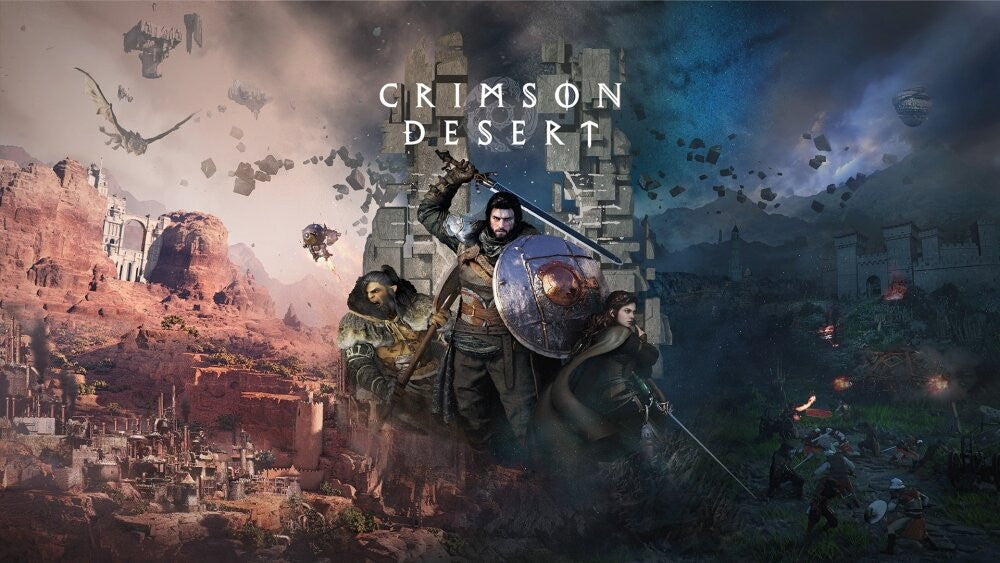
The headline that Pearl Abyss is teaming with Samsung to showcase Crimson Desert at Gamescom 2026 is more than another gaming-news update. For Canadian players, it is a reminder that the next wave of visually ambitious open-world games is being built to impress on powerful hardware, high-refresh displays, sharp resolutions, and modern graphics features. If you are researching a Gaming PC for New Games, this is exactly the kind of announcement that should make you ask a practical question: is your current computer ready for the next generation of big-budget PC gaming, or are you going to be forced into an upgrade at the worst possible time?
At Groovy Computers, we look at announcements like this from a buyer’s perspective. A major game showcase, especially one tied to a premium display brand like Samsung, usually signals that the marketing focus will be on visual impact: cinematic landscapes, fast motion, detailed environments, smooth gameplay footage, and a “you need to see this properly” kind of experience. Even without confirmed final PC requirements from the source headline, Canadian gamers can still use this moment wisely. Instead of waiting until launch-week panic, you can start thinking now about what kind of gaming desktop, creator PC, or workstation-class system will actually fit the games and software you care about.
What do you want your next PC to do for you? Do you want to play Crimson Desert and other AAA open-world games at 1080p without overspending? Are you aiming for 1440p high refresh gameplay? Do you want 4K gaming, ray tracing, ultra settings, streaming, recording, video editing, or content creation on the same machine? Or are you trying to avoid buying a cheaper computer today only to replace it too soon when the next demanding release arrives?
Why the Pearl Abyss and Samsung Gamescom 2026 Showcase Matters for PC Buyers
A Gamescom showcase is designed to create hype, but it also reveals where the market is going. When a game like Crimson Desert is positioned in front of a global audience, the focus is rarely just “can it run?” The focus becomes how immersive it looks, how smooth it feels, and how well it can show off modern gaming hardware. For players shopping in Canada, that changes the buying conversation from basic compatibility to real-world experience.
Are you buying a computer just to launch the game, or are you buying a computer to enjoy the game the way the showcase makes it look? That difference matters. A basic gaming desktop may handle popular esports titles and older games very well, but large open-world action games often benefit from stronger graphics cards, modern CPUs, fast SSD storage, and enough RAM to keep background tasks from dragging the experience down.
The Samsung angle also matters because display technology affects what kind of PC makes sense. If you are using a 1080p monitor, you do not need the same graphics horsepower as someone running a high-refresh 1440p display or a large 4K screen. If you are planning to upgrade your monitor around the same time as your PC, the system should be chosen around the display you want, not just the display you currently own.
What Gaming PC for New Games Should Canadian Buyers Be Considering?
A strong Gaming PC for New Games should be selected around your target resolution, target frame rate, game type, and upgrade expectations. Open-world games, cinematic action titles, ray tracing games, competitive shooters, survival games, racing games, and modded titles can all stress a computer differently. That is why a one-size-fits-all prebuilt system is often the wrong answer.
Before you buy, ask yourself: what are the next three games you actually care about? Are you waiting for Crimson Desert, GTA 6, the next Call of Duty, new Unreal Engine 5 games, competitive titles like Counter-Strike 2 or Valorant, or visually demanding RPGs? Do you play one game at a time, or do you keep Discord, browsers, music, recording tools, and streaming software open in the background?
For many Canadian gamers, the sweet spot today is not simply the cheapest computer that can run a game. It is the system that gives you enough performance headroom so you are not immediately turning down settings, fighting stutter, or planning another upgrade six months later. A well-planned custom gaming PC can be more efficient, more reliable, and more cost-effective over time because the parts are matched to your actual goals.
Do You Want 1080p, 1440p, 4K, Ray Tracing, or High-FPS Performance?
The fastest way to choose the right custom PC category is to decide what kind of visual experience you want. A 1080p gaming PC Canada buyer has very different needs from someone searching for a 4K gaming PC Canada build. A player focused on esports frame rates will prioritize different components than someone who wants cinematic ultra settings with ray tracing.
1080p Gaming: Are You Looking for Value, Smooth Gameplay, and Longevity?
A 1080p gaming PC is ideal for players who want great performance without jumping into premium pricing. If you mostly play esports games, mainstream multiplayer titles, indie games, school-friendly gaming, or a mix of new and older releases, a value-focused build can make a lot of sense. The key is avoiding the trap of buying too little GPU or too little RAM just because the starting price looks attractive.
Can a budget gaming computer play new games? Yes, if it is built intelligently. But “budget” should not mean poorly balanced. You still want a modern processor, a capable graphics card, a fast SSD, proper cooling, and enough memory for Windows, games, launchers, Discord, and browser tabs. If you want your first gaming PC to last, it is worth choosing a build that has a sensible upgrade path instead of a dead-end parts list.
1440p Gaming: Is This the Best Sweet Spot for Crimson Desert-Style Games?
For many serious players, 1440p is the sweet spot. It looks significantly sharper than 1080p, but it does not demand quite as much GPU power as 4K. If you are excited by the kind of detailed world that a showcase game like Crimson Desert is likely to emphasize, a 1440p gaming PC Canada build is often the most balanced recommendation.
What PC do you need for 1440p gaming? In practical terms, you want a strong modern GPU, a CPU that can keep frame rates stable, 32GB of RAM for better long-term comfort, and fast NVMe storage so large games load quickly. If you plan to stream, record, edit clips, or run a second monitor, the case for a stronger graphics card and extra memory becomes even more convincing.
4K Gaming: Are You Buying for Maximum Visual Impact?
If you want to play big open-world games on a large 4K display, you are shopping in premium territory. A 4K gaming PC Canada buyer should care about GPU class, VRAM capacity, cooling, power delivery, airflow, and long-term performance. 4K gaming is not just “more pixels.” It dramatically increases the work your graphics card must do, especially when you add high settings, ray tracing, high-resolution textures, and background apps.
Is a high-end gaming PC worth it? It can be, if you care about premium visuals, smoother frame pacing, longer useful life, and fewer compromises. It also makes sense if you are the type of buyer who would rather finance a stronger system once than buy a cheaper system now and replace major components sooner than expected.
Ray Tracing and Ultra Settings: Do You Care About the Showcase Look?
Ray tracing, advanced lighting, high-detail environments, and cinematic effects can transform the way a game looks, but they also increase hardware demand. If your goal is to experience games as close as possible to the visual standard shown in premium demos and showcases, you should plan for an RTX-class gaming PC with enough performance headroom for current and upcoming titles.
Do you need an RTX GPU for every game? No. But if you care about ray tracing, AI upscaling features, streaming acceleration, creator acceleration, and better performance in visually demanding titles, the GPU tier becomes one of the most important parts of the build. This is where Groovy Computers can help you avoid overspending in the wrong place or underspending where it matters most.
What Do You Want Your Next PC to Do for You?
This is the question every buyer should answer before looking at specs. A PC is not just a list of parts. It is a tool for the games, projects, deadlines, streams, and creative goals you have in mind. Are you buying for one game, or are you building a system around the way you actually use your computer every day?
Do you want your next PC to:
- Play upcoming AAA games like Crimson Desert smoothly at your preferred resolution?
- Handle esports titles at high FPS for competitive gaming?
- Stream to Twitch, YouTube Live, or TikTok Live while gaming?
- Record gameplay clips and edit them for YouTube, Instagram, or TikTok?
- Run Adobe Premiere Pro, DaVinci Resolve, Photoshop, Lightroom, Illustrator, or Canva?
- Support Blender, Unreal Engine, Unity, SketchUp, AutoCAD, Revit, Maya, 3ds Max, or Cinema 4D?
- Power a multi-monitor setup for gaming, school, work, and content creation?
- Last longer before needing another expensive upgrade?
If your answer includes more than just gaming, you may not need a basic gaming desktop. You may need a gaming and creator PC Canada build, a streaming and editing PC Canada configuration, or a custom workstation PC Canada system designed around your workload.
Crimson Desert, Open-World Games, and Why Hardware Headroom Matters
Open-world games can be demanding because they often combine large environments, detailed textures, complex lighting, fast traversal, many on-screen effects, and heavy CPU work. Even when a game is well optimized, the best experience usually comes from a balanced system rather than one flashy part paired with weak supporting components.
What specs do you need for this game? Since final requirements were not provided in the source headline, the smartest answer is to buy based on your target experience rather than guessing. A system designed for 1080p medium settings is very different from one designed for 1440p high refresh or 4K ultra settings. If you want to be ready for a showcase-level open-world experience, build for the performance tier you want to play at, not the bare minimum you hope will pass.
Hardware headroom matters because games continue to evolve. Texture packs get larger. Updates add features. Background software becomes heavier. Windows updates, game launchers, anti-cheat software, browser tabs, RGB control apps, voice chat, and recording tools all consume resources. A PC that feels “just enough” on day one can feel limited much sooner than expected.
Which Performance Tier Fits You Best?
Choosing the right performance tier is easier when you match it to your real use case. Instead of asking only “how much should I spend on a gaming PC,” ask “what level of experience am I trying to buy, and how long do I want this system to feel strong?”
Tier 1: Budget Gaming PC for 1080p Players
A budget gaming PC Canada build is a strong choice for students, first-time PC gamers, families, casual players, and value-focused buyers. This tier is best for 1080p gaming, popular multiplayer games, esports titles, and mixed everyday use. It can be excellent if the parts are chosen carefully.
Ask yourself: do you mainly want to play games like Fortnite, Roblox, Minecraft, Valorant, Counter-Strike 2, Rocket League, and mainstream titles at sensible settings? If yes, a value build may be enough. But if you are already excited for more demanding open-world releases, consider whether stretching to a stronger GPU now could delay your next upgrade.
Tier 2: Balanced 1440p Gaming PC for Serious Players
This is the tier many Canadian gamers should look at first. A balanced 1440p build gives you sharper visuals, stronger GPU performance, better multitasking, and a more comfortable path into upcoming games. It is also a great fit for players who stream occasionally, edit clips, or use a dual-monitor setup.
Are you the kind of player who notices dips in smoothness? Do you want high settings without constant tweaking? Do you want a system that feels premium without going all the way to flagship pricing? A balanced custom gaming PC is often the smartest long-term value.
Tier 3: Premium 4K and Ray Tracing Gaming PC
A premium gaming PC Canada build is for players who want high-end visuals, 4K gaming, ray tracing, ultra settings, and stronger future-proofing. This tier is also excellent for creators who use GPU-accelerated software, 3D artists, video editors, and users who want one powerful machine for gaming and professional workloads.
Should you finance a high-end gaming PC instead of buying a cheaper one outright? For some buyers, yes. If monthly payments let you secure a better GPU, more RAM, better cooling, and a longer-lasting platform, financing can be a strategic way to avoid underbuying. The goal is not to overspend; the goal is to buy the right system once.
Tier 4: Creator, 3D, and Workstation Builds
If your PC needs go beyond gaming, you should think in terms of workflow. A creator PC Canada buyer may need fast exports, smooth timelines, reliable storage, and quiet operation. A 3D modeling PC Canada buyer may need GPU rendering, more VRAM, 64GB or 128GB of RAM, and CPU strength for simulation or production workloads. A workstation PC Canada customer may need stability, testing, and reliability more than flashy aesthetics.
What PC do content creators need? It depends on whether you edit short-form video, stream live, render 3D scenes, design graphics, edit RAW photos, or work inside Adobe Creative Cloud. Groovy Computers can help match your build to the software that actually makes you money or saves you time.
Is a Gaming PC Good for Streaming and Content Creation?
A gaming PC can be excellent for streaming and content creation, but only if it is configured properly. Many streamers start with a gaming desktop and later discover they need more RAM, a better GPU encoder, more storage, quieter cooling, or a stronger CPU for multitasking. If you know you want to stream, record, and edit from the beginning, it is smarter to build for that from day one.
What PC do you need for streaming? For a gaming and streaming PC Canada setup, you want smooth gameplay performance plus encoding power for OBS Studio, Streamlabs, Twitch, YouTube Live, or TikTok Live. GPU encoding can be extremely useful, especially when paired with a strong CPU and 32GB of RAM. Storage also matters because recorded footage can fill a drive quickly.
Do you need a separate streaming PC? Most buyers do not, especially if their main PC is built correctly. A single powerful gaming and creator PC can handle gameplay, streaming, chat, browser sources, alerts, recording, and editing. The key is choosing parts that match the workload instead of buying a generic box and hoping it handles everything.
Video Editing, Photo Editing, and Graphic Design: Should Creators Care About Gaming News?
Yes, because gaming hardware trends often affect creator hardware decisions. The same GPUs that power high-resolution gaming can accelerate video editing, rendering, AI tools, effects, previews, and export workflows. The same fast SSDs that reduce game load times can also improve project loading, cache performance, and file transfers. The same high-RAM configurations that help with multitasking can make editing and design work feel smoother.
If you use Adobe Premiere Pro, DaVinci Resolve, After Effects, Photoshop, Lightroom, Illustrator, InDesign, Canva, Capture One, or similar creative software, the question is not simply “is a gaming PC good for video editing?” The better question is: is this gaming PC balanced for creative work too?
A custom video editing PC Canada build may need more RAM and storage than a pure gaming system. A photo editing PC Canada setup may prioritize CPU responsiveness, fast SSDs, and colour workflow. A graphic design PC Canada build may benefit from strong single-core performance, lots of memory for large files, and smooth multi-monitor support. A content creation PC Canada system may need all of the above because modern creators rarely do only one thing.
What specs do you need for 4K video editing? Many creators should consider 32GB of RAM as a practical starting point, with 64GB or more for heavier projects, effects, 6K or 8K footage, and multitasking. A powerful GPU helps in DaVinci Resolve, effects-heavy workflows, AI tools, and accelerated exports. A fast NVMe SSD setup helps with active projects and cache files. If you are editing for clients, school, YouTube, or a growing business, time saved on exports and fewer crashes can matter more than a small upfront discount.
3D Modeling, Rendering, and Unreal Engine: Are You Buying a Gaming PC or a Workstation?
Games like Crimson Desert also reflect a broader trend: real-time 3D worlds are getting more complex. That matters for players, but it matters even more for 3D artists, game developers, animators, architects, product designers, and students learning tools like Blender, Unreal Engine, Unity, Maya, 3ds Max, Cinema 4D, SketchUp, AutoCAD, Revit, SolidWorks, and ZBrush.
What PC do you need for Blender? What PC do you need for Unreal Engine? The answer depends on scene complexity, rendering method, texture sizes, viewport performance, and whether you render on the CPU, GPU, or both. A gaming PC can be good for Blender, but a workstation-oriented build may need more RAM, more VRAM, stronger cooling, additional storage, and a platform chosen for long working sessions.
Workstation PC vs gaming PC for 3D modeling is not always an either-or decision. Many Groovy Computers customers need a hybrid system: powerful enough for gaming at night, stable enough for rendering, school, freelancing, design work, or professional production during the day. That is where a custom 3D workstation Canada build becomes more useful than a generic prebuilt gaming computer.
Should You Buy Before a Major Game Release, Hardware Shortage, Sale Period, or Price Spike?
Timing matters. Major game showcases can create demand. Big releases can push buyers into the market at the same time. New GPU launches, memory pricing changes, SSD supply pressure, seasonal sales, tariffs, exchange-rate shifts, and sudden component shortages can all affect Canadian pricing. Waiting is not always wrong, but waiting without a plan can become expensive.
Is it better to buy a gaming PC now or wait? The honest answer depends on your current system, your target games, your budget, and your risk tolerance. If your current PC already struggles with today’s games, waiting for tomorrow’s requirements may only increase frustration. If you are planning to buy before a major release, building early can give you time to choose the right parts, test the system, set up your software, and avoid rush decisions.
Canadian buyers also deal with currency and replacement-cost pressure. Component prices in Canada can be affected by exchange rates, availability, shipping costs, and distributor pricing. A system that fits your budget today may not be available at the same price later. If you are already certain you need a stronger computer, delaying only makes sense if there is a clear reason to wait.
Can Financing Help You Secure a Stronger System Before Replacement Costs Rise?
Financing is not just about affordability. Used wisely, it can be a way to buy the right build at the right time instead of compromising too hard upfront. If you are choosing between a cheaper system that may feel outdated sooner and a stronger custom build that better matches your gaming, streaming, editing, or workstation needs, monthly payments can make the stronger option more practical.
Should you finance a better PC instead of buying a cheaper one? If the cheaper system will force you into early upgrades, lower settings, slower exports, or reduced productivity, financing may be worth considering. Groovy Computers offers financing options up to 4 years where applicable, helping Canadian customers secure a stronger gaming PC, creator PC, or workstation PC without needing the full amount upfront.
Can you finance a gaming PC in Canada? Yes, and for many buyers this can be especially helpful before major game releases, sale periods, or possible pricing shifts. The key is choosing responsibly. Financing should help you buy the system that truly fits your needs, not push you into unnecessary extras. Groovy Computers can help you focus your budget where performance matters most: GPU, CPU, RAM, SSD storage, cooling, power supply quality, and long-term upgrade path.
If you are already asking, “Should I buy a gaming PC before prices go up?” that is a sign you should at least compare your options now. Waiting until your current computer fails, a game launches, or a component shortage hits can leave you with fewer choices and higher stress.
Why Custom Builds Matter More Than Generic Prebuilts
When games and creator software become more demanding, build quality matters. A generic prebuilt may advertise a recognizable GPU or CPU, but the supporting parts can make or break the experience. Cooling, motherboard quality, RAM configuration, SSD selection, case airflow, power supply reliability, cable management, BIOS settings, and stress testing all affect long-term performance.
Custom PC vs prebuilt PC Canada is not just about aesthetics. It is about whether the system is designed around your needs. A custom gaming PC can be optimized for 1080p value, 1440p high refresh, 4K ray tracing, streaming, video editing, 3D rendering, or workstation reliability. A generic off-the-shelf machine may be built to hit a price point, not your workload.
Why does testing matter in a gaming PC? Because a PC that looks powerful on paper still needs to perform reliably under real load. Groovy Computers builds custom systems with careful part matching, rigorous testing, and a 1-year warranty, giving Canadian customers more confidence than a random marketplace listing or unknown configuration. When you are spending serious money on a performance PC, peace of mind matters.
How Canadian Buyers Should Think About GPUs, CPUs, RAM, SSDs, and Cooling
A strong system is balanced. The graphics card usually has the largest impact on gaming performance, especially at 1440p and 4K. The CPU affects frame rate consistency, simulation-heavy games, streaming, editing, compiling, and multitasking. RAM affects smoothness when games, browsers, launchers, creative tools, and background software are all open. SSDs affect load times, project performance, and overall system responsiveness. Cooling protects sustained performance and helps reduce noise.
What parts should you choose for a gaming PC? Start with your display and workload. If you want high-FPS 1080p esports, CPU and monitor pairing matter. If you want 1440p AAA gaming, GPU tier becomes central. If you want 4K ultra settings, you need high-end graphics performance and enough VRAM. If you want video editing and streaming, consider more RAM and a GPU with strong encoding support. If you want Blender or Unreal Engine, look closely at GPU rendering performance, VRAM, CPU cores, and memory capacity.
Do you want to avoid upgrading too soon? Then do not treat RAM, SSD capacity, power supply quality, or cooling as afterthoughts. These are the parts that often determine whether a system feels premium after the first few months. A good custom build is not simply about winning a benchmark; it is about staying smooth, stable, and useful over time.
What If You Are Buying for a Student, Family, or First-Time Gamer?
Not everyone needs a flagship gaming desktop. If you are buying for a student, a younger gamer, or a family computer, the right build might be an affordable gaming PC with enough performance for school, entertainment, and popular games. But even then, the system should be chosen carefully.
How much should you spend on a gaming PC? The answer depends on whether the buyer plays casual games, competitive esports, new AAA titles, or wants to create content. A first gaming PC should be reliable, upgradeable where possible, and not so underpowered that it becomes frustrating right away. Groovy Computers can help families avoid confusing spec sheets and choose a system that fits both budget and expectations.
Should you buy a cheap gaming PC or finance a better one? If the cheaper option is genuinely enough, it can be the right choice. But if it will struggle with the games the buyer is excited about, financing a stronger system may be more sensible than replacing parts almost immediately. The goal is value, not just the lowest sticker price.
What If You Are Buying for a Premium Setup?
If you are building around a premium Samsung display, 4K monitor, ultrawide screen, high-refresh panel, or immersive setup, your PC should match the display. A premium monitor can expose the limits of an underpowered GPU. There is little point in buying an impressive screen if the computer cannot deliver the resolution and frame rate you expected.
What PC do you need for ultra settings? You need a high-end gaming PC Canada build designed around GPU performance, modern CPU strength, fast storage, cooling, and future upgrade flexibility. If you want ray tracing, high-resolution textures, and smooth gameplay in visually ambitious games, the graphics card choice becomes critical.
How long will a high-end gaming PC last? No system lasts forever at maximum settings, but a well-built premium desktop usually gives you more performance headroom and a better experience over time. It can also be a smarter platform for creators, streamers, and professionals who want one powerful machine instead of separate devices.
Questions to Ask Before Buying or Financing a Custom PC
Before you commit to a new build, take a few minutes to answer the questions that actually shape the right recommendation. These are the same kinds of questions Groovy Computers uses to guide customers toward the right performance tier.
- What games are you most excited to play over the next 12 to 24 months?
- Do you want 1080p, 1440p, 4K, ultrawide, or high-refresh performance?
- Do you care about ray tracing, ultra settings, or cinematic visuals?
- Will you stream, record, or edit gameplay?
- Do you use Adobe Premiere Pro, DaVinci Resolve, Photoshop, Lightroom, Illustrator, Blender, Unreal Engine, AutoCAD, Revit, or other demanding software?
- How much RAM do you need for your real workload: 16GB, 32GB, 64GB, or more?
- How much storage do you need for games, videos, projects, photos, and backups?
- Are you buying before a major game release, school term, client workload, sale period, or possible component price shift?
- Would financing help you choose a stronger system that lasts longer?
- Do you want a budget gaming computer, premium RTX gaming PC, custom creator PC, editing workstation, or 3D modeling workstation?
- Do you want help choosing a build instead of guessing from spec sheets?
If you are unsure about any of these, that is normal. Most customers do not need to memorize component names. They need expert guidance that translates goals into a build that makes sense.
Why Groovy Computers Is a Strong Fit for Canadian Gaming and Creator PC Buyers
Groovy Computers is a Canadian custom PC builder focused on helping customers choose systems that fit real gaming, creative, and workstation needs. Whether you are in Nova Scotia, Atlantic Canada, Ontario, Alberta, British Columbia, or anywhere else we can support through Canada-wide service, the goal is the same: build a computer that is properly matched, carefully tested, and ready for what you actually want to do.
For customers searching for a custom gaming PC Canada solution, Groovy Computers offers more than a parts list. We help you think through resolution, game type, GPU tier, CPU needs, RAM, storage, cooling, airflow, upgrade path, and financing options. For creators, we can help configure systems around Premiere Pro, DaVinci Resolve, Photoshop, Lightroom, Blender, Unreal Engine, and other demanding tools. For professionals, we can guide workstation choices with reliability and sustained performance in mind.
Want a PC built for you instead of trying to decode every benchmark online? Visit GroovyComputers.ca to browse available systems, explore custom options, and ask about financing. If you are researching a Gaming PC for New Games and want to avoid buying the wrong tier, Groovy Computers can help you choose a build that makes sense before demand, prices, or replacement costs move against you.
Should You Upgrade Now for Crimson Desert and the Next Wave of AAA Games?
You do not need to buy a new PC just because a game appears at a showcase. But you should use moments like the Pearl Abyss and Samsung Gamescom 2026 headline as a signal to evaluate your current setup honestly. If your PC already struggles with newer titles, lacks storage, runs hot, stutters at your preferred settings, or cannot support the monitor you want, waiting may not solve the problem.
Can your PC run the next big game the way you want to play it? If the answer is “maybe,” you have time to plan intelligently. That is much better than rushing later when everyone else is shopping, parts are limited, and your choices are narrower. A custom build gives you control over where your money goes, and financing can help make a stronger system possible without forcing the full cost upfront.
For many Canadian gamers, the smartest move is not panic-buying and not endless waiting. It is choosing the right performance tier now, based on your games, your display, your creative software, your budget, and your upgrade timeline. That is how you get a PC that feels exciting on day one and still feels capable when the next major release arrives.
The Bottom Line: Build for the Experience You Actually Want
The Crimson Desert Gamescom 2026 showcase headline is a reminder that modern PC gaming is becoming more cinematic, more demanding, and more connected to high-end display experiences. If you want your next system to handle new games confidently, the right question is not simply “what is the minimum requirement?” It is “what kind of experience do I want, and what PC will deliver it without forcing me to upgrade too soon?”
A Gaming PC for New Games should be built around your real goals: 1080p value, 1440p smoothness, 4K impact, ray tracing, streaming, editing, content creation, 3D modeling, or workstation reliability. Groovy Computers helps Canadian buyers make that decision with custom builds, careful testing, financing options up to 4 years where applicable, and a 1-year warranty for added confidence.
If you are ready to stop guessing and start planning, visit GroovyComputers.ca. Tell us what you want your next PC to do, and we will help point you toward the right custom gaming PC, creator PC, or workstation build for your budget and performance goals.
#GamingPCForNewGames #GamingPCCanada #CustomGamingPCCanada #1440pGamingPC #4KGamingPC #CrimsonDesert #CreatorPCCanada #GamingPCFinancingCanada #GroovyComputers #CanadianCustomPCBuilder
Groovy Computers | All Rights Reserved


Leave a comment
This site is protected by hCaptcha and the hCaptcha Privacy Policy and Terms of Service apply.