



































Pragmata PC Buying Guide Canada: What Kind of Gaming PC Do You Need for Cinematic Sci-Fi Games Like Pragmata?
If Pragmata PC buying guide Canada is the question on your mind after seeing the conversation around Capcom’s new sci-fi action game, you are not alone. The source article focused on the game’s emotional storytelling, compact campaign length, polished combat, and unusual parent-child dynamic. But for Canadian PC buyers, there is a second question that matters just as much: what kind of system do you actually need to enjoy games like this properly without replacing your PC too soon?
That is where Groovy Computers comes in. As a Canadian custom PC builder, Groovy Computers helps customers connect game hype to real hardware decisions. Are you buying for smooth 1080p play, sharper 1440p visuals, or premium 4K gaming? Do you also want ray tracing, streaming, recording, video editing, or content creation performance? Are you trying to buy before the next wave of hardware demand changes pricing? Those are the practical questions that turn excitement into a smart purchase.
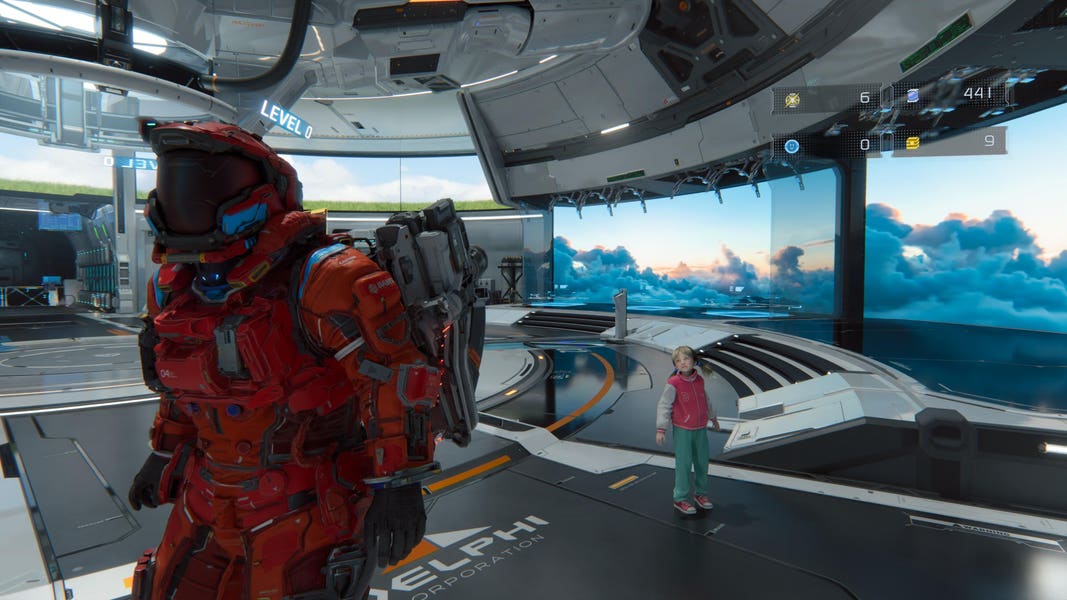
The source article makes one thing clear: Pragmata is not just another disposable release. It is a polished, visually stylized, story-driven sci-fi game with action mechanics that reward immersion, responsiveness, and consistency. That matters because games in this category tend to expose weak systems quickly. Stutter, slow asset loading, unstable frame rates, weak GPU performance, and limited memory can all chip away at the atmosphere these games depend on.
What does the source article get right about Pragmata?
The original piece highlights several reasons Pragmata stands out. It describes the game as polished, focused, and refreshingly digestible compared with bloated modern releases. It also emphasizes the emotional core of the story, with Hugh and Diana’s evolving relationship serving as more than a simple escort mechanic. That matters for PC buyers because cinematic games with strong atmosphere tend to benefit the most from stable performance, strong image quality, and fast loading.
In other words, Pragmata is exactly the kind of title that makes players care about the experience, not just the minimum requirement. If you are exploring moon-base environments, following story beats, managing combat pressure, and enjoying visual detail, do you really want your system fighting you the whole way?
The article also mentions the game’s distinctive hacking mechanic and polished combat loop. That suggests an experience where responsiveness matters. Games that blend action, traversal, and layered mechanics can feel dramatically better on a properly balanced desktop than on an underpowered machine that is already near its limit.
Why should Canadian buyers think differently about a game like Pragmata?
Canadian buyers often have to make hardware decisions under different conditions than U.S. shoppers. System prices, GPU availability, shipping realities, and replacement costs can all feel more volatile here. A weak buying decision is not just inconvenient. It can become more expensive to fix later.
That is why a game like Pragmata should not only make you ask, Can my current PC run it? It should make you ask, What else do I want my next PC to handle over the next few years?
Are you only buying for one game, or are you preparing for a bigger stretch of upcoming AAA releases? Do you want a PC for new games at high settings, or do you also want to stream, capture gameplay, edit clips, make thumbnails, or render creator content? If your next desktop is supposed to cover gaming, streaming, and creative workloads, a custom build makes far more sense than chasing the lowest upfront price.
What do you want your next PC to do for you?
This is the most important question in the entire buying process.
Do you want your next system to be a straightforward Gaming PC Canada setup for immersive single-player titles? Do you want a dual-purpose machine for Discord, OBS, game capture, and YouTube uploads? Are you a student, creator, or professional who needs the same desktop to handle Photoshop, Premiere Pro, Blender, or multitasking-heavy workdays?
Before you buy, ask yourself:
- What games do I actually play most?
- Do I care more about high FPS, visual quality, or both?
- Am I gaming at 1080p, 1440p, or 4K?
- Do I want ray tracing?
- Will I be streaming or recording at the same time?
- Do I also need video editing, photo editing, graphic design, or 3D modeling performance?
- How soon do I want to upgrade again if I buy too low today?
These are not small details. They determine whether you need a budget gaming computer, a premium RTX gaming PC, a custom creator PC, or a full workstation-class build.
What gaming PC do I need for Pragmata-style games?
For a cinematic action game like Pragmata, your ideal PC depends less on bare minimum compatibility and more on the kind of experience you want. A story-heavy sci-fi game benefits from strong GPU performance, fast storage, good CPU balance, and enough RAM to avoid bottlenecks when the action ramps up.
1080p gaming: Is a budget gaming PC enough?
If you are targeting 1080p with good settings and smooth gameplay, a Budget Gaming PC Canada build can absolutely make sense. This is the right lane for buyers who want strong value, clean performance, and a better experience than a basic mass-market desktop.
A good 1080p setup is ideal if you are asking questions like these:
- Do I mainly want to enjoy the story and gameplay without maxing every setting?
- Am I shopping for my first serious gaming desktop?
- Do I want to stay cost-conscious while still being ready for modern games?
- Would I rather buy a balanced system now than keep tweaking an older PC that is falling behind?
For many buyers, this is the sweet spot. But if you already know you are picky about image quality, sharper detail, and longer-term game readiness, moving up a tier can be smarter than buying twice.
1440p gaming: Is this the real sweet spot for most buyers?
For many Canadian gamers, yes. A 1440p Gaming PC Canada build often delivers the best balance between sharp visuals, strong frame rates, and future value. Pragmata-style games are exactly where 1440p shines. You get more detail, better visual presence, and a more premium feel without necessarily jumping all the way into flagship 4K territory.
If you are wondering what PC do I need for 1440p gaming, the answer is usually a balanced modern CPU, an RTX-class GPU with room to breathe, fast SSD storage, and enough memory for both gaming and general multitasking.
This tier is especially strong if you:
- Want high settings in modern AAA titles
- Play on a quality gaming monitor and want to justify it
- Care about consistency as much as average FPS
- Want a system that still feels capable as games become more demanding
4K gaming: Do you want the full cinematic experience?
If your answer is yes, then you are looking at a 4K Gaming PC Canada or High End Gaming PC Canada category build. This is the tier for players who want visual impact, premium texture quality, stronger ray tracing performance, and room for demanding future releases.
Ask yourself: are you buying a system to simply run today’s games, or are you buying one to enjoy the next several years of visually ambitious releases at a high level? If the second option sounds more like you, going premium may save you money and frustration over time.
Do you need ray tracing for games like Pragmata?
Not every buyer needs it, but many buyers want it once they see the difference. Sci-fi environments, reflective surfaces, dramatic lighting, and cinematic interiors are exactly where ray tracing can add atmosphere. If immersive visual presentation matters to you, this feature deserves serious consideration.
That does not mean you should overspend blindly. The smarter question is this: Do I want a system that can handle ray tracing comfortably, or am I fine prioritizing raster performance and value?
At Groovy Computers, the goal is not to force every customer into the most expensive build. It is to match the right GPU tier to the way you actually play.
What if you also want to stream or record gameplay?
This is where many shoppers underestimate their needs. A game that feels fine on a midrange system during solo play can feel very different once you add OBS, browser tabs, Discord, audio tools, overlays, and local recording.
If you are asking what PC do I need for streaming, or whether one desktop can cover both gaming and content creation, the answer is yes, but only if the build is chosen with that in mind from the start.
A proper Gaming and Streaming PC Canada setup should be selected around more than just game performance. It should account for:
- Encoding efficiency
- CPU headroom
- GPU acceleration
- Sufficient RAM
- Fast storage for recordings and projects
- Cooling and stability under longer loads
Are you thinking about streaming on Twitch, posting on YouTube, or clipping short-form content for social media? If so, buying only for today’s game list may leave you underpowered sooner than expected.
Is a gaming PC good for video editing and content creation too?
Sometimes yes, but not always in the way buyers expect. A gaming-first PC can be a strong starting point for content work, especially if it includes a capable CPU, enough RAM, and a good GPU. But if your workflow includes 4K editing, heavier timelines, motion graphics, multi-layer projects, or frequent exports, it may be smarter to step into Creator PC Canada or Video Editing PC Canada territory from day one.
If reading about Pragmata makes you want to capture footage, review games, edit content, create thumbnails, or launch a channel, your desktop needs can shift quickly.
Ask yourself:
- Will I edit gameplay clips in Premiere Pro or DaVinci Resolve?
- Do I want smooth scrubbing in 4K timelines?
- Will I work in Photoshop and Illustrator too?
- Do I want one system for gaming, editing, and streaming instead of juggling compromises?
A custom creator-focused build from Groovy Computers can be the difference between “it technically works” and “this saves me time every week.”
What if you also need photo editing, graphic design, or Adobe Creative Cloud performance?
That changes the buying conversation in a meaningful way. A customer who starts with a gaming article can easily become a buyer for a broader custom desktop once they realize how many tasks one machine needs to handle.
If you use Photoshop, Lightroom, Illustrator, InDesign, Canva, or wider Adobe Creative Cloud tools, your needs go beyond average FPS. You should be thinking about:
- RAM capacity for multitasking
- SSD speed for project files and scratch workloads
- CPU responsiveness for exports and batch work
- GPU support where software acceleration matters
- Monitor pairing and desk workflow
So ask the practical question: Do I want a PC that only plays games well, or a custom system that also supports the work and creative projects I actually do?
For a lot of Canadian buyers, a Custom Creator PC Canada build is the smarter long-term answer.
What about 3D modeling, Unreal Engine, or Blender?
Pragmata also speaks to a different kind of customer: the one inspired by game design, environments, sci-fi art direction, or interactive storytelling. If that sounds like you, maybe you are not only playing games. Maybe you are learning Blender, experimenting in Unreal Engine, building assets, or rendering scenes.
If that is the case, you should be looking at a 3D Modeling PC Canada or Workstation PC Canada path rather than a purely gaming-focused machine.
Ask yourself:
- What PC do I need for Blender?
- Will I be doing GPU rendering or CPU-heavy rendering?
- Do I need more RAM now to avoid a near-term upgrade?
- Will this desktop be used for both gaming and 3D work?
A system built for Blender, Unreal Engine, and game-ready graphics needs the right balance. Too little memory, weak cooling, or a mismatched component list can limit productivity just when your projects start getting serious.
Which performance tier fits you best?
One of the biggest mistakes buyers make is shopping without clearly placing themselves in a performance tier. That usually leads to either overspending on features they will not use or underspending on a build they outgrow too fast.
Entry-Level Value Tier
This tier is best for buyers who want:
- 1080p gaming
- Esports and lighter AAA play
- A first desktop upgrade from a basic PC or console-only setup
- Better reliability than random low-cost marketplace systems
This is where an Affordable Gaming PC Canada or First Gaming PC Canada build makes sense. It is a practical choice, especially if you value smooth play and upgrade potential.
Mainstream Sweet Spot Tier
This tier is best for buyers who want:
- 1440p gaming
- Modern AAA readiness
- Stronger multitasking
- Some streaming, recording, and creator flexibility
For many customers, this is the best overall long-term value tier. If you are wondering how much should I spend on a gaming PC, the answer often depends on whether this middle tier helps you skip an earlier replacement cycle.
Premium Enthusiast Tier
This tier is best for buyers who want:
- 4K gaming
- High refresh visual performance
- Ray tracing headroom
- Longer-term future-proofing
- High-end streaming and creator performance
If you are asking what PC do I need for 4K gaming or what PC do I need for ultra settings, this is your category. It costs more upfront, but often delivers a better ownership experience over time.
Creator and Workstation Tier
This tier is best for buyers who want:
- Gaming plus Premiere Pro, DaVinci Resolve, Photoshop, Lightroom, or Blender
- Heavy multitasking
- Fast project handling
- A professional desktop that is still fun after work
This is where Groovy Computers can really help buyers avoid the wrong compromise. A workstation or creator build should not be chosen like a generic gaming tower.
Is it better to buy a gaming PC now or wait?
This is one of the most important buying questions in Canada right now, and the answer depends on your timing, your current PC, and how close you are to outgrowing it.
If your current system is already struggling, waiting can become more expensive than acting. As new games arrive, software gets heavier, and demand shifts across GPUs, RAM, and SSDs, replacement costs do not always move in the buyer’s favour.
Ask yourself honestly:
- Am I trying to squeeze one more year out of a PC that already feels weak?
- Do I have major game releases coming up that I actually want to enjoy properly?
- Am I waiting for a perfect price that may never appear?
- Will I regret buying too low if I need to upgrade again sooner than expected?
Buying at the right time is not about panic. It is about avoiding a bad replacement window.
Why does pricing volatility matter when choosing a custom PC?
Even when a source article is about a game, smart buyers should think about hardware conditions behind the scenes. Full-system costs can shift because of GPU pressure, changing CPU demand, memory pricing, storage cost movement, and broader release cycles around new games and creator workloads.
That is why “I will just wait and see” is not always a money-saving strategy.
A custom build gives you more control. Instead of being stuck with a one-size-fits-all tower, you can prioritize the components that matter most to your own use case. If your focus is 1440p gaming, the build can lean that way. If you also need editing speed or Blender support, the system can be configured around that reality.
This kind of precision matters even more when pricing is unpredictable.
Should I finance a better PC instead of buying a cheaper one?
For many buyers, yes, that is the smarter move. Not because financing is automatically right for everyone, but because buying too little machine can cost more in frustration, lost performance, and premature upgrades.
If you are deciding between a weaker build paid all at once and a stronger custom desktop that better fits your actual needs, financing can make the better option realistic sooner.
That is especially relevant if you are asking:
- Is financing a gaming PC worth it?
- Should I finance a gaming PC?
- Can I finance a gaming PC in Canada?
- Should I buy a gaming PC before prices go up?
Groovy Computers helps Canadian buyers explore custom systems with financing options up to 4 years. That can be a practical way to lock in a stronger gaming, creator, or workstation build before your old PC forces the decision at the worst possible time.
Why not just buy any prebuilt?
Because not all systems are built with the same care, part matching, airflow logic, testing standards, or upgrade planning. A low-quality prebuilt can look fine on a product page and still disappoint in real-world use.
When you buy a custom PC from Groovy Computers, you are not just buying parts in a box. You are buying a system designed around your actual workload. That matters whether you need a Custom Gaming PC Canada build, a creator desktop, or a more serious workstation.
Why does that matter so much for games like Pragmata and modern creative workloads?
- Balanced parts reduce bottlenecks
- Proper cooling supports stable sustained performance
- Fast SSD storage improves responsiveness and loading
- Thoughtful RAM selection helps multitasking and future use
- Stress testing improves confidence before the PC reaches you
- A 1-year warranty adds real trust to the purchase
If you are spending serious money, should you not know the system was built and tested with care?
What kind of buyer should choose Groovy Computers?
Groovy Computers is a strong fit for the Canadian buyer who wants guidance, not guesswork.
That includes:
- The gamer upgrading for new AAA releases
- The customer moving from console to desktop
- The streamer who needs one PC for gaming and OBS
- The editor who wants smoother timelines and faster exports
- The designer using Photoshop, Illustrator, or Canva daily
- The Blender or Unreal user who needs more than a generic gaming tower
- The buyer who wants financing rather than settling for an underpowered build
Whether you are in Nova Scotia, Atlantic Canada, or shopping online from elsewhere in Canada, the right custom system should feel like it was chosen for your needs, not for warehouse convenience.
What should you ask before buying your next custom PC?
Before you commit, make sure you can answer these clearly:
- What games or software will I use most over the next 2 to 4 years?
- Do I care more about 1080p value, 1440p balance, or 4K visual performance?
- Will I use ray tracing, streaming, recording, or creator software?
- Do I need extra RAM or storage right away to avoid upgrading too soon?
- Am I buying for today only, or for a longer cycle of upcoming games and workloads?
- Would financing a stronger system help me avoid a bad compromise?
- Do I want a tested, warrantied custom build from a Canadian company?
If you cannot answer all of those yet, that is exactly why a guided custom PC conversation matters.
So, what is the smartest takeaway from Pragmata for PC buyers?
The source article praises Pragmata for being polished, emotionally grounded, and mechanically distinct. That kind of game reminds buyers of something important: not every great release is about endless grind or live-service sprawl. Some games are about atmosphere, design, and execution. To enjoy them properly, your hardware should support the experience instead of holding it back.
And once you start thinking that way, the buying question gets bigger. You are no longer just asking if you can run one game. You are asking what your next desktop should be able to do across gaming, streaming, editing, design, and future upgrades.
Need help choosing the right build?
If you are still asking what gaming PC do I need, or whether you should go with a budget gaming computer, a 1440p RTX system, a creator desktop, or a workstation-class build, the best next step is to talk to a builder that understands the full picture. Visit GroovyComputers.ca to explore custom options, compare performance tiers, and see whether a stronger system or financing plan makes more sense for your goals.
Whether you want a gaming desktop for new sci-fi releases, a streaming and editing setup, or a custom workstation that will not feel outdated too soon, Groovy Computers helps Canadian buyers make smarter hardware decisions with testing, support, and a 1-year warranty built into the process.
In short, a strong Pragmata PC buying guide Canada is really about something bigger: buying a system that fits the way you actually play, create, and work. If your current PC is already showing its age, if upcoming games are making you rethink performance, or if financing a stronger machine now could save you from a weak stopgap purchase, this may be the right moment to move.
#PragmataPCBuyingGuideCanada #GamingPCCanada #CustomGamingPCCanada #1440pGamingPCCanada #4KGamingPCCanada #CreatorPCCanada #VideoEditingPCCanada #StreamingPCCanada #3DModelingPCCanada #CanadianCustomPCBuilders #NovaScotiaComputers #GroovyComputers
Groovy Computers | All Rights Reserved



Leave a comment
This site is protected by hCaptcha and the hCaptcha Privacy Policy and Terms of Service apply.