



































Pragmata PC Buying Guide Canada: What Diana’s Design Story Tells Us About Choosing the Right Custom Gaming PC
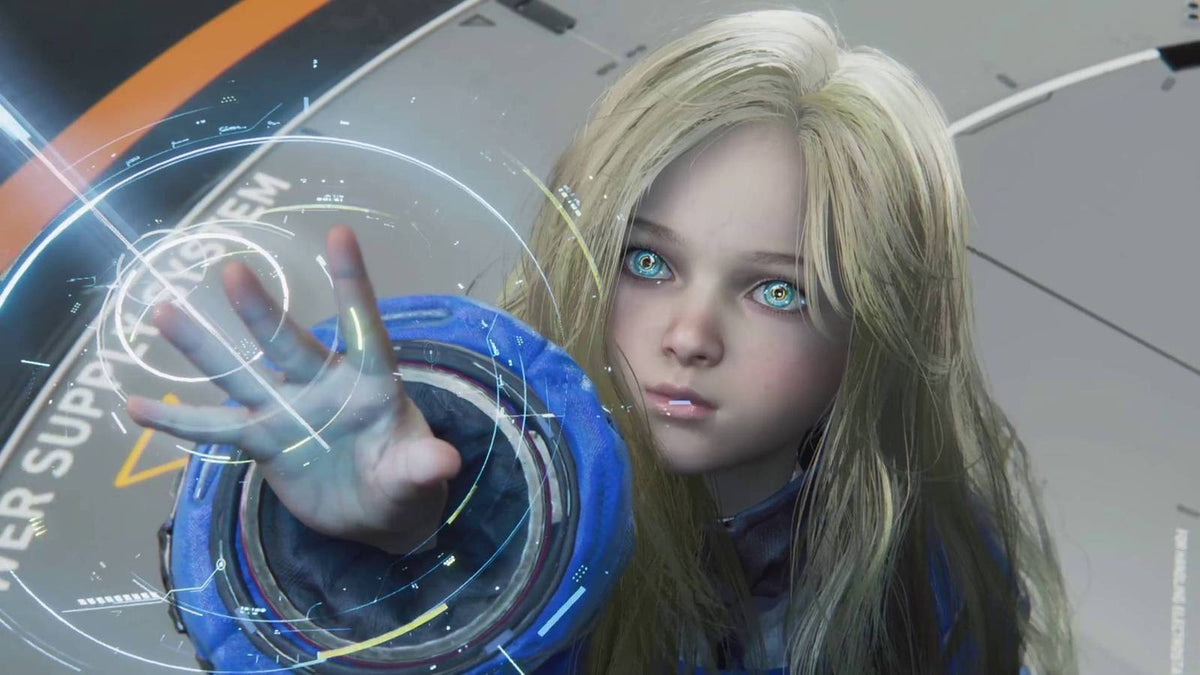
The news around Pragmata PC buying guide Canada interest is easy to understand. A recent report highlighted how Capcom reportedly used an all-female internal “Diana Police” team to protect the childlike innocence and consistency of Diana’s character design. That detail matters because it shows how much modern blockbuster game development depends on precision, oversight, and polish. For players in Canada, it also raises a practical question: if today’s major releases are this ambitious in storytelling, visuals, animation, and world-building, what kind of PC do you need to enjoy new games properly without replacing your system too soon?
That is where this story becomes more than entertainment news. Games like Pragmata remind buyers that new AAA titles are no longer lightweight experiences. They combine cinematic presentation, advanced effects, higher texture demands, larger install sizes, and more complex CPU and GPU workloads. If you are planning your next setup, it makes sense to think beyond one game and ask a more useful question: do you want a PC that only runs today’s releases, or a custom gaming PC in Canada that still feels strong when the next wave of demanding titles lands?
For Canadian buyers, this is especially important. Hardware pricing can shift quickly, demand can spike around major releases, and many shoppers want one machine that can handle gaming, streaming, content creation, and everyday productivity at the same time. A well-planned custom build from GroovyComputers.ca can help you avoid the common mistake of buying too low, upgrading too soon, and paying more overall.
What does the Pragmata Diana story really tell PC buyers?
The headline about a dedicated “Diana Police” team is more than a quirky behind-the-scenes detail. It reflects a broader trend in game development: major studios are investing heavily in character quality, narrative control, animation fidelity, and gameplay presentation. That usually means higher development complexity, and over time, that complexity shows up in the games we install on our own systems.
When developers put that much care into a lead character, you can safely assume they are also pushing visual detail, environmental effects, cinematic transitions, and performance expectations. So if you are reading this as a gamer, ask yourself: are you preparing for one title, or are you preparing for the next few years of AAA gaming?
If your answer includes ray tracing, high settings, smooth frame rates, and room for future releases, then the right PC choice matters a lot more than a generic spec sheet. A bargain machine that barely clears minimum requirements often becomes expensive the moment you need a GPU upgrade, more RAM, more storage, or better cooling.
Why should Canadian buyers think differently about new game readiness?
Canadian shoppers have to balance performance, value, and timing carefully. Exchange-rate pressure, uneven component availability, and release-driven demand can all affect full-system pricing. Even if one game seems manageable today, tomorrow’s updates, DLC, patches, and new launches can push your hardware harder than expected.
That is why a Gaming PC Canada purchase should not be based only on whether a system can technically launch a game. It should be based on how you want the experience to feel. Do you want stable 1080p performance and strong value? Are you targeting 1440p with better image quality? Are you planning for 4K, ray tracing, or streaming? Do you want a system that also works as a Content Creation PC Canada option for editing clips, thumbnails, or long-form video?
These are better buying questions than simply asking whether a game will run. They help you choose the right tier from the start.
What do you want your next PC to do for you?
This is the most important question in the entire buying process, and many people skip it. Before comparing parts, stop and think about your real use case.
- Do you want to play new AAA games at 1080p with strong value?
- Do you want a 1440p system that feels balanced for modern releases?
- Do you want a 4K gaming machine with premium visual settings?
- Do you also plan to stream through OBS or record gameplay for YouTube?
- Do you want to edit videos in Premiere Pro or DaVinci Resolve after gaming?
- Do you need Photoshop, Lightroom, Illustrator, or other Adobe Creative Cloud tools?
- Are you working in Blender, Unreal Engine, CAD, or 3D rendering software?
- Do you want one PC that handles gaming at night and workstation tasks during the day?
Once you answer those questions honestly, your ideal category becomes much clearer. Some buyers need a straightforward Budget Gaming PC Canada build. Others need a premium graphics-focused system. Others would be better served by a creator or workstation build with more memory, more cores, and faster storage instead of overspending only on a GPU.
What gaming performance tier fits you best?
If Pragmata-style releases are part of your buying motivation, performance tier selection is where smart budgeting starts. A custom system should fit your monitor, game library, visual expectations, and how long you want the machine to stay relevant.
1080p tier: who is it for?
A 1080p gaming setup is ideal for buyers who want strong value, smooth performance, and a lower total system cost. If you mainly play a mix of newer single-player games, esports titles, and general PC games, this tier can be the right answer.
Ask yourself: do you want good performance today without paying for premium features you may never use? If so, a budget-conscious 1080p build can be a smart first gaming PC, student system, or entry-level custom desktop. It can also be enough if you are happy using optimized settings instead of insisting on every visual option maxed out.
1440p tier: is this the sweet spot for new AAA games?
For many buyers, yes. A 1440p Gaming PC Canada configuration is often the best balance between image quality, frame rate, and long-term value. This tier makes a lot of sense if you want modern games to look noticeably better than 1080p while still keeping costs below a full premium 4K build.
If you are thinking, what PC do I need for 1440p gaming? the answer is usually a balanced build with a capable modern GPU, a strong gaming CPU, enough RAM for newer titles, and SSD capacity that does not force constant uninstalling. This is also a strong choice if you expect future games to become heavier but still want sensible pricing.
4K and ray tracing tier: when should you go high-end?
A 4K Gaming PC Canada or Ray Tracing Gaming PC Canada build is for buyers who care deeply about visual fidelity, premium settings, and longer top-tier relevance. If you want major releases to look their best on a high-resolution display, this is where GPU selection becomes critical.
But ask a practical question first: do you actually have a 4K display or plan to buy one soon? If not, jumping straight to the top end may not be the best allocation of your budget. A better strategy may be a high-quality 1440p build with stronger overall balance, especially if you also want to stream, edit, or multitask heavily.
Are you only gaming, or do you want a gaming and streaming PC too?
This is where many buyers underestimate their needs. If you plan to game, stream, record, chat in Discord, browse, and run background software at the same time, your system requirements change. Suddenly CPU headroom, encoder support, cooling quality, RAM capacity, and storage speed all matter more.
A Streaming PC Canada or Gaming and Streaming PC Canada setup should not just be “a gaming PC that might survive OBS.” It should be built for multi-tasking stability. If you are asking what PC do I need for streaming? think about your target output. Are you streaming at 1080p? Recording high-bitrate gameplay? Running multiple overlays? Editing clips after the stream?
If the answer is yes, a properly configured custom system can save you from dropped frames, sluggish alt-tabbing, or the need to split tasks across multiple devices. For Canadian creators and aspiring streamers, this is often a better long-term investment than buying a weaker machine and trying to stretch it beyond its design.
Could your next gaming PC also be your creator PC?
For many customers, absolutely. Modern buying behaviour is no longer just gamer or creator. It is both. You may want to play cinematic games like Pragmata, capture footage, edit TikToks, create YouTube videos, design thumbnails, and run Adobe software on the same system.
That is why Creator PC Canada and Gaming Streaming Editing PC Canada demand keeps rising. If you are using Premiere Pro, DaVinci Resolve, Photoshop, Illustrator, Lightroom, or After Effects, your ideal system may need more RAM, more CPU power, and a storage strategy built around active project files and exports.
Ask yourself: is a gaming PC good for content creation in your case? If your creative work is occasional, a balanced gaming build may be enough. If you edit 4K footage, work with layered graphics, or batch-export often, then a more creator-focused custom build will usually feel much better over time.
What if you also need video editing, photo editing, or graphic design performance?
Not every buyer coming from gaming news is only a gamer. Some readers are students, freelancers, hybrid creators, or small business owners who want one powerful desktop for everything. If that sounds like you, your buying decision should focus on workflow, not just frame rates.
Video editing buyers
If you are asking what PC do I need for video editing? think about footage resolution, effects, export frequency, and software. A proper Video Editing PC Canada build should be planned around CPU performance, GPU acceleration where relevant, memory capacity, and fast SSD storage. The difference between an okay editing experience and a smooth one is often not one flashy part, but the right overall system balance.
Photo editing buyers
If your world is Photoshop, Lightroom, RAW image management, and high-resolution asset work, a Photo Editing PC Canada build can prioritize responsiveness, RAM, storage speed, and display pairing logic. Do photographers need a dedicated GPU? Sometimes yes, sometimes less than expected. What matters is that the system matches your software and image workflow instead of blindly chasing gaming specs.
Graphic design buyers
If you work in Illustrator, Photoshop, InDesign, Canva, or multi-monitor branding workflows, a Graphic Design PC Canada build should be stable, fast, and comfortable for multi-app use. Ask yourself: do you need a machine that opens files quickly and handles many creative apps at once, or are you trying to force design work onto a gaming-only setup that is not optimized for your day-to-day tasks?
3D modeling and workstation buyers
If you use Blender, Unreal Engine, CAD applications, or rendering tools, then you may need more than a standard gaming desktop. A 3D Modeling PC Canada or Workstation PC Canada build should be selected around rendering needs, viewport performance, CPU vs GPU usage, and memory capacity. If you are wondering workstation PC vs gaming PC for 3D modeling? the answer depends on your software stack and whether your income depends on predictable professional performance.
Why timing matters when a big game gets everyone thinking about upgrades
Major game releases do more than drive hype. They push buyers into the market at the same time. When enough people decide they want a stronger GPU, more RAM, or an entirely new desktop before the next wave of releases, hardware demand can tighten. That does not guarantee a price spike every time, but it does mean waiting is not always the safe move many shoppers assume it is.
Ask yourself a blunt question: are you planning to buy before a big release period, holiday rush, back-to-school demand, creator-software upgrade cycle, or possible component price increase? If yes, there is value in locking in the right build earlier instead of scrambling later when availability or full-system costs become less favourable.
This matters even more if your current system is already struggling. The buyer who waits too long often ends up making a rushed decision, choosing whatever is available, or settling for a weaker replacement than they originally wanted.
Should you buy a cheaper PC now or finance a better one?
This is one of the most important real-world questions for customers. Many shoppers try to stay under a hard budget ceiling, then discover that the cheapest acceptable system becomes expensive after one GPU upgrade, one RAM upgrade, and one storage expansion. In some cases, it is smarter to secure a stronger machine from the beginning.
If you are wondering should I finance a better PC instead of buying a cheaper one? the answer depends on how close you are to the performance tier you actually need. If a modest increase gets you meaningfully better longevity, smoother gameplay, better creator performance, and less risk of upgrading too soon, financing can be the more cost-effective path.
Groovy Computers can help Canadian buyers explore practical options, including financing up to 4 years where available. For customers who want a stronger custom gaming PC, creator system, or workstation without making the full payment upfront, that can make better hardware more accessible at the right moment.
How do GPU, CPU, RAM, and SSD choices affect your long-term value?
Shoppers often fixate on the graphics card, but whole-system planning is what determines whether your PC stays satisfying to use. A powerful GPU paired with weak cooling, too little RAM, or cramped storage can still feel disappointing.
GPU
Your GPU has the biggest impact on gaming resolution, visual settings, and ray tracing performance. If your main goal is a Gaming PC for New Games, this is where your monitor target matters most. A 1080p buyer and a 4K buyer should not shop the same way.
CPU
Your CPU affects frame consistency, system responsiveness, simulation-heavy titles, background tasks, and streaming or editing workloads. If you plan to game and stream or game and create, CPU selection becomes much more important.
RAM
How much RAM do you need? That depends on your use case. Pure gaming needs are different from streaming, editing, or 3D work. If you alt-tab constantly, run multiple apps, or work with larger assets, underbuilding RAM is one of the fastest ways to regret a purchase.
SSD storage
Modern games are large, and creator files are larger. Fast storage improves load times, project handling, and day-to-day usability. If you have ever had to uninstall games just to edit footage or move files around constantly to make room, you already know storage planning matters.
Which kind of buyer should choose which kind of build?
Here is a practical way to think about it.
Choose a budget-focused gaming build if:
- You play mostly at 1080p
- You want the best value per dollar
- You are buying your first gaming desktop
- You do not need heavy streaming or editing performance
- You want a sensible entry point into PC gaming in Canada
Choose a balanced mid-tier build if:
- You want strong 1440p gaming
- You play newer AAA titles regularly
- You want some future-proofing without overspending
- You may stream casually or do light editing
- You want a system that stays comfortable for longer
Choose a premium gaming build if:
- You want 4K or high-refresh 1440p performance
- You care about ray tracing and ultra settings
- You expect demanding new releases to be part of your routine
- You want stronger longevity before your next major upgrade
- You are considering whether financing a high-end gaming PC makes sense
Choose a creator or workstation build if:
- You edit video, design graphics, or process photos regularly
- You use Blender, Unreal Engine, CAD, or rendering tools
- You need stable multitasking more than raw gaming-only performance
- You want a custom desktop that supports professional output
- Your time savings matter just as much as your frame rates
What questions should you ask before buying your next PC?
Before you commit, ask yourself these decision-making questions:
- What games or software will I actually use most?
- Am I targeting 1080p, 1440p, or 4K?
- Do I want ray tracing, high FPS, or both?
- Will I stream, record, or edit content on this system?
- How much storage will I realistically need within the first year?
- Am I trying to avoid upgrading again too soon?
- Would a custom build fit me better than a generic off-the-shelf system?
- Should I buy now before a major release cycle or possible pricing pressure?
- Would financing help me get the right build now instead of settling?
- Do I want support, testing, and warranty confidence from a Canadian builder?
If those questions expose uncertainty, that is not a bad thing. It means you are thinking like a smart buyer instead of impulse shopping.
Why does a custom build matter more than ever?
A Custom Gaming PC Canada or custom creator desktop is not just about aesthetics. It is about matching the system to your actual workloads, cooling needs, upgrade path, and long-term budget. That matters even more when modern games and creative software continue to become more demanding.
Generic mass-market systems often hide compromises in power delivery, airflow, memory configuration, motherboard quality, or storage planning. A custom-built machine is more likely to be balanced properly for what you actually want to do.
If you are comparing custom PC vs prebuilt PC Canada, ask what matters more to you: the fastest checkout, or the best-fit machine? If your goal is long-term satisfaction, smoother performance, and fewer compromises, custom usually wins.
Why Groovy Computers is a smart fit for Canadian buyers
Groovy Computers is built around what serious buyers in Canada actually need: properly matched custom systems, helpful guidance, stress-tested builds, and confidence that your PC was put together with care rather than rushed through a volume pipeline.
Whether you need a gaming desktop, a streaming setup, a creator workstation, or a more specialized build, Groovy Computers helps connect your workload to the right hardware tier. That means you are less likely to overspend in the wrong place or underspend in a way that creates frustration later.
There is also practical peace of mind in buying from a Canadian custom PC builder. Groovy Computers offers rigorous testing, a 1-year warranty, and support that makes sense for buyers who want reliability, not guesswork. For customers in Nova Scotia, Atlantic Canada, and across the country, that trust factor matters.
Still wondering what PC you need for games like Pragmata?
If a story like Pragmata’s development detail has you thinking about the future of AAA gaming, the bigger takeaway is simple: games are becoming more polished, more cinematic, and more demanding. That means your next system should be chosen with a clear purpose.
Do you want a value-first gaming desktop for 1080p? A stronger 1440p system that feels like the sweet spot? A premium build for 4K and ray tracing? A hybrid setup for gaming, streaming, and editing? A workstation-class machine for Blender, Adobe apps, or 3D projects?
The right answer depends on you, and that is exactly why a custom approach matters.
Ready to choose the right custom PC for your needs?
What do you want your next PC to do for you, and do you want to buy once instead of upgrading again too soon? If you are looking for a custom gaming PC in Canada, a creator desktop, or a workstation that fits your real workload, Groovy Computers can help you choose a system that makes sense now and still feels right later. If a stronger build would serve you better, ask about available options at GroovyComputers.ca, including financing paths that may help you secure the right performance before replacement costs rise.
In the end, the Pragmata story is a reminder of where gaming is headed. Behind-the-scenes design discipline creates bigger, more impressive experiences on the player side. For Canadian buyers, that means this is a good time to think seriously about a Pragmata PC buying guide Canada mindset: buy for the games you want to play next, the software you want to use next, and the performance tier that keeps you confident longer.
#PragmataPCBuyingGuideCanada #GamingPCCanada #CustomGamingPCCanada #GamingPCForNewGames #1440pGamingPCCanada #4KGamingPCCanada #CreatorPCCanada #StreamingPCCanada #WorkstationPCCanada #CanadianCustomPCBuilders #NovaScotiaTech #GroovyComputers
Groovy Computers | All Rights Reserved



Leave a comment
This site is protected by hCaptcha and the hCaptcha Privacy Policy and Terms of Service apply.