






















Resident Evil Survival Unit x Monster Hunter: What This Crossover Means for Your Next Gaming PC in Canada
The Resident Evil Survival Unit x Monster Hunter crossover is more than a quick gaming headline. It is another clear sign that major franchises are continuing to blend genres, expand live events, and keep players engaged across mobile, PC, and creator ecosystems. For Canadian buyers, that matters because every new event, release window, and franchise crossover raises the same practical question: is your current system still ready for the games you actually want to play next?
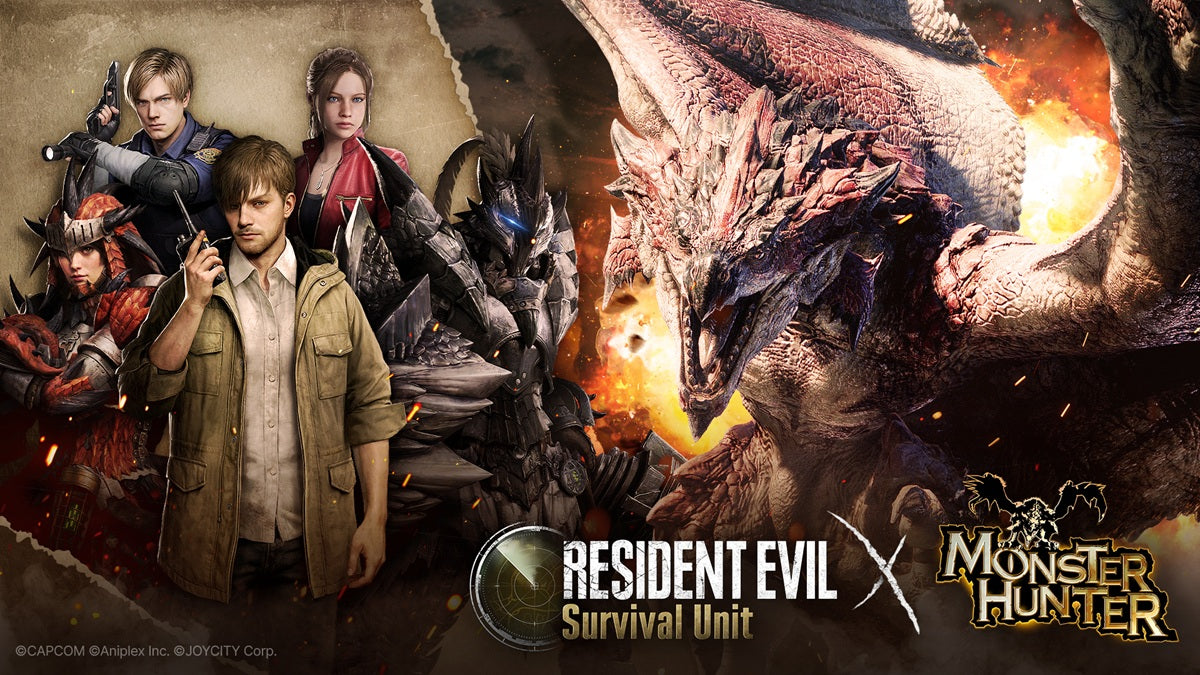
The source announcement focuses on a limited-time collaboration inside Resident Evil Survival Unit, bringing Monster Hunter-inspired monsters, missions, strategic encounters, minigames, and exclusive rewards into the game from July 2 to July 29. On the surface, that is straightforward news. But for gamers, streamers, and content creators, it points to a much larger trend: game universes are becoming more connected, event-driven, and performance-sensitive, which means your next PC should not be chosen only for one title. It should be chosen for the next wave of games, streams, clips, edits, and multitasking workloads you know are coming.
If you are reading about this crossover and thinking, “Do I need a stronger system before the next big game event, hardware demand spike, or GPU price jump?” you are asking exactly the right question.
What did the source article reveal, and why does it matter beyond mobile gaming?
The announcement highlights a collaboration between Resident Evil Survival Unit and Capcom’s Monster Hunter franchise, introducing iconic monsters like Rathalos, Yian Kut-Ku, and Silver Rathalos into a post-apocalyptic strategy environment. It also adds free collaboration-exclusive Hunter characters, cosmetic customization items, and limited-time event rewards.
Why does this matter if you are shopping for a desktop PC rather than following mobile strategy news? Because franchise crossovers are no longer side content. They are part of how publishers drive long-term engagement, community spikes, streaming moments, and creator traffic. When a crossover hits, players do not just log in. They watch gameplay, record reactions, stream event battles, create clips, post guides, and compare performance across devices.
That means the buying conversation quickly shifts from “Can I run one game?” to “Can my system handle modern gaming, recording, Discord, browser tabs, OBS, editing software, and future titles without struggling?”
That is where a properly planned Gaming PC Canada build becomes far more important than a generic off-the-shelf machine.
Why should Canadian buyers think differently about crossover gaming trends?
Canadian buyers have a different reality than many general gaming news articles account for. We deal with exchange pressure, shipping considerations, hardware availability swings, and replacement-cost volatility. Even when a specific game event is not graphically extreme, the buying environment around gaming PCs can change quickly.
So what should you be thinking about in Canada right now?
- Will the next game you care about be more demanding than this one?
- Are you buying for 1080p now but planning for 1440p later?
- Do you want ray tracing, high refresh rates, or smoother streaming?
- Would financing a stronger PC now save you from upgrading too soon?
- Are you trying to avoid paying more later if GPU or memory pricing tightens?
Those are real purchase questions, especially if you want a custom system that will still feel strong after the current event cycle ends and the next AAA title arrives.
What do you want your next PC to do for you?
This is the most important buying question in the entire article.
Do you want a system mainly for gaming? Do you also want to stream to Twitch or YouTube? Are you clipping gameplay for TikTok, editing highlight reels, or running Photoshop and Illustrator between sessions? Are you a player today but a content creator six months from now?
Many Canadian shoppers start by looking for a gaming desktop, then realize they also need creator performance. Others begin by looking for a creator system, then discover they want smooth 1440p or even 4K gaming as well. That is why a one-size-fits-all desktop is often the wrong answer.
A better question is this: what workloads do you want your next PC to handle without compromise?
If you are mainly a gamer, ask yourself:
- What games are you actually playing over the next 12 to 24 months?
- Do you care more about esports FPS performance or cinematic AAA settings?
- Are you targeting 1080p, 1440p, or 4K?
- Do you want ray tracing and ultra settings, or just stable value performance?
- Are you buying before a big release so you are not scrambling at the last minute?
If you are also a streamer or creator, ask yourself:
- Will you be running OBS while gaming?
- Do you need strong GPU encoding for streaming and recording?
- Will you edit in Premiere Pro, DaVinci Resolve, or CapCut?
- Do you need fast exports, responsive timelines, and room for large media files?
- Would more RAM and storage save you frustration every week?
If you are using design or 3D software too, ask yourself:
- Do you work in Photoshop, Lightroom, Illustrator, or InDesign?
- Are you moving into Blender, Unreal Engine, or rendering workloads?
- Do you need a gaming-first machine or a workstation-first machine?
- How long do you want this system to stay useful before the next major upgrade?
What kind of PC makes sense if you are excited by modern game crossovers and live events?
If headlines like Resident Evil Survival Unit teaming up with Monster Hunter get your attention, you are probably not looking for a bare-minimum computer. You are likely the kind of player who follows gaming news, tries event content, watches creators, and cares about responsiveness and visual quality.
That usually places you into one of several buying categories.
1. Budget gaming buyer
If you mostly want dependable 1080p performance and a strong starting point, a budget gaming PC Canada build can make sense. This type of system is ideal if you play lighter multiplayer titles, strategy games, or a mix of current games at sensible settings.
But here is the key question: are you buying a value system because it fits your needs, or because you are trying to avoid the upfront cost of a stronger PC?
If it is the second reason, financing may be the smarter route, because under-buying often leads to replacing parts sooner than expected.
2. Mainstream 1440p gaming buyer
This is where many Canadian gamers should be looking. A balanced custom gaming PC built for 1440p gives you stronger longevity, better visual headroom, and a much better experience if your game library expands into larger open-world or effects-heavy titles.
If you are asking, “What PC do I need for 1440p gaming?” this tier is often the sweet spot between value and future-readiness.
3. Premium RTX gamer
If you care about ray tracing, high refresh displays, premium settings, and stronger long-term performance, a high-end custom gaming PC is the category to consider. This is especially true if your purchase is meant to last through several game cycles instead of just one.
Do you want to play upcoming releases at high settings without immediately thinking about your next GPU upgrade? If yes, stepping up now may cost less overall than buying twice.
4. Gaming and streaming buyer
If your plan includes gameplay plus livestreaming, voice chat, browser windows, alerts, recording, and post-session clip editing, you are not just buying a gaming system. You are buying a streaming PC Canada setup with real multitasking demands.
That means CPU, GPU encoder performance, RAM capacity, cooling, and storage all matter more than many first-time buyers realize.
5. Creator-first buyer who also games
If you edit video, design graphics, create thumbnails, process RAW images, or work with Adobe Creative Cloud, your ideal build may be a Creator PC Canada system rather than a gaming-only machine. The good news is that a well-designed creator build can still be an excellent gaming desktop.
The real question is: which part of your workflow costs you more time right now, in-game lag or creative software slowdowns?
What performance tier fits you best?
Choosing the right tier is less about chasing hype and more about matching hardware to your actual goals. Here is a practical way to think about it.
Entry Tier: Best for 1080p and lighter mixed use
This tier is suitable if you play competitive titles, older AAA games, or less demanding genres and want a responsive everyday system. It can also work for basic school tasks, moderate multitasking, and light content creation.
Ask yourself: will you be satisfied if newer games require reduced settings sooner rather than later? If yes, this can be a smart value tier.
Mid Tier: Best for 1440p gaming and stronger longevity
This is often the best all-around choice for buyers who want smooth modern gaming and enough power for occasional streaming, editing, and creative work. It is frequently the right answer for shoppers wondering how much they should spend on a gaming PC without overspending.
If you want strong value without feeling outdated too quickly, this tier is usually the sweet spot.
Upper Tier: Best for high refresh, ray tracing, and serious multitasking
This range makes sense for gamers who want better visuals, more headroom, and stronger streaming or creator flexibility. If you are recording, streaming, editing, or using heavier software alongside your games, this is where the experience becomes much smoother.
Premium Tier: Best for 4K, advanced creator work, and maximum headroom
If you want a 4K gaming PC Canada class experience, or if you are combining gaming with demanding production workloads, premium hardware makes the most sense. This tier is also well suited to video editing, 3D rendering, and workstation-style use.
Are you trying to avoid a major upgrade for as long as possible? A premium build may be the most economical long-term option, especially if financed sensibly.
Can a gaming-focused build also work for streaming, editing, and content creation?
Yes, but only if it is planned correctly.
This is where many buyers in Canada make a costly mistake. They assume any gaming desktop automatically works well for streaming or editing. In reality, the right balance of CPU cores, GPU acceleration, memory, storage speed, cooling, and motherboard expandability matters a lot.
If you are searching for a gaming and streaming PC Canada setup, the build needs to account for more than frame rates. It should also handle:
- OBS or Streamlabs while gaming
- Discord and browser multitasking
- Fast game loads and recording storage
- Efficient video exports
- Stable temperatures under long sessions
- Upgrade room for future storage or RAM expansion
The same logic applies if you need a Video Editing PC Canada or a Graphic Design PC Canada that still plays modern games well. A custom build allows those priorities to be balanced instead of forcing you into compromises you did not ask for.
What if your next PC is for more than gaming?
Gaming headlines often bring shoppers into the market, but a lot of those buyers quickly realize they need more than pure gaming performance.
Maybe you are editing YouTube videos after work. Maybe you are building stream overlays in Photoshop. Maybe you are producing marketing graphics, handling Lightroom catalogs, or learning Blender. If so, your next system may need to bridge categories.
For video editors
If you are asking, “What PC do I need for video editing?” the answer depends on your footage, codecs, software, and export demands. A proper custom video editing PC Canada build should consider RAM capacity, storage speed, and GPU acceleration just as seriously as gaming performance.
Do you edit 1080p casually, or are you working with 4K timelines, multiple layers, and effects-heavy projects? That difference changes what the right build looks like.
For photo editors and graphic designers
If your work lives in Photoshop, Lightroom, Illustrator, or InDesign, responsiveness matters in a different way. Batch exports, layered files, AI features, and high-resolution assets can make an underpowered system feel slow every single day.
A Photo Editing PC Canada or PC for Graphic Design Canada should be designed for fast storage access, sufficient RAM, a quality CPU, and a stable platform for long sessions.
For 3D artists and advanced creators
If your workflow is moving into Blender, Unreal Engine, rendering, or simulation, then you may be beyond the normal gaming category entirely. In that case, a 3D Modeling PC Canada or Workstation PC Canada approach is often the smarter investment.
So ask yourself honestly: are you buying for your current hobby, or for the heavier work you know is coming next?
Is it better to buy now or wait?
This is one of the biggest questions Canadian buyers ask, and it is a fair one.
Waiting can make sense if your current system already handles everything you need and you are not facing any upcoming software, gaming, or creator-pressure change. But waiting can also backfire if you are already compromising on settings, storage, thermals, or workflow speed.
You should think carefully about timing if any of these sound familiar:
- Your current PC struggles with newer games
- You are lowering settings more than you want
- You want to move from 1080p to 1440p or 4K
- You plan to start streaming soon
- You are losing time to exports, loads, or render delays
- You expect to buy around a major game release or seasonal demand spike
- You are worried about rising replacement costs later
If you know you will need a better machine soon anyway, the question becomes more practical: does waiting help, or does it simply delay the build you already know you need?
Why does pricing volatility matter when choosing a custom PC?
Even when a source article is about a game crossover rather than hardware pricing, Canadian buyers should still pay attention to market timing. System costs are not static. GPUs, RAM, SSDs, and even supporting parts can shift in price based on demand, supply, and broader market conditions.
That matters because the difference between buying now and buying later is not always just a few dollars. In some cases, waiting means:
- Paying more for the same GPU tier
- Settling for weaker alternatives due to stock changes
- Delaying a content or streaming plan you wanted to start now
- Spending money on short-term upgrades that do not solve the real problem
If your current PC is already near its limits, every delay can also mean more frustration, lost time, and a greater chance that you will make a rushed purchase later.
Should you finance a stronger PC instead of buying a cheaper one?
For many buyers, yes, that is the smarter long-term move.
This is especially true when the alternative is buying a lower-tier system that you expect to outgrow quickly. If a modest monthly payment lets you move into a stronger custom gaming PC, creator desktop, or workstation with a much better lifespan, that can be a better value than replacing or upgrading too soon.
At Groovy Computers, this matters because many customers are not deciding between “buy” and “not buy.” They are deciding between:
- A cheaper system that may feel limited faster
- A better balanced system they can keep longer
So ask yourself: should you finance a better PC instead of buying a weaker one outright?
If you want more performance headroom for gaming, streaming, editing, or creative work, financing up to 4 years can make the stronger option more accessible without forcing you into the wrong tier today.
What should you look for in a Canadian custom PC builder?
Not every desktop seller is solving the same problem. If you want confidence in your purchase, a true custom builder should do more than just assemble parts.
You should be looking for:
- Workload matching based on the games and software you actually use
- Proper cooling for long sessions and sustained performance
- Part balance so one weak component does not bottleneck the whole system
- Upgrade planning so your build can grow with you
- Rigorous testing before shipping
- Warranty support from a real Canadian custom PC company
That is one reason custom builds continue to matter. A generic machine may look fine on paper, but if it is poorly matched, weakly cooled, or built around short-term compromises, it can become a more expensive decision over time.
Why Groovy Computers is a smart fit for Canadian buyers
Groovy Computers is built around the needs of Canadian buyers who want more than a random parts list. Whether you need a gaming desktop, creator system, or workstation-class build, the goal is to match the machine to your actual use case and help you buy with more confidence.
That means:
- Custom PC recommendations based on performance goals
- Gaming, streaming, creator, and workstation build categories
- Canada-focused service and support
- Rigorous testing before systems go out
- A 1-year warranty for added peace of mind
- Financing up to 4 years for buyers who want a stronger system sooner
If you are in Nova Scotia, Atlantic Canada, or shopping online from elsewhere in the country, the biggest advantage is simple: you are not forced into a one-size-fits-all solution. You can get a system designed around what you actually want to play, create, edit, stream, and keep for the long term.
What gaming PC do you need after reading this crossover news?
If the Resident Evil Survival Unit and Monster Hunter crossover has you thinking about game readiness, the next step is not to chase a headline. It is to define your target experience.
Do you want:
- A budget-friendly system for 1080p gaming?
- A balanced 1440p machine with stronger longevity?
- A ray tracing-ready premium build?
- A gaming and streaming setup that can also edit content?
- A creator workstation that handles Adobe apps, design, and gaming together?
- A heavier 3D modeling or rendering machine with room to grow?
Once you know the answer, the build becomes much easier to choose.
Need help choosing the right custom PC category?
If you are unsure whether you need a budget gaming computer, premium RTX gaming desktop, custom creator PC, editing workstation, or 3D modeling workstation, that is exactly the point where expert guidance matters.
What do you want your next PC to do that your current one cannot do comfortably? If you can answer that question, Groovy Computers can help point you toward the right category and performance tier.
For Canadian shoppers who want a properly matched system instead of guesswork, the best next move is to explore GroovyComputers.ca and compare custom options built for gaming, streaming, editing, design, content creation, and workstation use.
Final thoughts: the crossover is temporary, but your PC decision is not
The Resident Evil Survival Unit x Monster Hunter event may be limited-time, but the buying lesson is not. Big gaming moments create urgency, hype, and renewed interest in what your hardware can actually handle. That is often when buyers realize their current PC is one release, one monitor upgrade, or one creator workflow away from feeling outdated.
If you already know you want better 1080p, 1440p, or 4K performance, smoother streaming, faster editing, or more future-proof hardware, this is the right time to think carefully about the build you choose. A stronger Gaming PC Canada system, especially one tailored for your gaming and creator goals, can save you from upgrading too soon and help you stay ready for what comes next.
If you are asking yourself whether now is the right time to buy, whether financing makes sense, or what custom performance tier fits you best, visit GroovyComputers.ca and start with a build that matches your real needs instead of forcing your needs to fit a generic PC.
#GamingPCCanada #CustomGamingPCCanada #GamingAndStreamingPCCanada #VideoEditingPCCanada #CreatorPCCanada #3DModelingPCCanada #WorkstationPCCanada #CanadianCustomPCBuilders #GamingPCNovaScotia #GroovyComputers
Groovy Computers | All Rights Reserved

Leave a comment
This site is protected by hCaptcha and the hCaptcha Privacy Policy and Terms of Service apply.