






















Slay the Spire 2 Multiplayer Update and the Best Gaming PC Canada Buyers Should Choose Next
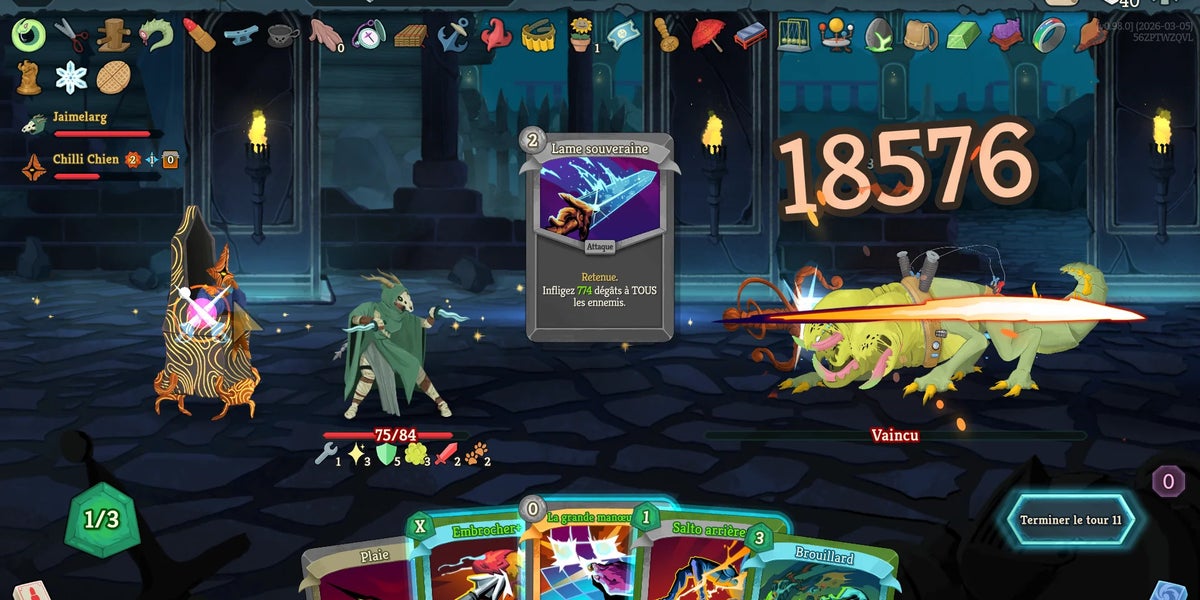
The latest Slay the Spire 2 multiplayer update is more than a simple balance pass. It adds a wave of powerful co-op cards across multiple classes, reworks existing interactions, tones down some scaling issues, and even makes mod installation friendlier by helping players copy unmodded saves into modded save slots the first time they install a mod. For Canadian players, that kind of update matters for a bigger reason too: when a strategy game starts expanding its multiplayer systems, mod support, and long-session replay value, it often changes what kind of PC actually makes the most sense to buy.
If you are following deckbuilders closely, this patch is a reminder that PC gaming is not just about raw graphical spectacle. It is also about responsiveness, multitasking, platform flexibility, stability, community mods, Discord voice chat, browser tabs, patch downloads, OBS capture, and the ability to keep your system feeling fast even when your gaming habits expand. So the real question is not only, what changed in Slay the Spire 2? It is also, what kind of system should you buy if games like this are part of your regular rotation?
For many buyers, this is where a generic off-the-shelf machine stops making sense. If you want a system that handles card games, indie games, larger AAA titles, streaming, light editing, and future upgrades without feeling dated too quickly, a properly matched custom build becomes a much smarter long-term decision. That is exactly where GroovyComputers.ca enters the conversation for Canadian buyers who want a gaming PC that is built around real use, not guesswork.
What changed in the Slay the Spire 2 multiplayer update, and why does it matter?
Based on the source material provided, the update introduces 15 new multiplayer-focused cards spread across the game’s classes, including Ironclad, Silent, Regent, Necrobinder, Defect, plus a new colourless card called The Ball. There are also card reworks, multiplayer enemy block scaling changes for two-player co-op, bug fixes, UI tweaks, and a quality-of-life improvement for mod users.
That sounds like game news, but it also signals something broader. Slay the Spire 2 is continuing to develop as a social, repeatable, PC-first experience. Co-op card interactions, support mechanics, shared scaling, and mod usability all increase the odds that players spend longer sessions in game, run multiple apps in the background, and return often for experimental builds. Do you only want a PC that can technically launch your games, or do you want one that still feels sharp when your gaming turns into a nightly habit?
Here are the biggest gameplay takeaways from the update:
- Ironclad gains explosive co-op potential with cards like Midnight, Blaze, and Outrage.
- Silent becomes even more team-friendly through shiv generation, poison support, and turn-based Dexterity boosts.
- Regent strengthens team setup with extra draw, energy support, and defensive utility.
- Necrobinder leans harder into synergy through Doom scaling, Soul support, and damage tied to total card draw.
- Defect becomes more collaborative with frost-based support, buffs to zero-cost attacks, and copy effects for power cards.
- Mod onboarding is easier because the first mod installation can copy unmodded saves into modded save space.
In plain language, this update pushes Slay the Spire 2 further toward the kind of game players tweak, discuss, stream, mod, and revisit constantly. If that sounds like you, your next PC should reflect that lifestyle.
Why should Canadian PC buyers care about a Slay the Spire 2 update?
Because game updates often reveal buying patterns before customers realize they are shopping. A player who comes back for a major multiplayer patch may suddenly notice their current desktop feels old, noisy, sluggish, or unstable. Maybe Discord starts stuttering while the game is open. Maybe alt-tabbing feels clumsy. Maybe you decide to stream a co-op run. Maybe your machine is still running on limited RAM or a cramped SSD, and every new patch pushes you closer to replacing it.
Canadian buyers also face a different market reality than many headline-driven tech stories acknowledge. Hardware pricing in Canada can shift quickly once GPU demand rises, stock tightens, or popular new releases trigger a wave of upgrades. That means timing matters. Are you trying to wait for the perfect moment, or are you risking paying more later for the same class of system?
If your current PC is already showing signs of age, waiting can become expensive in two ways. First, component and full-system pricing can climb. Second, buying too weak a machine now can force you to upgrade again sooner. A well-planned custom gaming PC is often the smarter way to control that risk.
What do you want your next PC to do for you?
This is the most important question in the entire buying process, and it matters far more than chasing one isolated benchmark.
Do you mainly play strategy games, roguelites, indie titles, and co-op games with friends? Do you also want the freedom to jump into larger releases later? Are you thinking about 1080p now but curious about 1440p gaming next year? Do you want to stream to Twitch or record YouTube videos? Do you edit clips in Premiere Pro, cut shorts in CapCut, or design thumbnails in Photoshop?
Your answer changes the right build category completely.
Some buyers need a budget gaming PC Canada shoppers can justify for esports, indie gaming, and general use. Others actually need a stronger custom gaming PC Canada build because they want smoother multitasking, faster load times, better long-term value, and room for future games. Still others are not just gaming at all; they need a system that can game at night and handle creator workloads during the day.
The real lesson from this patch: modern PC gaming is about ecosystem performance
Slay the Spire 2 is not the most graphically punishing game on the market, but that does not mean hardware quality stops mattering. In 2026-era PC usage, buyers are rarely doing one thing at a time. You might be gaming while running chat apps, browser tabs, music, game launchers, update services, voice software, mods, and even capture tools.
That is why a stronger CPU, enough RAM, and a fast SSD often make a bigger day-to-day difference than shoppers expect. A better machine is not just about more frames. It is about a more comfortable PC life.
Ask yourself:
- Do you want your system to launch games and apps instantly instead of dragging through every restart?
- Do you want enough storage for multiple modern games without uninstalling something every week?
- Do you want your PC to stay useful if your habits shift from card games to large open-world titles?
- Do you want a machine that can stream or record without becoming frustrating?
If the answer is yes, your buying decision should not be based on minimum requirements alone.
What gaming PC do I need if I play games like Slay the Spire 2?
If your library centres around indie games, deckbuilders, strategy titles, lighter co-op games, and esports, you do not necessarily need a flagship GPU. But you do benefit from a balanced system. For this kind of buyer, the sweet spot is often a machine with a modern multi-core CPU, enough memory for multitasking, and a fast SSD that makes the whole system feel responsive.
Entry-level performance tier: Who is it for?
This tier fits buyers who mostly want 1080p gaming, fast system responsiveness, and enough power for lighter modern titles. If you are asking, what gaming PC do I need for card games, roguelites, indie releases, and general online play, an entry-level to lower-midrange gaming desktop may be enough.
This is a strong fit if you:
- Play mostly lighter PC games
- Use one monitor or a simple dual-monitor setup
- Do not care about ultra settings in every new AAA game
- Want a first gaming PC in Canada without overspending
But here is the next question: are you buying only for what you play today, or for what you will want six to twelve months from now?
Midrange performance tier: The best balance for most Canadian buyers
For many shoppers, this is the real value zone. A midrange gaming desktop gives you a much better everyday experience, more headroom for demanding games, stronger multitasking, and a more realistic upgrade path. If you are interested in 1080p ultra settings or stepping into 1440p gaming, this is often the smartest point to buy.
This tier makes sense if you:
- Play a mix of indie and AAA games
- Want your next PC to last longer before feeling outdated
- Use Discord, browsers, launchers, and background apps while gaming
- May start streaming, recording, or basic editing
- Do not want to replace your system too soon
For many customers, this is where a custom build clearly beats a random marketplace prebuilt. Proper part matching, cooling, airflow, memory configuration, and storage planning matter more than flashy specs on a sticker.
High-end performance tier: When should you go bigger?
If you want 1440p maxed settings across more demanding new releases, stronger ray tracing capability, higher refresh gameplay, or a machine that can handle gaming plus serious content creation, stepping up to a premium tier can absolutely make sense. This is especially true if you are the kind of buyer who would rather buy once and enjoy a longer runway.
Do you want to play Slay the Spire 2 today, but also be ready for heavier open-world, ray traced, or poorly optimized releases tomorrow? That is a very different buying goal than simply asking whether one game is easy to run.
Do you want 1080p, 1440p, or 4K gaming performance?
One of the biggest mistakes buyers make is shopping by game title instead of by resolution target.
If your goal is 1080p gaming, your system can be built for excellent value while still feeling fast and modern. If you want 1440p gaming, the GPU choice becomes more important, and so does the overall balance of the build. If you are chasing 4K gaming, especially in newer AAA releases, you are moving into premium territory quickly.
So what matters more to you?
- Lower cost and excellent value at 1080p?
- Sharper visuals and a stronger all-around experience at 1440p?
- Maximum visual ambition and premium longevity at 4K?
For many buyers reading game update news, the right answer is not 4K. It is a well-balanced 1440p-capable build that still handles lighter games effortlessly while giving room for future releases.
Are you only gaming, or do you also want to stream and create content?
The moment you add streaming, recording, editing, thumbnail design, or creator work into the mix, your PC category changes. A machine that is merely “good enough” for gaming can start to feel limiting if you also want smooth OBS performance, quick export times, and reliable multitasking.
If you are asking what PC do I need for streaming, the answer depends on whether you want casual capture or a serious gaming and streaming PC Canada setup. A stronger CPU, solid GPU support, sufficient RAM, and smart storage separation all matter more once you stream regularly.
This is especially relevant for community-driven games like Slay the Spire 2, where patches, class discussions, challenge runs, multiplayer chaos, and mod experiments naturally lend themselves to content creation. Have you been thinking about posting build experiments, tier list videos, or co-op highlights? If so, it may be smarter to shop for a creator-capable gaming desktop now rather than upgrading again later.
Is a gaming PC good for video editing, photo editing, or graphic design too?
Sometimes yes, but not always in the way buyers expect. A balanced gaming desktop can be a very good starting point for lighter creative work, especially if it includes a modern CPU, enough memory, a fast SSD, and a GPU that supports creative acceleration. But a true creator system is chosen with workload priorities in mind.
If you use Adobe Premiere Pro, DaVinci Resolve, Photoshop, Lightroom, Illustrator, or Canva regularly, ask yourself a different question: do you just need occasional support for editing and design, or is creative software part of your weekly workflow?
For video editing
A proper video editing PC Canada buyers can rely on should focus on CPU performance, memory capacity, storage speed, and the right GPU support for accelerated playback and exports. If you are cutting gameplay clips, YouTube content, or social media edits, a stronger creator-oriented system can save real time every week.
For photo editing and graphic design
A good photo editing PC Canada or graphic design PC Canada build needs responsiveness, memory overhead, clean multitasking, and dependable display support. Designers and photographers often do not need the same GPU tier as a 4K gaming buyer, but they absolutely benefit from quality components and a stable platform.
For all-around creators
If you game, stream, edit, and design from the same machine, a creator PC Canada approach usually makes the most long-term sense. Why box yourself into a narrow system if your actual use is broader?
What if you also use Blender, Unreal Engine, or 3D tools?
This is where many shoppers accidentally underbuy.
If Slay the Spire 2 is one part of your PC life, but you also use Blender, Unreal Engine, Unity, CAD software, or rendering tools, then you are no longer shopping for a basic gaming machine. You are closer to a 3D modeling PC Canada or workstation PC Canada buyer, even if gaming is still part of the plan.
Do you need fast viewport performance, GPU rendering power, heavier RAM capacity, or a machine that can compile, simulate, render, and still game smoothly afterward? Then your build strategy should reflect workstation logic, not just gaming headlines.
A custom workstation-class desktop can help avoid one of the worst outcomes in PC buying: purchasing a nice-looking gaming rig that feels underpowered the moment real work begins.
Should you buy now or wait for a better time?
This is one of the most common buyer questions in Canada, and there is no universal answer. But there is a practical one.
If your current PC is meeting your needs comfortably, waiting may be reasonable. If your machine is already frustrating you, if you are starting new games with lower expectations than you want, or if you plan to stream or create more this year, waiting can cost more than it saves.
Why? Because waiting rarely freezes the market in your favour. GPU availability can tighten. Memory pricing can move. SSD demand can rise. New game launches can increase pressure on desirable build tiers. Even if the exact hardware you want does not jump dramatically, the replacement cost of a similar-quality full build can still trend upward.
Ask yourself honestly: are you waiting because it is strategically smart, or because it feels easier to postpone a decision?
Could financing help you secure a better PC before prices change?
For many buyers, this is the most practical decision point. If you know you need a stronger desktop, financing can be a sensible way to avoid settling for a weaker machine that you outgrow quickly. Instead of buying the cheapest option now and wishing you had gone one tier higher, you may be able to spread the cost of the right system over time.
This matters even more when your use is mixed. Maybe you want a gaming PC that can also stream, edit, and multitask well. Maybe you want more RAM, better cooling, a larger SSD, or a stronger GPU, but you would rather not compromise the whole build just to hit the lowest possible up-front number.
That is where Canadian buyers often ask the right question: should I finance a better PC instead of buying a cheaper one? In many real-world cases, yes. If the stronger build meaningfully extends the useful life of the system, improves your daily experience, and prevents a near-term replacement, financing can be the smarter value move.
Groovy Computers offers options that can help customers finance a custom PC for up to 4 years, which can make a better-tier gaming, creator, or workstation build far more realistic when timing matters.
Which performance tier fits you best?
If you are still deciding, this simplified guide can help.
Choose a value-focused gaming build if:
- You mainly play lighter titles, indie games, and esports
- You want strong 1080p value
- You are buying your first desktop gaming PC
- You want a clean upgrade path without overspending today
Choose a midrange custom gaming build if:
- You play a mix of lighter and demanding games
- You want better multitasking and smoother day-to-day responsiveness
- You are interested in 1440p gaming
- You may stream, record, or edit occasionally
- You want to avoid upgrading too soon
Choose a premium gaming or creator build if:
- You want strong 1440p or 4K gaming capability
- You care about ray tracing and higher-end visuals
- You stream seriously or produce regular content
- You use editing, design, or rendering software in addition to gaming
- You prefer longer-term performance headroom
Choose a workstation-oriented custom build if:
- You use Blender, Unreal Engine, CAD, rendering, or production software regularly
- You need heavy multitasking reliability
- You value productivity time savings as much as gaming performance
- You want a system chosen around workload stability, not marketing shortcuts
Why does a custom build matter more than ever?
When buying pressure rises or hardware choices become more confusing, build quality matters more. A custom-built desktop is not just about selecting parts from a list. It is about making sure the CPU, GPU, RAM, motherboard, storage, power delivery, and cooling all make sense together.
That affects:
- Stability during long gaming sessions
- Thermals and noise levels
- Upgrade flexibility later
- Storage planning for modern game libraries
- Multitasking performance
- Long-term value from your budget
A well-designed custom PC also reduces the risk of paying for flashy specs that are held back elsewhere by poor cooling, weak memory configuration, limited storage, or an unbalanced processor choice.
This is one reason Canadian shoppers continue to look for trusted custom PC builders instead of taking chances on unknown prebuilts. If you are spending real money, should you not also expect proper part matching, stress testing, and support?
Why Groovy Computers makes sense for Canadian buyers
Groovy Computers is positioned for the kind of customer this moment creates: someone who wants a gaming PC, creator PC, or workstation that is actually matched to how they use their machine. Not just a vague “good PC,” but the right one.
For buyers in Nova Scotia and across Canada, that matters. Whether you are local to Atlantic Canada or ordering from elsewhere in the country, the value of a properly built system is not just what is inside the case. It is the confidence that comes with a tested machine, a clear build purpose, and support from a Canadian custom PC company that understands what buyers are actually trying to accomplish.
Groovy Computers can help customers who need:
- A custom gaming desktop for today’s games and tomorrow’s upgrades
- A balanced PC for gaming, streaming, and editing
- A creator-focused build for Adobe, Resolve, or content workflows
- A workstation-class setup for 3D modeling, rendering, and production use
- Financing options that make a stronger build attainable now
Rigorous testing and a 1-year warranty also matter here. If you are investing in a machine you expect to rely on, those details are not extras. They are part of the reason to buy from a professional builder in the first place.
What questions should you ask before buying your next PC?
Before you choose any system, ask yourself these practical questions:
- What do I actually use my PC for every week? Only gaming, or gaming plus streaming, editing, design, and productivity?
- What resolution do I want to play at? 1080p, 1440p, or 4K?
- Am I buying for one game, or for the next few years?
- Will I regret choosing too little RAM or storage?
- Do I want to avoid upgrading again too soon?
- Would financing help me get the right system instead of the cheapest one?
- Do I want a generic prebuilt, or a custom desktop matched to my real workload?
Those questions lead to better buys than hype alone ever will.
Final takeaway: Slay the Spire 2 is growing, and your PC strategy should grow with it
The new Slay the Spire 2 multiplayer update shows a game becoming deeper, more social, and more replayable. For players, that is exciting. For PC buyers, it is also a useful reminder that modern gaming habits rarely stay simple. Today it is co-op deckbuilding. Tomorrow it is streaming, recording, editing, modding, or finally jumping into more demanding releases with friends.
If your current system is holding you back, if you are unsure whether to stay budget-conscious or step into a stronger tier, or if you want help choosing a custom gaming, creator, or workstation desktop that fits your real goals, now is a smart time to act. Want a system built around how you actually play and work? Visit GroovyComputers.ca and explore the right custom PC option before the next wave of hardware demand changes the buying landscape again.
#SlayTheSpire2 #GamingPCCanada #CustomGamingPCCanada #GamingPCBuilderCanada #CreatorPCCanada #VideoEditingPCCanada #3DModelingPCCanada #WorkstationPCCanada #GamingPCNovaScotia #CanadianCustomPCBuilders
Groovy Computers | All Rights Reserved



Leave a comment
This site is protected by hCaptcha and the hCaptcha Privacy Policy and Terms of Service apply.