



































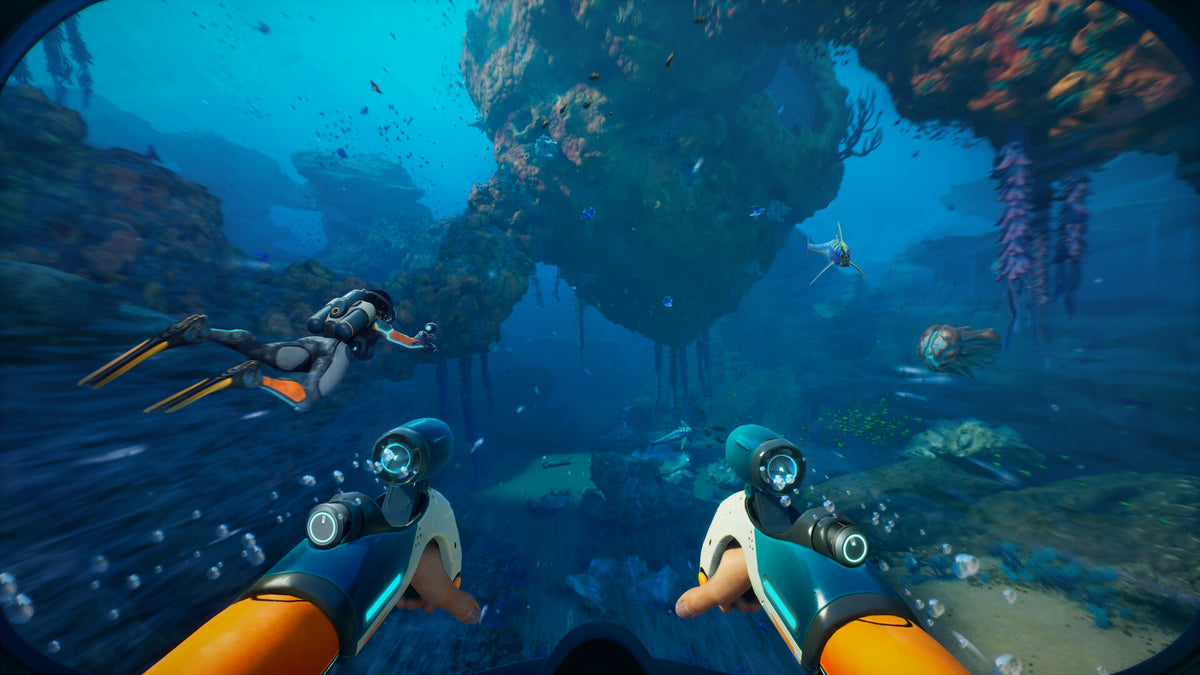
Subnautica 2 Sales Surge Shows Why More Canadian Players Need the Right Gaming PC for New Games
Subnautica 2 reaching more than 5 million copies sold in just 22 days is more than a headline. It is a clear signal that demand for large-scale survival games, co-op experiences, and visually immersive PC gaming is still growing fast. For Canadian buyers, this matters because every major breakout release pushes more players to ask the same practical question: do I have the right gaming PC for new games, or am I about to hit a hardware wall?
The source report highlights two major developments: first, Subnautica 2 has become a massive commercial success across PC and Xbox Series X/S; second, its publisher sees enough long-term value in the property to expand it as a franchise. That combination matters for PC buyers. A franchise game is not a one-week trend. It usually means longer support cycles, bigger updates, evolving technical requirements, more content, and a longer period where players want stable performance instead of barely meeting minimum specs.
That is where Groovy Computers enters the conversation for Canadian shoppers. If one game explosion can trigger a new wave of hardware demand, what happens when that demand overlaps with creator workloads, streaming ambitions, GPU pressure, and rising expectations for 1440p or 4K gaming? A lot of customers realize too late that they did not just need a PC that could launch the game. They needed a system that could run it well, stay cool, multitask smoothly, and avoid another upgrade in the near future.
What does Subnautica 2’s success really tell PC buyers?
It tells buyers that modern PC gaming is being shaped by long-life titles, community-driven updates, and games that continue evolving after launch. In the case of Subnautica 2, the report points to expanded co-op ambitions, community-focused development, and a quality-first path toward full launch. That means the game’s audience is not likely to disappear quickly. If anything, player expectations may rise as updates add features, polish, balancing, and potentially heavier performance demands.
So what should a customer ask next? If you are buying a system today, are you choosing a build for one game at launch, or for the next two to four years of game updates, new releases, and growing hardware expectations? That is a very different buying decision.
Many shoppers still think in old terms: can this PC run the game, yes or no? But the better question is: can this PC run the game the way I actually want to experience it? Do you want stable 1080p? High refresh 1440p? Ultra settings? Ray tracing in other upcoming games? A second monitor open for Discord, browser tabs, and streaming tools? Fast storage for giant game installs? Quiet cooling during long sessions? Those details matter more than a basic minimum-spec checklist.
Why should Canadian buyers pay close attention right now?
Canadian buyers often face a more complicated PC market than shoppers expect. Full-system pricing can shift quickly when graphics card availability tightens, memory prices fluctuate, SSD costs move, or a wave of major game launches pushes more people into the market at once. Even when a breakout game is not the sole cause, it adds pressure to demand.
If you are in Nova Scotia, Atlantic Canada, or ordering elsewhere in Canada, waiting can sometimes mean paying more later for similar or weaker parts. That is why buying strategy matters just as much as raw performance. Are you trying to secure a strong build before prices change again? Are you trying to avoid buying an underpowered budget system now, only to replace the GPU, storage, or memory sooner than planned?
For many people, the smartest move is not buying the cheapest machine that technically qualifies. It is choosing a better-balanced custom system from the start, especially if financing helps spread the cost over time instead of forcing a compromise build today.
What do you want your next PC to do for you?
This is the most important question in the entire buying process, and it is the one many customers skip.
Do you want a PC mainly for survival and open-world gaming? Are you also planning to stream? Will you record gameplay for YouTube or TikTok? Are you editing 4K videos in DaVinci Resolve or Adobe Premiere Pro after your gaming sessions? Do you need Photoshop and Lightroom for photography work? Are you running Illustrator, InDesign, or Canva workflows for graphic design? Are you learning Blender, Unreal Engine, or 3D rendering on the side?
Your answer changes the build recommendation completely.
A customer who only plays at 1080p does not need the same system as someone targeting 1440p high refresh with heavier visual settings. A gamer who also streams through OBS needs different CPU, GPU, RAM, and storage priorities than someone who only plays solo. A content creator juggling games, recordings, exports, and thumbnails needs a different balance again. A 3D artist or workstation user needs even more emphasis on core counts, memory capacity, GPU acceleration, and sustained thermal stability.
That is why a custom approach matters. A one-size-fits-all machine often leaves performance on the table in the places that matter most to you.
What gaming PC do I need for a game like Subnautica 2 and other new releases?
If a breakout title like Subnautica 2 has your attention, you should think beyond one game and consider your full library. Open-world and survival games often reward stronger hardware with smoother traversal, quicker asset loading, more headroom during large environments, and better visual consistency. Even if one title is reasonably optimized, the next major release may not be as forgiving.
As a general buying framework, Canadian gamers should think in performance tiers rather than isolated part names.
Entry-level gaming tier: who is it for?
This tier makes sense for players who want a budget gaming PC experience at 1080p, medium to high settings, and a focus on value. If your main goal is getting into modern PC gaming without overspending, this category can be a great fit. It is especially useful for first-time buyers, students, and customers upgrading from older hardware that struggles with current titles.
But ask yourself something important: are you okay with reduced visual settings in future AAA releases, or do you already know you will want more in a year? If you tend to jump from game to game as new launches hit, a very low-end build can become limiting faster than expected.
Mid-range gaming tier: who is it for?
This is the sweet spot for many buyers looking for a 1080p and 1440p gaming PC in Canada. A well-balanced mid-range custom gaming PC is often the smartest option for players who want strong modern performance, better longevity, and a smoother overall experience across open-world games, shooters, co-op titles, and content-heavy releases.
Are you hoping to play new games at high settings without feeling forced into another upgrade too quickly? Do you want enough CPU and GPU headroom for background apps, Discord, browser tabs, and occasional streaming? This is the range where many customers get the best value per dollar.
High-end gaming tier: who is it for?
If you are aiming for premium 1440p, high refresh competitive play, heavier visual settings, stronger ray tracing capability in supported games, or a better path toward 4K gaming, a high-end build makes more sense. This category is ideal for customers who want a future proof gaming PC experience and do not want to feel boxed in when upcoming releases raise the bar.
Do you usually keep a PC for years? Do you hate dropping settings right after spending serious money? Do you want your machine to feel powerful not just now, but after multiple game launches, patches, and expansions? Then a high-end custom build may be the right call.
Premium enthusiast tier: who is it for?
This tier is for customers who want as few compromises as possible. If your goal is top-tier 4K gaming, stronger ray tracing performance where applicable, high-end creator crossover capability, and maximum longevity, this is where premium custom PC planning matters. These buyers are not just purchasing FPS. They are buying flexibility, confidence, and reduced upgrade pressure.
Should every customer buy at this level? No. But if you are already considering a premium monitor, demanding games, streaming, editing, and long-term ownership, stretching too little can become more expensive than buying right the first time.
How do streaming and content creation change the recommendation?
This is where many buyers make a mistake. They shop for a gaming system, then later decide to stream, record, edit, or create content on the same machine. Suddenly, the build that looked good on paper starts feeling cramped.
If you are planning to use OBS, capture gameplay, stream to Twitch or YouTube, clip highlights, or edit footage afterward, your PC needs more than just good gaming benchmarks. It needs stronger multitasking capability, enough RAM for simultaneous workloads, fast SSD performance, and a GPU that supports efficient modern creator workflows.
So ask yourself: do you just want to play, or do you want to create around your gameplay too?
If the answer includes streaming, editing, thumbnails, social media content, or short-form video, you may be better served by a gaming and creator PC rather than a pure gaming-focused build. This is especially true if you are handling:
- OBS or Streamlabs streaming while gaming
- Adobe Premiere Pro or DaVinci Resolve for editing
- Photoshop, Lightroom, or Illustrator for creative assets
- CapCut or social content workflows for fast turnaround clips
- Multiple drives and large project files that need fast storage access
In other words, if you want a PC for gaming and recording, your system should be selected like a workload machine, not just a game launcher.
Is a gaming PC good for video editing, photo editing, and graphic design too?
Sometimes yes, but not always in the right way.
A lot of modern gaming PCs can handle creator work reasonably well, especially in the mid-range and above. But the best gaming-first build is not automatically the best system for heavy exports, colour-critical workflows, large RAW photo libraries, Adobe Creative Cloud multitasking, or long render sessions.
If you are also a creator, ask a few honest questions. How much time do you spend waiting on exports? Do your timelines lag? Do large Photoshop files slow down your system? Are you editing 4K regularly? Do you bounce between gaming, thumbnails, design assets, and video projects on the same computer?
If those tasks are part of your life, a custom creator PC may be the better value than a gaming-only system. The reason is simple: productivity is performance too. Time saved on exports, smoother previews, faster application launches, and stronger multitasking all have real value.
For customers who need a machine for video editing, photo editing, or graphic design in Canada, the right PC often comes down to balancing:
- CPU strength for processing-heavy workloads
- GPU acceleration for supported creator apps
- RAM capacity for multitasking and larger projects
- Fast SSD storage for active files, cache, and media
- Cooling quality for long sessions under load
If you are asking whether a gaming PC is good for Photoshop or Premiere Pro, the better question is whether your workload is casual, mixed, or professional. Casual mixed users can often do very well with a properly chosen gaming and creator crossover system. Professional users should lean toward a more deliberate creator or workstation build.
What if you also use Blender, Unreal Engine, or 3D tools?
Then you should think even more carefully before buying.
Games like Subnautica 2 may pull customers into the PC market, but many of those same buyers also want to build mods, create environments, render assets, or learn game development workflows. If that sounds like you, do not choose a system based only on game performance. A workstation-minded build may save you a lot of frustration.
What PC do you need for Blender? What PC do you need for Unreal Engine? The answer depends on whether you are doing light learning, hobby work, or serious rendering and development. But in general, 3D modeling and rendering users benefit from more memory, stronger sustained cooling, capable GPUs, and parts selected for consistency under long workloads.
If your gaming hobby is slowly becoming a creation hobby, your next PC should reflect that shift.
Why does franchise growth increase the importance of future-proofing?
Because when a publisher signals long-term expansion, it usually means more content, more updates, more player retention efforts, and a longer relevance window for the game. A major franchise title can become part of your regular rotation for years, not weeks.
That means your hardware decision should account for:
- Ongoing updates and patches
- Co-op and multiplayer performance expectations
- New graphics features in future releases
- Higher resolution monitors you may buy later
- Background apps, streaming, or recording as your usage grows
Are you buying only for today’s settings, or for the next monitor, the next game, and the next workload? A future proof gaming PC is not about chasing the most expensive part. It is about selecting a build tier that will not feel outdated the moment your habits evolve.
Should I buy now or wait if I am thinking about a new gaming PC?
This is one of the most common and most difficult buyer questions.
There is no universal answer, but there are practical signals. If you know you need a stronger system soon, waiting only helps if you believe better value is clearly around the corner and your current PC can comfortably carry you until then. But many shoppers are not really waiting for better value. They are delaying a decision while living with stutter, weak frame rates, storage limitations, loud cooling, and repeated compromises.
Here is a better way to frame it: what is the cost of waiting for you personally?
If your current system already struggles with new games, streaming, editing, or multitasking, the cost of waiting may be months of poor experience plus the risk of buying into a tighter market later. If your machine is merely older but still comfortable, then you may have more flexibility.
What if a major game release, sale period, or seasonal buying wave pushes demand up? What if GPU supply tightens? What if SSD or memory pricing shifts? Those factors can all affect your final build cost.
For buyers who already know they need a stronger machine, acting earlier can be the safer move.
Could financing help you secure a better build before prices rise?
For many customers, yes.
One of the biggest mistakes in PC buying is forcing a weak compromise build because the full payment of a better system feels too steep at once. That can lead to lower performance now and extra upgrade costs later. A stronger, better-balanced custom PC often lasts longer and delivers better daily value.
So ask yourself: would you rather buy a lower-tier PC today and outgrow it quickly, or finance a more capable build that better matches your real needs?
Financing can make sense when it helps you:
- Move from a short-lived entry system to a stronger mid-range build
- Add more RAM for streaming, editing, or creative multitasking
- Choose better storage so you are not immediately fighting drive limits
- Get the GPU tier you actually need for 1440p or heavier games
- Avoid buying twice because the first system was too limited
At Groovy Computers, customers looking at custom PCs often benefit from financing up to 4 years because it allows them to build around their actual use case rather than their immediate cash ceiling. That is especially relevant if you are trying to secure a stronger system before replacement costs move higher.
Which performance tier fits you best?
If you are unsure where you land, use this practical breakdown.
Choose a value-focused system if:
- You mainly want 1080p gaming
- You are a first-time PC gamer or student
- You play a mix of lighter and modern titles with reasonable settings expectations
- You want a lower upfront cost and understand future upgrades may come sooner
Choose a balanced mid-range system if:
- You want strong 1080p and capable 1440p gaming
- You play new AAA titles and want better longevity
- You multitask with Discord, web, music, and background apps
- You may stream casually or edit some content
- You want the best mix of performance and value
Choose a higher-end system if:
- You want premium 1440p performance or a path toward 4K
- You care about visual settings, smoother frame rates, and stronger future readiness
- You stream, record, and create content regularly
- You do not want to feel forced into an upgrade too soon
Choose a creator or workstation-focused system if:
- You edit video frequently
- You work in Photoshop, Lightroom, Illustrator, or Adobe Creative Cloud daily
- You use Blender, Unreal Engine, CAD, or rendering tools
- You need reliability under long work sessions, not just game benchmarks
If you are reading this and thinking, “I am somewhere between gaming and creator use,” that is exactly why custom PC planning matters. You do not need to force yourself into a generic category if your real workload is mixed.
Why do custom builds matter more when demand and pricing feel uncertain?
Because part selection becomes more important when every dollar matters.
A custom gaming PC or creator PC is not just about choosing flashy parts. It is about matching parts properly so your money goes into real results. That means avoiding CPU and GPU mismatches, underpowered cooling, weak memory capacity, poor storage planning, and low-quality shortcuts that can hurt stability over time.
When game demand grows and hardware markets feel unpredictable, buyers need more than availability. They need judgment.
A properly built custom system can help you:
- Spend where performance actually improves
- Avoid overspending on specs you do not need
- Preserve upgrade paths for later
- Get better cooling and reliability
- Choose the right system for gaming, streaming, editing, design, or workstation use
That is especially important if your goal is a system that will keep delivering value long after one specific title leaves the headlines.
Why choose Groovy Computers for a custom PC in Canada?
Groovy Computers is positioned for the buyer who wants more than a random box of parts. Canadian shoppers looking for a custom gaming PC, creator PC, or workstation need confidence in the whole build, not just confidence in one component. That means proper part matching, thermal planning, testing, support, and a warranty you can actually trust.
For many customers, especially those in Nova Scotia and across Canada, that peace of mind matters as much as the spec list. Groovy Computers offers custom-built systems designed around real use cases, rigorous testing, and a 1-year warranty. That matters if you are spending serious money and want a reliable gaming PC in Canada rather than a guess.
Are you trying to find a build that fits your game library? Do you need a PC that can handle gaming plus streaming? Are you balancing school, work, content creation, and entertainment on one machine? Those are exactly the kinds of buying situations where expert guidance makes the process easier and smarter.
What should you ask before buying your next PC?
Before you make your decision, ask yourself these practical questions:
- What games or software will I actually use most? New AAA games, esports titles, Adobe apps, OBS, Blender, or a mix?
- What resolution am I targeting? 1080p, 1440p, or 4K?
- Do I want ray tracing or just strong raster performance?
- Will I stream, record, edit, or multitask heavily?
- How long do I want this PC to feel current? One to two years, or much longer?
- Am I buying for today’s needs only, or for the next wave of games and workloads too?
- Would financing help me buy the right system instead of settling for one I may outgrow quickly?
These questions can prevent a lot of expensive regret.
Final takeaway: Subnautica 2 is a game success story, but for buyers it is also a hardware wake-up call
Subnautica 2’s sales momentum shows how fast a major release can capture player attention and reinforce the long-term value of PC gaming. But the bigger lesson for Canadian shoppers is this: breakout games do not just create hype. They expose whether your current system is still ready for what modern gaming demands.
If you are asking what gaming PC you need for new games, whether a stronger tier is worth it, whether you should buy now or wait, or whether your next machine should also handle streaming, editing, or creator work, this is the right time to plan carefully. The right answer is not always the most expensive PC. It is the system that fits how you actually play, create, work, and upgrade.
What do you want your next PC to do for you, and how soon do you want it doing it well? If you are ready to stop guessing and start building toward the right performance tier, explore a custom-built solution at GroovyComputers.ca. Whether you need a gaming-focused build, a creator-ready system, or a stronger workstation with financing options, Groovy Computers can help you choose a PC that makes sense for today and holds up better for tomorrow.
#GamingPCForNewGames #GamingPCCanada #CustomGamingPCCanada #CreatorPCCanada #VideoEditingPCCanada #StreamingPCCanada #3DModelingPCCanada #CanadianCustomPCBuilders #NovaScotiaPCBuilder #FutureProofGamingPC
Groovy Computers | All Rights Reserved


Leave a comment
This site is protected by hCaptcha and the hCaptcha Privacy Policy and Terms of Service apply.